The average B2B sales rep spends 45 minutes researching an account before writing a single email. They toggle between LinkedIn, Google, the company's investor relations page, their CRM, and maybe a news aggregator. By the time they draft something personalized, the window has shifted. The prospect already talked to a competitor. The signal that triggered the research is three days old.
The teams outperforming their peers in 2026 are not doing more research. They are doing faster, smarter research, and turning it into personalized outreach in under five minutes.
TL;DR: Signal-to-send is a workflow where AI agents monitor buying signals across your territory, build research briefs automatically, and draft personalized outreach anchored to real events. The entire process from signal detection to email sent takes under five minutes, replacing 45+ minutes of manual research per account.
Why Speed Matters More Than Volume in B2B Outbound
The outbound playbook of 2020 was simple: more emails, more calls, more meetings. Scale the SDR team, buy a bigger contact database, and increase sequence volume until the funnel fills.
That playbook is broken. Research shows that only 24% of sales emails get opened. Generic outreach based on job titles and company size gets ignored because every competitor is running the same sequences from the same databases.
What works now is relevance at speed. When a target account's CEO mentions "consolidating our tech stack" on an earnings call, the first rep who references that statement in a personalized email has a massive advantage over the rep who sends a template three weeks later. InsideSales data shows that contacting a lead within five minutes of a trigger event makes you 21x more likely to convert. The signal is perishable. Act on it fast or lose it.
The problem has never been that reps lack motivation to personalize. It is that personalization at the level that actually gets responses, referencing specific executive statements, strategic initiatives, and recent events, takes too long when done manually. That is where the signal-to-send workflow changes the equation.
The Signal-to-Send Workflow: Five Minutes From Alert to Outbox
Here is the workflow that top-performing outbound teams are running, broken into the actual steps and time each one takes.
Minute 0: Signal Fires Automatically
You are not searching for signals. The Signal Agent is already monitoring all 500+ accounts in your territory across 1,000+ data sources. When something relevant happens, it surfaces in your feed: a leadership change, an earnings call insight, a hiring surge, a funding round, a competitive displacement, or a strategic initiative announcement.
The rep does not start work until the signal arrives. This is the fundamental shift from reactive research ("let me Google this account before my call") to proactive intelligence ("this account just entered a buying window and here's why").
Minutes 1–2: Review the Account Brief
The Research Agent has already compiled a brief by the time you open the signal. It includes:
- The triggering event: What happened and why it matters
- Executive context: Who said what, their background, and what it signals about priorities
- Related signals: Other recent events at the account (hiring patterns, product launches, competitor mentions) that create a fuller picture
- Financial snapshot: Revenue trends, recent earnings commentary, strategic priorities from public filings
- Suggested talking points: Specific angles that connect the signal to your solution
This is the brief that would take 45 to 90 minutes to build manually. The Research Agent delivers it in under two minutes.
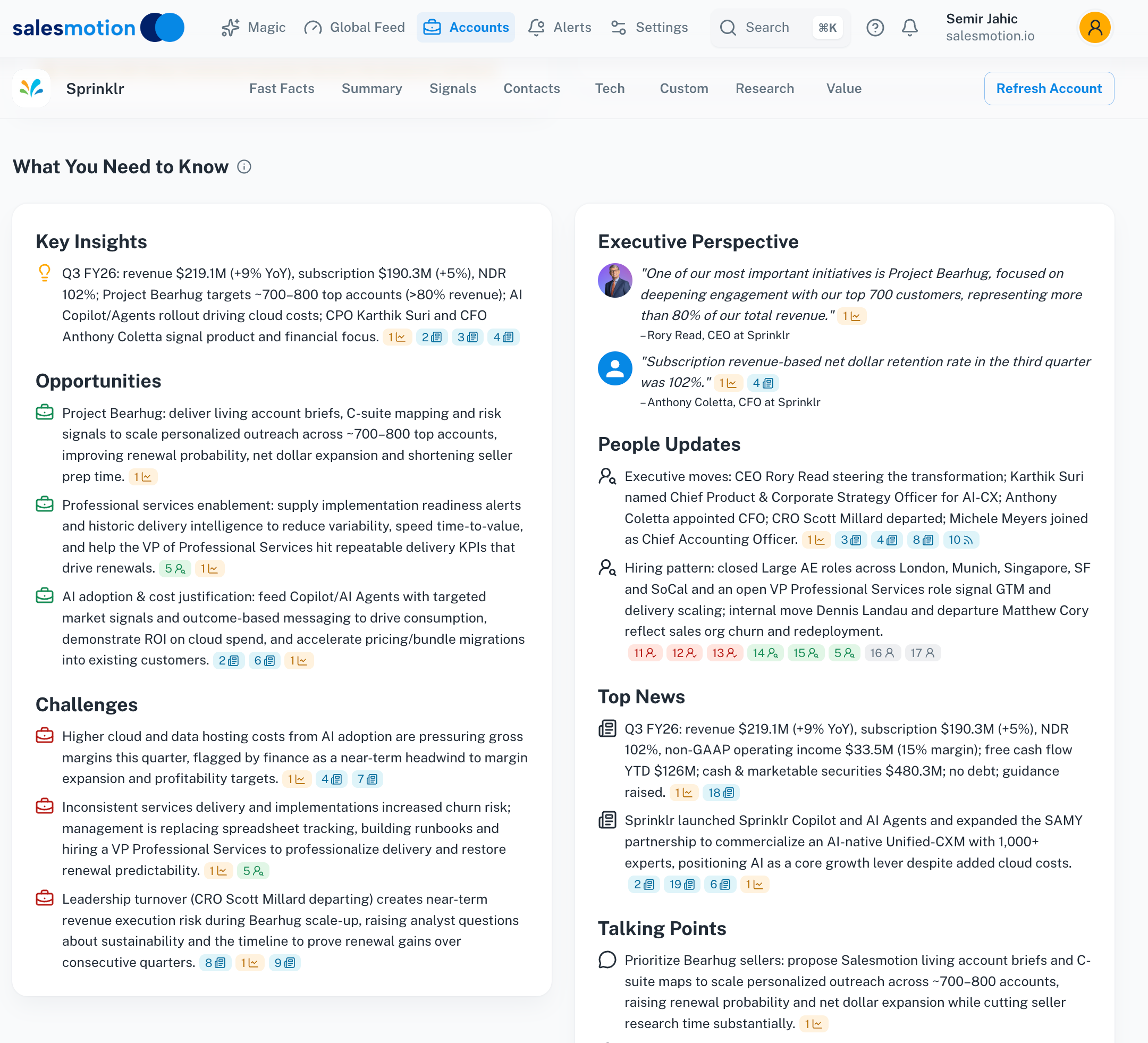 A complete account brief with signals, executive context, and talking points — ready before you open the account.
Minutes 2–4: Draft Personalized Outreach
The Outreach Agent uses the research brief to draft an email that references the specific event. Not a template with merge fields. An email that demonstrates genuine understanding of the prospect's current situation.
What a generic email looks like:
"Hi Sarah, I noticed your company is growing. We help companies like yours improve sales productivity. Would you have 15 minutes to chat?"
What a signal-anchored email looks like:
"Hi Sarah, I noticed your CEO mentioned 'reducing vendor sprawl in the GTM stack' on last quarter's earnings call, and you recently posted a VP of Revenue Operations role. We helped Analytic Partners consolidate their intelligence tools and grow qualified pipeline 40% YoY — happy to share what worked if that's relevant to what you're building."
The difference is not just personalization. It is proof of preparation. The prospect knows you did actual research. That is what earns the reply.
Minute 5: Review, Adjust, Send
The rep reads the draft, makes any adjustments (tone, specific asks, additional context from past conversations), and sends. Total time from signal to sent email: under five minutes.
Compare this to the traditional workflow where the same level of personalization requires:
- 10 minutes scanning LinkedIn for leadership changes
- 10 minutes reading the earnings call transcript
- 10 minutes checking news and job postings
- 5 minutes reviewing CRM history
- 10 minutes drafting and editing the email
That is 45 minutes per account. A rep with 20 accounts to contact this week just spent 15 hours on research and writing. In the signal-to-send workflow, the same 20 accounts take under two hours.

“There's been a big focus on hyper personalization and relevance in our outbounding efforts. Salesmotion has been a key partner in hitting our significantly increased meeting targets. What stands out is how simple it is. Reps can log in and get valuable account insights within 30 seconds to a minute.”
Joe DeFrance
VP of Sales, Incredible Health
The Data Behind Signal-Anchored Outreach
This is not just faster. It performs better.
Teams running signal-driven outreach consistently report higher engagement than teams running volume-based sequences:
- Response rates: Signal-personalized outreach achieves 18% average response rates, compared to 2-5% for generic sequences
- Meeting conversion: Incredible Health hit significantly increased meeting targets using signal-based personalization as their primary outbound strategy
- Research time: Cacheflow's team went from hours of prep per account to five minutes, with reps reporting the platform became "essential" from day one
- Pipeline quality: Analytic Partners grew qualified pipeline 40% year over year because outreach targeted accounts with active buying signals rather than static lists
- Rep productivity: Sigma's reps cut research time from 12 hours per week to 4, finding signals they were previously missing entirely
The compounding effect matters. When reps spend less time researching and more time selling, they contact more accounts with higher-quality outreach. The pipeline improvement is not linear. It accelerates.
Which Signals Drive the Best Outreach?
Not every signal makes a good email hook. The strongest outreach anchors to signals that indicate strategic priority shifts — moments where the prospect's needs are changing and they are open to new conversations.
Tier 1: Conversation Starters (Highest Response)
- Earnings call mentions of your category: The CEO told investors they are investing in exactly what you sell. That is a public commitment you can reference by name.
- New executive hires from your customer base: A new CRO who used your product at their previous company already understands the value. The conversation starts warm.
- Competitive displacement signals: The prospect just lost a key vendor or publicly expressed dissatisfaction with a competitor. Timing is everything.
Tier 2: Strong Context (High Response)
- Hiring surges in relevant departments: Posting 10 SDR roles signals growth investment. Posting a VP of Sales Operations signals process change.
- Funding rounds: Fresh capital means active buying decisions. The budget is available and being allocated.
- Strategic initiative announcements: Press releases about "digital transformation" or "go-to-market optimization" tell you where the company is heading.
Tier 3: Supporting Context (Use in Follow-ups)
- Technology stack changes: A new CRM or marketing automation tool signals willingness to change vendors.
- Industry event participation: A keynote on a topic you solve means the executive is actively thinking about it.
- Job posting language: The specific requirements in a role description reveal the tools and methodologies the company is adopting.
The Signal Agent categorizes and prioritizes these automatically, so reps see the most actionable signals first.
See Salesmotion on a real account
Book a 15-minute demo and see how your team saves hours on account research.
Building the Workflow for Your Team
Implementing signal-to-send is not a six-month project. Most teams are running within a week because the workflow maps directly to what reps already do — research, personalize, send — but removes the manual research bottleneck.
Step 1: Load your accounts. Import your target account list into Salesmotion or connect via Salesforce/HubSpot integration. The Signal Agent begins monitoring immediately.
Step 2: Set territory filters. Configure which signal types and account tiers trigger real-time alerts vs. daily digests. This prevents alert fatigue while ensuring high-priority signals get immediate attention.
Step 3: Train reps on the brief. Show reps where to find the talking points, how to read the signal context, and how to use the Outreach Agent's drafts as a starting point. Most reps are self-sufficient after reviewing two or three example briefs.
Step 4: Measure what matters. Track time from signal to sent email, response rates on signal-anchored vs. generic outreach, and meetings booked per signal type. These metrics tell you which signals drive the most pipeline in your specific market.
Cacheflow saw full platform utilization within 24 hours of signing up. The learning curve is not the barrier. The barrier is the decision to stop doing research manually.
Key Takeaways
- The traditional outbound workflow of manual research plus generic sequences is too slow and too generic to compete in 2026.
- Signal-to-send replaces 45+ minutes of manual research per account with a five-minute workflow: signal fires → AI builds brief → AI drafts outreach → rep reviews and sends.
- Signal-anchored outreach achieves 18% response rates versus 2-5% for template-based sequences because it demonstrates genuine preparation.
- Three AI agents chain together automatically: Signal Agent monitors events, Research Agent builds the brief, Outreach Agent drafts the message.
- Speed matters because buying signals are perishable. Contacting a lead within five minutes of a trigger event makes you 21x more likely to convert.
- Most teams are fully running the workflow within a week of setup because it maps to what reps already do, minus the manual bottleneck.
Frequently Asked Questions
How is signal-to-send different from automated email sequences?
Automated sequences send pre-written templates on a schedule. Signal-to-send starts with a real event at the target account and generates personalized outreach anchored to that specific event. The email references what the CEO said on an earnings call or who just got hired, not generic value propositions. The difference shows in response rates: 18% for signal-anchored outreach versus 2-5% for template sequences.
What if my team has fewer than 500 accounts?
The workflow works at any account volume. Even teams with 50 target accounts benefit because the quality of each outreach improves dramatically. The time savings compound differently — a 50-account team saves hours per week, while a 500-account team saves days — but the response rate improvement applies regardless of territory size.
Does the Outreach Agent write the final email, or does the rep still edit it?
The Outreach Agent drafts based on the research brief, but the rep always reviews and adjusts before sending. Most reps modify tone, add context from past conversations, or adjust the specific ask. The agent handles the research-heavy part (connecting signal to talking point to value prop), and the rep adds the human judgment. Think of it as a first draft that is 80% ready, not a fire-and-forget robot.
How quickly does a signal show up after an event happens?
Signals from earnings calls, press releases, and leadership changes typically surface within hours of the event becoming public. Job posting patterns and hiring surges update daily. SEC filings are processed as soon as they are published. The Signal Agent monitors continuously, so reps see events the same day they happen rather than discovering them weeks later during a manual research session.
Can I use this workflow with my existing sales engagement platform?
Yes. The signal-to-send workflow generates the intelligence and draft, but the actual sending happens through whatever tool your team already uses — Outreach, Salesloft, HubSpot sequences, or direct email. Salesmotion integrates with Salesforce and HubSpot, so signals and briefs surface inside the CRM where reps work. The outreach draft can be copied into any sequencing tool.