Sales reps spend just 28% of their time actually selling. The rest disappears into CRM updates, admin work, and the biggest silent killer of all: account research. Toggling between LinkedIn, Google, SEC filings, and news sites to build a picture of a prospect before a call. For most reps, that eats 2 to 4 hours every single day.
Salesmotion was built to eliminate that grind. But not every feature gets the same attention, and three in particular have become the ones reps tell us they genuinely cannot work without. Here's a look at each, with real screenshots from inside the platform.
TL;DR: Three features that reps rely on daily: (1) "What You Need to Know" condenses hours of account research into a single AI-generated brief, (2) Earnings Call Summaries extract actionable intelligence from quarterly transcripts, and (3) configurable Alerts ensure no buying signal slips through the cracks.
1. What You Need to Know: Your Pre-Call Briefing in 60 Seconds
Ask any rep what they dread most before a big call and the answer is the same: not having enough context. Who are the key stakeholders? What initiatives are they running? What did the CEO say on the last earnings call? Finding those answers used to mean 45 minutes across five tabs.
The "What You Need to Know" section on every account page changes that entirely. It's an AI-generated briefing that pulls from public filings, news, job postings, earnings transcripts, and company announcements to surface five critical categories:
- Key Insights with financial performance, strategic moves, and market positioning
- Executive Perspective featuring direct quotes from leadership on priorities and direction
- People Updates tracking recent hires, promotions, and departures at the account
- Opportunities identifying where your solution maps to their stated initiatives
- Talking Points providing conversation starters tied to what the company is publicly discussing
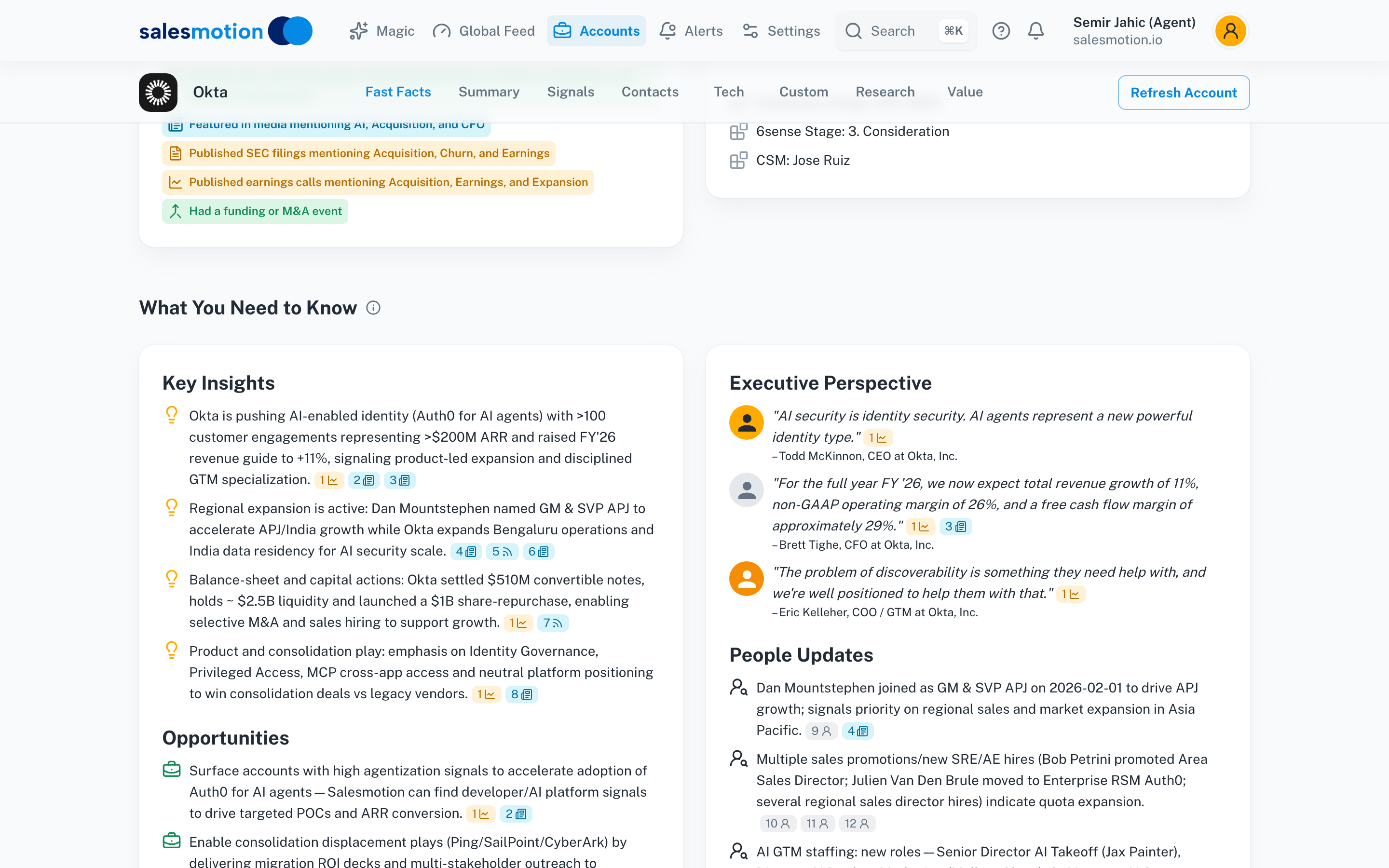 The "What You Need to Know" section on an account page, with AI-generated Key Insights, Executive Perspective, and People Updates.
The difference is not just time saved. It's what reps find that they would have missed entirely. Buried podcast mentions, niche press releases, leadership changes announced on LinkedIn but nowhere else. According to Worldwide Business Research, B2B buyers complete 57% to 70% of their research before contacting sales. If your rep walks into a call without matching that preparation, the conversation starts at a disadvantage.
Derek Rosen, Director of Strategic Accounts at Guild Education, put it simply: "This is my singular place that very simply summarizes a company's top initiatives, strategies and connects them to my solution. Something I would spend hours researching manually, now it's automated."
See the product in action
Take a self-guided tour of the Salesmotion platform — no signup required.
2. Earnings Call Summaries: AI That Reads Transcripts So You Don't Have To
Earnings calls are a goldmine for enterprise sellers. They reveal strategic priorities, budget shifts, expansion plans, and competitive pressures in the company's own words. The problem? A single transcript runs 8,000 to 12,000 words, and most reps don't have time to read one, let alone track them across 50+ accounts.
The Earnings Call Summaries feature solves this with an AI-generated "Smart Summary" that appears automatically when an earnings signal fires. Click on any earnings signal and you get a structured breakdown:
- Key business updates with revenue figures, margin changes, and guidance
- Strategic priorities mentioned by the executive team
- Expansion and growth signals indicating where the company is investing
- Risks and challenges flagged in the call
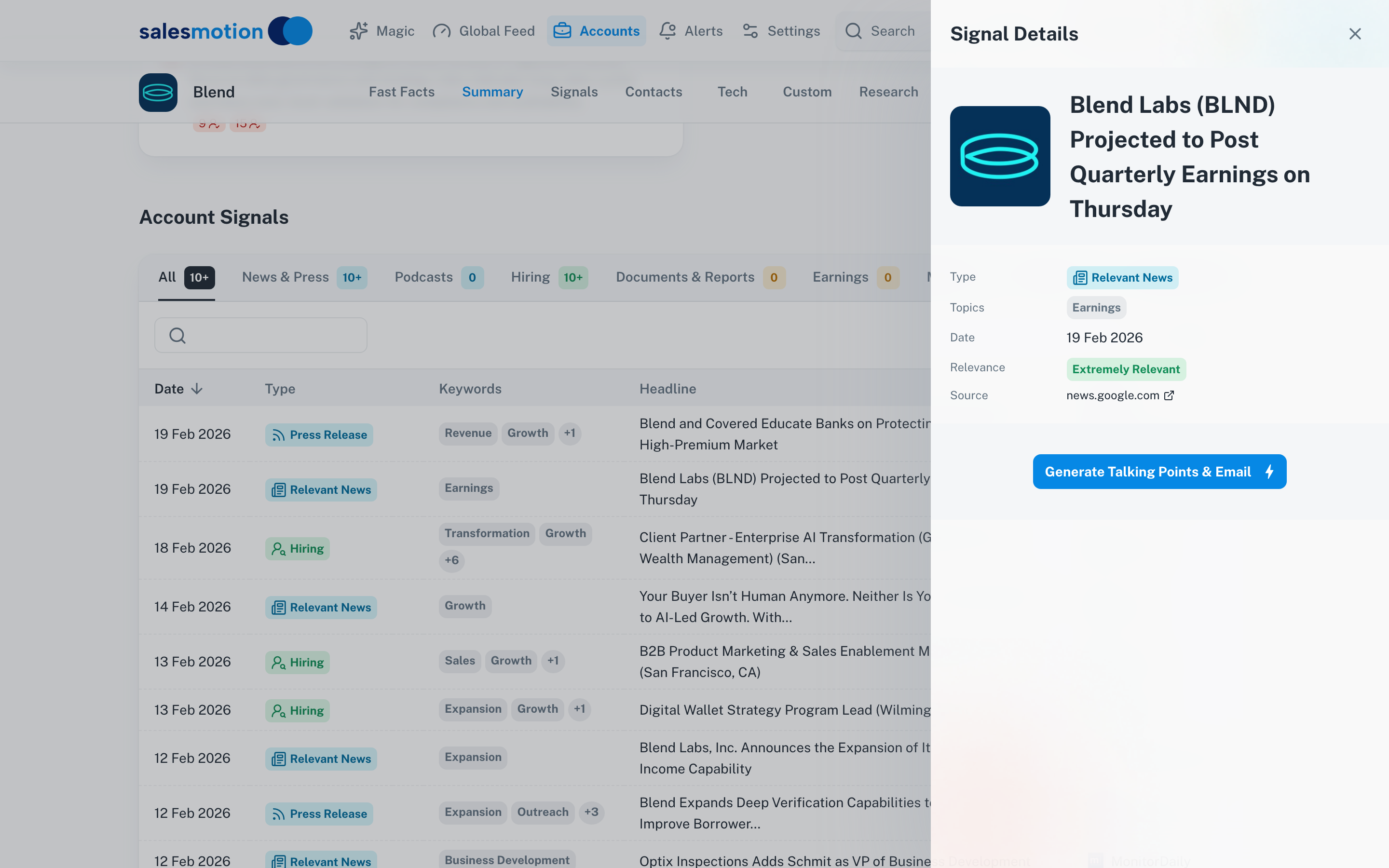 The Signal Details panel for an earnings call, showing the AI-generated Smart Summary with key financial metrics and strategic takeaways.
Here's what makes this operationally powerful: the summary is tagged with topics like "Revenue," "Expansion," "Pipeline," and "Account Research" so reps can quickly scan which themes are relevant to their pitch. A rep selling into HubSpot, for example, can see in 30 seconds that Q4 revenue grew 18.2% year over year and that leadership referenced "multi-hub adoption" as a strategic priority. That's a conversation opener that no amount of LinkedIn scrolling would surface.
With the average B2B buying group now at 22 people according to LinkedIn's 2025 B2Believe conference, reps need to understand the full organizational context, not just the one contact they're emailing. Earnings calls give that macro view, and Smart Summaries make it accessible without a 45-minute read.

“The talking points are gold. If they're in Salesmotion, I know they're being discussed inside that business. That makes it easy to spark a real conversation, which is 90 percent of the battle.”
Andrew Giordano
VP of Global Commercial Operations, Analytic Partners
3. Alerts: Never Miss a Buying Signal Again
Since we first shipped real-time alerts in our June 2025 product update, they've become one of the most-used features on the platform. The best opportunities don't announce themselves with a calendar invite. A VP of Sales gets promoted at a target account. A competitor's earnings reveal a weakness. A key contact changes roles. These are the buying signals that separate a well-timed outreach from a cold email that lands in the archive.
The Alerts system is designed to catch exactly these moments. There are three layers:
Standard Alerts
Toggle-based alerts that run automatically. Two that reps consistently keep on: a weekly digest of all signals and contact changes across their accounts, and an instant notification every time a new earnings call drops.
Keyword Alerts
Custom alerts triggered when specific keywords appear in signals across your account list. Selling a compliance solution? Set alerts for "regulatory," "audit," and "data governance." The system monitors all signal types, including news, press releases, job postings, podcasts, and filings, then sends a digest at your chosen frequency.
Contact Alerts
Track job title changes, departures, and new hires at your accounts. When a champion leaves or a new decision-maker arrives, you know immediately, not three months later when the deal stalls.
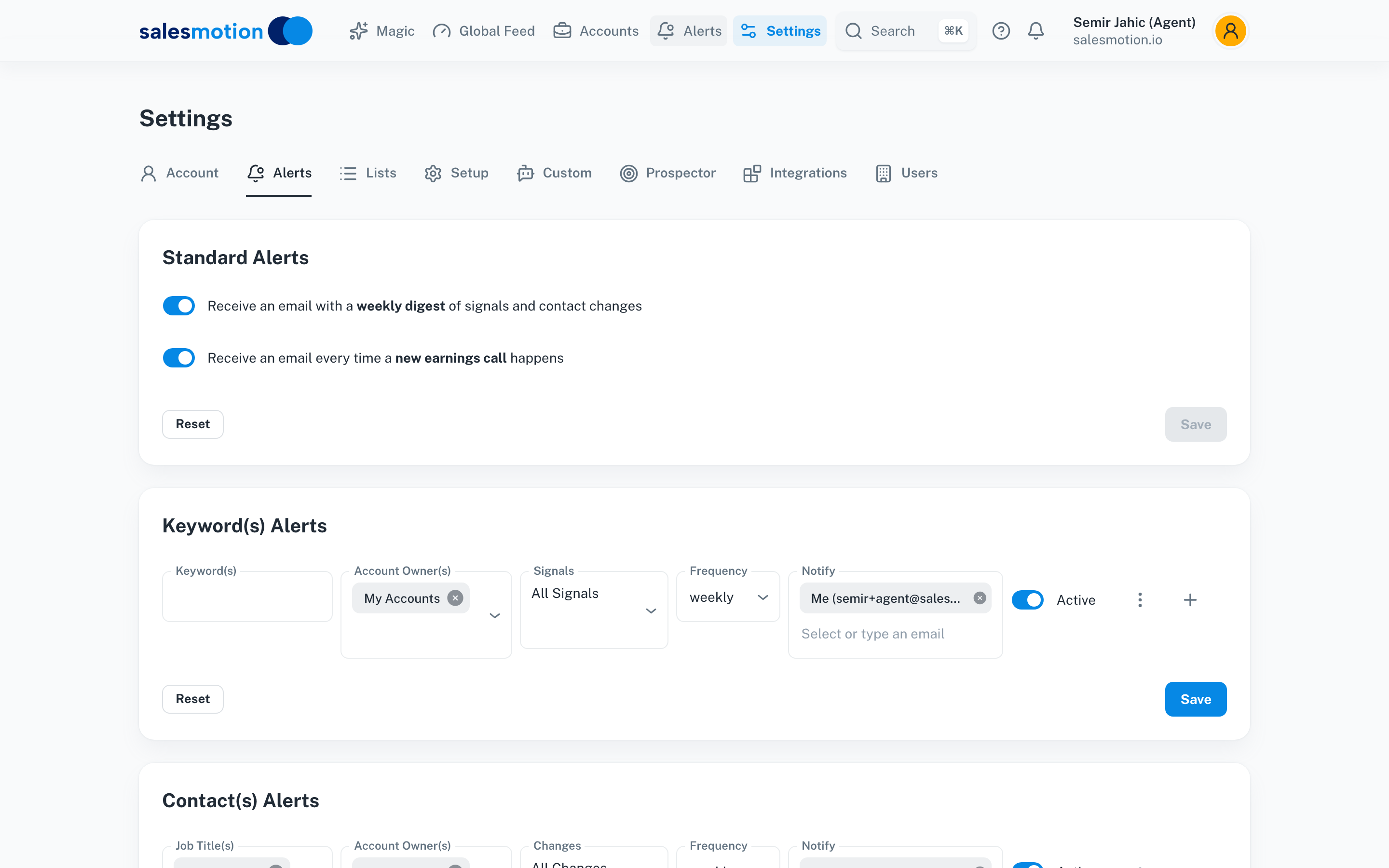 The Alerts settings page, where reps configure standard signal digests, keyword-based alerts, and contact change monitoring.
The Global Feed brings all these signals together in one real-time view, categorized by type: News and Press, Podcasts, Hiring, Documents and Reports, Earnings, M&A, and Funding. Instead of checking six different sources, reps open one feed and see what's happening across every account they own.
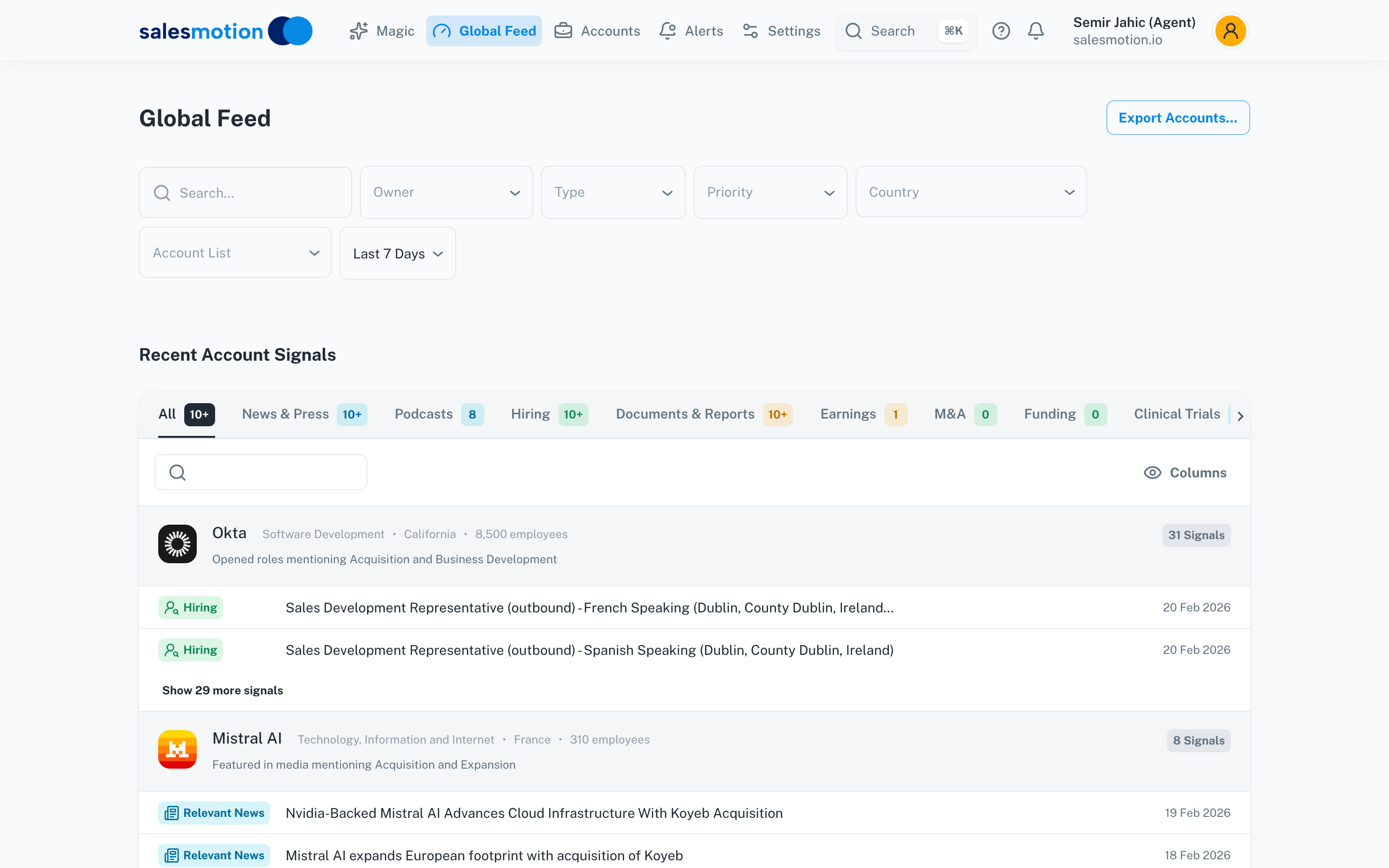 The Global Feed, showing recent signals across all tracked accounts with filters for signal type.
Daniel Pitman, Mid-Market Account Executive at Black Swan Data, captured the value: "The account and contact signals are key for reaching out at important times, and the value-add messaging it creates unique to every contact helps save time and efficiency."
Why These Three Features Matter Together
Individually, each feature solves a specific problem. Together, they create a workflow that fundamentally changes how reps prepare and prospect:
- Alerts surface that something is happening at a target account
- Earnings Call Summaries give the strategic context behind the signal
- What You Need to Know provides the full briefing before the rep picks up the phone
This is the difference between reactive selling, where a rep scrambles for context after getting a meeting, and proactive selling, where the rep already knows the account's priorities, recent moves, and pain points before the first touchpoint. Sellers with proactive habits generate 19% to 30% higher annual revenue than their reactive peers, according to Emblaze's 2025 research.
George Treschi, Account Executive at Sigma and FY25 President's Club winner, summed it up: "I used to spend 12 hours a week on prospect research, now it's down to 4. Plus I'm finding stuff I was totally missing, podcasts, news mentions, the good bits."

“The moment we turned on Salesmotion, it became essential. No more hours on LinkedIn or Google to figure out who we're talking to. It's just there, served up to you, so it's always 'go time.'”
Adam Wainwright
Head of Revenue, Cacheflow
Key Takeaways
- "What You Need to Know" replaces 45 minutes of manual research with a 60-second AI-generated account brief covering insights, executive perspectives, and opportunities.
- Earnings Call Summaries turn 10,000-word transcripts into structured, scannable Smart Summaries tagged by topic.
- Configurable Alerts (standard, keyword, and contact-based) ensure reps never miss a buying signal across their accounts.
- The three features form a complete signal-to-action loop: detect the signal, understand the context, and brief the rep before the call.
- Reps using these features report cutting research time by 50% or more while uncovering intelligence they previously missed entirely.
Frequently Asked Questions
How does the "What You Need to Know" section generate its insights?
The platform aggregates data from public filings, news sources, job postings, earnings transcripts, podcasts, and company announcements. AI then synthesizes this into structured sections (Key Insights, Executive Perspective, People Updates, Opportunities, and Talking Points) and refreshes automatically as new information becomes available.
Can I customize which signals trigger alerts?
Yes. Beyond the standard weekly digest and earnings call notifications, you can create keyword-based alerts with custom terms, filter by account owner, and choose your notification frequency (daily or weekly). Contact alerts can be filtered by job title to track specific roles at your accounts.
Do Earnings Call Summaries work for private companies?
Earnings Call Summaries are generated from publicly available earnings call transcripts, so they apply to publicly traded companies. For private companies, the platform tracks other signal types like funding rounds, press releases, hiring patterns, and leadership changes to provide equivalent intelligence.