
On a demo call last week, the moment that landed was not a dashboard. It was a prompt. A rep typed one sentence into Claude and got back a ranked territory review with sources. That is what Claude for sales looks like in practice: you connect an MCP server to your account intelligence, ask for your top five accounts this week, and get an answer built on live signals instead of gut feel.
This is a hands-on tutorial. The exact prompt, the setup, and the guardrails.
TL;DR: Connect an account intelligence MCP server to Claude and your reps can ask "review my accounts and give me the top 5 to focus on this week" in plain language. Claude pulls live signals (hiring, earnings, leadership changes), explains why each account matters now, and drafts the outreach angle. Setup takes about ten minutes. The key is one well-scoped server and a human making the final call.
Why Reps Are Asking Claude to Run Their Territory
Reps already live in AI assistants, so bringing account data into the assistant beats adding another tab. Salesforce's State of Sales research finds 54% of sellers have used AI agents, and sellers expect agents to cut prospect research time by roughly a third. Meanwhile the same research has consistently shown reps spend well under half their week actually selling.
Here is the pattern we see: a rep has 60 to 100 named accounts. Monday morning, the honest question is "where do I spend this week?" The traditional answer involves opening the CRM, LinkedIn, a news feed, and a spreadsheet, then guessing. The new answer is a single question to an assistant that can see every signal across the territory.
Gartner predicts that 40% of enterprise applications will feature task-specific AI agents by the end of 2026, up from less than 5% in 2025. Sales teams that learn to direct these agents now build a compounding advantage: better prioritization every week, with receipts.
See Salesmotion on a real account
Book a 15-minute demo and see how your team saves hours on account research.
What Is an MCP Server, in One Minute?
MCP (Model Context Protocol) is an open standard that lets AI assistants like Claude securely query external systems, so the assistant answers from your live data instead of its training set. Think of it as a USB port between Claude and your sales stack.
The standard has won. According to adoption data compiled by Digital Applied, MCP SDKs passed 97 million monthly downloads by March 2026, and the official registry lists more than 9,600 servers. OpenAI adopted MCP in March 2025, Google followed in April, Microsoft wired it into Copilot Studio in July, and in December 2025 Anthropic donated the protocol to the Linux Foundation with all three as co-sponsors.
For a deeper primer on the protocol itself, read our guide to MCP servers for sales tools. For this tutorial, you only need one fact: once a server is connected, Claude can call it like a teammate with database access.
One practical warning from teams already running this: resist connecting six servers at once. Every connected server consumes context with its tool definitions, and answers get muddier, not sharper. One account intelligence server plus your CRM covers 90% of rep questions.

“Salesmotion has been a game-changer for me. I used to spend 12 hours a week on prospect research, now it's down to 4. Plus I'm finding stuff I was totally missing - podcasts, news mentions, the good bits.”
George Treschi
Account Executive, FY25 President's Club, Sigma
The Exact Prompt: Your Top 5 Accounts This Week
Here is the prompt, lightly generalized from what reps run in live evaluations:
I'm a rep at [your company]. Review my accounts and give me the
top 5 to focus on this week based on signals and context.
For each one: what happened, why it matters, and my angle to
position our offering. Provide sources with links.
What comes back is a ranked shortlist. For each account: the trigger (a new CFO, an earnings call that mentioned your category, a hiring surge in the buying team), a short explanation of why it matters for your offer, a suggested angle, and source links so you can verify everything before you act.
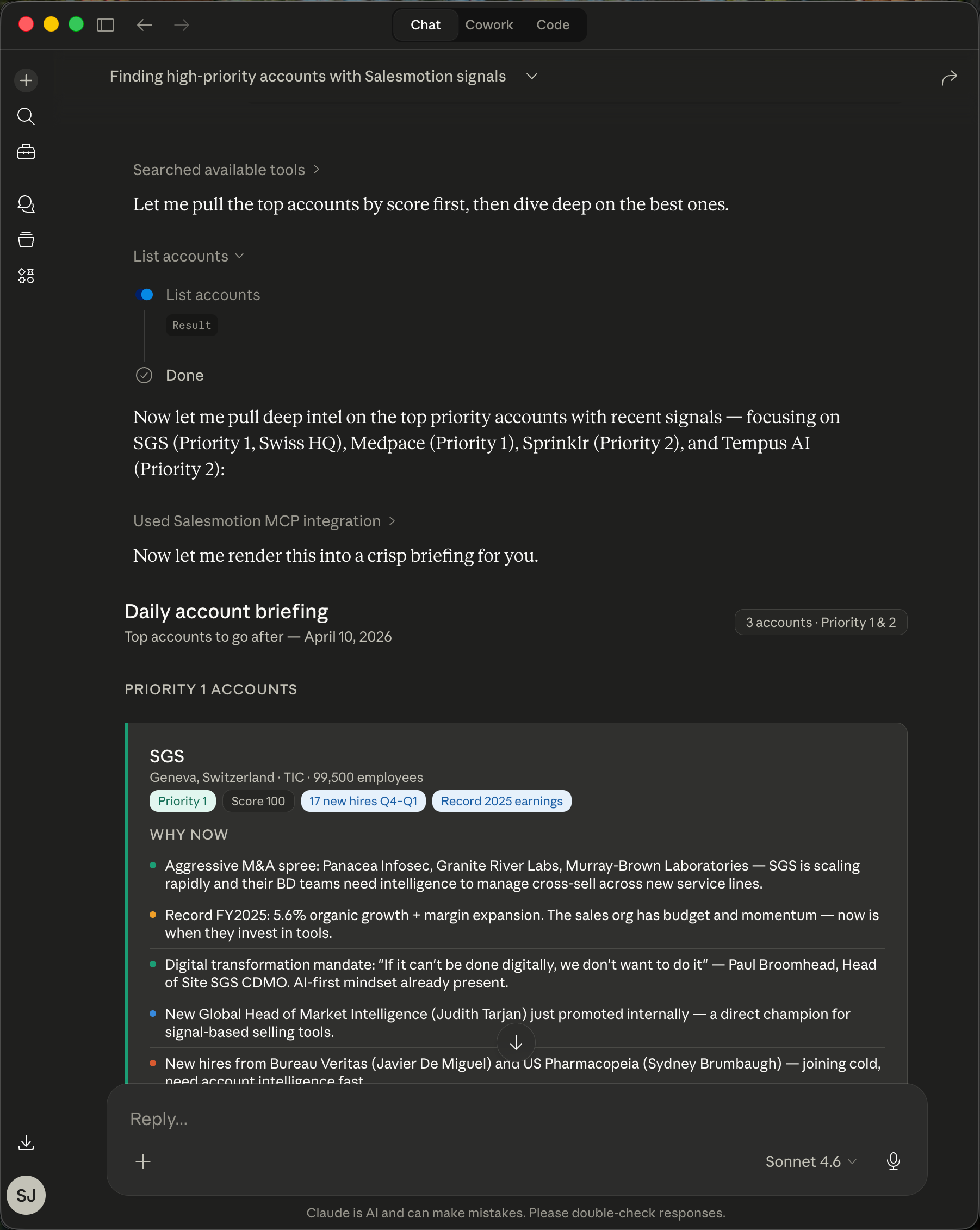 Once the MCP server is connected, it appears in Claude's tools menu and responds to plain-language questions.
Two details make this work. First, the model needs real buying signals to rank against, not just firmographics. A list sorted by company size is not prioritization. Second, the "provide sources" line matters: it converts the answer from an opinion into a brief you can defend in pipeline review.
This replaces the manual version of the same exercise, which is the account prioritization framework most teams run in spreadsheets once a quarter. The framework does not change. The refresh rate does: weekly instead of quarterly, and per rep instead of per RevOps cycle.
How to Set It Up
The setup is a one-time, ten-minute job per rep, and most account intelligence vendors with MCP support follow the same three steps.
- Generate an API or MCP key in your platform's settings. We covered our own rollout in the Salesmotion MCP launch post, and the pattern is similar across vendors.
- Add the server in Claude's settings (Settings, then Connectors on desktop or web). Paste the server URL and key. Claude lists the new tools it can now call.
- Test with a narrow question like "what signals fired on [one account] in the last 30 days?" before you run territory-wide prompts. If the narrow question returns clean, cited data, the wide ones will too.
From there, build a small prompt library. The ones reps reuse most:
- "Prep me for my 2pm with [account]: recent signals, likely priorities, three discovery questions."
- "Which of my accounts mentioned [topic] in earnings calls or job postings this quarter?"
- "Draft a first-touch email to [contact] anchored to the most recent signal on their account."
Each of these used to be 30 to 60 minutes of tab-switching. Frontify's team cut account research from 30 to 60 minutes to a few minutes per account with this kind of consolidated intelligence, and the MCP pattern brings that same speed into the assistant reps already use.

“This is my singular place that very simply summarizes a company's top initiatives, strategies and connects them to my solution. Something I would spend hours researching manually, now it's automated.”
Derek Rosen
Director, Strategic Accounts, Guild Education
A Monday Morning, Played Out
Here is the workflow end to end:
- Trigger: Monday, 8:45am. A rep with 80 accounts runs the top-5 prompt before her pipeline meeting.
- Platform action: Claude queries the MCP server, which returns the week's signals: one account posted three RevOps roles, one named a new CFO, one mentioned "consolidating vendors" on Thursday's earnings call.
- Rep action: She picks the earnings-call account, asks for the exact transcript quote, and sends a two-line email referencing the initiative by name. Total elapsed time: 20 minutes for all five accounts.
- Outcome: Her outreach this week ties to something that happened in the last seven days. In pipeline review, "why this account, why now" has a sourced answer instead of a shrug.
Guardrails: Keep a Human on the Send Button
Use Claude to recommend and draft; keep a person deciding what actually goes out. Gartner also predicts that over 40% of agentic AI projects will be canceled by the end of 2027, mostly from unclear value and runaway scope. The teams getting results in 2026 are running the scoped version: agent proposes, rep disposes.
Three rules keep this clean:
- Verify before you reference. The sources requirement in the prompt exists so a rep never cites a signal that did not happen.
- Scope the data. Connect a server that covers your named accounts, not the whole internet. Tighter scope means better answers and a cleaner security review.
- Watch the first two weeks. If reps stop using it, the data underneath is usually the problem, not the prompt. Stale signals kill trust in one bad answer.
Key Takeaways
- MCP is now the standard way to connect AI assistants to sales data, backed by Anthropic, OpenAI, Google, and Microsoft, with 9,600+ servers in the official registry.
- The highest-value rep prompt is territory prioritization: "top 5 accounts this week, with signals, why it matters, my angle, and sources."
- Setup is about ten minutes: generate a key, add the connector in Claude, test narrow before going wide.
- One scoped account intelligence server beats many generic ones. Tool definitions consume context, and muddy inputs produce muddy rankings.
- Keep a human on the send button. Use the assistant for ranking, research, and drafts, and a rep for judgment.
Frequently Asked Questions
What is an MCP server and how does it work with Claude?
An MCP server is a connector built on the Model Context Protocol, an open standard introduced by Anthropic in November 2024 and now governed by the Linux Foundation. Once added in Claude's settings, it exposes tools Claude can call, such as "get signals for account X," so answers come from your live data with sources rather than from training data.
Can Claude connect to my CRM like Salesforce or HubSpot?
Yes. CRM vendors and third parties publish MCP servers for Salesforce and HubSpot, and many account intelligence platforms sync into the CRM directly. The common pattern is two connectors: one for CRM context (deals, stages, ownership) and one for external signals (hiring, earnings, leadership changes), which together answer "what should I do this week?"
Is it safe to connect Claude to company sales data?
It is as safe as the scoping you apply. Use a dedicated API key with read-only access, connect only the systems reps need, and run it under your existing SSO and security review. Per-rep keys also give you an audit trail of what was queried.
How is this different from the AI already built into my sales tools?
Built-in AI answers questions inside one tool's data. The MCP pattern inverts that: the assistant sits above your stack and can combine territory signals, CRM context, and drafting in a single conversation. That is why reps prefer it, and adoption surveys keep showing reps defaulting to general assistants over embedded AI features.
Do I need a developer to set this up?
No. Adding a remote MCP server in Claude is a settings change: paste a URL and a key. Developer effort only enters the picture if you want custom servers over internal databases or warehouse data.