Your top target account just made a move, and your team found out from a rep who saw it on LinkedIn after lunch. By the time the account review starts, a competitor has already sent the right email, the right talk track, and the right demo angle. That's the hidden cost of working blind, and it's exactly why account monitoring software matters when revenue teams need to act before the opportunity shifts.
Account monitoring software watches your target accounts continuously, detects meaningful changes (leadership moves, hiring spikes, earnings commentary, product announcements) and routes them to the right rep with enough context to act. The value is not in collecting more alerts. It is in turning account activity into a next step fast enough for a rep to use it, so a hiring spike, leadership change, or product announcement becomes a concrete outreach plan instead of another item in a dashboard.
The Hidden Cost of Flying Blind
A rep can spend an hour stitching together a last-minute account brief, scan a few press releases, check hiring activity, and still miss the signal that changes the deal. By the time the team notices a new executive sponsor or a shift in budget priority, the buyer is already moving in a different direction. That is the cost of manual research that cannot keep pace with active pipeline.
Manual research doesn't scale with pipeline pressure
The old model turns sellers into part-time analysts. They are expected to watch every target account, make sense of every signal, and still keep deals moving. That breaks down quickly once a team carries a real book of business, because the useful cues rarely sit in one place. They are spread across earnings calls, leadership changes, press coverage, social activity, and CRM history.
The workload also gets expensive in time. For a closer look at the time drain, the real cost of manual account research is easy to recognize in any active sales team. Every extra minute spent hunting for context is a minute not spent on discovery, follow-up, or deal progression.
Monitoring-oriented workflows solve the problem at the point of action. They collect activity, normalize it, and surface what is worth a rep's attention. That matters because the team does not need more raw alerts, it needs a clear next step before the opportunity cools.
Practical rule: if a signal cannot be turned into an outreach decision quickly, it is just more noise.
Revenue teams feel this as a research tax. Reps spend too much time piecing together context instead of progressing the deal. Response times slow down, morale slips, and the pipeline starts to depend on whoever happens to be doing the most homework.
Market interest in monitoring systems reflects the same shift. Organizations want tools that do more than collect activity, they want systems that help turn account changes into action. The smarter move is to treat account monitoring software as an always-on layer between raw account activity and seller action. That is where proactive selling starts, because the rep gets a reason to engage now instead of next week after someone else has already done the digging.
Skip the comparison fatigue?
If you're shopping for a sales intelligence tool, here's the short version.
Salesmotion combines account intel, buying signals, verified contacts, and AI-drafted outreach in one tool. From $85/mo, live in minutes, no annual contract.
What Account Monitoring Software Actually Is
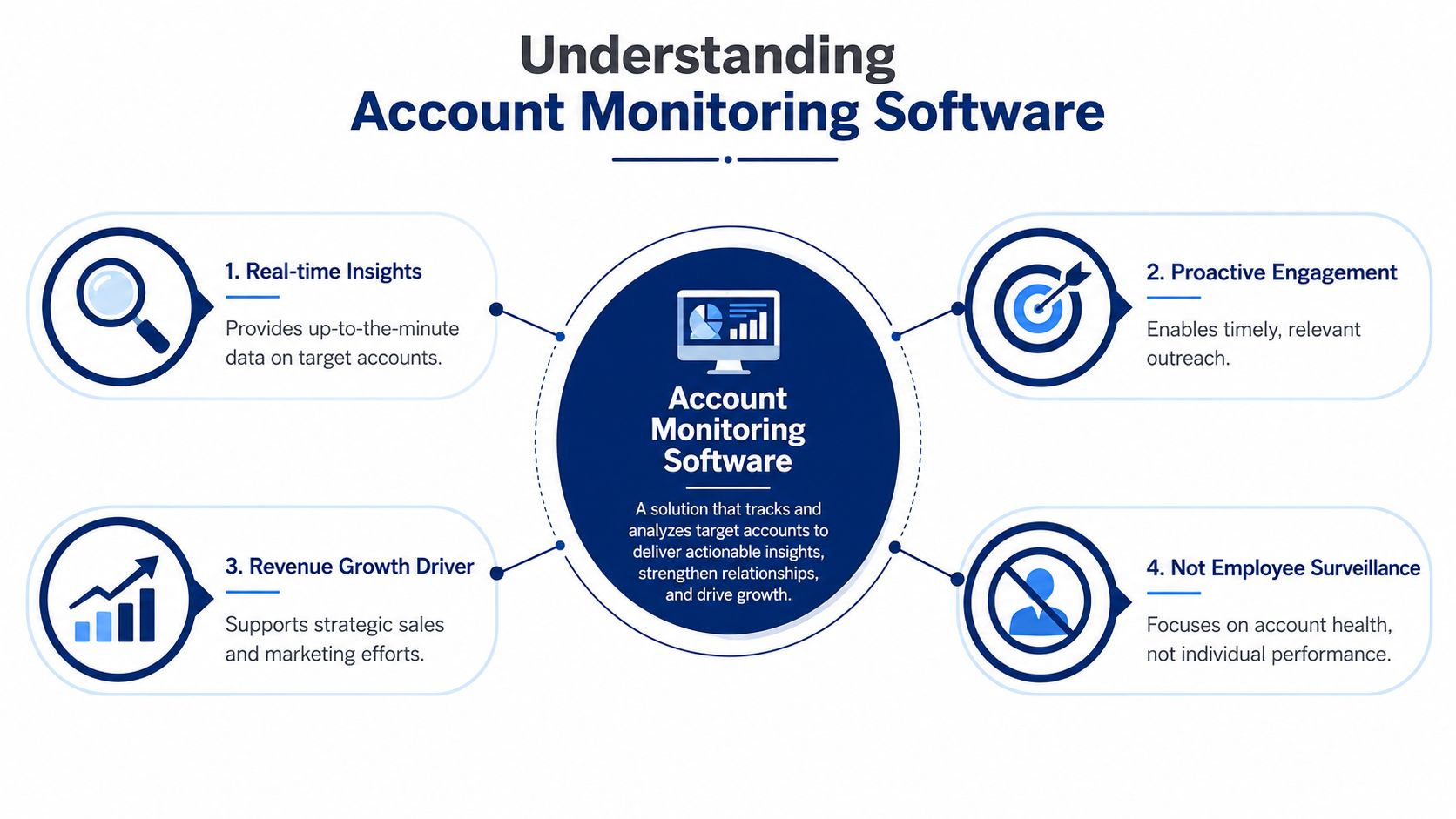
Account monitoring software is a system that watches target accounts continuously, picks up meaningful changes, and turns them into usable sales context. It isn't employee surveillance, and it isn't a generic news feed. It's a signal engine for revenue teams that need to know what changed, why it matters, and what to do next.
The basic loop is collect, interpret, and route
The operating model is straightforward. First, the platform ingests activity. Then it evaluates that activity, flags relevant patterns, and escalates what matters for review. That loop matters in sales because nobody wants a pile of unread alerts. They want a decision-ready prompt.
A useful comparison is a traffic system. Raw account data is the road network. Monitoring software is the control center that notices the jam, tells you which lane changed, and routes the driver to the fastest path. News alerts alone don't do that. They only report that something happened.
For a primer on the signals themselves, see our guide to buying signals.
What separates modern systems from old alert tools
Older tools often stopped at detection. They pushed headlines, keyword matches, or broad account changes into a feed and left the rep to figure out the significance. Modern platforms do more. They normalize signals across sources, preserve context, and help teams judge urgency instead of forcing them to guess.
That's also why account monitoring software fits neatly beside broader sales intelligence workflows. If you want a deeper look at how these systems support territory coverage and account planning, the comparison of real-time account monitoring tools and our territory review template are worth reading.
The best systems don't just say “something happened.” They say “this is the thing that changes the deal, and here's the next move.”
The distinction matters because the value isn't in volume. It's in relevance. A rep who sees the right trigger at the right time can open a conversation with context instead of with a generic check-in.

“Salesmotion has been a game-changer for me. I used to spend 12 hours a week on prospect research, now it's down to 4. Plus I'm finding stuff I was totally missing - podcasts, news mentions, the good bits.”
George Treschi
Account Executive, FY25 President's Club, Sigma
The Core Features That Drive Revenue
A useful platform doesn't win because it throws the most alerts at the team. It wins because it keeps the right signals moving from detection to action with minimal friction. The technical foundation for that is continuous monitoring plus correlation across many data sources, through API-based integration and multi-source ingestion that reduce blind spots and preserve context.
Signal detection is only the starting point
The first job is obvious, find the trigger. That could be a leadership change, a hiring spree in a key function, a product expansion announcement, or a competitor named on an earnings call. The platform should detect those shifts without requiring a rep to manually patrol half the internet.
The second job is harder, merge those signals with account context. A hiring alert means little on its own. If the company just expanded into a new region and is filling RevOps roles, the signal becomes a sales trigger. That's the difference between a dashboard and a revenue insight.
Alerts need a reason, not just a ping
In this key area, most tools underperform. They can alert, but they can't explain the so what. Good monitoring software tells the rep why the event matters, what account initiative it may connect to, and which contact should get the message first.
That's also where workflow design becomes central. A clean signal in Slack is useful. A clean signal plus a short brief, source links, and a suggested next step is much better. It cuts the time from “I saw something” to “I know what to send.”
Integration is part of the product, not an add-on
If the alert lands in a place nobody checks, the tool isn't helping. The strongest platforms connect to CRM, email, Slack, and case or task workflows so the signal doesn't die in the inbox. That's where the handoff from detection to decision becomes real.
For teams evaluating stack fit, Salesmotion's Signal Agent combines account briefs, monitoring signals, and outbound context, which is useful only if the system routes that context into the tools reps already use.
AI should shorten the path to outreach
AI adds value when it reduces the blank-page problem. A rep should get a signal, a short account summary, and a draft angle that reflects the actual trigger. If the platform also helps write the first personalized message, the gap between insight and outreach gets much smaller.
A good rule of thumb is simple.
- Detection: Did something meaningful happen?
- Context: Why does it matter to this account?
- Routing: Who should see it, and where?
- Action: What should the rep do next?
- Reuse: Can the signal feed follow-up, sequences, and CRM history?
If a product can't answer those five questions, it's probably collecting data better than it's creating revenue motion.
The Business Value and ROI
Revenue leaders don't buy account monitoring software because they enjoy another dashboard. They buy it because the right signal at the right time changes who gets contacted, how quickly, and with what level of credibility. That can affect pipeline creation, deal velocity, and rep output in ways manual research never can.
Pipeline improves when the reason to reach out is fresh
A timely trigger gives a rep a concrete opening. That could be a new executive hire, a funding event, or a change in strategic direction. Instead of sending a broad nurture email, the rep can anchor outreach to an actual business change. That makes the first touch more relevant and usually makes the conversation easier to start.
Deals move faster when context is current
Late-stage deals often stall because the seller is still talking about last quarter's priorities while the buyer has already moved on. Monitoring software reduces that gap. It keeps account context current enough that the rep can adjust messaging, bring in the right stakeholder, and avoid wasting cycles on stale assumptions.
For a practical lens on revenue outcomes, this guide to the ROI of sales intelligence tools is a helpful companion read.
Productivity rises when research becomes automatic
Every minute spent stitching together account context manually is time pulled away from selling. When the platform handles the research layer, reps can spend more time on discovery calls, follow-ups, and deal strategy. That matters most for teams where every account deserves thoughtful treatment, but no one has time to do that work by hand.
The best ROI story is not “we got more alerts.” It's “our sellers reached out earlier, with better context, and spent less time on prep.” That's the kind of change a CRO can take to the board without turning it into a science project.

“The Business Development team gets 80 to 90 percent of what they need in 15 minutes. That is a complete shift in how our reps work.”
Andrew Giordano
VP of Global Commercial Operations, Analytic Partners
Real-World Use Cases and Sales Playbooks
A rep sees a new CRO announcement and treats it as background noise. The better move is to treat it like a structured trigger. A new leader usually brings a new mandate, a fresh agenda, and a sharper appetite for change, which means the account is easier to read and easier to work.
A new executive hire should trigger a fast account brief
The first playbook is straightforward. The system catches the hire, pulls together the executive's background, the company's current priorities, and the likely implications for the account. The rep does not start from zero. They get a brief that gives them a real angle, not a generic congratulations email.
The next step is automation that does useful work. A tool like Salesmotion's Outreach Agent can take the signal and context and draft a personalized sequence, which saves the rep from building the first touch manually. The rep still reviews, tweaks, and approves. The machine removes the blank page and gets the motion started faster.
Competitor mentions call for repositioning, not panic
If a competitor gets named in an earnings call, the value is not the mention itself. The value is the signal that the account is making a comparison or shifting priorities. That should prompt the rep to revisit differentiation, bring in proof points that match the new concern, and reframe the conversation around the buyer's current reality.
A useful comparison lives in fraud monitoring. Banks watch for unusual payment patterns because deviations reveal risk. Sales teams can watch for unusual business patterns because deviations reveal opportunity. The logic is the same, even though the outcome is different.
Automation works best when it supports the rep's judgment
Automation earns its keep when it moves the work forward. A rep should not have to manually assemble a three-step follow-up every time an account moves. A workflow can generate the draft, route it to the right owner, and keep the CRM current. Automation should remove friction, not create new process debt.
Use automation to prepare the move, not to replace the judgment.
The best playbooks are repeatable. New executive, strategic hiring, M&A chatter, and competitor references all deserve a defined response path. Once the team agrees on those paths, account monitoring becomes more than a source of alerts. It becomes a repeatable sales motion. For a closer look at how to structure that response, see our account-based outreach playbook and how one leadership trigger turned into the biggest deal of the year.
How to Choose the Right Platform
The wrong way to buy this category is to chase the longest feature list. A better approach is to ask whether the platform helps the team act on the right signals without creating alert fatigue. That is the key buying question, and it puts the weight on workflow handling, low IT dependency, and clean handoff into Slack or CRM.
A practical checklist for vendor demos
| Capability | Why It Matters | Key Question to Ask |
|---|---|---|
| Data source coverage | Wider coverage lowers the chance of missing a trigger | Which public and internal sources are actually monitored? |
| Signal quality | Bad filtering creates noise and rep distrust | How does the system decide what gets surfaced? |
| Context enrichment | A raw alert rarely changes behavior | What explanation appears with each alert? |
| Workflow integration | Signals must land where reps work | Can alerts route into CRM, Slack, and email cleanly? |
| Case or task handling | Alerts should lead to action, not just awareness | What happens after the alert is assigned? |
| Admin load | Heavy setup slows adoption | How much tuning does RevOps need to maintain it? |
What good looks like in practice
A strong platform doesn't ask your team to rebuild its process around the tool. It fits the process you already run and makes it sharper. If reps still need to copy-paste context into half a dozen systems, the software hasn't solved the problem.
It's also worth testing whether the platform helps operators tune the noise level over time. The team should be able to tighten signal rules, adjust routing, and change ownership without waiting on a long IT cycle. If that's hard, adoption tends to stall.
Ask one final question during the demo
Can the platform help a rep know exactly what to do next? If the answer is no, the tool may still be useful for monitoring, but it won't help revenue teams move faster. That's the difference between intelligence and operational impact.
Implementation and Measuring Success
The first rollout mistake is trying to monitor everything. Start with the triggers your team already knows matter, then define who gets each signal and what action should follow. Reps need clarity, not another inbox full of unnamed events.
Adoption starts with specific trigger rules
Build around the few account changes that consistently create sales opportunities. Assign ownership by role, not by whoever opens the alert first. A manager may need a different view than an individual rep, and RevOps may need a different routing path than either of them.
Once the rules are in place, train the team on how to use the signal in daily work. That means showing them where to read the context, how to update the CRM, and when to turn a signal into outreach. If the process is vague, the platform turns into background noise.
Measure outcomes, not activity volume
The cleanest success measures are tied to revenue motion. Track whether meetings booked from monitored accounts increase, whether sales cycle length improves on signal-driven opportunities, and whether win rates move in the right direction for those accounts. You should also watch rep productivity, since the point of automation is to free time for selling.
If the team is seeing more alerts but fewer conversations, the system needs tuning, not more enthusiasm.
The strongest programs don't stop at detection. They build a repeatable loop where signals become action, action becomes CRM history, and CRM history informs the next round of monitoring. That's the operational advantage that separates proactive teams from reactive ones.
If you want account monitoring software that does more than surface alerts, Salesmotion is built around turning account signals into briefs, outreach, and next steps. Book a demo to see how autonomous monitoring can help your team act faster on the accounts that matter most.