The counterintuitive part of sales intelligence is that more data can make you slower. In a lot of teams, the rep already has the right contact record, the CRM looks healthy, and the dashboard says the account is active, yet the buying signal comes and goes without anyone acting on it.
That gap is why sales intelligence software has become a real revenue layer, not just a prospecting add-on. Industry estimates put the market between USD 3.2 billion in 2023 and USD 4.85 billion in 2025, with double-digit growth projected into the next decade, and North America holding 38% to 42.3% of share in those estimates, which fits what many of us see in mature U.S. and Canadian sales orgs using these systems at scale. Market estimate and regional share data
Why Most Sales Intelligence Software Misses the Point
A rep can have a complete contact record, a healthy pipeline number, and still miss the quarter because nobody reacted when the signal fired. That is the failure mode in most stacks. They store data well, but they do not force action fast enough.
Timing, not access, is the core problem
Traditional tools often act like static databases. They help when a team needs to fill in missing fields, but buyers do not move like database rows, they move like news cycles. A promotion, a funding announcement, or a hiring spike can change the path to a meeting, but only if the rep sees it early enough and knows what to do with it.
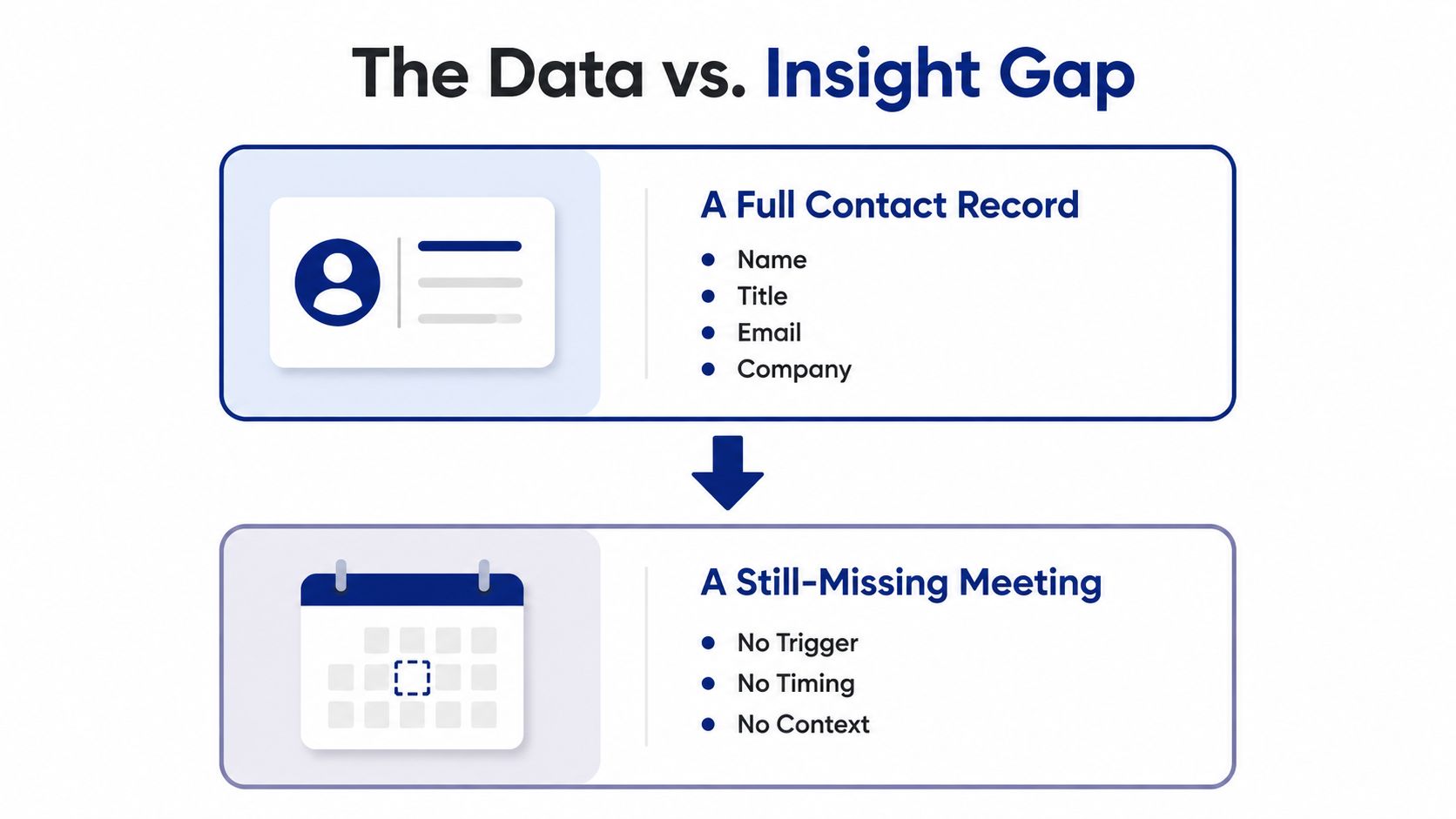
That is why trigger-based selling changed the category. Sales intelligence used to mean contact appending, then intent data, then account monitoring. In practice, the job is now turning raw account events into rep activity. If the platform does not do that, it is just a more expensive list provider.
Practical rule: if the alert does not change what a rep does next, it did not create intelligence, it created noise.
The category's growth reflects that shift. Buyers are spending on systems that combine account signals, contact data, and workflow automation rather than on point tools that only enrich records. The broader market numbers point to a category that is becoming core infrastructure, not optional hygiene. Market estimate and regional share data
The abandonment problem is real too, and it usually starts when teams buy a tool for data and expect it to behave like a workflow engine. A useful breakdown of why teams stop using these platforms is in this analysis of why sales teams abandon intelligence tools. The pattern is consistent. The software is only valuable when the signal reaches the rep in time and in context. One of the few ways to keep that discipline is to tie signal handling to a real operating motion, the same way a team might structure its Bidwell BI package around actual decisions instead of raw output.
Sales intelligence shopping list this long?
Skip the matrix. Salesmotion combines account intel, signals, and outreach drafts in one tool.
1,000+ public sources monitored 24/7, verified contacts with 200 credits/mo included, $85/mo. Monthly contract, no lock-in.
How Sales Intelligence Software Works
Credible platforms all follow the same basic architecture, even if the demos make them sound different. The useful frame is simple, data comes in, the system interprets it, it pushes an action, and then it has to live inside the workflow where reps already work. Oracle describes that structure as data collection and enrichment, analysis and intelligence, application and activation, and workflow integration. Oracle sales intelligence architecture
Four layers to evaluate
The first layer is the intake and cleanup stage. It pulls from account sources continuously, then normalizes and enriches what it finds. That matches the category's broader design, where systems aggregate from news feeds, social media, company databases, public filings, and CRMs so the data can become actionable rather than sit in a static record. Crunchbase sales intelligence guide
The second layer is where the system separates signal from clutter. The software scores what matters. Oracle's feature set points to active leads, deal count, and interaction frequency as the kinds of signals used to model engagement and predict outcomes, while vendor feature summaries also point to lead scoring, analytics, reporting, multivariate filtering, open APIs, and account engagement modeling as the capabilities buyers should expect. Oracle feature details
The third layer is delivery into rep work. The platform has to move the insight into a rep's day, whether that means CRM tasks, Slack alerts, sequence enrollment, or routing to the right owner. If it stops at a dashboard, the team still has to interpret the signal manually, which slows response time and makes the product feel smarter than it is.
The fourth layer is workflow integration. That is what keeps intelligence from becoming shelfware. A strong demo should show how a trigger becomes a task, an email draft, a CRM update, or a Slack alert with context attached, not just a green score in a tile.
One practical benchmark for buyers is whether the system can quantify engagement in a way that matches your motion. That means looking for models that behave like a real operating system for revenue, not a contact warehouse. If you already use a broader planning stack, a resource such as the Bidwell BI package is useful as a reminder that reporting and activation are not the same thing.
For a plain-language definition of the category, this overview on sales intelligence definition is a good companion piece. The key idea is still the same, the platform only matters if the insight survives the handoff into daily work.

“The account and contact signals are key for reaching out at important times, and the value-add messaging it creates unique to every contact helps save time and efficiency.”
Daniel Pitman
Mid-Market Account Executive, Black Swan Data
Matching Sales Intelligence to Your Sales Motion
The wrong way to buy this software is to compare feature checklists and assume the broadest platform wins. The better way is to map signals to the motion you run. A trigger that helps an SDR can be irrelevant for an enterprise rescue rep, and the reverse is true too.
Different motions need different signals
For SDR outbound, the highest triggers are usually hiring patterns and tech stack changes. Those are the signals that suggest an account is building capacity, changing process, or creating urgency. For AE expansion, leadership moves, earnings calls, and competitive mentions tend to surface the moments where the account is reorganizing priorities or validating a larger budget. For enterprise deal rescue, regulatory filings, layoffs, and M&A often matter more because they can explain why a stalled deal suddenly needs to move.
Salesforce's trigger list includes funding, hiring, promotions, layoffs, M&A, and awards as core sales triggers, but that list doesn't tell you which one matters most in each motion. Salesforce sales intelligence triggers
| Signal Type | SDR Outbound | AE Expansion | Enterprise Rescue |
|---|---|---|---|
| Hiring changes | Strong for new capacity and team buildout | Useful if they signal a new buyer or budget owner | Moderate, often secondary |
| Leadership moves | Good when a new exec changes priorities | Very strong, especially for expansion windows | Very strong when the deal has gone stale |
| Earnings calls | Usually a supporting signal | Strong, especially when they imply investment | Strong when they reveal pressure or urgency |
| Layoffs | Useful only in specific markets | Often a warning sign, sometimes a reframe | Strong when the deal needs to be requalified |
| M&A activity | Rarely the first signal | Useful for expansion mapping | Strong, because priorities and ownership change fast |
| Awards and PR | Good for timing and warm outreach | Helpful for relevance and context | Usually weak unless tied to a strategic pivot |
The same event can mean different things depending on the motion. A new CRO hire can be a goldmine for expansion if you sell into that persona, but it can also be a rescue signal if the deal has stalled and a new executive needs to reset the process. That's why motion-first buying beats feature-first buying.
Operational takeaway: the best signal is the one your team can turn into a relevant next step before the opportunity cools.
This is also where generic tool lists fall short. They'll tell you a platform has intent data, contact enrichment, and account alerts, but they won't tell you whether the signal is right for SDRs, AEs, or deal rescue work. If your motion isn't clear, the tool will feel impressive and still underperform.
From a Trigger Event to a Booked Meeting
A useful sales-intelligence workflow starts with one event and ends with a rep doing something specific. A target account announces a funding round, an earnings call points to a new initiative, or a leadership change opens a fresh window. The platform catches the signal, removes duplicates, adds company and contact context, and routes it where the rep already works.

What a useful alert looks like
A raw news clip is not enough. The alert needs a so what, a clear next action, and a direct path back to the source so the rep can trust it. That separates a notification from operational intelligence, and it is where many platforms look better in the demo than they do in the workflow.
Sales intelligence systems pull from news feeds, social media, company databases, public filings, and CRMs, which is what lets them turn account events into context-rich next steps. Sales trigger event examples and outreach patterns
A good alert might tell the rep that a competitor came up in an earnings call, a new executive joined a priority account, or a hiring spike points to a fresh project. A weak alert just repeats the headline. One gives the rep enough context to write a better note, the other becomes another notification to ignore.
The outreach has to match the trigger. A template email about “growing your team” is easy to spot and easy to delete. A message that references the trigger, explains why it matters, and asks for one concrete next step shows the rep did the work.
The fastest teams do not ask, “Did we get the signal?” They ask, “Did we act on it before the context expired?”
Freshness matters more than vendors like to admit. If a trigger arrives late, the meeting chance is already weaker. The edge comes from getting the signal into a rep's workflow fast enough that the outreach still feels timely and relevant.
Salesmotion's page on sales trigger events is a useful reference point for how those signals can be framed in real outreach. The practical lesson is the same across every motion, the signal only matters if it changes what gets sent next.

“All of the vendors that I've worked with, all of the onboarding that I have had to deal with, I will say, hands down, Salesmotion was the easiest that I have had.”
Lyndsay Thomson
Head of Sales Operations, Cytel
The Vendor Scorecard Buyers Need
The fastest way to waste budget is to buy on accuracy claims and polished dashboards. The better filter is to test the mechanics that determine whether the software helps reps book meetings. Apollo's vendor guidance is direct on this point, it recommends keeping hard email bounce rate below 2% in sample testing, validating 200 to 500 records in a trial, and sending a 100 to 200 email sequence per batch so you can measure bounce rate and connect rate directly. Apollo data quality testing guidance
What to test before you sign
Start with freshness. Look for last-verified timestamps and ask how often the source updates. If the vendor cannot explain recency in plain language, the data quality story is usually weaker than the demo makes it sound.
Then test provenance and overwrite behavior. A strong platform should show where each record came from, whether CRM data will be overwritten, and how conflicts are handled. If the answer is vague, you can end up with a CRM mess that reps stop trusting.
Alert quality deserves the same pressure test. Ask how the system deduplicates signals, how many false positives it creates, and how fast alerts route into the tools your team already uses. API access and workflow routing matter more than a long feature list.
Practical rule: if a vendor cannot explain how a signal was generated, audited, and routed, do not let it touch your live CRM.
A useful scorecard for real buying cycles looks like this:
- Hard bounce rate: keep sample testing below the 2% benchmark, or the data is not healthy enough for outbound use.
- Record validation: test 200 to 500 records before you judge the vendor.
- Batch send test: run a 100 to 200 email sequence to see how the data behaves in the wild.
- API and routing: confirm the alert can move cleanly into CRM, Slack, or your sequencing tool.
- Audit trail: every trigger should trace back to a real source, not just a score.
That's where the ROI of sales intelligence tools becomes visible. The return shows up when data quality supports action, not when it inflates the database. Red flags are easy to spot, unverifiable accuracy claims, no clear source trail, and alerts that cannot be tied to a defined workflow.
A vendor review should also separate data quality from rep behavior. A clean record set can still underperform if the alert lands in the wrong workflow, at the wrong time, or without a clear next step. The better question is whether the platform helps a rep move from signal to outreach without extra cleanup, manual rework, or a second tool to patch the gaps.
Rolling Out Sales Intelligence Software in 90 Days
Implementation fails when teams treat this like a software install. It's really a change-management project. The first quarter should prove that the platform can shorten the time between a signal and a rep action, not just fill a dashboard with new fields.
A rollout that won't overwhelm reps
Days 1 to 30 should focus on the basics, define the target account list, connect CRM and Slack, and measure current response time before changing anything. That baseline matters, because without it you can't tell whether the new workflow is helping or just adding motion.
Days 31 to 60 should activate one motion first. Start with the highest-volume workflow, usually the one where the team already feels pain, and route only the signals that match that use case. If you dump every event into the CRM, reps will tune it out.
Days 61 to 90 is where tuning happens. Tighten the alert thresholds, measure signal-to-meeting conversion, and expand to the next motion only if the first one is working. The goal is adoption, not blast radius.
The KPIs that matter are straightforward. Look at meetings booked per signal, average alert-to-action time, and influenced pipeline. If alert volume rises while action time worsens, the system is creating noise. If response time falls and the team books more meetings from the right signals, the rollout is working.
Common failure points show up fast:
- No ownership of signal quality: someone has to own freshness, deduplication, and routing.
- Too many alerts too soon: reps stop trusting the stream when everything feels urgent.
- One-and-done thinking: intelligence needs ongoing tuning, not a launch announcement.
The best first-quarter result is not perfect coverage. It's a small number of signals that the team trusts enough to act on quickly. If that happens, you've built a program instead of buying another tool.
Turning Signals Into Pipeline You Can Measure
The category is moving away from static data and toward always-on signal operations. That shift matters because pipeline doesn't come from knowing more about an account, it comes from shortening the gap between an event and an action. If the event is funding, hiring, a leadership change, or a strategic announcement, the platform only earns its keep when a rep sees it, understands it, and responds before the moment cools.
A simple decision framework works well here. Define the motion first, pick the signals that match that motion, pressure-test vendors on quality mechanics, then instrument the rollout so you can prove the result. That keeps the buying decision grounded in workflow instead of marketing claims.
The next wave is already visible in how teams are talking about the category. More workflows are becoming agentic, which means the system won't just detect a signal and alert a rep, it'll draft the outreach, route the task, or prepare the next-best action automatically. That's useful only if the underlying signal quality is strong, because automation makes bad data move faster.
This week, audit your current signal-to-meeting latency. If you can't tell how long it takes from trigger to rep action, you don't have a revenue system yet, you have a feed. Run one controlled vendor trial, test a narrow motion, and see whether the software helps your team act before the opportunity disappears.
Salesmotion gives revenue teams a practical way to monitor account triggers, generate account context, and turn those signals into outreach reps can use right away. If you want to see how that works in a real workflow, visit Salesmotion and look at how its agents connect signals to next steps without adding more manual research.