Your reps already have AI in their workflow. The problem is that most of it still depends on the same old motion: open Salesforce, check LinkedIn, scan earnings notes, pull up your sales intelligence platform, copy details into Claude or ChatGPT, then ask for an email draft.
That isn't an AI workflow. It's manual research with a chatbot bolted on.
What's changed is that MCP servers let AI assistants connect directly to live tools and data sources instead of waiting for a rep to paste context into the prompt. For sales teams, that shifts AI from “help me write this” to “help me execute the entire motion with current account context.”
For a CRO, that matters because the bottleneck is rarely copywriting. It's access to timely context, consistent account research, and clean execution across a messy sales stack.
The End of Copy-Paste Sales Research
A familiar outbound sequence looks like this.
A rep gets assigned Acme Corp. They pull up the CRM to check the open opportunity history. Then they open LinkedIn to see whether the buying committee changed. Then they skim recent press releases, maybe check job postings, maybe search for an earnings transcript, maybe look for investor commentary. After that, they paste a pile of notes into Claude and ask for a decent first email.
By the time the draft is ready, the rep has already spent more energy assembling context than on selling. If you want a good breakdown of that drag, Salesmotion has a useful piece on how sales reps waste time on research.
The real tax isn't writing
Most leaders assume the pain is content creation. It usually isn't. The pain is all the work that comes before the first sentence.
A rep needs answers to questions like:
- What changed at this account recently: leadership move, funding event, product launch, org expansion, hiring pattern.
- Who likely cares: new CRO, VP of Sales, operations leader, finance stakeholder.
- Why now: what signal creates a reason to reach out this week, not next quarter.
- What should the message reference: a strategic initiative, a known pain, or a public trigger.
Without that context, AI produces polished generic outreach. That's better grammar, not better pipeline.
Sales teams don't need another writing assistant if the assistant can't see what the rep sees.
What changes with MCP
An MCP server for sales tools changes the flow. Instead of asking the rep to gather and paste information, the AI assistant can reach into connected systems and retrieve the relevant context through a structured interface.
So the prompt becomes: “What signals has Acme shown this quarter?” Or: “Draft an email to the new CRO at Acme referencing their latest strategic priorities.”
That's a different category of workflow. The rep isn't acting as the middleware anymore.
The practical win is simple. You reduce tab switching, reduce copy-paste, and move account intelligence closer to the point of action. Reps spend less time assembling a brief and more time deciding what to do with it.
Skip the comparison fatigue?
If you're shopping for a sales intelligence tool, here's the short version.
Salesmotion combines account intel, buying signals, verified contacts, and AI-drafted outreach in one tool. From $85/mo, live in minutes, no annual contract.
What Is an MCP Server in a Sales Context
A sales rep opens ChatGPT before Salesforce, asks for an account brief, and expects something useful in 30 seconds. That only works if the assistant can reach the systems that hold the full context.
An MCP server is the connection layer that lets an AI assistant use your sales systems in a standard way. In practice, it sits between the AI client and tools like your CRM, sequencing platform, call notes, and account intelligence sources.
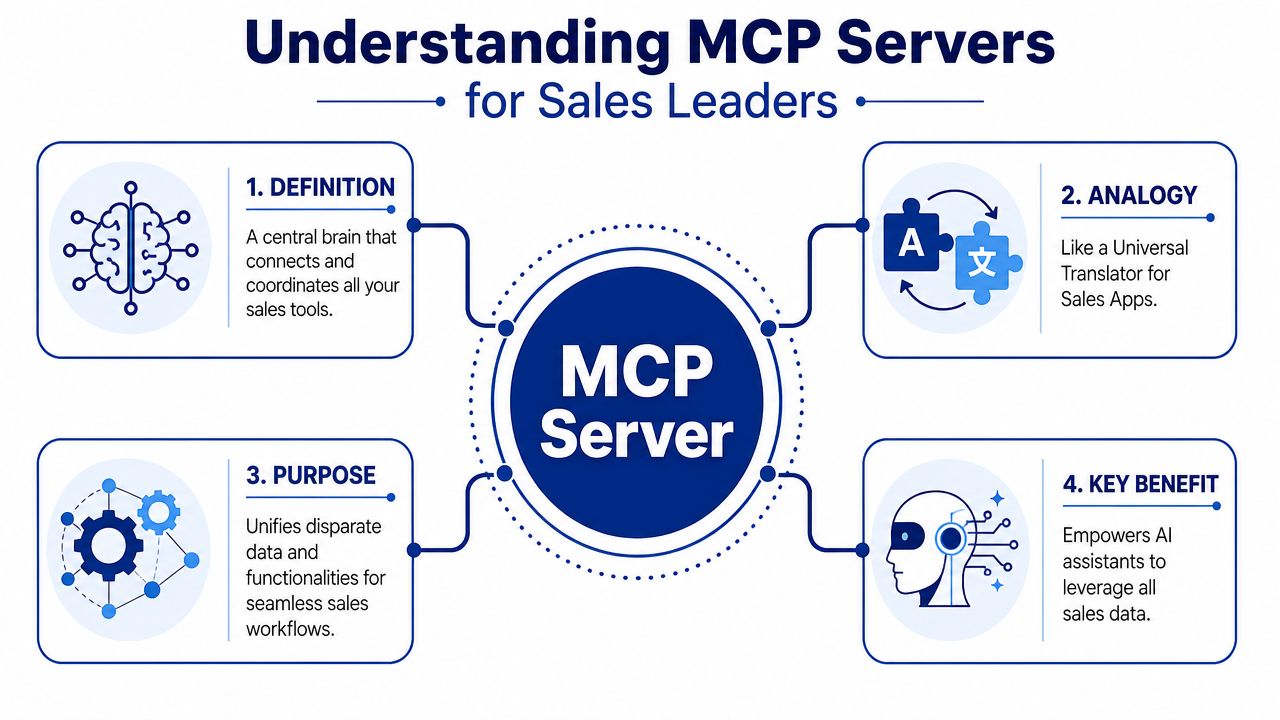
Old integration logic versus MCP
Before MCP, adding AI to a sales workflow usually meant custom API work for each use case (part of why API-first sales intelligence took hold). Pull account data from one system, fetch contact details from another, pass both into a prompt, then write back the result somewhere else. It worked, but every new workflow created more glue code, more maintenance, and more failure points.
MCP changes the operating model. Instead of wiring each workflow from scratch, teams expose approved tools once through a common interface, and AI clients can call those tools consistently. For a revenue team, that matters because the effort shifts from building one-off automations to deciding which sales actions the assistant should be allowed to perform.
That is the core point. MCP is not a new destination product for reps to learn. It is a standard way to make the tools you already pay for usable inside AI.
What that means for a revenue leader
For a CRO or RevOps leader, the benefit is straightforward. Your stack starts acting less like a set of disconnected apps and more like a coordinated operating system for sellers.
| Old way | MCP way |
|---|---|
| Rep manually moves context between tools | AI can call connected tools for the context it needs |
| New workflow means new custom integration work | One access pattern can support many workflows |
| Research happens in one place and execution in another | Research and execution can happen in the same working session |
| Output quality depends on what the rep pasted in | Output quality improves because the assistant can use live system context |
There is a trade-off. Standard access does not remove the need for governance. Someone still has to define permissions, approve actions, and decide where human review is required. That is a leadership advantage, not a technical nuisance. The teams that set those rules early will get faster rep workflows without creating a compliance mess.
A practical example is Salesmotion's MCP integration setup for sales intelligence workflows. The value is not another dashboard. The value is giving an assistant access to the account signals, contact context, and research reps already need, right where they are working.
Why sales leaders should care now
Most MCP content is written for developers. Sales leaders need a different translation. The question is not how the protocol works at the transport layer. The question is whether it gets better account research, better timing, and better rep execution from the systems you already own.
That is why MCP matters in sales. It turns AI from a writing tool into a working layer across your revenue stack.

“The talking points are gold. If they're in Salesmotion, I know they're being discussed inside that business. That makes it easy to spark a real conversation, which is 90 percent of the battle.”
Andrew Giordano
VP of Global Commercial Operations, Analytic Partners
How an MCP Server Puts Your Sales Tools to Work
A rep asks an AI assistant for a target account brief, then follows with, "Pull the latest buying signals, identify the likely economic buyer, draft a follow-up email, and log the notes in CRM." If the assistant cannot reach the systems behind those tasks, the rep is back to copying, pasting, and checking tabs by hand. An MCP server closes that gap between request and execution.
The practical model is simple. The assistant decides what needs to happen. The MCP server connects to the right system, runs the approved tool, and returns the result in a format the assistant can use. When several agents share those tools, the single agent vs multi-agent trade-offs apply.
Client and server in plain English
In a sales workflow, the client is the AI host, such as Claude or Cursor. The server is the execution layer that connects to CRM, email, research sources, or a sales intelligence platform. The rep sees one conversation window, but behind it the client is discovering available tools and calling them in sequence.
A technical explanation from TrueFoundry describes an MCP server as the tool-execution layer exposed through a standardized JSON-RPC 2.0 interface, while the host client handles discovery and invocation in this MCP server architecture overview. Sales leaders do not need the transport details. They need to know what this separation buys them. It gives AI a controlled way to work across the revenue stack without hardwiring a custom workflow for every use case.
Why tools matter more than raw data
Sales teams get better outcomes when the model can call defined actions instead of reading a pile of fields (see why the account data matters more than the model).
Useful tools look like this:
- Get account signals to pull recent buying triggers
- Find stakeholders to surface likely contacts and role changes
- Draft outreach email using current account context
- Update CRM record to write back notes, next steps, or qualification details
That structure reduces failure points. The model is not guessing what to do with a spreadsheet-shaped blob of information. It is choosing from a set of approved actions with clear inputs and outputs.
The analogy is straightforward. Raw data is a parts bin. Tools are labeled instruments on the workbench. Reps need the second setup.
What effective implementations look like
The strongest setups are modular and specific. A technical architecture guide explains that MCP servers often expose tools, resources, and prompts, and recommends small, specialized servers with explicit schemas, clear contracts, and strong logging in this MCP architecture article.
That maps well to revenue operations. One vague "sales assistant" endpoint usually creates confusion, because every request has to be interpreted from scratch. Separate capabilities for CRM lookup, account research, and outreach generation are easier to test, easier to secure, and easier to improve over time.
This is also where existing systems matter. If you are reviewing what can connect into the same workflow, Salesmotion's sales tool integrations show how account intelligence sources and downstream execution tools can sit around the same rep motion.
What works and what creates drag
What works:
- Narrow tool definitions with a clear job, input, and output
- Live system context so the assistant is working from the current account state
- Write-back actions that let work continue inside the same session
What creates drag:
- One oversized connector that tries to cover every task
- Read-only access that leaves reps to finish the job in other systems
- Loose permission design that makes write-backs risky or inconsistent
For sales leaders, the point is simple. MCP is not interesting because it is a new protocol. It matters because it gives AI a governed way to access research, context, and action paths across the tools reps already use. That is how an assistant starts behaving less like a copy generator and more like an operating layer for revenue work.
Practical MCP Use Cases That Boost Pipeline
The value becomes obvious when you look at how reps work.
One published example describes an MCP deployment that exposes 91 tools across 6 modules from a single server, from CRM and ERP to product lookups and task tracking, in this multi-tool MCP example. It shows MCP can put CRM actions, product lookups and task management inside one conversational interface. It also shows the opposite risk: the more tools an assistant sees, the harder it is to choose the right one, which is why our guide to the best MCP servers for sales argues for connecting two or three.

Pre-call prep on demand
A rep has a meeting in fifteen minutes with Acme's operations leader and a newly hired CRO. Normally, that rep would race across five tabs to assemble a point of view.
With an MCP setup, the rep can ask Claude something like:
Give me a brief on Acme Corp. Include recent strategic initiatives, leadership changes, likely operational priorities, and a few smart questions for the call.
The assistant can pull live account context from connected systems and return a structured brief instead of a generic summary. If the underlying sales intelligence platform already tracks signals, stakeholder movement, and company initiatives, the rep gets a usable answer without doing the assembly work by hand.
Account intelligence inside the assistant becomes more valuable than another dashboard. The rep doesn't need one more place to check. The rep needs context delivered inside the workflow where they're already preparing.
Signal-anchored outreach
The second use case is stronger because it connects research to action.
Say Acme announces a funding round tied to expansion into Europe. A rep asks:
Draft an email to Acme's VP of Sales connecting our logistics solution to that expansion. Reference the funding news and keep it grounded in what likely changes operationally.
That request is far better than “write a cold email to a VP of Sales.” It gives the assistant a real reason to reach out, a relevant stakeholder, and an initiative that shapes the message.
If your MCP server has access to trigger monitoring, stakeholder data, and outreach tools, the assistant can:
- identify the signal,
- connect it to likely business implications,
- anchor the email in that context,
- prepare the draft for rep review or downstream execution.
Where Salesmotion fits
One example in this category is Salesmotion, whose MCP server brings account intelligence into Claude, ChatGPT and other assistants, with twelve guided skills such as account plans and meeting prep. In practical terms, that means a rep can use account research, live signals, and prospecting context from within the assistant instead of leaving the conversation to hunt through separate systems.
That's the part many sales tools miss. They may have good data, but the rep still has to go fetch it.
What strong use cases have in common
The most effective MCP use cases in sales usually share four traits:
- They start with a live account question rather than a generic writing prompt.
- They connect multiple sources instead of relying on one database.
- They end in an action such as a brief, a message draft, or a CRM update.
- They stay narrow enough to trust so reps know what the assistant is doing.
Good sales AI doesn't replace rep judgment. It removes the prep work that keeps judgment from showing up on time.
That's why this approach has pipeline impact. It improves speed to relevance. Reps can react to account change faster, with better context, and with less manual effort in the middle.

“All of the vendors that I've worked with, all of the onboarding that I have had to deal with, I will say, hands down, Salesmotion was the easiest that I have had.”
Lyndsay Thomson
Head of Sales Operations, Cytel
Evaluating the Benefits and Strategic Risks
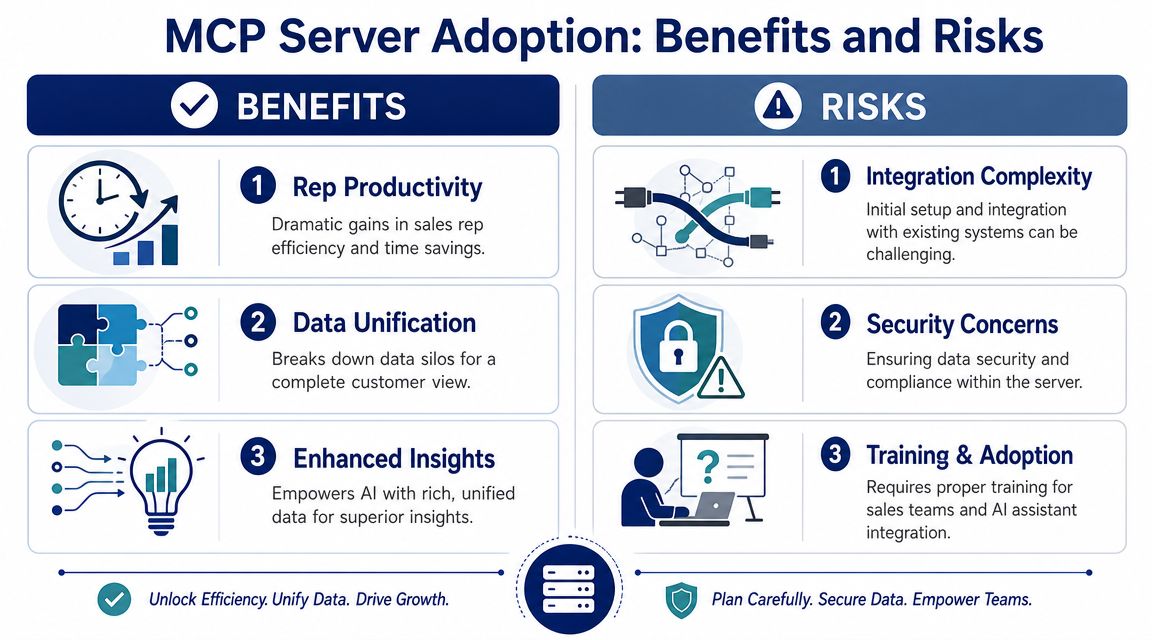
The upside is easy to see. An MCP server for sales tools can turn disconnected systems into a working layer of intelligence that reps can query and act on from a single assistant.
The hard part is making sure that convenience doesn't create new operational risk.
Where the value is real
For revenue leaders, the gains usually show up in a few predictable places.
- Rep productivity improves: less tab switching, less manual stitching, faster pre-call prep, faster follow-up.
- Outreach quality becomes more consistent: good reps already work this way manually. MCP helps average reps access the same depth of context.
- Existing tools get used better: expensive data and intelligence platforms become more actionable when they're accessible inside the assistant.
- Execution gets tighter: research, writing, and system updates can happen in one chain instead of getting dropped between steps.
There's also a stack strategy benefit. If AI clients change over time, a protocol layer gives you more flexibility than tying every workflow to one app vendor's interface.
The risks are not theoretical
Enterprise concerns around MCP are legitimate, especially for sales-facing workflows with write access. Solo.io highlights practical adoption issues around onboarding, authorization, protected resource discovery, and governance in this enterprise MCP security analysis. Separately, an arXiv study of 10,240 real-world MCP servers found that about 13% showed substantial mismatches between what their tools say they do and what they do, which can enable undocumented privileged operations or hidden state changes.
That number should get attention from anyone letting agents touch CRM, messaging, or workflow systems.
Here's the practical concern for a CRO. It's not whether an MCP server can read account data. It's whether it can take a wrong action, with the wrong permissions, and leave your team cleaning up the mess.
Questions that matter before rollout
A serious evaluation should include questions like these:
| Area | What to ask |
|---|---|
| Authorization | What permissions does each tool have, and how are they scoped? |
| Approval flow | Which actions require human review before execution? |
| Auditability | Can RevOps see what the agent did, when, and why? |
| Write access | Which systems can the assistant update directly? |
| Tool design | Are tools narrow and explicit, or broad and ambiguous? |
Practical rule: Treat MCP like an execution layer, not a demo feature. Govern it the same way you'd govern any system that can write into CRM or trigger customer communication.
Where teams get this wrong
The usual failure mode is overexposure. A team connects too many systems, grants broad permissions, and assumes the assistant will “figure it out.” That's how trust erodes fast.
A better approach is narrower:
- Start with research-heavy motions.
- Add write-back only where the workflow is clear.
- Require review for customer-facing communications.
- Log everything.
- Keep permissions least-privilege by default.
The risk isn't a reason to avoid MCP. It's a reason to buy and implement carefully. The strongest programs treat governance as part of design, not a compliance step after rollout.
Activating MCP in Your Sales Organization
A rep has five minutes before a call. One browser tab has CRM notes. Another has recent buying signals. Slack has a thread with deal context. The assistant can help, but only if it can reach the right systems at the right moment. That is the practical starting point for MCP in sales.
Start with the work that still forces reps to collect context by hand. The best early candidates are the moments where a seller has to pull from multiple tools just to complete one task well.
Start with one painful workflow
Use one motion that reps already complain about, because adoption follows obvious time savings.
- Pre-call briefing
- Signal-based outbound
- CRM research and update
- Post-meeting follow-up drafting
Pre-call briefing is often the cleanest place to begin. The inputs are clear, the output is easy to judge, and the risk stays low because the rep still decides what to say. Post-meeting follow-up can also work well, but only if your team is disciplined about review before anything goes to a customer.
Evaluate vendors differently
Sales leaders have spent years buying for data coverage, dashboards, and native integrations. Those still matter. They no longer answer the full question.
The question now is whether a platform's intelligence can show up inside the assistant your reps already use, with enough structure to support real workflow steps instead of passive research. A tool that stores useful context but cannot deliver it into the rep's working session creates another destination to check. That keeps the research tax in place.
This is the shift many developer-focused MCP articles miss. For a sales org, protocol support matters because it changes where work happens. It puts account context, signals, and next-step recommendations closer to the rep's decision point. For platforms like Salesmotion, that means sales intelligence can be activated inside AI-driven workflows instead of sitting in another tab. For a server-by-server view, see the sales MCP stack comparison.
Pilot small and set clear success criteria
A practical rollout looks more like a RevOps test than a platform migration.
-
Map one manual workflow
Pick a motion where reps lose time gathering account context before outreach or meetings. -
Connect one intelligence source
Keep permissions narrow and outputs easy to review. If you are assessing setup options, the Salesmotion in Claude quickstart shows what an initial implementation can look like. -
Measure behavior change
Look for faster prep, better message relevance, more consistent CRM updates, and whether reps trust the output enough to use it repeatedly. -
Expand only after the handoff works
Once the assistant can reliably pull the right context for one motion, then add the next source or workflow.
That sequence matters. Teams that try to connect everything at once usually create noise before they create value.
MCP earns attention when it reduces the delay between finding context and acting on it. For a CRO, that is the point. Less rep time spent stitching together account research. More time spent on relevant outreach, cleaner execution, and pipeline work that moves.