Hyper-personalization is real-time decisioning at the individual level. It takes live behavioral, contextual, and preference signals, works out what they mean for one specific buyer, and changes the message, offer, timing, or channel right away.
TL;DR: Standard personalization swaps in static fields like first name, company, and industry. Hyper-personalization changes the message because the buyer's signal changed. It runs on four elements (data foundation, decisions, design, and distribution), and in B2B sales AI agents make it scale by handling research, signal monitoring, and drafting while the rep reviews and sends.
Monday morning in B2B usually starts the same way. A rep opens the target list, sees thirty accounts, knows twelve need attention, and then burns two hours digging through earnings calls, hiring posts, LinkedIn activity, and old CRM notes just to send one email that doesn't sound like the forty other emails in the buyer's inbox this week.
That's the cost of manual personalization. The work is hard, it takes skill, and it still doesn't scale past a few dozen accounts per rep before quality slips. Teams don't usually fail because they're lazy, they fail because the research-to-outreach loop is too slow for the pace of the market.
Hyper-personalization changes that loop. In B2B, it stops being a clever email trick and becomes a system for turning live account signals into action before the moment goes cold.
The Monday Morning Every B2B Rep Already Knows
The first thing most reps do isn't selling, it's rebuilding context from scratch. They search the account name, scan a press release, open the last call note, check for org changes, and try to figure out whether the message should mention growth, risk, expansion, or a new executive.
By the time the draft is ready, the rep has already spent the attention budget that should have gone into the actual conversation. That's why so many good emails still fail, not because they're badly written, but because they arrive after the buyer's situation has already changed.
An enterprise account executive at an HR tech firm told us: "I'm wasting my time coming up with these customized emails that aren't being read." That is manual personalization described by someone doing it.
Practical rule: if the rep had to spend half the morning to earn one relevant sentence, the process is too manual.
The pressure gets worse on teams with target-account motions. A handful of high-value accounts can justify deep research, but the same process breaks down when a manager expects consistent coverage across the whole territory. That's the bottleneck Salesmotion calls out in its breakdown of how much time reps spend researching, and it's the same problem most RevOps leaders see in their own pipeline reviews, too, because research time eats into actual selling time, as shown in this analysis of rep research time.
What changes when Monday stops being research is simple. Reps stop acting like analysts who occasionally send emails, and start acting like sellers who respond to real buying behavior.
See Salesmotion in action
Take a self-guided interactive tour — no signup required.
What Hyper Personalization Means
Hyper-personalization is real-time decisioning at the individual level. It takes live behavioral, contextual, and preference signals, interprets what they mean for one specific buyer, then changes the message, offer, timing, or channel right away instead of waiting for the next campaign cycle.
That is different from standard personalization, which usually means static fields like first name, company, industry, or maybe a recent job title. Those details are useful, but they do not tell you what the buyer cares about this morning. Hyper-personalization does, because it keeps updating the profile as the person acts.
The difference in thirty seconds
A mail-merge email says, “Hi Sarah, I saw you're in logistics and wanted to connect about efficiency.”
A signal-anchored email says, “Hi Sarah, your team's new hiring posts for warehouse operations suggest the rollout is accelerating, so I thought it was worth sharing how similar teams are handling onboarding friction before the peak season hits.”
The second version is not just more specific, it is more timely. It reacts to a signal that means something right now, which is why hyper-personalization is better understood as an operating system for relevance, not a writing style.
A RevOps lead at a software firm told us what the first kind of email leaves behind: "Just a feeling that you're, that no one did any research about you before you had a conversation with him."
The mechanics are straightforward. Ingest a signal. Decide what it means. Adapt the outreach. Send it now. That loop is what the IBM definition emphasizes, and it is also why a buyer can feel the difference immediately when a message is based on live behavior rather than stale segment rules, especially when the system adapts to immediate intent signals.
One detail that matters in practice is delivery. If you are sending highly individualized email at scale, you cannot ignore how messages are grouped and routed, because mailbox behavior still affects how buyers see them. A useful technical perspective on that comes from how grouping affects deliverability, which is worth reading before you let a personalization engine spray the same pattern across every account.
The practical test is simple. If the message changes because the buyer's signal changed, that is hyper-personalization. If the message only changes because a field in the CRM changed, that is standard personalization with better formatting.
In B2B sales, the difference shows up in reply quality. A rep does not need more adjectives. They need a system that spots the right trigger, applies judgment fast, and turns that into outreach the buyer can recognize as relevant. The same principle also applies to the upstream signal layer, which is why teams that study what intent data is usually get closer to a usable personalization workflow.

“Salesmotion empowers me to cultivate a great buyer experience. I'm able to challenge prospects' thinking and be a trusted consultative seller. A major part of this is Salesmotion insights.”
Austin Friesen
Account Executive, FY25 #1 President's Club, Clari
The Four Elements That Make It Work
A rep usually feels where hyper-personalization breaks before they can name it. The research may be strong, the email may read well, and the reply still never comes because one part of the workflow failed to move with the others.
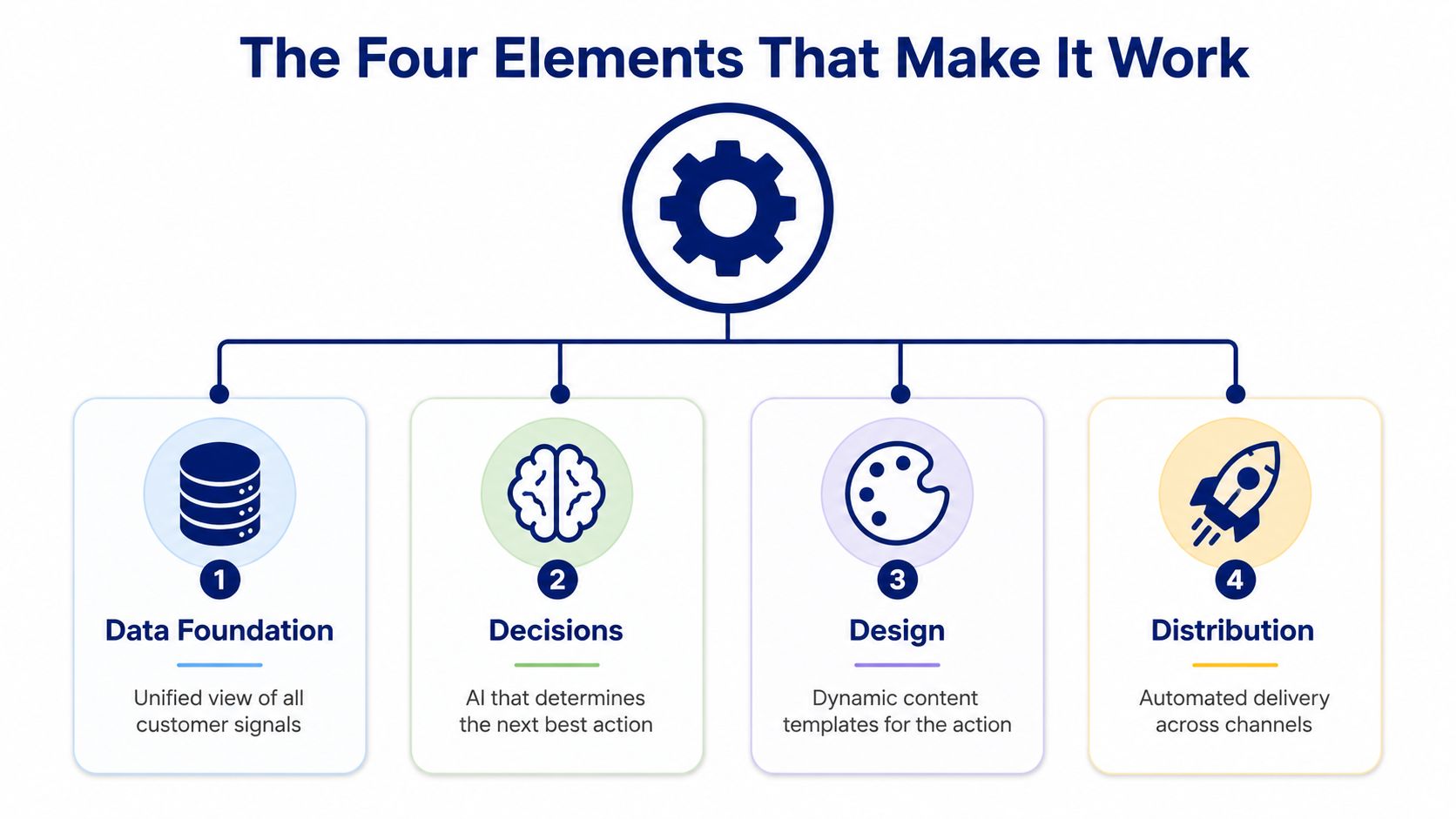
The working model in the academic paper breaks the system into data foundation, decisions, design, and distribution, and that framing maps cleanly to B2B sales operations because each piece has a different job. I use that split in practice because it makes the failure point easier to spot.
Data foundation starts with the signal layer. In B2B, that can include earnings calls, hiring posts, LinkedIn activity, CRM history, press releases, and executive changes. If the inputs are thin, the rest of the system turns into educated guessing. Teams that spend time reading intent data basics usually get a better read on which signals are worth acting on and which ones are just noise.
Decisions is the step where the system asks whether a signal matters for this account, at this moment. A new CRO hire may be highly relevant in one deal and irrelevant in another. A competitor mention on a call may demand action in one pipeline stage and deserve a watchlist note in another. That judgment has to come from rules, scoring, or models that do real work, not from a generic if-this-then-that setup.
The choice point is where a lot of teams lose time. If every signal goes to a rep, the noise drowns out the useful stuff. If nothing gets filtered, the rep starts ignoring the alerts.
Design covers the message itself, including the angle, format, and channel. A Slack alert for a rep is not the same as a customer-facing email, and a short account note should not read like a long-form nurture sequence. The strongest systems match the output to the job that needs to happen next.
Distribution is the handoff into the tools the team already uses. The insight has to land in email, CRM, or a sales engagement platform, otherwise it stays as context instead of becoming action. That part sounds simple, but in a real sales stack it is usually where good ideas die.
The point is not to collect more data for its own sake. The point is to turn account signals into something a seller can use on the next touch. The same four-part structure appears in the research on customer hyper-personalization, which describes the capability as an end-to-end system built to gather data, decide what to do, design the experience, and distribute it at scale, in the working model published in the academic paper.
A clean way to check your stack is to look at where the break happens. If the team sees signals but cannot decide what matters, the problem sits in decisions. If the rep gets strong context but sends a flat note, the problem sits in design. If the message is ready but no one acts on it, distribution is broken.
B2B Use Cases That Move Pipeline
The use cases that matter change timing, not just tone. Hyper-personalization pays off when a rep can tie a real trigger to a real next step and send it while the buyer still cares.
Inbound lead enrichment
A demo request lands, and the clock starts immediately. Instead of a generic follow-up, an agent can enrich the account, pull the latest company context, and give the rep a point of view before the first call.
A strong version sounds like this:
“Thanks for reaching out. I noticed your team has been hiring in operations and customer support, which usually means the rollout is already moving fast. I'd be glad to compare what we're seeing in similar accounts and show where teams usually get stuck first.”
That email works because it references the buyer's current motion, not just the form fill. It gives the rep a useful angle without forcing them to spend half the morning piecing together the account story by hand.
Deal nurture on stalled opportunities
Stalled deals usually do not need more cadence. They need better timing. A trigger like a new CRO hire, a competitor mention, or a shift in hiring can give the rep a reason to reopen the conversation with context instead of pressure.
A useful note might say:
“Congrats on the new CRO announcement. That kind of leadership change usually resets priorities fast, so I wanted to send a short recap of how teams in your position are handling rollout risk and internal alignment.”
That is not magic. It is a cleaner message attached to a signal the buyer will recognize as relevant.
Account-based expansion
Expansion works when the rep knows where the organization is adding capacity. A hiring spike in a target department often means the account is preparing for change, and that creates a window for multi-threaded outreach.
A simple outreach line can sound like this:
“I saw the new hiring activity across finance operations. If that team is taking on more process volume, I can share the framework we have seen work when systems need to support a broader internal audience.”
One practical guardrail matters here. Use the signal to create relevance, not to prove how much you know. If the email sounds like surveillance, the buyer will feel it immediately. The same restraint shows up in multi-agent systems for business, where each agent handles a narrow job instead of trying to act like a full seller.
Re-engagement and dormant accounts
Dormant accounts often come back for boring reasons. A leadership change, a new product line, or a budget reset can make an old conversation useful again, but only if the rep sends a message that connects the old thread to the new reality.
A good re-entry note is short and direct:
“We spoke last quarter about improving internal handoffs. I saw your team has since added headcount in operations, so I wanted to revisit whether the same workflow is still creating friction.”
That kind of message works because it is specific enough to feel informed, but not so detailed that it reads like a surveillance report.
Triggered content for late-stage buying groups
Late-stage buying groups rarely stall because no one cares. They stall because each stakeholder wants a different proof point. A hyper-personalized follow-up can use the right trigger to send the right artifact to the right person, which is where manual outreach usually runs out of steam.
A finance leader may need a cost-control angle, while an operations leader wants implementation risk addressed. If one rep has to build both messages from scratch every time, coverage breaks down fast. Using an AI agent to draft the context and route the right version into the workflow keeps the message aligned without forcing the seller to start from zero on every account.
The point is simple. The best B2B use cases are the ones that give the rep a reason to respond now, with language tied to what changed in the account.

“We have very limited bandwidth, but Salesmotion was up and running in days. The template made it easy to load our accounts and embedding it in Salesforce was simple. It was one of the easiest rollouts we've done.”
Andrew Giordano
VP of Global Commercial Operations, Analytic Partners
How Autonomous AI Agents Make It Scale
Manual personalization usually breaks at the handoff between research and writing. Autonomous AI agents compress that handoff by splitting the work into three jobs: gather the context, watch for signals, then write the outreach when the timing is right.
Salesmotion's model is useful here because the agents map cleanly to the workflow already in use. The AI agents for sales teams article lays out the logic well, and the practical value is easy to see once the whole chain is connected.
Research, signal, and prospecting
The Research Agent builds the account brief. It pulls from earnings calls, press releases, hiring posts, podcasts, and SEC filings, then turns all that noise into a structured view of what matters, who matters, and what the likely talk tracks are. That replaces the rep's first two hours of scavenger hunting.
The Signal Agent watches target accounts continuously. When something worth acting on happens, it routes an alert to Slack, email, or CRM and explains why the event matters, so the rep doesn't have to translate the signal into sales language manually.
The Outreach Agent turns the context into outreach. It writes personalized, multi-step sequences tied to the specific trigger and the account's priorities, then hands the draft to the rep for review.
The rep should edit judgment, not reconstruct research.
That distinction matters because agents are most valuable when they remove the blank page, not when they replace the seller's thinking. If you want a broader framework for how multiple agents can work together in a business process, this overview of multi-agent systems for business is a helpful companion read.
What the handoff looks like
A clean sequence might look like this. The Signal Agent detects a new finance leader. The Research Agent surfaces the company's recent expansion and key initiatives. The Outreach Agent drafts a short email that references the leadership change and the likely operational priorities behind it.
The rep opens the draft, trims the wording, and sends it the same day. That's the shift. The workflow moves from “find something to say” to “respond to what just changed.”
Your Implementation Roadmap in Parallel Tracks
Rolling this out works better as three parallel tracks than as a sequential project plan. People, process, and tech all have to move at the same time, or the system stalls before it reaches the field.
People, process, and tech
On the people side, assign ownership clearly. Someone needs to own signal quality, someone has to write the point of view behind the outreach, and someone has to handle escalation when a rep rejects an agent draft. If that ownership is fuzzy, every bad draft becomes a philosophical debate.
On the process side, define what happens when a signal fires. The rep should know when to review, when to send, and how fast the response needs to happen on high-priority triggers. A practical internal target is to keep the first touch under 48 hours on the most important signals, because delay kills the point of the trigger.
On the tech side, keep your systems of record clear. CRM should stay the source of truth for the account, sales engagement should stay the source of truth for sending, and the agent should sit in the middle as the context layer, not as a separate island of data.
| Track | Day 30 | Day 60 | Day 90 |
|---|---|---|---|
| People | Assign a signal owner and one rep champion | Train managers on review and escalation | Expand to broader team coaching and QA |
| Process | Define trigger types and approval flow | Add feedback loops from rep edits and replies | Standardize SLAs and account review rhythm |
| Tech | Connect CRM and source data | Route alerts into Slack, email, or CRM | Push agent output into the send workflow |
A useful way to avoid confusion is to keep the first rollout narrow. Start with one trigger category, one team, and one motion, then expand once the team trusts the output. If the first use case is too broad, the agents start looking noisy instead of useful, and that kills adoption fast.
Where Hyper Personalization Crosses the Line
The line between relevance and creepiness is real. Buyers usually accept outreach that reflects public, job-relevant signals, but they react fast when a seller appears to know too much, especially if the message reveals more context than the buyer expected.
Governance matters because the failure mode is easy to predict. Consent, data minimization, and model transparency are not compliance theater, they keep the system from turning intrusive. The privacy concerns now being debated in recent research reflect the same tension sellers face in practice. Deeper signal collection can drift toward over-targeting if the workflow is not controlled carefully, and that is exactly why the question of whether hyper-personalization is going too far keeps coming up.
If you want a practical privacy lens for your own digital footprint, protect your digital footprint is a useful reminder that buyers care about visibility and control too.
The same risk shows up inside the sales team. Signal overload makes reps ignore alerts. Tone-deaf drafts make the system feel mechanical. Hallucinated context damages trust quickly. If reps stop thinking because the agent writes the first draft, quality drops even when the tooling looks advanced. The hard part is keeping the agent useful without letting it become noise, and that includes understanding AI sales email deliverability limits before you scale send volume.
Measurement should stay simple. Compare reply rate and meeting rate on signal-anchored outreach against your baseline. Track time to first touch after a trigger fires. Watch pipeline influenced by agent-flagged accounts. Measure rep hours saved per week.
If those numbers improve, the workflow is working. If they do not, the agent needs tighter governance, better signals, or a narrower use case. Teams that win with this will treat the agent like a teammate with oversight, not a black box.