AI in sales is already standard operating practice, not a side experiment. About 70% of sales teams already use AI technologies, and adopters report average revenue increases of 6% to 10%, according to IBM's overview of AI agents in sales. That changes the conversation. The question isn't whether your team should use AI. It's whether you're still buying assistants when the market is moving toward autonomous systems.
Many sales teams still use AI like a smarter search bar. They ask it for an email draft, a call summary, or a list of target accounts. Useful, yes, but not revolutionary.
The shift is from passive help to active execution. AI agents for sales teams don't wait for a prompt every time. They monitor accounts, synthesize research, and prepare outreach continuously. If one of your target accounts changes leadership, expands hiring, mentions a strategic initiative, or signals a new buying need at 3am, an agent can catch it before your reps open their laptops.
What Exactly Are AI Sales Agents
An AI sales agent is not a chatbot. It's not the “write me an email” box inside your CRM either.
It's an autonomous system that handles a defined job on an ongoing basis with limited human prompting. Salesforce describes AI sales agents as autonomous applications that can analyze and learn from sales and customer data to handle lead qualification, follow-ups, scheduling, coaching, and CRM updates with little or no human input, while IBM emphasizes that these systems complement human reps rather than replace them, as covered in this comparison of AI agents vs automation in sales.
Copilot versus agent
Most sellers already understand a copilot. You ask, it responds. You need to initiate the work.
An agent is different. It has a job, watches for conditions, and takes action when those conditions appear.
A simple way to think about it:
| Attribute | AI Copilot (Assistant) | AI Agent (Autonomous) |
|---|---|---|
| Trigger | Waits for your prompt | Runs continuously based on goals or rules |
| Working style | Supports a task in the moment | Executes a workflow over time |
| Typical output | Draft, answer, summary | Alert, research brief, recommended next step, drafted outreach |
| Human involvement | High at the start of each task | High at review and decision points |
| Best fit | Ad hoc productivity | Repeatable pipeline generation and account monitoring |
A copilot is a calculator. An agent is the accountant who worked through the books overnight and left the important issues on your desk in the morning.
That distinction matters because sales doesn't suffer from a lack of one-off content. Sales suffers from missed timing, inconsistent research, slow follow-up, and weak prioritization. A copilot helps once you've decided where to focus. An agent helps decide what deserves focus in the first place.
Practical rule: If the system only works after a rep asks for help, it's not an agent. It's an assistant.
Why this has become infrastructure
The strongest reason to care isn't novelty. It's the move from isolated tasks to persistent workflows.
You don't need another widget that drafts generic outreach. You need systems that keep watching your accounts, keep updating context, and keep surfacing the next best action. That's where AI agents for sales teams start acting like infrastructure instead of software features.
This is also why the “chatbot” label is misleading. A chatbot is an interface. An agent is an operating model. The interface could be Slack, email, your CRM, or a sales engagement platform. The value sits in the autonomous work happening behind it.
What an agent should own
If you're evaluating this category, insist on clear ownership. A real agent should own one repeatable job such as:
- Monitoring account changes that create a reason to reach out
- Building account briefs from scattered public and internal information
- Preparing personalized outreach tied to a real trigger
- Updating systems and routing alerts into the places reps already work
If it can't do that without constant prompting, it doesn't deserve the label.
See Salesmotion in action
Take a self-guided interactive tour — no signup required.
The Three Agent Model That Drives Pipeline
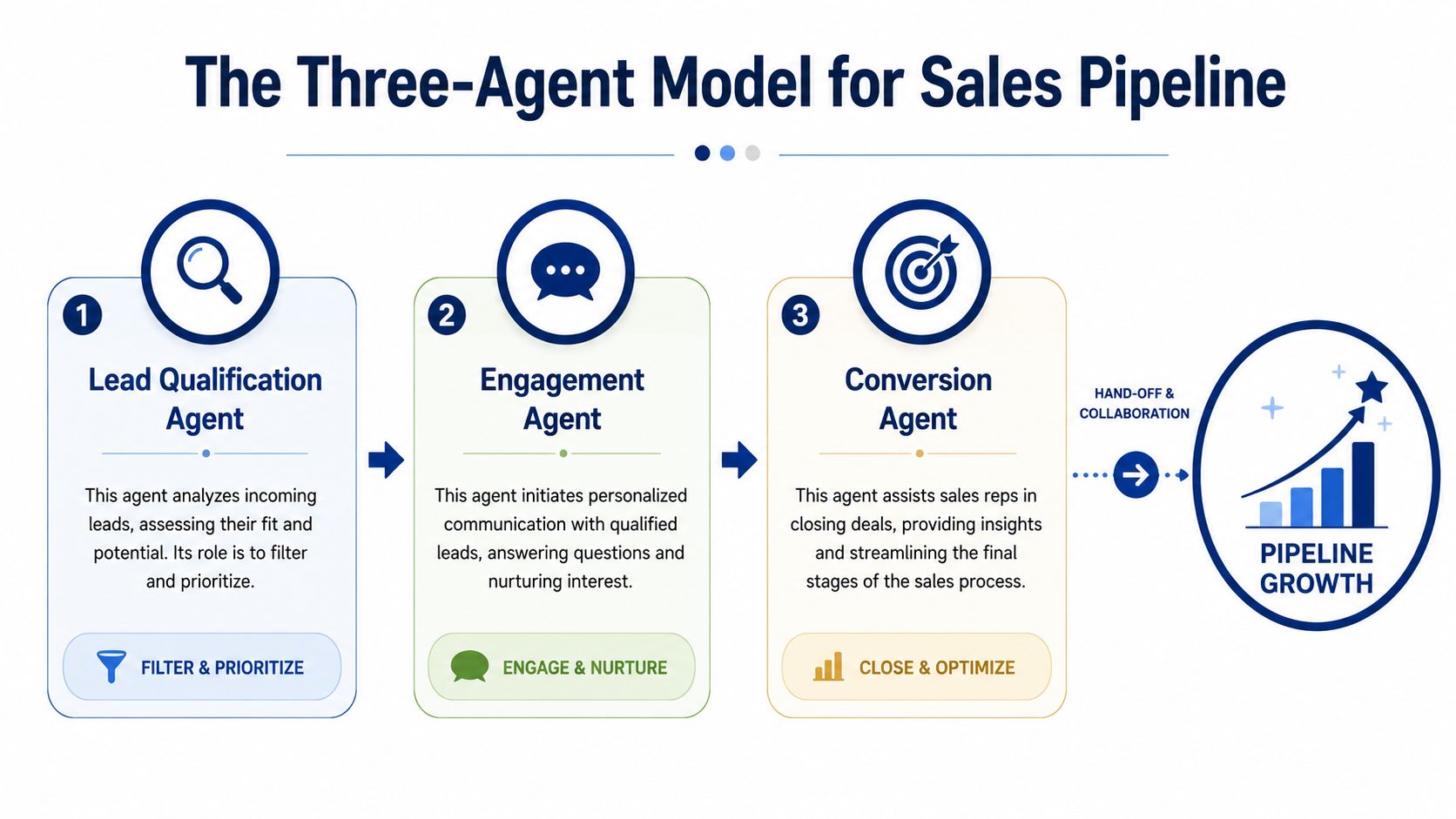
The best agent setups don't try to build one giant all-purpose brain. They split the work into specialized roles.
That matters because sales pipeline is built from three inputs. Context, timing, and action. If one is weak, outreach becomes generic or badly timed.
Signal agents watch for reasons to act
A signal agent monitors the market around your target accounts. Its job is simple. Find change that matters.
That can include executive moves, hiring shifts, new product announcements, expansion signals, public interviews, investor updates, earnings commentary, or changes in stated priorities. The key is not collecting more news. The key is detecting what's commercially relevant.
In practice, autonomous systems offer a distinct advantage over manual prospecting. Humans don't monitor accounts continuously. They check when they remember, when they have time, or when leadership asks for an update. Agents don't have that limitation.
Your pipeline doesn't stall because reps lack effort. It stalls because the right signal appears and nobody sees it in time.
Research agents turn scattered facts into a point of view
Once a signal appears, a research agent should answer the next question fast: why does this matter to us?
PwC found that nearly two-thirds of organizations adopting AI agents reported increased productivity, and 38% of respondents trusted AI agents most with data analysis tasks, according to PwC's AI agent survey. That lines up perfectly with the sales research problem. Reps lose too much time jumping across company sites, earnings transcripts, LinkedIn, hiring pages, and CRM notes just to form a basic account view.
A good research agent synthesizes, not just aggregates. It should produce a usable brief with current initiatives, likely priorities, relevant stakeholders, possible pain points, and suggested angles.
One practical example is the three-layer outbound stack framework, where signal detection, account intelligence, and outbound execution work as separate but connected layers.
Here's how that looks in a real architecture used by Salesmotion:
- Signal Agent monitors 1,000+ sources across target accounts and flags changes worth acting on.
- Research Agent builds account briefs from 42+ sources into finished deliverables reps can use.
- Outreach Agent drafts personalized emails tied to the trigger and the account context.
Those are product facts provided by the publisher, and they illustrate the right model well. Separate jobs. Continuous execution. Direct handoff from intelligence to action.
Outreach agents convert intelligence into movement
A signal without outreach is just interesting information. A brief without follow-through is expensive note-taking.
That's why the third role matters. The outreach agent takes the signal and the research and turns them into a usable message. Not a generic sequence. A message anchored to something real.
For example:
- Account change: A company starts hiring for a function tied to your product area.
- Research context: The brief shows recent expansion, a leadership shift, and a stated efficiency initiative.
- Agent output: A drafted email that references the hiring move, ties it to the likely initiative, and proposes a relevant conversation.
That's a much better starting point than “saw your company is growing.”
Why the three-agent loop works
This model works because each agent does one thing well, and the handoff is clear.
- Research provides context
- Signals provide timing
- Outreach provides action
If you collapse all three into one vague “AI assistant,” quality drops. If you keep them separate, pipeline work gets sharper.
The outcome is straightforward. Reps stop starting from a blank page. They start the day with specific accounts, a reason to reach out, and a draft grounded in something that happened.

“Salesmotion is instrumental in helping me prioritize net-new accounts, understand their strategic initiatives, and cover more ground. With a lot of green-field accounts, I'm heavily leaning on the AI insights to tier my accounts and focus my time. The platform is incredibly intuitive and easy to use.”
Rob Webster
Enterprise Account Executive, Synthesia
Tangible Business Benefits Beyond the Hype
The strongest case for AI agents in sales teams isn't that they save time. It's that they improve where your team spends attention.
A lot of sales tech promises efficiency. That's table stakes. What matters is whether the system helps your team create better conversations with better timing.
Faster pipeline creation
Manual prospecting usually fails in one of two ways. Reps either work from stale account lists, or they send outreach with no compelling reason behind it.
Agents fix both problems. They identify movement inside accounts and convert that movement into usable outreach. That means more conversations start with relevance instead of guesswork.
A simple scenario makes this clear. A rep logs in Monday morning and sees an alert that a target account is expanding a team tied to a known business problem your product addresses. The research brief already explains the likely initiative behind the hiring pattern. The outreach draft references that trigger and suggests a reason to talk now. The rep reviews, tweaks, and sends.
That workflow is better than asking the rep to discover the account, research the account, invent the angle, and write the email from scratch.
Less manual research tax
The hidden cost in outbound teams isn't just list building. It's the time spent stitching together context from too many places.
A research-heavy selling motion breaks down when prep depends on rep discipline. Top performers do the work. Everyone else shortcuts it. The result is inconsistent account planning and generic messaging.
If you want a plain-English view of where this fits, using AI in sales works best when it removes repetitive prep work and feeds sharper decisions, not when it adds another dashboard to check.
Good reps already know how to personalize. The bottleneck is time and timing, not intent.
Better prioritization
Pipeline quality improves when teams stop treating all accounts as equal.
The true utility of agents emerges. Instead of working down a static territory list, reps can focus on accounts showing fresh activity, strategic change, or a stronger reason to engage. That changes manager behavior too. Pipeline reviews become less about “who did the most activity” and more about “which accounts show the best conditions for action.”
Here's what that looks like on the ground:
-
Before agents
Reps build lists quarterly, revisit them sporadically, and often contact accounts with weak timing. -
After agents
Reps receive ranked accounts with current context, clearer urgency, and usable outreach angles. -
Manager impact
Leaders coach on account quality, trigger relevance, and follow-through instead of policing random activity volume.
That's a better sales motion. Not because AI made sellers smarter, but because it made focus less random.
Your Roadmap for Implementing AI Sales Agents
Most rollouts fail for a simple reason. Teams buy the software before they define the operating model.
You don't implement AI agents for sales teams by flipping a switch. You build them into your revenue engine in stages.
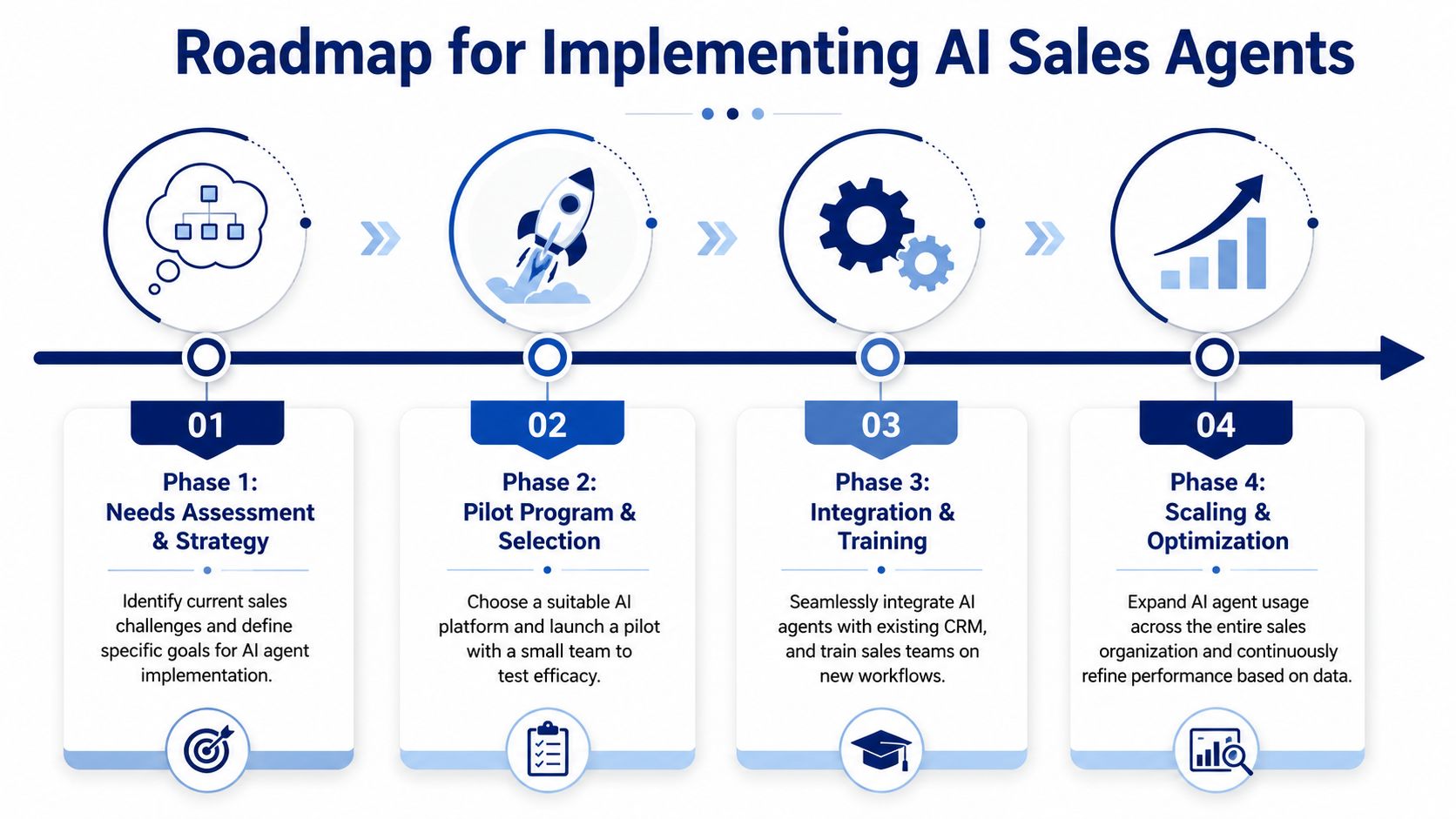
Phase one starts with account focus
Don't start with prompts. Start with targets.
Your first job is to define which accounts, segments, and roles the agents should support. If your CRM data is messy, fix the core fields that identify target accounts, ownership, stage, and strategic fit. Agents become noisy when the underlying account universe is vague.
A practical setup usually includes:
- Target account list tied to territory or segment ownership
- Core CRM fields that determine routing and relevance
- Basic signal categories that matter to your motion, such as hiring, leadership changes, expansion, or public initiative shifts
If you skip this step, the system will produce activity without precision.
Design the workflows before launch
The next question is simple. Where should the agent output land, and who acts on it?
Teams often become careless. They buy a platform with strong detection capability, then force reps to log into a separate interface to find insights. Adoption dies quickly.
Instead, define the path from signal to action:
- Alert destination such as Slack, email, or CRM task flow
- Owner assignment based on account or territory
- Action standard for what reps should do when a signal appears
- Manager visibility so leaders can inspect usage and quality
If an alert doesn't land where the rep already works, it usually doesn't get acted on.
Integrate with the tools your team already uses
Your agents should plug into existing systems, not compete with them.
That usually means your CRM first, then sales engagement, then team communication tools. The right setup lets a rep move from alert to context to draft without opening five tabs. That's the difference between infrastructure and novelty.
Typically, integration priorities look like this:
| Integration priority | Why it matters |
|---|---|
| CRM | Anchors account ownership, pipeline context, and record updates |
| Slack or email | Delivers timely alerts where reps already pay attention |
| Sales engagement platform | Lets outreach drafts move into actual sequences and sends |
| Calendar and meeting tools | Helps connect signals to meeting prep and follow-up workflows |
Train reps on judgment, not just usage
This is the human part that leaders often neglect.
Your team doesn't need long AI training sessions. They need clear rules for interpreting signals, deciding which ones matter, and acting quickly without over-automating the relationship. The rep should still own judgment. The agent should own prep, detection, and draft generation.
Run a pilot with one team, inspect the first weeks closely, and coach on questions like:
- Was this signal commercially useful?
- Did the outreach angle match the trigger?
- Did the rep act quickly enough?
- Did the agent output reduce prep time or just relocate it?
That's how you make adoption stick. Not with hype. With repeatable routines.

“The Business Development team gets 80 to 90 percent of what they need in 15 minutes. That is a complete shift in how our reps work.”
Andrew Giordano
VP of Global Commercial Operations, Analytic Partners
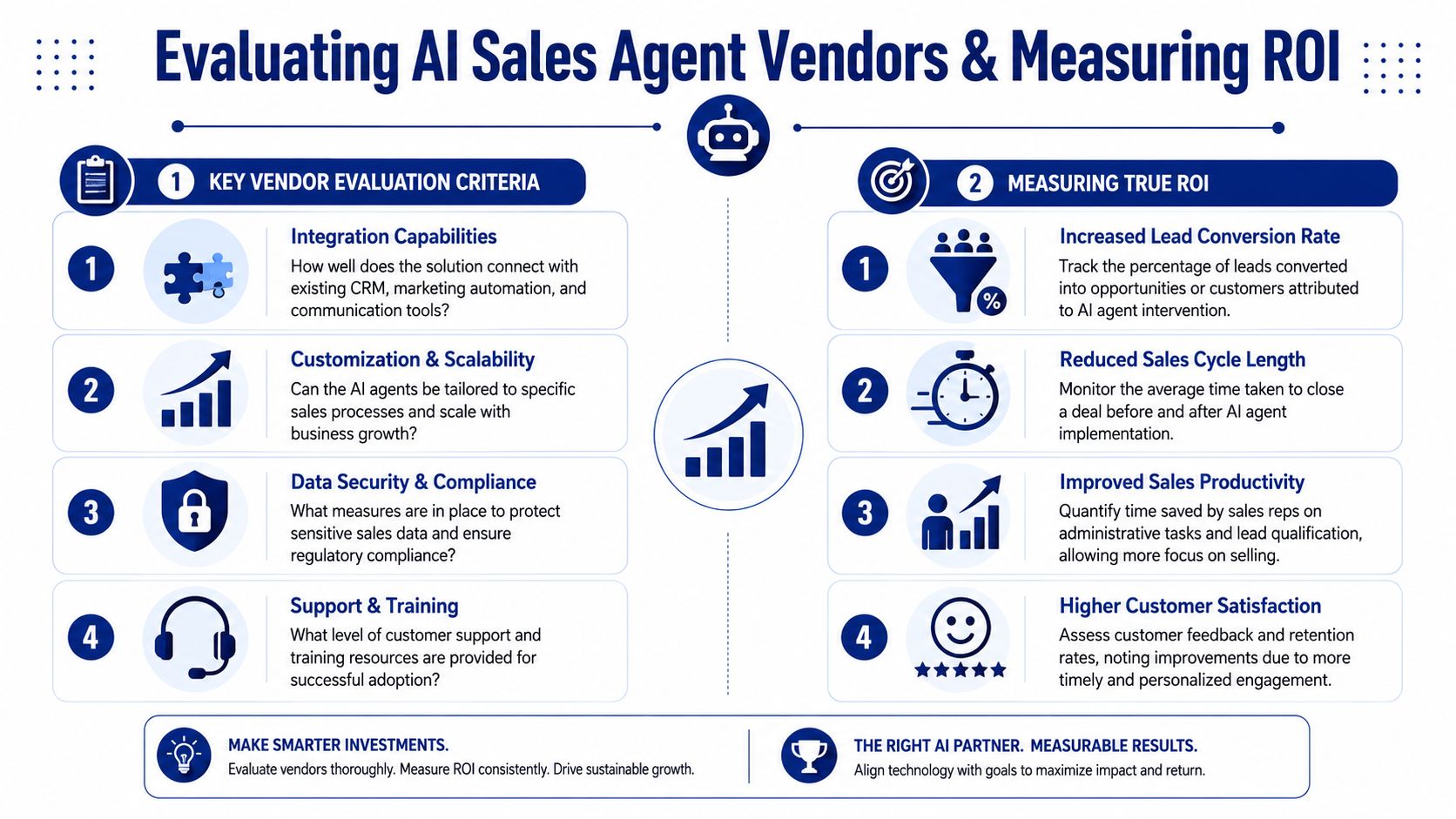
Evaluating Vendors and Measuring True ROI
Most buyers ask the wrong first question. They ask what features a vendor has.
You should ask what job the system does reliably, how well it integrates, and whether the output is explainable enough for reps to trust.
What to look for in a vendor
SAP's framing is useful here. High-value use cases for AI sales agents include lead scoring, deal-risk detection, and follow-up orchestration, and SAP notes that analytical agents extract insights from CRM data and market trends while conversational agents handle scheduling and personalized outreach, as described in SAP's guide to the benefits of AI sales agents.
That means your evaluation criteria should go beyond whether the tool can “generate content.” Use a tougher checklist.
-
Data coverage Ask what sources the system uses and how it turns raw inputs into useful context. More data isn't automatically better. You want relevant coverage and strong filtering.
-
Signal quality
Inspect sample alerts. Do they explain why the event matters, or just dump news into your lap? -
Integration depth
A separate dashboard is a red flag. The system should fit into CRM, communication channels, and outbound workflows. -
Explainability
Reps need to see why an account was prioritized and why a message angle was recommended. -
Operational fit
Some tools are stronger at conversation support, some at CRM automation, some at external signal monitoring. Match the product to the job.
A practical buying framework is covered well in this guide to evaluating AI sales tools.
What ROI should actually mean
Vanity metrics will fool you fast. Number of alerts. Number of drafts. Number of summaries. None of those prove business impact on their own.
Track ROI in two layers.
First, look at leading indicators:
- Signal-to-meeting conversion
- Rep follow-through on qualified alerts
- Quality of meetings sourced from agent-driven outreach
- Share of outreach tied to real account events
Then look at lagging indicators:
- Pipeline sourced from agent-identified opportunities
- Opportunity progression from signal-led engagement
- Win quality on accounts with stronger context and timing
- Manager confidence in account prioritization
Don't measure whether agents are busy. Measure whether your team is pursuing better opportunities because of them.
That's the standard. If the tool creates more activity but doesn't improve prioritization or conversation quality, it's not driving revenue. It's just automating motion.
Common Pitfalls and How to Avoid Them
Most failures with AI agents for sales teams come from bad operating decisions, not weak models.
The technology is good enough to create value. The bigger risk is that leaders deploy it carelessly and expect outcomes to take care of themselves.
Signal overload
If the system floods reps with alerts, it becomes background noise.
This usually happens when teams monitor too many event types, skip prioritization rules, or fail to define what should trigger action. Reps stop trusting the output. Then they ignore everything.
The fix is discipline. Limit the monitored signals to the ones that connect directly to your sales motion. Route them to clear owners. Require context with every alert so the rep knows why it matters.
The productivity mirage
Many teams celebrate time savings and stop there. That's a mistake.
As noted in MindStudio's discussion of AI agents for sales teams, McKinsey estimates generative AI could create substantial value in sales, but only when it's embedded in workflows that change decision-making and prioritization, not just task automation. That's the key warning. Efficiency alone doesn't build pipeline.
If all you automate is research or drafting, but reps still chase weak accounts, the underlying sales problem remains. Measure whether the agent changes who your team contacts, when they contact them, and why.
The siloed tool problem
If agents become one more tab to check, adoption drops fast.
The solution is straightforward. Push outputs into the systems reps already live in. CRM, Slack, email, and the sales engagement layer should carry the workflow. The agent platform can do the heavy lifting in the background.
A few rules keep this clean:
- Keep reps in familiar tools so acting feels normal, not additive
- Tie every alert to a recommended next step so the rep doesn't have to interpret raw data alone
- Review output quality weekly early in rollout, then tighten the signal set based on what effectively led to conversations
The teams that win with agents don't treat them like novelty software. They treat them like a new operating layer for pipeline generation.
If your team is buried in manual account research, weak “why now” outreach, and inconsistent prioritization, it's worth looking at Salesmotion. It uses three AI agents for sales teams. A Signal Agent to monitor account changes, a Research Agent to build account briefs, and an Outreach Agent to draft personalized messages tied to those triggers. The point isn't to replace your reps. It's to give them sharper timing, better context, and more chances to start the right conversation.