Sales reps spend surprisingly little of their week in live selling. Current benchmarks put active selling at 40% to 43% of working time, while prospecting research alone takes 9% of time overall and 11% for B2B field reps, or about 3.6 to 4+ hours in a 40-hour week, and broader research and content-prep work can reach 30 hours per month, or roughly 7.5 hours per week.
TL;DR: Sales reps spend about 9% of their time on prospecting research (11% for B2B field reps), and Seismic reports reps spend an average of 30 hours per month searching for and creating their own content. Those are the latest benchmarks to plan 2027 capacity against. The fix is to move account monitoring and brief building out of the rep's day so sellers review assembled context instead of collecting it by hand.
That's the answer to how much time do sales reps spend researching. But the more useful answer for a CRO is this: research isn't just a time-management problem. It's a pipeline capacity problem hiding inside normal sales operations.
Sales organizations acknowledge that reps already lose time to CRM updates, internal meetings, and admin. What gets missed is that research sits in a strange middle ground. It feels productive because it's tied to better personalization and stronger calls. It also absorbs hours without immediate notice before a rep has created a single opportunity, advanced a deal, or spoken to a buyer.
That matters because sales capacity is finite. If a rep's week gets consumed by collecting account context from scattered sources, the business pays twice. First in lost conversations now. Then in slower pipeline creation later.
The Seller Productivity Crisis You Don't See
Sales teams do not lose pipeline only in obvious places like low connect rates or weak conversion. They also lose it in preparation work that looks disciplined at the individual rep level and expensive at the portfolio level.
Benchmarks cited earlier already show that active selling occupies less of the week than most leaders assume. The harder problem is what sits inside the remaining hours. Research rarely gets flagged as waste in QBRs because it sounds like good judgment: check the account, confirm the trigger, find the right buyer, tailor the message. Each step is reasonable. Repeated across every named account, it becomes a hidden operating cost.
That hidden cost is the research tax.
Why research gets underestimated
Admin is visible. Research is not.
A manager can see meeting load, CRM lag, and forecast process friction. Manual account research hides inside behaviors teams actively encourage. Reps open LinkedIn, company sites, funding databases, job boards, news alerts, and intent tools to assemble context before outreach. The work feels productive because it can improve message quality. It still consumes capacity before a single live buyer interaction occurs.
The mistake is evaluating prep one account at a time.
At account level, 10 or 15 minutes can look harmless. Across a full territory, that same workflow strips hours out of the week and reduces the number of accounts a rep can touch with consistency. For a CRO, that is not a coaching issue. It is pipeline drag caused by process design.
Practical rule: If your reps need to open multiple tabs and manually stitch together account context before every outreach, you don't have a rep-effort problem. You have a workflow design problem.
Forrester reported that only 23% of a rep's time goes to the most productive selling activities, meaning direct buyer conversations and engagement (Forrester on sales productivity). That finding reframes the problem. Sales has treated research as necessary overhead for years. In reality, manual prep is one of the clearest reasons productive selling time stays constrained even after headcount, tooling, and enablement spend increase.
The non-obvious conclusion is operational. Better discipline does not solve a workload that is structurally repetitive. Better templates do not solve scattered data. The only scalable path is to remove manual research from the rep workflow with autonomous systems that collect, synthesize, and deliver account context before the rep starts work.
For a closer look at the day-to-day mechanics, this breakdown of how sales reps waste time on research shows how the research tax shows up in live sales motions.
See Salesmotion in action
Take a self-guided interactive tour — no signup required.
Where an Entire Workday Goes Each Week
A rep does not lose selling time in one obvious block. It disappears in small operational slices across the week, and research is one of the most expensive because it happens before any buyer interaction begins.
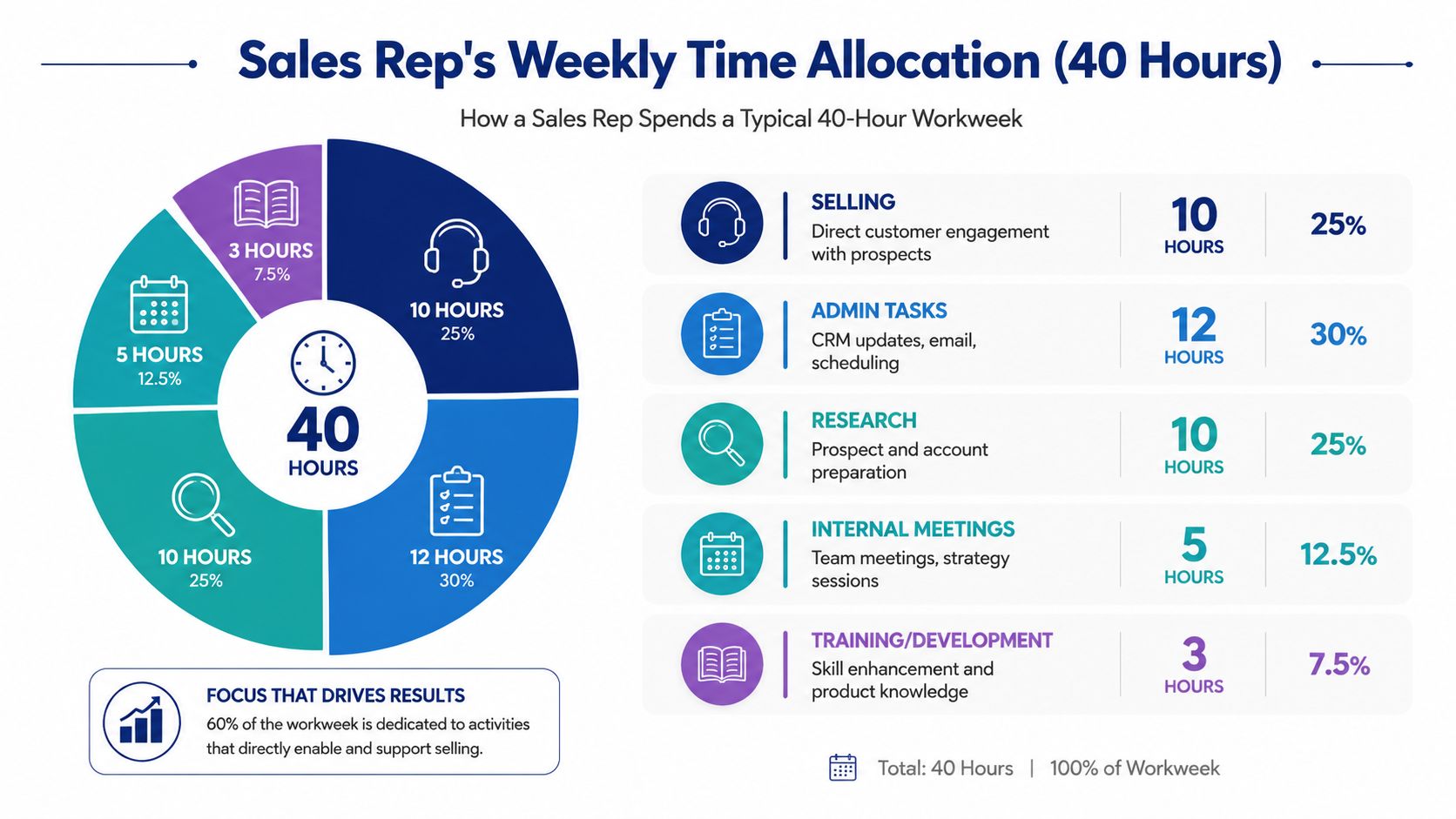
Across sales teams, a common benchmark is that only about 30% of a rep's time goes to selling, while the rest is absorbed by non-selling work such as administration, internal coordination, and prep (Everstage sales productivity statistics). For CROs, that split matters less as a productivity anecdote and more as a capacity model. If the workflow around each account keeps expanding, pipeline coverage falls even if headcount stays flat.
The useful split for operators
For RevOps, a weekly time model is only useful if it separates direct revenue work from support work clearly enough to diagnose drag.
| Activity bucket | What it includes | Revenue relationship |
|---|---|---|
| Active selling | Calls, demos, deal conversations, live prospect engagement | Direct |
| Research and prep | Prospecting research, account planning, call prep, content searching | Indirect |
| Admin | CRM updates, note entry, task logging, scheduling | Minimal |
| Internal coordination | Forecast calls, team syncs, approvals, handoffs | Minimal |
| Training and enablement | Coaching, onboarding, content review | Long-term |
That distinction changes how you manage the problem. Admin can often be compressed. Training can be scheduled. Research behaves differently because it expands to fill the highest-quality parts of the day, especially the hours reps would otherwise use for outbound and follow-up.
A practical way to audit that drag is to compare your team's actual prep motion against a standard pre-call research checklist for B2B sales reps. If the rep has to gather each input manually from separate systems, the workflow is already too expensive to scale.
Research is a front-loaded tax on capacity
Earlier in the article, the SPOTIO benchmark quantified research time directly. The important operational point is not the exact percentage by itself. It is that research happens upstream of pipeline creation.
That makes it different from other non-selling work. A forecast meeting delays selling after activity has already occurred. Manual account research delays whether activity happens at all. The result is a front-loaded tax on every account touched.
A business development rep at an HR software firm told us: "I'll put it off for a day or two because it's like, I don't have two hours to go through and research this account." That is one rep describing one account, and it shows the mechanism: the outreach waits for the research.
This is why teams can look active on paper and still miss coverage targets. Reps are working. Managers see motion. But a meaningful share of weekly capacity is consumed before the first call, email, or LinkedIn message is ever sent.
For CROs, the implication is straightforward. If research remains a manual rep task, the business keeps paying that tax account by account, week after week.

“There's been a big focus on hyper personalization and relevance in our outbounding efforts. Salesmotion has been a key partner in hitting our significantly increased meeting targets. What stands out is how simple it is. Reps can log in and get valuable account insights within 30 seconds to a minute.”
Joe DeFrance
VP of Sales, Incredible Health
The 70 Minute Pre-Call Scramble Per Account
Most leaders don't need another abstract warning about lost productivity. They need a realistic view of what the rep is doing when “research” shows up on the calendar.
A manual prep flow for one account often looks like this:
- LinkedIn review: checking the company page, recent executive moves, and likely stakeholders
- News scan: looking for funding, launches, acquisitions, or market shifts
- Corporate source review: reading a press release, blog post, or investor page for initiatives
- Competitive framing: figuring out what angle might resonate and what competitors may already be in the account
- Meeting brief creation: turning scattered notes into something the rep can use in outreach or on a call
None of these tasks are unreasonable. The friction comes from doing them manually, in sequence, across many accounts.

What the scramble feels like in practice
A rep starts with LinkedIn because they need org context. Then they jump to Google to verify whether the company has done anything recently that creates urgency. Then they open the company website, maybe the careers page, maybe the newsroom. If the account is public, they may skim investor material or an earnings transcript for clues about priorities.
By the end, they have fragments, not insight.
We hear this in our own conversations with sales teams, across more than 370 sales and customer calls in the twelve months to October 2026. A new-business sales executive at an IT services firm told us: "then have to end up clicking through all these links. ... And nothing's telling me what I'm actually looking at." The sources are there. The meaning is not.
Now they still need to answer key selling questions:
- Why this account?
- Why now?
- Which stakeholder matters first?
- What message should I use?
- What proof point fits?
That synthesis step is where time disappears. Gathering facts is only half the job. Turning them into a point of view is the slower half.
The real drag is context switching
Manual research punishes reps in two ways. It uses time, and it breaks focus.
Every tab switch forces a rep to rebuild context. Every source uses different language. Internal notes may conflict with external signals. CRM history may be thin or outdated. What should be a short prep task becomes an exercise in assembling a narrative from incomplete pieces.
A solid pre-call research checklist for B2B teams helps standardize this work, which is better than leaving reps to improvise. But even a strong checklist doesn't solve the underlying issue if the rep still has to gather everything by hand.
Good reps don't waste time researching because they're careless. They waste time because the org asks them to create intelligence manually from fragmented systems.
That's the difference many sales leaders miss. The rep isn't doing extra work. The rep is doing work the system failed to do for them.
Calculating the Hidden Research Tax on Your Pipeline
The fastest way to make research visible is to stop talking about it as a soft productivity issue and start treating it like capacity consumption.
Seismic reports that sales reps spend an average of 30 hours per month searching for and creating their own content, which works out to roughly 7.5 hours per week (Seismic sales performance data). That figure matters because it captures work adjacent to research, not just prospect list building. It includes the time reps spend looking for assets, assembling context, and creating their own prep material when the system doesn't provide it.
Why this becomes a pipeline problem
A rep who spends that amount of time on research and content prep isn't just losing hours. They're losing attempt volume, speed, and consistency.
Here's the practical impact:
- Fewer first touches: more time researching means fewer accounts reached this week
- Slower follow-up: reps delay outreach while they “finish the homework”
- Uneven quality: strong reps build useful briefs, weaker reps collect noise
- Bad prioritization: too much effort goes into accounts that don't justify deep prep
That last point is where many teams overpay operationally. They apply the same manual research standard to every account, whether the account deserves deep strategic planning or only lightweight qualification.
A simple way to audit the tax
You don't need a complex study to find this in your org. Start with three questions:
| Audit question | What to look for | What it usually reveals |
|---|---|---|
| How many sources does a rep check before outreach? | LinkedIn, news, CRM, company site, investor pages, notes | Fragmented prep workflow |
| How long does first-touch prep take by account tier? | Compare enterprise targets vs broad outbound lists | No tier-based research standard |
| How often do reps recreate the same account context? | Re-researching old accounts before each touch | Missing persistent account intelligence |
A more detailed look at manual account research time across sales teams can help frame this audit in operational terms.
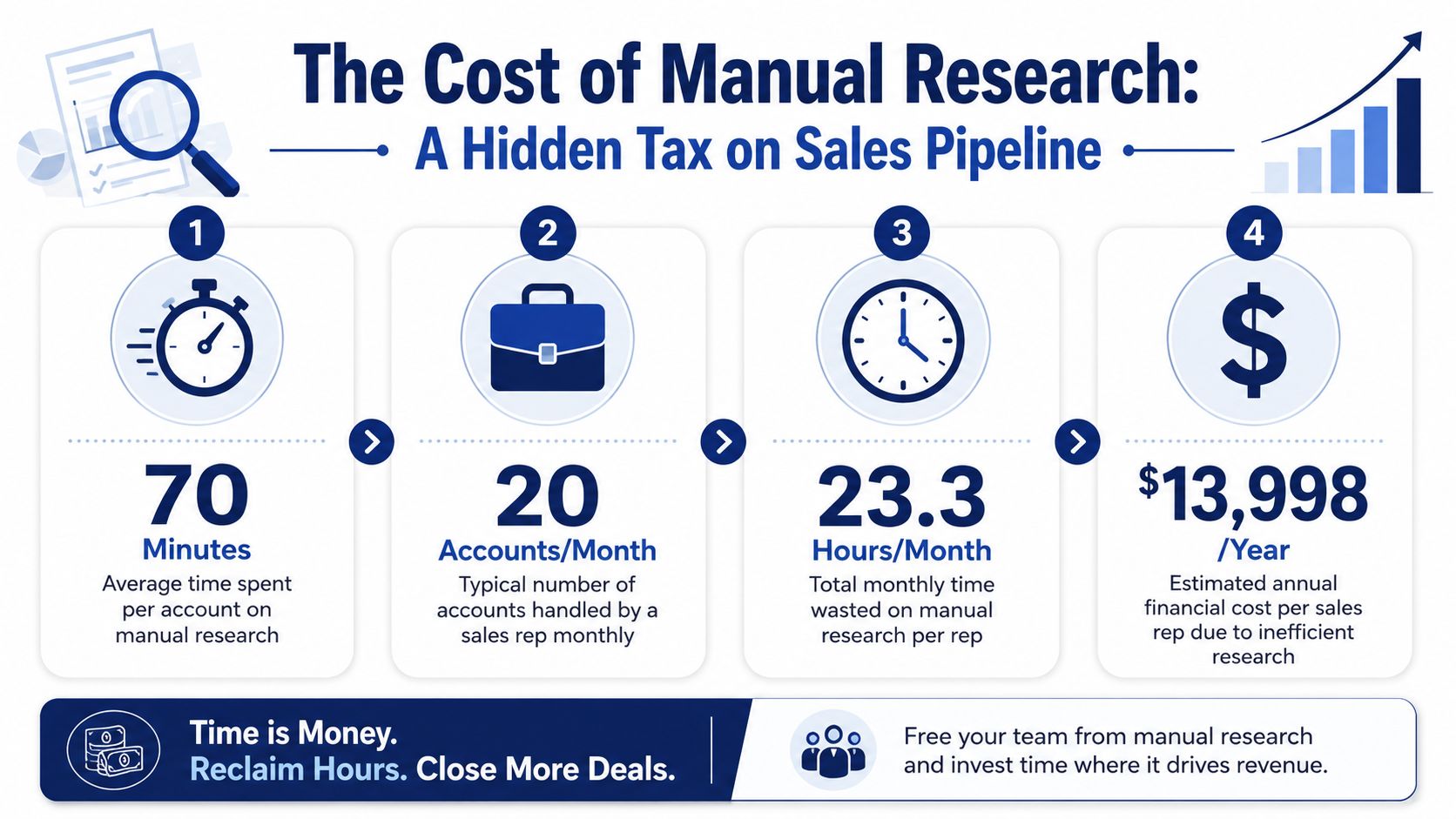
The biggest mistake CROs make here is assuming all research time is equally valuable. It isn't. Some accounts deserve deeper work because the deal is complex, multi-threaded, or strategically important. Other accounts don't. If your process doesn't distinguish between the two, your team burns expensive selling hours on low-return preparation.

“This is my singular place that very simply summarizes a company's top initiatives, strategies and connects them to my solution. Something I would spend hours researching manually, now it's automated.”
Derek Rosen
Director, Strategic Accounts, Guild Education
From Manual Prep to Autonomous Intelligence
The practical question isn't whether research should disappear entirely. It shouldn't. The question is who should do it, when, and for which accounts.
That's where the market is shifting. The best framing I've seen is that leaders should stop asking how to reduce total research time and start asking how to route the right amount of research to the right account. Not every deal deserves deep manual prep, and AI workflows can help decide which complex deals justify it versus which outbound motions should be automated (analysis on routing research by account and stage).
What a better operating model looks like
A stronger model has three layers.
-
Automate account monitoring
Let systems track hiring, leadership changes, company announcements, investor updates, and other public signals continuously instead of asking reps to check them manually. -
Create structured account briefs
Turn scattered data into a usable point of view. A good brief should explain what changed, why it matters, which stakeholders are likely involved, and what message angle fits. -
Match effort to deal value
High-value or complex deals may still warrant human judgment and deeper planning. Broad outbound shouldn't require handcrafted research every time.
This changes the rep's role. The rep stops being an information gatherer and becomes an editor and decision-maker.
Where technology actually helps
This is not about adding another dashboard and hoping behavior improves. Many organizations are already equipped with sufficient tools.
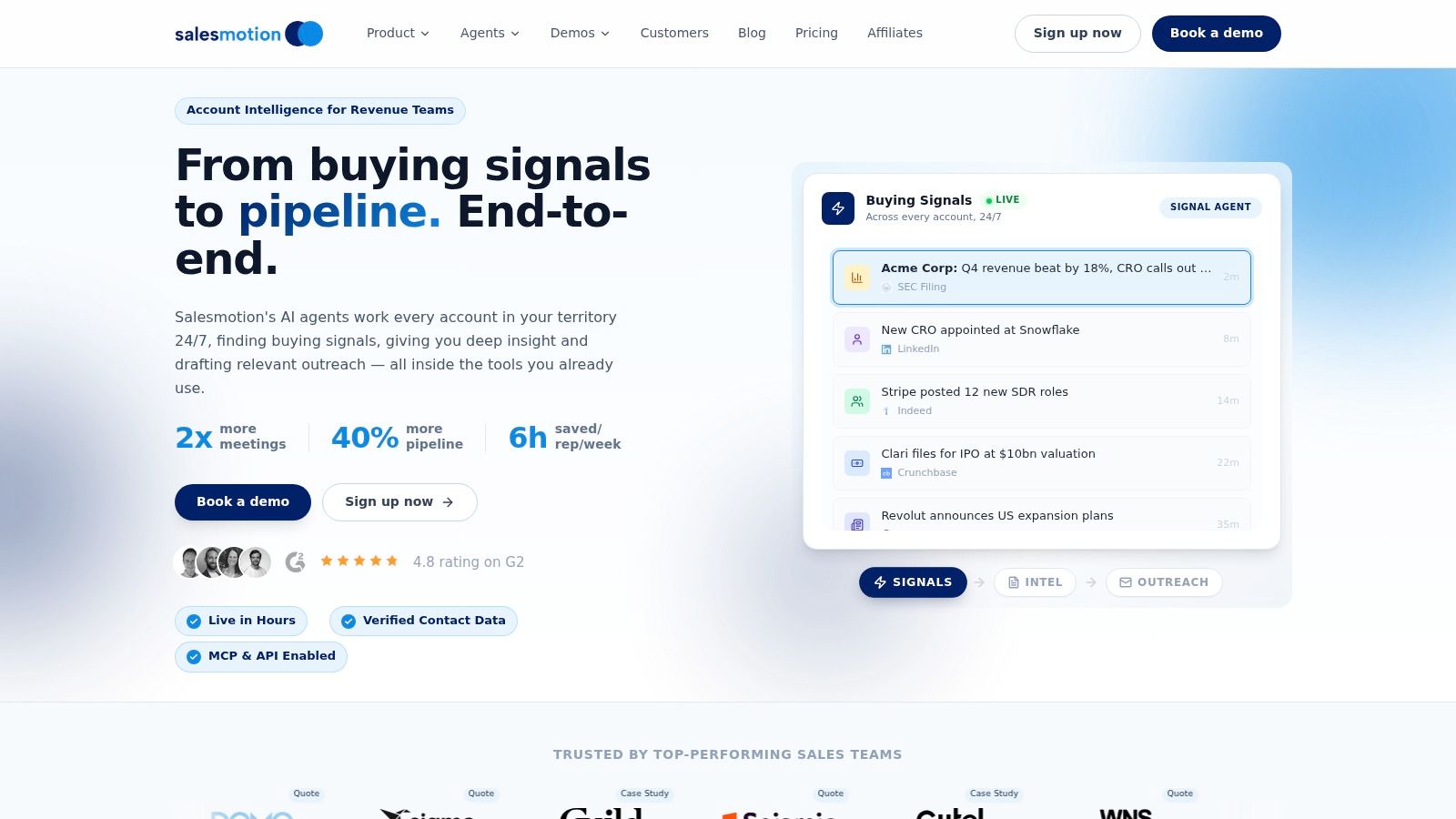
The right technology collapses work across systems and gives reps an opinionated output they can review quickly. That can come from internal workflows, custom AI processes, or platforms built for account intelligence. For example, how to use AI for account research shows one path teams are taking to move from tab-hopping to structured prep. In that category, Salesmotion is one example of a platform that uses AI agents to monitor accounts, build structured briefs from public sources, and turn signals into rep-ready context.
Operating principle: Don't ask reps to search for relevance. Give them relevance already assembled, with the source trail attached.
That's a different philosophy from “make research faster.” Faster research still assumes the rep owns the collection work. Autonomous intelligence shifts that work upstream.
Reclaim Your Team's Most Valuable Asset Selling Time
If you want a clean answer to how much time sales reps spend researching, measure the lag between account assignment and the first relevant customer touch. That interval exposes a hidden tax on pipeline capacity.
For a CRO, that is the point. Research time is not just an efficiency issue. It is a capacity planning issue, a coverage issue, and in many teams, a preventable source of pipeline drag. Every hour a seller spends assembling context by hand is an hour that cannot be used for outreach, discovery, follow-up, or deal advancement.
Start with evidence, not opinion. Pull a sample of rep calendars, CRM activity, and pre-call workflow behavior. Measure how long it takes to move from assigned account to first meaningful outreach, then separate work that improved message quality from work that was only manual information assembly.
That distinction matters.
If the time is strategic, keep it. If the time is repetitive collection, remove it upstream. Teams do not gain much by managing that work more tightly. They gain far more by eliminating it from the rep workflow altogether.
This is the operating decision many revenue leaders miss. Once research tax is visible at the account level, the goal is no longer to make prep slightly faster. The goal is to stop paying that tax on every account, every week, across the entire book of business. Process can reduce variation. Autonomous agents remove the collection burden at scale and give reps reviewed, source-backed context before the work starts.
Teams rarely have a motivation problem. They usually have a systems problem that shows up as a time problem.
The practical next step is simple. Quantify the hours lost, convert them into missed account coverage and delayed pipeline creation, then decide whether you want reps to remain part-time researchers. If the answer is no, redesign the workflow so intelligence is generated before the rep touches the account.
If your reps are still stitching together account context by hand, it's worth evaluating whether an account intelligence platform can remove that workload upstream. Salesmotion uses AI agents to track target accounts, build structured briefs from public signals, and deliver actionable context into rep workflows so teams can spend more time selling and less time researching.