
What is Salesmotion?
Salesmotion provides account intelligence AI agents that monitor 1,000+ data sources to deliver real-time insights about your target accounts. Three agents — Signal Agent, Research Agent, and Outreach Agent — help sales teams spend less time researching and more time selling, replacing hours of manual research with AI-generated briefings, signal alerts, and personalised outreach suggestions.
Before you start: configure Setup
This step is easy to skip but makes a big difference. If you configure your keywords, job titles, and value proposition before adding accounts, the first intelligence scan will be tuned to your priorities from day one.
Go to Settings → Setup and configure:
- Keywords — The topics and terms that matter to your business (e.g. "digital transformation", "cost reduction", competitor names).
- Job titles — The roles you sell to (e.g. "VP of Sales", "CRO", "Head of Procurement").
- Exclusions — Terms to filter out noise (e.g.
-intern,-internshipto skip internship job postings). - Value proposition — A description of what your product does and who it's for. This powers personalised messaging and the Value Pyramid.
See the full guide: Configuring Keywords, Titles & Setup.
Step 1: Log in to your account
Navigate to app.salesmotion.io and sign in with the email and password provided by your admin. If this is your first login, change your password immediately after signing in.
You'll land on the Accounts dashboard — this is your home base, showing all tracked accounts with their Salesmotion Scores.
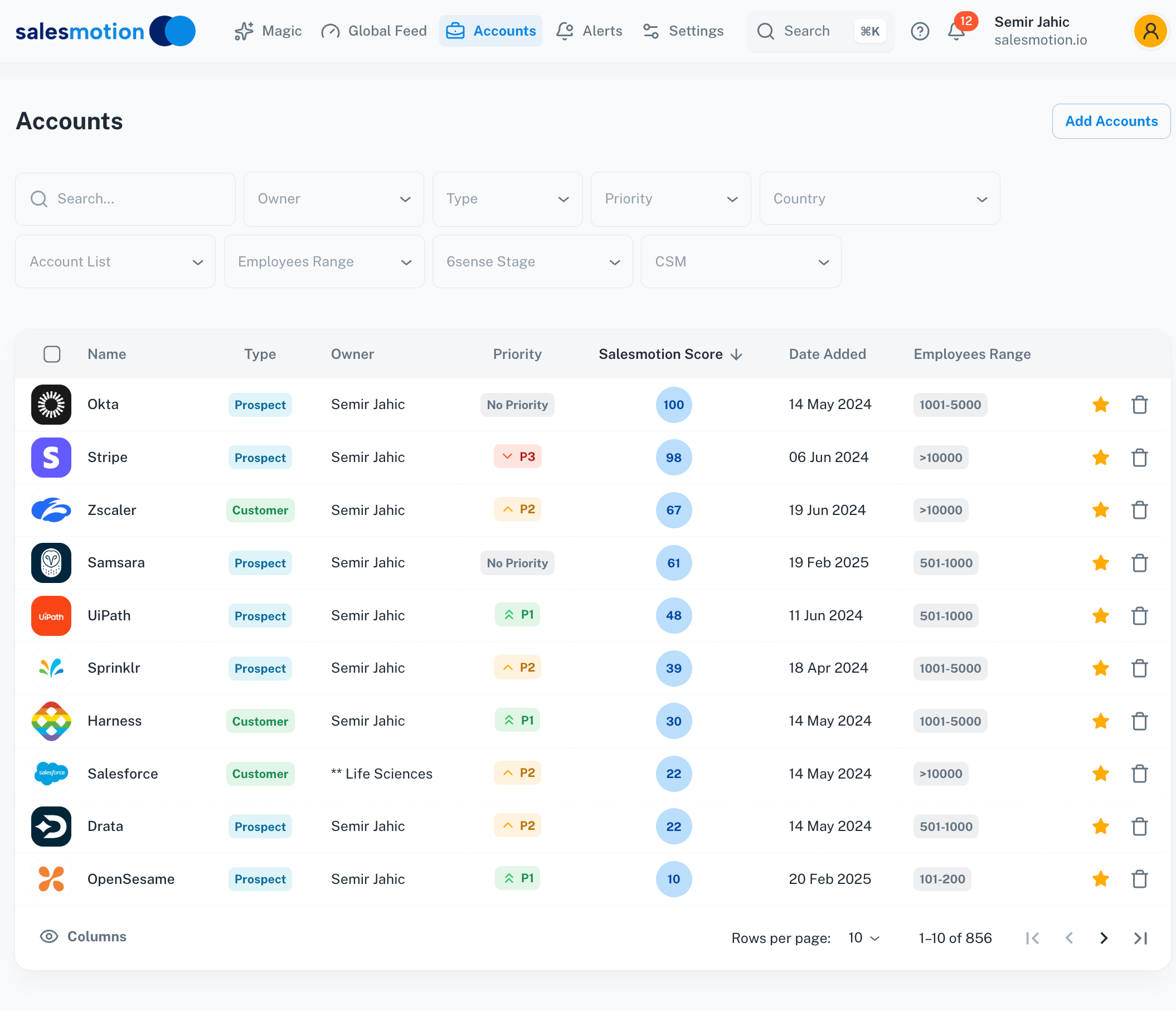 The Accounts dashboard — your tracked accounts sorted by Salesmotion Score. Higher scores indicate stronger recent signal activity.
Step 2: Add accounts to track
Click the Add Account button at the top of the Accounts page. You can add accounts in two ways:
- Search by name — Type a company name and click Add when you find the right match.
- Paste website URLs — Paste one or more company website URLs (one per line, copied from a spreadsheet). Each line turns green when recognised.
After adding accounts, Salesmotion begins scanning public sources for intelligence. Most accounts are fully processed within an hour. Large batches (100+) may take a few hours.
For detailed instructions including bulk imports and troubleshooting, see Managing Accounts.
Step 3: Explore account intelligence
Click on any account to see its detail page. This is where Salesmotion's intelligence comes together.
Fast Facts tab
Your quick-reference overview: company name, website, industry, employee count, revenue, Quick Links (to the CRM, LinkedIn, Crunchbase), and recent signal highlights across 30/90/180 day windows.
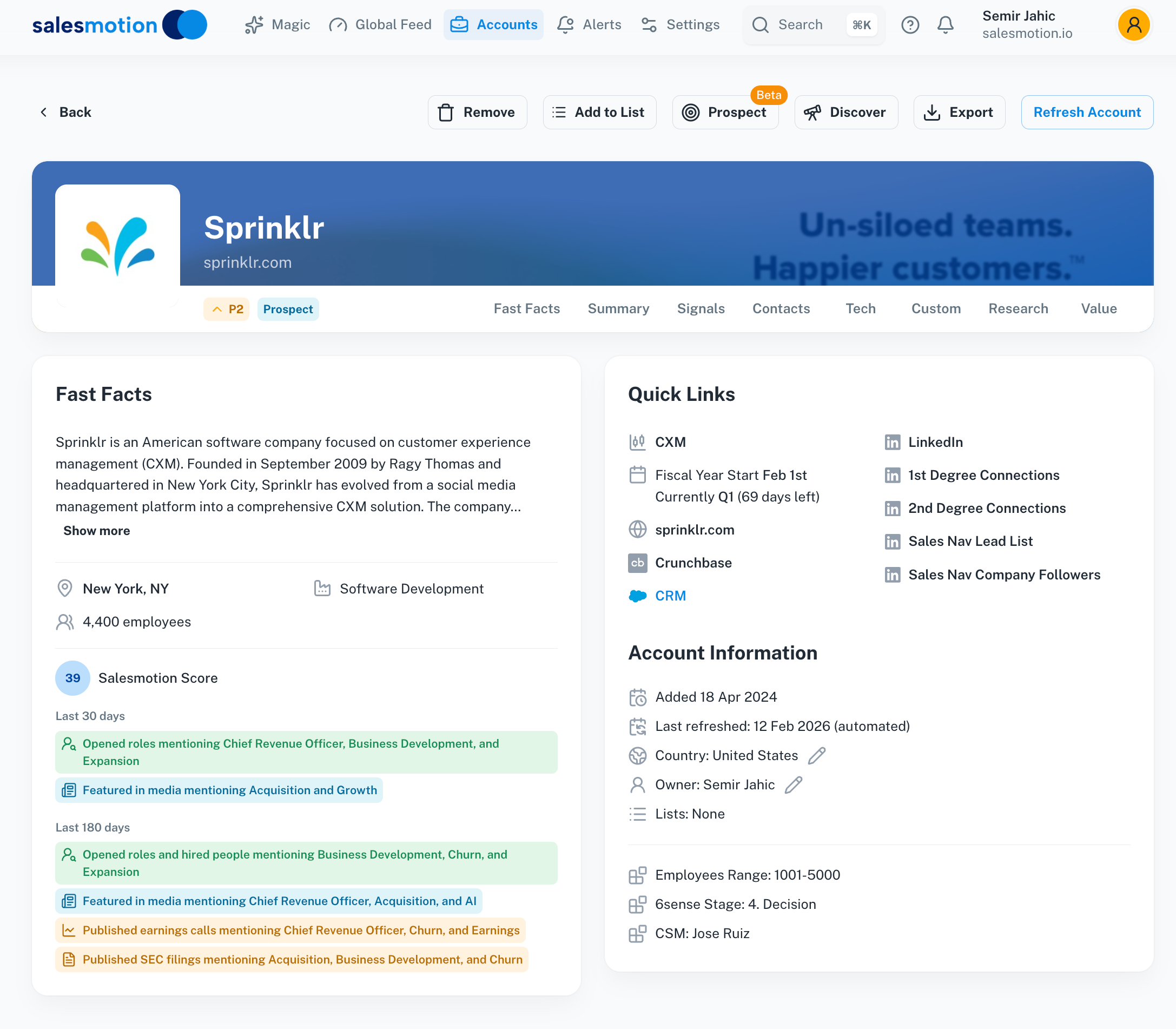 The Fast Facts tab gives you a snapshot of the company and links to key external resources.
Summary tab
The most valuable tab for meeting prep. The Summary provides an AI-generated briefing with Key Insights, Executive Perspective, People Updates, Opportunities, Challenges, Top News, and Talking Points — everything you need to know in one view.
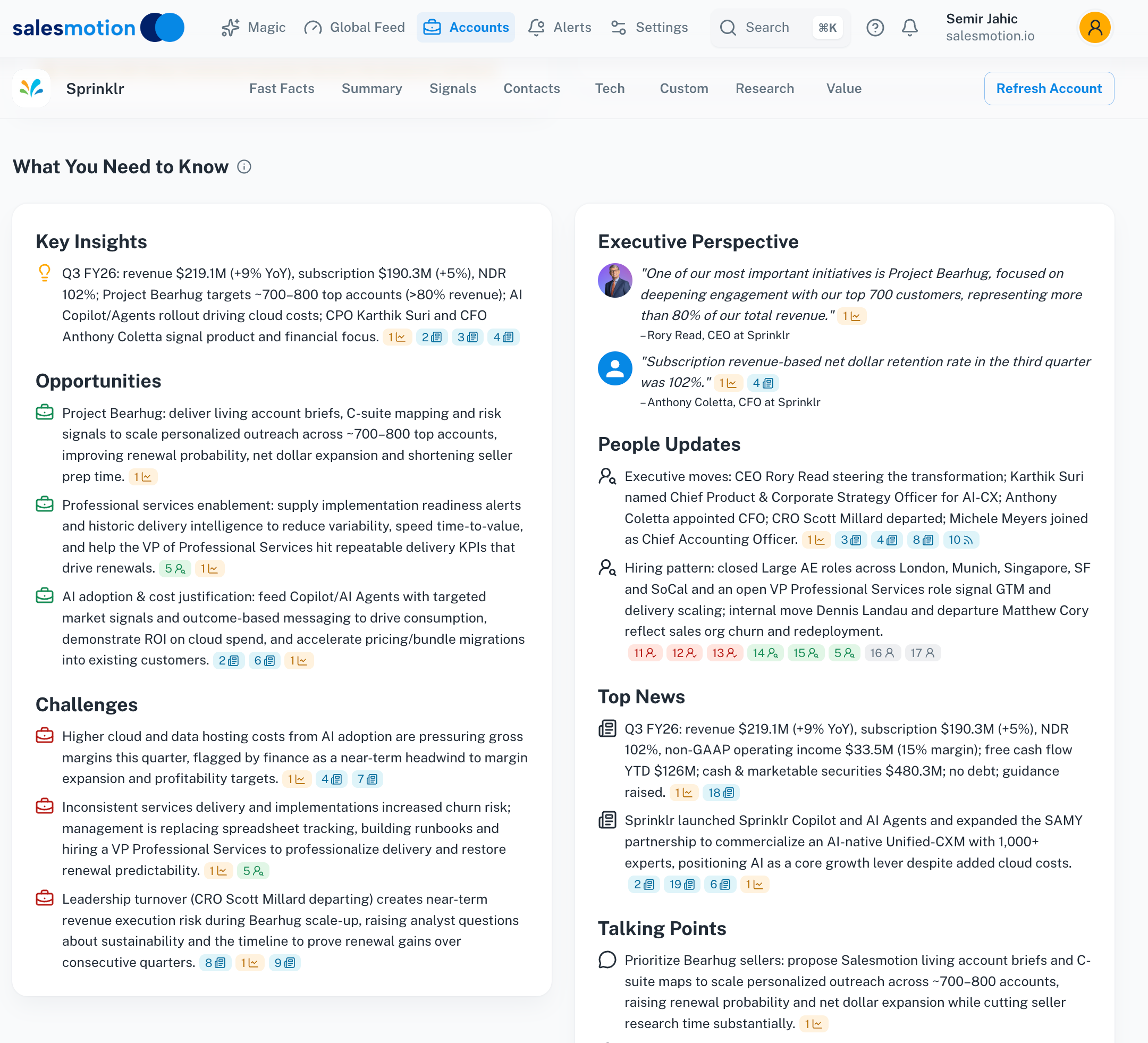 The Summary tab — your AI-generated briefing covering everything from strategic direction to conversation starters.
Signals tab
Real-time events detected across the account: news, earnings, hiring, podcasts, filings, M&A, funding, and more. Click any signal to open the full detail drawer with the source content and AI summary.
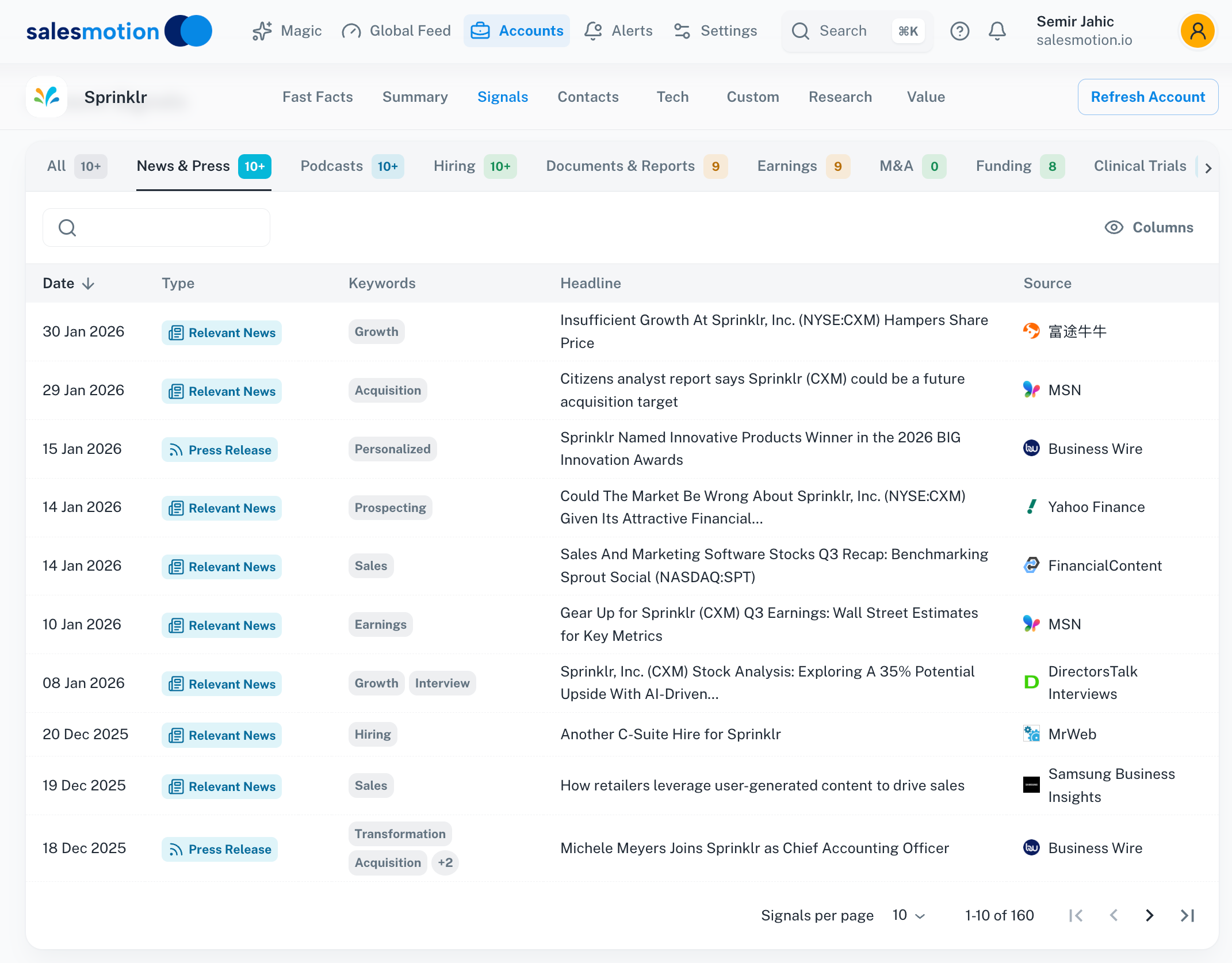 The Signals tab shows every detected event — click any signal to see the full detail and original source.
Other tabs
- Contacts — Key people at the account with titles, email addresses, personality insights, and talking points. See Working with Contacts.
- Tech — The company's technology stack, showing which tools they use.
- Custom — Discovery questions organised by persona and category.
- Research — AI-generated SWOT analysis with source citations.
- Value — The AI-generated Value Pyramid mapping your solution to the account's goals.
Step 4: Check the Global Feed
The Global Feed shows signals across all your tracked accounts in one timeline. It's your daily briefing — scan it each morning to see what's new across your territory.
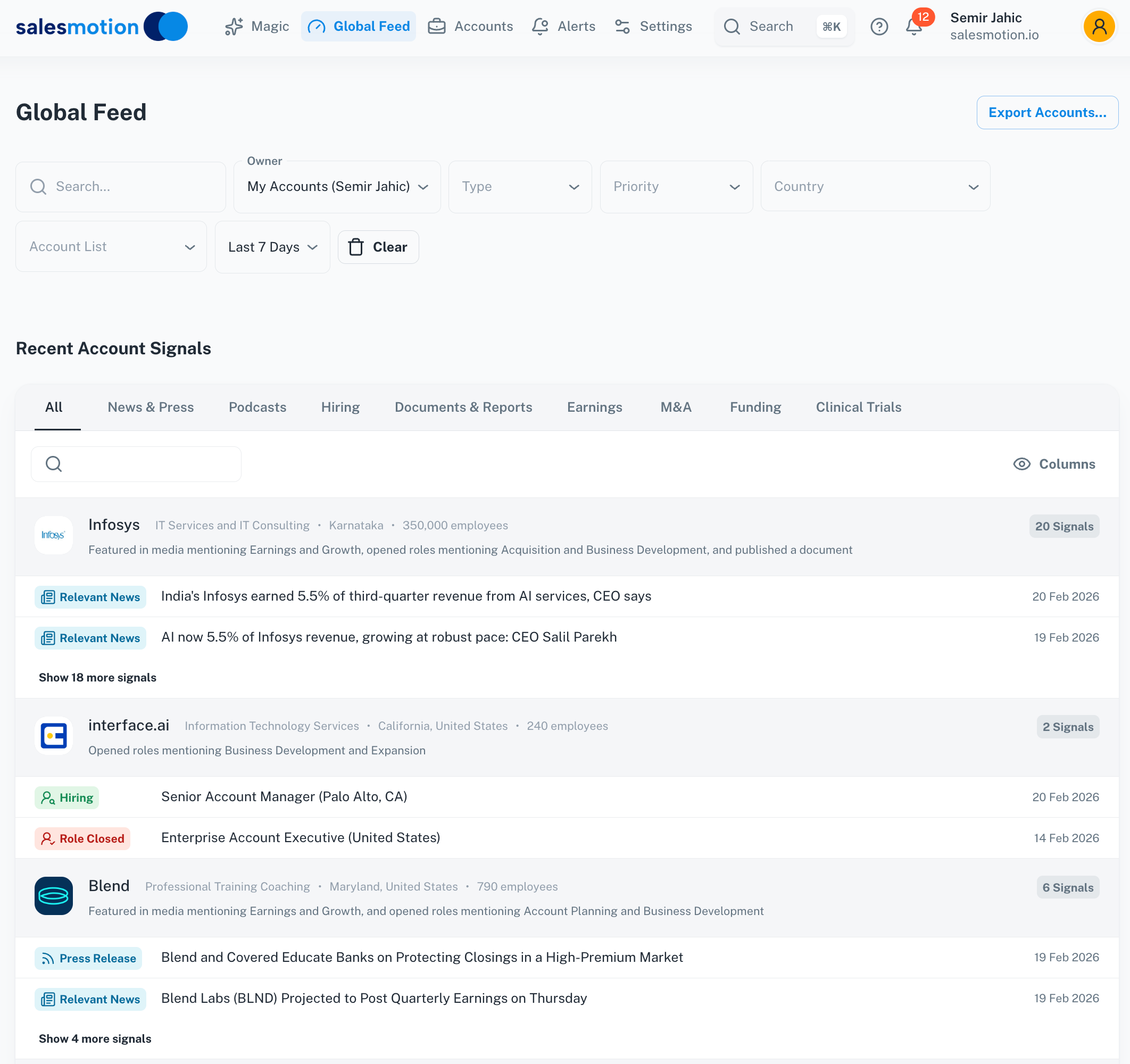 The Global Feed — signals from all tracked accounts in one view. Use the filter bar to focus on specific signal types, owners, or time ranges.
Step 5: Set up Search Alerts
Search Alerts notify you automatically when Salesmotion detects new mentions of your key topics. To create one:
- Click Search in the left sidebar.
- Type a keyword (e.g. a competitor name, a methodology like "MEDDPIC", or a strategic topic).
- Click Create Alert and configure the frequency (daily or weekly) and recipients.
This is the best way to stay informed without checking the platform constantly.
Step 6: Connect your CRM (Enterprise plan)
If your team is on the Enterprise plan and uses Salesforce, navigate to Settings → Integrations to connect your CRM. This syncs account data and surfaces Salesmotion signals directly inside Salesforce. See the full guide: Connecting Salesforce and CRM Integrations.
Salesmotion works completely standalone — no CRM integration is required. Individual and Team plans include full platform access (account intelligence, signals, Magic, Prospector, Search, PDF exports) without connecting any external tools.
Organising your view
If your workspace has hundreds of accounts and you only work a subset:
- Star your accounts — Click the star icon next to your accounts to mark them as favourites. Then filter to favourites in the dashboard.
- Filter by owner — If account ownership is set up, use the Owner filter to show only your accounts.
- Use account lists — Lists let you group accounts (e.g. "Enterprise EMEA", "Renewals Q2") for focused views.
For more on account organisation, see Managing Accounts.
Next steps
Now that you're set up, explore these features to get the most from Salesmotion:
- Salesmotion Score — Understand how accounts are ranked and what the score means.
- Magic — Get AI-powered outreach suggestions tailored to each account.
- Prospector — Generate personalised emails for specific contacts at your accounts.
- PDF Export — Share account briefings with colleagues who don't have Salesmotion access.
- Data Sources — Learn what Salesmotion monitors and how to interpret the intelligence.