A sales engagement platform (SEP) is the system reps work in to run outreach across email, calls and social, with every activity logged back to the CRM. If the CRM is the database of record, the SEP is where daily selling gets executed.
TL;DR: A sales engagement platform sequences outreach, gives reps a prioritized task queue, tracks engagement and syncs activity to the CRM. It is different from a CRM (system of record), sales intelligence (who to contact and why) and sales enablement (content and training). When you evaluate one, test CRM sync depth, personalization beyond tokens, signal-based workflows and manager reporting, then add an intelligence layer so automation improves relevance as well as volume.
Your reps are probably working from five screens right now. CRM on one tab. Inbox on another. A spreadsheet for follow-ups. LinkedIn open in the background. Dialer floating somewhere on the side. They're copying notes, setting reminders, hunting for context, and trying not to forget who needs a call versus who needs a nudge.
That setup looks busy, but busy isn't the same as effective.
A sales engagement platform fixes a real operational problem. It gives sales teams one place to run outreach, log activity, and keep follow-up from slipping through the cracks. But sales teams often encounter a second problem right after they solve the first one. They automate the workflow, then watch message quality drop. Volume goes up. Relevance goes down.
That's where the conversation needs to get more practical. A modern sales engagement platform shouldn't just help teams send more touches. It should help them run timely, informed conversations that create pipeline.
The End of Disconnected Sales Outreach
Disconnected outreach creates invisible drag. Reps don't always notice it because it shows up as small tasks: copy a note into Salesforce, check whether someone opened the last email, move a prospect into a different list, set a reminder for next Thursday. None of that feels dramatic. Together, it eats the day.
The result is predictable. Good reps build their own workarounds. Average reps miss follow-up. Managers get inconsistent data. Forecast conversations turn into debates about activity quality instead of pipeline reality.
Where the old workflow breaks
A typical rep workflow still looks like this:
- CRM for record keeping: account history lives there, but daily action rarely does
- Email for outreach: threads get buried and follow-ups become memory-based
- Spreadsheets for prioritization: someone always has a shadow system
- LinkedIn for context: useful, but disconnected from execution
- Dialer and meeting tools: another set of tabs, another set of logs
A sales engagement platform pulls that into one operating layer. Reps can work from a queue, execute across channels, and keep activities tied to the right accounts and contacts. That alone improves consistency.
But automation has a trap.
Most guidance on sales engagement stops at sequence automation instead of showing teams how to bring real-time account signals, such as hiring changes or funding rounds, into the workflow.
Generic automation is organized spam. Structured, signal-based outreach is a system.
That distinction matters. If your team is trying to shorten the sales cycle, the win doesn't come from sending more emails on a timer. It comes from making each touch more timely and more credible.
A useful example is platform consolidation. Teams that replace disconnected point tools with one workflow layer usually get cleaner execution and better manager visibility. This breakdown of how one team replaced five sales tools with one platform captures the operational logic well. Fewer handoffs. Fewer missed steps. Less rep friction.
The real job of a modern SEP
The best way to think about a sales engagement platform is simple. It should reduce admin work and improve conversation quality at the same time.
If it only does the first part, your reps become faster at sending forgettable messages.
Skip the comparison fatigue?
If you're shopping for a sales intelligence tool, here's the short version.
Salesmotion combines account intel, buying signals, verified contacts, and AI-drafted outreach in one tool. From $85/mo, live in minutes, no annual contract.
What Is a Sales Engagement Platform
A sales engagement platform is the system your reps work in to execute outreach. If the CRM is the database of record, the SEP is mission control. It turns contact data into action.
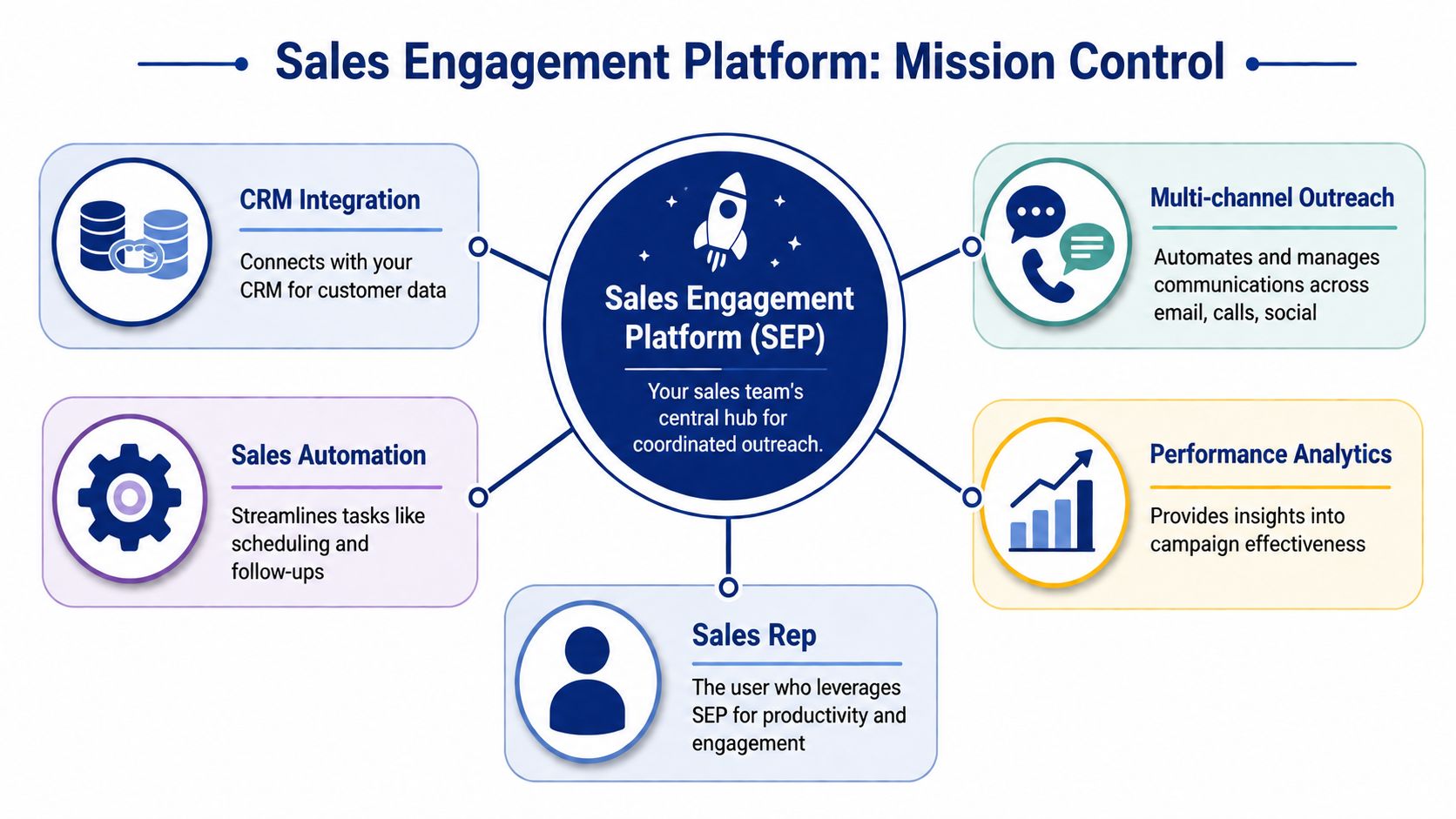
Mission control for day-to-day selling
Many teams don't struggle because they lack account data. They struggle because their daily execution is fragmented. A rep knows who should be contacted, but not always what to do next, when to do it, or how to keep every touch logged cleanly.
That's the operating gap an SEP fills.
A sales engagement platform coordinates outreach across email, calls, and social activity from one place. It lets teams build repeatable follow-up paths, assign tasks automatically, and keep responses from getting lost in personal inbox habits.
Why this category matters now
This category isn't niche anymore. The global sales engagement platform market is projected to expand from US$ 9 billion in 2024 to US$ 25 billion by 2031, driven by demand for centralized hubs that simplify communication, automate nurturing, and integrate with CRM systems to improve sales efficiency, according to Research and Markets.
That growth makes sense from an operator's point of view. Once a team reaches any meaningful outbound volume, manual coordination stops scaling. Managers need visibility. Reps need structure. RevOps needs clean activity data without constant cleanup.
Practical rule: If reps are building personal follow-up systems outside the stack, the operating model is already broken.
What an SEP actually does
At a practical level, a sales engagement platform handles four jobs:
- Orchestrates outreach: sequences emails, calls, and tasks so reps don't have to manage every next step manually.
- Creates rep workflow: gives sellers a queue of prioritized actions instead of asking them to hunt across tools.
- Tracks engagement: shows opens, clicks, replies, and activity patterns in a format managers can coach from.
- Keeps systems aligned: syncs activity back to the CRM so records don't decay.
The difference between SEP software and generic sales automation software is that an SEP is built around seller execution. It's not just background automation. It's where the rep lives.
If you're comparing broader workflow tooling, this guide to sales automation software is a useful companion because it helps separate execution platforms from tools that only automate tasks around them.
A simple analogy that holds up
Think of the CRM as the warehouse. It stores inventory. The SEP is the loading dock. That's where work gets dispatched, tracked, and moved.
Without the dock, the warehouse still exists. It just doesn't move fast enough.

“Consolidation of prospect company information that I can use frequently to be way better informed when I'm doing my outbound, preparing for a meeting, or building relationships. Ease of use and Customer Support is excellent.”
Werner Schmidt
CEO & Co-Founder, Lative
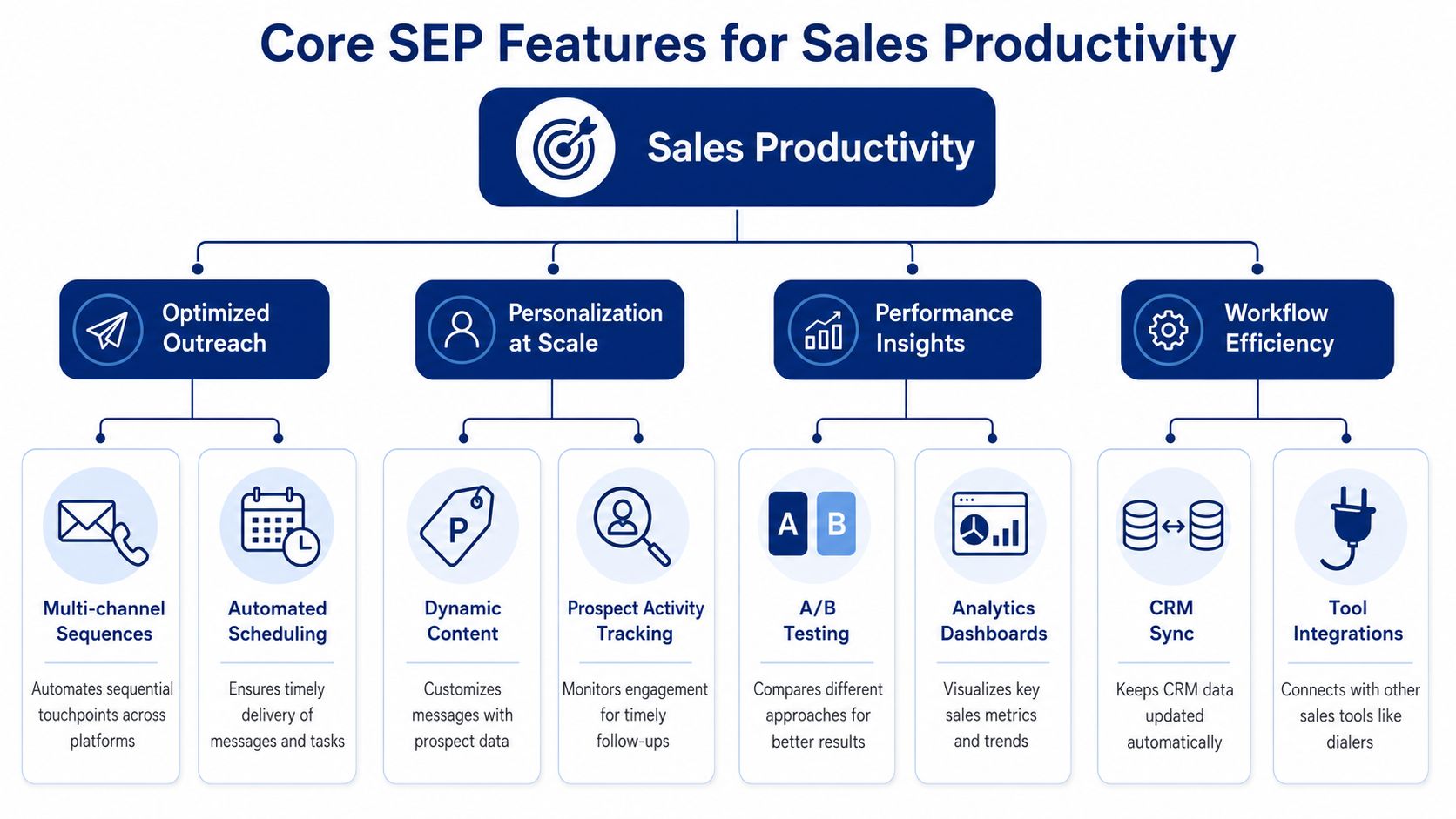
Core Features That Drive Sales Productivity
Feature lists aren't very helpful in isolation. The better question is what job each feature does for the rep and the manager. Good SEP design removes friction from execution, not just clicks from a workflow.
Sequencing that behaves like a playbook
A sequence is the operational backbone of an SEP. It defines what happens after the first touch and stops reps from treating follow-up like a memory exercise.
A simple outbound sequence might start with a personalized email, then create a call task, then schedule a follow-up email if there's no reply. The point isn't complexity. The point is consistency.
What works is a sequence with clear decision points. If a prospect replies, the automation should stop. If they engage but don't respond, the next step should reflect that behavior. If nothing happens, the system should move the rep forward without guesswork.
What doesn't work is a static cadence that sends the same message to every contact on the same timer.
Multi-channel execution in one workflow
Reps lose time when every channel lives in a different tool. The best SEPs let them work through calls, emails, and social tasks from one queue. That reduces context switching and makes activity easier to inspect.
In practice, this matters because outreach is rarely won on one channel alone. A rep might:
- Open with email: establish the problem and point of view
- Follow with a call: test urgency and learn whether timing is real
- Use LinkedIn selectively: reinforce familiarity, not replace selling
- Return to email with context: reference the trigger or business issue uncovered earlier
That sequence feels coordinated to the rep and coherent to the buyer.
Analytics that support coaching
Managers don't need more dashboards. They need better questions.
A useful SEP analytics layer helps answer things like:
| Workflow Question | What the manager looks for | Why it matters |
|---|---|---|
| Which messages are getting responses? | reply patterns by template or sequence step | helps improve messaging, not just activity volume |
| Where are reps stalling? | overdue tasks, skipped steps, incomplete cadences | exposes process friction and adoption issues |
| Which channels are actually moving conversations? | engagement across calls, email, and task outcomes | improves channel strategy by segment |
The mistake many teams make is overvaluing opens and undervaluing reply quality. Opens can indicate deliverability or curiosity. Replies tell you whether the message earned attention.
Managers should coach from conversation outcomes, not raw activity counts.
CRM integration that actually matters
Many evaluations encounter a common pitfall. “CRM integration” can mean a light sync that copies fields once a day, or it can mean a true operating connection between systems.
A critical technical requirement is bidirectional CRM integration in near real time, so static contact lists become adaptive workflows triggered by engagement signals rather than fixed timers.
That sounds technical, but the operational point is simple. If a prospect opens an email and doesn't reply, the system should adjust. If a contact changes status in the CRM, the sequence should react. If a rep updates an account, the platform shouldn't wait around to catch up.
Personalization tools that go beyond mail merge
Most platforms offer tokens for first name, company name, and title. That's table stakes. Real productivity comes from helping reps personalize without doing manual research every time.
Useful personalization features include dynamic snippets, account context blocks, and activity-triggered task logic. Weak personalization is just a template with a mail-merge field. Buyers can tell the difference immediately.
Clearing the Confusion SEP vs CRM vs Sales Intelligence
Sales teams buy the wrong tool when they blur categories. The cleanest way to avoid that is to define each platform by its primary job, not by the overlap in marketing language.
A CRM stores the account and contact history. A sales intelligence tool helps you find people and understand accounts. A sales engagement platform runs the outreach. A sales enablement platform gives reps the messaging assets and training support.
Sales Tech Stack Role Comparison
| Platform Type | Primary Job | Key User | Example |
|---|---|---|---|
| CRM | Store account, contact, and opportunity data | RevOps, sales managers, reps | Salesforce |
| Sales intelligence | Find contacts and enrich account context | SDRs, AEs, RevOps | ZoomInfo, LinkedIn Sales Navigator |
| Sales enablement | Provide content, messaging, and training | Enablement leaders, reps, managers | Highspot |
| Sales engagement platform | Execute and track outreach workflows | SDRs, AEs, managers | Outreach, Salesloft (compared here) |
The easiest way to separate them
If a rep asks, “Who should I contact?” that's usually a sales intelligence question.
If they ask, “What happened with this account before?” that's a CRM question.
If they ask, “What should I send next, and can the system queue it for me?” that's a sales engagement platform question.
If they ask, “What deck, case study, or battle card should I use?” that's a sales enablement question.
This distinction sounds basic, but it helps during evaluation. Teams often expect the SEP to solve enrichment problems, or expect the CRM to handle execution design. Then they blame the software when it doesn't do the job it was never built for.
Where the stack works together
The stack is strongest when each layer stays in its lane.
A sales intelligence tool surfaces contacts and company signals. The CRM holds the shared account truth. The SEP turns that information into action. Enablement gives reps the talk tracks and proof points to use in those conversations.
A related confusion comes up around intelligence itself. This guide on what sales intelligence is is worth reading if your team keeps mixing up data sources with execution platforms.
When one tool is asked to be database, workflow engine, intelligence layer, and content hub at once, nobody gets what they need.

“This is my singular place that very simply summarizes a company's top initiatives, strategies and connects them to my solution. Something I would spend hours researching manually, now it's automated.”
Derek Rosen
Director, Strategic Accounts, Guild Education
Your Sales Engagement Platform Evaluation Checklist
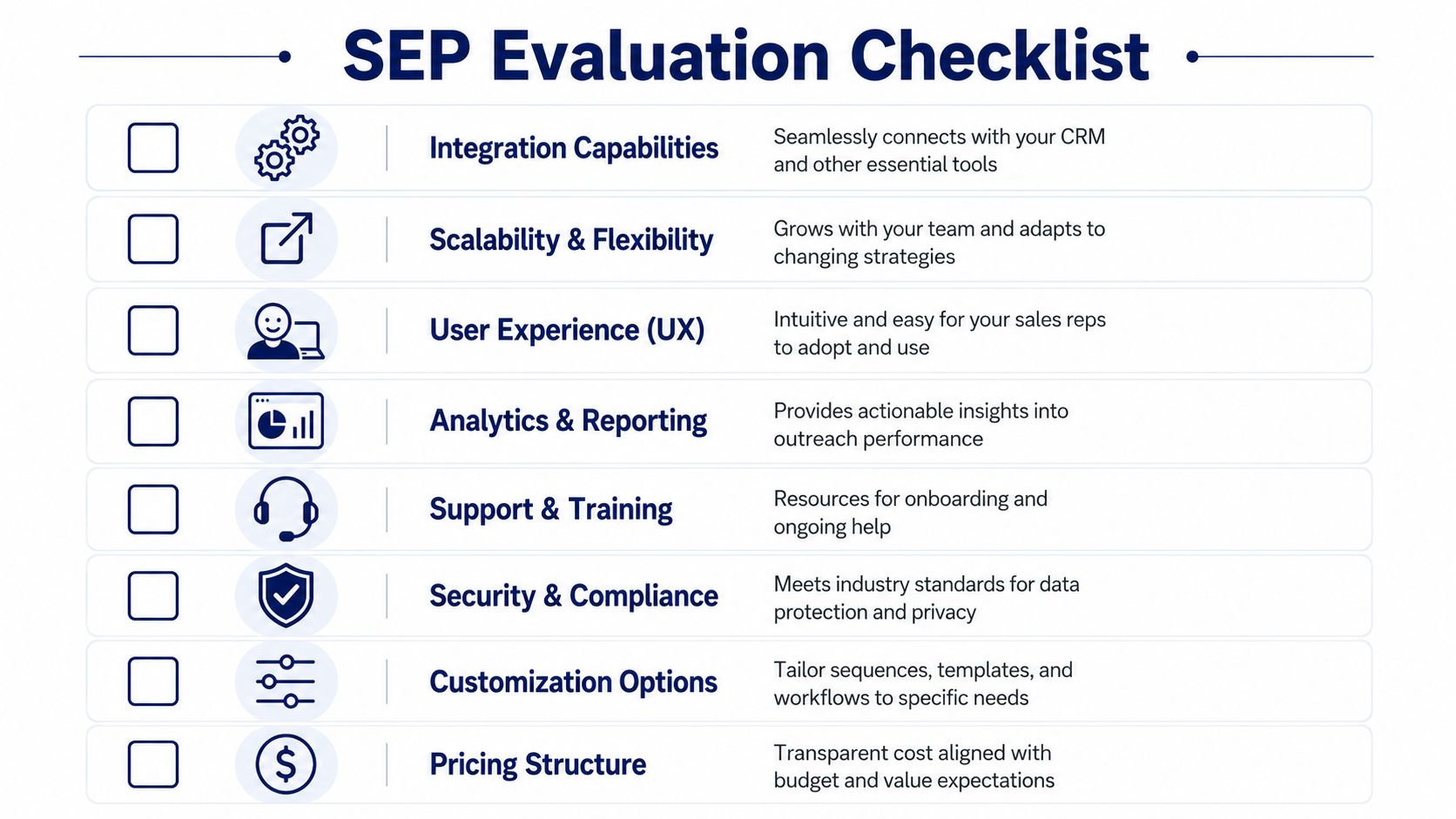
Most SEP buying mistakes happen before the contract is signed. Teams get pulled toward flashy demos, then discover six weeks later that the workflow doesn't fit the way reps sell. The better approach is to evaluate the platform like an operating system, not a feature catalog.
Questions to ask every vendor
Start with direct questions. If the answers are fuzzy in the demo, they'll be worse in production.
-
How deep is the CRM sync?
Ask whether activity, contact updates, and workflow changes move in both directions without delay. If the sync is shallow, your team will end up reconciling records manually. -
Can the platform personalize beyond basic tokens?
“Hi Sarah at Acme” isn't personalization. Ask how the system supports account-specific messaging, dynamic snippets, and behavior-based branching. -
Can workflows react to signals, not just time delays?
This separates rigid sequence tools from flexible execution systems. You want logic based on engagement and account changes, not just “send step three three days later.” -
Do reporting views answer management questions?
Don't settle for a dashboard that only shows activity volume. Managers need a view into whether outreach is producing meetings, progressing conversations, and surfacing rep coaching opportunities.
What reps will tell you after go-live
A lot of adoption issues are obvious to operators before they show up in the dashboard.
- If the queue feels confusing, reps go back to inbox-first selling.
- If templates are hard to edit, messaging gets stale fast.
- If task creation is noisy, reps start skipping steps.
- If activity logging is unreliable, managers stop trusting the reports.
That's why user experience matters more than many buying committees admit. A platform can be technically capable and still fail because daily use feels clumsy.
Practical criteria beyond the demo
Use this short checklist during evaluation meetings:
- Workflow fit: does the platform match how SDRs and AEs work, or will you force a process rewrite?
- Manager visibility: can frontline leaders inspect sequence performance and rep behavior without exporting data?
- Admin control: can RevOps standardize rules, templates, permissions, and reporting without building workarounds?
- Security posture: does the vendor clearly document compliance and data handling expectations?
- Support model: will your team get implementation help and ongoing problem solving, or just a knowledge base?
Buy the platform your managers can coach in, your reps will actually use, and your RevOps team can govern without duct tape.
A simple test that catches a lot
Ask the vendor to show one real workflow end to end.
Have them start with a new contact entering the system. Then ask them to show how that contact gets assigned, sequenced, updated after engagement, synced to CRM, and reported on for a manager. That single exercise tells you more than a polished feature tour.
Beyond Automation Augmenting Your SEP with AI Agents
Traditional SEPs solved the mechanics of outreach. They helped teams schedule touches, queue tasks, and log activity. That was a big step forward. It still left a context gap.
A sequence can tell a rep when to send an email. It usually can't tell them why this account matters today, what changed, or what point of view should shape the message.

Why the next layer is intelligence, not more volume
Vendors such as Nooks now describe sales engagement platforms as AI agent workspaces that handle data enrichment and draft personalized messaging, with intent signals and trigger events reprioritizing the workflow.
That shift matters because relevance is now the bottleneck.
The best workflow I've seen looks like this in practice:
- A trigger appears: new executive hire, funding update, hiring pattern, or strategic announcement
- Context gets synthesized: the system connects the event to likely priorities and risks
- A message draft is created: outreach is anchored to the signal, not a generic persona template
- The rep reviews and sends through the SEP: execution stays in the system of action
That's augmentation. Not replacement.
What AI agents are actually good at
AI agents are useful when they do the manual work reps are bad at sustaining every day.
The strongest use cases are:
- Account research: pulling scattered public information into a usable brief
- Signal monitoring: watching for changes that create a real reason to reach out
- Draft generation: turning context into a first-pass email or sequence step
- Prioritization: helping reps know which accounts deserve attention now
AI sales agents can operate 24/7, which is valuable when they're grounded in CRM data and can surface real-time triggers like new CRO hires or funding announcements without waiting for a human review cycle, as described in Salesforce's guide to AI sales agents.
The practical value isn't that the machine “sells.” It's that the machine shortens the time between signal, context, and action.
Where this fits into the current stack
This layer should feed the SEP, not fight it.
For example, AI agents for sales teams can sit upstream of execution by researching accounts, tracking buying signals, and drafting outreach that reps review inside their existing workflow. One example is Salesmotion, which uses three agents for research, signal monitoring, and personalized outreach drafting based on real account activity.
That model is more realistic than ripping out your engagement platform and asking AI to replace the full motion. Reps still need a system for task execution, manager visibility, and activity governance. AI improves the quality of what enters that system.
The old SEP asked, “Did we send the next touch?” The new stack asks, “Was this the right account, the right moment, and the right message?”
Sales teams that already have a sales engagement platform don't need more activity. They need better timing, sharper context, and cleaner execution. Salesmotion's agents add that intelligence layer by monitoring account signals, building research briefs, and drafting outreach tied to real changes across target accounts, so reps can work from stronger context inside the systems they already use. Comparing directly? See Salesmotion vs Salesloft.