Advanced account research means reading the sources where a company tells you, in its own words, what it is trying to do: earnings calls, SEC filings, job postings, executive interviews and its own pricing and product pages. Basic research tells you what a company is. Advanced research tells you what it is changing, who owns the change, and when it has to be done.
Why Advanced Account Research Matters
Enterprise buyers can tell within a sentence whether a seller has done the work. LinkedIn and the About page give every competing rep the same facts. The sources below give you a reason to reach out that the others do not have, and they let you:
- Stand out with messaging tied to a stated priority, not a persona.
- Time outreach to the moment a priority becomes a funded project.
- Focus effort on accounts that are actually changing.
For the fundamentals first, see what account research is and why it matters.
Six Advanced Account Research Techniques
1. Read the earnings call, not the press coverage
Public companies explain their priorities every quarter. The prepared remarks tell you where money is going; the analyst Q&A tells you where management is under pressure. Quote the CEO or CFO in your outreach and you are talking about their agenda, not yours. Our 10-minute earnings call framework shows how to turn a transcript into a one-page brief.
2. Mine SEC filings for risks and strategy
The annual 10-K is where a company has to describe its business and its risks. The "Risk Factors" and "Management's Discussion and Analysis" sections are the most useful for sellers: they name what management worries about and what it is investing in. Current reports on Form 8-K flag material events such as executive changes and acquisitions, and the proxy statement (DEF 14A) shows how executives are paid, which tells you which metrics they are judged on. See how to use DEF 14A for account research.
3. Treat job postings as a strategy document
A company has to describe the work before it hires for it. A cluster of roles in one team shows where budget just landed; the tools named in the requirements show the current stack; seniority tells you whether a function is being built or scaled. The job posting analysis guide covers what to look for.
4. Map the technology stack
Technographic tools such as BuiltWith or Datanyze, plus the tools named in job postings and integration pages, show what a prospect already runs. That tells you whether you are an add-on, a replacement, or a non-starter. More in tech-stack targeting.
5. Profile the decision-makers in their own words
Use LinkedIn Sales Navigator for roles, tenure and shared connections, then go further: conference talks, podcast appearances, interviews and posts show what each stakeholder says they care about. The guide to finding decision-makers shows how to build the buying-group map.
6. Track competitive and market signals
Competitor mentions on an earnings call, a vendor swap visible in job postings, an acquisition or a regulatory change all shift what a buyer needs next. Add them to a short watch list per account rather than researching from scratch each time.
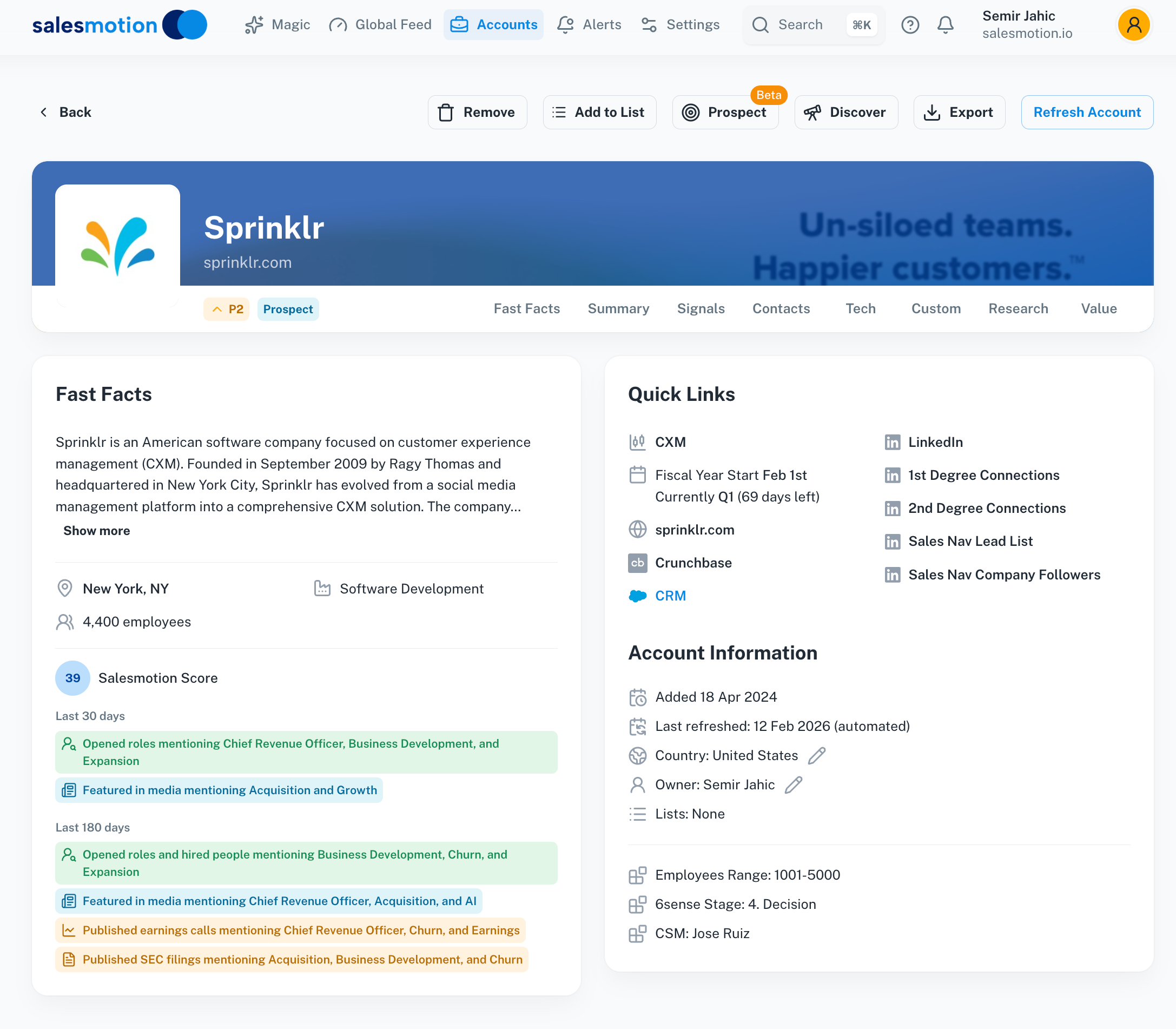 One account view that combines earnings calls, SEC filings, hiring and news signals.

“We're saving about 6 hours per week per seller on account research alone. That's time they can reinvest in actually selling.”
Derek Rosen
Director, Strategic Accounts, Guild Education
Integrating AI and Automation
The techniques above are slow by hand: a full read of a transcript, a 10-K and a month of job postings takes hours per account. Two kinds of automation help:
- Monitoring. Alerts on leadership changes, filings, earnings calls and hiring surges, so research starts when something changes rather than on a calendar. A signal monitoring agent does this across a whole territory.
- Synthesis. AI that reads the sources and drafts the brief with citations, so the rep checks and decides instead of collecting. Insist that every claim cites its source. Salesmotion's Research Agent is built to turn about 3 hours of research into 5 minutes.
Crafting a Data-Driven Strategy
Once you have the research:
- Segment your accounts by fit and by how much is changing right now.
- Build account plans for the top tier, with objectives tied to what leadership has said in public. Our account planning template walks through it.
- Write the message from the source. One quote, one implication, one specific ask.
“This is my singular place that very simply summarizes a company's top initiatives, strategies and connects them to my solution. Something I would spend hours researching manually, now it's automated.”
Derek Rosen
Director, Strategic Accounts, Guild Education
Key Takeaways
- Advanced account research reads the sources where companies explain themselves: earnings calls, SEC filings, job postings and executive interviews.
- The analyst Q&A on an earnings call and the Risk Factors in a 10-K are where pressure and priorities show most clearly.
- Job postings reveal funded initiatives and the current tech stack before any announcement.
- Profile decision-makers from what they say in public, not only from their titles.
- Automate the monitoring and the first draft; keep the judgment with the rep.
Frequently Asked Questions
What makes advanced account research different from basic research?
Basic research covers firmographics like company size, industry and revenue. Advanced research adds what the company is changing and why: earnings call commentary, SEC filings, hiring patterns, technology stack and executive priorities. That reveals timing and pain that basic research misses.
How do I use technology stack data in my sales approach?
Tools like BuiltWith or Datanyze, plus the tools named in job postings, reveal what platforms a prospect uses. If they run a competitor's software, position against a specific gap. If they use complementary technology, show how you fit with it. Both give a specific, credible reason to engage.
How much time should sales reps spend on advanced research per account?
Match the time to the account's tier. Strategic accounts justify a few hours of deep research; mid-tier accounts need a focused brief; the rest need monitoring, not research. Automating collection and monitoring is what makes deep research possible on more than a handful of accounts.
Can small sales teams benefit from advanced account research techniques?
Yes. Small teams benefit most from precision because they cannot afford to waste effort on poor-fit accounts. Earnings calls, SEC filings, job boards and company press releases are free to read for public companies.