Using ChatGPT for account research works, and so does using Claude, Microsoft Copilot, Gemini or Perplexity. Each one will produce a cited, multi-page brief on a named company in minutes. Where they stop is everything around that brief: knowing which of your 80 accounts changed this week, doing it the same way for every rep, and checking the output before it reaches a customer.
That is not a guess. In 48 of 134 recorded sales and customer calls between June and October 2026, the buyer was already researching accounts with a general AI assistant or a home-built agent. Two of them asked nearly the same question. A commercial lead at a specialist CRO put it this way: "How is this better than me going into Claude and creating an agent to do this search for me?"
TL;DR: General AI assistants are strong at one-off research on a named account, filings analysis and drafting. All five now offer scheduled runs and ways to connect outside data, so "they can only answer when asked" is out of date. Teams still report four limits: per-account prompting, manual validation at scale, uneven prompting skill across reps, and token cost on large documents. The pattern buyers are moving to keeps the assistant and feeds it a monitored account-signal layer through an MCP connector.
What Are ChatGPT, Claude and Copilot Good At in Account Research?
They are good at depth on one company at a time. Give any of them a named account and a clear question and the output is better than most reps produce by hand in an hour.
Three jobs came up again and again on calls:
- One-off research on a named account. Strategy, recent news, leadership, competitors, likely priorities. Every assistant in this post has a dedicated research mode for it.
- Filings and document analysis. A GTM engineer at a workforce-management software company told us reps there use Claude to read filings and work out cost ratios, and have built their own research skills.
- Drafting. Turning a brief into a first-touch email, a call opener or a set of discovery questions.
None of this needs a new tool. If your territory is 15 accounts and you review each one before every meeting anyway, an assistant plus a good prompt covers the research. The guide to using AI for account research has prompts for exactly that.
How Do the Assistants Compare by Job?
They overlap more than most comparisons admit. The table below describes each assistant from its own documentation as of October 2026. Check the linked pages before you standardize, because these products change monthly.
| Assistant | Research on one named account | Recurring runs | Bringing in outside data |
|---|---|---|---|
| ChatGPT | Deep research returns a documented report with citations. You can restrict it to sites you enter or tell it to prioritize them. | Scheduled tasks, with active-task limits from 3 on Free to 15 on Pro and Enterprise. | MCP apps through developer mode: full MCP support on Business, Enterprise and Edu; read/fetch MCP on Pro. |
| Claude | Research runs multiple searches that build on each other and returns cited answers in minutes, across the web and connected Gmail, Calendar and Docs. | Scheduled tasks in Cowork on paid plans: hourly, daily, weekly or weekdays. They run remotely and can use connected tools and skills. | Custom connectors over remote MCP on Free through Enterprise plans. Owners add them on Team plans. |
| Microsoft Copilot | The Researcher agent draws on the web and your work content (files, emails, meetings, chats) and returns source-cited reports. You choose work data, web, or both. | Scheduled prompts, up to 10. | Copilot Studio agents connect to MCP servers and use their tools and resources. |
| Gemini | Deep Research uses Google Search by default. | Scheduled actions, up to 10 active at a time. | Gmail, Drive, uploaded files and NotebookLM notebooks can be added as research sources. |
| Perplexity | Research mode performs dozens of searches, reads hundreds of sources and delivers a report. | Scheduled Tasks in Computer run in the cloud on any recurring cadence, no more often than hourly. | Custom remote connectors over MCP. |
Two things stand out. First, the research modes are close enough that the choice usually follows the license your company already pays for. A sales operations lead at a banking software vendor told us: "In enterprise, we use Copilot, but there's a move to use more Claude." Second, every assistant now has scheduling and a route to outside data. The useful question is no longer which assistant. It is what the assistant reads when it runs.

“This is my singular place that very simply summarizes a company's top initiatives, strategies and connects them to my solution. Something I would spend hours researching manually, now it's automated.”
Derek Rosen
Director, Strategic Accounts, Guild Education
Where Do Teams Say General Assistants Stop?
They stop at coverage, consistency and verification, not at intelligence. Buyers described seven limits.
1. Research on request, nothing watching the territory. The same GTM engineer whose reps had built those research skills told us: "But what they don't have is anything that's trigger based or constantly looking through their market." Scheduled runs narrow this gap. They do not close it for a full territory. With 10 to 15 slots and 80 accounts, a schedule becomes one broad prompt across the whole list, and the rep still has to check what comes back.
2. One company, one prompt. Reps described the work as manual and per-company. A BD rep at a mid-size CRO, working across Perplexity, Copilot and two data tools, called it "a whole lot of Frankensteining."
3. Human validation at scale. A research leader at an IT services provider, whose team already captures its signals with LLMs, said the only challenge is scale: "it's not just running a prompt, but there is some manual validation as well." Validation is cheap for five accounts and a staffing line for five hundred.
4. No say over the sources. A product owner at a global IT services firm told us: "when LLMs work ... we don't know where they will go, what they will fetch, what all sources they are referring to, it's not in our control." Site restriction helps for a single report. It is harder to enforce across 50 reps who each write their own prompt. Checking that every claim carries a source is the minimum. For how source coverage changes by language, see signal coverage in non-English markets.
5. Uneven prompting skill. A RevOps lead at a software company estimated that roughly a fifth of reps go deep with the assistant. The rest write generic prompts and get overview-level output. The team is building a shared prompt and skill library to raise the floor.
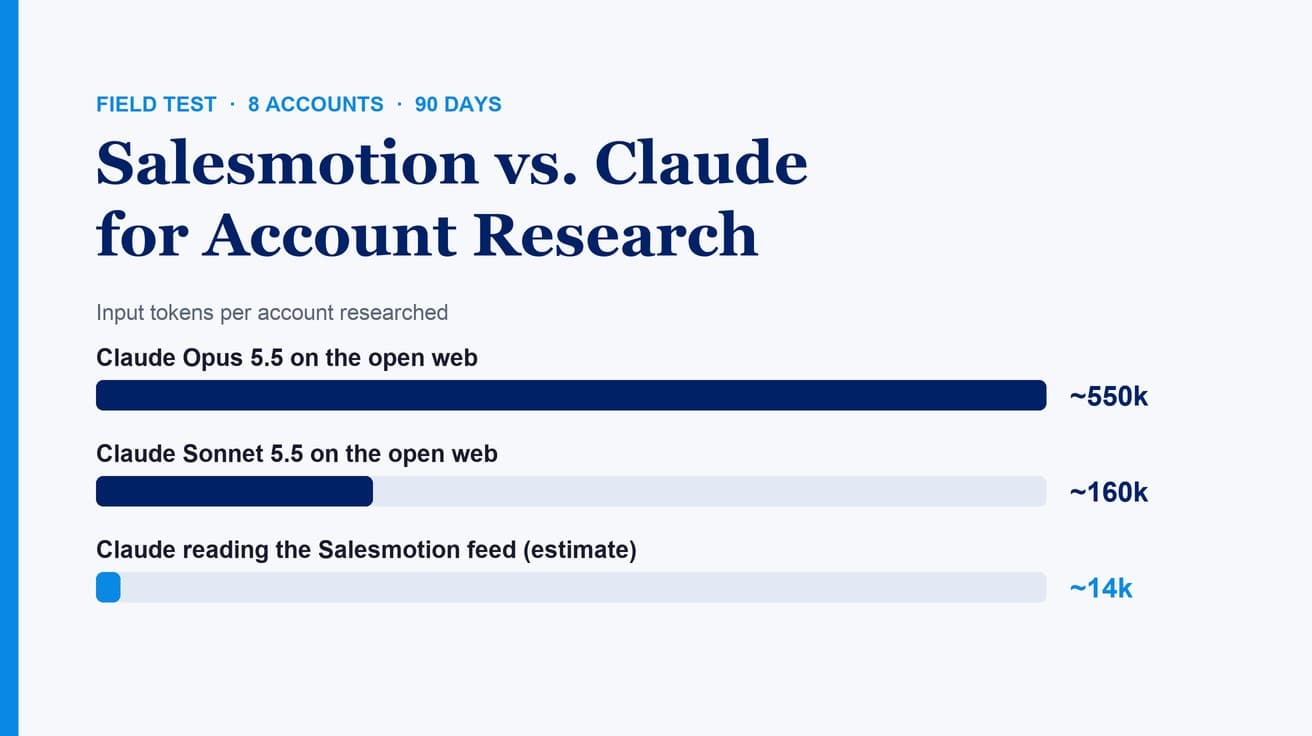
6. Token cost on large documents. The same RevOps lead said that when reps pull raw call transcripts into the assistant, their usage allowance disappears, and token cost is now a rollout constraint. Anthropic's own help center notes that tools and connectors are token-intensive.
7. Feeds that are about the industry, not the accounts. A BD rep at a small CRO built a daily industry news feed in Gemini. The verdict: "it's not specific to the accounts that I have."
What Is the Hybrid Pattern Buyers Are Moving To?
Keep the assistant as the place reps work. Change what it reads. The assistant handles reasoning, summarizing and drafting. A monitored account-signal layer handles the watching, the source list and the account matching, and the two connect through an MCP connector.
MCP, the Model Context Protocol, makes this practical. It is an open standard for connecting AI applications to tools and data, and the table above links the MCP documentation for ChatGPT, Claude, Copilot Studio and Perplexity.
Here is how the pattern answers the main limits:
| Limit teams reported | Assistant alone | Assistant plus a monitored signal layer |
|---|---|---|
| Nothing watching the territory | A small set of scheduled prompts | Signals collected continuously per tracked account, queried when the rep asks |
| One company, one prompt | Rep prompts each account | One question across the whole account list |
| Manual validation | Rep checks each claim against the web | Each signal arrives with its source and date |
| Source control | Depends on each rep's prompt and settings | One fixed source set for the whole team |
| Token cost | Whole documents pulled into context | Short, structured signal records |
A commercial lead at a clinical trials CRO saw account signals queried inside Claude on a call and said: "No, this is truly brilliant." The reaction had little to do with the model, which the team already had. What changed was the input.
There is also a compliance angle. A RevOps lead told us legal approved an MCP connector quickly because it carried only public company information and no call transcripts. A connector with deep CRM access took far longer. The guide to getting a sales intelligence tool through security review covers why.

“With Salesmotion, you realize just how much time you were spending on low-value tasks. Now that our team isn't drowning in manual research, they can truly focus on execution, which is priceless for a startup.”
Adam Wainwright
Head of Revenue, Cacheflow
A Worked Example: Monday Morning With Both
A rep with 80 named accounts opens Claude at 8:30 on Monday. A custom connector to the team's account-signal layer was added once by the workspace owner.
- Ask across the territory. "Which of my accounts had a leadership change, a funding event or an earnings call in the last seven days? Rank them and give me the source for each." The assistant queries the connector and returns six accounts, each with a dated signal and a link.
- Pick one and go deep. For the account that just reported earnings, the rep switches on Research and asks for what management said about cost pressure and which initiatives were named. This is the job assistants do best, and now it is aimed at the right account.
- Draft from both. "Write a four-sentence email to the new COO that references the earnings comment and the hiring signal. No flattery." The rep edits and sends.
- Schedule the first step. The rep saves step 1 as a scheduled task for every weekday at 8:00. That is one scheduled task. The prompt stays the same because the watching happens in the signal layer.
The rep never asked "what is new at company X?" 80 times.
Salesmotion's MCP server is one way to supply that layer: it exposes account briefs, signals (earnings calls, news, hiring, M&A, funding, SEC filings, clinical trials, podcasts) and contacts to Claude, Copilot and other MCP-compatible assistants, with nothing to install. The Claude prioritization tutorial walks through setup and prompts in detail.
When Is Building Your Own Agent the Right Call?
Build when the list is small, the signals are narrow and someone owns the upkeep. That describes more teams than vendors like to admit.
Building is reasonable when:
- You track a few dozen accounts and one person reviews all of them weekly anyway.
- Your signal comes from one or two sources you can name, such as a single regulator database or one job board.
- A technical owner has time for maintenance, not only for the first build. A commercial operations leader at a large life-science tools company told us: "We do have kind of a homegrown system. ... It's still pretty manual."
Buying the signal layer is the better call when the team is larger than the builder's attention span. The founder of a software development agency told us: "Like we know how to build. I just don't want to build." The long version of the build decision, including what breaks around month three, is in Can't I Just Build This With Claude Code?
How Should You Decide?
Run a two-week test on your own accounts and count three things: how many relevant events the assistant-only setup caught, how many it missed that you found later, and how many minutes per account the checking took.
If the misses are near zero and checking is quick, stay with the assistant. If reps keep hearing about a leadership change from the prospect, the gap is monitoring. A continuous signal layer behind the assistant fixes that without changing where anyone works, which is the case Salesmotion is built for.
The best account research setup is rarely one tool. It is the assistant your team already uses, reading from a source that knows which accounts are yours and what changed since Friday.
Frequently Asked Questions
Is ChatGPT good for account research?
Yes, for one company at a time. ChatGPT's deep research mode returns a documented report with citations and can be restricted to sites you choose. Teams report limits across a whole territory: capped scheduled tasks, per-account prompting, and manual checking. For when to use each, see ChatGPT vs sales intelligence tools.
Is Claude or ChatGPT better for sales research?
For a single account brief the two are close, and the choice usually follows the license your company already has. Test both on three of your own accounts before standardizing.
Can Microsoft Copilot do account research?
Yes. Microsoft's Researcher agent draws on the web and your work content, including files, emails, meetings and chats, and returns source-cited reports. That makes it strong when the account history lives in Outlook and Teams.
Can an AI assistant monitor my accounts for buying signals?
Partly. All five assistants covered here offer scheduled runs, so a daily or weekly digest is possible. Schedules are time-based and limited in number. For a full territory, teams pair the assistant with a system that tracks each account continuously and connect the two through MCP.
Should I build my own account research agent?
Build if you track a small list, need one or two narrow sources, and have someone who will maintain it. Buy the signal collection if the team is large, the sources are many, or the builder has other work. Many technical teams buy the feed and build their own scoring on top.