Most sales teams already know manual account research is broken. The problem is that they often try to fix it with the wrong kind of AI.
A rep has a call tomorrow with a strategic account. They open LinkedIn, the company site, a few press releases, maybe the latest earnings transcript, and then ask ChatGPT to “summarize what matters.” Twenty minutes later, they have a rough set of notes, no confidence that the information is current, and no system that carries forward what they learned into the CRM or the next touch.
That's the key question behind how to use AI for account research. It's not whether AI can help. It's which approach effectively improves rep workflow, keeps context fresh, and turns research into outreach.
Your Reps Are Drowning in Manual Research
The manual research tax is easy to recognize. Good reps spend time gathering context before calls, before outbound, and before account reviews. Great reps do it more often. That sounds disciplined, but it creates a hidden problem. Your best sellers end up acting like part-time analysts.

The cost isn't just time. It's inconsistency. One rep checks earnings calls. Another looks at job posts. A third relies on LinkedIn and whatever they can find in a quick search. By the time the team compares notes, everyone has a different picture of the same account.
Purpose-built AI account research platforms can reduce per-account research time by 85% to 90%, turning work that often takes 2 to 3 hours per account into minutes while continuously monitoring signals like leadership changes, funding, and hiring patterns, according to Salesmotion's review of AI account research workflows. That changes more than productivity. It changes the operating model.
Three ways teams try to solve it
Most revenue teams land in one of three buckets:
- General LLMs: ChatGPT or Claude for one-off questions and rough summaries.
- Embedded AI in existing tools: features inside platforms like Sales Navigator or ZoomInfo that surface useful snippets.
- Purpose-built account intelligence systems: workflows that monitor accounts continuously, synthesize what matters, and push it back into the seller's tools.
Only one of those removes the manual handoffs.
If this problem sounds familiar, it's the same pattern described in how sales reps waste time on research. Reps don't just lose hours. They lose momentum, relevance, and sometimes the trigger event that would have made the outreach timely.
Practical rule: If research lives in browser tabs and personal notes, it won't scale across the team.
See Salesmotion in action
Take a self-guided interactive tour — no signup required.
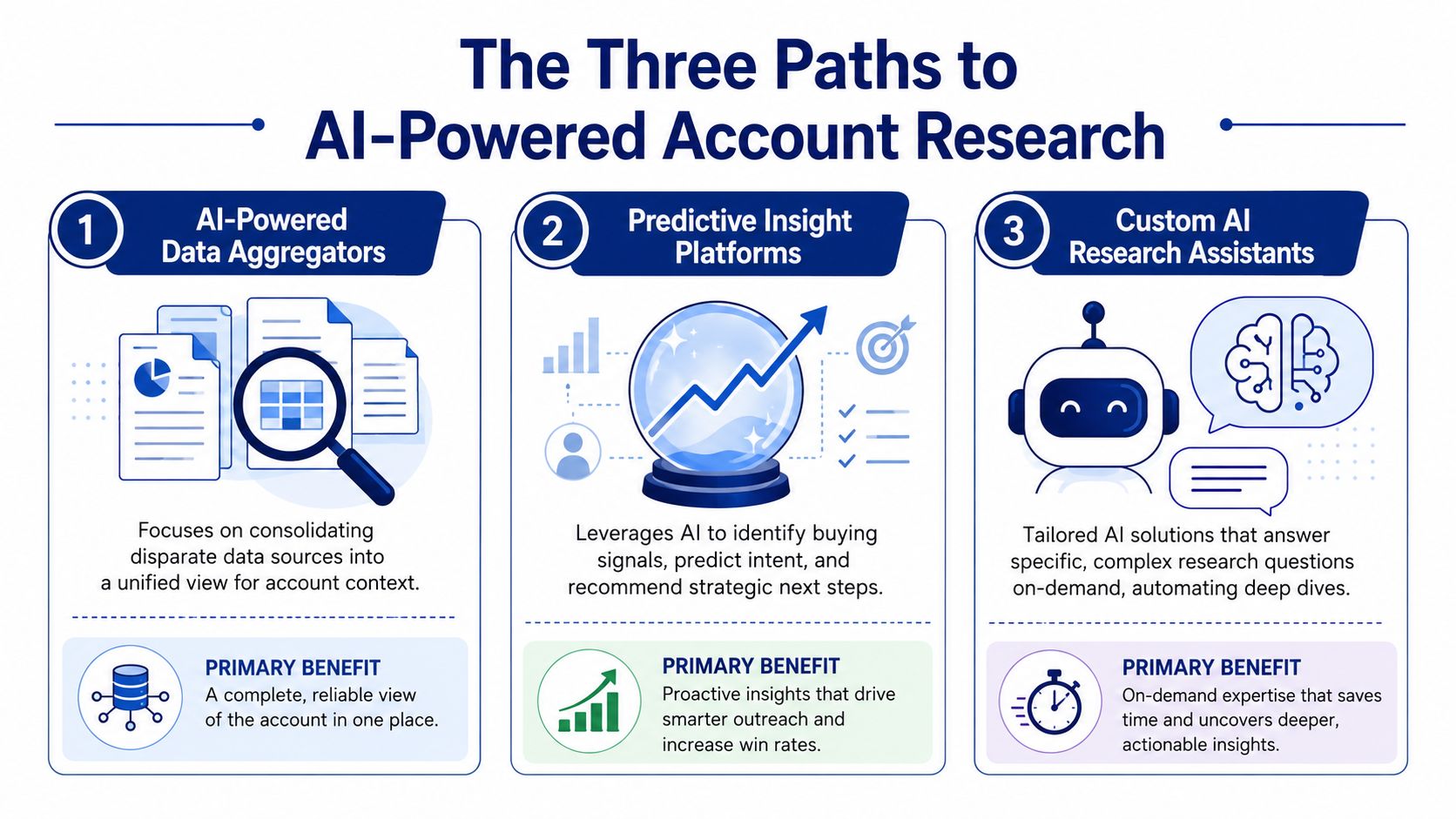
The Three Paths to AI-Powered Account Research
A sales team says it is "using AI for research." That can mean three very different operating models. One rep is pasting filings into ChatGPT. Another is reading AI summaries inside Sales Navigator. A third team has account briefs showing up in the CRM before the rep opens the record.
Those setups produce very different outcomes in speed, consistency, and handoff quality.
Path one with ChatGPT or Claude
This is usually the starting point because it is fast to test. A rep opens ChatGPT or Claude, enters a company name, uploads a transcript or 10-K, and asks for likely priorities, risks, or pain points.
For individual prep, that can be useful. I use this path for quick synthesis when I want a rough read on a company before refining the angle myself.
Its strengths are clear:
- Fast first draft: turns long source material into notes a rep can scan quickly.
- Flexible questioning: handles unusual account questions without waiting on an admin or analyst.
- Low setup cost: no rollout project, no new system, no process change.
The trade-off is operational. The rep still has to gather sources, prompt well, separate fact from inference, and save the output somewhere useful. It also costs more than it looks: in a field test of Claude researching eight accounts, a single account took 160,000 to 550,000 tokens of web reading, depending on the model.
Common failure points show up fast:
- No shared memory: context stays in one chat unless someone manually recreates it.
- No ongoing monitoring: new leadership hires, funding, product launches, or hiring shifts do not appear automatically.
- No system handoff: research often dies in a chat thread, doc, or private note.
- No standard output: every rep structures the work differently, which makes coaching and reuse harder.
This path helps a rep answer a question. It does not give the team a repeatable account research process.
Path two with AI features inside existing tools
The second path lives inside the systems reps already use, such as Sales Navigator or ZoomInfo. Adoption is easier here because the AI sits next to account and contact data the team already trusts.
That convenience matters. It cuts down on tab switching and gives reps faster access to news, firmographics, and contact context.
The limitation is usually synthesis. Embedded AI can surface useful updates, but sales leaders still need to ask whether the tool produces a usable point of view or just a better-organized feed.
A rep may get recent news, org changes, intent signals, and account details. Helpful. But someone still has to turn that into a message strategy:
- What changed at the account?
- Why does that change matter right now?
- Which initiative connects to our offer?
- Which stakeholder should hear that story first?
That is the difference between seeing signals and receiving a research brief a rep can act on.
Path three with a purpose-built platform
The third path is built for continuous account intelligence. The system monitors target accounts, pulls in relevant public evidence, synthesizes the findings, and writes the result back to the tools sellers already work from.
This changes the unit of work. The rep is no longer starting with raw inputs and a blank prompt. The rep starts with a structured brief tied to an account record, with context the manager can review and the rest of the team can reuse.
That model usually includes trade-offs of its own:
- Stronger workflow discipline: teams need clear rules for sources, prompts, review, and CRM fields.
- Higher setup effort: someone has to design the process, not just buy software.
- Governance requirements: sales ops and leadership need to decide what gets pushed to reps and what stays in the background.
The payoff is consistency. The goal of the best account research setup is to surface what matters before the rep even has to ask.
Here is the practical comparison:
| Approach | Good for | Where it breaks |
|---|---|---|
| ChatGPT or Claude | One-off account analysis and quick summaries | No monitoring, no shared workflow memory, no native CRM handoff |
| Embedded AI in sales tools | Quick context inside familiar systems | Limited synthesis, reps still assemble the story themselves |
| Purpose-built platforms | Continuous account intelligence and finished briefs | Requires process design, governance, and clear ownership |
For sales leaders, the question is less about whether AI is present and more about where the human work still sits. If reps still have to collect inputs, interpret scattered signals, and write their own summary every time, the team has added AI to manual research. It has not changed the workflow.
If your team is evaluating broader AI agent workflows for sales teams, use the same test here. Ask whether the system outputs a finished deliverable that a rep can act on, or another queue of signals that still needs rep time.

“Salesmotion helps you spot signals from prospect accounts, news items / job hiring alerts etc that indicate that now is a good time to reach out with a well-crafted message.”
Rob Douglas
Director of Sales, icit business intelligence
A Tale of Two Workflows Researching Acme Corp
Let's make this concrete.
A rep needs to prepare for outreach to Acme Corp, a target account that just moved into an active territory plan. They want to know what Acme is focused on, who matters, and whether there's a real reason to reach out now.
The manual LLM workflow
The rep opens ChatGPT.
They type something like, “Summarize Acme Corp's strategy and likely pain points.” The answer is broad, so they open the company website, copy in a press release, then find an earnings transcript and paste excerpts into a second prompt. After that, they search LinkedIn for executive changes and jot those notes into a doc.
Twenty minutes later, they've done a decent job. But they still have common gaps:
- no confidence that they caught the latest signal
- no clean distinction between fact and inference
- no record synced into Salesforce
- no reusable output for the next rep or manager
- no monitoring if something changes after today
This is the familiar “copy, paste, prompt, rewrite” cycle. Useful in a pinch. Fragile in a team setting.
The purpose-built workflow
Now take the same account in a platform built for continuous account intelligence.
The rep opens the CRM record and finds a structured brief already attached. It pulls together the company's recent public narrative, likely initiatives, leadership context, hiring patterns, and a few current triggers that give the rep a point of view. Instead of reading scattered notes, the rep reads a brief designed for action.
In the publisher's category, how to build an account brief is the core idea. A system should do the evidence gathering and first-pass synthesis before the rep enters the account.
A prospect once described their current workflow as “ChatGPT + Notebook LM.” That's honest. It means the rep is still acting as the orchestrator, the memory layer, and the quality control step.
A purpose-built platform shifts that burden into the system. Salesmotion is one example of that approach. It continuously monitors accounts and generates AI briefs without the rep having to prompt from scratch each time.
Raw information helps a rep prepare. A finished account brief helps a team execute.
Designing Your Research-to-Outreach Workflow
A workable research-to-outreach workflow answers one operational question: where does account context get created, and how does it reach the rep in time to shape outreach?
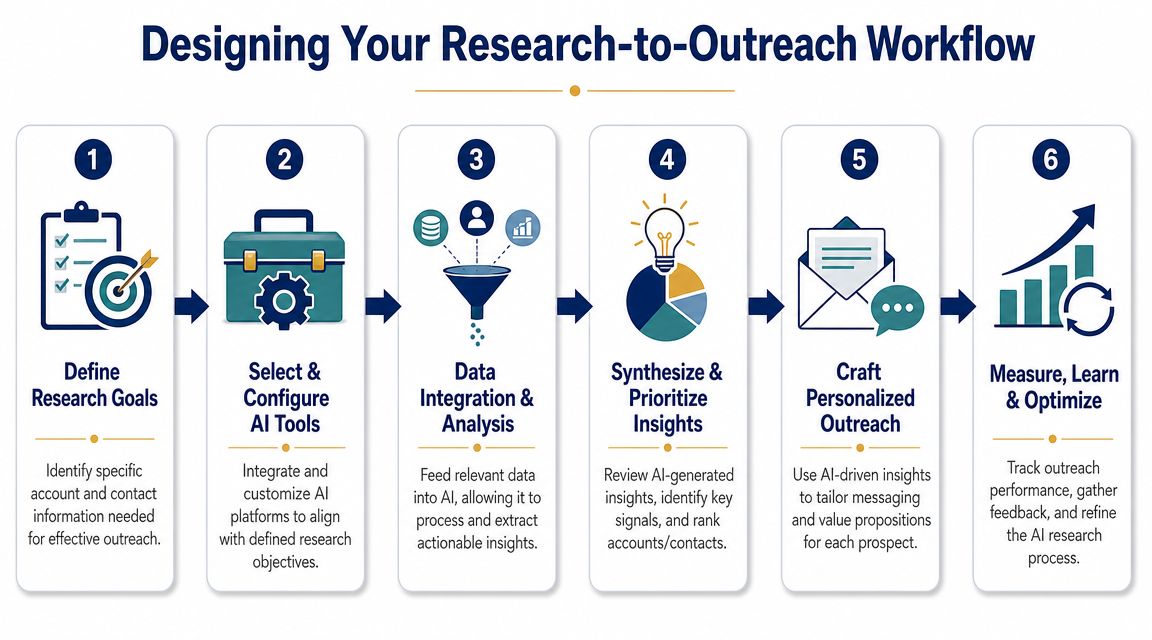
In practice, there are three versions of this workflow. A rep can research Acme Corp manually in an LLM, an AI feature inside a sales tool can generate a partial summary, or a purpose-built system can collect, structure, monitor, and write usable output back to the account record. The difference is not just output quality. It is whether the team gets a repeatable process or another one-off task.
Start with decision-grade questions
Generic prompts create generic summaries. Sales teams need research that supports a next step.
Set the workflow up around questions like these:
- What initiatives is this company signaling publicly right now?
- What changed in the last 30 to 90 days that gives a rep a reason to reach out?
- Which executive or team is most likely to care about this problem?
- What evidence belongs in the first email, call opener, or account plan?
That framing changes the output. Instead of a polished company overview, the rep gets material they can use in pipeline creation, meeting prep, and deal strategy.
Build around CRM in, CRM out
If research lives in tabs, docs, and chat threads, adoption drops fast. Reps use what shows up where they already work.
A stronger operating model is simple. Accounts enter the CRM. A workflow pulls the record, gathers public source material, generates structured notes, and writes the result back to the account. As noted earlier, that pattern is the difference between ad-hoc AI use and a system a manager can inspect.
This is also where embedded AI tools usually stall. They can help summarize a page or draft a message, but they often stop short of creating a durable record the next rep, manager, or account owner can build on.
Separate collection, analysis, and outreach generation
The cleanest workflows do these jobs in order.
- Collect evidence from filings, earnings calls, press releases, hiring pages, executive interviews, and LinkedIn.
- Analyze each source before combining anything. Tag the source by initiative, leadership change, hiring signal, expansion move, or risk.
- Synthesize at the account level only after the source notes exist and the evidence is traceable.
- Generate outreach assets such as email angles, call openers, and stakeholder-specific talk tracks.
- Write everything back to the CRM so the output survives past one rep's session.
That sequence matters. If the system jumps straight from raw inputs to an email draft, it usually blurs facts and assumptions. If it stores source-level notes first, managers can review the reasoning, and reps can adjust messaging without restarting the research.
Design for triggers, not just snapshots
A static brief helps once. A monitored workflow keeps helping.
Good account research should update when the company posts a new job cluster, changes leadership, announces a partnership, expands into a region, or shifts language on an earnings call. Those changes create the opening for outreach. Without that monitoring layer, reps end up rerunning the same research from scratch every time they revisit an account.
For teams building messaging around current developments, using company news as a sales outreach trigger is a strong downstream pattern.
Define the handoff to the rep
The final output should tell the rep what to do next. That usually means four fields inside the account record:
- Top initiatives
- Current trigger
- Likely stakeholder
- Recommended outreach angle
I use this test. If a frontline manager opens the account and still has to ask, "Why now, who owns this, and what should we say?" the workflow is incomplete.
Field note: A summary saves reading time. A workflow that turns evidence into a usable outreach angle saves selling time.

“Automatic account profile detail I can use to manage my territory. Using Salesmotion AI to generate value statements per persona, account, etc. Using Salesmotion to give me a starting point based on new hires, or news alerts is critical.”
Adam Wainwright
Head of Revenue, Cacheflow
Example Prompts and Outreach Templates
If you're still using general-purpose LLMs for one-off account prep, the prompt design matters a lot. Weak prompts produce broad, polished nonsense. Better prompts force the model to work source by source and show its reasoning.
Better prompts for manual account research
Use prompts like these when you want a quick deep dive:
-
Strategic initiatives prompt
“Read this earnings call transcript. Identify the top three strategic initiatives the company discusses. For each initiative, cite the specific language that supports it, explain which executive appears to own it, and note any likely operational pressure behind it.” -
Signal extraction prompt
“Review these recent press releases and hiring pages. List any leadership changes, expansion signals, partnership moves, or hiring patterns that could indicate a new buying motion. Separate facts from inferences.” -
Stakeholder mapping prompt
“Based on these public sources, identify likely stakeholders for [problem area]. Show which evidence supports each stakeholder hypothesis, then draft two outreach angles designed for those priorities.”
The prompts that usually fail
These are common and weak:
- “Tell me everything about Acme Corp.”
- “What pain points does this company have?”
- “Write me a personalized email.”
Those prompts ask the model to skip the evidence layer. That's when it starts guessing.
Example outreach built from real signals
Once a system has reliable account evidence, the outreach gets sharper. Instead of generic mail merge language, the rep can anchor messages to something specific.
For example:
“Noticed Acme is hiring into operations and talking publicly about efficiency. That usually creates pressure to standardize workflows across teams. Reaching out because we help revenue teams turn those operational changes into cleaner account coverage and faster response to new signals.”
Or:
“Saw the recent leadership change and the emphasis on execution in recent company communications. That often shifts how teams prioritize target accounts and outbound timing. Thought it might be useful to compare how similar teams turn those moments into coordinated outreach.”
The difference is simple. Good outreach doesn't just mention news. It explains the so what.
Measuring Impact and Avoiding Common Pitfalls
A sales leader can usually tell within two weeks whether AI account research is improving execution or just creating another layer of software. Reps either move from signal to outreach faster, managers see better account preparation, and more target accounts get covered, or they do not.
That is the standard to use.
Start with operating metrics, because they show whether the workflow changed rep behavior before pipeline numbers catch up:
- Research time per account: How much time does a rep spend getting to a usable account brief?
- Coverage of strategic accounts: How many priority accounts have current, evidence-backed briefs?
- Speed from signal to outreach: How quickly does the team respond to a hiring change, leadership move, product launch, or earnings call comment?
- CRM usage of AI briefs: Are reps opening the brief, referencing it, and using it in account planning and outbound?
- Manager inspection quality: Do forecast reviews and account reviews include clearer evidence, sharper hypotheses, and fewer generic talking points?
Then look at commercial outcomes. Reply quality, meeting quality, conversion on priority accounts, and rep ramp often improve after the operating model is in place. If those early workflow metrics are flat, the AI layer is probably sitting beside the process instead of inside it.
The failure pattern is usually operational, not technical.
Teams buy a general LLM tool, ask reps to research accounts with prompts, and assume the job is done. That setup can help an individual rep work faster on a good day. It does not give leadership a repeatable system. Outputs vary by rep, source quality is inconsistent, and no one can inspect how the brief was assembled. As noted earlier, the structured, multi-step research process matters here because it reduces the guessing that shows up in single-pass summaries.
The common mistakes are predictable:
- Signal overload: reps get alerts without context, priority, or a suggested next action.
- One-pass synthesis: the model jumps to conclusions before the evidence is sorted and checked.
- No source traceability: managers and reps cannot verify what supports a claim in the brief.
- No workflow integration: research lives in Slack, docs, or browser tabs instead of the CRM and outreach flow.
- No review threshold: high-value accounts get the same level of scrutiny as low-priority ones, or none at all.
The contrast among the three approaches becomes obvious. Manual LLM use can save a rep time on one account. Embedded AI can summarize records already inside a sales tool. A purpose-built intelligence system changes team throughput because it handles collection, structuring, synthesis, and delivery in one workflow. That is how a team gets from twenty minutes of ad hoc Acme research to a brief that appears in about thirty seconds with sources attached and outreach implications already framed.
What tends to work is not flashy. Reliable collection from defined sources. Consistent tagging. AI-generated synthesis with evidence attached. Human review for exceptions, important accounts, and anything that will influence account strategy.
A peer-reviewed review of AI in analytics found that AI is useful for reducing manual analysis time, automating repetitive work, and improving precision in data-heavy processes, which maps well to account research across large account lists. The review is available through this peer-reviewed review of AI in big data analytics.
Use AI for speed and coverage. Keep ownership of judgment, source standards, and review with the sales team.
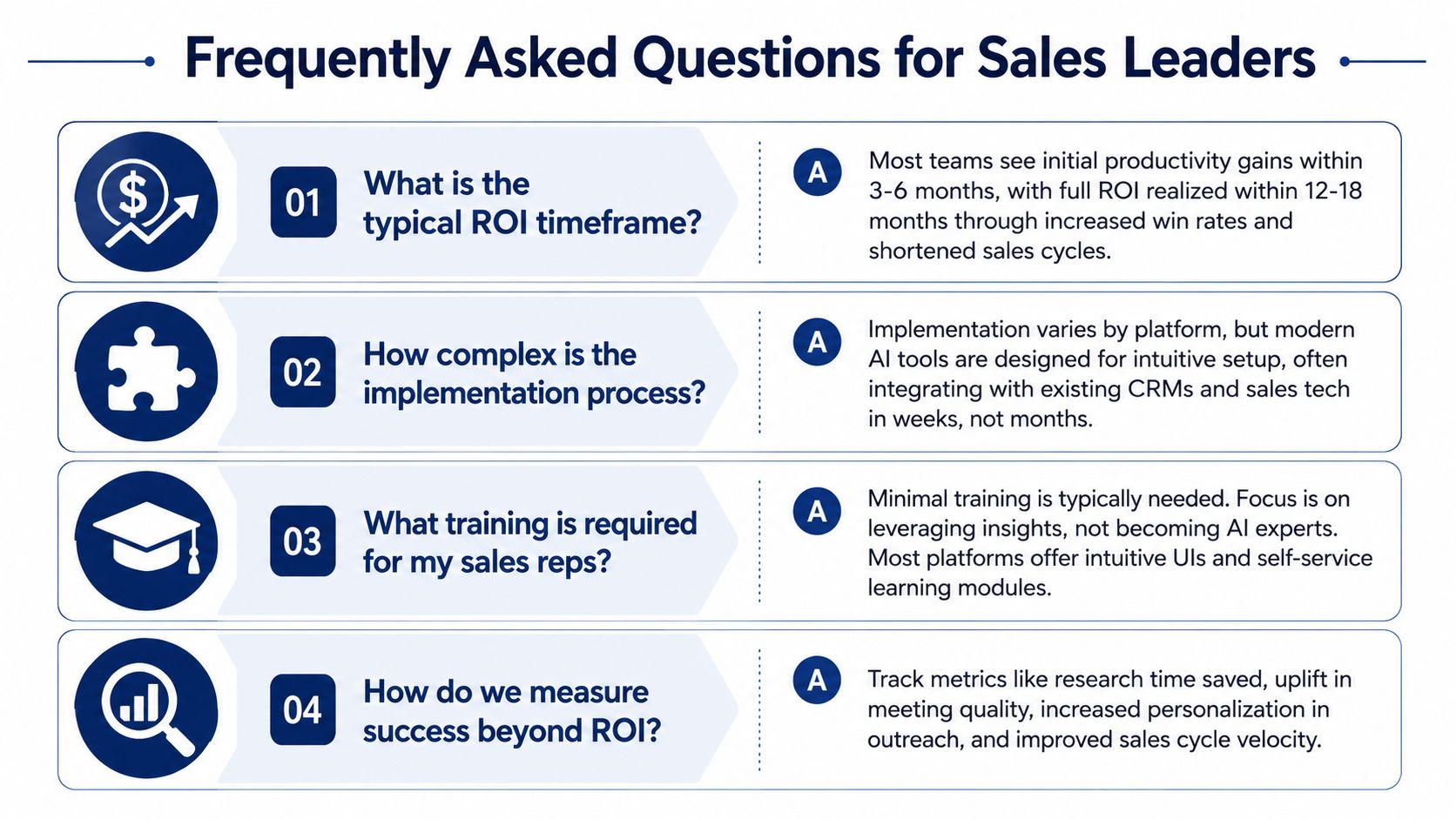
Frequently Asked Questions for Sales Leaders
The adoption questions usually aren't about whether reps like AI. They're about whether leadership can trust the output and operationalize it.
How do we keep AI-generated account briefs trustworthy
Governance has to be designed in. Leaders should decide what evidence every AI brief must include, who verifies it, and what level of confidence is required before it reaches a rep or the CRM. That's especially important because frontier AI systems still hallucinate and employees are already using AI informally without oversight, a governance issue discussed in this overview of AI account research operations.
How does this scale beyond a few power users
It scales when the workflow sits inside the systems reps already use. If the process depends on a handful of people writing clever prompts, it won't spread. If briefs and alerts appear in the CRM, email, or Slack with clear source traceability, adoption becomes much more natural.
Do we need heavy implementation
Not necessarily. The core pattern is straightforward. Connect account records, pull public evidence, generate structured output, and return it to the rep workflow. The harder part is usually deciding what should count as a real signal and where human review is required.
Should reps still do their own research
Yes, but differently. They should spend less time collecting raw information and more time pressure-testing the AI's conclusions, tailoring outreach to the buyer, and preparing for live conversations.
The point of learning how to use AI for account research isn't to remove seller judgment. It's to stop wasting seller judgment on copy-paste work.
If your team wants account research to happen continuously instead of manually, Salesmotion is one option to evaluate. It uses AI agents to monitor target accounts, generate structured briefs from public signals, and route that context into rep workflows so sellers can move from research to outreach without starting from a blank page.