The average B2B rep spends 60-90 minutes researching a single enterprise account before a first meeting. They toggle between LinkedIn, the company website, SEC filings, news aggregators, earnings call transcripts, and Glassdoor reviews. Most of that time is spent locating information, not analyzing it. And the result? A handful of bullet points on a sticky note. According to Forrester, executive buyers rank "understands my business" as the number one attribute they value in a sales rep, yet most reps walk into meetings with surface-level preparation because thorough account research takes too long.
TL;DR: Modern account research should take 5 minutes, not 60. The key is consolidating fragmented sources (earnings calls, SEC filings, news, leadership changes, hiring patterns) into a single workflow that surfaces strategic context, not just company facts. Reps who research faster do not research less. They research smarter, focusing on what actually changes the conversation.
The Real Cost of Slow Account Research
The math on slow research is brutal. A team of 20 AEs, each spending 5 hours per week on account research across multiple tools, burns 5,200 hours per year. That is 2.5 full-time headcount spent on gathering information, not selling. And the quality of that research varies wildly because every rep has a different process, different bookmarks, and different levels of diligence.
The hidden cost is what gets missed entirely. When research takes an hour, reps cut corners on the accounts that seem less urgent. They skip the earnings call transcript. They miss the leadership change. They never see the job posting that signals a strategic initiative directly aligned to what they sell. The accounts that needed the most research get the least because there is never enough time.
Here is what a typical account research workflow looks like today:
| Source | Time Spent | What You Get |
|---|---|---|
| LinkedIn (company page + key people) | 15-20 min | Headcount, recent posts, leadership bios |
| Company website (about, newsroom, blog) | 10-15 min | Product strategy, recent announcements |
| News search (Google News, industry pubs) | 10-15 min | Press coverage, partnerships, M&A |
| SEC filings / earnings transcripts | 15-20 min | Financial health, strategic priorities, risk factors |
| Glassdoor / review sites | 5-10 min | Culture signals, hiring patterns |
| CRM notes + past interactions | 5-10 min | Historical context, prior engagement |
Total: 60-90 minutes. And that is for a single account. Do this for 10 target accounts a week and you have lost an entire selling day.
See Salesmotion on a real account
Book a 15-minute demo and see how your team saves hours on account research.
Step 1: Start With Fast Facts, Not a Google Search
The first mistake in account research is opening a browser and starting to search. That is the slowest possible path because you have no framework for what matters. Start instead with a structured overview that gives you the 80/20 in 60 seconds: company size, industry, recent funding, fiscal year timing, key executives, and the top strategic initiatives.
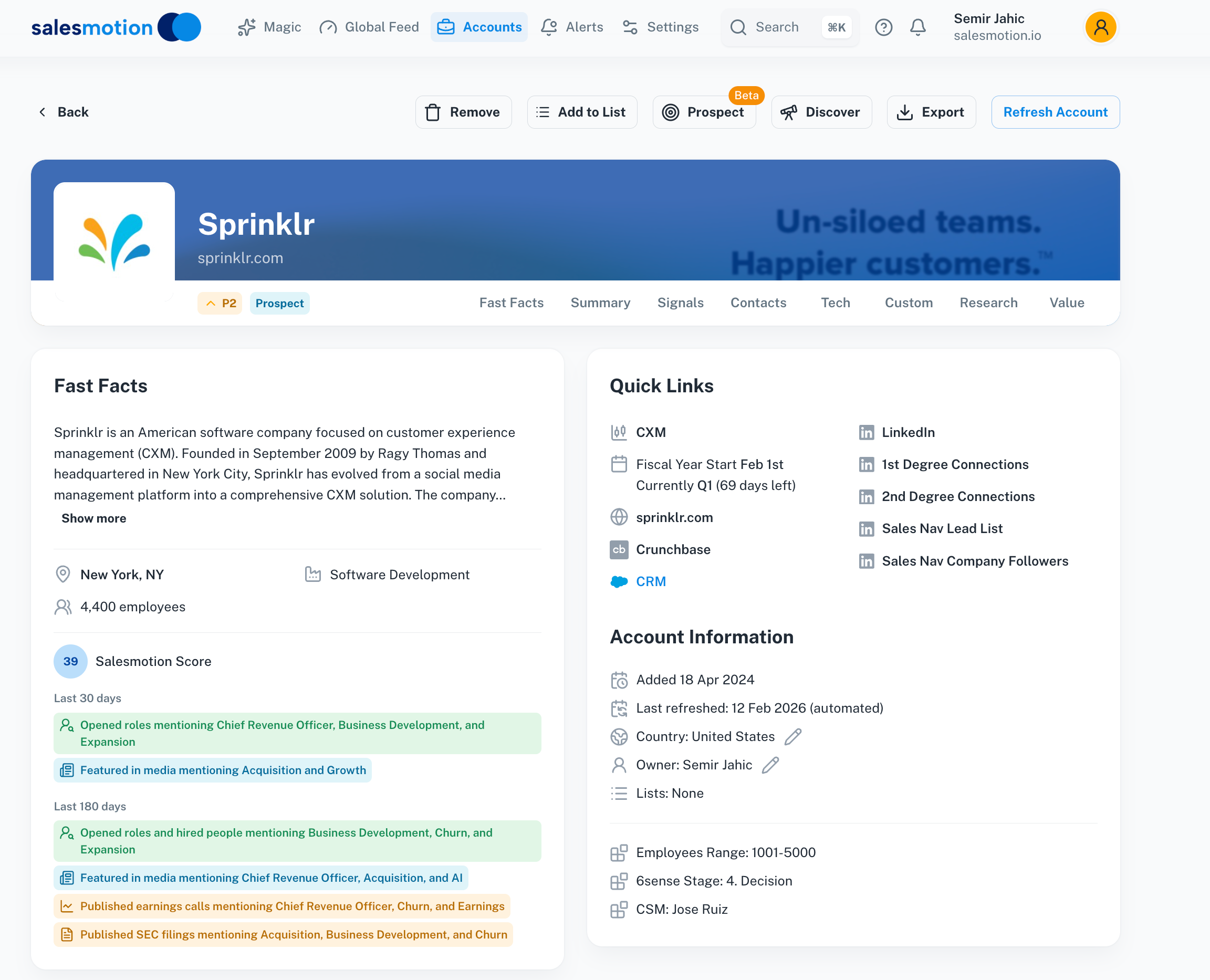 Fast Facts gives you a structured account overview, including company size, industry, key executives, and strategic priorities, in under a minute.
This is not about memorizing facts. It is about building a mental model of the account before you go deeper. When you know the company just reported earnings, you know to check the transcript. When you see a new CRO was hired three months ago, you know the sales strategy is likely shifting. The fast facts layer is your research compass.
The best account research workflows are sequential and intentional: start wide with the overview, then drill into the areas that matter most for your specific deal hypothesis. For a deeper look at what account research is and why it matters, see our comprehensive guide to account research in B2B sales.

“Salesmotion has been a game-changer for me. I used to spend 12 hours a week on prospect research, now it's down to 4. Plus I'm finding stuff I was totally missing - podcasts, news mentions, the good bits.”
George Treschi
Account Executive, FY25 President's Club, Sigma
Step 2: Mine the Earnings Call and Financial Filings
For enterprise accounts, earnings calls are the single most underused source of sales intelligence. The CEO and CFO spend 60-90 minutes telling analysts exactly what the company plans to invest in, what is working, what is failing, and where they see growth. This is the strategic roadmap, delivered publicly, and most reps never read it.
The problem is access and time. Earnings transcripts run 10,000+ words. 10-K filings are 200+ pages. Nobody has time to read them line by line. What you need is the ability to search across these documents for the specific themes that matter to your deal.
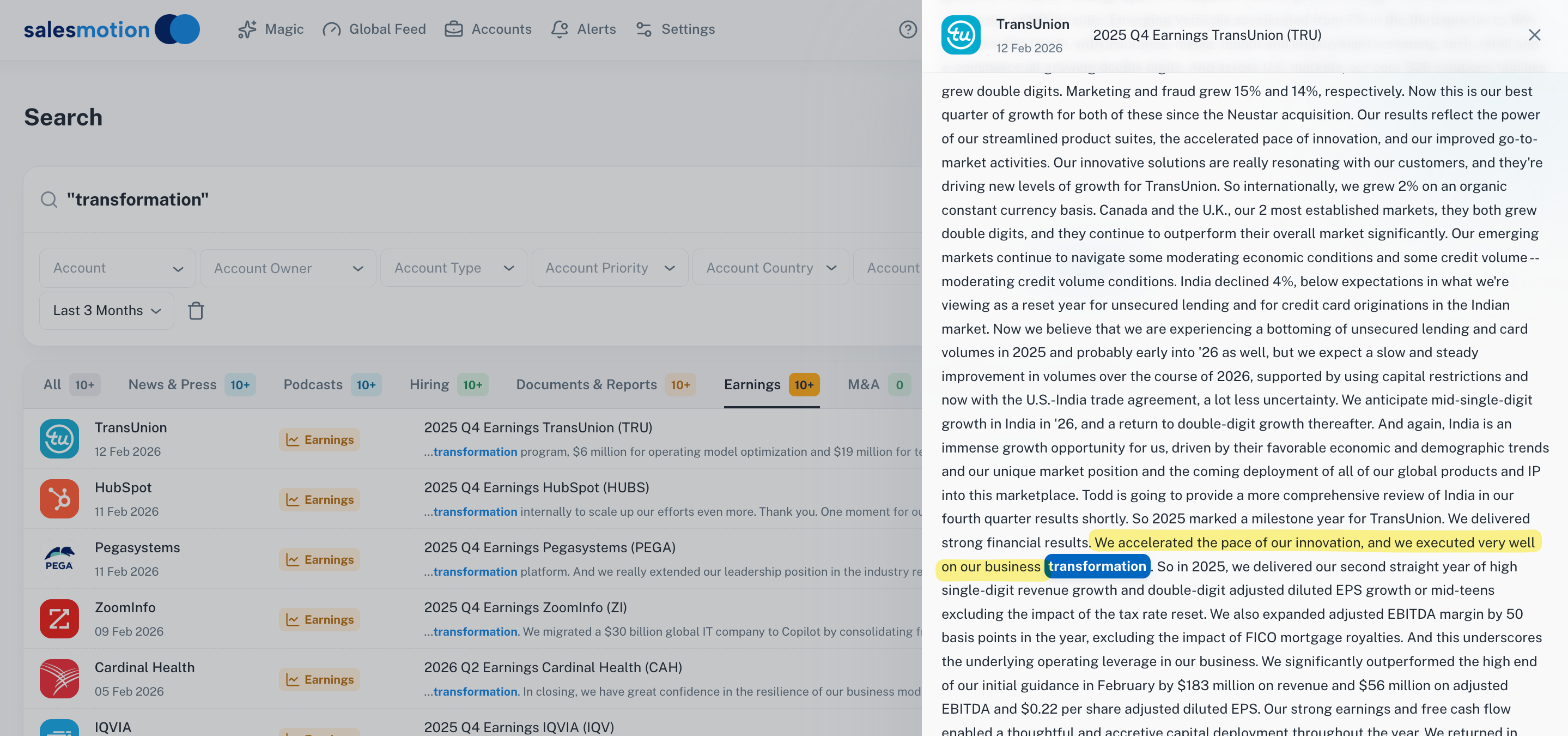 Search across earnings transcripts to find exactly where executives discussed the themes that matter to your deal, from digital transformation spend to margin pressure.
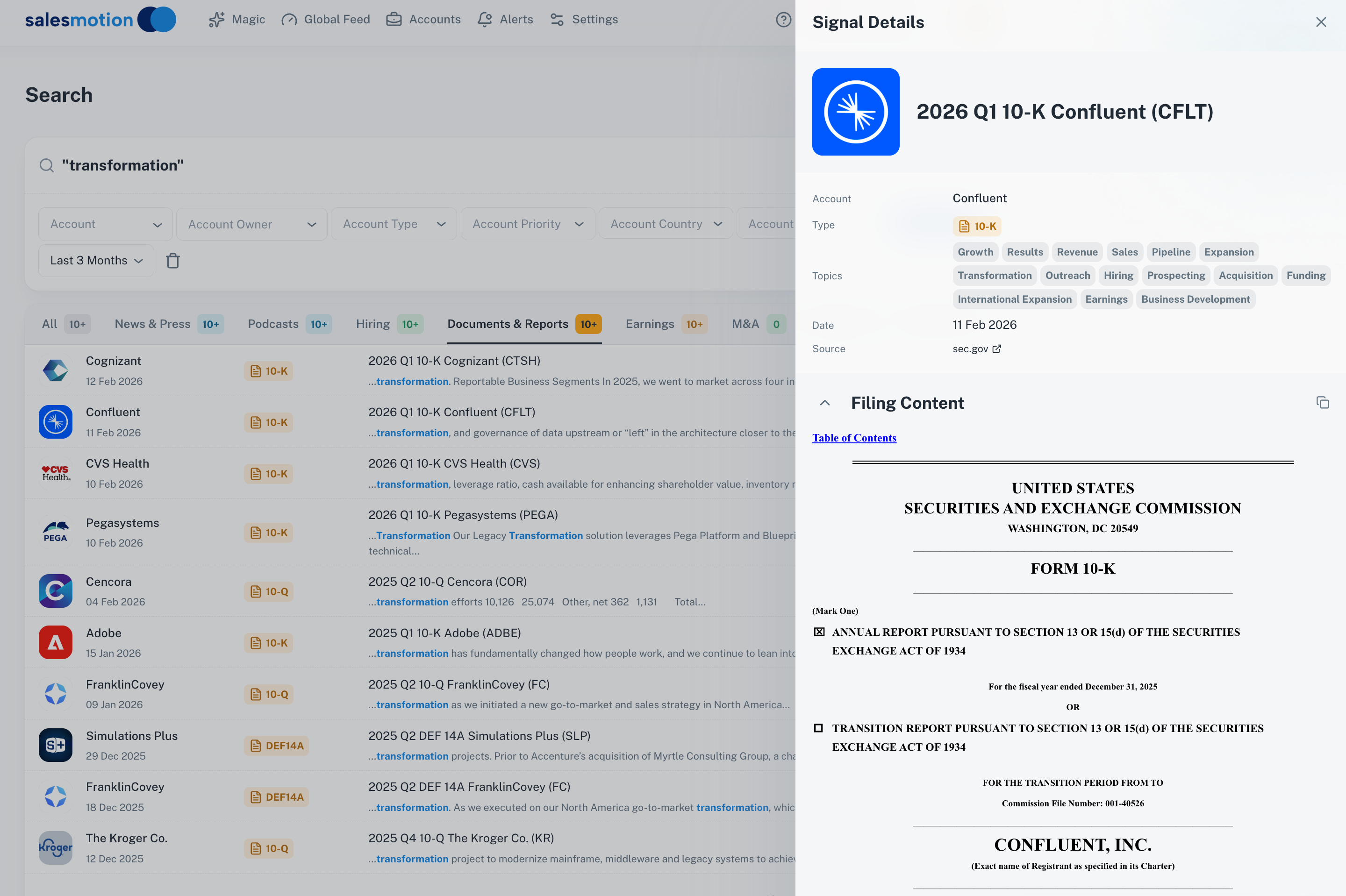 Search across SEC filings like 10-Ks and 10-Qs to surface risk factors, strategic investments, and competitive disclosures relevant to your value proposition.
When you can search across earnings calls and filings for keywords like "cost reduction," "digital transformation," or "sales productivity," you find the exact quotes where the CEO told Wall Street what they plan to spend money on. That is your entry point for a conversation that resonates at the executive level. These CEO statements are also powerful buying signals that indicate where the company is actively allocating budget.
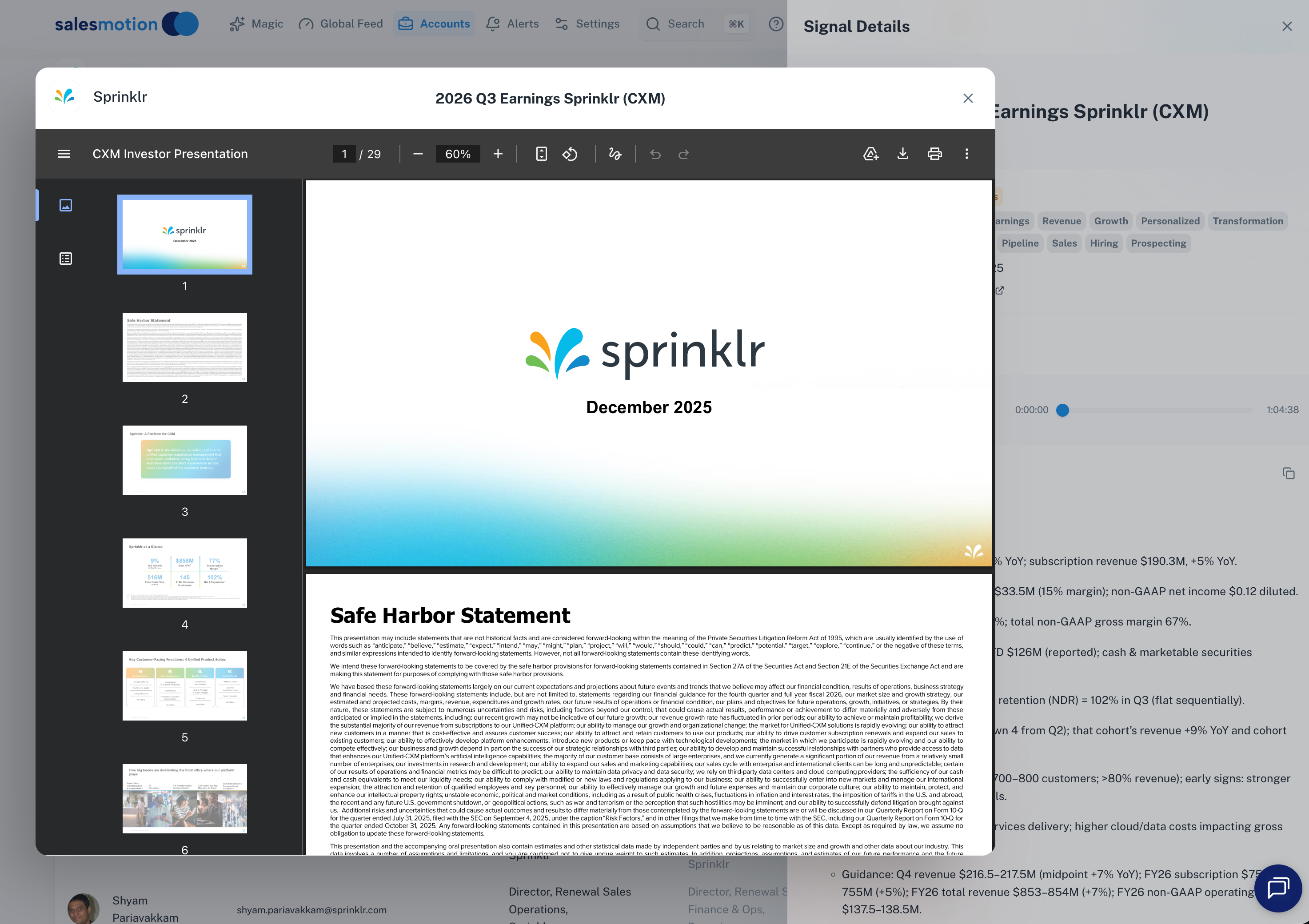 Review earnings presentation slides alongside the transcript to understand both the narrative and the numbers behind an account's strategic direction.
Step 3: Surface AI-Generated Insights
The hardest part of account research is not finding information. It is connecting disparate data points into a coherent narrative. A leadership change, a new product launch, an earnings miss, and a hiring surge in engineering might all be related, but it takes a skilled analyst to see the pattern.
This is where AI-powered account intelligence changes the workflow. Instead of manually connecting dots across six tabs, AI surfaces the connections and generates a narrative that explains what is happening at the account and why it matters for your conversation.
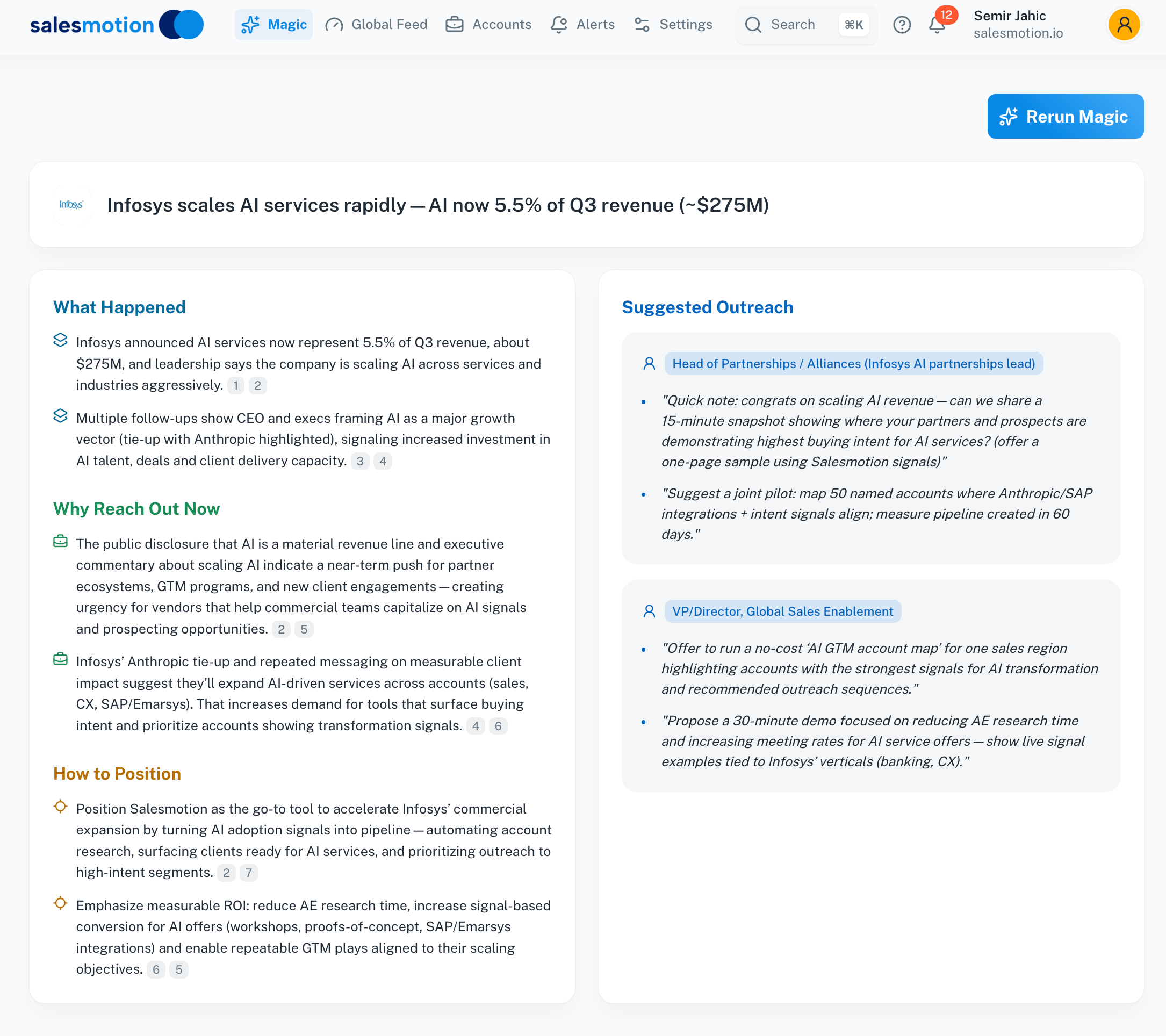 AI-generated insights synthesize leadership changes, strategic initiatives, financial data, and market signals into a coherent narrative you can use in your next meeting.
The insight layer is what turns 60 minutes of research into 5. Not because you are skipping information, but because the synthesis happens automatically. The rep's job shifts from "find the data" to "decide what to do with it," which is a far better use of their time.
Teams at Analytic Partners saw this shift firsthand. Their business development team now gets 80-90% of what they need in 15 minutes, a complete transformation in how reps prepare for conversations.

“This is my singular place that very simply summarizes a company's top initiatives, strategies and connects them to my solution. Something I would spend hours researching manually, now it's automated.”
Derek Rosen
Director, Strategic Accounts, Guild Education
Step 4: Validate and Prepare Your Talking Points
Research without application is trivia. The final step is translating your findings into 3-5 specific talking points for your next interaction. Each talking point should follow this formula:
Observation + Relevance + Question
For example: "I noticed your CEO mentioned a $50M investment in AI infrastructure on last quarter's earnings call. Several of our customers in your space have used that kind of initiative as the catalyst for consolidating their sales intelligence stack. How is your team thinking about the research tools that support that motion?"
This formula works because it demonstrates you did the work (observation), connects it to something the buyer cares about (relevance), and opens a conversation rather than delivering a pitch (question).
Here is a practical checklist for your pre-meeting prep:
- One insight from the earnings call or annual report tied to a strategic priority
- One recent leadership change and what it might signal about shifting priorities
- One industry trend affecting the account specifically (not a generic trend)
- One competitive or market signal that creates urgency or relevance
- One connection between all of the above and your specific value hypothesis
This takes 5 minutes when the research is already consolidated. It takes an hour when you are starting from scratch across six different tools.
Key Takeaways
- Account research should take 5 minutes, not 60-90. The bottleneck is information access, not analysis skill.
- Start with structured fast facts, not a Google search. Build a mental model of the account before going deeper.
- Earnings calls and SEC filings are the most underused sources of enterprise sales intelligence. They contain the CEO's own words about where the company is investing.
- AI-generated insights synthesize disparate data points into actionable narratives, shifting the rep's job from "find data" to "decide what to do with it."
- Translate research into 3-5 specific talking points using the Observation + Relevance + Question formula.
- Teams using Salesmotion for consolidated account research report saving 6+ hours per week per rep, time that goes directly back to selling.
Frequently Asked Questions
How long should account research take before a sales meeting?
Five minutes for a well-prepared meeting is achievable with the right workflow and tools. The goal is not to spend less time caring about the account. The goal is to eliminate the 55 minutes spent locating and organizing information so you can focus on the 5 minutes of analysis and talking point preparation that actually change the conversation. Teams at Guild Education report saving 30 minutes per account research session by consolidating their workflow.
What sources matter most for enterprise account research?
Earnings call transcripts and SEC filings are the highest-value sources because they contain the CEO's and CFO's own words about strategic priorities, investment areas, and risk factors. After that, leadership changes, hiring patterns, and recent press coverage round out the picture. The mistake most reps make is spending too much time on easily available sources (LinkedIn, company website) and not enough on the high-value sources (earnings, filings, strategic initiatives) that differentiate their preparation.
How do you research a private company that does not file with the SEC?
Private companies require a different source mix: press releases, executive interviews on podcasts, job postings (which signal investment areas), funding announcements, and industry publication coverage. The research framework is the same, but you need to start with what is publicly observable (hiring patterns, news mentions, technology stack signals) rather than financial filings. Buying signals like leadership changes and new product launches are public for both private and public companies.
What is the difference between account research and account intelligence?
Account research is a manual activity: a rep spending time gathering information about an account. Account intelligence is the automated, continuously updated layer that consolidates research from hundreds of sources and surfaces what matters without manual effort. The shift from research to intelligence means reps always have current context on every account in their territory, not just the ones they had time to research this week.
How do you prioritize which accounts to research first?
Prioritize accounts showing active buying signals: leadership changes in your buyer persona, earnings commentary about initiatives you address, hiring surges in the department you serve, or technology evaluation signals. If you want to automate this prioritization layer, see our roundup of the best B2B sales automation tools with AI agents. Accounts with active signals deserve 5 minutes of deep research. Accounts with no recent signals can be monitored passively until a trigger appears. This signal-based prioritization prevents the common trap of spending equal time on every account regardless of readiness.