A rep sees it first.
One of their target accounts posts a leadership update on LinkedIn. In the comments, an executive casually praises a competitor's rollout. Later that week, the same company publishes a job opening asking for experience with that competitor's platform. Nobody on the sales team connects the dots. The account stays in “monitoring” status until procurement starts talking to someone else.
That's how deals slip away. Not because the team lacked effort, but because the signal never became a workflow.
Teams frequently still treat competitive intelligence as a research task. They review competitor mentions in closed-lost notes, pull a win-loss report at quarter end, and call that visibility. The problem is timing. When a prospect mentions a competitor in an earnings call, a job post, a news article, a review thread, or a live buyer conversation, they're revealing intent. That's the moment to act.
The gap is bigger than most sales leaders think. Gartner data says 60% of sales professionals admit they lack timely signals needed to pivot their approach during a prospect meeting, yet most guidance still stops at basic monitoring and never shows how to operationalize those signals inside the sales motion. The result is a lot of awareness and very little action. If you want the broader context behind that shift, Salesmotion's take on signal-based selling is a useful framing.
From Signal to Sale An Introduction
Competitive mentions create anxiety for sales teams because they feel like bad news. They're often the opposite.
If a prospect account is mentioning a competitor publicly, hiring for experience with a rival product, or talking about a category initiative tied to your market, that account is telling you something important. They're already spending time on the problem you solve. That makes the mention a selling trigger, not just a threat indicator.
Why most teams miss the moment
The usual process breaks in three places:
- The signal lives in the wrong place. It sits in a news alert inbox, a rep's browser tab, or an analyst's spreadsheet.
- The meaning is unclear. Teams can't tell whether the mention signals active evaluation, current usage, dissatisfaction, or just casual awareness.
- The follow-up is weak. Reps default to “we're better than Competitor X,” which sounds self-serving and lands flat.
Practical rule: A competitor mention is only valuable when it changes rep behavior on a live account.
That's the lens I use. If a mention doesn't affect prioritization, messaging, or next action, it's noise.
What a good process looks like
A working system does four things well.
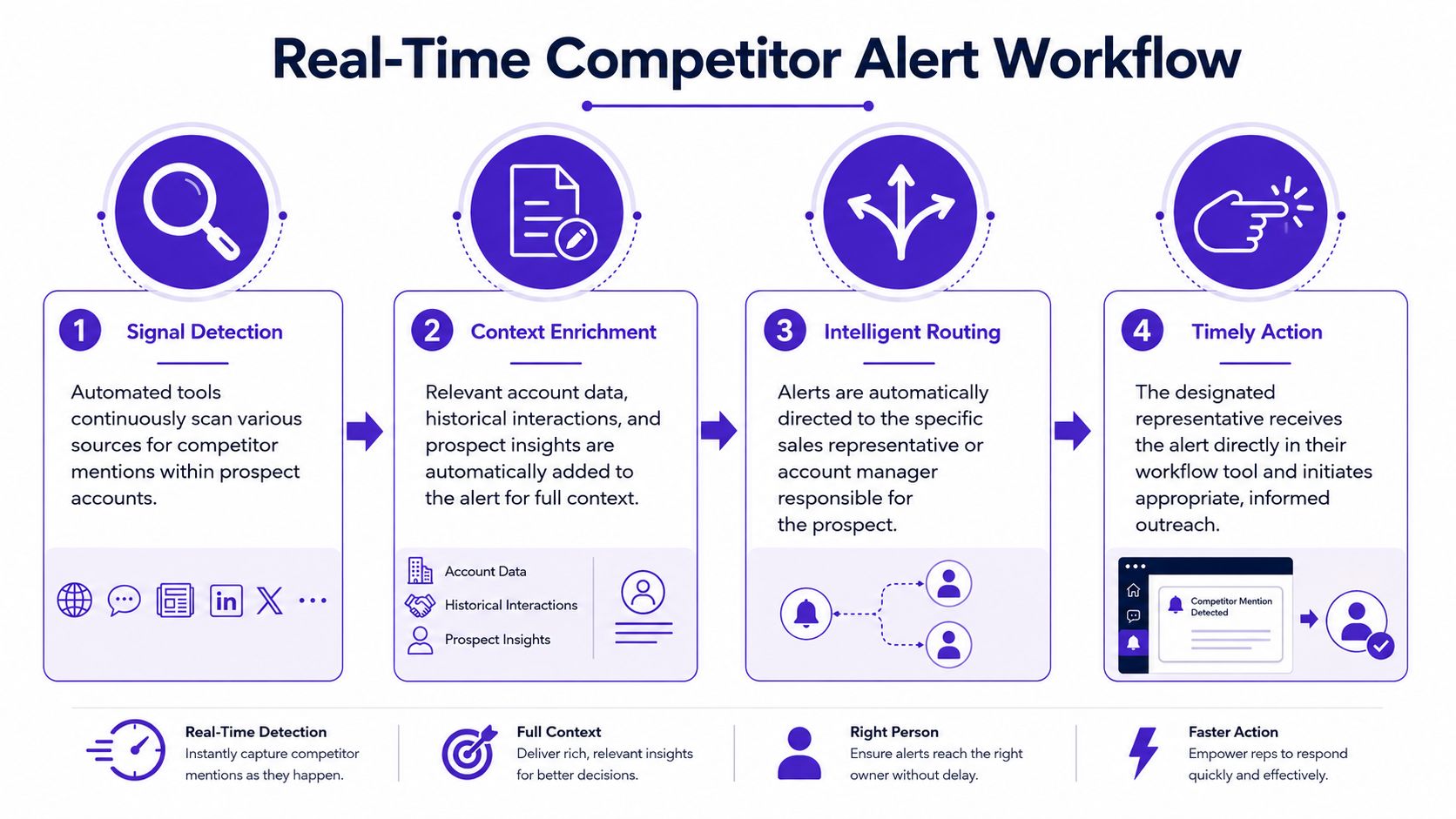
First, it finds mentions across multiple surfaces, not just one. Public company communication, hiring data, third-party platforms, and sales conversations each reveal a different slice of intent.
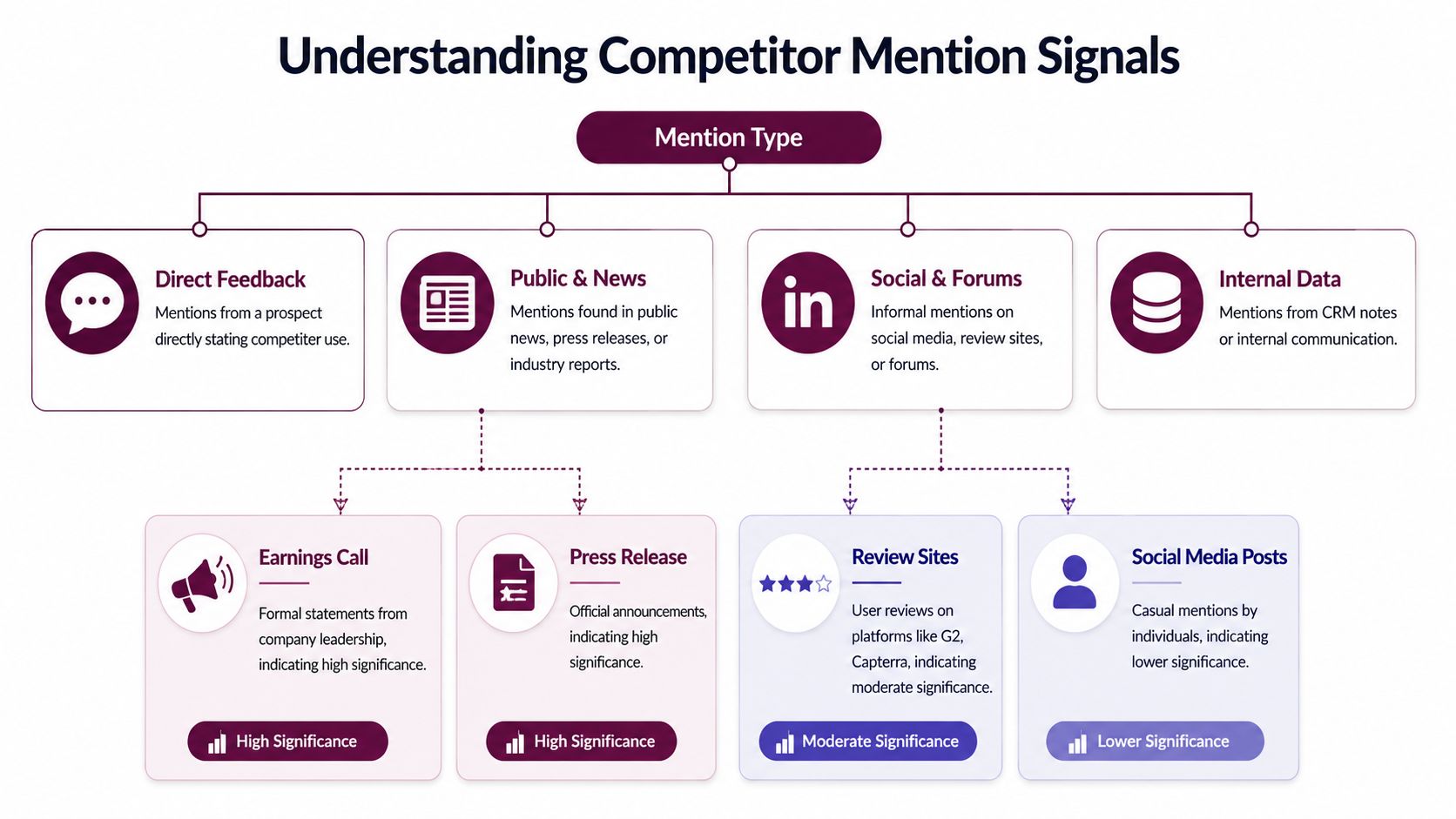
Second, it qualifies the mention. A board-level statement carries more weight than a casual social comment. A review-site complaint carries different urgency than a neutral industry mention.
Third, it routes the signal fast. Reps won't live in another dashboard. They'll act on alerts that arrive inside the tools they already use.
Fourth, it gives the rep a point of view. The follow-up shouldn't attack the competitor. It should connect the signal to a business issue the buyer already cares about.
Here's the shift in simple terms: stop treating competitor mentions as background research, and start treating them as a trigger for account action.
See Salesmotion in action
Take a self-guided interactive tour — no signup required.
Decoding Signals Where Mentions Hide and What They Mean
A common question is where to find competitor mentions. The better question is which mentions matter enough to change outreach.
The answer starts with source quality. A prospect mentioning a vendor on an earnings call isn't the same as an employee liking a LinkedIn post about that vendor. Both are useful. They just mean different things.
The main places to look
I group competitor mentions into four buckets.
| Source | What you might see | What it usually signals |
|---|---|---|
| Public corporate communication | Earnings calls, press releases, implementation announcements, partnership news | Strategic commitment, vendor selection, category investment |
| Hiring activity | Job posts asking for experience with a competitor or adjacent stack | Current usage, planned rollout, internal expansion |
| Third-party platforms | G2 comparisons, review threads, industry articles, listicles | Evaluation behavior, dissatisfaction, shortlist activity |
| Public social chatter | LinkedIn posts, comment threads, forums, podcasts | Informal interest, peer influence, problem awareness |
How to read intent instead of just logging mentions
A mention on its own doesn't tell you much. Intent does.
A practical way to interpret mentions is to normalize every source into a single competitor taxonomy, then track mention frequency, source type, and intent context, such as complaint, comparison, shortlist, or switch signal. The strongest accounts are the ones where mentions cluster across multiple independent channels, which Semrush highlights in its guidance on competitive analysis and brand monitoring.
That framework gives you three common interpretations.
Current user
This is the easiest one to detect. You'll see it in job descriptions, implementation news, partner content, or employee posts describing work with a competitor's tool.
Don't rush to pitch replacement. Current-user signals usually mean the account is invested in the category. Your opening move is to understand maturity and gaps.
Good read: “They have something in place.” Bad read: “They're unavailable.”
Active evaluator
This is the most valuable state for outbound. Comparison-page behavior, review threads, buyer-side questions on social, or multiple mentions across news and community sources often point to live evaluation.
If an account appears in several places with the same category pattern, that's rarely random. It usually means a project is forming, a vendor review is underway, or an internal champion is collecting options.
A single mention can be curiosity. A pattern across channels usually means work is already happening inside the account.
Possible churn or dissatisfaction
Teams either overreact or miss the opening entirely. Complaint language on review sites, frustrated social posts, comments about integration pain, or buyer-side discussion about switching are not all equal. But they can be strong displacement signals when they come from people close to the implementation.
The key is to respond to the business problem, not the complaint itself.
What doesn't work
Manual checking sounds disciplined and fails in practice. Reps won't consistently search news, LinkedIn, review sites, and forums across dozens of accounts.
Another mistake is treating all mentions the same. Teams that do this end up prioritizing a neutral article mention the same way they'd prioritize a buyer complaint in a review thread.
For a broader strategic lens on how market signals fit into research and positioning, I like Fypion Marketing's B2B insights. It's helpful because it connects market context to actual go-to-market choices, not just monitoring.
If you need a simple planning model for sorting these signals, Salesmotion's competitive analysis framework gives a useful structure for deciding what belongs in active account coverage.

“The talking points are gold. If they're in Salesmotion, I know they're being discussed inside that business. That makes it easy to spark a real conversation, which is 90 percent of the battle.”
Andrew Giordano
VP of Global Commercial Operations, Analytic Partners
Building Your Automated Monitoring System
Manual searching is fine for one account. It breaks immediately when you have territory coverage, named-account lists, or multiple reps watching the same segment.
The fix is an always-on monitoring system that turns scattered mentions into a clean signal feed.
The category itself has evolved. What started with basic email alerts has expanded into platforms that monitor a mix of social channels, news, web mentions, and sentiment in real time, which Oxford College of Marketing describes in its overview of competitor monitoring tools. That matters because competitor mentions can now be treated as a structured signal inside sales workflows instead of just a list of search results.
Start with a focused tracker set
Teams often make the same mistake at setup. They track too much.
A practical rule from Gong's competitor-tracking workflow is to use no more than 6 trackers. That limit forces discipline. You stop throwing every market term into the system and start choosing the phrases that actually change selling behavior.
Here's a good starting set:
- Core competitor names. Include the vendor brands your reps see most often in deals.
- Product-line references. Track the product names buyers mention, not just the parent company.
- Common misspellings and shorthand. Buyers and journalists don't always use the official term.
- Category phrases. Terms like “digital transformation” can reveal initiative-level intent when they appear alongside competitor activity.
- Switch language. Words like “replace,” “migrate,” or “consolidate” help separate passive mentions from active movement.
Build one taxonomy across all sources
This is the part many teams skip, and it's why their monitoring feed turns into clutter.
Your taxonomy should map every tracked term to a consistent account-level view. If one source says “Salesforce,” another says “SFDC,” and a third references a product family, the system should treat them as related rather than as separate noise.
That lets you compare mentions by account, source, and context instead of staring at disconnected alerts.
A practical setup looks like this:
-
Define competitor families
Group direct rivals, adjacent tools, and aspirational vendors separately. -
Map strategic keywords to those families
Include initiative language that often appears near vendor evaluation. -
Attach source tags
Label each mention by source class, such as hiring, news, social, review, or call transcript. -
Add an intent label
Mark each mention as current use, comparison, complaint, shortlist, or switch signal.
Use tools that support real account search
Dedicated platforms address this need. Google Alerts can still catch basic web mentions, but it won't give reps the context they need across target accounts.
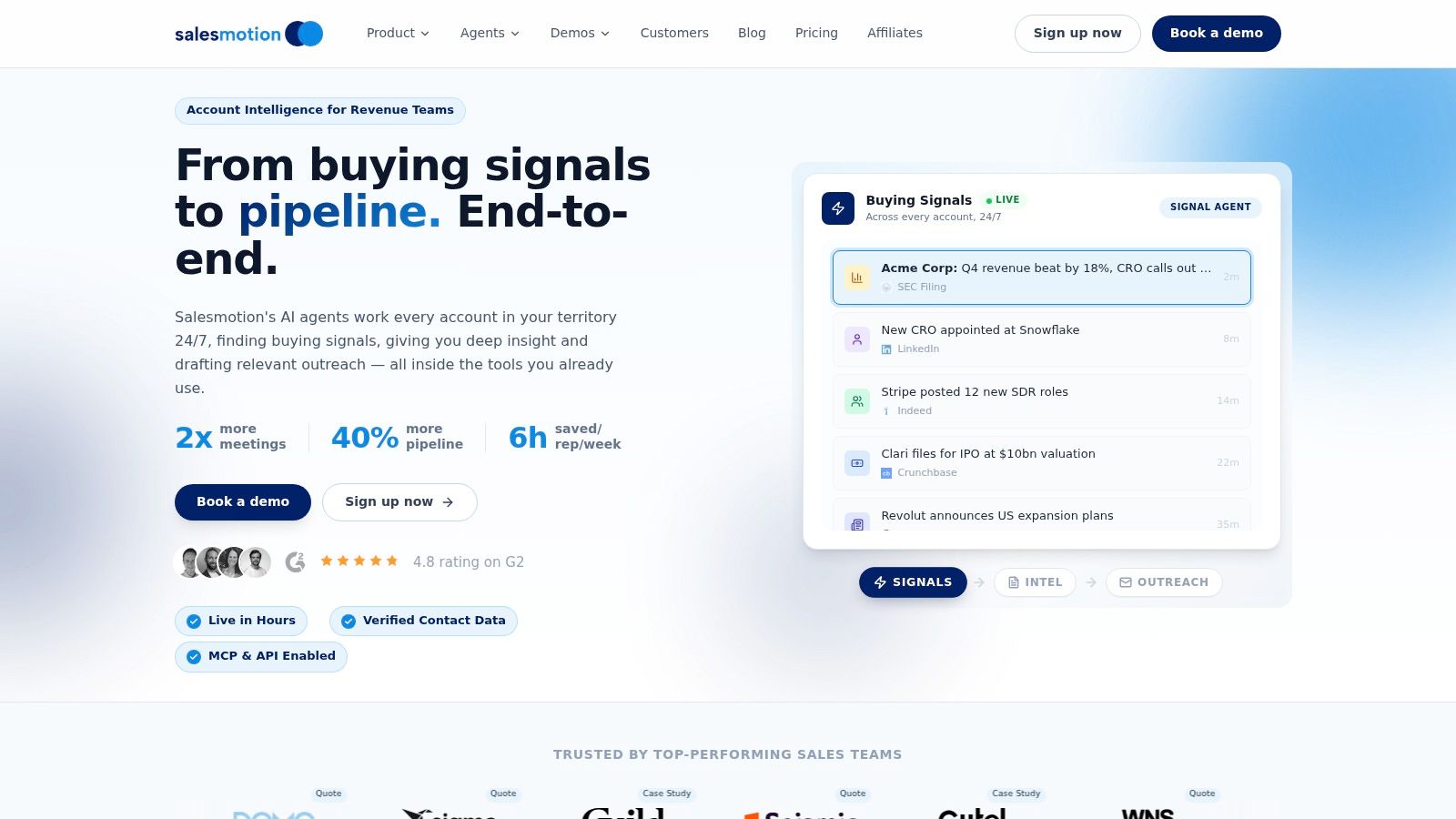
One option is Salesmotion's Global Search, which lets teams search specific keywords across all monitored accounts, such as “Salesforce” or “digital transformation,” and pull those mentions into a unified account view. Used properly, that's less about search and more about persistent surveillance of the exact terms that matter to your segment.
The goal isn't to collect more mentions. It's to create fewer, better signals that a rep can act on the same day.
If you're evaluating different setups, this guide to real-time account monitoring tools is useful for comparing what belongs in a modern workflow versus what still behaves like a passive alert feed.
Routing Alerts for Real-Time Action in Your Workflow
A dashboard doesn't create pipeline. Action does.
Most competitor-monitoring projects often stall. Ops builds the feed, leadership likes the idea, reps nod, and then nothing changes because the signal isn't landing where work happens.
Route by urgency, not by source alone
The source matters, but urgency matters more.
A complaint about a competitor from a buyer on social should move faster than a neutral trade-publication mention. A direct competitor reference during an active opportunity should outrank almost everything else. Routing rules need to reflect that reality.
A simple operating model works well:
- Instant Slack alert for high-urgency signals tied to active accounts or open opportunities
- CRM activity log for lower-urgency mentions that matter for account history
- Manager escalation when the mention indicates live displacement risk or strategic account exposure
- Digest summaries for patterns that are useful but not time-sensitive
What every alert should include
The rep shouldn't have to investigate before understanding why the mention matters.
Every routed alert should include:
- The exact mention. What was said, and where it appeared.
- Account context. Open opportunity, owner, recent activity, and strategic priority.
- Interpretation. Current user, evaluator, churn risk, or category investment.
- Suggested next move. A practical action the rep can take right away.
That context layer is the difference between “Competitor X was mentioned” and “Procurement at this target account is likely evaluating alternatives after a public implementation issue.”
Why routing is the filter
Signal overload isn't really a collection problem. It's a decision problem.
According to a 2025 McKinsey report on sales intelligence, teams waste 45% of their time analyzing low-value signals because they don't have a framework to separate noise from strategic threats. Proper routing is one of the cleanest ways to create that filter because it forces you to encode priority before the signal reaches the rep.
If every mention goes to everyone, nobody treats any mention as important.
That's why I prefer account-owner routing over shared alert channels for most signals. Shared channels are useful for leadership visibility, but personal ownership drives follow-up.
The workflow that sticks
The best design is boring in a good way. It fits into habits reps already have.
Slack is ideal for fast response and manager visibility. CRM is ideal for memory and reporting. Email digests are fine for leaders and analysts, but they're weak as the primary action path for frontline sellers.
If you want adoption, route urgent competitor mentions into the rep's daily workflow with enough context that they can draft outreach immediately. Everything else should support that motion, not compete with it.

“All of the vendors that I've worked with, all of the onboarding that I have had to deal with, I will say, hands down, Salesmotion was the easiest that I have had.”
Lyndsay Thomson
Head of Sales Operations, Cytel
Crafting Outreach That Starts a Conversation
A competitor mention gives you permission to be relevant. It doesn't give you permission to be aggressive.
The worst outreach sounds like this: “I saw you're using Competitor X. We're better. Want to switch?” Buyers don't respond well to that because it ignores their context and assumes they're in the market for a replacement.
The better move is to acknowledge the underlying investment and open a conversation around priorities, trade-offs, or execution risk.

Match the message to the signal type
Competitor mentions are strongest when they appear in the buyer conversation itself, because that's where they can be tied directly to outcomes. Gong's workflow is useful here because teams can track mentions by deals or calls, and in the deals view the key metric is the percentage of deals where tracker terms are mentioned, which keeps follow-up grounded in validated selling context rather than guesswork, as shown in Gong's guide to understanding your competitive landscape.
That principle applies to outbound too. The message should respond to the signal you saw.
If the mention came from an earnings call or press release
This usually means strategic commitment.
Weak outreach
“You announced a partnership with Competitor X. We replace them.”
Better outreach
“Noticed your team is investing in this area. When companies formalize a category initiative, the next challenge is usually execution across systems, teams, or reporting lines. We help teams handle that transition with a different approach. Worth comparing notes?”
If the mention came from a job post
This often signals current use, expansion, or operational dependence.
Weak outreach
“I saw you're hiring for someone with Competitor X experience. You should look at us instead.”
Better outreach
“Saw the role asking for experience in this stack. That usually means the team is scaling a program, not just maintaining it. A lot of teams hit workflow and adoption friction at that stage. We take a different approach to that problem. Open to a quick conversation?”
If the mention came from social or review chatter
In this situation, tone matters most.
Weak outreach
“I noticed complaints about your current vendor. We can fix that.”
Better outreach
“I saw a few signs that your team may be revisiting how this process is handled. When teams reassess the setup, they usually care less about feature checklists and more about time-to-value, internal adoption, or handoff pain. Happy to share what we're seeing in similar environments.”
The rep's job is not to prove the competitor is bad. The rep's job is to prove they understand the buyer's situation.
A simple framing formula
Use this structure when writing emails or call openers:
-
Reference the signal naturally
Mention the initiative, hiring move, announcement, or conversation. -
Name the likely business implication
Tie it to scale, complexity, change management, evaluation, or switching risk. -
Offer a differentiated perspective
Focus on your approach, not generic superiority. -
Ask for a low-friction next step
A short conversation, a comparison, or a point of view.
If your team needs examples of how to do that without sounding forced, this guide on sales emails that reference company news is useful because the structure carries over cleanly to competitor-triggered outreach.
Measuring the Impact on Your Sales Pipeline
If you can't show pipeline impact, competitor monitoring will eventually get labeled as “interesting research” and lose executive attention.
The fix is simple. Tag the signal, tag the action, and measure what happens next.
Track the handoff from alert to revenue work
You don't need a complex model to start. You need consistency.
I'd monitor these four fields at minimum:
- Signal captured. A competitor mention was detected on the account.
- Action taken. A rep sent outreach, made a call, or updated the opportunity strategy.
- Conversation created. The signal led to a reply, meeting, or renewed engagement.
- Pipeline association. The signal influenced an opportunity already in motion or helped open a new one.
That gives RevOps something leadership can put to use. Not a pile of mentions, but a chain from trigger to selling activity.
Measure signal quality, not just volume
High alert counts can hide a weak process. A smaller set of well-qualified mentions is better than a noisy feed nobody trusts.
I'd look at questions like these:
- Which source types create the most sales conversations?
- Which competitors show up most often in active pipeline?
- Which intent labels lead to real engagement?
- Which reps act on alerts quickly and convert them into meetings?
Good measurement changes behavior. Vanity measurement creates more dashboards.
Over time, you'll also want to compare competitive-triggered opportunities against your broader pipeline. That's where the full story emerges. You can see whether these accounts move faster, re-engage more often, or need different messaging from the start.
A mature program turns how to track competitor mentions in prospect accounts into a repeatable revenue motion. The mentions aren't the outcome. The outcome is better timing, sharper outreach, and more informed selling on the accounts that are already showing their hand.
Sales teams don't need more scattered alerts. They need a system that watches target accounts, explains why a signal matters, and routes the next step into the rep's workflow. If that's what you're building, Salesmotion is designed to monitor real account activity, surface competitor and category signals, and turn them into actionable context for Slack, email, and CRM.