Intent data software collects research behavior from your own channels, partners and the wider web, matches it to accounts, scores it, and pushes the result into CRM, sales engagement and ABM tools so a signal becomes an action. It has become part of the revenue stack rather than a side experiment: the layer that tells reps which accounts are moving and why.
TL;DR: Intent data software captures first-party, second-party, and third-party research behavior, matches it to accounts, scores it, and pushes it into CRM, sales engagement, and ABM tools so a signal becomes an action. Judge vendors on data sourcing, signal granularity, freshness, integration depth, account matching, privacy compliance and reporting, and walk away from opaque pricing. Start with one use case and measure pipeline velocity, opportunity creation, cycle length, win rate, and cost per opportunity.
That matters whether you run SDR-led outbound, ABM, or enterprise demand generation. SDR teams need sharper prioritization. ABM teams need better timing and audience selection. Revenue leaders need a way to route signal into ownership, sequencing, and follow-up without making reps dig through tabs and spreadsheets. The rest of this guide stays focused on that activation layer, because that's where most intent programs win or die.
New to the category? The B2B intent data and buying signals hub explains the three sources of intent, the signal types worth tracking and how to act on a signal within a day.
Why Intent Data Software Is Now Core Revenue Infrastructure
The market signal is hard to ignore. The global intent data software market is projected to grow from USD 4.75 billion in 2026 to USD 10.31 billion by 2031, at a 16.84% CAGR from 2026 to 2031, according to Mordor Intelligence's market outlook. That kind of growth doesn't describe a niche add-on. It describes infrastructure that revenue teams are building around because it connects research behavior to real commercial action.
What changed is not the idea of buying signals. What changed is the operational expectation. Teams now expect intent data software to plug into CRM, marketing automation, sales engagement, and ABM systems so a signal can become a task, an audience update, a sequence enrollment, or a rep alert without manual cleanup. The old model was passive, collect the surge and stare at it. The useful model is active, detect, route, assign, and follow up while the account is still warm.
Here's the part buyers often miss. Intent data isn't only for outbound prospecting. Omnibound's roundup of buyer intent statistics says intent data is used most often for digital advertising targeting (67%), market and competitive intelligence (62%), and lead generation (57%). That spread matters because it shows the category touches multiple motions, not just SDR queue management.
How Intent Data Software Is Used Across B2B Revenue Teams
| Use Case | Share of Teams Using Intent Data |
|---|---|
| Digital advertising targeting | 67% |
| Market and competitive intelligence | 62% |
| Lead generation | 57% |
If you're deciding whether this is relevant to your role, the answer is simple. If you care about account prioritization, pipeline creation, timing, or message relevance, it is. The clearest related primer is this sales intelligence overview, because intent data software works best when it sits inside a broader intelligence stack instead of living alone.
Comparing intent data providers?
Anonymous intent is hard to action. Salesmotion shows you verifiable buying signals with named accounts.
Earnings, hiring, leadership, M&A — concrete signals reps can act on, not anonymous web pixels. From $85/mo.
What Intent Data Software Actually Does and Where the Signals Come From
Intent data software captures behavior that suggests an account is researching a problem, category, or vendor and then turns that behavior into something a revenue team can use. The raw signal is rarely useful by itself. The software layer is what separates a pile of activity from an account worth calling, messaging, or excluding from ads.
A security camera network records motion everywhere. The analyst decides which footage matters, which person is a real visitor, and which scene is just a delivery truck passing by. Intent data software does the same thing for buying behavior: it collects events, groups them, filters noise, and surfaces the accounts that look active. A useful starting point is the intent data providers guide, because the terminology gets messy fast.
The three types that matter
First-party intent data is what you observe on your own properties, your site, email, and social channels. It's the cleanest signal because you control the environment and know the context. Second-party intent data is another company's first-party data shared with you through a partnership. Third-party intent data comes from activity across the wider web, usually topic-level research behavior collected outside your owned channels as defined in the buying guide.
Practical rule: when in-flight deals are on the line, first-party signals usually deserve the highest weight because they reflect direct engagement with your brand, not just general category curiosity.
The behaviors that count are concrete. Think content consumption, search activity, website engagement, keyword searches, competitor comparisons, and engagement with industry events Workato's overview of intent data. That's the difference between a real buying signal and random traffic.
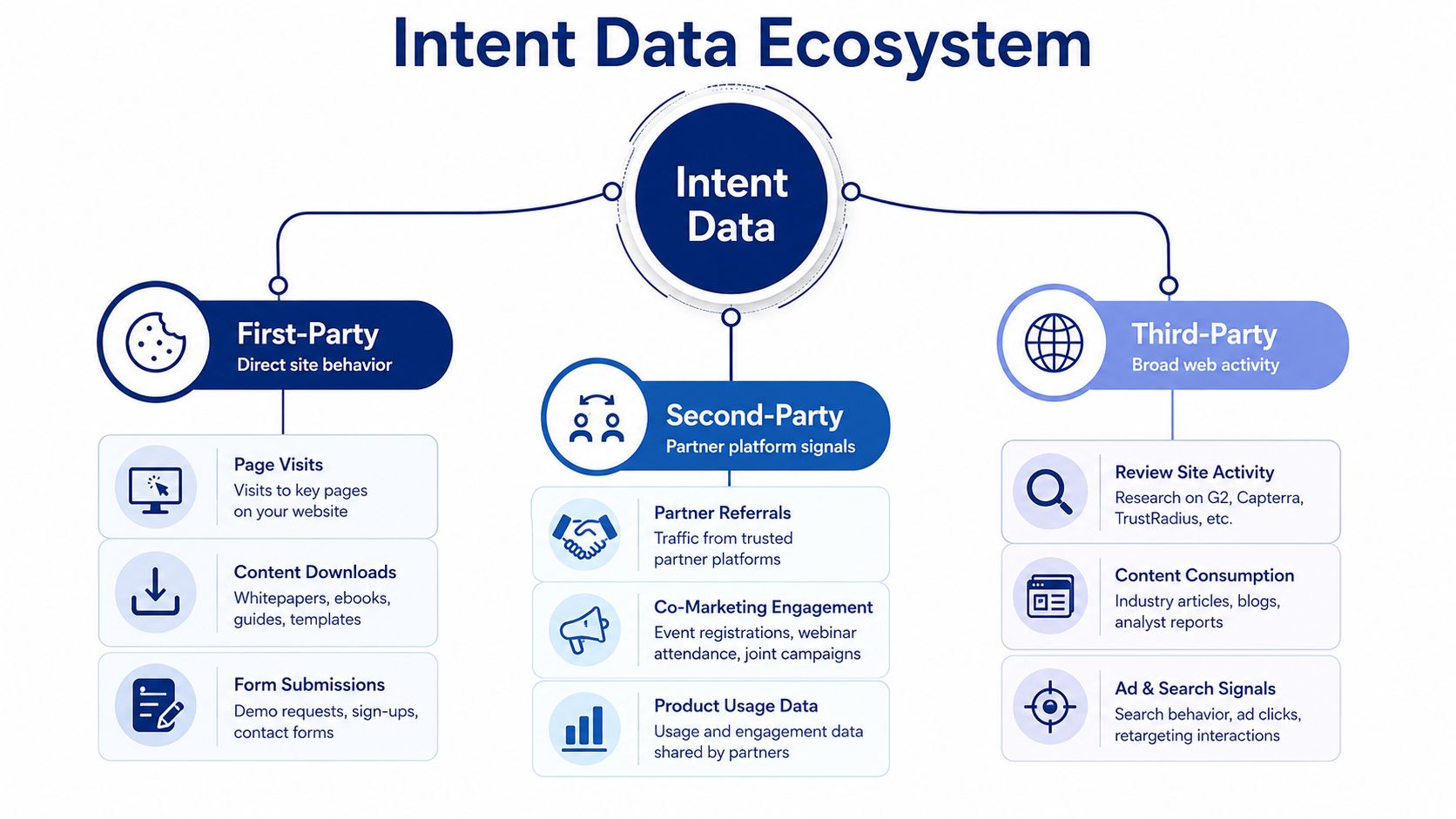
First-Party vs Second-Party vs Third-Party Intent Data
| Type | Source | Best Use |
|---|---|---|
| First-Party | Your website, email, social, product flows | Prioritizing known and in-flight accounts |
| Second-Party | Partner-shared behavioral data | Extending reach into adjacent audiences |
| Third-Party | Broader web activity across publisher networks | Finding new accounts researching your category |
Intent data software should be judged by the quality of the signal and how directly it can be acted on.

“Salesmotion helps you spot signals from prospect accounts, news items / job hiring alerts etc that indicate that now is a good time to reach out with a well-crafted message.”
Rob Douglas
Director of Sales, icit business intelligence
How Signals Are Collected, Scored, and Kept Fresh
The mechanics matter more than the sales pitch. A vendor captures behavioral events, normalizes them across sources, deduplicates them against known accounts, and then scores them so your team can decide whether to act. If the platform can't do those four things cleanly, you'll end up with noisy alerts and a pile of stale opportunities.
Freshness is not a nice-to-have
Intent signals decay quickly, so the time between capture and action is the difference between a useful alert and a dead lead. Major vendors and industry guides recommend daily or near-real-time refreshes instead of weekly batch exports, because the shorter the lag, the more likely the account is still in motion ZoomInfo's intent platform guidance. That's not a technical preference, it's a commercial one.
Three vendor questions to ask before any demo:
- How fast does the signal arrive?
- How do you deduplicate and resolve accounts?
- How do you match contacts to the account so downstream teams can act?
If they dodge those questions, they're selling theater.
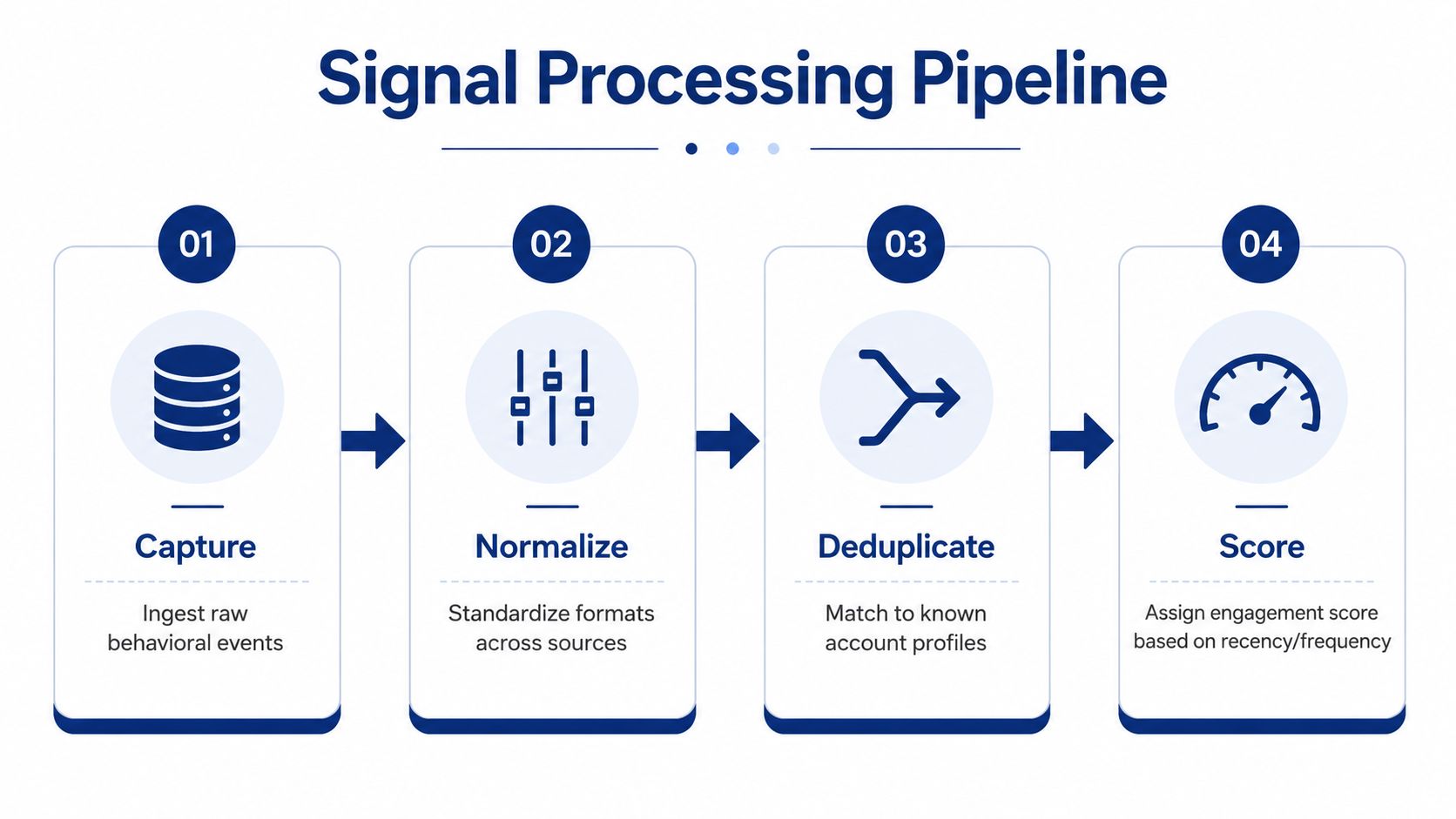
Intent Signal Lifecycle From Event to Action
| Stage | What Happens | Failure Risk |
|---|---|---|
| Capture | Behavioral events are ingested | Missing source coverage |
| Normalize | Formats are standardized | Inconsistent event naming |
| Deduplicate | Events are matched to known accounts | Duplicate or split accounts |
| Score | Recency and frequency drive prioritization | Scores that no one trusts |
That's why sales data freshness guidance matters so much. If your alert arrives after the rep has already moved on, you've built reporting, not revenue.
Signals should move at the speed of the buyer, not at the speed of your weekly ops export.
A good platform doesn't just show a score. It pushes that score into the places where action happens, and it does it fast enough to matter.
Real Use Cases That Move Pipeline
The cleanest way to judge intent data software is to watch what happens in two very different motions. One team wants daily prioritization for outbound. Another wants ABM orchestration that changes ad spend and messaging. Same class of software, different operating model.
SDR-led outbound uses intent as a queue manager
A good SDR manager running an intent motion starts the day by sorting accounts by fresh signal, not by static tier. Reps open their queue and see the companies that showed relevant research activity overnight, plus a short explanation of why the account matters. They don't get a vague “high intent” badge. They get a topic, a contact list, and a reason to call now.
A practical 90-day pattern looks like this. The team stops pulling from the full list and works only the accounts that cross the intent threshold. Reps use the signal to choose the opener, for example a pricing comparison, integration question, or category switch. The manager reviews which signals consistently produced meetings and removes the junk. That's how intent becomes a daily operating habit instead of a quarterly report.
ABM teams use intent plus firmographics to reallocate spend
ABM looks different. A marketer watches a dashboard where accounts are grouped by intent topic, industry, and fit. The platform flags which accounts deserve ad pressure, which should get custom content, and which should be suppressed because they already entered sales motion. The point isn't to blast more impressions, it's to waste fewer.
A strong ABM program doesn't treat intent as a standalone filter. It combines it with firmographics and account fit so the team isn't throwing budget at the wrong segment. In practice, that means the ad audience changes, the landing page changes, and the content sequence changes based on what the account is researching.
Two Operating Motions Side by Side
| Motion | Primary Trigger | Primary Action |
|---|---|---|
| SDR outbound | Fresh account-level research signal | Prioritize outreach and sequence timing |
| ABM | Intent plus fit and segment context | Shift ads, content, and account plays |

The lesson is simple. If the rep can't tell what to do before the second coffee, the platform isn't working. The right program gives sales and marketing different actions from the same signal, which is exactly what good revenue ops should do.

“Automatic account profile detail I can use to manage my territory. Using Salesmotion AI to generate value statements per persona, account, etc. Using Salesmotion to give me a starting point based on new hires, or news alerts is critical.”
Adam Wainwright
Head of Revenue, Cacheflow
Integrations and Workflows That Make the Data Useful
Intent data software only earns its keep when it lands inside the revenue stack cleanly. The handoff starts in the source platform and ends in tools your team already uses, especially CRM, marketing automation, sales engagement, ABM systems, and sometimes ad platforms or chat tools. If the vendor can't connect those layers, the signal dies in a spreadsheet.
The workflow should move once, not three times
A strong handoff looks like this. The intent score updates the account record in CRM, triggers a sales sequence for the assigned rep, and updates an ad audience so the same account is treated consistently across channels. That's not overengineering, that's basic hygiene. The whole point is to avoid three teams making three different decisions from the same account event.
Routing is where many teams stumble. Someone has to own the signal, and ownership needs to be encoded in the workflow, not discussed in Slack every morning. If an account has no owner, no sequence, and no audience rule, the platform becomes another place to admire the data instead of acting on it.
For more advanced orchestration, the signal-based selling guide shows how signal-driven workflows are structured around real outreach instead of abstract dashboards. The principle is the same across categories, use the signal to decide who acts, when they act, and what they do next.
Integration Map for an Intent Data Stack
| System | Receives | Typical Workflow |
|---|---|---|
| CRM | Account score, topic, timestamp | Update ownership fields and task queues |
| Marketing automation | Segment and trigger data | Start nurture or suppress active accounts |
| Sales engagement | Priority account flag | Enroll in the right sequence |
| ABM platform | Intent audience rules | Shift ads and account-level experiences |
| Slack or email alerts | Trigger-based signal notices | Notify reps when an account spikes |
A useful reference on the plumbing side is Salesforce and CRM integrations, because intent tools live or die on whether they can write back cleanly to the system of record. If they can't, you'll create a shadow stack and confuse everyone.
The Vendor Selection Checklist That Actually Filters
Most vendor reviews are too soft. They focus on features and skip the mechanics that decide whether the platform will work in your stack. A good evaluation framework keeps seven dimensions in view; score them before any live demo.
The seven things that matter
Data sourcing methodology should be the first filter. If the vendor can't explain where signals come from, you can't judge coverage or trust. Signal granularity comes next, because topic-level chatter is not the same as account-level activity. Data freshness is essential for any team that wants timely routing.
Then come integration depth, account matching accuracy, privacy compliance, and reporting. Those are the dimensions that separate a working stack from a slide deck. The right weight depends on your motion. SMB buyers usually care more about integration simplicity and transparency, and smaller teams can compare lighter 6sense alternatives. Enterprise teams usually care more about freshness, compliance, and account resolution.
Practical rule: if a vendor can't show how its signal lands in your CRM without manual exports, it's not ready for a serious rollout.
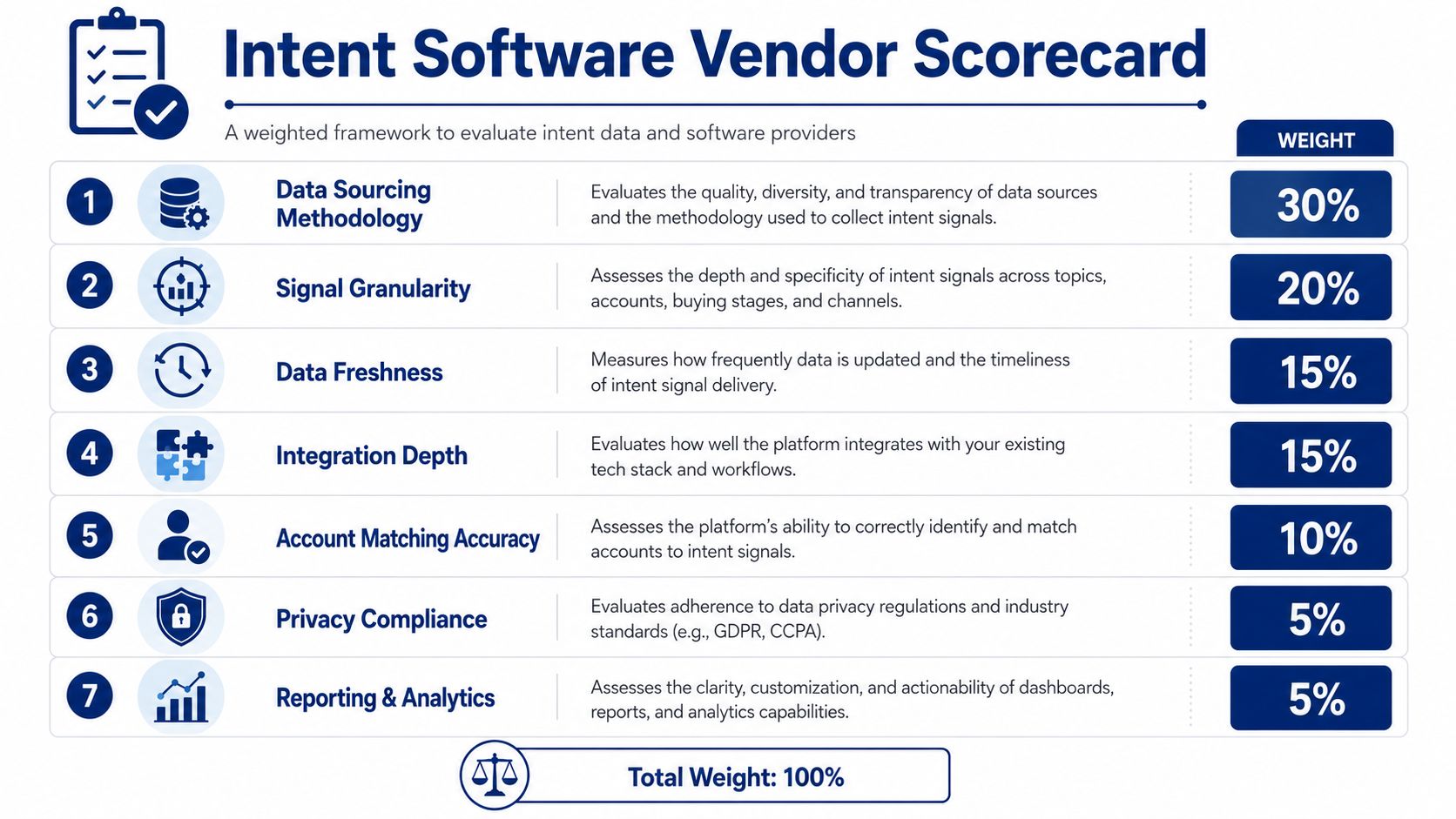
Seven-Dimension Vendor Scorecard
| Dimension | What Good Looks Like | Red Flag |
|---|---|---|
| Data Sourcing Methodology | Clear, explainable source mix | “Proprietary” with no detail |
| Signal Granularity | Account and topic specificity | Only broad surge alerts |
| Data Freshness | Daily or near-real-time updates | Weekly batch exports |
| Integration Depth | Native writeback into core systems | CSV-based handoffs |
| Account Matching Accuracy | Clean resolution to known accounts | Frequent duplicates or mismatches |
| Privacy Compliance | Clear governance and consent posture | Hand-wavy compliance language |
| Reporting & Analytics | Actionable views for ops and managers | Pretty dashboards with no workflow use |
Three quick disqualifiers save a lot of time. First, a vendor that hides freshness. Second, a vendor that can't explain account matching. Third, a vendor that makes pricing opaque until the final call. If any of those show up, you already know how the rest of the relationship will feel.
Keep the intent data providers comparison open during evaluation, because the right purchase is usually the one that fits your operating model, not the one with the loudest demo.
Implementation Pitfalls and Best Practices
The same four mistakes kill most rollouts, and the pattern is predictable. A team buys the tool first, then tries to invent the use case after the contract is signed. That's backwards.
The four mistakes that waste the budget
Buying before the use case is defined is the first failure. The fix is to choose one motion, one owner, and one signal path before launch. Treating intent as a score instead of a workflow is the second. The fix is to attach every signal to a task, a sequence, a suppression rule, or an audience update.
Ignoring CRM hygiene is the third. Bad account naming, duplicate records, and broken ownership fields will destroy confidence fast. Skipping sales-marketing alignment on routing is the fourth. The fix is to agree in advance on who gets alerted, when an account gets passed, and what happens when the signal is ambiguous.
A solid rollout rhythm is straightforward. In the first 30 days, define the use case and the routing logic. In the next 30, test the signals against real accounts and remove noise. In the final 30, tighten the workflow and train managers to inspect adoption instead of just outcome metrics.
Pitfall to Fix Mapping
| Pitfall | Corrective Move | Success Signal |
|---|---|---|
| Use case not defined | Pick one motion and one owner | Reps know exactly what to do |
| Score treated as the end goal | Tie signals to actions | Tasks and sequences fire automatically |
| CRM hygiene ignored | Clean account records early | Fewer mismatches and duplicates |
| Sales and marketing not aligned | Agree on routing rules up front | Faster handoffs and fewer disputes |
The leading indicators show up before pipeline does. Reps act faster, managers trust the alerts, and fewer accounts fall through the cracks. That's the sign the system is working.
Measuring ROI and Deciding What to Do Next
ROI should be judged the way a CRO would judge any revenue system, by what it changes in the pipe. The metrics that matter are pipeline velocity, opportunity creation rate, sales cycle length, win rate on intent-sourced accounts, and cost per opportunity. If the tool doesn't move one of those, it's entertainment.
Frame the return in three lenses. Efficiency means fewer wasted touches and cleaner prioritization. Effectiveness means better conversion and more wins on the accounts that mattered. Expansion means larger deals when the team engages at the right time with the right message.
Intent Data ROI by Lens
| ROI Lens | Core Metric | Leading Indicator |
|---|---|---|
| Efficiency | Cost per opportunity | Fewer wasted touches |
| Effectiveness | Win rate on intent-sourced accounts | Better rep response to signals |
| Expansion | Deal size | More relevant conversations earlier |
The next move should be a pilot, not a platform sprawl. Pick the single use case that has the cleanest routing path and the shortest feedback loop. Then require enough data to prove the signal is real before you extend the contract or add another motion.
If you want a tool that turns account activity into alerts, briefs, and outreach prompts, Salesmotion's Signal Agent is one option worth evaluating alongside broader intent platforms; the B2B buying signals benchmark shows how often each kind of account event happens, and the guide to finding in-market accounts without intent data covers the public-signal route. Start with one use case, measure the handoff, and don't expand until the workflow is being used.