Key Takeaways
- Sales reps spend only 28-30% of their time actually selling, with the rest consumed by research, admin, and toggling between tools.
- Surfacing account intelligence directly inside Salesforce eliminates the "toggle tax" that costs reps hours every week.
- Salesmotion's Salesforce integration delivers deep account research, live signals, and AI-generated outreach at the point of work — inside the CRM your reps already live in.
- The managed package installs in minutes, with enterprise-grade security and full customer-side control.
- Teams using embedded intelligence report significantly faster meeting prep and more contextual conversations.
Deep account research, inside Salesforce
Signals, briefs, and AI outreach at the point of work — no more toggling out of the CRM. The managed package installs in minutes.
The Problem: Your Reps Leave Salesforce to Do Their Job
Here's a number that should bother every sales leader: according to Salesforce's own State of Sales report, reps spend only 28-30% of their time actually selling. The rest? Admin work, internal meetings, and — critically — research. Toggling between CRM tabs, news sites, LinkedIn, investor relations pages, earnings transcripts, and ChatGPT just to understand what's happening at an account before picking up the phone.
A Harvard Business Review study found that knowledge workers toggle between applications roughly 1,200 times per day, losing nearly 4 hours per week just reorienting themselves after each switch. UC Irvine research puts the cost even higher: after a significant interruption, it takes 23 minutes to fully regain focus.
For sales reps, this isn't abstract. It's the difference between walking into a call informed and winging it. It's the 45 minutes of pre-call research that gets skipped because there simply isn't time when you're doing it manually for 200 accounts.
The reps using 8+ tools to close a single deal aren't more productive — they're more fragmented. And Salesforce's research confirms it: 42% of reps feel overwhelmed by too many tools, and overwhelmed sellers are 45% less likely to hit quota.

“All of the vendors that I've worked with, all of the onboarding that I have had to deal with, I will say, hands down, Salesmotion was the easiest that I have had.”
Lyndsay Thomson
Head of Sales Operations, Cytel
The Fix: Account Intelligence at the Point of Work
The solution isn't another tool your reps need to log into. It's intelligence delivered inside the tool they already use.
With over 150,000 companies running Salesforce and 90%+ of Fortune 500 on the platform, "the point of work" for most B2B sales teams means one thing: Salesforce.
Salesmotion's Salesforce integration embeds deep account research, real-time signals, and AI-generated insights directly into the Salesforce Account record. No new tabs. No separate logins. No copy-pasting from one tool to another.
When a rep opens an account in Salesforce, they immediately see:
- What You Need to Know — AI-generated briefings covering Key Insights, Executive Perspective, Opportunities, Challenges, and Talking Points
- Live signals — Leadership changes, earnings beats, funding rounds, strategic initiatives, and hiring activity detected from 1,000+ sources
- Data points dashboard — Signal counts over 30, 90, and 180 days showing whether the account is heating up or cooling down
- Salesmotion Score — A 0-100 score reflecting current signal activity, so reps can prioritise at a glance
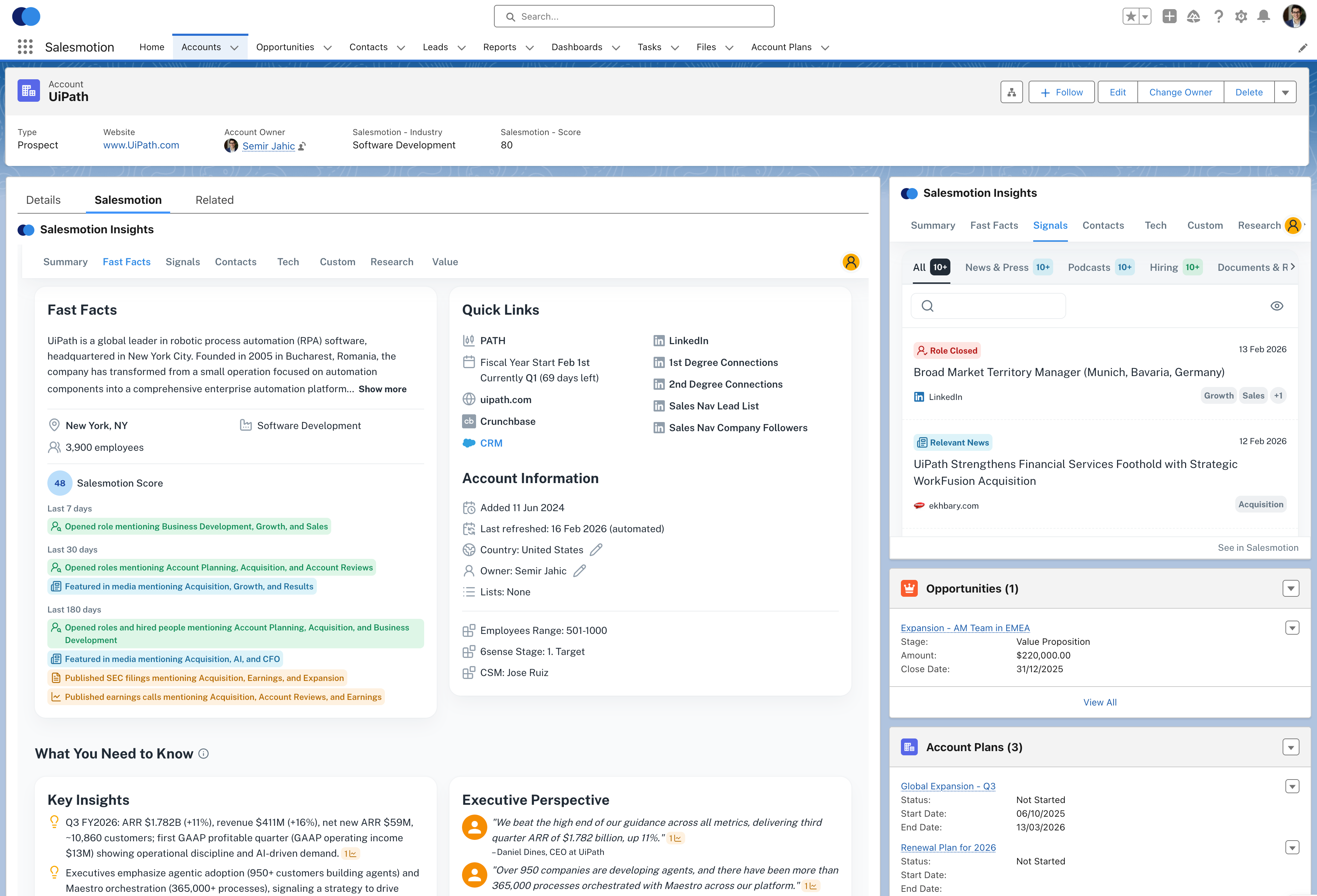 Salesmotion intelligence embedded directly inside a Salesforce Account record. Reps see deep research, live signals, and AI-generated insights without leaving the CRM.
What This Looks Like in Practice
Let's walk through a real scenario.
A rep at an enterprise software company opens the Salesforce account for UiPath before a QBR. Without embedded intelligence, they'd spend 30-60 minutes searching Google News, scanning the investor relations page, checking LinkedIn for leadership changes, reading through the latest 10-K, and trying to piece together what's happening at the account.
With Salesmotion embedded in Salesforce, they open the Account record and immediately see:
- Key Insights: UiPath's Q3 revenue beat estimates. They're expanding their partner ecosystem. A new CRO was appointed three weeks ago.
- Executive Perspective: Management is prioritising AI-powered automation and moving upmarket into healthcare and financial services.
- Opportunities: Their emphasis on partner-led growth creates an opening for your integration story. The new CRO will want quick wins to demonstrate impact.
- Talking Points: Specific, researched points the rep can reference in the meeting — not generic templates, but intelligence sourced from real buying signals.
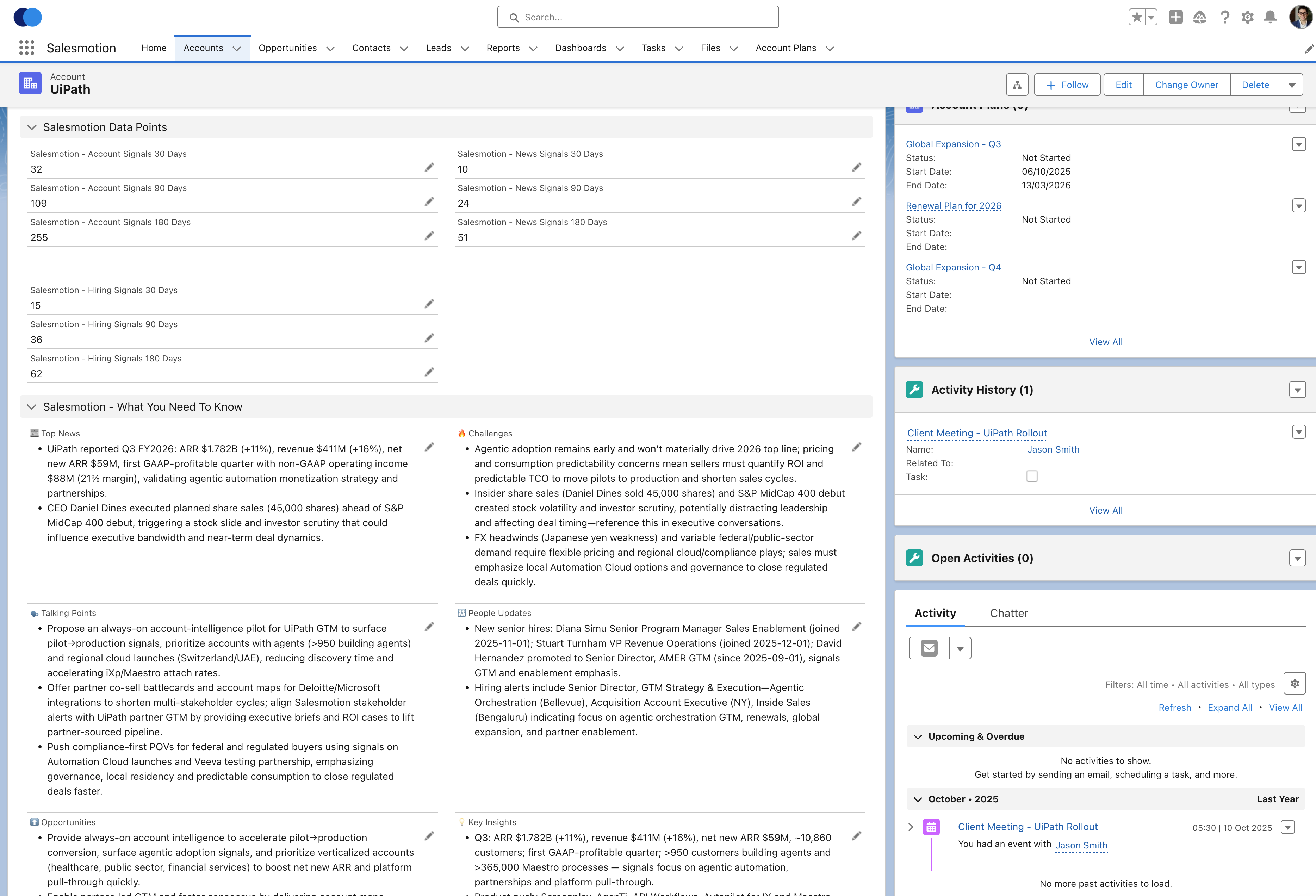 Deep account intelligence — signal data points, AI-generated insights, and selling guidance — all embedded at the point of work inside Salesforce.
Total prep time: under 5 minutes. And the quality of that preparation is higher than what most reps achieve in an hour of manual research, because Salesmotion has been monitoring the account continuously across 1,000+ sources.
See It in Action
Watch how Salesmotion delivers account intelligence directly inside Salesforce:
Enterprise-Grade Architecture, Simple Setup
Salesmotion's Salesforce integration is delivered as a managed package — the standard enterprise method for extending Salesforce. This matters because:
Full customer-side control. Your Salesforce admin controls everything: which fields are mapped, which direction data flows, and what permissions the integration has. Nothing happens without explicit configuration.
Dedicated integration user. A named Salesforce user handles all API calls between the platforms. Every action appears in your standard Salesforce audit log. Your security team has complete visibility.
One-way or bi-directional sync. Start with Salesmotion pushing intelligence into Salesforce (one-way), then expand to bi-directional when you're ready — pulling account ownership, opportunity data, and custom fields back into Salesmotion.
Minutes to install. Despite being enterprise-grade, the managed package installs through Salesforce's standard package installer. Most teams are fully configured and syncing in under an hour.
This is the same approach used by other enterprise Salesforce integrations. Your IT team will recognise the architecture immediately — managed package, integration user, standard APIs, standard audit trails.
Beyond Read-Only: Intelligence That Drives Action
The Salesmotion Salesforce integration isn't just a dashboard. It actively changes how reps work.
Pre-call preparation in seconds
Before every meeting, the rep opens the Salesforce Account record and scans the What You Need to Know section. Key Insights, Opportunities, and Talking Points are right there — no tab switching, no separate research session. This consistency means every rep on the team walks into every call prepared, not just the most diligent ones.
Signal-driven prioritisation
The Salesmotion Score and signal data points are visible directly on the Salesforce Account record. Reps can sort and filter their pipeline by signal activity, focusing time on accounts showing real buying behaviour — not just accounts that happen to be in their CRM.
Competitive intelligence at the right moment
When Salesmotion detects a competitor mentioned in an account's earnings call, press release, or job posting, that signal shows up inside Salesforce. The rep sees it in context, alongside the deal they're working, and can adjust their approach immediately.
Account handoffs that actually work
When accounts change ownership (new rep, territory realignment, promotion), the incoming rep has instant access to everything Salesmotion has collected. Months of intelligence, signals, and AI-generated insights transfer automatically — no "knowledge download" meetings, no lost context.
The ROI Case
Research from McKinsey estimates generative AI could unlock $0.8-1.2 trillion in incremental productivity across sales and marketing. But that potential depends entirely on how well the intelligence integrates with existing workflows.
Companies with strong data integration achieve 10.3x ROI from AI initiatives compared to 3.7x for those with poor connectivity. The integration layer isn't optional — it's the multiplier.
For a concrete example: Cytel consolidated 5 separate research tools into Salesmotion and recovered significant selling time across their team. The research that used to take 60+ minutes per account now takes under 5 minutes — and it's available directly in Salesforce, where reps already spend their day. Analytic Partners grew qualified pipeline by 40% after embedding account intelligence into their daily workflows.
Getting Started
The Salesforce integration is included with Salesmotion's Enterprise plan. Setup is straightforward:
- Your Salesmotion account manager provides the managed package installation link.
- Your Salesforce admin installs the package and creates a dedicated integration user.
- Configure field mappings and sync direction with your Salesmotion team.
- Verify intelligence appears on your Salesforce Account records.
The entire process typically takes under an hour. For organisations with formal IT review processes, Salesmotion provides integration architecture documentation covering data flow, authentication, and compliance.
Ready to see Salesmotion inside your Salesforce instance? Book a personalised demo and we'll show you the integration on one of your accounts.
Frequently Asked Questions
How long does the Salesforce integration take to set up?
The managed package installs in minutes. End-to-end configuration — including creating the integration user and mapping fields — typically takes under an hour. Your Salesmotion Customer Success Manager guides you through the process.
Does the integration affect Salesforce performance?
No. The integration uses standard Salesforce APIs and respects governor limits. The managed package is lightweight and does not impact your org's performance or existing customisations.
What Salesforce editions are supported?
The integration works with Salesforce Core, Advanced and Max (and the legacy Enterprise, Unlimited and Performance editions). It requires API access, which Salesforce lists as included from Core upward.
Can I control what data flows between the systems?
Yes. Your Salesforce admin has full control over field mappings, sync direction (one-way or bi-directional), and permissions. Nothing is synced without explicit configuration.
Do we need a separate Salesmotion login, or can reps stay in Salesforce?
Reps can access Salesmotion intelligence entirely within Salesforce — no separate login required. For teams that want the full Salesmotion experience (Prospector, Search, Global Feed), the standalone app is also available. Most teams use both: Salesforce for day-to-day context and the full app for deeper research.
Is the integration available on plans other than Enterprise?
The Salesforce managed package integration is part of the Enterprise plan. Individual and Team plans work fully standalone without CRM integration. Contact us to discuss Enterprise pricing.