Enterprise sales reps spend roughly 70% of their week on non-selling activities, and account research is one of the biggest time sinks. According to Salesforce's State of Sales Report, reps dedicate only 28% of their time to actual selling. Meanwhile, RAIN Group research shows that reps who thoroughly research prospects before outreach see up to 70% higher call-to-meeting conversion. The gap between these two numbers is where deals are won and lost. This account research playbook gives you a repeatable system for preparing for any enterprise meeting in under 10 minutes.
TL;DR: The best enterprise reps follow a structured account research process, not ad hoc Googling. This playbook covers the 5-minute account brief framework, source-by-source research methods, stage-specific research depth, and how to build an always-on monitoring system. The goal: walk into every meeting with more context than your prospect expects.
Why Account Research Is the #1 Differentiator for Enterprise Reps
The data is clear: preparation separates top performers from everyone else. Champify's value report puts the average win rate on opportunities with former advocates at 39%, versus under 19% for the SaaS average. That is roughly double. And organizations with strong sales enablement programs report a 49% win rate on forecasted deals, compared to 43% without.
But the real differentiator is not just knowing about an account. It is knowing the right things at the right time.
Consider two reps calling the same VP of Operations at a $2B manufacturer. Rep A opens with a generic pitch about "driving efficiency." Rep B opens with: "I noticed your CEO mentioned a $200M supply chain modernization initiative on last quarter's earnings call, and you just posted three supply chain analyst roles. Sounds like you're building the team to execute. How's that going?"
Rep B did 5 minutes of research. Rep A did zero. The conversation quality, and the win probability, are fundamentally different.
The challenge is not that reps don't want to research. It is that the process is fragmented: toggling between LinkedIn, SEC filings, Google News, Crunchbase, ZoomInfo, and ChatGPT. Most reps either skip research entirely or spend 30-60 minutes and still miss key signals.
This playbook solves that problem with a repeatable framework.
See Salesmotion on a real account
Book a 15-minute demo and see how your team saves hours on account research.
The 5-Minute Account Brief Framework
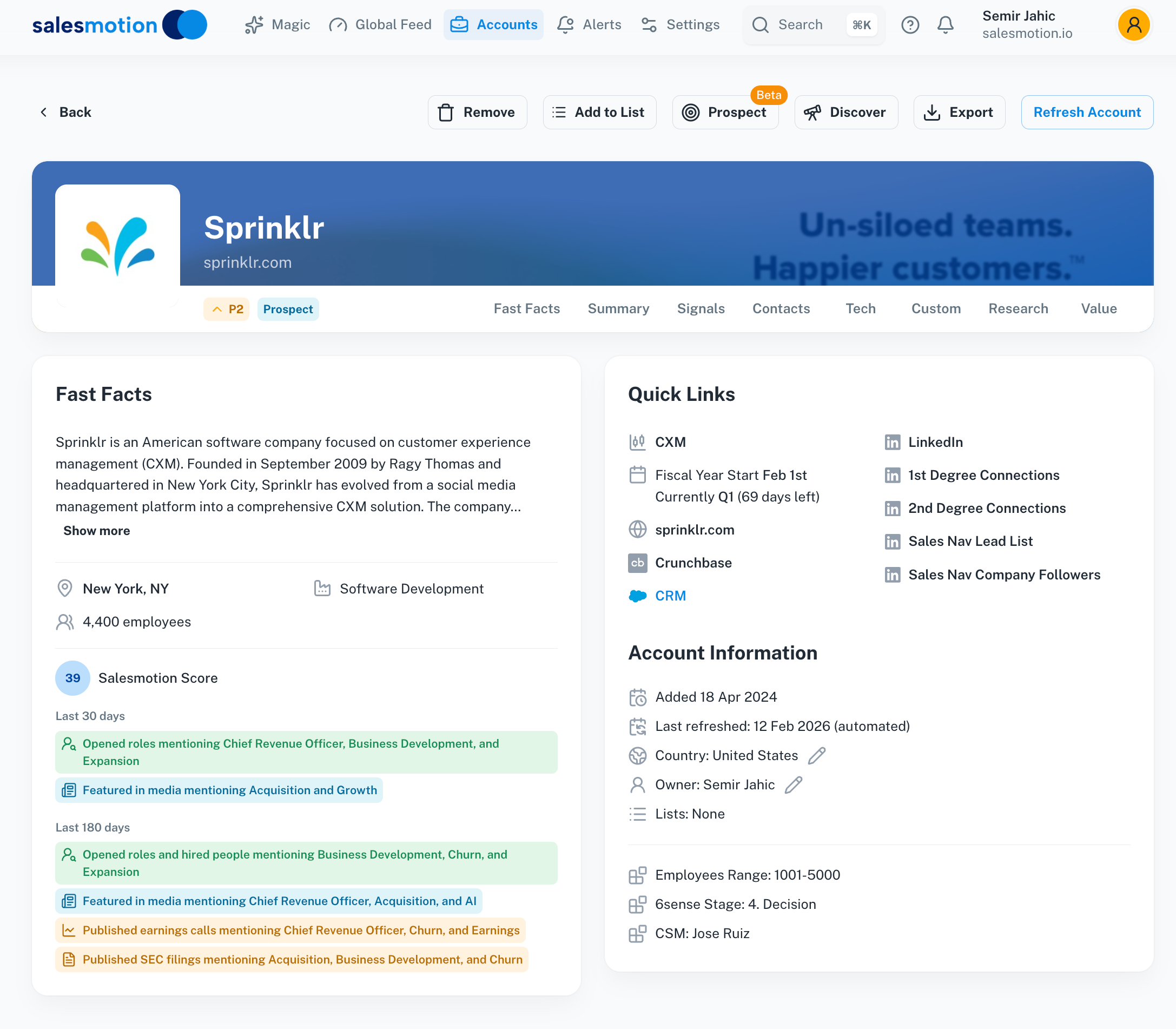 A fast facts view delivers the essential company context — size, industry, financials, strategic priorities — in seconds, not hours.
Before any call, discovery meeting, or proposal review, you need answers to five questions. This is your minimum viable research.
1. What Does the Company Do and How Do They Make Money?
This sounds basic, but most reps cannot articulate their prospect's business model in two sentences. For public companies, read the first paragraph of their latest 10-K filing. For private companies, check their "About" page and recent press releases.
What to capture: core revenue streams, target customer segments, approximate company size (headcount and revenue), and geographic footprint.
2. What Strategic Initiatives Are They Pursuing?
This is the most valuable research question and the one most reps skip. Strategic initiatives tell you where the company is investing, what problems they are prioritizing, and where budget is flowing.
Sources: earnings call transcripts (for public companies), press releases, executive interviews, annual reports, and job postings. If a company is hiring 15 data engineers and their CEO mentioned "digital transformation" on the last earnings call, that is a funded initiative you can sell into.
3. Who Are the Key Stakeholders?
Map the buying committee before you engage. Identify the economic buyer, the technical evaluator, the champion, and potential blockers. Check LinkedIn for recent hires (new executives often bring new priorities and new budget).
4. What Signals Indicate Timing?
Timing kills more deals than competition. Look for triggers that suggest urgency: leadership changes, funding rounds, earnings misses, layoffs and restructuring, technology vendor changes, regulatory shifts, or M&A activity.
5. What Is Their Competitive Landscape?
Know who your prospect competes with and where they are winning or losing. This lets you frame your solution in terms of competitive advantage, which resonates with executives far more than feature lists.
The 5-minute rule: If you cannot answer all five questions in 5 minutes, your research process needs better tools or better sources. Teams using Salesmotion generate this brief automatically from 1,000+ sources, reducing what used to take 30-60 minutes to under 5 minutes per account.
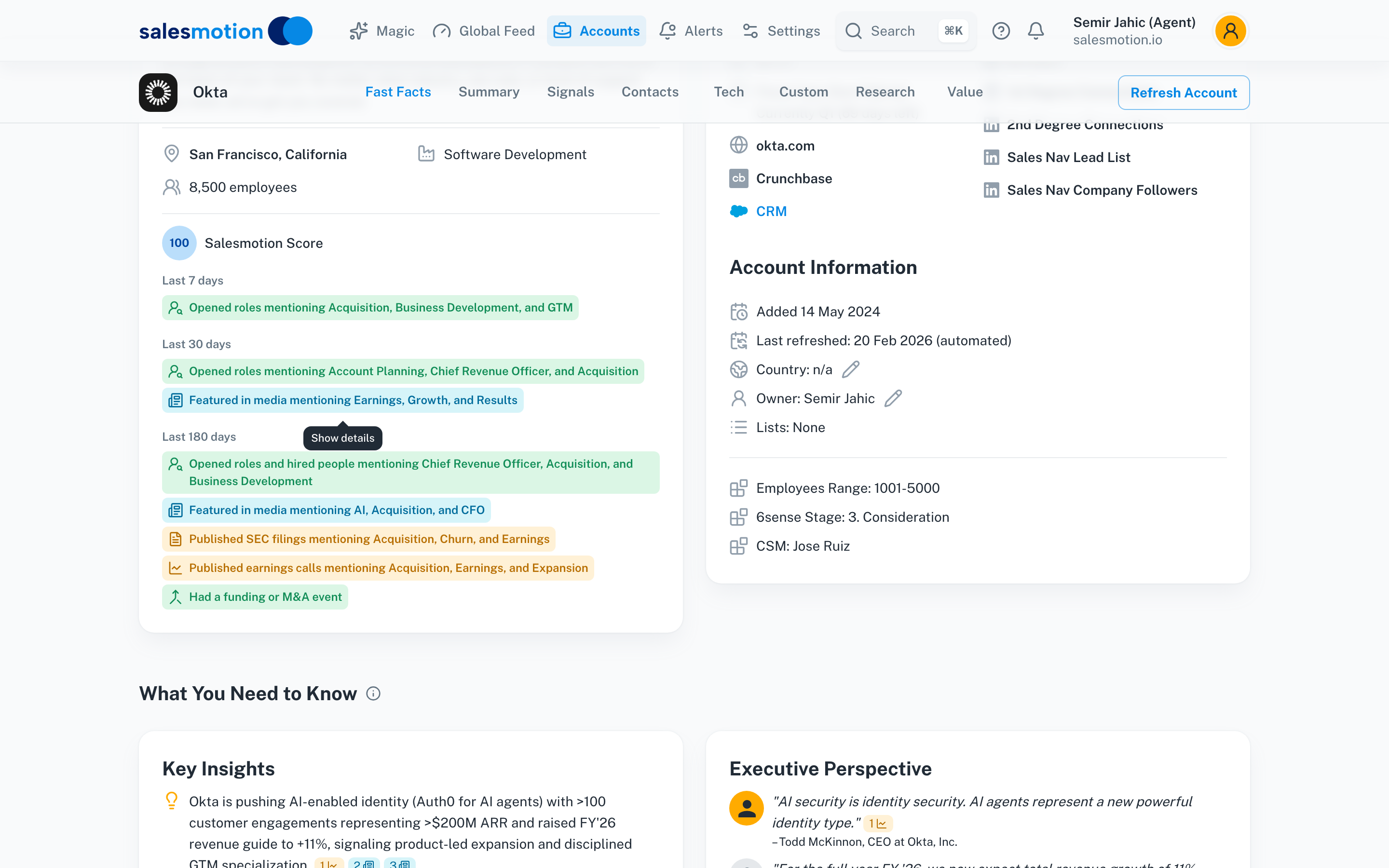 Salesmotion generates a complete account brief in minutes — key insights, executive quotes, opportunities, challenges, and talking points sourced from 1,000+ data sources.

“We're saving about 6 hours per week per seller on account research alone. That's time they can reinvest in actually selling.”
Derek Rosen
Director, Strategic Accounts, Guild Education
Where to Find Account Research: A Source-by-Source Guide
Not all account research sources are equal. Here is a prioritized breakdown of where to look and what each source tells you.
Public Filings and Earnings Calls
What they reveal: Strategic priorities, revenue trends, investment areas, risks, competitive positioning, and executive commentary on future direction.
Where to find them: SEC EDGAR for 10-K and 10-Q filings, investor relations pages for earnings transcripts, and services like Seeking Alpha or The Motley Fool for earnings call summaries.
What to look for: CEO and CFO language about "investing in," "accelerating," "pivoting to," or "doubling down on" specific areas. These phrases signal funded initiatives. Also note any mentions of headwinds, challenges, or missed targets, as these are pain points you can address.
Example: A pharmaceutical company's CEO says on Q3 earnings, "We're investing $150M in commercial analytics to improve our launch effectiveness." A rep selling analytics tools now knows the budget exists, the initiative is executive-sponsored, and the timing is now.
News and Press Releases
What they reveal: M&A activity, product launches, partnerships, executive appointments, funding rounds, and market expansion.
Where to find them: Google News, PR Newswire, Business Wire, and company newsrooms.
What to look for: Any structural change (acquisition, divestiture, new market entry) is a potential trigger event. New hires at the C-suite or VP level often signal strategic shifts and fresh budget allocations.
Job Postings
What they reveal: Where the company is investing, what capabilities they are building, and what tools they currently use (listed in job requirements).
Where to find them: LinkedIn Jobs, Indeed, and the company's careers page.
What to look for: Volume and seniority of hires in specific functions. If a company posts 20 sales development roles in a single month, they are scaling outbound. If they post a VP of Revenue Operations, they are centralizing their go-to-market operations. The tech stack listed in job descriptions also reveals what tools they use and where gaps might exist.
Social and Executive Activity
What they reveal: Executive priorities, thought leadership positioning, upcoming initiatives, and personal interests that can build rapport.
Where to find them: LinkedIn posts and articles, X (Twitter), conference speaking engagements, and podcast appearances.
What to look for: Executives sharing content about specific topics often signals active interest in that area. A CRO posting about "signal-based selling" is more likely to take a meeting about account intelligence than one posting about team-building retreats.
Technographic Data
What they reveal: Current tech stack, recent technology changes, and potential integration points or displacement opportunities.
Where to find them: BuiltWith, Wappalyzer, job postings (tech stack requirements), G2 reviews, and sales intelligence platforms.
What to look for: Recent technology additions or removals. If a company just adopted Salesforce, they are likely evaluating the surrounding ecosystem. If they recently dropped a competitor of yours, the door is open.
Account Research for Different Deal Stages
The depth of research should match the deal stage. Over-researching a cold prospect wastes time. Under-researching a late-stage opportunity loses deals.
Prospecting Stage (2-3 minutes per account)
Goal: Determine if the account is worth pursuing and craft a relevant opening message.
Research checklist:
- Company overview (size, industry, business model)
- One recent trigger event (leadership change, funding, product launch)
- One relevant executive to contact
- One specific pain point or initiative to reference
Output: A personalized 3-sentence outreach message that references something specific to the account. Not a template. Not "I noticed you're a leader in [industry]." Something that proves you spent 2 minutes learning about them.
Discovery Stage (5-10 minutes per account)
Goal: Prepare questions that demonstrate expertise and uncover real pain.
Research checklist:
- Full 5-minute account brief (all five questions above)
- Stakeholder map with titles and likely roles in the buying process
- 2-3 prepared questions tied to their specific initiatives
- Competitive landscape (who else are they likely evaluating?)
Output: A one-page discovery prep sheet you can reference during the call. Include hypotheses about their pain points so you can test them in conversation rather than asking generic questions.
Proposal and Negotiation Stage (15-20 minutes per account)
Goal: Build a business case that maps your solution to their stated priorities.
Research checklist:
- Updated stakeholder map (including anyone new who has entered the conversation)
- Detailed financial context (revenue growth, margins, recent earnings)
- Specific executive quotes about priorities (from earnings calls, interviews, or LinkedIn)
- Competitive intelligence (what alternatives are they considering?)
- Internal champion prep (give your champion the data they need to sell internally)
Output: A custom business case that connects your solution directly to their strategic initiatives, uses their language, and includes relevant ROI examples from similar companies.
At Cytel, a life sciences analytics company, switching from five fragmented research tools to a single account intelligence platform cut research time by 50% and reduced account planning prep by 30%. Their reps now spend less time gathering data and more time building strategic relationships.

“All of the vendors that I've worked with, all of the onboarding that I have had to deal with, I will say, hands down, Salesmotion was the easiest that I have had.”
Lyndsay Thomson
Head of Sales Operations, Cytel
How to Build an Ongoing Account Monitoring System
The biggest mistake in account research is treating it as a one-time activity. Enterprise deals take 6-18 months. The account landscape shifts constantly: executives change roles, budgets get reallocated, competitors enter and exit, and strategic priorities evolve.
The Problem with Manual Monitoring
Most reps try to stay current by checking LinkedIn once a week, setting Google Alerts (which miss most relevant signals), and scanning news before calls. This approach has three fatal flaws:
- It depends on the rep remembering to check. In a territory of 50+ accounts, manual monitoring fails within the first month.
- Google Alerts capture a fraction of what matters. They miss earnings commentary, job posting patterns, executive social activity, technology changes, and competitive moves.
- The signals that matter most are not in any single source. A leadership change on LinkedIn plus a new job posting on Indeed plus earnings language about "transformation" together tell a story. No rep is manually connecting those dots across hundreds of accounts.
What an Effective Monitoring System Looks Like
An effective system tracks signals across these categories for every account in your territory:
- Leadership changes: New hires, departures, promotions, and board changes
- Financial signals: Earnings beats/misses, guidance changes, funding rounds, M&A
- Strategic signals: New product launches, partnerships, market expansions, restructuring
- Hiring patterns: Volume and seniority of open roles by function
- Technology changes: New vendor adoptions, RFPs, platform migrations
- Competitive moves: Competitor wins or losses at the account, vendor evaluations
The system should surface these signals proactively, not wait for you to go looking. It should prioritize by relevance and timing, and it should be integrated into where you already work (your CRM, your email, or your daily workflow).
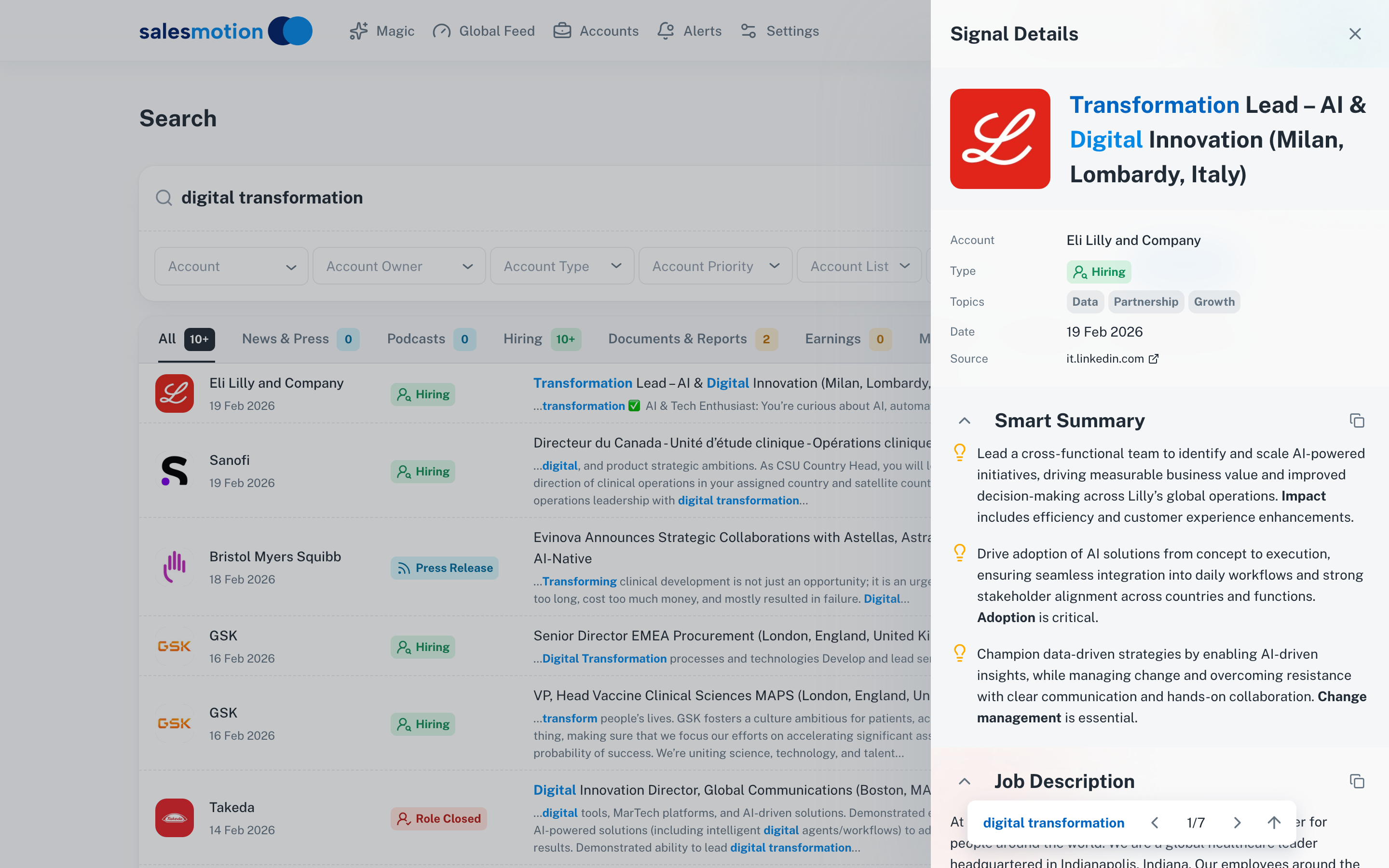 Salesmotion lets reps search any keyword across all accounts and all data sources — news, earnings calls, job ads, press releases — surfacing signals proactively.
George Treschi, an Account Executive at Sigma who won FY25 President's Club, reduced his weekly research time from 12 hours to 4 by replacing manual research with automated signal monitoring. That freed 8 hours per week for actual selling conversations.
At Guild Education, Director of Strategic Accounts Derek Rosen saves 30 minutes per account on research. On enterprise deals worth $20M+ with sales cycles stretching to 24 months, that ongoing account monitoring is not optional. It is the difference between being reactive and being the rep who always seems to know what is happening at the account before the prospect mentions it.
Common Account Research Mistakes
Even experienced reps fall into these traps. Avoiding them is often more impactful than adding new research steps.
Mistake 1: Researching Breadth Instead of Depth
Knowing 50 surface-level facts about an account is less valuable than deeply understanding 3-4 strategic initiatives. Executives do not care that you know their founding year or their stock price. They care that you understand what they are trying to accomplish and why it is difficult.
Mistake 2: Researching the Company but Not the Person
Every call is with a human, not a logo. Check their LinkedIn for recent posts, shared connections, career trajectory, and anything that signals what they care about. A VP who was recently promoted from Director is in a different headspace than one who has been in the role for five years.
Mistake 3: Stopping Research After the First Meeting
Accounts evolve. The insight that earned you the first meeting will not carry you through a 9-month sales cycle. Set a cadence: refresh your account brief before every substantive interaction. Monitor for new signals between meetings. The best reps know about organizational changes at their target accounts before the prospect's own colleagues do.
Mistake 4: Not Using Research in the Conversation
Research has zero value if it stays in your notes. Reference what you learned directly: "I saw your CEO mentioned X on the last earnings call. How is that initiative progressing from your team's perspective?" This transforms a sales call into a consultative conversation.
Mistake 5: Relying on a Single Source
LinkedIn is not enough. Google is not enough. Your CRM is not enough. The most important signals live across multiple sources, and the insight comes from connecting them. A company hiring aggressively in one function while their CEO talks about cost optimization in another area tells you something neither source reveals alone.
Tools and Automation for Account Research
The manual playbook above works, but it does not scale. Here is how the research landscape breaks down.
Free Research Stack
For reps without a budget for dedicated tools:
- SEC EDGAR for public company filings
- Google News with saved search alerts
- LinkedIn for stakeholder mapping and executive activity
- Company websites for press releases and job postings
- Crunchbase (free tier) for funding and organizational data
This stack costs nothing but takes 20-40 minutes per account. Fine for 10 target accounts. Unsustainable at 50+.
Mid-Range Tools
Sales intelligence platforms like ZoomInfo, LinkedIn Sales Navigator, and Crunchbase Pro improve efficiency by consolidating contact data and company profiles. They are built around the "who to contact" problem; the "why and when" questions still take further research.
Enterprise Account Intelligence
For teams managing large territories where manual research collapses, Salesmotion consolidates 1,000+ sources into automated account briefs. One click generates the full 5-minute brief: strategic initiatives, financial context, stakeholder mapping, buying signals, competitive landscape, and technology stack. Continuous monitoring tracks signals across every account in your territory, 24/7, and surfaces them proactively in your CRM.
The difference: manual research is episodic (you do it before a call). Automated intelligence is continuous (signals come to you, always current, always prioritized). That shift from episodic to continuous is what separates reps who react to opportunities from reps who create them.
Key Takeaways
- Every enterprise rep needs a structured account research framework, not ad hoc Googling. The 5-minute account brief (business model, strategic initiatives, stakeholders, timing signals, competitive landscape) is your minimum before any interaction.
- Match research depth to deal stage: 2-3 minutes for prospecting, 5-10 for discovery, 15-20 for proposals. Over-researching early wastes time; under-researching late loses deals.
- The most valuable research sources are often the least used: earnings call transcripts, job posting patterns, and executive social activity reveal funded initiatives and timing signals that generic company profiles miss.
- Ongoing account monitoring is non-negotiable for enterprise sales cycles. Manual monitoring (Google Alerts, weekly LinkedIn checks) fails at 50+ accounts. Automated signal tracking ensures you never miss a trigger event.
- Use research in the conversation, not just in your prep. Referencing specific initiatives and signals transforms sales calls into consultative conversations that earn trust and accelerate deals.
- Teams using automated account intelligence, like those at Guild Education and Cytel, report 30-50% reductions in research time while improving the quality of every prospect interaction.
Frequently Asked Questions
How much time should sales reps spend on account research before a meeting?
It depends on the deal stage. For initial prospecting, 2-3 minutes is sufficient to identify one trigger event and personalize outreach. For discovery calls, invest 5-10 minutes to complete a full account brief. For high-stakes proposals or executive presentations, spend 15-20 minutes on deep financial and stakeholder analysis. The key is using structured frameworks, not open-ended browsing, to make every minute productive.
What are the most important sources for enterprise account research?
Earnings call transcripts and SEC filings are the most underused and highest-value sources for public companies. They reveal funded strategic initiatives, executive priorities, and competitive positioning directly from leadership. Pair these with job postings (which reveal where the company is investing) and LinkedIn executive activity (which signals personal priorities). For private companies, press releases, Crunchbase, and job posting patterns provide similar strategic context.
How do you scale account research across a large territory?
Manual research does not scale past 15-20 accounts. The most effective approach is to combine a structured research framework (like the 5-minute account brief) with automated monitoring tools that track buying signals across your entire territory. This way, you do deep research on high-priority accounts while automated alerts flag trigger events at every other account in your book of business.
What is the difference between account research and account intelligence?
Account research is the manual process of gathering information about a target company. Account intelligence is the automated, continuous delivery of insights from hundreds of sources, synthesized and prioritized for relevance. Research is something you do before a call. Intelligence is something that comes to you, 24/7, flagging the right accounts at the right time. The shift from research to intelligence is what enables reps to manage larger territories without sacrificing preparation quality.
How do you use account research during a sales conversation?
Reference specific findings directly: "I noticed your CEO mentioned a supply chain modernization initiative on the Q3 earnings call. How is that progressing from your team's perspective?" This approach demonstrates preparation, earns credibility, and opens substantive conversations about real priorities. Avoid generic references like "I see you're a leader in your industry." The more specific your reference, the more trust you build.