Salesmotion today launched Relationship Maps — a drag-and-drop org chart on every account, wired directly into the live contact data, signals, and freshness pings the platform already tracks.
It is the first relationship map we know of that does not go stale the moment you stop editing it.
Why We Built This
Account maps are one of the most-talked-about, least-maintained artifacts in B2B sales. Reps build them for a QBR, the deal closes (or stalls), the slide gets buried, and by the next renewal nobody can tell you whether the champion is still at the company.
We held off on shipping a map for a long time. The honest reason: most relationship-mapping products turn into a second spreadsheet — accurate the day a rep edits them, stale six weeks later. We did not want to add another graveyard surface.
What changed is that our customers kept asking. Over the last year:
- A global business services firm tracking 750+ accounts in Salesmotion told us they had cancelled their previous $11k/year org-charting tool because nobody opened it, but they still wanted the canvas — the gap had not gone away, they just refused to keep paying for a stale one.
- A revenue leader who had run People.ai at his previous company told us account mapping there "still ended up as a static spreadsheet" by the time the deal closed.
- A sales-coaching platform evaluating us called out org-chart visualization as the one missing piece for the larger enterprise accounts on their list.
- Operators reviewing our roadmap kept pulling the same number: in their own deal data, accounts with an identified executive champion closed at roughly 18× the rate of accounts without one. Mapping who that person is, and who they need internally, is not a nice-to-have — it is the single biggest unlocked win-rate lever.
The pattern was consistent. Reps did not want another standalone canvas. They wanted the map to live where they already lived — next to the brief, the signals, the contacts, the research — and they wanted it to update itself when the people changed.
That is what shipped today.
See Salesmotion in action
Take a self-guided interactive tour — no signup required.
What Shipped
The new Relationships tab appears on every account page in Salesmotion. Open it and you get:
- A canvas with drag-and-drop nodes and four edge kinds: reports-to, influences, blocks, allies.
- Per-person tags for role (Champion, Supporter, Critic, Blocker), decision power, and influence ring — fully customizable per organization from the new Relationship Mapping settings panel.
- A right-rail contact picker that pulls every contact Salesmotion has on the account, so building the chart is a single click per person, not a fresh data-entry exercise.
- A freshness pill on each node, driven by
lastChangeDetectedOn. When Salesmotion detects a job change, promotion, or departure for a person on the map, the pill flags it on the chart itself. The map does not just record reality; it tells you when reality moved. - Share-by-link with a revocable token and a branded public read-only view at
/r/[token]. Private notes are stripped server-side before the public payload ever leaves the API, so internal commentary stays internal. - One-page PDF export (A4 landscape chart + A4 portrait people table) for deal reviews, QBRs, and the inevitable executive read-out.
The map is collaborative, versioned with optimistic concurrency, and saves as you edit — no "remember to hit save" footgun.
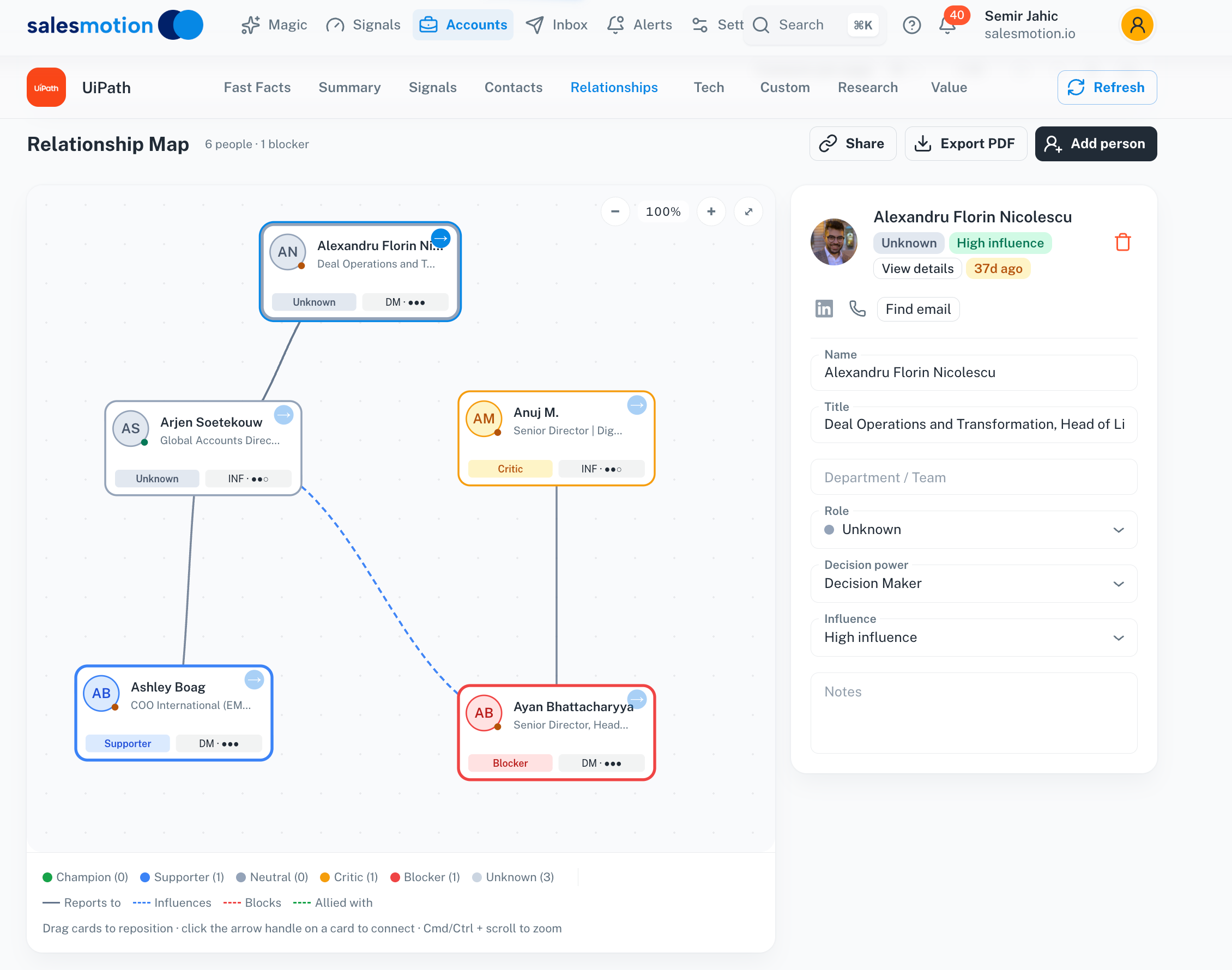 The Relationship Map tab on a real account — drag-and-drop nodes, role colors, influence edges, and the same Salesmotion nav as the rest of the platform.

“The Business Development team gets 80 to 90 percent of what they need in 15 minutes. That is a complete shift in how our reps work.”
Andrew Giordano
VP of Global Commercial Operations, Analytic Partners
Org Chart vs Relationship Map (and Why It Matters)
These two terms get used interchangeably. They are not the same thing, and the distinction is the entire point of the feature.
- An org chart shows who reports to whom — formal structure, drawn from titles and reporting lines. It is true in HR's system of record.
- A relationship map shows who influences a decision, who blocks it, and who has power outside their title. It is true in the deal.
The relationship map does not throw the org chart away — it uses it as scaffolding and layers the informal power on top. The CFO sitting at the top of the org chart might have nothing to do with your deal. The Senior Director three boxes down might be the one your champion can't move without. The reports-to lines tell you nothing about that. The influence and ally lines tell you everything.
This matters more in 2026 than it did five years ago, because the buying committee has roughly doubled:
- Gartner's research now pegs the average B2B buying committee at 11 stakeholders, up from around five a decade ago.
- For enterprise technology purchases, Foundry has measured committees as large as 25 people.
- Deals where the selling team engages three or more stakeholders close at 2-3× the rate of single-threaded deals. Map at least six supporters and win rates can triple.
You cannot win an 11-person deal with a four-person mental model of the account. And you cannot keep a 25-person committee current in a spreadsheet that someone edits the week before a QBR.
That is why we built this as a live surface, not a slide.
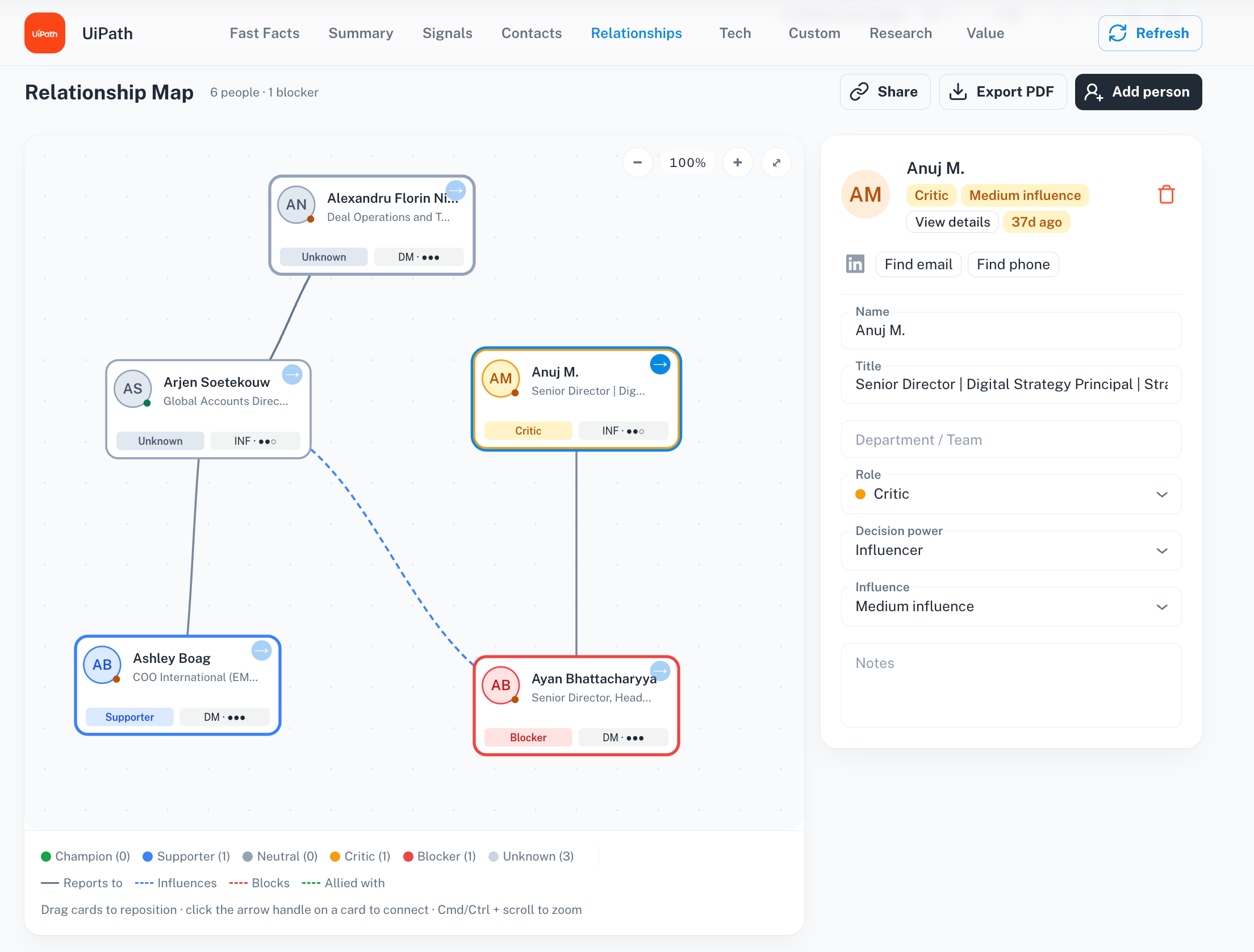 Click any node and the inspector opens with role, decision power, influence, freshness, and notes — everything you need to make a call about how to play the account.
What Makes This Different
1. The map is wired to the account, not the calendar
Most relationship mapping tools treat the map as a thing you maintain. We treat it as a view onto data that is already moving. Add a person to the chart and their title, location, and tenure come from Salesmotion's contact record. When that record changes — and Salesmotion is monitoring leadership changes, hiring, and executive movement 24/7 — the chart picks it up automatically.
User-edited fields (role, influence, notes, positions on the canvas) are preserved on every sync. The platform only updates the parts you have not opted to own.
2. No second tool, no second seat, no second sync
Relationship Maps ship inside the Salesmotion account record. The contacts on the map are the contacts in your pipeline, with the same signals firing on them, in the same product your team already uses every day. There is no integration to maintain because there is no second system. There is no per-seat add-on because the feature is included in the plan you already have. And there is no separate CRM sync, because the contact graph is shared with the rest of Salesmotion.
This was deliberate. The customers who asked us for this had all paid for a dedicated mapping tool at some point and watched it gather dust. The fix is not a better dedicated tool — it is removing the dedicated tool from the workflow entirely.
3. Public share links your champion can actually open
When a champion forwards your account map internally to rally their buying committee, they should not need to send a screenshot. Every map has a revocable share URL that opens a branded read-only view, complete with account logo, name, domain, and a stat strip from the account record — plus a deep-link button back into Salesmotion for anyone on your team.
Private notes are filtered out of the public payload at the API layer, not the UI. A pure, tested helper enforces the strip server-side, so a future bug in the share view cannot leak commentary your team only intended for internal eyes.
4. Built into the workflow reps already run
Most reps will not open a relationship mapping app. They will open the account they are working on this week. Relationship Maps live on that exact page — one tab over from Summary, Signals, Contacts, and Research. There is no second tool to remember.
A Day With the New Tab
Tuesday morning. You are prepping for a renewal call with a strategic account. You open the account in Salesmotion, click Relationships, and add the four people you know — VP Procurement (Champion), Director of Finance (Supporter), Head of IT (Blocker), and the COO (decision power: high).
A freshness pill is flashing on the COO. You click in and see the signal: she moved from EVP Operations to COO eight days ago, per a press release Salesmotion picked up that week. Your "decision power" tag is now outdated by one promotion, and your influence ring just changed. You bump her up, redraw the edge from her to your champion as influences, and add a note: "Promoted Mar 5 — congratulate, re-anchor the business case to her new remit."
You hit Export PDF and drop the one-page chart into your QBR deck. You hit Share and forward the public link to your AE, who is dialing in from another timezone and does not have a Salesmotion seat.
That whole loop — surface the change, update the map, rebrief the deal, share it — took under five minutes. The next time someone on that account changes role, you will see it on the chart without opening a thing.
Founder's Take
"We resisted shipping a map for years because every map we had ever seen — ours included, in spreadsheet form — was wrong by the time you needed it. The thing that changed our mind was watching our own customers describe the same workflow over and over: the deal stalls, the rep goes to look at the org chart, the chart is six months out of date, and they fall back on memory and LinkedIn. We had the live account data sitting right next to it. The fix was obvious. The map you draw on Monday is the map you share on Friday, with the role changes already on it — and the people who asked us for this don't have to maintain a second tool to get there."
— Semir Jahic, CEO & Co-Founder, Salesmotion
Key Takeaways
- Relationship Maps are live in Salesmotion today on the new Relationships tab of every account.
- Drag-and-drop org charts with Champion/Supporter/Critic/Blocker roles, decision power, influence rings, and four edge kinds (reports-to, influences, blocks, allies).
- Auto-synced from live contact data — freshness pills flag role changes detected by Salesmotion's monitoring without overwriting your edits.
- One-click contact import, public share links with private-notes stripped server-side, and one-page A4 PDF export for QBRs and deal reviews.
- Included on all paid plans ($85/mo Individual; custom Team pricing with unlimited users) — no add-on seat, no separate billing.
Frequently Asked Questions
How is Salesmotion's Relationship Map different from a standalone org-chart tool?
Standalone relationship mapping tools — even the good ones — sit outside your account intelligence. You maintain two surfaces: the org chart in one tool and the account brief, signals, and contacts in another. Salesmotion's Relationship Map lives inside the account record, so the chart shares state with everything else you know about the account. When Salesmotion detects a role change on someone on the map, the freshness pill on the chart updates automatically. There is no second tool to maintain or sync, and no separate seat to license.
Does it integrate with my CRM?
The map uses the contacts Salesmotion has on each account, which can flow in from Salesforce, HubSpot, CSV, or the Salesmotion contact discovery itself. You do not need a separate sync to maintain the chart — it reads from the same contact graph as the rest of the platform.
Can I share a map with someone who does not have a Salesmotion account?
Yes. Every map has a revocable public share link at /r/[token]. The public view is a branded read-only page with the account logo, name, stat strip, and chart. Private notes are stripped server-side before the payload ever reaches the public endpoint, so internal commentary cannot leak by accident.
Can I export the map for a QBR?
Yes. The Export PDF button generates a one-page A4-landscape chart plus an A4-portrait people table. Filenames follow salesmotion-relationship-map-yy-mm-dd-account-slug.pdf so they are easy to find later.
What about the data my team has already edited on the chart?
Salesmotion preserves user-edited role, influence, notes, and positions on every contact sync. The platform only updates display fields (title, company, recent activity) — your interpretation of the org stays yours.
When can I try it?
It is live now on all paid plans. Open the app and click Relationships on any account, or book a 15-minute demo and we will run it on one of your real accounts.