Your revenue team knows the feeling. A rep opens Slack, sees a new funding announcement, a hiring spike, and a founder podcast mention, then spends half an hour stitching together context before they can send one decent email. Meanwhile, RevOps wants better prioritization, managers want cleaner follow-up, and leadership wants proof that AI is doing more than producing more noise.
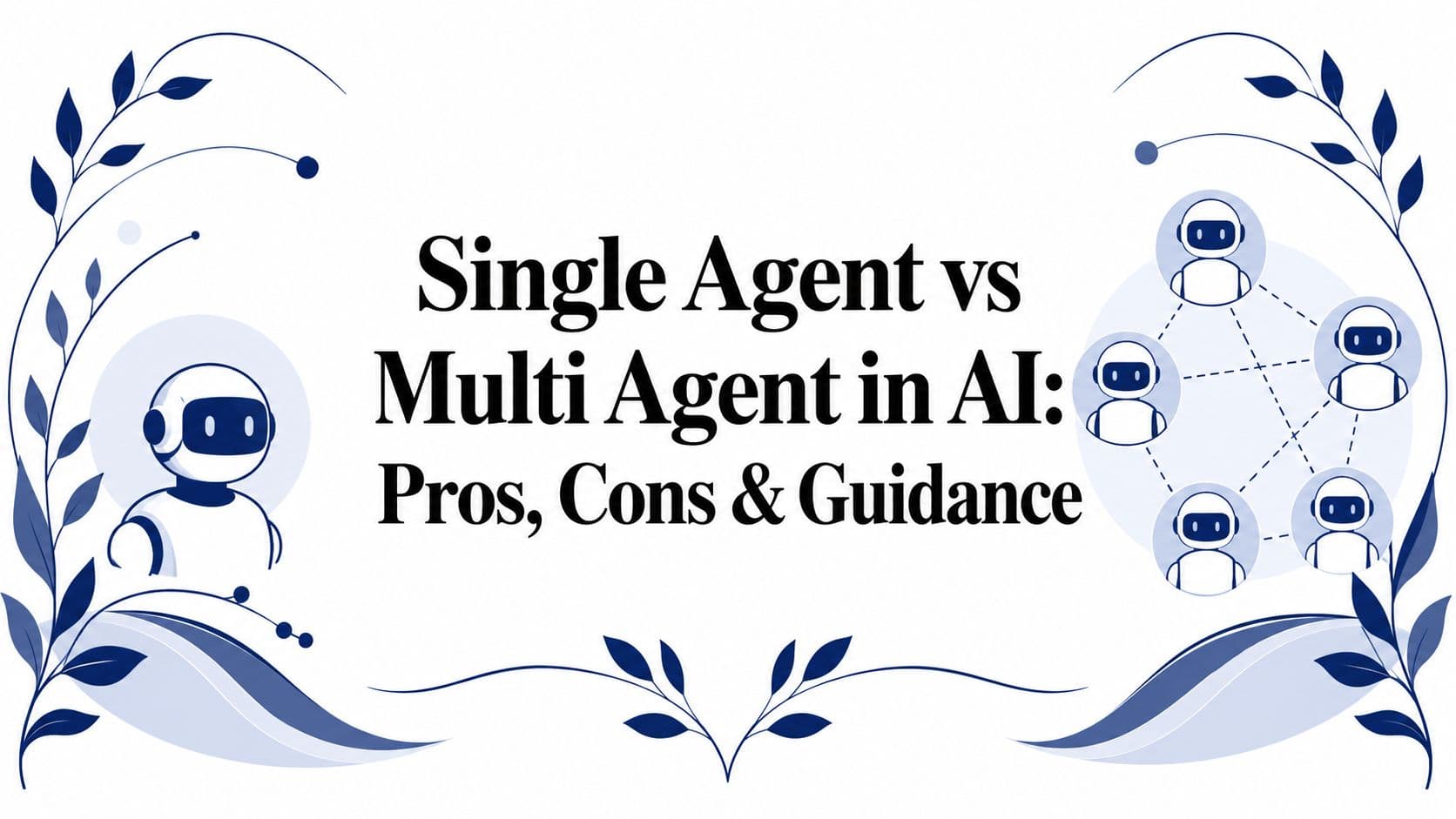
That's where the single agent vs multi agent in AI decision stops being academic. For sales intelligence workflows, the right architecture changes how fast teams move, how much they spend, and how much context survives from research to outreach. This guide keeps the discussion grounded in real workflow design, cost trade-offs, and the task-structure thresholds that usually decide whether one agent is enough or whether coordination is worth it.
The short answer: start with a single agent for sequential, context-heavy work such as AI account research and outreach drafting. Move to multiple agents only when the work splits into independent subtasks that can run in parallel, or when security or team boundaries force separation.
| Dimension | Single agent | Multi agent |
|---|---|---|
| Governance | Easier to monitor and audit | More moving parts, more oversight |
| Cost | Usually lower | Can rise quickly with coordination overhead |
| Speed | Strong on straightforward sequential work | Strong when work can be split and run in parallel |
| Best fit | Bounded tasks, context-heavy execution | Specialized subtasks, parallel research, cross-functional workflows |
Introduction to Agent Architectures
A common starting point is one AI system, one prompt chain, one output. That single-agent setup is attractive because it's easier to govern, cheaper to run, and often good enough when the task is bounded and sequential. A single agent receives the request, reasons through it, and returns the result without needing other agents to pass context back and forth.
Multi-agent systems grew out of a different need. As AI work shifted from narrow prompting to workflows that require parallel execution, specialized roles, and handoffs between stages, a swarm of agents began making more sense than one generalist. The trade-off is real, though, because coordination creates overhead that single-agent systems avoid.
For revenue teams, that difference shows up fast. One agent can summarize a target account, but a research brief, a live signal monitor, and a personalized outreach writer may each need different operating modes. A practical place to see the difference in action is the workflow framing in Salesmotion's overview of AI sales agents, where the core challenge is turning raw signals into immediate action.
Practical rule: if one model can keep the whole workflow in context, start there. Once the handoffs become the hard part, you're in multi-agent territory.
The rest of this topic is less about “which is more advanced” and more about which architecture fits the work. That's the decision revenue leaders have to make.
Understanding the Key Concepts
A sales leader looking at an AI workflow usually needs to answer one question first: is this one coordinated job or a set of separate jobs that can be split cleanly. That answer drives the architecture. A single-agent system routes planning and execution through one model instance. It can still call tools, query systems, and generate structured outputs, but the reasoning loop stays centralized. That usually makes it easier to debug, easier to supervise, and less fragile when the output has to preserve context across multiple steps.
A multi-agent system splits the job into specialized roles. One agent may research, another validate, another monitor, and another draft the next action. The appeal is specialization, but the price is communication overhead, more failure points, and more design work around who hands off what, when, and with what context preserved.
Why the architectural shift happened
The shift matters because the work changed. Early AI use often looked like one-step prompting, where a single answer was enough. Modern workflows are more often operational systems, where the AI has to coordinate across sources, maintain state, and deliver output that fits a business process instead of a standalone reply.
Sales intelligence makes that difference easy to see. A team might want one agent to watch account signals, another to enrich records, and another to draft outreach from those findings. That structure can work well only if the steps are separable. Salesmotion's AI agents vs automation article helps clarify that divide, because it distinguishes between task movement and context-aware action.
Task structure matters more than model hype. In a January 2026 study, Google Research found that centralized multi-agent coordination improved performance by 80.9% over a single agent on a parallelizable financial-analysis task, while every multi-agent variant tested degraded performance by 39% to 70% on a sequential planning task. That is a strong reminder that coordination helps when the work can run in parallel, and hurts when one coherent reasoning thread has to stay intact.
A practical rule follows from that. If the workflow breaks into independent subtasks, multi-agent systems can help. If the workflow depends on one continuous line of reasoning, a single agent usually holds up better.
Microsoft's guidance on agent design points in the same direction. It recommends starting with a single-agent prototype unless the use case crosses security boundaries, involves multiple teams, or faces clear growth pressure, because multi-agent systems add orchestration overhead even when modularity improves (Microsoft guidance). That advice matters in sales operations, where the first version often fails because the handoffs are too ambitious, not because the model is too weak.
The key mental model
Single-agent systems optimize for context continuity. Multi-agent systems optimize for division of labor.
That trade-off sits underneath every architecture decision in this article, especially in sales intelligence, where one broken handoff can damage the workflow more than a slower but coherent one.

“The talking points are gold. If they're in Salesmotion, I know they're being discussed inside that business. That makes it easy to spark a real conversation, which is 90 percent of the battle.”
Andrew Giordano
VP of Global Commercial Operations, Analytic Partners
Comparing Single and Multi Agent Systems
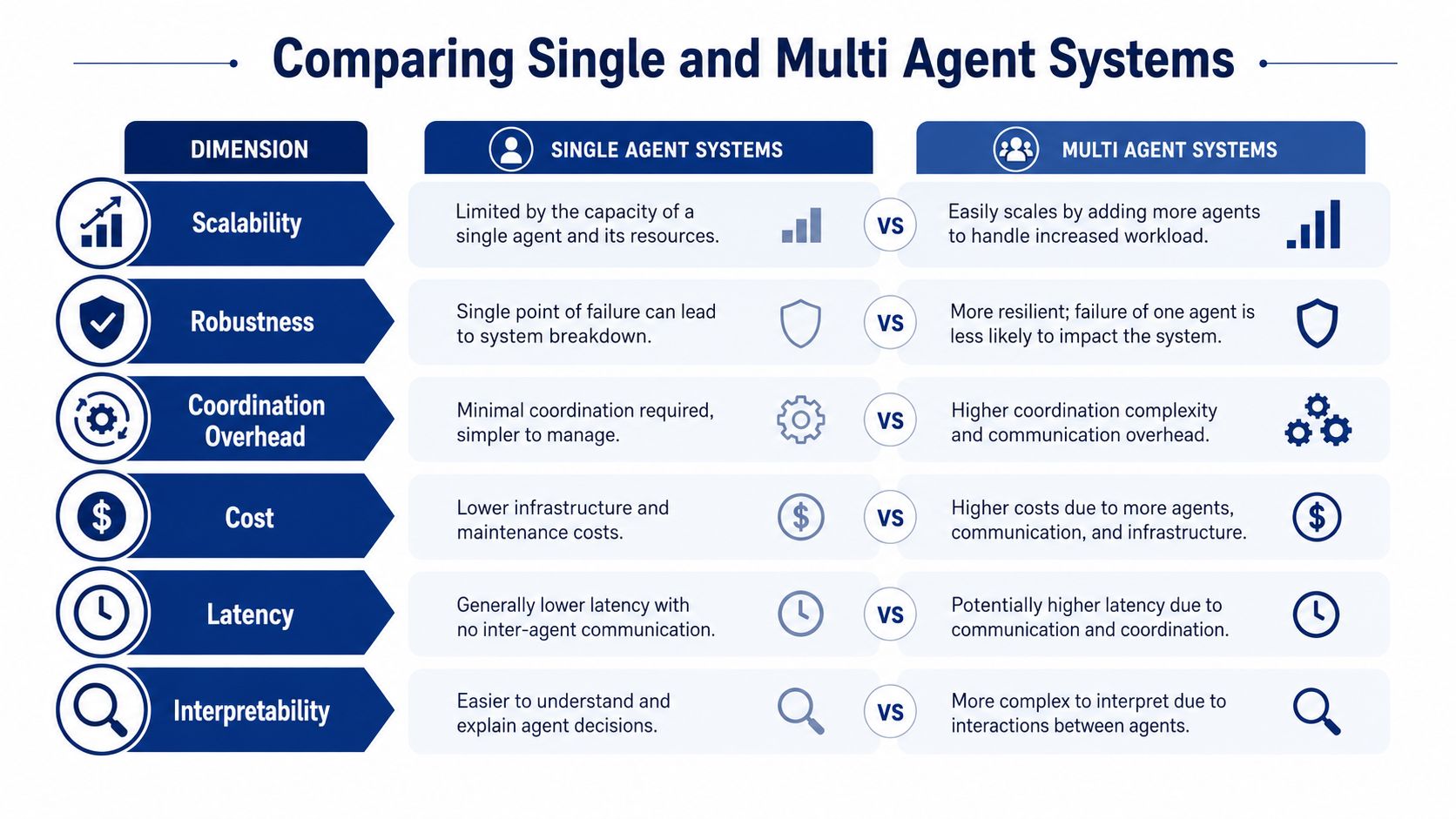
A sales leader usually feels the difference between these architectures before a dashboard ever makes it obvious. One setup gives you a single reasoning thread that is easier to govern. The other spreads work across specialists, which can help when the task is decomposable, but it also creates more handoffs to manage.
The practical comparison is not abstract. In production, the gap shows up in specialization, reliability, coordination overhead, cost, latency, and interpretability. For sales intelligence workflows, those dimensions decide whether the system produces a usable account brief or a pile of partially connected outputs that still need human repair.
Specialization and task shape
Single-agent systems work well when one coherent context can carry the whole job. That is common in account research, message drafting, and summarizing a lead history, where continuity matters more than parallel work. Multi-agent systems fit better when the workflow has distinct subproblems, separate policy boundaries, or parallel research tracks, because each agent can focus on a narrower slice of the job.
The trade-off is easiest to see in sales intelligence. A single agent can keep a cleaner view of the account, the pipeline stage, and the rep's intent. Multiple agents can be useful when one handles firmographic enrichment, another checks trigger events, and a third shapes outreach angles, but that only helps if the handoff structure is disciplined. A useful reference point for that kind of workflow design is MCP server patterns for sales tools, since the integration layer often determines whether distributed work stays useful or turns into fragmented output.
Reliability and failure modes
Single-agent systems are usually simpler to inspect because one reasoning path produces the result. That makes error tracing easier when an account summary misses a signal or a recommendation feels off. Multi-agent systems can add resilience through role separation, but they also introduce more chances for context loss, repeated effort, or agents drifting away from the original objective.
That matters in revenue workflows because small errors do not stay small for long. If one agent misreads a buying signal and another agent builds a recommendation on top of it, the final output can look polished while still being wrong. A single agent is often easier to correct when the workflow needs one consistent judgment rather than several partial judgments stitched together.
Coordination overhead and interpretability
Coordination is where many multi-agent designs lose their advantage. Every extra exchange creates another place where instructions can be misread, state can be dropped, or the process can stall while one agent waits for another. The operational burden is not just technical, it also shows up in prompt maintenance, testing, and debugging.
Interpretability follows the same pattern. A single-agent workflow gives you one trace to inspect, which is useful when a sales ops team needs to understand why a lead was scored a certain way or why an account was prioritized. Multi-agent systems can be harder to explain because the logic is spread across multiple decisions, each with its own assumptions. Microsoft's agent guidance frames this trade-off well: multi-agent architectures "provide value only when parallelization delivers measurable performance gains," so adding agents can improve modularity without improving the output.
Cost and throughput
Cost often decides the architecture before architecture decides the product. Multi-agent systems usually consume more tokens, more orchestration logic, and more engineering time to keep the workflow stable. They also make throughput less predictable when one agent becomes a bottleneck or when the system spends time coordinating instead of producing output.
That is why the strongest use cases are usually the ones where decomposition creates clear business value. In sales intelligence, if the extra structure helps separate enrichment from reasoning from drafting, the added overhead can be worth it. If the workflow is mostly one continuous judgment call, a simpler system usually gives better operational value and is easier to maintain. The Google Research study makes the same point: more agents do not automatically produce better work.
Operational takeaway: choose the architecture that matches the shape of the work, not the one that sounds more advanced.
Architecture Patterns and Orchestration
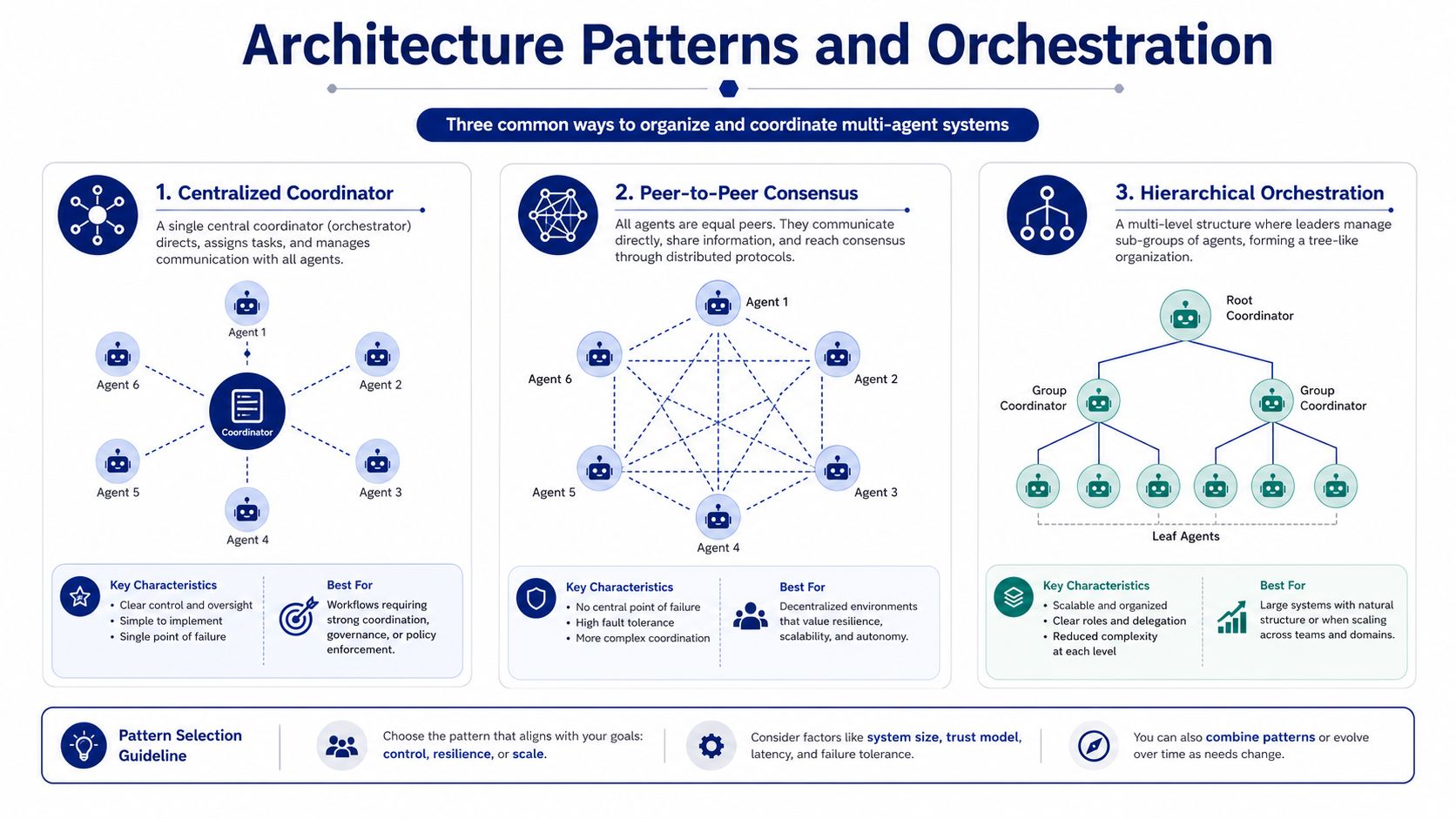
Once a sales team decides to split work across agents, orchestration becomes the design choice. The agent count matters, but the control model matters just as much. The three patterns that show up most often are centralized coordinator, peer-to-peer consensus, and hierarchical pipelines. Each one moves work differently, and each one creates a different failure mode, cost profile, and maintenance burden.
Centralized coordinator
A centralized coordinator acts like an operations manager. One agent sets the plan, assigns subtasks, collects outputs, and shapes the final result. This pattern is usually the easiest to govern because there is a single place to inspect state, trace decisions, and intervene when the workflow drifts.
It fits sales intelligence work where one system should hold the account narrative while other agents supply narrow inputs. That can mean one agent gathers firmographic data, another checks buying signals, and a third drafts the outbound brief. The coordinator keeps those pieces aligned, which matters when a rep needs a consistent summary instead of a pile of disconnected facts.
For teams that want to move from a simple prototype into more distributed behavior without losing control, this pattern is the safest starting point. It also maps well to the way many revenue teams already work, with one owner responsible for the final account view and specialists contributing around that core.
Peer-to-peer consensus
Peer-to-peer works better when agents need to challenge each other or compare evidence before landing on a recommendation. In sales workflows, that can help when one agent reads web signals, another reviews CRM history, and a third questions whether the account is in market. The value comes from comparison, not from speed.
The trade-off is coordination overhead. More messages mean more opportunities for disagreement, looped conversations, and uneven outputs that need manual cleanup. That is manageable in research-heavy work, but it becomes expensive when the team needs fast, repeatable output for a live pipeline or outbound sequence.
Hierarchical pipelines
Hierarchical designs fit work that moves through distinct stages. Research can feed monitoring, monitoring can feed drafting, and drafting can feed review. The structure keeps specialization intact while still giving the workflow an understandable path from input to output.
That model is especially useful in revenue operations because it separates tasks that have different tool needs and different quality checks. In a sales intelligence pipeline, enrichment and reasoning should not be treated as the same step. If the design makes every stage wait on the same agent, the workflow slows down and the handoff cost rises. The best MCP servers for sales teams are useful here because that tool layer is what makes those stages dependable enough to orchestrate.
The lesson for sales teams is simple. A simple task structure usually works best with a single agent. A workflow with real specialization boundaries can benefit from multiple agents, but only when the extra coordination pays for itself in clearer output and less manual rework.

“All of the vendors that I've worked with, all of the onboarding that I have had to deal with, I will say, hands down, Salesmotion was the easiest that I have had.”
Lyndsay Thomson
Head of Sales Operations, Cytel
Evaluating Metrics and Cost
If the architecture debate stays abstract, teams make expensive mistakes. Finance needs to know what the system costs, engineering needs to know how it fails, and RevOps needs to know whether the workflow gets faster. For sales intelligence work, the useful view is broader than model accuracy alone. The right question is how accuracy, throughput, error amplification, latency, and total cost of ownership interact once the system has to support real account research, prioritization, and outreach.
What to measure first
Accuracy still matters, but it should not stand alone. A workflow that is slightly more accurate but materially slower can hurt adoption if reps wait on output, and latency matters when a signal loses value quickly. Throughput matters when the team has many target accounts to cover, and the shape of the work matters too. A system that performs well on one account brief may still fail under steady pipeline pressure.
Multi-agent systems can add value in the right setting, but they can also overcomplicate simple tasks. A 2026 guide from Innervation AI cites benchmarks showing about 23% higher accuracy on reasoning tasks for multi-agent setups. That signal matters, but it does not transfer cleanly to every business workflow. Sales intelligence is a good example, because the value comes from both the quality of the output and the speed at which a rep can act on it.
The more useful metrics are often task-specific. For a sales research pipeline, I look at whether the system produces a usable account brief without forcing a rep to clean up missing fields, reconcile conflicting sources, or wait for a second pass. That is where automation patterns for sales research become relevant, because the workflow has to work under real operational pressure, not only in a benchmark.
Why total cost of ownership is the central consideration
A lot of buyers look only at model spend. That misses orchestration, retries, debugging, state handoff, and governance work. Microsoft's guidance notes that multi-agent cost structures rise "because each agent processes redundant context and communication overhead multiplies with agent count." Errors compound too: in the Google Research study, independent multi-agent systems amplified errors up to 17.2x, while centralized systems held amplification to 4.4x.
That is why total cost of ownership needs to include the orchestration tax. If an architecture requires more monitoring, more prompt tuning, and more failure recovery, those costs land somewhere, even if they do not show up in the first API bill. In sales workflows, the hidden cost usually appears as analyst review time, rep rework, and longer time to send.
Budget rule: if the workflow is sequential and context-heavy, count every extra handoff as a cost center until proven otherwise.
For revenue operations, that framing is especially useful. A system that generates good output but is too slow for active pipeline work can still lose to a simpler one that gets the rep to action faster.
Use Cases in Sales Intelligence Workflows
Sales intelligence is where the single-agent vs multi-agent decision becomes real instead of theoretical. The workflow often starts with scattered signals, then moves into account research, then into prioritization, then into outreach. Some of those steps are naturally parallel, while others need one continuous thread of context.
Research and monitoring belong in parallel
Research is a strong multi-agent candidate because it can be decomposed into independently verifiable subtasks. One agent can gather company news, another can pull hiring signals, another can inspect investor updates, and another can synthesize the account brief. Monitoring also fits this pattern because signals can be watched across many accounts at once without collapsing into one sequential reasoning chain.
Multi-agent designs fit work that can run concurrently, such as researching several topics or analyzing different data sources at once (Thinking). For sales, that means research and monitoring can be parallelized, while outreach benefits from one agent holding the full context. In practice, that distinction saves teams from using the wrong design for the wrong stage.
Outreach needs continuity more than swarm logic
Personalized outreach is different. A rep wants a message that feels coherent, specific, and rooted in the same account story that the research produced. Once you split that into too many agents, you increase the chance that the subject line, body copy, and call to action drift apart.
That's why a hybrid pattern makes sense for many revenue teams. One agent can own the account narrative, while specialist agents feed in research, signal detection, and contact-level drafting. The orchestration stays lightweight, but the team still gets the benefit of specialization where it helps.
The practical workflow shape
In sales intelligence platforms, the cleanest split usually looks like this.
- Research layer: gather public signals, build the account brief, and keep the core context current.
- Signal layer: watch for meaningful triggers and push alerts when something changes.
- Prospecting layer: turn verified context into outreach that sounds informed rather than templated.
The point is not to maximize agent count. The point is to keep the workflow coherent. If the output depends on one evolving account story, the execution layer should preserve that story instead of fragmenting it across too many independent decisions.
Decision Checklist and Implementation Considerations
Start with the workflow, not the framework. If the task is well-defined and sequential, a single agent is usually the safer choice. If the task has parallel subtasks, multiple domains, or clear separation between research and execution, a multi-agent design starts to earn its keep.
A quick filter for architecture choice
- Task structure: Ask whether the work is mostly one continuous reasoning path or a set of separable subproblems.
- Governance needs: Check whether security, compliance, or cross-team ownership creates a reason to centralize control.
- Prototype scope: Build the smallest useful version first, then add agents only when the handoff problem is real.
- Monitoring plan: Instrument latency, error rates, and handoff failures before the system scales.
- Fallback behavior: Decide what happens when one agent fails, stalls, or returns inconsistent context.
Implementation discipline matters
The strongest teams treat orchestration as production infrastructure, not a demo feature. That means version control, logging, clear role boundaries, and incident response need to exist from day one. If those pieces are missing, multi-agent designs get harder to trust as soon as they touch revenue workflows.
The best path is usually hybrid. Keep the core reasoning loop lean, then add specialist agents only where separation creates actual business value. That's how you avoid paying the coordination tax before the system has earned the complexity.
If you're evaluating agent architecture for sales intelligence, Salesmotion can help you see what a practical multi-agent workflow looks like in practice. It combines account research, live signal tracking, and outreach generation so revenue teams can move from context to action faster, with less manual stitching in between. See how the Signal, Research and Outreach agents split that work, or book a demo to explore how that approach fits your pipeline motion.