Your reps already have more data than they can use. Slack alerts fire all day. LinkedIn shows job changes. Google alerts dump random headlines into inboxes. Someone on the team opens six tabs, reads half an earnings transcript, skims a press release, then sends an email that still sounds like every other outbound message in the market.
That's the problem. Not lack of information. Lack of usable context.
Teams often aren't losing because they have no signals. They're losing because reps can't turn signals into action fast enough. By the time someone figures out the compelling reason to reach out, the moment is gone, the message is generic, or the rep gives up and falls back to a tired sequence.
The End of Aimless Prospecting
A familiar scene plays out on a lot of sales floors.
An SDR gets assigned a target account. They check the CRM. Sparse notes. They open LinkedIn. A few leadership updates. They search recent news. One article about expansion, one about a product launch, and three irrelevant mentions from scraping sites that copy press releases without context. Forty minutes later, they still don't have a strong opening line, let alone a real point of view.
That's the manual research tax. It drains time, but the bigger issue is quality. Reps don't need more headlines. They need the answer to one question: why should this buyer talk to us now?
Modern lead intelligence software exists because that old workflow doesn't scale. The category itself is expanding fast. The global lead intelligence software market is projected to grow from $2.5 billion in 2024 to $7.9 billion by 2034, at a CAGR of 12.2%. That growth tells you something simple. Revenue teams are done treating research as a side task.
The shift that matters isn't “more data.” It's moving from passive monitoring to context-rich action. If you want a good primer on that motion, signal-based selling is the right mental model. You stop prospecting based on static lists and start engaging when a company gives you a credible reason to.
Why bad signals waste good reps
Weak prospecting usually falls into three buckets:
- Too early: The account fits your ICP, but nothing is happening. Outreach feels forced.
- Too vague: The rep sees “high intent” but can't explain what changed or why it matters.
- Too late: By the time someone pieces the story together, another vendor is already in the conversation.
Good outreach starts with relevance, not volume.
The best reps have always done this manually. They read between the lines. They connect hiring to strategy, leadership changes to budget shifts, funding to new priorities. What's changed is that software can now do a lot of that prep work continuously instead of once, badly, right before a call block.
What winning teams do differently
Strong teams don't tell reps to “personalize more.” That advice is useless on its own.
They give reps a system that spots a trigger, explains the trigger, and suggests what to do next. That's the difference between aimless prospecting and pipeline creation. One creates activity. The other creates meetings.
Skip the comparison fatigue?
If you're shopping for a sales intelligence tool, here's the short version.
Salesmotion combines account intel, buying signals, verified contacts, and AI-drafted outreach in one tool. From $85/mo, live in an hour, no annual contract.
What Is Lead Intelligence Software Exactly
Lead intelligence software is best understood as a research and decision layer for your revenue team. Not a contact database. Not just intent scores. Not another dashboard nobody checks.
At its best, it works like a personal research analyst assigned to every target account. It watches what's changing, pulls in relevant context, cleans the data, and gives the rep a usable brief instead of a pile of fragments.
Lead intelligence software works by aggregating firmographic, technographic, and behavioral data to create a unified profile, allowing teams to distinguish high-quality opportunities from noise in seconds by automating data enrichment and verification.
That's the core job. Separate signal from noise, then make it useful.
What the software is actually doing
Under the hood, good platforms are pulling from many public and commercial inputs, then resolving them into one account story. Depending on the platform, that can include earnings calls, SEC filings, company websites, LinkedIn activity, job postings, and buyer engagement data.
If you want to understand the mechanics behind collecting and structuring public web data at scale, it helps to explore web scraping API concepts. You don't need to become a data engineer, but you should understand why source coverage and data extraction quality matter.
The output should not be a wall of news
Most tools typically fail here.
Bad tools dump updates into a feed and call that intelligence. Reps then do the synthesis themselves. That's not intelligence. That's outsourced homework.
Good tools answer practical questions like:
- What changed at this account
- Why it matters to our deal
- Who likely cares internally
- What message angle makes sense now
A useful way to frame it is through the broader sales intelligence definition. Raw data helps with targeting. Actual intelligence helps with timing, messaging, and prioritization.
What to look for in the output
When I evaluate lead intelligence software, I care less about the volume of data and more about the shape of the answer. Reps need short, opinionated guidance they can use in a live workflow.
A strong output usually includes:
- Account narrative: What the company appears to be prioritizing right now.
- Trigger context: What changed, and why the timing matters.
- Stakeholder relevance: Which leaders are most likely connected to the change.
- Suggested action: A practical next step, not just another alert.
If a rep still has to read twelve links and write their own theory, the tool hasn't solved the problem.
That's the standard. Anything less is enrichment with a nicer interface.

“The account and contact signals are key for reaching out at important times, and the value-add messaging it creates unique to every contact helps save time and efficiency.”
Daniel Pitman
Mid-Market Account Executive, Black Swan Data
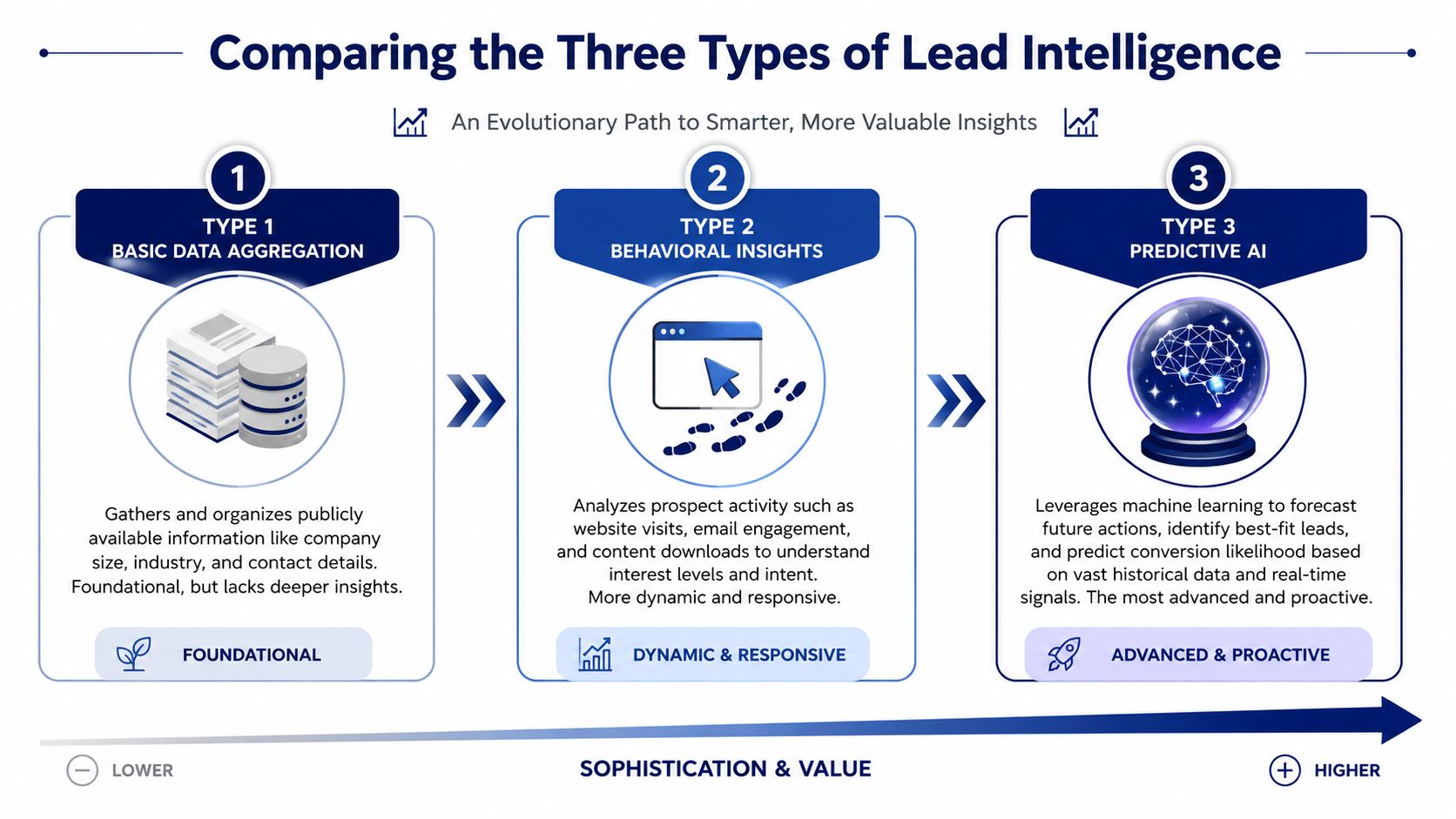
Comparing the Three Types of Intelligence
Not all lead intelligence is equal. Most tools in market fall into one of three buckets, and sales leaders get in trouble when they treat them as interchangeable.
The progression is straightforward. Data enrichment is the base layer. Intent data adds behavior. Signal-based intelligence adds timing, context, and an actual reason to engage.
Type one is data enrichment
This is table stakes.
Enrichment tools append company size, industry, titles, direct contact information, and sometimes technographics. They help clean up the CRM, improve routing, and make sure reps aren't working with incomplete records. Tools like Clearbit, ZoomInfo, Apollo, and Cognism all play somewhere in this layer.
Useful? Yes. Enough to drive timely outreach? Usually not.
A rep can know a company's tech stack and employee count and still have no clue why that account would talk this quarter.
Type two is intent data
Intent data improves on enrichment because it gives you behavioral signals. Website visits, content downloads, topic research, email engagement. This tells you an account may be paying attention.
That's better than static data, but it still has a real limitation. Intent often tells you that something is happening without telling you what changed in the business.
For example, if an account is researching “sales automation,” that might matter. Or it might be a junior team member browsing. Or it might reflect a broad education phase with no active project behind it. Intent can point you in the right direction, but reps still have to interpret the significance.
Type three is signal-based intelligence
At this point, things become actionable.
Signal-based intelligence tracks actual business changes such as executive hires, expansion activity, funding, job posting patterns, leadership movement, or shifts in public messaging. These signals create a far sharper “why now” than generic intent.
The best systems don't stop at detection. They synthesize those signals into opinionated briefs. According to ActiveProspect's discussion of lead intelligence, the most effective intelligence requires opinionated briefs that synthesize signals from sources like earnings calls, press releases, and LinkedIn, reducing manual prep from 2–3 hours per account to minutes.
That matters because reps don't need more tabs. They need judgment delivered in workflow.
The trade-offs side by side
| Approach | What it does well | Where it breaks |
|---|---|---|
| Data enrichment | Improves coverage, contact quality, and CRM completeness | Doesn't explain urgency |
| Intent data | Surfaces interest and research behavior | Often lacks context and next-step clarity |
| Signal-based intelligence | Connects business events to outreach timing and message angle | Requires stronger synthesis to avoid noisy alerts |
The broader category of market intelligence software overlaps here, but sales teams should stay focused on one question. Does the tool help a rep act today?
A trigger without context creates hesitation. Context without action creates delay. Reps need both.
That's why signal-based intelligence is the most useful layer for proactive teams. It gives you a reason to call, not just a reason to sort the account into a list.
The Real Business Value for Sales Teams
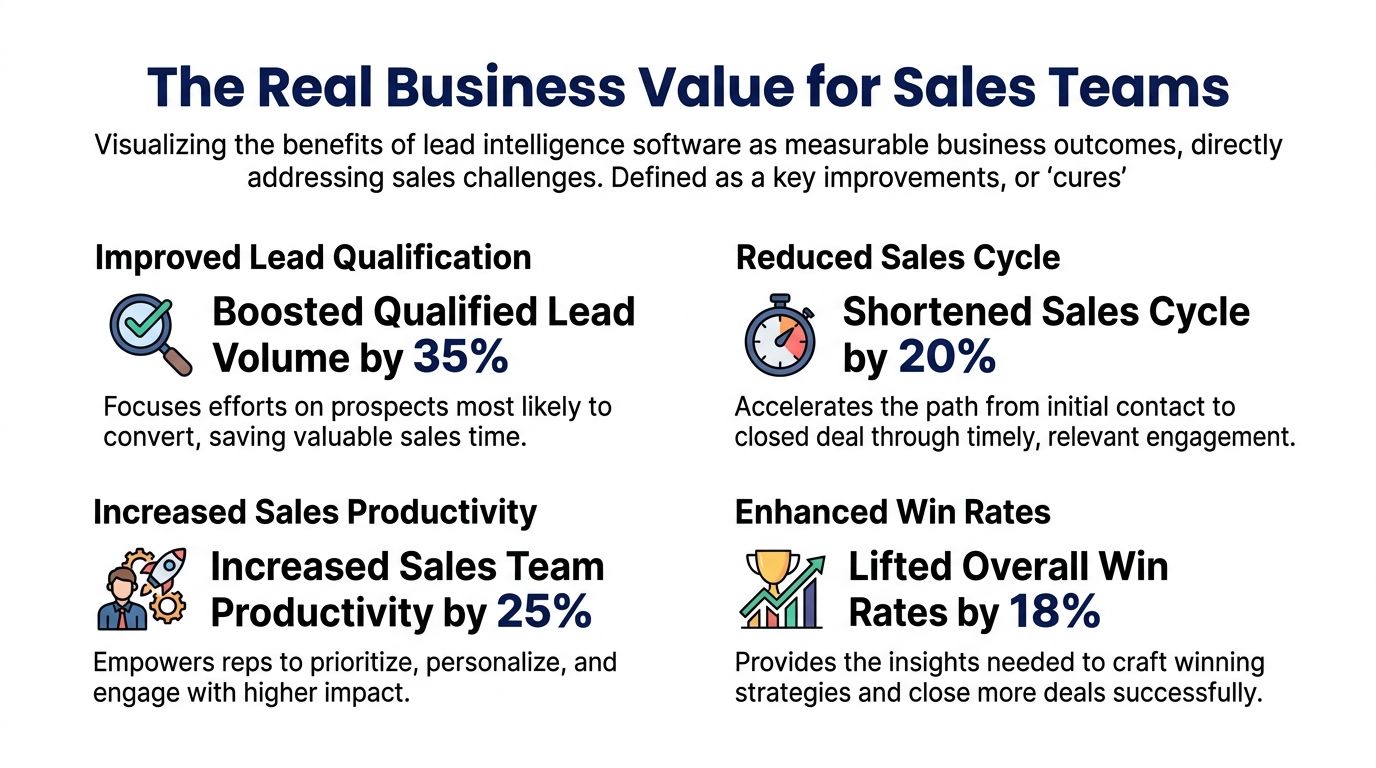
Sales leaders don't buy lead intelligence software because they want prettier data. They buy it because reps are wasting time, messaging is weak, and account prioritization is inconsistent.
The value shows up when the software changes behavior on the floor. Less Googling. Better timing. Stronger emails. Cleaner account plans. Fewer reps spraying generic sequences across the same stale lists.
It removes the manual research tax
This is the first win because it's immediate.
That time goes somewhere. Either back into prospecting, or into better discovery prep, or into follow-up that would otherwise slip. Reps don't need to become analysts before they can send a relevant email.
It fixes the weak why now problem
A lot of outbound fails because the messaging isn't wrong. It's just untimely.
Consider the difference:
- Before: “Reaching out because we help companies streamline RevOps.”
- After: “Noticed you're hiring for sales systems leadership and expanding process ownership. That usually signals a tooling and workflow review.”
Same product. Completely different reason to engage.
The second message works because it ties to a visible change inside the account. That gives the rep credibility. It also gives the buyer a reason to reply other than politeness.
It makes account planning consistent
Every sales org has a few reps who are naturally good at research. They know how to read transcripts, scan job boards, and map org changes into opportunity hypotheses.
The problem is that you can't build a forecast around hero behavior.
Lead intelligence software gives average reps a repeatable planning baseline. Every named account can have current context, recent changes, likely priorities, and stakeholder clues. That consistency matters more than generally acknowledged.
Operational test: If only your top rep can explain why an account is in active pursuit, you don't have a process. You have a talent dependency.
It cuts signal overload down to something usable
Too many tools generate alerts with no point of view. A rep sees “new funding” or “job change” and still has to answer the hard part alone. Why does this matter to our offering? Who should I contact? What should I say?
That's where ROI really lives. Not in alert volume. In interpretation.
A good way to think about the business case is through the broader ROI of sales intelligence tools. The return doesn't come from owning more information. It comes from reducing wasted effort and increasing the number of relevant conversations that enter pipeline.
When the tool can tell a rep, “This hiring pattern suggests a systems rollout” or “This executive move usually precedes a budget shift,” it becomes part of execution, not just reporting.

“All of the vendors that I've worked with, all of the onboarding that I have had to deal with, I will say, hands down, Salesmotion was the easiest that I have had.”
Lyndsay Thomson
Head of Sales Operations, Cytel
How to Choose the Right Software
Most buying processes for lead intelligence software go sideways for one reason. The demo rewards volume and UI polish, while the actual job is workflow improvement.
A vendor shows millions of contacts, a busy dashboard, and a clean enrichment sync into Salesforce or HubSpot. None of that tells you whether a rep will book more meetings.
The right buying process is blunt. Force vendors to prove they can move from signal to suggested action, not just from source to screen.
Start with these questions in the demo
Ask questions that expose whether the platform is passive or operational:
- Show me how a rep goes from alert to email. Don't accept a slide. Ask for the actual workflow.
- What sources are being synthesized, and how do you explain relevance? Source breadth matters, but synthesis matters more.
- How does the system decide what's worth surfacing? If everything becomes an alert, nothing is urgent.
- Can the platform tailor recommendations by role, segment, or product line? Enterprise AE workflows and SDR workflows aren't the same.
- Where do the insights appear? Slack, CRM, and sales engagement tools matter because that's where adoption lives.
If you're evaluating broader stacks for solving B2B pipeline issues, keep this same filter. Does the tool reduce rep effort and improve timing, or does it just add another screen?
Evaluate the so what layer
This is the most overlooked part of the category.
Anyone can show a list of signals. Fewer vendors can explain the implication of the signal. Fewer still can produce a useful outreach angle from it.
Use a simple test in the trial:
| Test | Weak platform | Strong platform |
|---|---|---|
| New executive hire | Sends generic alert | Explains likely initiative and who to contact |
| Hiring spike | Shows open roles | Connects roles to project direction |
| Funding event | Flags the news | Suggests urgency, budget logic, and message angle |
Check workflow fit, not just feature fit
A feature-rich platform can still fail if reps have to leave their normal workflow to use it.
Look for practical fit in these areas:
- CRM integration: Reps and managers should see account context where they already work.
- Sales engagement handoff: Suggested emails and sequences should move into tools like Outreach or Salesloft without friction.
- Alert delivery: Slack and email matter because speed matters.
- RevOps control: Admins need reasonable control over routing, prioritization, and account coverage.
Don't let vendors hide behind data volume
More sources don't automatically mean better intelligence.
What matters is whether the system can answer these questions cleanly:
- What changed
- Why it matters
- Who should act
- What they should do next
If the vendor can't show that in under a few clicks, your reps won't use it. And unused intelligence has exactly zero pipeline value.
Implementing a Trigger-to-Action Workflow
This point dictates whether teams gain an advantage or create another dead tool.
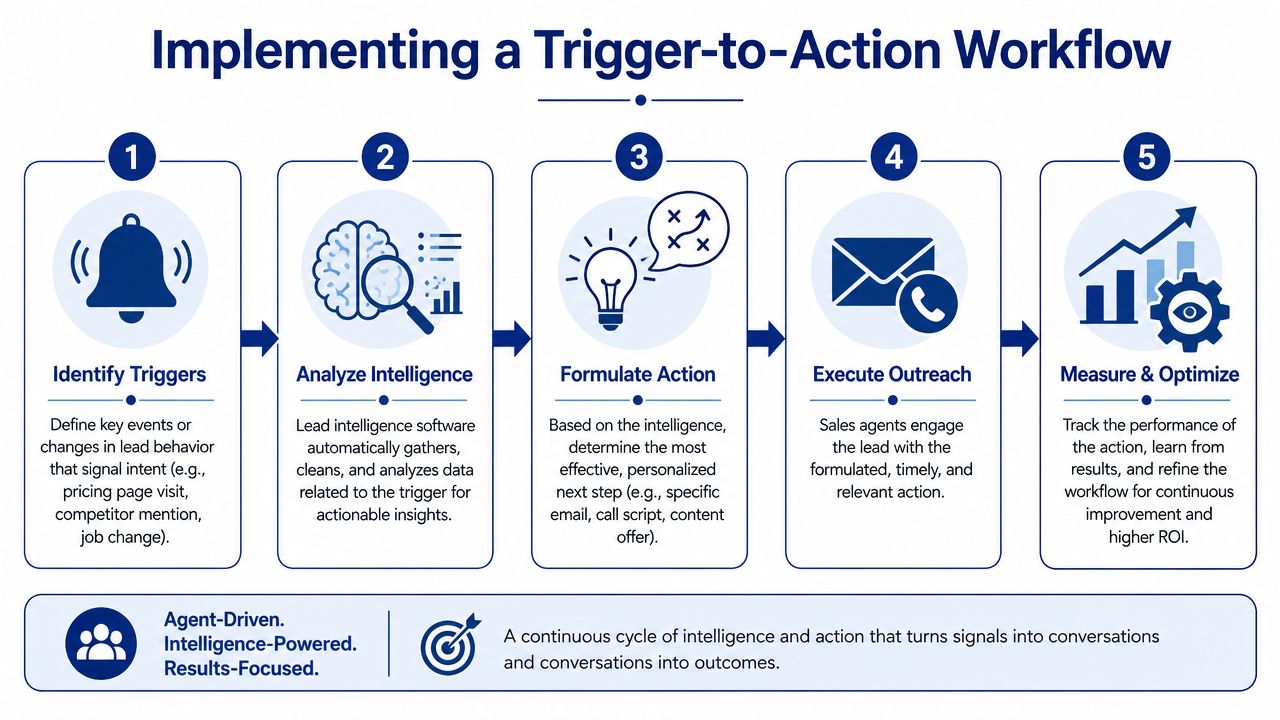
A trigger-to-action workflow only works when ownership is clear. Someone or something has to research the account, monitor for changes, turn those changes into a sales angle, and put the result in front of the rep fast enough to matter.
That gap is bigger than most vendors admit. SalesTech Star notes that the critical gap in the market is the failure to bridge passive intent scoring with autonomous trigger-to-action workflows, and that 70% of sales teams struggle to prioritize leads because they lack real-time behavioral signals linked to specific next steps.
A practical model that works
The cleanest implementation uses three motions.
First, a research layer builds structured account intelligence. That includes recent strategic moves, leadership priorities, hiring patterns, and relevant public signals.
Second, a signal layer watches those accounts continuously for meaningful changes. Not every news item matters. The system needs rules or models that separate useful triggers from clutter.
Third, an action layer drafts or recommends the next move. That might be an email, a call note, a task in CRM, or a short brief for the account owner.
A real sales example
Let's say one of your target accounts starts posting roles for cloud data engineers and data platform leads.
On its own, that's interesting but incomplete.
The workflow should do more than alert the rep. It should interpret the pattern. The account appears to be investing in data infrastructure. That may point to a modernization initiative, tooling review, migration project, or reporting rebuild. The best contact probably isn't a random director in IT. It may be the VP of Engineering, Head of Data, or a newly hired platform leader.
Now the rep has something usable:
You're hiring heavily into cloud data engineering. That usually means the team is formalizing a broader data initiative, not just backfilling seats. We help engineering leaders reduce the operational drag that shows up when those programs scale.
That's not magic. It's a workflow that connects trigger, context, buyer, and message.
How to roll it out without creating chaos
Start small. Pick a segment, a team, or a named-account pod.
Then do this:
- Define high-value triggers: Choose events that correlate with your sales motion, such as executive changes, hiring patterns, expansion signals, or public initiative shifts.
- Set routing rules: Decide who gets what. SDRs, AEs, account directors, and managers shouldn't all receive the same alert stream.
- Create action templates: Build response patterns for common triggers, but leave room for rep judgment.
- Measure response quality: Look at whether reps act on alerts, whether messages improve, and whether triggered outreach creates meetings.
- Tune aggressively: If reps ignore a class of alerts, fix the logic. Don't blame adoption before you fix relevance.
The winning pattern is simple. Research continuously. Detect meaningful change. Turn that change into a recommended action. Put it in workflow.
That's what gets you from passive data to pipeline.
If your team is tired of drowning in alerts and still struggling to find a real “why now,” Salesmotion is built for exactly that problem. Its AI agents track target accounts across public sources, surface the signals that matter, explain the so what, and turn those triggers into ready-to-use outreach so reps can spend more time selling and less time stitching context together.