Sales reps spend only 28% of their week selling, and that's the core problem sales automation is built to fix. Sales automation is software that handles repetitive sales tasks like lead qualification, follow-up messaging, and CRM updates so reps can spend more time in live selling conversations.
That simple definition matters because the category has outgrown basic scheduling and sequence tools. What started as a way to remove admin work now reaches into account research, trigger detection, prioritization, and outreach that responds to real buying signals. Teams that treat automation as a narrow productivity hack usually miss the bigger payoff, which is cleaner execution across the full revenue motion.
Why Sales Automation Matters More Than Ever
The daily reality for most reps is a long list of small tasks that never feel small. A deal update gets delayed because someone's buried in CRM hygiene. A follow-up goes out late because the rep is still digging for context. A promising lead cools off because the next step never got logged. That's the drag behind the 28% number, and it's why automation moved from convenience to necessity in modern revenue teams, as discussed in this ROI of sales intelligence tools analysis.
The work behind the work
When selling time gets crowded out by admin, managers don't just lose efficiency, they lose momentum. Reps end up spending energy on data entry, scheduling, and repeated follow-ups instead of discovery calls, qualification, and real conversations. The result is a pipeline that looks active on paper but moves too slowly in practice.
Sales automation exists to remove that friction. It handles repetitive sales tasks automatically, such as lead qualification, follow-up messaging, CRM record updates, and workflow triggers. The point isn't to replace the rep, it's to keep the rep out of low-value busywork so they can focus on judgment, timing, and conversation quality.
That shift is bigger than a software feature. McKinsey Global Institute estimated that approximately one-third of sales and sales-operations tasks could be automated with then-available technology, which showed that automation was structurally feasible, not a niche idea. The category has only become more relevant as revenue teams try to recover time from manual work and move faster on better accounts.
Practical rule: If a task repeats often, follows a clear pattern, and doesn't need human judgment every time, it should be the first thing you evaluate for automation.
Modern sales leaders also need a broader view of what counts as automation. The strongest systems don't just send reminders. They create room for smarter prioritization, cleaner records, and faster action when a buyer signal appears. That's where the conversation starts moving from task efficiency to revenue design.
See Salesmotion in action
Take a self-guided interactive tour — no signup required.
What Sales Automation Actually Means
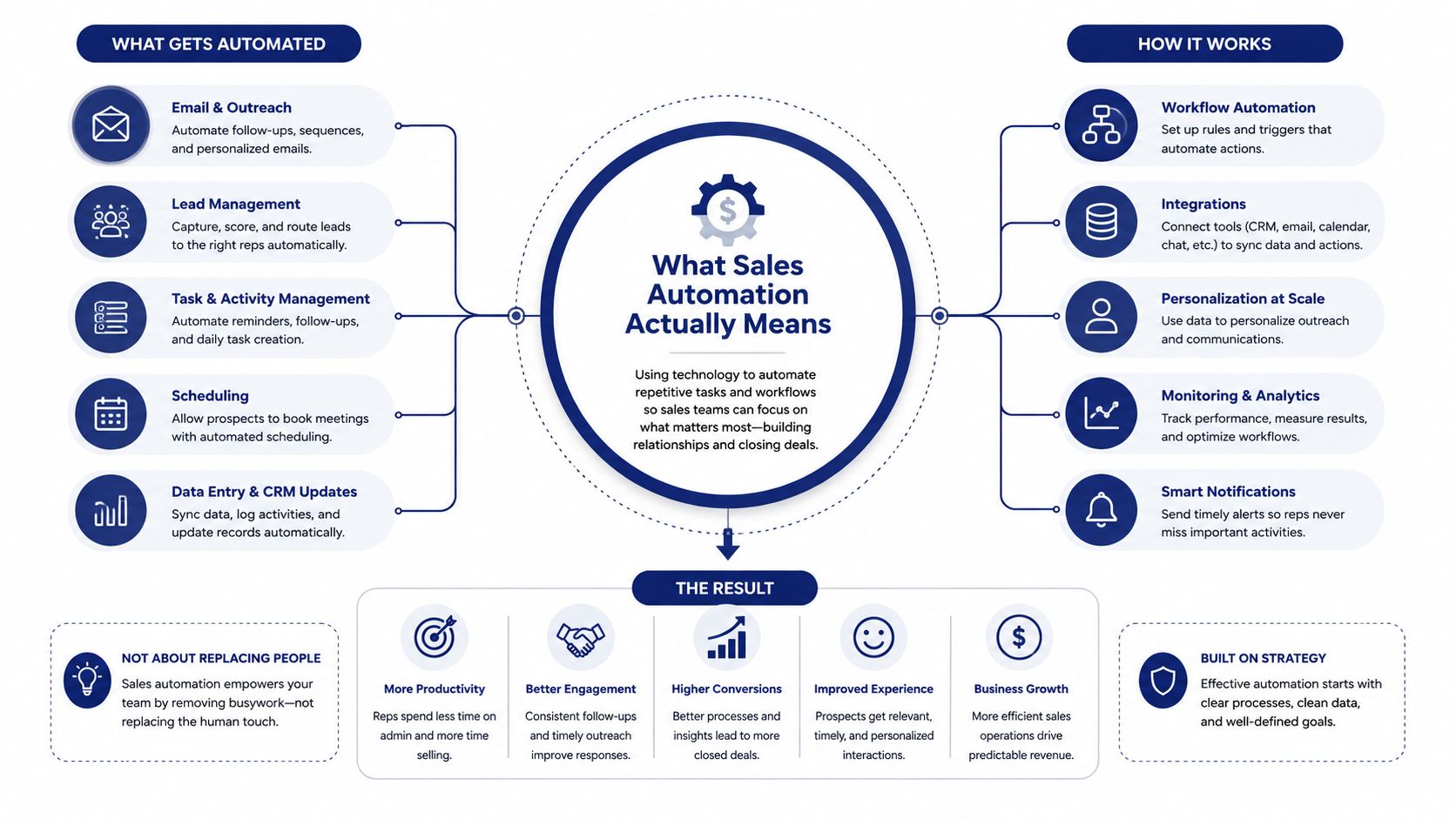
At its simplest, sales automation is technology that does the repetitive parts of selling for you. That includes logging activity, routing leads, sending follow-ups, updating records, and triggering next steps when a defined event happens. In practice, it sits between your CRM, your communication tools, and the rules that define what happens next.
Two layers that matter in real selling work
Salesforce's framing is useful because it separates automation into data capture and update and workflow automation. The first layer pulls deal information from emails into account records so reps don't have to retype what already happened. The second layer triggers once-manual actions, such as quote approvals, when a sales event occurs. That distinction matters because many teams buy “automation” when they really only need one half of the system.
A rep feels the difference immediately. If a prospect replies to a pricing email, the system can log the activity, update the deal, and notify the owner. If a deal enters proposal stage, the system can route it for approval instead of making the rep chase a manager by Slack. Those are not abstract efficiency gains, they're fewer places where deals stall.
Modern platforms also go beyond email sequences. They handle lead scoring, call logging, meeting scheduling, record updates, and increasingly account intelligence, the research and trigger layer that tells a rep why now matters. That's where a lot of teams are still behind. They automate the outbound motion but leave the trigger logic manual, which means reps still spend too much time hunting for a reason to reach out.
For a plain-English overview that stays close to the basics, the what is sales automation guide from Yalc is a useful reference point.
What “automation” really means in the stack
The phrase gets used loosely, so it helps to be precise. A sales automation system is not just a sequence builder. It's the combination of data capture, logic, and execution that keeps the process moving without forcing a rep to touch every step.
A useful way to think about it is this:
- Input, the system sees a signal, such as a form fill, email reply, or meeting booked.
- Logic, rules or AI decide what matters and what should happen next.
- Action, the platform updates records, sends alerts, creates tasks, or launches outreach.
That's why sales automation touches both record quality and process speed. It's not just outbound messaging, it's the operating layer that keeps selling work consistent.

“The moment we turned on Salesmotion, it became essential. No more hours on LinkedIn or Google to figure out who we're talking to. It's just there, served up to you, so it's always 'go time.'”
Adam Wainwright
Head of Revenue, Cacheflow
Core Components of a Sales Automation System
A serious sales automation stack usually has five moving parts, even if the vendor doesn't label them that way. The pieces are lead capture and scoring, workflow automation, alerts and notifications, outreach sequencing, and record management. If one of those is weak, the whole motion starts to wobble.
Lead capture and scoring
Lead capture identifies who should enter the system, and scoring decides who gets attention first. If a visitor downloads a resource, books a meeting, or fits a target profile, automation can push that person into the right queue without manual sorting. When this is missing, good leads sit too long while reps sort lists by hand.
Workflow automation
This is the logic engine. It moves work forward based on rules, such as sending an approval request when a deal reaches a specific stage or creating a follow-up task after a discovery call. Without it, every transition depends on memory, which is where process drift starts.
Alerts and notifications
A strong system tells the right person at the right time. A manager should know when a deal is blocked. A rep should know when an executive sponsor engages. A sales engineer should know when technical questions surface. If alerts are too noisy or too slow, people ignore them, and the system loses credibility.
Outreach sequencing
Sequences are the visible part of automation, but they work best when they're anchored to a real reason for contact. That's the difference between a generic cadence and a relevant conversation starter. When sequences are disconnected from account context, they become another form of spam with better timing.
Record management and CRM hygiene
Adobe's breakdown of automatable sales tasks includes data entry, scheduling, lead scoring, lead tracking, reporting, and customer communication. Those tasks all depend on clean records. If the CRM is full of duplicates, missing fields, or stale ownership data, the automation will faithfully execute bad instructions.
Clean data doesn't make automation exciting, but it makes it usable. Bad records turn every rule into a liability.
For teams mapping their process, the sales process automation resource is a practical companion because it frames automation around motion, not just tools.
Sales Automation vs Marketing Automation and Sales Enablement
These three terms get blended together constantly, and that creates bad buying decisions. They overlap, but they solve different problems. Sales automation is about the work reps do every day. Marketing automation is about how leads are nurtured before a rep gets involved. Sales enablement is about helping reps sell better once they're in the conversation.
Where the boundaries actually sit
Sales automation handles tasks like follow-ups, scheduling, pipeline updates, and qualification. If a rep is losing time to admin, this is the category to look at first. Marketing automation lives earlier in the journey. It manages campaigns, nurture streams, and content distribution so prospects move from awareness to interest before sales steps in.
Sales enablement is broader. It covers training, content access, coaching, and the materials reps need to handle real objections. If the issue is that reps don't know how to position the product, automation won't solve that. You need enablement, not another workflow.
| Problem you're seeing | What it usually means | What to invest in |
|---|---|---|
| Reps spend too much time on admin | Selling time is getting eaten by repetitive work | Sales automation |
| Leads come in but stall before follow-up | Handoff and nurture are weak | Marketing automation plus sales automation |
| Reps struggle to explain value | Messaging and skills are the issue | Sales enablement |
The best teams don't choose one concept at random. They diagnose the primary bottleneck first. That matters more than the tool category.
If you need a current view of how teams are using AI to write outbound content, the AI copywriter guide for 2026 gives useful context on where content generation fits, and where it doesn't.
“Automatic account profile detail I can use to manage my territory. Using Salesmotion AI to generate value statements per persona, account, etc. Using Salesmotion to give me a starting point based on new hires, or news alerts is critical.”
Adam Wainwright
Head of Revenue, Cacheflow
Implementation Roadmap and Key KPIs
The biggest mistake teams make is buying automation before they know which process they're fixing. Start with one bottleneck, not the whole revenue engine. A good rollout usually begins with lead routing, follow-up, or record updates, because those are easy to define and painful when done manually.
Phase 1, choose tools and connect systems
Pick the platform that fits your CRM and core workflow. Connect email, calendar, and opportunity data first so the system can trigger actions off live activity. If the integration layer is shaky, the automation will fail before it starts.
Phase 2, clean the data and map the process
Before any workflow goes live, clean duplicates, fix missing fields, and document the exact path a deal should follow. This is the least glamorous step and usually the one teams rush. That's how bad records and messy logic get locked into the system.
Phase 3, build the first workflows
Keep the first rules narrow. A lead response workflow, a stage-based approval, or a deal-stagnation alert is enough to prove value. Teams that try to automate every branch at once usually spend more time debugging than selling.
Phase 4, train the team and roll out carefully
Reps need to know what the system does automatically and what still needs human judgment. If they don't understand the boundaries, they'll either overtrust the tool or work around it. Both outcomes weaken adoption.
Phase 5, measure and refine
The KPIs that matter most are automation coverage rate, response time to inbound leads, pipeline velocity, rep selling time percentage, and outreach quality. The internal sales pipeline metrics guide is a useful companion if you're building a measurement discipline around these numbers.
A practical rollout usually improves when one person owns governance. That person reviews exceptions, checks whether alerts are useful, and makes sure the automation isn't generating new work.
Useful checkpoint: If a workflow creates more manual cleanup than it removes, it isn't automation yet, it's just a more complicated task list.
How AI Agents Operationalize Sales Automation
AI agents push sales automation past fixed rules and into account-aware action. That matters because modern selling rarely depends on one clean trigger. It depends on context, timing, and a credible reason to reach out. A rigid workflow can't always see that nuance, but a well-designed agent can help surface it.
Three agents, three jobs
Salesmotion's model is useful because it breaks the motion into three distinct jobs. The Research Agent builds account briefs from 1,000+ public sources, which turns hours of prep into minutes. The Signal Agent watches accounts 24/7 and alerts the team when something worth acting on happens, then explains why it matters. The Outreach Agent turns that context into personalized, multi-step outreach instead of generic templates.
Those jobs map cleanly to how real reps work. Research gives the rep context before the meeting. Signals tell the rep when to act. Prospecting turns both into outbound motion. That combination is stronger than simple sequencing because it ties outreach to actual account movement.
The best part is how the agents work together. One builds the brief, another catches the trigger, and the third creates the next move. In practical terms, that means a rep can go from zero context to a ready-to-send email without stitching together news, LinkedIn, and CRM notes by hand.
For teams evaluating how AI fits into the operating model, the guide to AI voice agents is a helpful adjacent read because it shows how agent-led execution is spreading across sales workflows.
What changes for the rep
The biggest difference is not that the rep works less. It's that the rep starts with better inputs. A good agent system doesn't replace the human judgment needed to approve messaging or prioritize accounts. It reduces the time lost to manual research and lets the rep spend more of the day on conversations that can move pipeline.
For a broader view of how AI agents are used in sales teams, the AI agents for sales teams resource adds helpful context.
Common Pitfalls and How to Avoid Them
Automation failures usually come from the same places. Teams automate too early, trust dirty data, or leave the system running without review. None of those problems are exotic. They're operational mistakes, which means they're preventable.
Over-automation
This happens when a team automates outreach before the trigger logic is solid. The result is generic emails, wrong-timed nudges, and messages that look automated because they are. Fix it by starting with one high-confidence trigger and testing it with a small group before expanding.
Poor CRM hygiene
Duplicate accounts, stale owners, and incomplete fields make automation unreliable. If the system can't trust the record, it can't act well on the record. The fix is boring but necessary, clean the database before you scale workflows.
No auditing
Many teams launch workflows and never review the outcomes. That's a mistake because bad rules keep firing until someone notices the damage. Build a weekly review habit for exceptions, false positives, and ignored alerts.
Trying to automate everything
The fastest wins usually come from the most repetitive, high-friction tasks. Start there. Leave exceptions, nuanced negotiations, and final judgment with people.
A simple pre-launch checklist helps:
- Clean records first, remove duplicates and fill critical fields.
- Define triggers clearly, make sure every workflow has a reason to fire.
- Limit the first rollout, pilot with one team or one motion.
- Assign an owner, someone has to review exceptions.
- Measure one outcome, track whether the workflow removes work or creates it.
Key Takeaways and Next Steps
Sales automation matters because reps still spend most of their week on work that isn't selling. The answer isn't to automate blindly. It's to remove the repetitive parts of the motion so people can spend more time on conversations, judgment, and account strategy.
The modern definition is broader than sequences and CRM cleanup. Good systems now cover data capture, workflow logic, alerts, outreach, and account intelligence. AI agents push that further by connecting research, trigger detection, and personalized prospecting into one operating model.
If you want to act on this in the next few days, do four things. First, audit how much rep time is going to admin. Second, identify the top two tasks that consume it. Third, pilot one automation or agent-based workflow against that bottleneck. Fourth, set a baseline KPI before rollout so you can see whether the change helps.
Salesmotion helps revenue teams turn account signals into action with autonomous agents that research, monitor, and draft outreach around real buyer context. If you're rethinking what sales automation should do beyond CRM hygiene and sequences, visit Salesmotion to see how signal-based automation can fit into your pipeline motion.