After 380+ enterprise demos, we have heard nearly every question a buying committee can ask about sales intelligence. Not the polished questions from a webinar Q&A. The real ones. The ones that come up when a VP of Sales leans forward in the Zoom and says, "Look, can we just talk about what actually happens after we sign?"
This post covers those questions. We are sharing the exact objections and concerns enterprise buyers raise in every evaluation, along with honest answers. No spin.
TL;DR: Enterprise buyers consistently ask the same seven to ten questions before buying sales intelligence: Can ChatGPT replace this? How accurate is the data? How long does Salesforce integration take? Will reps actually use it? What about small or private companies? We answer each one with specifics, case study data, and the honest tradeoffs.
"Can't We Just Use ChatGPT for Account Research?"
This is the most common question in every evaluation. The short answer: ChatGPT is a solid starting point for one-off research, but it falls apart at scale for three specific reasons.
Stale data. ChatGPT's training data has a cutoff. It cannot tell you that your target account's CFO changed two weeks ago, that the company announced layoffs last Thursday, or that earnings commentary last quarter mentioned a "sales transformation initiative." These are exactly the signals that determine whether your outreach lands or gets ignored.
No monitoring at scale. A sales team managing 200+ accounts cannot prompt ChatGPT for each one every morning. There is no alerting, no territory-wide signal tracking, no way to surface which of your 200 accounts just entered a buying window. You get research for the account you think to ask about, not the one that just became ready to buy.
Hallucination risk. In enterprise sales, quoting a wrong executive name or a fabricated initiative in a meeting is worse than having no research at all. ChatGPT frequently generates plausible but inaccurate details about company strategy, org structure, and financials. According to Salesforce's 2026 State of Sales report, 42% of sales reps feel overwhelmed by too many tools, and adding an unreliable one to the mix only makes that worse.
A dedicated account intelligence platform like Salesmotion monitors 1,000+ sources continuously across your entire territory, surfaces verified signals with cited sources, and keeps account briefs updated in real time. ChatGPT requires manual prompting, one account at a time, with no way to verify what it returns.
The honest tradeoff: If you have five named accounts and an hour to spare, ChatGPT works. If you have a team of 15 reps managing 50+ accounts each, you need something purpose-built.
See Salesmotion on a real account
Book a 15-minute demo and see how your team saves hours on account research.
"What About Data Accuracy? How Do We Know the Intel Is Right?"
Data accuracy is the number one dealbreaker in enterprise evaluations, and rightfully so. According to Forrester's 2025 survey, B2B buying groups now average 13 internal stakeholders per purchase. One rep walking into a meeting with incorrect information about a prospect's strategic priorities poisons the entire deal.
Here is how to evaluate data accuracy in any sales intelligence platform:
Source transparency
Ask any vendor: "Can I see where this data point came from?" If the answer is a black box, walk away. Good platforms cite their sources, whether that is an SEC filing, a press release, a LinkedIn post, or an earnings transcript. Your reps should be able to click through and verify before using any data point in a meeting.
Freshness cadence
Static data goes stale fast. Leadership changes happen weekly. Earnings calls happen quarterly. Hiring patterns shift monthly. The right question is not "is the data accurate today?" but "how quickly does it update when something changes?"
The best platforms refresh account intelligence continuously from public and proprietary sources. When a leadership change is announced, it surfaces within hours, not the next quarterly database refresh.
Accuracy in practice
We built our platform with source attribution because we knew enterprise buyers would demand it. Every insight links back to its original source. Reps can see exactly where a talking point, an initiative, or a leadership change was sourced from, and verify it in 30 seconds.

“At first it sounded like a simple utility. But once we deployed it, it became clear there's nothing else like it. Any sales, business development, or client services team should try this. It changes the way you work.”
Andrew Giordano
VP of Global Commercial Operations, Analytic Partners
"How Long Does Salesforce Integration Take?"
This question usually comes from IT or RevOps, and they are often bracing for the worst. The industry norm for Salesforce integrations with enterprise software ranges from three to six months for complex implementations. Buying committees are right to be cautious.
Here is the honest answer for sales intelligence specifically: most Salesforce integrations for account intelligence platforms take days to weeks, not months. The integration scope is fundamentally different from implementing a full CRM, ERP, or marketing automation platform. You are syncing account data and surfacing intelligence, not rebuilding your tech stack.
At Analytic Partners, the VP of Global Commercial Operations, Andrew Giordano, described their experience: the platform was up and running in days, and embedding it into Salesforce was straightforward. That is a team with limited bandwidth who needed something that did not require a six-month implementation project.
What the integration actually involves
- Account list sync. Your Salesforce accounts map to the intelligence platform. This is typically a CSV upload or API connection that takes minutes.
- Embedded views. Intelligence panels surface inside Salesforce so reps do not leave their CRM. Configuration, not custom development.
- Signal routing. Alerts for leadership changes, earnings updates, and buying signals push to Salesforce fields or Slack channels. Standard webhook setup.
The real question to ask any vendor: "Do we need a Salesforce admin or developer for this, and for how many hours?" If the answer is more than a few hours, that is a red flag for an intelligence tool.
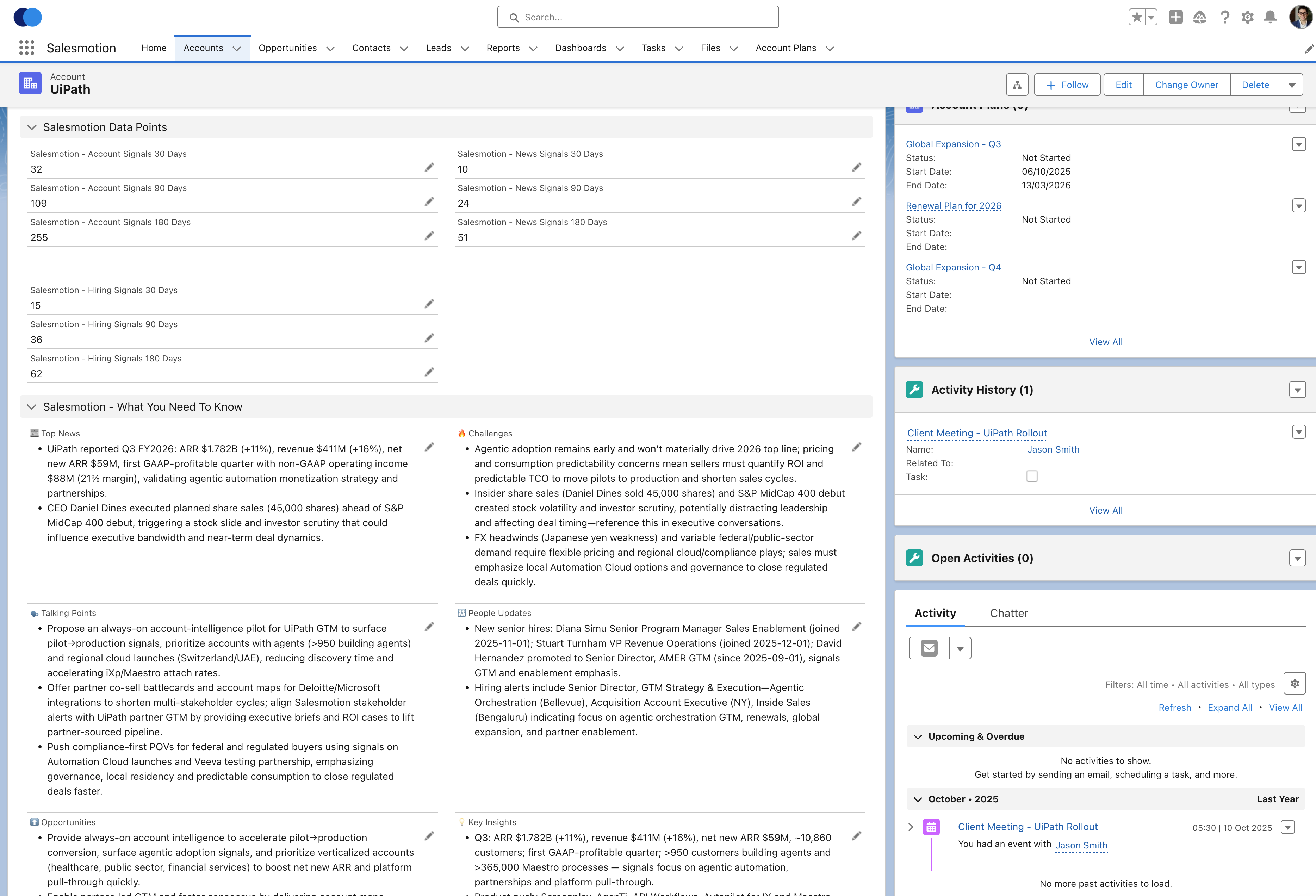 What the Salesforce integration looks like in practice. 15-30 minutes to install, intelligence flows directly into the CRM your reps already use.
"Will Reps Actually Use It? We Have Bought Tools Nobody Touches."
This is the question that keeps revenue leaders up at night, and the data confirms their concern. According to HubSpot's 2025 report, only 19% of sales reps actively use AI features built into their existing tools. Sellers use an average of eight tools to close deals, and 42% feel overwhelmed by the stack. Overwhelmed sellers are 45% less likely to hit quota.
The adoption problem is real, and it breaks down into three root causes:
Complexity kills adoption
If a tool requires training sessions, certification courses, or a 40-page user guide, reps will not use it. They will revert to Google, LinkedIn, and gut instinct. The bar for adoption in a busy sales org is this: can a rep get value in under 60 seconds on their first login?
At Incredible Health, VP of Sales Joe DeFrance described rep adoption this way: reps can log in and get valuable account insights within 30 seconds to a minute. That speed to value is what separates tools that get used from tools that get shelved.
Workflow integration matters more than features
Reps live in Salesforce, Slack, and email. If your intelligence tool requires them to open another tab, log into another platform, and remember to check it before every meeting, adoption will be low. The intelligence needs to surface where reps already work.
Measure adoption, not just deployment
Ask any vendor for their usage metrics. Not "how many seats are activated" but "how many unique users logged in this week" and "how many accounts were viewed." If a vendor cannot share these numbers, that tells you something.
Teams using Salesmotion typically see 80-90% weekly active usage because the intelligence lives inside the CRM and takes seconds to consume. That is not a marketing claim. It is what happens when the tool fits into existing workflows instead of creating new ones.
"What About Small or Private Companies? Does It Only Work for Public Companies?"
Enterprise sales teams do not sell exclusively to Fortune 500 companies. Most B2B pipelines include a mix of public companies, private mid-market firms, and fast-growing startups. If your intelligence tool only works well for companies with SEC filings, it covers maybe 20% of your territory.
Here is what to evaluate:
Public company intelligence
This is the baseline. Earnings transcripts, SEC filings, investor presentations, and analyst coverage provide rich context for publicly traded accounts. Any serious platform handles this well.
Private company intelligence
This is where platforms diverge. For private companies, intelligence comes from job postings, press releases, leadership changes on LinkedIn, news coverage, podcast appearances, technology adoption signals, and hiring patterns. The breadth of sources matters more than the depth of any single source.
Small company coverage
For companies under 100 employees, the signal volume is naturally lower. There are fewer press releases, no earnings calls, and less analyst coverage. But hiring patterns, funding announcements, leadership changes, and technology adoption are still available. The question is whether the platform aggregates these lighter signals into something actionable.
The best account intelligence platforms cover public, private, and small companies by monitoring 1,000+ sources that include news, job boards, SEC filings, social media, podcasts, technology tracking, and more. The depth varies by company size, but the coverage does not stop at the Fortune 500.
"What Is the Realistic ROI Timeline? When Will We See Results?"
More than half of B2B buyers expect to see a return within three months of purchase. That expectation is reasonable for sales intelligence, but it depends on what you measure and when you start measuring.
Week one: research time savings
This is the fastest, most measurable win. If your reps spend two to four hours per week on manual account research, and an intelligence platform compresses that to minutes, you recover selling time immediately. At Guild Education, Director of Strategic Accounts Derek Rosen reported saving approximately six hours per week per seller on account research alone. That is time reinvested in actual selling from day one.
Month one to two: conversation quality
Reps who walk into meetings with context on strategic initiatives, leadership changes, and competitive dynamics have better conversations. This shows up in meeting conversion rates, progression from first meeting to second meeting, and qualitative feedback from prospects who say, "You clearly did your homework."
Month three to six: pipeline quality and velocity
This is where the compounding effect kicks in. Reps focused on accounts with active buying signals waste less time on accounts that were never going to close this quarter. Pipeline quality improves because reps are qualifying based on real signals, not gut feel. Deal velocity increases because discovery is half done before the first call.
What to track
Set up a baseline before you deploy: average research time per account, meeting-to-opportunity conversion rate, average deal cycle length, and win rate. Measure again at 90 days. Most teams see measurable improvements in research time within the first week and pipeline metrics within the first quarter.
"How Do You Handle Security and Compliance?"
This question usually comes from IT security or legal, and it often arrives as a 200-question security questionnaire. Enterprise buyers are right to be thorough. With B2B buying groups involving an average of 13 stakeholders, and legal teams acting as gatekeepers in nearly two-thirds of purchases, security is not a checkbox. It is a gate.
What to ask any vendor
- SOC 2 Type II compliance. This is the baseline for enterprise SaaS. If a vendor does not have it, stop the evaluation.
- Data handling. Where is your data stored? Is it encrypted at rest and in transit? Who has access? What happens when you cancel?
- GDPR and CCPA compliance. Especially relevant if your team sells into Europe or California. The vendor should have a clear data processing agreement.
- No CRM data extraction. Your Salesforce data should stay in Salesforce. The intelligence platform should push insights into your CRM, not pull your proprietary data out.
These are non-negotiable requirements for any enterprise purchase, and any vendor worth evaluating should have clear, documented answers to all of them.
How to Run an Effective Sales Intelligence Evaluation
After covering the specific objections, here is a practical framework for running the evaluation itself. Enterprise B2B purchases now involve an average of 10 to 13 stakeholders, and over 40% of deals stall because internal stakeholders fail to align. Structure the evaluation to prevent that stall.
Build the evaluation committee early
Include sales leadership, RevOps, IT security, and at least two frontline reps who will actually use the tool. Leaving out any group means their objections surface late and derail the timeline.
Define success criteria before you see demos
Write down what "good" looks like before any vendor walks you through their product. Common criteria: data accuracy, Salesforce integration scope, time to value, security posture, and adoption track record.
Run a real pilot
Do not evaluate based on demos alone. Load your actual accounts, assign the tool to two or three reps for two weeks, and measure research time savings and conversation quality. A pilot exposes whether the tool works with your specific account mix, not just the vendor's cherry-picked examples.
Ask for references in your industry
Generic case studies are not enough. Ask for a reference call with a company similar to yours in size, industry, and sales motion. Ask the reference: "What was the hardest part of the rollout?" and "What does daily usage actually look like?" You can read our customer stories to see how teams like Analytic Partners, Guild Education, and Cacheflow evaluated and deployed account intelligence.
If you want to see how Salesmotion handles your specific accounts, book a 15-minute demo and we will run the platform on your actual target accounts. No slide deck. Real intelligence on real companies. You can also review transparent pricing before the conversation.
Key Takeaways
- ChatGPT works for one-off research but cannot replace a purpose-built intelligence platform that monitors your entire territory with verified, cited sources.
- Data accuracy depends on source transparency, freshness cadence, and the ability for reps to verify every insight before using it in a meeting.
- Salesforce integration for account intelligence platforms typically takes days, not months. Ask vendors for exact implementation hours.
- Rep adoption succeeds when the tool delivers value in under 60 seconds and lives inside existing workflows like Salesforce and Slack.
- Small and private company coverage depends on the breadth of sources aggregated. Look beyond SEC filings to hiring, news, and technology signals.
- Set baseline metrics before deploying and measure at 90 days. Most teams see research time savings in week one and pipeline improvements within the first quarter.
- Security and compliance are gates, not checkboxes. SOC 2 Type II, GDPR, and CCPA compliance should be non-negotiable.
Frequently Asked Questions
How many tools does a typical enterprise sales team use for account research?
According to Salesforce's 2026 State of Sales research, sellers use an average of eight tools to close deals. That tool sprawl is a core problem. Sales intelligence platforms that consolidate research, signals, and prospecting into a single view reduce switching costs and increase the odds reps actually use them.
What is the average enterprise sales intelligence implementation timeline?
For account intelligence platforms specifically, most implementations take days to a few weeks, not months. The scope is narrower than a full CRM implementation because you are syncing account lists and embedding intelligence views, not rebuilding workflows. Teams like Analytic Partners were operational within days of signing.
How do you measure ROI on sales intelligence software?
Track four metrics before and after deployment: average research time per account, meeting-to-opportunity conversion rate, average deal cycle length, and win rate. Research time savings are measurable in the first week. Pipeline quality improvements typically show within the first quarter. Teams report saving two to six hours per rep per week on research alone.
Should we run a pilot before purchasing sales intelligence?
Yes. Load your actual accounts, assign two to three reps, and run a two-week pilot. Evaluate based on time saved, conversation quality, and whether reps voluntarily continue using the tool after the trial. Pilots expose compatibility issues that demos cannot. Any vendor confident in their product should welcome a real-world test on your accounts.