Your rep has a big meeting in half an hour. They're flipping between the company website, LinkedIn, old CRM notes, and a half-read press release. They find a VP name. Then lose the thread. Then chase a news item that has no connection to the meeting.
That isn't preparation. It's panic with tabs open.
An account brief is a one-page, decision-ready summary of an account: who the company is, what changed, what leadership cares about, who matters in the buying group, and what to say next. If you want to know how to build an account brief that reps will use, start with one rule. It has to fit on one page, and it has to pass one test: could a rep who has never touched this account walk into a meeting with this brief and hold a credible conversation?
If the answer is no, the brief is bad. I don't care how “thorough” it is.
The Difference Between Pre-Call Scrambling and Real Prep
Most sales teams know the scramble.
An AE gets invited into a late-stage call. The account owner says, “Just do a little research before you join.” That “little research” turns into a frantic hunt for basic context. What does the company do? Who owns the initiative? Why might they care right now? Which exec said what recently?
The rep shows up with fragments. A recent funding round. A few copied headlines. An org chart guess. Nothing tied together. Nothing usable.
A strong rep works differently. They review one page. They get the company snapshot in seconds. They see what leadership is focused on. They spot the recent signals that matter. They know the stakeholders. They know their angle.
That's real prep.
If your team needs a cleaner way to prep before meetings, this pre-call research checklist for B2B sales is a useful companion. But the checklist is only part of it. The primary benefit comes from turning that research into a meeting-ready brief.
What the one-page brief actually does
A one-page account brief is not a mini account plan.
It's not a CRM dump. It's not a company bio. It's not six screenshots from LinkedIn and a pasted earnings quote with no interpretation.
It's a decision-ready prep document. It tells the rep:
- Who this company is
- What changed
- What leadership likely cares about
- Who matters in the buying group
- What to say next
A good brief doesn't prove the rep did research. It proves the rep knows what to do with it.
The test that matters
Use this simple standard before any customer-facing meeting.
| Test | Bad brief | Good brief |
|---|---|---|
| Could a new rep use it cold | No. Too much history, not enough meaning | Yes. Clear angle and clear next move |
| Could a manager inspect it fast | No. Buried in notes | Yes. One page, easy to scan |
| Could it shape the conversation | No. Generic facts | Yes. Specific priorities and likely relevance |
Your best reps already do this in their heads. Everyone else needs the structure.
Why Most Account Briefs Fail Before They're Even Read
Most account briefs fail because they're built like archives.
Someone asks for “research,” so the rep collects everything. Company overview. Leadership team. Press releases. Product lines. Competitors. Random notes from a call six months ago. A copied About page. Then they dump it into a doc and call it prep.
Nobody wants to read that. What's more, nobody can use it.
The core failure isn't effort. It's lack of compression and judgment.
A brief without a clear owner, a point of view and a next action becomes a passive document instead of an operating tool. Overload it with unstructured notes and nobody reads it. The fix is to make it opinionated, compressed, and tied to a specific next step.
That's the standard. Not “did we collect enough information.” The standard is “can a rep act on this right now.”
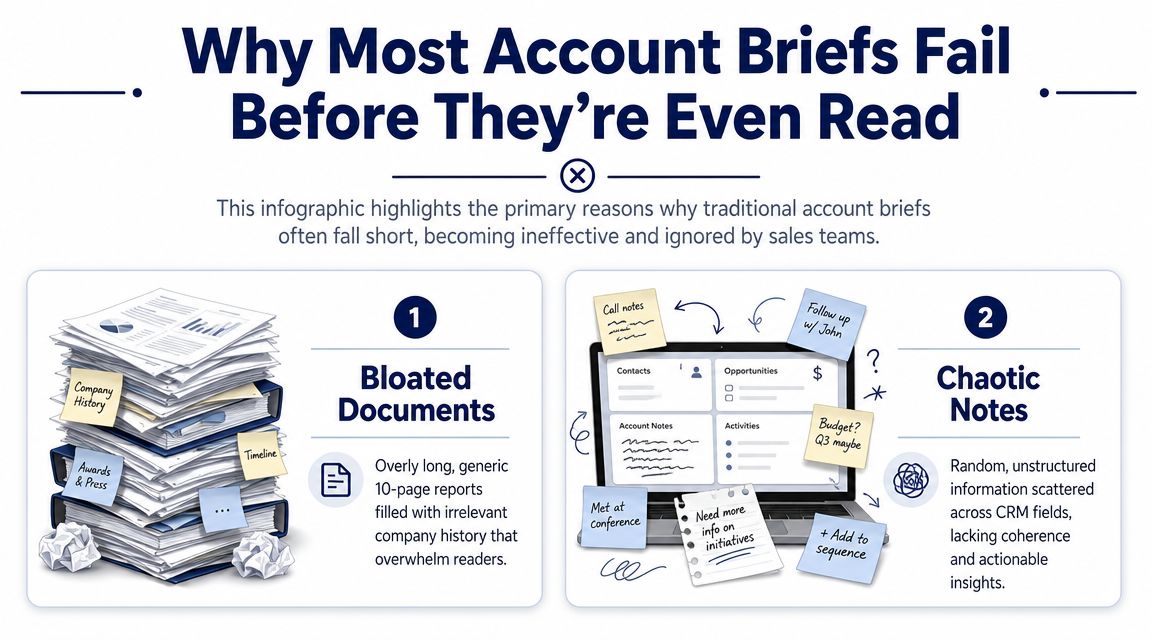
The two formats that waste the most time
I've seen the same two bad formats over and over.
The bloated brief. This is the ten-page deck nobody opens before a meeting. It has too much company history, too many screenshots, and no point of view.
The chaotic note pile. This lives in the CRM. It's half sentences, meeting scraps, old call notes, and copied headlines. Some of it is useful. Most of it is unusable under pressure.
Both formats force the rep to do the hard work at the worst possible time. Five minutes before the meeting.
What a useful brief looks like instead
A useful brief is selective.
It doesn't try to preserve every fact. It chooses the facts that change rep behavior. It answers the “so what” for the meeting in front of you.
Use this filter:
- If a detail doesn't shape the conversation, cut it
- If a signal doesn't change priority, cut it
- If a stakeholder isn't relevant to the current motion, move them out
- If the brief doesn't produce a next step, rewrite it
Practical rule: If your brief reads like a Wikipedia page, you've already lost.
The best account briefs are short because the writer did the hard thinking first.

“We're no longer fishing. We know who the right customers are, and we can qualify them quickly. Salesmotion has had a direct impact on pipeline quality.”
Andrew Giordano
VP of Global Commercial Operations, Analytic Partners
The Five Essential Parts of a One-Page Brief
You don't need a complicated framework. You need five parts, in the right order, on one page.
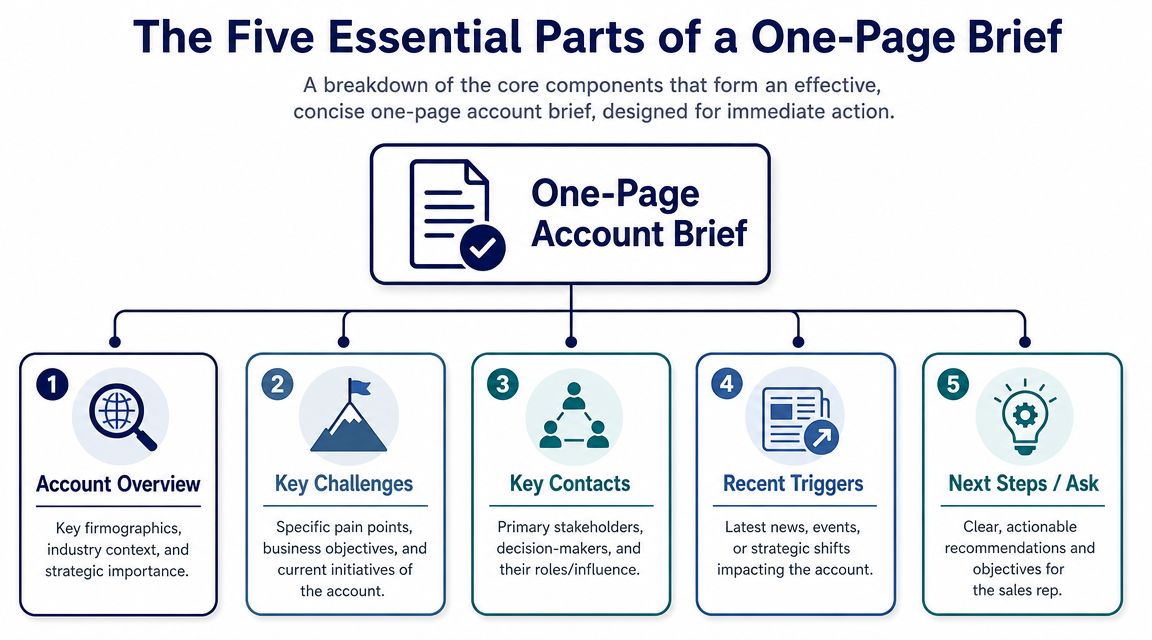
Quip's account-planning guide gets the foundation right. A strong account brief starts with a profile that captures the basics, including an organizational relationship map, but it also needs pain points and current gaps to become action-oriented. Quip recommends using the client's website, recent press releases, and LinkedIn to build that relationship map. That's the backbone of a one-page brief that can help a rep in a real meeting.
If you want a parallel format for executive conversations, this executive briefing template is worth studying, and for strategic accounts the brief grows into a full account plan. The same discipline applies. Tight summary. Real stakes. Clear angle.
Company snapshot
Start with the 30-second version of the account.
Most reps tend to overdo it. You don't need a history lesson. You need enough context to sound fluent fast.
Include:
- What they do
- Business model
- Rough scale or operating footprint, if publicly clear
- Recent trajectory in plain English
- Why this account matters to your team
Example:
Regional logistics provider serving enterprise retail and manufacturing customers. Expanding operations and investing in process consistency across distributed teams. Leadership messaging suggests a push toward efficiency, standardization, and better visibility across operations.
That is enough. The rep can now open the meeting without sounding lost.
Strategic context
This is the section lazy reps skip and good reps win with.
Find what the CEO, CFO, or business unit leader is prioritizing this year. Use primary sources when possible, such as earnings calls, annual reports, investor letters, or official company updates. You're looking for themes, not random quotes.
Typical themes include:
- Efficiency pushes tied to cost discipline or margin pressure
- Expansion plays such as new regions, product launches, or new segments
- Transformation language around systems, automation, or operating model changes
Example:
A manufacturer repeatedly talks about reducing complexity, improving planning accuracy, and tightening coordination across plants. That tells you this is not a generic productivity story. It's an execution story. Your angle should map to operational visibility, coordination, and risk reduction.
Recent signals
Here, the brief becomes current.
Use the last 90 days as your default window. Not because every signal matters, but because old information creates false confidence. Fresh information gives the rep a credible reason to ask better questions.
Capture only events that could change priorities or timing:
- Executive moves
- Strategic hires
- Press releases tied to initiatives
- Product or market expansion
- Partnerships
- Operational announcements
- Visible hiring patterns
Good example:
| Signal | Why it matters |
|---|---|
| New VP of Operations hired | Fresh leadership often re-evaluates tools, workflows, and reporting cadence |
| Job posts for process improvement roles | Suggests active investment in operating change |
| Press release on expansion into a new market | Creates execution pressure and cross-functional coordination needs |
Don't just list the signal. Write the interpretation.
Key people
This section should stop reps from single-threading.
Stakeholder lists are often treated like admin work. That's a mistake. Modern B2B sales is multi-stakeholder by default: according to Gartner, the typical buying group for a complex B2B solution involves six to 10 decision makers.
That means your brief needs more than names and titles. It needs working hypotheses about what each person likely cares about.
Use a simple structure:
- Primary contact. What they're measured on. What they likely want to avoid.
- Economic buyer. What business outcome matters to them.
- Champion candidate. Who benefits from change.
- Blocker risk. Who might slow or redirect the deal.
Example:
Director of RevOps Owns process consistency and reporting quality. Likely cares about rep productivity, forecast confidence, and tool adoption.
CRO Cares about pipeline quality, team efficiency, and predictable execution.
IT lead Will care about integration risk, admin burden, and data quality.
Your angle
This is the whole point.
The brief should end with a sharp answer to one question: why does your solution matter to this company right now?
Not in theory. Not in your category pitch. In this account, at this moment.
Bad angle:
“We help teams improve collaboration and efficiency.”
Good angle:
“They appear to be pushing operational standardization while adding new leadership and hiring into process-heavy roles. That usually creates friction between systems, teams, and reporting. Our relevance is faster coordination and better visibility during change.”
If the rep can't read the final section and know how to open the meeting, the brief isn't finished.
Hunting for Signals That Actually Matter
Most reps don't have a research problem. They have a filtering problem.
They can find news. They can skim LinkedIn. They can search the company website. What they can't do consistently is separate a real buying signal from background noise.

A signal only matters if it changes one of three things: priority, timing, or stakeholder behavior.
If it doesn't do that, it's trivia.
For a sharper framework on what counts as a real trigger, this guide to buying signals in B2B sales is useful. But don't confuse signal libraries with judgment. The source is only half the job. Interpretation is the other half.
Where to look and what to pull
The best sources are the ones executives and operators already use to explain what they're doing.
| Source | What to look for | Why it matters |
|---|---|---|
| Earnings calls and investor materials | Repeated words like investment, headwinds, initiative, simplification, productivity | Shows what leadership is signaling publicly |
| Annual reports and filings | Risk factors, operating priorities, dependency language, execution concerns | Reveals what can slow progress or create urgency |
| Job postings | New roles, team buildout, systems keywords, regional expansion hints | Hiring shows where change is becoming real |
| Press releases and newsroom updates | Product launches, partnerships, leadership moves, market expansion | Good source for official timing and positioning |
| LinkedIn activity | Executive moves, team announcements, promoted initiatives | Useful for stakeholder-level context |
What reps should ignore
A lot of “research” doesn't deserve space in the brief.
Skip:
- Vanity press with no operating impact
- Old news with no current relevance
- Generic mission statements
- Leadership bios copied without context
- Random facts that don't affect your meeting
Here's the rule I use with teams.
A signal belongs in the brief only if you can finish the sentence, “This matters because…”
If you can't finish that sentence fast, leave it out.
Turn sources into talk tracks
Don't stop at collection. Translate each signal into a meeting move.
For example:
- Executive hire becomes a question about mandate and change priorities
- Expansion announcement becomes a question about coordination, capacity, or rollout complexity
- Hiring for new systems roles becomes a question about current stack limitations or implementation plans
That translation step is what separates research from prep.
“We have very limited bandwidth, but Salesmotion was up and running in days. The template made it easy to load our accounts and embedding it in Salesforce was simple. It was one of the easiest rollouts we've done.”
Andrew Giordano
VP of Global Commercial Operations, Analytic Partners
From Manual Prep to Automated Intelligence with Salesmotion
Manual briefing works. It just doesn't scale.
A careful rep can build a solid one-page account brief by hand. They can read the filings, scan the newsroom, review job posts, check leadership updates, and write a decent point of view. The problem is consistency. Teams don't do this at the same level across every account. Under pressure, they default back to scattered research and recycled messaging.
That gap gets bigger as buying groups grow. With six to 10 decision makers in a typical complex purchase, a brief has to stay live enough to keep up with org changes and executive moves.

What good automation should actually do
Most tooling still dumps data on the rep. That's not enough.
A useful research system should:
- Pull from primary and timely public sources
- Synthesize the account into one view
- Highlight strategic context and recent signals
- Map likely stakeholders
- State the so what
- Refresh when the account changes
That last point matters. A static brief gets stale fast. A live brief stays useful because it updates when the company updates.
One-click brief generation
Analytic Partners reduced account research from 3 hours to 15 minutes per account using AI-generated briefs.
That's the right use of automation. Not replacing judgment. Compressing the grunt work so reps spend time on interpretation, message shaping, and meeting prep.
One option is Salesmotion's research-time reduction workflow. Its Research Agent generates account briefs in one click from sources such as earnings calls, SEC filings, news, job posts, and podcasts, then turns those inputs into a structured view of company context, recent changes, likely priorities, and suggested angles. That fits the operating model many teams need: less searching, more selling.
The real benefit isn't speed
Speed helps. Consistency matters more.
Your top rep probably already knows how to build a sharp brief. The issue is that your average rep won't do that reliably across every target account. Automation closes that gap. It gives every rep a usable starting point, and it keeps the brief current enough to support outreach, handoffs, and meeting prep without another research sprint.
The value of a live brief isn't that it saves clicks. It's that it keeps the team from walking into meetings with expired thinking.
Turn Every Rep Into Your Best Rep
The point of an account brief isn't documentation. It's performance.
A one-page brief forces discipline. It cuts the noise. It gives reps a working view of the account they can effectively use in a live conversation. Company snapshot. Strategic context. Recent signals. Key people. Your angle. That's enough if it's sharp.
A common pitfall is treating research like a tax. The better approach is to treat it like enablement. When the brief is concise and current, reps ask better questions, multi-thread earlier, and stop relying on generic discovery.
Your best reps already know how to do this. They compress information fast. They spot what matters. They walk into meetings with a point of view. The move is to make that standard, not leave it to individual talent.
Build the brief so a new rep can use it cold. Keep it to one page. Make it live. If it doesn't change what the rep says in the first five minutes of the meeting, rewrite it.
If your team is still stitching together account research by hand, look at the interactive demo. Salesmotion helps revenue teams turn public signals into concise, action-ready account briefs so reps spend less time hunting for context and more time having credible conversations.