Market research automation is the use of software to replace manual collection, coding, analysis, and reporting tasks in research workflows. For revenue teams, the version that pays off is an always-on pipeline that searches the sources that matter, extracts the useful fields, analyzes the pattern, and delivers a brief or alert where the rep already works.
TL;DR: Market research automation runs in four stages: search, extract, analyze, deliver. Project automation still suits annual studies and board prep, but pipeline generation needs an always-on signal pipeline that updates account context as the market moves. Keep a human review layer for validation and bias checks, roll it out over 30, 60 and 90 days, and judge it on time-to-context per account, signal-to-meeting conversion, research hours per rep, and win rate on trigger-rich accounts.
The week usually starts the same way. A rep opens an account plan with a forecast call in an hour, then spends the next stretch bouncing between earnings transcripts, LinkedIn, press releases, job boards, and a CRM tab that still looks empty because nobody had time to fill it in yesterday. By the time the brief is stitched together, the meeting already started, and the rep is walking in with half a picture and a strong excuse for why follow-up will be late.
That manual research tax is the quiet drag on revenue teams. It steals rep time, makes account coverage uneven, and creates the same problem over and over again, good opportunities get under-prepared while the hottest signals age out in someone's inbox. If you're trying to fix that without turning your team into dashboard operators, the answer is not more tabs, it's an automated signal-to-outcome pipeline that keeps context current and usable.
Research only helps when it's tied to execution. For a closer look at how much time reps lose to this work, the internal breakdown in how much time do sales reps spend researching frames the problem well.
The Hours Your Reps Are Losing to Manual Research
A good rep can lose an entire morning building one account brief that still feels incomplete. They search for leadership changes, skim a recent call, pull a few job posts, then stitch the result into a deck that's already stale by the time they send it to the manager. That's not because the rep is lazy, it's because the work is fragmented, repetitive, and hard to do well under deadline.
The cleaner version looks very different. A rep starts with an automated workflow that scans source material, extracts the important parts, and assembles a short brief with the latest context, the likely priorities, and the trigger worth acting on. The same prep that used to take hours can now happen fast enough to shape the call prep before the meeting window closes.
Practical rule: if a rep has to rebuild the same account context twice, the process is already broken.
A lot of teams try to solve this with one-off research projects. That can help for a big deal review or a board-level summary, but it doesn't fix the daily grind that eats selling time. Revenue teams need a working model where the account picture refreshes as the market changes, not just when someone remembers to request a new brief.
The operational payoff is simple. Better automation doesn't just save labor, it gives reps a chance to act while the signal still matters. That's why this topic sits at the center of pipeline creation, not just the research function.
What Market Research Automation Actually Means
Market research automation is the use of software to replace manual collection, coding, analysis, and reporting tasks in research workflows. It's broader than a survey tool, and it's different from marketing automation, which is built for campaign execution rather than research production. In practice, it covers survey design, fieldwork, cleaning, qualitative coding, report assembly, and continuous monitoring of outside signals.
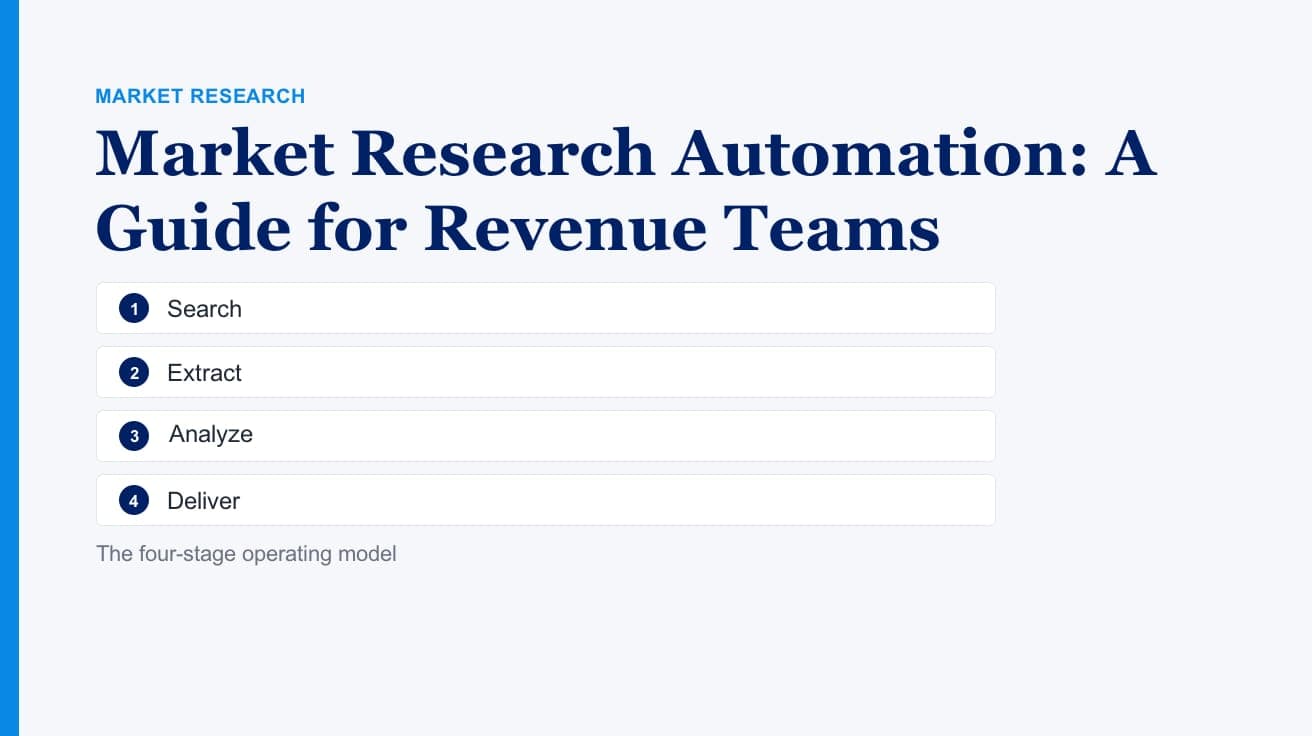
The four-stage operating model
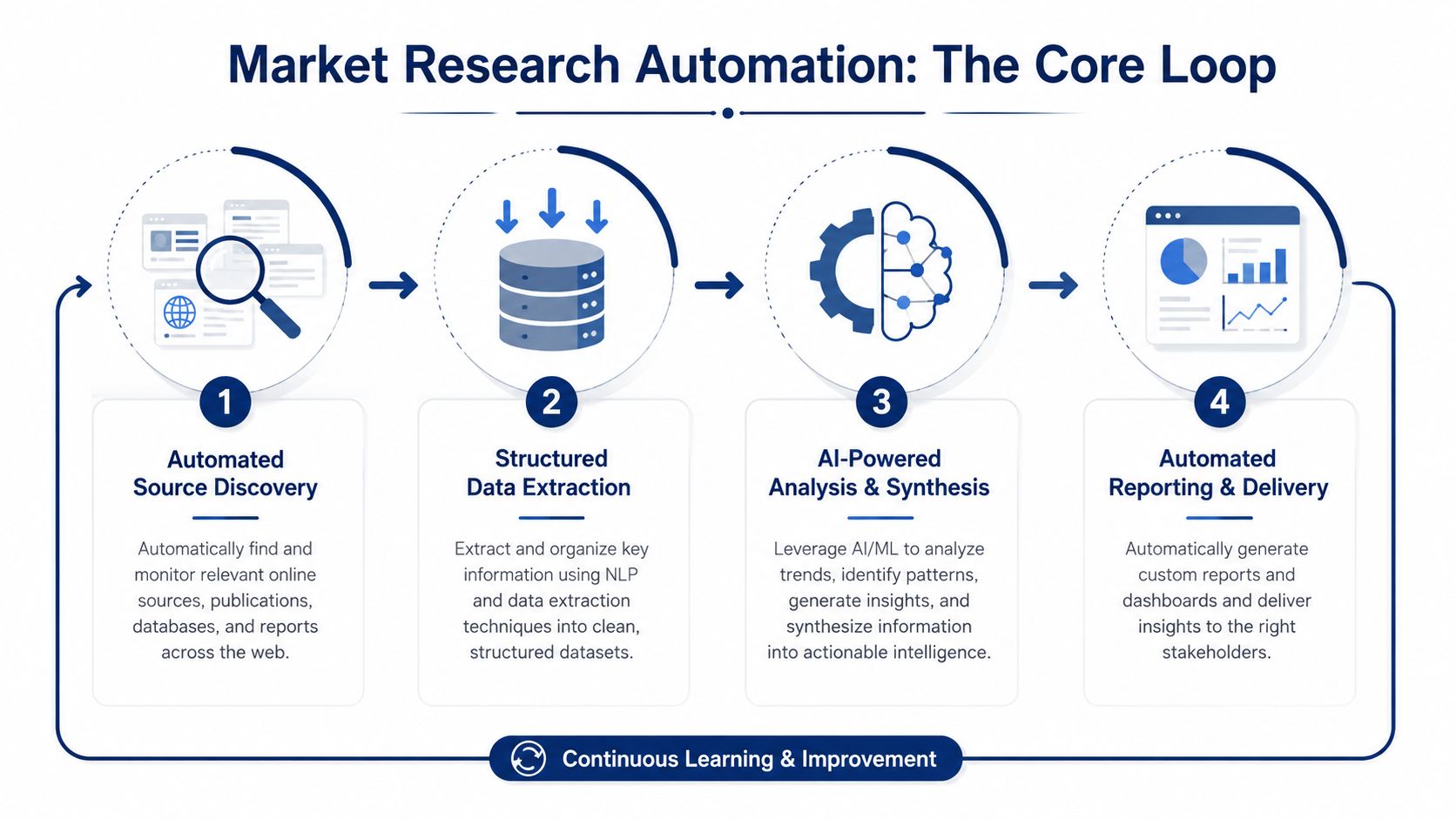
The cleanest way to think about it is as a pipeline with four steps.
- Search. Find the sources that matter. For revenue teams, that usually means earnings calls, press releases, job boards, podcasts, SEC filings, and social channels.
- Extract. Pull the useful fields out of those sources and turn messy text into structured information.
- Analyze. Interpret the pattern, cluster the signals, and turn raw items into a recommendation.
- Deliver. Package the result into a brief, alert, dashboard, or CRM note that somebody can use.
That structure matters because automation only helps if it connects the whole workflow. A fast search step is useful, but not if the data still sits in a spreadsheet waiting for someone to summarize it by hand. The value comes from moving the work across all four stages with minimal friction.
The other useful distinction is scope. Modern automation isn't limited to survey programming or report formatting, it can support continuous source monitoring and live updates too. That's why many teams now treat research less like a project and more like a persistent operating layer.
For a practical framing on where this sits relative to other AI use cases, the discussion in can AI replace sales research helps separate assistance from substitution.

“The account and contact signals are key for reaching out at important times, and the value-add messaging it creates unique to every contact helps save time and efficiency.”
Daniel Pitman
Mid-Market Account Executive, Black Swan Data
Why Revenue Leaders Are Making It an Operating Priority
The business case is no longer theoretical. Backlinko's market research statistics roundup cites ESOMAR's forecast of $140 billion in global market research revenue for 2024, and Qualtrics research showing 47% of researchers worldwide use AI regularly and 69% used synthetic data in the past year.
Those numbers matter to revenue teams because they point to a changing operating baseline. If more researchers are already using AI regularly, then waiting for fully manual research is no longer a sign of rigor, it's often just a sign of latency. The commercial advantage shifts to whoever shortens the gap between a market event and the next customer conversation.
The latency problem is the real problem
Automation is useful because it removes delays in the middle of the process, which is why downstream steps like coding, crosstabs, significance checks, and report assembly are so important to automate early. The point isn't to chase a flashy tool, it's to remove the bottleneck that sits between signal capture and revenue action.
Faster insight cycles matter because timing changes the quality of the conversation. A rep who knows about the trigger on the same day can lead with relevance, while the rep who finds out next week is already late.
None of this means every revenue team should buy more software. It does mean the operating model is moving toward AI-assisted decision support, not just task removal.
Project Automation Versus Always-On Signal Pipelines
Teams often begin with project automation because it feels familiar. One study, one deadline, one report, then everyone moves on. That works for annual category work and brand tracking, but it breaks down when account context changes weekly and buyers expect timely follow-up.
The better fit for revenue teams is an always-on signal pipeline. It keeps watching accounts, sources, and triggers in the background, then pushes useful changes into the team's workflow as they happen. The difference is less about software category and more about cadence, ownership, and how quickly the output can shape a conversation.
Two Models of Market Research Automation
| Dimension | Project Automation | Always-On Signal Pipeline |
|---|---|---|
| Trigger cadence | Runs on a deadline or request | Runs continuously or on event trigger |
| Output type | One report or one deck | Alerts, briefs, CRM updates, live dashboards |
| Ownership | Often centralized in research or ops | Shared across revenue, ops, and sales leadership |
| Best-fit use case | Annual studies, category sizing, board prep | Account monitoring, buying signals, expansion timing |
| Main risk | Insights go stale after delivery | Noise if filtering and governance are weak |
The project model still has its place. If you're sizing a category, validating a new message, or preparing for a board review, a one-time research package is still sensible. But for pipeline generation, the context that matters changes too often to rely on batch work alone.
That's why many revenue teams are shifting toward agent-based workflows that monitor signals and turn them into action. The operational logic is straightforward, if the market moves, the brief should move too. For a deeper look at how AI agents fit into the selling motion, ai agents for sales teams is a useful reference point.

“All of the vendors that I've worked with, all of the onboarding that I have had to deal with, I will say, hands down, Salesmotion was the easiest that I have had.”
Lyndsay Thomson
Head of Sales Operations, Cytel
Building the Search, Extract, Analyze, Deliver Pipeline
A practical automation stack starts with source discovery, not with a dashboard. The strongest pattern is to search broadly across the sources that move revenue, then extract only the fields that matter, then interpret them in context, and finally deliver the result where the rep already works. That sequence keeps the workflow tied to action instead of turning research into another destination.
Start with source discovery and extraction
Search should cover both structured and unstructured sources. Earnings calls, press releases, job postings, funding announcements, podcasts, SEC filings, and public social activity all carry useful context, especially when the buying committee is shifting. The extraction layer then needs to pull out names, dates, initiatives, hiring themes, strategic language, and mention patterns so the team isn't reading every source from scratch.
Integrations matter. The output should flow into CRM, Slack, and engagement tools without forcing the rep to copy and paste context manually. If the research layer can't land inside the systems the team already uses, it will get ignored.
Implementation rule: automate the happy path first. Get the straightforward cases reliable before you try to cover every edge case.
Add analysis, then delivery
Once the sources are structured, the analysis layer should synthesize the signal into a reason to act. That can mean identifying a likely initiative, tagging a change in priority, or drafting a brief that explains why the event matters for the account. After that, delivery should be simple, a Slack alert, a CRM note, a rep-facing brief, or a sequence draft.
Delivery only matters when the team can see what happened next. In research automation, the key question is whether the alert led to a conversation, a meeting, or a useful update in the deal record.
For teams trying to connect research and outreach more directly, how to automate sales research with AI is the right companion. The key is not just generating insight, it's getting the insight into the next workflow step without friction.
Governance, Bias, and the Human Oversight Layer
The fastest teams don't trust automation blindly. They build review points into the workflow so AI can draft, filter, and summarize without becoming the final authority. That matters because the most common failure mode in automated research is not speed, it's confidence without verification.
The distinction from generative AI research is useful here. In the paper on complement versus replace, “complement” means using LLMs as auxiliary tools for survey design, hypothesis generation, or exploratory response simulation, while “replace” means full substitution of traditional methods with AI-generated data or analysis. For revenue teams, that line is important because the goal is to assist interpretation, not to outsource judgment.
What needs human review
The right oversight layer focuses on a few practical controls.
- Validate outputs: Check whether the extracted signal appears in the source and whether the summary preserves the meaning.
- Audit for bias: Watch for repeated pattern errors, source imbalance, or overconfident conclusions from weak evidence.
- Insert review triggers: Route sensitive alerts or customer-facing language to a human before it leaves the system.
- Score confidence: Keep a record of how certain the model or workflow should be about a given output.
The Forbes Council piece on AI for market research makes the same point in another way, leaders should define business goals first, monitor for bias, triangulate findings with quantitative and qualitative research, and keep experienced researchers involved in interpretation. That's the model that protects credibility when automation scales.
A separate control layer matters in fieldwork too. As automated research becomes more common, fraud detection and real-time quality checks are increasingly part of the workflow, because bad inputs create bad outputs faster when the process is automated. The governance question is no longer whether to use AI, it's how to keep it honest enough to trust.
The same choices about validation, transformation, and load order that data teams make in any pipeline show up in research automation too. If the data foundation is weak, the output won't rescue it.
Three Revenue Use Cases That Prove the Model
New-logo hunting is the cleanest starting point because it connects research directly to outreach. A Research Agent builds the account brief, a Signal Agent watches for hiring or funding changes, and an Outreach Agent drafts the first sequence once a trigger lands. The workflow usually starts with source scanning from public filings, job posts, and executive updates, then ends in Slack or CRM with a rep-ready message.
Expansion plays work differently. The signal is often buried in an earnings call or a strategic update that hints at a new initiative, a new geography, or a shift in operating priority. Once the account team sees that change, they can tailor the upsell conversation to the moment instead of pushing the same generic pitch they used last quarter.
Competitive displacement is the third strong use case. When automated monitoring surfaces competitor mentions inside target accounts, the team can prepare counter-positioned messaging before the next buying meeting. That means the alert isn't just a news item, it's a routing signal that helps the rep choose the right angle, the right proof point, and the right timing.
Why these three patterns matter
Each scenario uses the same core idea, but the output is different.
- New-logo hunting: fastest path from signal to first meeting.
- Expansion: best for timing based on strategic change.
- Competitive displacement: strongest when the buying committee is already evaluating alternatives.
The reason these patterns matter is that they reduce the manual research tax without reducing context. The rep still gets the “so what,” but doesn't have to spend the morning building it from scratch. That's what turns automation from a reporting layer into a pipeline mechanism.
A 30, 60, 90 Day Adoption Plan and the KPIs That Prove It Works
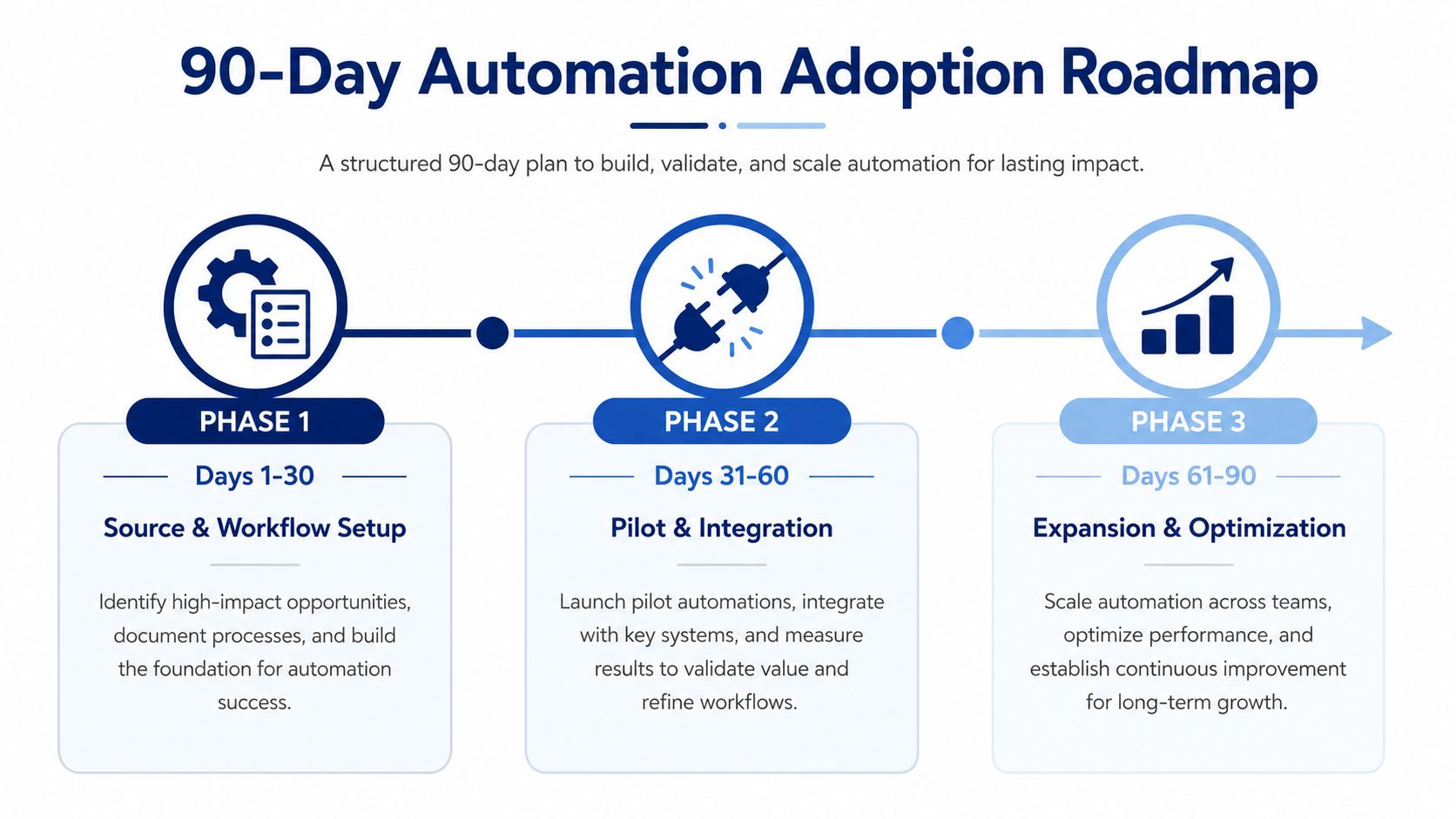
The first 30 days should be about source setup and workflow design. Pick the account set, define the signals that matter, connect the data sources, and map the handoff into CRM or Slack. If the team can't explain why each source exists, it's probably noise.
Days 31 to 60 are for pilot accounts and integrations. During this phase, the team tests whether the alerts are actionable, whether the brief format is readable, and whether the rep uses the output in live selling conversations. The goal isn't perfect coverage, it's proving the workflow survives real use.
Days 61 to 90 should focus on expansion and optimization. At that point, the team can broaden the account set, tighten filtering, and formalize reporting so leadership sees what changed in the motion. The strongest teams don't stop at adoption, they keep trimming friction until the process feels invisible.
The KPIs that actually tell the truth
The scorecard should stay close to revenue outcomes.
- Time-to-context per account: how fast a rep can get to a usable brief.
- Signal-to-meeting conversion: whether alerts are translating into conversations.
- Research hours per rep: whether the manual tax is shrinking.
- Win rate against trigger-rich accounts: whether timed context is improving deal quality.
Those metrics are more useful than a stack of dashboards because they connect automation to selling behavior. A system can look busy and still miss the point, while a cleaner workflow can create more timely conversations with the right accounts.
The best test is simple. If your reps are starting more calls with current context, better timing, and a clearer reason to reach out, the automation is working. If not, the tool is just generating more content for the team to ignore.
Salesmotion helps revenue teams automate account research with autonomous agents that watch target accounts, surface real-time signals, and turn them into briefs and outreach context. If you're trying to replace the manual research tax with a continuous signal pipeline, see how the Research Agent and Signal Agent fit into your team's existing CRM, Slack, and sales engagement stack.