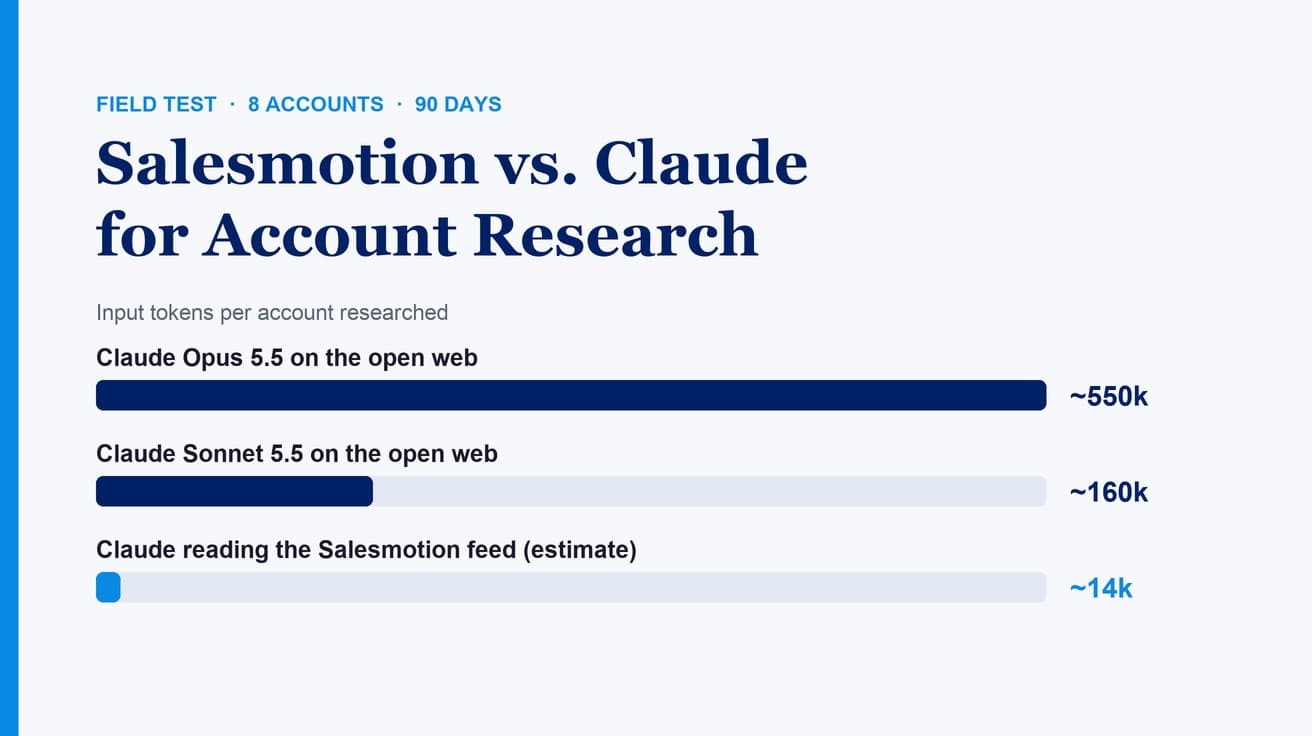
Perplexity is one of the best tools a rep can use for account research on a named company: every answer cites its sources, Deep Research writes a full report in minutes, and Automations can re-run a check on a schedule. It stops being enough when the job is a territory rather than a question: watching 80 or 200 accounts the same way for every rep, matching what changed to your account list, and checking every source before it reaches a customer. Most teams that get value from it keep Perplexity for research and drafting, and add a signal layer that does the watching.
TL;DR: Use Perplexity for cited research on one account, call prep, "why now" scans and short watch lists. Use Projects to share instructions and files, and Automations for a handful of recurring checks. For a team covering many accounts, someone has to write, run, pay for and check every automation. A sales intelligence tool such as Salesmotion ($85/month for individuals) monitors the whole list, and on the Enterprise plan its connector brings the same signals into Claude.
This comes up in our sales conversations every week. Between 21 October and 18 November 2026, 7 of the 32 buyer organisations we spoke with compared Salesmotion with doing the research themselves in Claude, ChatGPT, Perplexity or Copilot. Perplexity features below were checked on Perplexity's own help center on 18 November 2026.
What Is Perplexity Good For in Sales?
Perplexity is good at cited answers to specific questions. It searches the web, reads the sources and writes an answer with a link for each claim, which suits sales research better than an answer you cannot check. These are the Perplexity features that matter for sales work, as described on Perplexity's help center (checked 18 Nov 2026):
| Feature | What it does | Sales use |
|---|---|---|
| Search with Pro Search | Runs several searches, synthesizes the result and links every answer to its sources. Applied automatically within your plan's limits | Quick facts, recent news, "who is the CFO", one account in two minutes |
| Deep Research | Reads many sources and writes a detailed report, exportable as PDF, DOCX or Markdown. Included on Pro and Max | A full account brief before a first meeting or a QBR |
| Projects | Shared workspaces that keep searches, files, instructions and connected tools together | One Project per territory or key account, with house rules for research |
| Automations in Computer | Recurring work on a schedule (as often as every 15 minutes) or when something happens in a connected app, with a notification when there is something new | A weekly news check on your top accounts; a briefing when a meeting lands on your Google Calendar |
| Connectors for HubSpot and Salesforce | HubSpot: read-only questions about CRM records. Salesforce: query, create and update records, after a Salesforce admin sets it up | "Which of my open deals are at companies that announced layoffs?" |
| Comet Assistant | An assistant in Perplexity's browser that answers questions about and summarizes the pages you have open | Summarize an investor relations page or a careers page while you read it |
Perplexity also documents custom remote connectors over MCP, which an organisation's administrator can enable for members.
Perplexity Prompts for Account Research and Prospecting
The prompts that work best in Perplexity ask for a date range, a source for every claim and a clear format. Use Search for the short ones and Deep Research for the full brief.
- Account snapshot (Search). "Summarize [company]'s strategy, last two quarters of results and stated priorities for [year]. Only use sources from the last 12 months. Give the source and date for every point."
- Full account brief (Deep Research). "Write an account brief on [company] for a seller of [your category]. Sections: business overview, recent results, leadership changes in the last 12 months, stated initiatives, risks named in filings, technology they use for [category], and three reasons they might buy in the next two quarters. Cite every claim. Mark anything you could not verify as unverified."
- Why-now scan. "List every event at [company] in the last 90 days that could create a need for [your category]: new executives, funding, acquisitions, layoffs, expansions, new products, regulatory changes. One line per event with date and source. Leave out anything older than 90 days."
- Buyer priorities. "What has [name], [title] at [company], said publicly in the last 12 months about [topic]? Use interviews, podcasts, earnings calls and their company's press releases. Quote the exact words and link the source."
- Earnings call to pitch. "From [company]'s most recent earnings call, list the three priorities management repeated most often. For each, quote the line and suggest one question a seller of [your category] could ask the [title] about it."
- Tech stack evidence. "Which [category] tools does [company] use today? Look for job posts, case studies, partner pages and conference talks. Give the evidence for each tool and its date."
- Lookalike list. "List 15 companies like [best customer]: [industry], [region], [employee range], that have announced [trigger] in the last six months. For each, give the trigger, the date and the source. Do not include a company without a dated source."
- Email from a signal. "Using only the facts above, write a four-sentence email to [name, title] that refers to [event, date]. One question at the end. No flattery, no 'I hope this finds you well'."
Prompt 7 is the one to check most carefully. Lists built from web search mix company names that look alike and miss companies that publish little. Open every source before a company goes into your CRM.
A Perplexity Workflow for One Rep
For a single rep with a short list of accounts, Perplexity can run a reasonable research routine. Set it up once, then let Automations do the repeat work.
1. Create a Project for your territory. Add instructions that every answer in it must follow: "Only use sources from the last 12 months. Cite every claim with a link and a date. Flag anything unverified. Write for a seller of [category] to [persona]." Perplexity allows up to 8,000 characters of instructions per Project.
2. Add your account list as a file. Upload a short list with company name, domain and what you sell to each, so every search in the Project can refer to it. The file does not update itself, so replace it when the list changes.
3. Schedule one weekly check. In Automations, describe it in plain language and put the companies and rules in the prompt itself, because background runs start fresh without the earlier conversation: "Every Monday at 8am, check news, press releases and job posts from the last 7 days for [company 1], [company 2] ... [company 10]. Only report events that could create a need for [category]. Give the date and source for each." Perplexity notifies you when a run finds something and stays quiet when it finds nothing new.
4. Add a meeting trigger. Perplexity's own example of a conditional trigger is close to a sales use case: when a new customer meeting is added to your calendar, research the company and prepare a briefing. Calendar triggers are documented for Google Calendar. Write your format rules into the trigger's instructions so every briefing looks the same.
5. Write back only what you checked. If your team uses Salesforce and an admin has set up Perplexity's connector, Perplexity can update records. Decide which fields it may touch, and read each change before you save it.
That routine works well for one person with discipline and a short list. The questions start when it has to work for a team.
Where Does Perplexity Stop for a Sales Team?
It stops at scale, list ownership, consistency and verification. None of these are about the quality of Perplexity's answers. They are about the work around the answers once many reps cover many accounts.
1. Monitoring is something you build and pay for per task. Automations can watch accounts, and Perplexity is testing teammates, agents that own ongoing work, as a research preview for individual Max subscribers. But each automation is a prompt someone writes, and every run uses Computer credits from the plan's monthly allowance. With 80 accounts per rep, a team chooses between one broad automation across the whole list, which trades depth per account for coverage, and many narrow ones, which someone has to write, maintain and pay for.
2. Connecting it to your accounts is a setup project. The territory, who owns which account and which deals are open live in your CRM. Perplexity's Salesforce and HubSpot connectors can read those records, but someone has to connect them, a Salesforce admin has to set up the Salesforce side, and every prompt and automation has to say which accounts to cover. When territories change, those prompts change too.
3. Every rep's research comes out different. Two reps who ask about the same account with different prompts get different sources, different findings and different angles. Shared Project instructions narrow the gap. They do not give a manager the same account brief for every account in a pipeline review.
4. Every source still needs a check. Citations make checking possible, which is Perplexity's real strength. At team scale, checking is still work. A research leader at an IT services firm whose team gathers signals with AI tools described it:
“the only challenge is scale ... it's not just running a prompt, but there is some manual validation as well”
Anonymised buyer
Sales research leader, IT services
5. Company matching is up to you. Web search does not know which of several companies called "Apex" is the one in your CRM, or that a subsidiary's news belongs to its parent account. A rep reading one answer can spot a mismatch. Across 200 accounts on a schedule, someone has to build that check into the prompts or read every result.
For one rep and 15 accounts, none of this matters much. For a team, these five points are where the hours go.
See the signal layer behind your research
We'll run Salesmotion on your own accounts in a 30-minute demo: what changed this week, why it matters, and the draft a rep would send.
Book a demo →How the Work Splits Between Perplexity and a Signal Layer
Perplexity and a sales intelligence tool do different jobs, and most teams that have both use them together. Perplexity facts were checked on its help center on 18 Nov 2026; Salesmotion facts come from our pricing page and help center.
| Perplexity | Salesmotion | |
|---|---|---|
| What starts the research | A prompt, an automation you set up, or an app event | A signal at any tracked account (Signal Agent, 24/7) |
| Accounts covered | The ones in your prompts and automations | Every tracked account; up to 100 on the Individual plan |
| Sources | The web and connected apps, chosen per query | 1,000+ public sources, the same set for every rep |
| Output | Cited answers and reports | Cited account briefs, a signal feed and outreach drafts a rep reviews |
| CRM | Salesforce connector reads and updates records; HubSpot connector is read-only | Native Salesforce and HubSpot integrations, included with Enterprise and on request on other plans |
| Where it runs | Perplexity web, apps and Comet | Salesmotion app, Salesforce, HubSpot, and inside Claude through the Salesmotion connector on the Enterprise plan |
| Best for | Answering a specific question with sources | Knowing which accounts to work this week and why |
Where Does Salesmotion Fit?
Salesmotion is the layer that watches every account so reps do not have to ask. It covers the work from the limits above: monitoring, one source set, the same brief for every rep, and context in the CRM.
- Signal Agent monitors your tracked accounts for 50+ signal types across 1,000+ public sources: leadership changes, funding, M&A, earnings calls, filings, job posts, news and more. Nobody has to write or schedule a prompt per account.
- Research Agent writes a cited account brief for every account in the same format, so a pipeline review compares like with like.
- Outreach Agent drafts emails and LinkedIn messages that refer to a real event, for a rep to review and send.
- CRM: native Salesforce and HubSpot integrations put signals and briefs on the account record.
Salesmotion also works inside the assistant your team already uses. On the Enterprise plan, the Salesmotion connector for Claude lets each person ask Claude "which of my accounts had a leadership change this week?" or "brief me on [company]" and get an answer from the monitored data. Each person connects with their own login through Sign in with Salesmotion, so nobody shares an API key and access ends when someone leaves. The same MCP server also serves ChatGPT.
A regional sales manager in cybersecurity described what they were looking for:
“I'm looking more for surveillance on my accounts to pick up the stuff that I might miss.”
Anonymised buyer
Regional sales manager, cybersecurity
Put the watching behind your research
The Individual plan monitors up to 100 accounts for 50+ signal types, writes cited briefs and drafts outreach for $85/month on a monthly contract. The Enterprise plan adds the Claude connector and MCP server.
When Is Perplexity Alone Enough?
Perplexity alone is a sensible setup more often than vendors admit. It is enough when:
- Your list is short. About 15 named accounts that you research before every meeting anyway, with one or two automations for the top five.
- One person owns the research. A single Project with good instructions keeps quality steady for one rep or a very small team.
- Your deals are transactional. Short cycles and one buyer, where an hour of research per account is not worth it.
Add a signal layer when reps hear about leadership changes from the prospect, when account reviews show a different research standard per rep, or when nobody can say which accounts changed since Friday. For the same question about other assistants, read ChatGPT for sales and the comparison of ChatGPT, Claude and Copilot for account research. Salesmotion vs ChatGPT covers the longer comparison with a general assistant.
Frequently Asked Questions
How do you use Perplexity for sales?
Use it for research that starts with a question: a cited snapshot of one account, a full Deep Research brief before a meeting, a "why now" scan of the last 90 days, a buyer's public statements, and earnings call priorities. Ask for a date range and a source for every claim. Use Projects to share instructions and Automations for a few recurring checks.
What are the best Perplexity prompts for account research?
Prompts that set a time window, require a source and date for every point, and fix the output format. For example: "List every event at [company] in the last 90 days that could create a need for [your category], one line per event with date and source." Ask it to mark anything unverified, and open the sources before you use a fact with a customer.
Can Perplexity monitor accounts automatically?
Yes, within limits you set. Automations in Perplexity Computer run on a schedule, as often as every 15 minutes, or when something happens in a connected app, and notify you when they find something new. Each run uses Computer credits, and someone has to write and maintain each automation, which is the constraint for a team covering many accounts.
Does Perplexity connect to Salesforce or HubSpot?
Yes. Perplexity's Salesforce connector can query, create and update records once a Salesforce admin sets it up, and requires Salesforce Enterprise Edition or above. Its HubSpot connector is read-only. Both are listed for Pro, Max, Enterprise Pro and Enterprise Max, according to Perplexity's help center (checked 18 Nov 2026).
Is Perplexity better than ChatGPT for sales research?
Both return cited research and both offer scheduled work and connectors. Perplexity's strength is search-first answers with a source on every claim; ChatGPT's is writing and working with documents you give it. For a team, the bigger question is the same for both: who builds and checks the monitoring for every account. See ChatGPT for sales for that side.
Can Salesmotion work inside an AI assistant?
Yes. On the Enterprise plan, the Salesmotion connector brings monitored signals and account briefs into Claude, with each person signing in with their own Salesmotion login. The same MCP server also serves ChatGPT.