Most reps are still doing some version of the same bad routine. They pull a name from a list, glance at a company page, write a generic email, and hope timing somehow works in their favor. It usually doesn't. The message isn't wrong. It's just disconnected from what the buyer cares about right now.
That's the core value of sales trigger events. They give you a reason to reach out that makes sense to the buyer, not just to your quota. Instead of asking for attention with no context, you show up when something has changed, priorities are shifting, or a decision is already forming.
The difference sounds small. In practice, it changes everything about prospecting: who you contact, what you say, when you say it, and whether the conversation goes anywhere.
What Are Sales Trigger Events
A sales rep calls a prospect with nothing but a name, a title, and a company. The opener sounds familiar.
“Wanted to introduce myself.” “Thought it might make sense to connect.” “We help teams like yours improve efficiency.”
The prospect has no reason to care. The timing is random. The outreach feels like outreach.
Now compare that to a rep who sees that the company just raised a new round, opened a regional office, or hired a new operations leader. The message changes from generic to relevant because it answers the question every buyer internally asks: why now?
The practical definition
Sales trigger events are changes inside a company, around a company, or in a buyer's market that create a real opening for a sales conversation. They aren't just interesting news items. They are signals that priorities, budgets, risk, strategy, or ownership may be shifting.
A trigger can be obvious, like a funding announcement. It can also be subtle, like a job post that mentions a system migration, a leadership hire with a transformation mandate, or a press release about entering a new market.
What matters is not the event itself. What matters is what the event signals.
Buyers don't respond because you noticed the news. They respond when you connect the news to a problem they now have to solve.
What trigger-based prospecting changes
Signal-based selling works because it replaces guessing with context. Instead of treating every target account the same, you look for moments when change creates need.
That usually means your outreach gets better in three ways:
- The timing improves because you're reaching out when something is in motion.
- The message gets sharper because you can tie your point of view to a real event.
- The conversation starts warmer because the buyer doesn't have to invent a reason to talk.
This is why sales trigger events sit at the center of modern prospecting. They turn cold activity into timely relevance.
See Salesmotion in action
Take a self-guided interactive tour — no signup required.
Why Trigger Events Are Your Unfair Advantage
The biggest prospecting mistake isn't poor copy. It's bad timing. A strong message sent at the wrong moment still gets ignored. A simpler message sent when priorities are changing often gets a reply.
That's why trigger events matter so much. They help sales teams stop interrupting people who aren't buying and start engaging accounts that are more likely to act.
The event is what turns a target account into an account with a reason to talk now. An enablement and operations leader at a software firm told us: "it's really important that we pick up signal when things happen because that gives us kind of the compelling event to break in".
First in matters
There's a real competitive edge in getting to the buyer early. According to Forrester research on reaching decision-makers first, the first vendor to reach a decision-maker and set the vision has a 74% chance of closing the deal. That's the strongest business case for trigger-based outreach. The signal gives you a reason to move before everyone else does.
If a new CFO joins, a product line launches, or a company starts hiring for a capability you support, you don't want to be the fifth seller in their inbox. You want to be the one shaping how they define the problem.
Relevance beats volume
Traditional prospecting often rewards activity that looks productive but isn't. More emails. More calls. More names loaded into sequences. The problem is that volume without context trains reps to sound interchangeable.
Trigger-based selling changes the unit of work. You're no longer asking, “How many accounts can I touch today?” You're asking, “Which accounts have a reason to care right now?”
That shift improves message quality fast. A rep who sees a company expanding into a new region can speak to onboarding complexity, regional coordination, or reporting consistency. A rep who notices a new head of customer success can speak to retention, process standardization, or team visibility. The outreach starts with the buyer's world, not your pitch deck.
Active priorities are easier to sell into
The best trigger events don't just tell you something changed. They tell you a budget, initiative, or internal project may already be active.
A company announcing a new warehouse, entering a regulated market, or replacing core systems is rarely doing that casually. Someone owns the work. Someone has urgency. Someone is being measured on the outcome.
That's why these moments create an advantage over broad cold outreach:
- You can map your offer to a live initiative
- You can tailor the message to a stakeholder likely involved
- You can prioritize accounts with movement instead of static fit alone
Practical rule: A trigger event is valuable when it gives your team a credible angle, a likely owner, and a reason the account may act soon.
This is the core trade-off. Spray-and-pray prospecting gives you scale but low relevance. Trigger-based selling asks for better research and tighter execution, but it gives you a much stronger shot at creating real pipeline.

“There's been a big focus on hyper personalization and relevance in our outbounding efforts. Salesmotion has been a key partner in hitting our significantly increased meeting targets. What stands out is how simple it is. Reps can log in and get valuable account insights within 30 seconds to a minute.”
Joe DeFrance
VP of Sales, Incredible Health
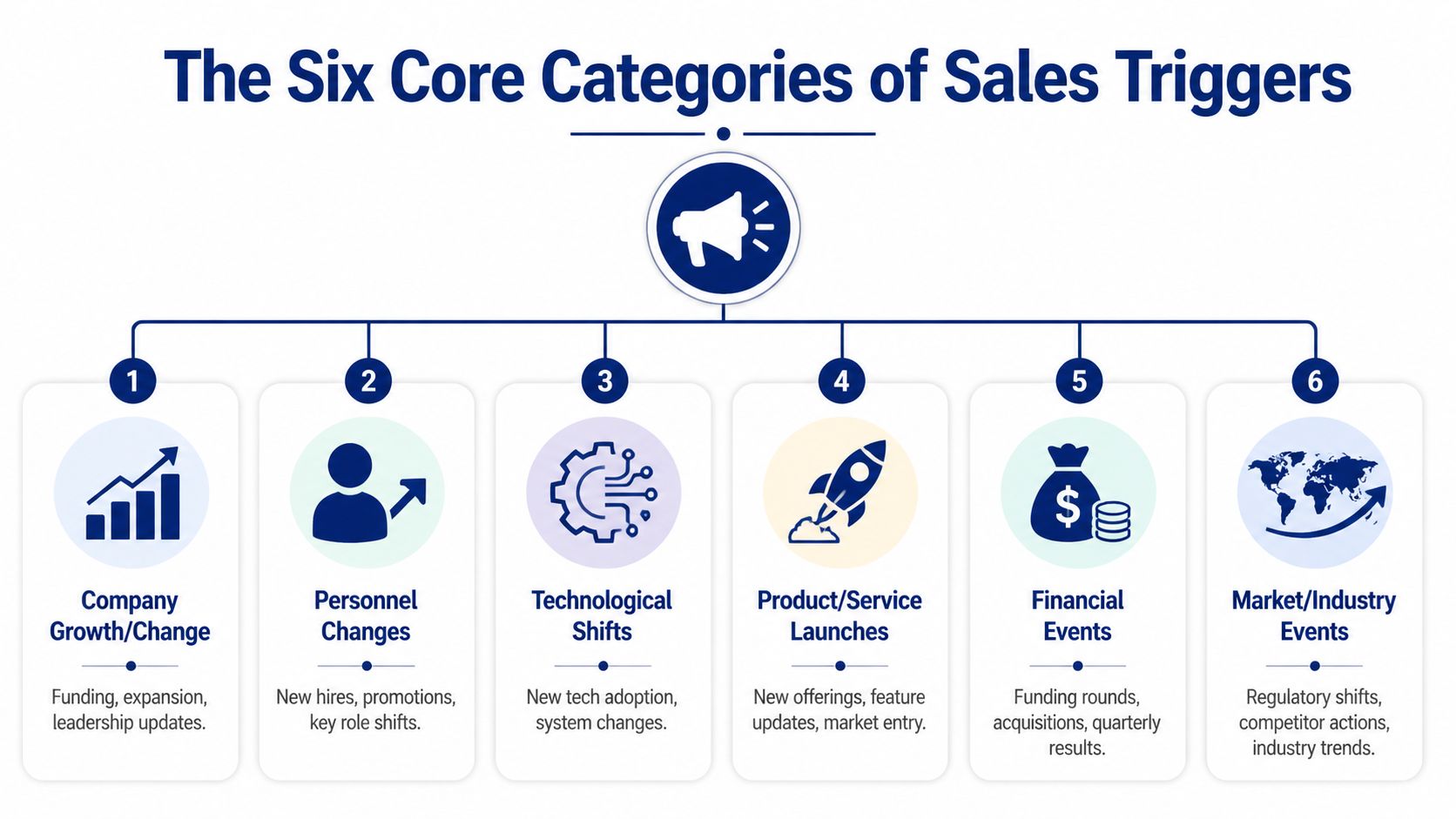
The Six Core Categories of Sales Triggers
Most sales teams don't struggle because they've never heard of sales trigger events. They struggle because the list becomes too long, too messy, and too manual. The fix is to group triggers into a few categories you can monitor and use.
Here's the visual map.
How to think about trigger categories
The six categories below cover most of the signals revenue teams care about. Some are high intent on their own. Others become powerful when combined. A single job post may not justify outreach. A job post plus a leadership hire plus a market expansion probably does.
For more examples, this roundup of sales trigger event examples is useful when you want to expand beyond your default list.
Common sales trigger events and where to find them
| Category | Example Trigger | What It Signals | Where to Find It |
|---|---|---|---|
| Financial | New funding round | Budget availability, growth pressure, new initiatives | Press releases, investor pages, business news |
| Financial | Earnings commentary on cost pressure or growth plans | A need for efficiency or acceleration | Earnings calls, SEC filings, investor relations pages |
| Leadership and Hiring | New CRO, CFO, COO, or VP hire | Fresh mandate, new evaluation criteria, openness to change | LinkedIn, company press releases, executive bios |
| Leadership and Hiring | Hiring surge in one function | Investment in a team or initiative | LinkedIn jobs, company careers pages, job boards |
| Product and Technology | Job post mentioning Salesforce migration, ERP rollout, or data tooling | Active tech change, integration work, process redesign | Job postings, engineering blogs, tech team hiring pages |
| Product and Technology | New implementation partner announcement | A systems change is underway | Partner pages, press releases, company blogs |
| Market and Competitive | Competitor launch or pricing move | Pressure to respond, reposition, or improve execution | Industry news, competitor websites, analyst commentary |
| Market and Competitive | Public frustration with an incumbent vendor | Openness to replacement or reevaluation | Review sites, social posts, community forums, news coverage |
| Expansion | New office, warehouse, region, or country launch | Operational complexity, local hiring, process scaling | Press releases, local business journals, company updates |
| Expansion | Entry into a new vertical or customer segment | New go-to-market motion, compliance needs, enablement gaps | Product announcements, sales decks, webinars, interviews |
| Digital Signals | Executive LinkedIn posts about strategic priorities | Live language you can mirror in outreach | LinkedIn activity, interviews, podcasts |
| Digital Signals | Website messaging changes around transformation, AI, compliance, or customer experience | A strategic initiative is becoming more explicit | Website copy, landing pages, blogs, newsroom updates |
What works and what gets misread
Not all triggers deserve the same confidence level.
Some signals are direct. A funding round, executive hire, or office expansion usually points to a concrete business change. Others are interpretive. A thought-leadership post from a VP may reveal priority, or it may just reflect personal branding.
That's why experienced teams don't treat every mention as a green light. They ask:
- Is this a real business event or just noise
- Can we infer a likely project or pain point from it
- Do we know who probably owns the problem
- Can we say something useful that goes beyond congratulations
A trigger is only useful if it sharpens action. If it doesn't change who you contact, what you say, or how urgent the account feels, it's just information.
A commercial excellence manager at a pharma firm told us she judges every new data source by one question: what is the call to action for the field team? If there is none, she drops it. It is one of the clearer tests we heard in more than 370 sales and customer calls in the twelve months to October 2026.
From Signal to Action Outreach Playbooks
Seeing a trigger is not the hard part anymore. The hard part is turning it into outreach that sounds informed, useful, and timely without sounding creepy or over-researched.
The pattern that works is simple. Start with the signal. Translate it into business implications. Then write to the likely consequence, not the headline.

If funding events are a core part of your motion, this guide to the funding round sales trigger is a useful companion.
Playbook one for a new executive hire
The signal
A company appoints a new VP of Revenue Operations.
The so what
New leaders often review systems, process gaps, reporting quality, and team accountability early. They need quick wins. They also need to show they have a plan, which means they're more willing to look at tooling, process redesign, and vendor changes than someone who inherited the status quo and wants to avoid disruption.
The outreach
Subject: Quick thought on your RevOps priorities
Hi [Name],
Congrats on the new role.
Stepping into RevOps usually means sorting through a mix of systems, reporting requests, and process gaps while the rest of the team still expects the numbers to stay clean. I work with teams that need to tighten execution without creating another layer of manual work for reps and managers.
If improving visibility, process consistency, or rep focus is on your list, happy to share a few patterns we're seeing across similar teams.
Worth a conversation next week?
Playbook two for a technology shift hidden in hiring
The signal
A job post mentions CRM cleanup, sales process redesign, or a data migration project.
The so what
Job posts are useful because companies often describe the actual work more plainly there than in public marketing. If they're hiring around systems cleanup or implementation, they're already spending money or attention on the problem. That gives you a much better angle than a generic intro email.
Job posts often reveal the operational pain before the press release does.
The outreach
Subject: Noticed the CRM work underway
Hi [Name],
I saw your team is hiring for a role tied to CRM process and data work.
That usually shows up when a team is trying to improve forecast visibility, simplify handoffs, or clean up rep workflow without slowing down the field. If that initiative is active, there may be a narrow window to fix the surrounding process while the team is already in change mode.
I have a few ideas on where teams usually get stuck during this kind of rollout. Happy to send them over if helpful.
Playbook three for competitor pressure
The signal
A buyer mentions a competitor challenge in an interview, webinar, or earnings commentary. The exact details vary, but the pattern is clear. They're reacting to external pressure.
The so what
Competitive pressure creates urgency. Teams may need faster execution, better visibility, stronger retention, or tighter coordination across go-to-market functions. The mistake here is pitching your product as a generic “solution.” The better move is to acknowledge the pressure and speak to the operating issue underneath it.
The outreach
Subject: A thought on responding faster
Hi [Name],
I noticed your team is putting real focus on responding to market pressure in [area].
When companies are in that mode, the issue usually isn't a lack of ideas. It's getting the right teams aligned quickly enough to execute. That's where a lot of initiatives stall.
If improving speed, coordination, or signal visibility is part of the push, I'm happy to share a few ways other teams structure it without adding more manual reporting work.
Open to a brief conversation?
Playbook four for geographic expansion
The signal
The company opens a new office or launches in a new region.
The so what
Expansion sounds positive, but it creates operational drag fast. New teams need onboarding, tools, reporting, governance, and often local adaptation. If you sell into operations, enablement, analytics, compliance, or workflow management, this is often a better trigger than broad company growth news because the pain is more tangible.
The outreach
Subject: Expansion usually creates this one problem fast
Hi [Name],
Congrats on the regional expansion.
When companies add a new location, the first challenge usually isn't ambition. It's consistency. New teams need to ramp quickly while leadership still wants clean process, reporting, and accountability across regions.
If that's becoming a focus, I can share a few ways teams reduce the manual overhead that tends to show up during expansion.
The common thread in all four playbooks is straightforward. Don't lead with the event alone. Lead with the business consequence.

“This is my singular place that very simply summarizes a company's top initiatives, strategies and connects them to my solution. Something I would spend hours researching manually, now it's automated.”
Derek Rosen
Director, Strategic Accounts, Guild Education
Building Your Trigger Monitoring System
Ad hoc trigger research works for a week. Then pipeline review hits, reps get busy, alerts pile up, and the whole thing turns back into random prospecting. If you want sales trigger events to matter, you need a monitoring system, not a heroic rep who happens to be good at research.

The manual stack most teams start with
Teams often begin with a patchwork of tools, and that's fine. The usual setup looks like this:
- Google Alerts for company names and key executives so you catch press mentions and public announcements.
- LinkedIn Sales Navigator saved accounts and lead alerts for job changes, hiring activity, and company updates.
- Investor relations pages and SEC filings if you sell into public companies and need direct financial context.
- Job boards and company career pages to spot systems projects, hiring surges, and strategic initiatives hidden in role descriptions.
- Industry newsletters and niche publications to catch regulation, competitor activity, and market shifts earlier than broad news sources.
This works, but it creates a serious manual research tax. Reps still have to check sources, interpret whether a signal matters, match it to the right account owner, and decide what to say. A lot of useful context gets lost because no one has time to stitch it together consistently.
Where manual monitoring breaks
The pain usually shows up in four places.
First, alerts are noisy. Teams see everything from minor mentions to irrelevant news and stop trusting the feed. A business development leader at a facility services firm told us: "And it's like I'm constantly being bombarded with information, and it's very hard to act."
Second, context is fragmented. The funding announcement is in one tab, the key hiring signal is in another, and the rep has to infer the story.
Third, ownership is fuzzy. Signals come in, but no one knows whether SDRs, AEs, account managers, or RevOps should act.
Fourth, timing slips. The event is useful on Monday. By Thursday it's stale.
The problem isn't lack of data. It's that reps are doing analyst work in the middle of a selling day.
What a workable system looks like
A strong trigger monitoring workflow has a few clear rules:
- Define your accounts first. Don't monitor the whole market. Monitor your ICP and named accounts.
- Choose trigger types by relevance. Track the events that map to your product and sales motion.
- Set routing rules. Decide who acts on which signal and in what channel.
- Attach a response playbook. Every high-value trigger should have a default next step.
- Review signal quality weekly. Remove noisy sources and tighten definitions.
If you sell into trade, manufacturing, logistics, or import-heavy operations, outside datasets can strengthen your trigger model too. For example, global customs data reporting can provide context when account activity depends on shipping flows, supplier changes, or cross-border movement.
For teams that want to reduce the manual work, platforms can automate the collection and interpretation layer. Tools like Google Alerts and Sales Navigator still help, but systems built for account intelligence can watch target accounts continuously, combine multiple public signals, and push useful context into Slack, CRM, or email. One example is AI for company research with API workflows, where account monitoring and research are handled in a more structured way. Salesmotion does this by tracking account changes and surfacing the “so what” behind the signal so reps spend less time searching and more time acting.
Prioritizing Triggers to Focus Your Efforts
Once you build a trigger feed, a new problem shows up. There's too much to look at. Every week brings more hires, more announcements, more posts, and more noise dressed up as opportunity.
The way out is a simple scoring model. Don't ask whether a trigger is interesting. Ask whether it deserves action now.

Use fit significance and recency
The cleanest framework uses three filters.
| Factor | What to ask | High score example |
|---|---|---|
| Fit | Does this account match our ICP and target segment? | The account already matches your size, industry, and use case |
| Significance | How likely is this event to create budget, pain, or change? | A funding event, executive hire, or system migration |
| Recency | Did this happen recently enough to justify outreach now? | The signal appeared very recently and the window is still open |
A useful operating habit is to score each factor: low, medium, or high. You don't need a complicated model to start. What you need is consistency.
How teams usually get this wrong
A lot of reps over-prioritize visible news and under-prioritize relevant news. A flashy announcement from a bad-fit account gets attention. A boring job post from a strong-fit account gets ignored.
That's backwards.
Field note: The best trigger isn't always the loudest one. It's the one attached to an account you actually have a chance to win.
Use prioritization to protect rep time. If the account is weak fit, the signal is minor, or the event is stale, don't force it. Save effort for triggers that combine relevance with momentum.
Measuring the ROI of Signal-Based Selling
If you change your prospecting model, you need to prove it's working. “The emails feel better” isn't enough. Revenue leaders want to know whether sales trigger events are producing more meetings, stronger pipeline, and better conversion efficiency than generic outbound.
Track the right comparisons
Start with side-by-side measurement. Compare triggered outreach against non-triggered outreach inside the same team and period. Focus on outcomes that tie directly to pipeline quality.
Good metrics to watch include:
- Meeting booked rate by trigger type so you can see which signals create conversations
- Opportunity creation rate from triggered accounts to separate replies from real pipeline
- Sales cycle patterns by signal source to understand whether some triggers create faster momentum
- Average deal quality by trigger category based on your own qualification standards
- Rep response time to high-value signals because speed matters if the trigger window is short
For broader commercial impact, connect this work to nurturing performance. According to Strategic IC data on lead nurturing outcomes, companies that excel at lead nurturing, often powered by timely trigger-based outreach, generate 50% more sales-ready leads at a 33% lower cost. That matters because trigger-based selling isn't just about one email. It improves how and when your team engages accounts over time.
Build a feedback loop
The best measurement habit is simple. Every month, review which triggers produced pipeline and which only produced activity.
Use that review to tighten your system:
- Remove low-value signals that create work but no meetings
- Upgrade playbooks for trigger types that regularly start conversations
- Refine your scoring so the best-fit signals rise to the top
- Share examples across the team so good judgment becomes repeatable
If you want a cleaner framework for tracking performance, these sales pipeline metrics are a solid place to start.
If your team is still doing manual account research, chasing weak timing, and guessing at the “why now,” Salesmotion can help operationalize signal-based selling. It monitors target accounts for real-world changes, explains why a signal matters, and routes that context into the workflows reps already use so they can act on the right accounts at the right time.