The average sales rep uses 6 to 10 different tools and still spends 70% of their time on non-selling activities. The problem is not a lack of sales intelligence software. It is that most of it solves the wrong problem.
According to Nektar's research on sales tool overload, 66% of sales reps feel overwhelmed by the number of tools they use. Companies spend an average of $1,200 per rep per year on sales technology, yet 67% of purchased features go unused. The sales intelligence market has grown to $4.85 billion in 2025 and is projected to reach $10.25 billion by 2032, growing at 11.3% CAGR. Software solutions dominate with 58.7% market share. The category is booming because the problem is real: B2B selling has gotten harder, buying groups have gotten bigger, and the old way of researching accounts does not scale.
But here is the catch. Most teams buying sales intelligence software end up disappointed. Not because the tools are bad, but because they bought the wrong category of tool for the problem they actually have.
This guide cuts through the noise. Whether you are evaluating your first sales intelligence platform or replacing one that never got adopted, we will cover what the category actually does, how it differs from contact databases and CRMs, and what to look for when buying.
TL;DR: Sales intelligence software has splintered into four distinct sub-categories: contact data, intent data, account intelligence, and revenue intelligence. Most teams buy a contact database thinking they are getting intelligence. The key is matching the tool to your actual workflow gap, then evaluating on five capabilities: data coverage, signal monitoring, research automation, CRM integration, and outreach personalization.
What Sales Intelligence Software Actually Does
The term "sales intelligence" has been stretched so far it barely means anything. ZoomInfo calls itself sales intelligence. So does 6sense. So does Gong. These are fundamentally different products solving different problems.
At its core, sales intelligence software collects, analyzes, and surfaces information that helps sales teams sell more effectively. But the spectrum is wide. On one end, you have contact databases that give you phone numbers and email addresses. On the other, you have platforms that monitor hundreds of sources to surface why a specific account is worth pursuing right now.
The distinction matters because most teams conflate "data" with "intelligence." Data is a phone number. Intelligence is knowing that your target account's CFO just spoke on a podcast about cutting vendor costs, their largest competitor announced a new product line, and they posted three job openings in your buyer's department this month.
According to Gartner's research on the B2B buying journey, today's B2B buying committees include 6 to 10 decision makers, with enterprise deals sometimes involving over 20 stakeholders. Each one enters the process with four to five pieces of independent research. If your "intelligence" is just a list of names and titles, you are bringing a spreadsheet to a strategy meeting.

“We had a variety of tools, and that was the pain — the variety. We had to go to multiple places to get streamlined data.”
Lyndsay Thomson
Head of Sales Operations, Cytel
The Account Intelligence Taxonomy
Before comparing vendors, it helps to understand what each layer of the sales intelligence stack actually answers. Most buyers conflate these layers and end up buying the wrong one.
| Layer | What It Answers | Examples |
|---|---|---|
| Contact Data | WHO to call | ZoomInfo, Apollo, Cognism, Lusha |
| Intent Data | WHO is researching | Bombora, 6sense, Demandbase, G2 |
| Buying Signals | WHEN to reach out | UserGems, Common Room |
| Account Intelligence | WHY they'd buy + WHAT to say | Comprehensive briefs, SWOT, competitive moves |
As Brendan Short of The Signal Club puts it: "Generic signals are getting commoditized. Niche signals are the new alpha." The platforms that win are the ones that go beyond who and when, and help reps understand why an account would buy and what to say in that first conversation.
See Salesmotion on a real account
Book a 15-minute demo and see how your team saves hours on account research.
Sales Intelligence vs. Contact Databases vs. CRMs
This is the most important distinction in the category, and the one most buyers get wrong.
Contact Databases
Tools like ZoomInfo, Apollo, and Lusha are primarily contact databases. They excel at answering WHO: who works at a company, what their email is, and whether their phone number is valid. They have expanded into intent data and engagement tracking, but their core value proposition is contact coverage. ZoomInfo claims over 420 million business contacts. Apollo claims 230 million. These numbers are impressive, but contacts are a commodity.
CRM Systems
Salesforce, HubSpot, and Microsoft Dynamics are systems of record. They track your interactions with accounts: deals in progress, emails sent, meetings booked. They tell you what you have done. They do not tell you what is happening at the account right now or what you should do next.
Sales Intelligence Platforms
True sales intelligence platforms answer the harder questions: WHY should you reach out to this account, and WHEN is the right moment? They monitor signals like leadership changes, earnings calls, hiring patterns, and competitive moves to surface timing-based opportunities. They automate account research so reps stop toggling between six browser tabs to prepare for a call.
Here is a practical way to think about it:
| Category | Core Question | Example Tools | Strength | Limitation |
|---|---|---|---|---|
| Contact Database | Who works there? | ZoomInfo, Apollo, Lusha | Contact coverage, email/phone accuracy | Data without context |
| CRM | What have we done? | Salesforce, HubSpot, Dynamics | Deal tracking, pipeline management | Backward-looking, no external signals |
| Intent Data | Who is researching our category? | Bombora, 6sense, TechTarget | Topic-level buying intent | Generic signals, noisy at account level |
| Account Intelligence | Why reach out now? | See account intelligence section | Real-time signals, automated research, contextualized outreach | Smaller contact databases (by design) |
| Revenue Intelligence | How are deals progressing? | Gong, Clari, Chorus | Conversation analytics, forecasting | Requires active deals, not for prospecting |
The mistake most teams make is buying a contact database when their real problem is not finding people, it is knowing what to say and when to say it. A recent survey from Salesforce found that salespeople burdened by too much technology are 43% less likely to hit their targets. Organizations with well-integrated tech stacks, on the other hand, are 42% more likely to boost sales productivity. More tools does not mean better outcomes. Better-connected tools does.
The 5 Capabilities That Separate Good Platforms from Expensive Databases
When evaluating sales intelligence software, skip the feature matrices and focus on five capabilities that actually predict whether reps will adopt the tool.
1. Data Coverage and Freshness
This is table stakes, but the devil is in the details. Ask vendors: How many sources do you aggregate? How often is data refreshed? What happens when a contact changes jobs?
Generic accuracy claims are meaningless. A platform might report 95% accuracy across its full database but deliver 60% accuracy in your specific vertical or geography. During evaluation, pull 50 contacts from your ICP and verify them manually. That is a better signal than any vendor benchmark.
2. Signal Monitoring and Alerting
This is where most sales intelligence tools differentiate themselves. The question is not whether the tool monitors signals. It is which signals and how fast.
Leadership changes, earnings surprises, M&A activity, funding rounds, job postings, product launches, regulatory filings, podcast appearances. The best platforms monitor all of these and surface the ones relevant to your ICP. The worst ones dump a firehose of alerts that reps ignore after week two.
According to Gartner's 2025 Sales Technology Report, 89% of revenue organizations now use AI-powered tools, up from 34% in 2023. But by 2028, AI agents will outnumber sellers by 10x, and fewer than 40% of sellers will report that AI agents improved their productivity. The lesson: more signals is not better. Contextual, prioritized signals are what change rep behavior.
3. Research Automation
Here is where the real time savings live. A rep preparing for a discovery call typically spends 30 to 60 minutes across Google, LinkedIn, the company's investor relations page, news sites, and their CRM. Multiply that by five calls a day and you have burned half the selling week on research.
Platforms that automate research do not just save time. They surface insights reps would never find manually: an obscure podcast where the CEO discussed priorities, a hiring pattern that signals expansion into your market, or an earnings transcript excerpt that maps directly to your value proposition.
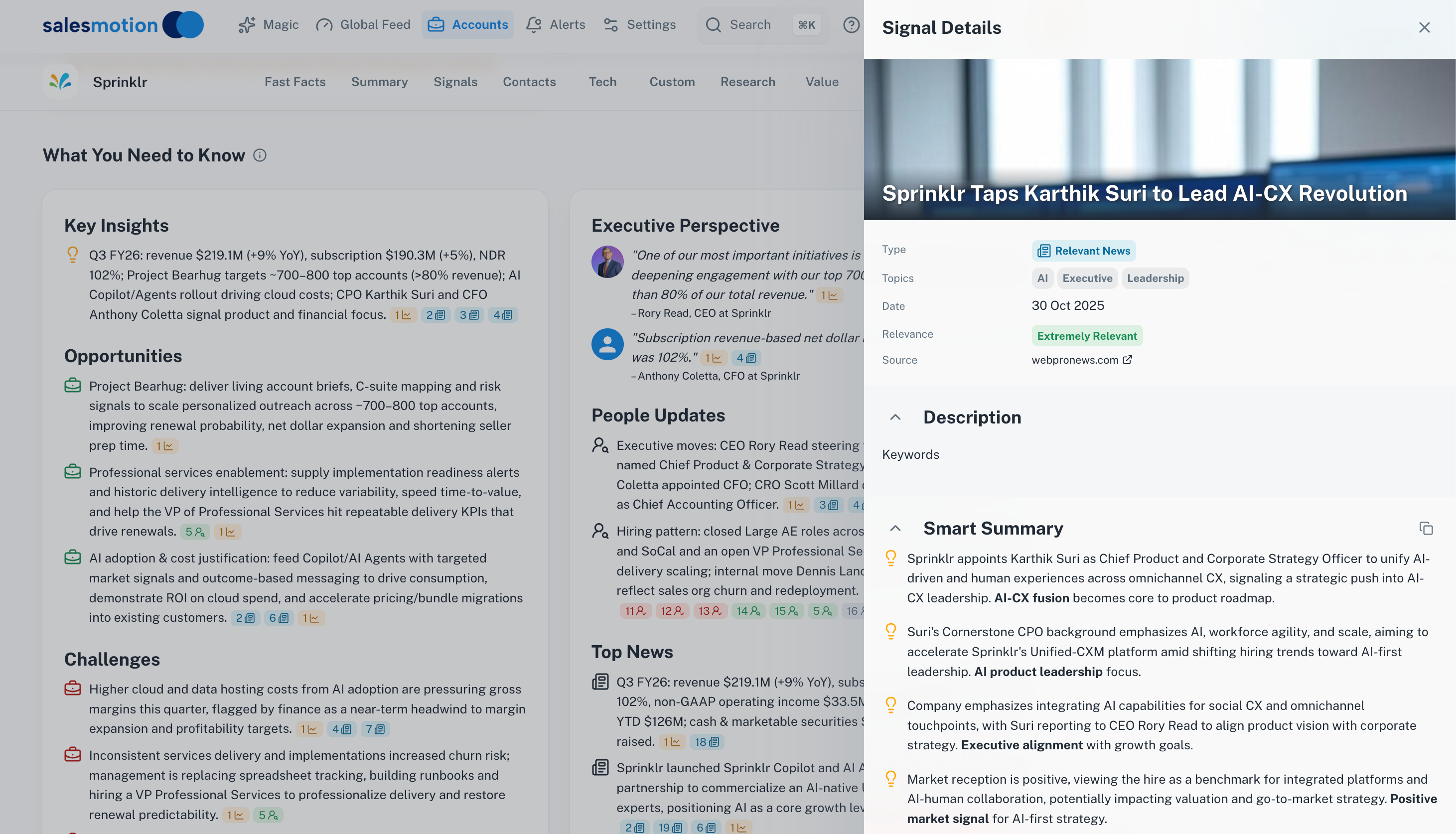 An account intelligence platform consolidating news signals, podcast mentions, and competitive moves into a single research view.
4. CRM Integration
If the intelligence does not live where reps already work, they will not use it. Period. Forrester's B2B predictions highlight that organizations struggle with fragmented tool adoption, and the solution is embedding intelligence directly into existing workflows.
Evaluate whether the platform pushes insights into Salesforce (or your CRM), whether reps need to context-switch to access it, and whether the integration actually adds value or just creates another data field no one reads.
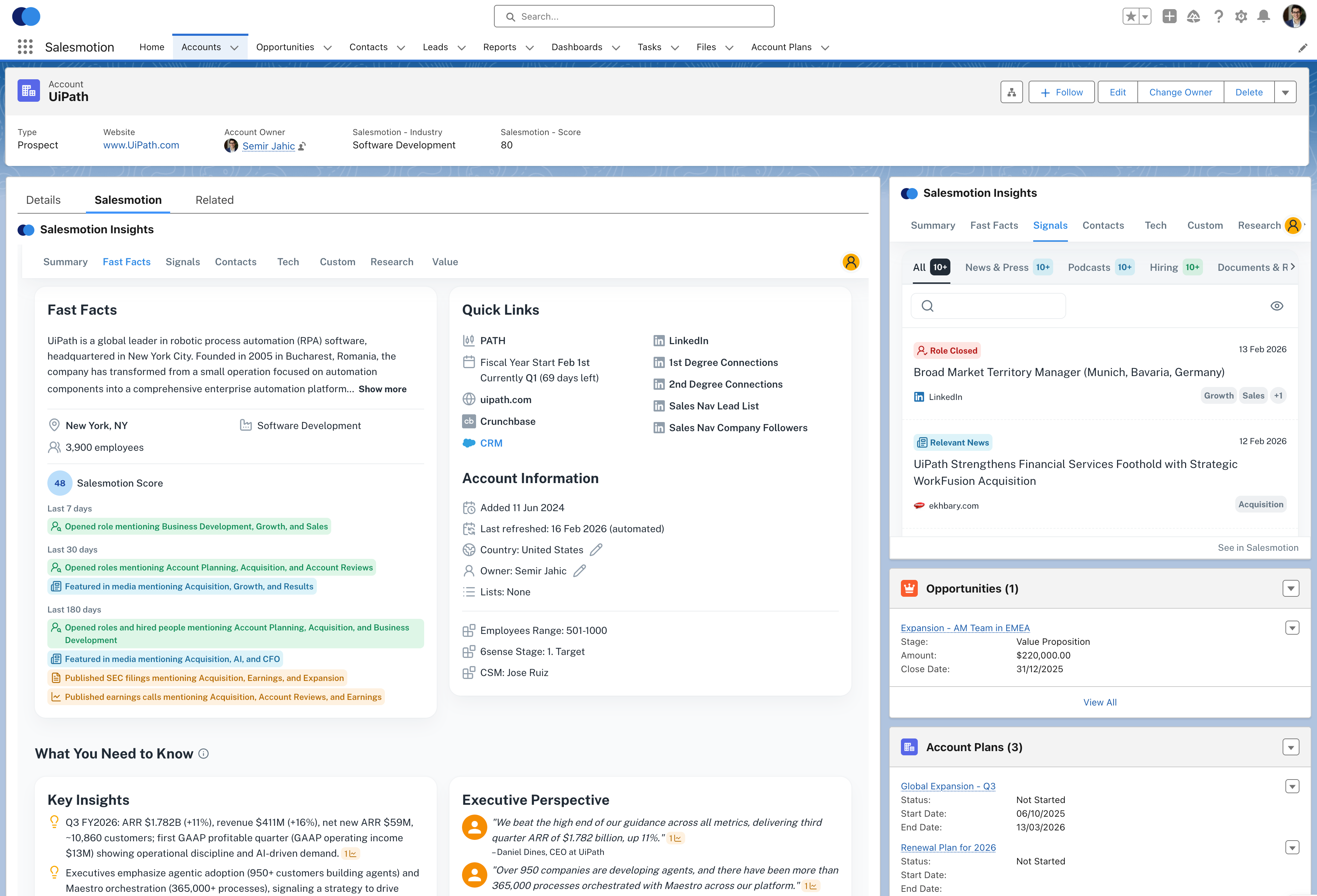 Sales intelligence works best when it lives inside the CRM reps already use daily.
5. Outreach Personalization
The final capability worth evaluating: can the platform help reps turn intelligence into action? Knowing that a prospect's company just reported strong earnings is useful. Having a draft email that references the earnings call and connects it to your value proposition is actionable.
This is where the best sales intelligence platforms pull ahead. They do not just show data. They connect the dots between signals, account context, and personalized messaging that sounds like the rep did hours of research. See pricing for platforms that do this well.
Salesmotion's Take
Most tools in this space sell you contact data and call it "intelligence." But knowing that Jane Smith is VP of Sales at Acme Corp is not intelligence. Intelligence is knowing that Acme just hired a new CRO, announced a 40% enterprise revenue growth target, and mentioned competitive pressure from your category in their earnings call. That is what changes a cold call into a warm conversation.

Semir Jahic
CEO & Co-Founder, Salesmotion

“The Business Development team gets 80 to 90 percent of what they need in 15 minutes. That is a complete shift in how our reps work.”
Andrew Giordano
VP of Global Commercial Operations, Analytic Partners
The Category Landscape: A Practical Market Map
The sales intelligence market has fragmented into several sub-categories. Understanding where each vendor sits helps you avoid buying the wrong tool.
Contact Data Providers: ZoomInfo, Apollo, Lusha, Seamless.AI, RocketReach. These companies have built massive databases of contacts and company information. If your primary problem is finding email addresses and phone numbers, start here. But do not expect them to tell you why or when to reach out.
Intent Data Providers: Bombora, 6sense, TechTarget, G2 Buyer Intent. These platforms track topic-level research behavior to identify accounts that may be "in-market." The challenge? Intent data can be noisy and topic-based signals (e.g., "someone at Company X researched CRM software") do not always translate to a real buying opportunity at the account level.
Account Intelligence Platforms: This is the emerging layer that focuses on the full picture of an account: what is happening at the company, why it matters to your sales motion, and how to turn that intelligence into outreach. These platforms monitor hundreds or thousands of sources to deliver automated account research, real-time signal alerts, and AI-generated messaging tied to what is actually happening at each account.
Revenue Intelligence Platforms: Gong, Clari, Chorus (now ZoomInfo). These tools analyze your internal sales conversations and activities to improve forecasting, coaching, and deal inspection. They are powerful for managing existing pipeline but do not help with prospecting or account research.
The gap most teams fall into: They buy a contact database and an intent data tool, expecting intelligence. They end up with two dashboards, more data than their reps can process, and adoption that drops off after the first quarter. According to Fortune Business Insights, the market is growing at 11.3% CAGR to reach $10.25 billion by 2032. That growth is increasingly driven by platforms that consolidate multiple capabilities rather than point solutions that add to the stack.
Why Most Sales Intelligence Implementations Fail
Here is the uncomfortable truth: buying sales intelligence software is easy. Getting reps to actually use it is hard.
The most common failure modes:
Data overload without workflow integration. You give reps access to a powerful platform, but it sits in a separate tab they have to remember to check. Within a month, usage drops to your top two or three reps. The rest go back to Google and gut feel. According to research from Outreach's 2025 Sales Data Report, most teams use AI for early pipeline tasks like research and enrichment, but few extend it to opportunity management or coaching, leaving intelligence fragmented.
Buying for features instead of outcomes. The vendor demo looked amazing. The platform has 47 features. Your reps use three. The rest create noise and confusion. When evaluating, ask: What is the one workflow this changes? If the answer is not specific and immediate, you are buying features you will not use.
No change management plan. Sales intelligence changes how reps work. That requires training, reinforcement, and leadership buy-in. If your rollout plan is "send the login link and hope for the best," you are setting up for failure.
A Practical Workflow Example
Here is what effective sales intelligence looks like in practice, not in a vendor demo.
It is Monday morning. A rep opens their CRM and sees an alert: a target account's CFO mentioned "cost optimization" and "vendor consolidation" on last week's earnings call. The same account posted three new job openings in the department your product serves. And a key contact just got promoted to VP.
Without sales intelligence, the rep would never connect these dots. With it, they have a contextualized account brief, draft outreach referencing the earnings call, and a prioritized signal telling them this account is worth pursuing this week, not next quarter.
That is the difference between a database and intelligence. The database tells you the VP's email. The intelligence tells you to email them today, and exactly what to say.
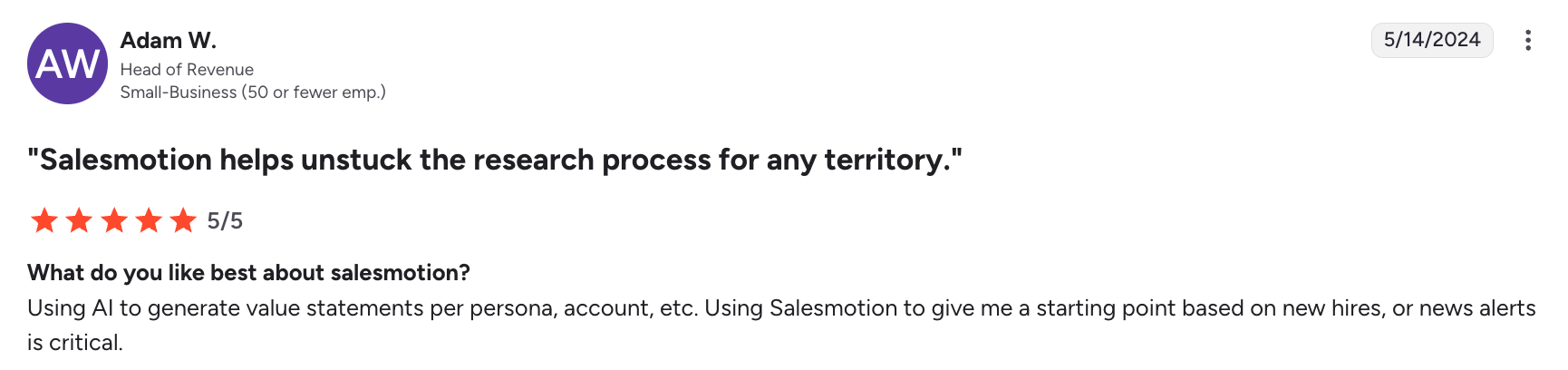 G2 reviewers consistently cite time savings and signal quality as the most valuable aspects of account intelligence platforms.
How to Evaluate Vendors: A Practical Buyer Checklist
Skip the generic RFP. Instead, run this evaluation in two weeks or less:
Week 1: Define and Test
- Write down the three biggest workflow problems your reps face (e.g., "spend too long researching before calls," "miss buying signals," "generic outreach gets ignored")
- Select 20 accounts from your active pipeline and 20 from your target list
- Ask each vendor to demonstrate their platform against YOUR accounts, not their demo data
- Test data accuracy: verify 50 contacts from your ICP for email deliverability and title correctness
Week 2: Pilot and Measure
- Give 3 to 5 reps a trial and measure specific behaviors: time spent researching before calls, number of personalized touches, signal-to-outreach conversion
- Ask reps the Cognism evaluation question: "Did this tool change how you prepare for a call?" If the answer is no, it is not intelligence. It is another dashboard.
- Check CRM integration quality: do insights surface inside the workflow, or require a separate login?
- Calculate total cost of ownership: per-seat fees, data credits, integration costs, training time
The 90-day ROI test: Any platform worth buying should show measurable impact within 90 days. That means either reduced research time per account, increased outreach personalization rates, or improved response rates. If the vendor cannot commit to a specific metric you will track together, that tells you something.
Key Takeaways
- Sales intelligence software is not a single category. It spans contact databases, intent data, account intelligence, and revenue intelligence. Matching the right sub-category to your actual workflow gap is the most important decision.
- Contact data is a commodity. The real value is in signal monitoring, automated research, and contextual outreach that tells reps why and when to engage an account.
- Evaluate platforms against YOUR accounts and YOUR reps, not vendor demo data. Test 50 contacts, pilot with 3 to 5 reps, and measure behavior change within 90 days.
- The biggest risk is not buying the wrong tool. It is buying the right tool without a workflow integration and change management plan, then watching adoption die after week two.
- When comparing vendors, ask one question: "Does this platform change how my reps prepare for calls, or does it just give them another dashboard to ignore?"
Frequently Asked Questions
What is the difference between sales intelligence software and a CRM?
A CRM (Salesforce, HubSpot) is a system of record that tracks your team's interactions: deals, emails, meetings, pipeline stages. It tells you what you have done. Sales intelligence software tells you what is happening at accounts right now and what you should do next. It monitors external signals like leadership changes, earnings data, hiring patterns, and competitive moves. The two are complementary. Your CRM manages the pipeline. Sales intelligence fills the pipeline with better-informed outreach. Forrester research shows that over half of large B2B purchases now process through digital channels, making external intelligence more critical than ever for reaching buyers early.
How much does sales intelligence software cost?
Pricing varies dramatically by sub-category. Contact database platforms like ZoomInfo typically run $15,000 to $40,000+ per year depending on seats and credit volume. Intent data platforms like Bombora and 6sense are often $25,000 to $100,000+ annually. Account intelligence platforms tend to be more accessible, with pricing starting around $1,000 per month for team plans. The key is evaluating total cost of ownership, including per-seat fees, data credits, integration costs, and the hidden cost of low adoption. According to Nektar's research, companies spend an average of $1,200 per rep per year on sales tools, yet 67% of purchased features go unused.
How do I get my sales team to actually use a new intelligence tool?
Adoption is the number one predictor of ROI, and the number one reason implementations fail. Three things drive adoption: workflow integration (the tool lives inside the CRM, not in a separate tab), immediate value (a rep can prepare for a call in under five minutes instead of 30), and leadership reinforcement (managers reference intelligence in deal reviews and one-on-ones). Start with a small pilot of your most engaged reps, measure specific time savings, then use their success stories to roll out to the broader team. According to a MarketsandMarkets buyer's guide, organizations that follow structured implementation methodologies achieve 60 to 80% higher ROI compared to ad hoc rollouts.
What buying signals should sales intelligence software track?
The most valuable signals depend on your ICP and sales motion, but the signals that consistently correlate with pipeline generation include: leadership changes (new CRO, VP of Sales, or department head), earnings call mentions of priorities aligned with your solution, hiring patterns in your buyer's department, M&A activity, funding rounds, and competitive displacement signals (e.g., a competitor's product getting negative press). The Gartner prediction that AI agents will outnumber sellers by 10x by 2028 underscores the importance of signal quality over quantity. The platforms that win are those that prioritize and contextualize signals rather than dumping raw alerts.