Most enterprise reps toggle between Salesforce, a contact database, a news aggregator, LinkedIn, and at least two browser tabs of Google searches before every call. That workflow costs 5 to 8 hours per rep per week, according to Forrester. The signals that actually indicate a buying window, like a new CRO hire, a strategic initiative mentioned on an earnings call, or a competitor displacement, rarely make it into the CRM at all. They live in scattered sources that nobody monitors consistently. Account intelligence tools solve this by pulling external signals and synthesized research directly into Salesforce, so reps spend their time selling instead of searching.
TL;DR: The best Salesforce account intelligence tools go beyond contact enrichment. Look for bi-directional CRM sync, real-time signal detection (leadership changes, earnings, hiring), automated research briefs, and outreach personalization. The top options in 2026 range from full-stack intelligence platforms to specialized prospecting and conversation analytics tools.
What Makes a Salesforce Integration Worth It
Not every "Salesforce integration" is created equal. Some tools push a few enrichment fields into contact records. Others fundamentally change how reps interact with their accounts inside the CRM. Before evaluating any vendor, understand the four capabilities that separate a genuine intelligence layer from a glorified data append.
Bi-directional sync. The integration should read from Salesforce (account lists, opportunity stages, ownership) and write back to it (signals, research summaries, engagement scores). One-way pushes create data that sits in custom fields nobody checks. Bi-directional sync means the intelligence layer knows what your reps are working on and surfaces the right context at the right time.
Signal detection. Static firmographic data tells you what a company looks like. Signals tell you what a company is doing right now. The tools worth investing in monitor leadership changes, funding rounds, earnings commentary, hiring surges, competitive mentions, and strategic initiatives, then surface those events as actionable alerts inside Salesforce.
Research automation. A good integration compresses multi-hour account planning in Salesforce into minutes. Instead of a rep opening 10 tabs and stitching together a narrative, the platform assembles a brief pulling from dozens of sources and maps it to the account record.
Outreach personalization. The final mile is turning intelligence into action. Tools that generate signal-anchored messaging, not generic templates, help reps write outreach that sounds like they did the homework. When that messaging lives inside the CRM workflow, adoption stays high.
See Salesmotion on a real account
Book a 15-minute demo and see how your team saves hours on account research.
Top Salesforce Account Intelligence Integrations
Salesmotion
Salesmotion deploys three AI agents directly into Salesforce through a managed package install. The Signal Agent monitors 1,000+ public sources around the clock, surfacing leadership changes, earnings insights, hiring patterns, funding events, and competitive mentions as real-time alerts. The Research Agent synthesizes 42+ data sources per account into SWOT-style briefs that map to Salesforce account records. The Outreach Agent generates research-backed messaging and pushes it into Lemlist.
The Salesforce integration is bi-directional. Account lists, opportunity data, and ownership sync into the platform, while signals, research briefs, and account scores write back to custom fields and activity records. The managed package installs in under an hour with no code required.
Customer results tell the story: Cytel consolidated five tools into one and cut research time by 50%. Guild Education saved 6 hours per rep per week on account research. Incredible Health increased quarterly meetings booked by 50% within the first month of signal-driven prospecting.
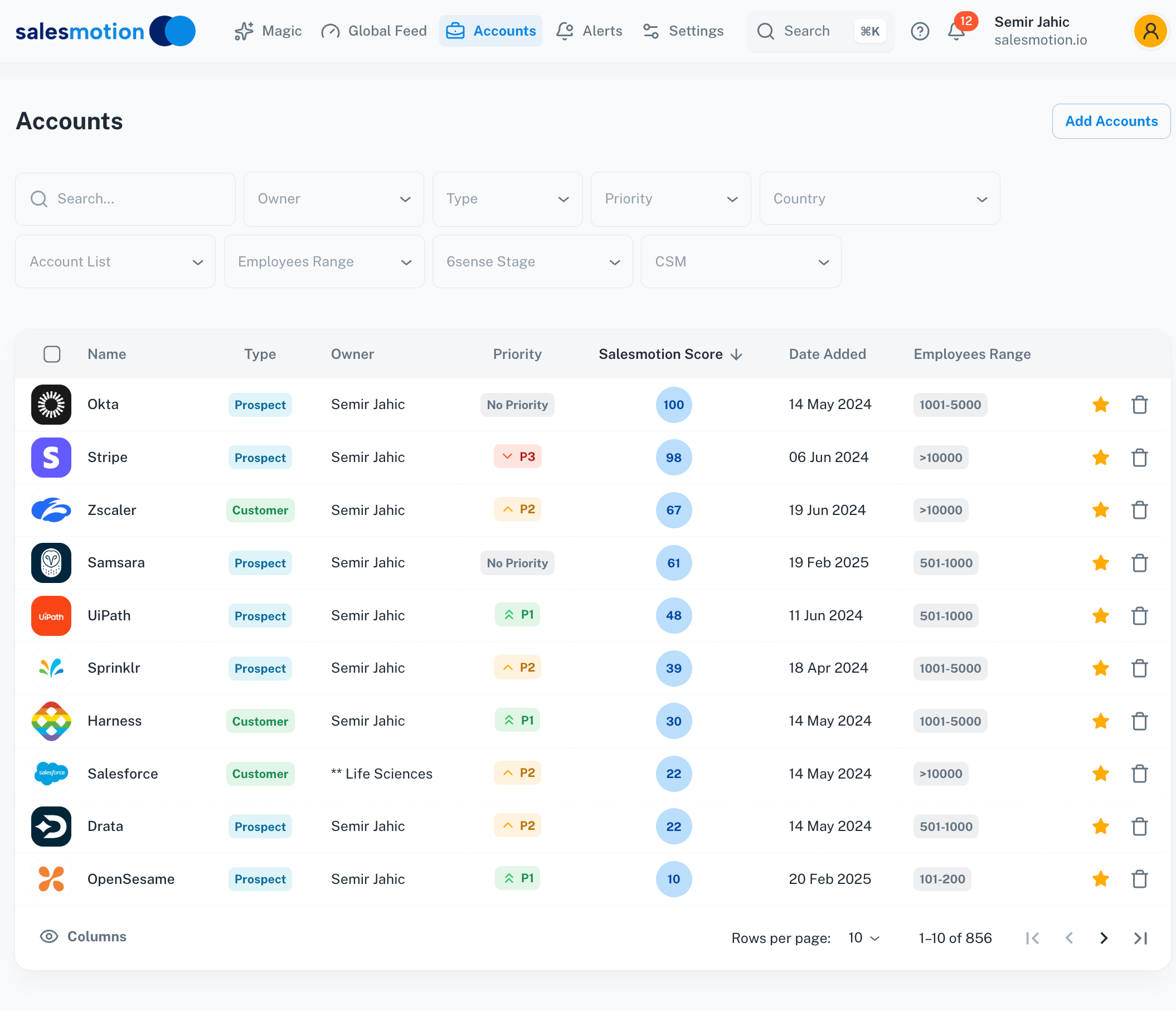 Salesmotion's account dashboard surfaces intelligence scores, live signals, and AI-generated research briefs directly alongside Salesforce account data.
Pricing: From $85/month for individual plans; custom pricing for team plans with unlimited users. Monthly contracts, no annual lock-in.
Best for: B2B sales teams that need deep account research, real-time signals, and AI outreach in a single Salesforce-native platform.
ZoomInfo
ZoomInfo offers the largest B2B contact database with over 100 million profiles, plus firmographic and technographic enrichment. The Salesforce Native Application (SNFA) embeds ZoomInfo data directly into Salesforce records, enabling reps to enrich contacts and companies without leaving the CRM. Higher-tier packages add Bombora-powered intent data and website visitor identification.
ZoomInfo also includes Chorus, its conversation intelligence module, which records and analyzes sales calls to surface deal insights and coaching opportunities. The integration pushes call summaries and key moments into Salesforce opportunity records.
Pricing: Enterprise packages typically run $25,000 to $50,000+ per year depending on seat count and modules selected. Intent data and Chorus require higher-tier plans.
Best for: Teams whose primary bottleneck is finding and reaching the right contacts. ZoomInfo answers the "who" question better than anyone, though it is lighter on the "why now" and "what to say" signals that dedicated intelligence platforms provide. For a deeper comparison, see account intelligence tools compared.
6sense
6sense is a predictive ABM platform that uses AI to analyze billions of intent signals and predict which accounts are actively in-market. The Salesforce integration runs nightly data syncs, pushing buying stage predictions, intent topic scores, and anonymous visitor identification into account and lead records.
6sense excels at answering the question "which accounts should we be targeting right now?" Its Revenue AI model scores accounts across six buying stages, from "target" through "purchase," giving marketing and sales teams a shared view of account readiness. The platform also orchestrates advertising, email, and web personalization based on predicted buying stage.
Pricing: Enterprise-level. Annual contracts typically start at $50,000+ depending on data volumes, modules, and the number of accounts monitored.
Best for: Large marketing and sales organizations running coordinated ABM programs that need predictive scoring at scale. 6sense is strongest when marketing and sales share a joint account strategy and have dedicated ops resources to manage the platform.
Clari
Clari focuses on revenue intelligence and AI-powered forecasting. Rather than enriching account data with external signals, Clari analyzes activity patterns across email, calendar, CRM, and conversation data to assess deal health and forecast accuracy. The Salesforce integration is deep: Clari reads opportunity data and writes back risk scores, engagement metrics, and AI-generated forecast recommendations.
Pipeline inspection is where Clari shines. Revenue leaders can drill into any deal and see exactly which stakeholders are engaged, whether activity is trending up or down, and how the deal compares to historical win patterns. The platform flags at-risk opportunities before they slip.
Pricing: Enterprise pricing based on seat count and modules. Typically requires annual contracts.
Best for: Revenue leaders and CROs who need forecast accuracy and pipeline visibility more than account-level research or prospecting intelligence. Clari complements account intelligence tools rather than replacing them.
Gong
Gong is the market leader in conversation intelligence. It records, transcribes, and analyzes every sales interaction (calls, video meetings, emails) to surface deal-level insights. The Salesforce integration pushes conversation data, deal warnings, and coaching insights into opportunity records.
Gong's strength is turning unstructured conversation data into structured deal intelligence. It identifies when competitors are mentioned, tracks how pricing discussions progress, flags deals where key stakeholders have gone silent, and surfaces the talk patterns that correlate with wins. For sales managers, the coaching features show exactly where reps need help.
Pricing: Enterprise pricing. Typically $100+ per user per month, with annual contracts required. Volume discounts for larger teams.
Best for: Sales organizations that want to improve win rates through conversation analytics and coaching. Gong tells you what happened in the deal. Account intelligence tools tell you what is happening at the account level before and between calls.
Apollo.io
Apollo.io combines a 210+ million contact database with built-in email sequencing, dialing, and engagement tracking. The Salesforce integration syncs contacts, accounts, and engagement activity bi-directionally. Apollo is the most accessible entry point for teams that want prospecting and engagement in a single tool.
What sets Apollo apart from other prospecting tools is the all-in-one approach. Instead of buying separate tools for contact data, email sequencing, and call tracking, Apollo bundles everything. The AI-powered features include lead scoring, email writing assistance, and automated sequence recommendations.
Pricing: Budget-friendly compared to enterprise alternatives. Plans range from $5,000 to $10,000 per year for most teams, with a free tier available for individuals.
Best for: Growth-stage teams and individual sellers who need a cost-effective prospecting and engagement stack. Apollo covers the "find and reach" workflow well, though teams needing deep account research and signal monitoring will want a dedicated account intelligence layer alongside it.
LinkedIn Sales Navigator
LinkedIn Sales Navigator integrates with Salesforce to sync lead and account data, surface relationship insights, and push InMail activity into CRM records. The platform tracks job changes, company news, and shared connections to help reps find warm introduction paths.
Sales Navigator's unique advantage is the social graph. No other tool can show you that your VP of Engineering went to college with the CTO at a target account, or that three of your existing customers recently moved to a company on your prospect list. Job change alerts are particularly valuable for champion tracking.
Pricing: Core is $119.99/month ($1,079.88/year) and Advanced is $159.99/month ($1,799.88/year). Advanced Plus is quoted per organization.
Best for: Reps who rely on relationship-driven selling and warm introductions. Sales Navigator complements account intelligence platforms by adding the social and relationship layer that external signal monitoring does not cover.

“All of the vendors that I've worked with, all of the onboarding that I have had to deal with, I will say, hands down, Salesmotion was the easiest that I have had.”
Lyndsay Thomson
Head of Sales Operations, Cytel
How to Evaluate the Right Tool for Your Team
Choosing the right Salesforce account intelligence integration depends on five factors that vary by team size, sales motion, and existing stack.
Start with your coverage model. If your team works named accounts (50 to 500 per rep), you need depth: rich signals, synthesized research, and personalized outreach per account. If your team runs high-volume outbound across thousands of prospects, you need breadth: contact data, sequencing, and basic enrichment. Depth-first teams benefit most from platforms like Salesmotion or 6sense. Breadth-first teams lean toward Apollo or ZoomInfo.
Assess integration depth, not just integration existence. Almost every vendor claims a Salesforce integration. The question is whether that integration is a managed package with bi-directional sync and native UI components, or a one-way CSV push that creates custom fields nobody opens. Ask for a live demo of the Salesforce experience specifically.
Measure time saved, not features listed. The ROI of account intelligence comes from hours recovered. If your reps currently spend 3 hours per account on research, a tool that reduces that to 15 minutes delivers immediate, measurable value. Run a two-week pilot with 5 to 10 reps and track time-to-first-touch and research hours per account.
Pilot before you commit. Annual contracts in the $25,000 to $50,000 range deserve a real evaluation. Ask vendors for a 30-day pilot with your actual account list. Tools that can't deliver value on your specific accounts in 30 days won't deliver it in 12 months either.
Consolidate where possible. Every additional tool in the stack means another login, another training session, and another line item to justify at renewal. If one platform can replace two or three point solutions, the operational simplicity often matters as much as the feature comparison.
RevOps Deployment Guide for Account Intelligence
Rolling out a new intelligence tool inside Salesforce requires more than just installing the package. RevOps teams should plan for four workstreams to maximize adoption and data quality.
Field mapping and data architecture. Before flipping the switch, map every field the intelligence tool writes into Salesforce. Decide where signals land (custom objects, activity records, or account fields), how research briefs display (embedded components or linked pages), and which scoring fields feed into existing reports and dashboards. Poor field mapping creates data clutter that reps ignore.
Workflow automation. Connect intelligence outputs to existing Salesforce workflows. When a high-priority signal fires (new CRO hire at a target account, earnings call mentioning your category), trigger a Slack notification, assign a task to the account owner, or update the account's engagement score. Signals that sit in a custom field without triggering action might as well not exist.
Rep training and enablement. Most intelligence tools fail not because the data is bad, but because reps don't know how to use it. Run a 30-minute session showing reps exactly how signals appear in their Salesforce workflow, how to read an account brief, and how to use AI-generated messaging. Record it so new hires can watch later.
Data governance and hygiene. Set rules for how intelligence data ages out. A leadership change signal from six months ago is stale. Define retention windows, archival policies, and deduplication rules for intelligence records. Assign an owner (usually RevOps) to monitor data quality monthly and adjust field mappings as the tool evolves.

“We're saving about 6 hours per week per seller on account research alone. That's time they can reinvest in actually selling.”
Derek Rosen
Director, Strategic Accounts, Guild Education
Building Your 2026 Intelligence Stack
No single tool covers every need. The strongest Salesforce intelligence stacks in 2026 combine complementary capabilities rather than relying on one vendor for everything.
A practical stack for most enterprise teams looks like this: a Salesforce CRM integration layer for signal monitoring and account research (the intelligence brain), a contact enrichment tool for verified emails and phone numbers (the data layer), and a conversation intelligence tool for deal-level insights from calls and meetings (the interaction layer). Some teams add a predictive ABM platform if they run large-scale, marketing-led account programs.
The key is to avoid overlap. If your intelligence platform already includes a contact database, you may not need a separate enrichment tool. If your CRM has built-in AI forecasting that meets your needs, a standalone revenue intelligence tool adds cost without proportional value. Map your current stack, identify the gaps, and fill them with the minimum number of tools that cover all four capabilities: signals, research, contacts, and conversation insights.
The teams seeing the best results in 2026 are the ones that treat intelligence as a workflow, not a dashboard. Signals fire, research auto-populates, outreach generates, and reps spend their hours on conversations instead of browser tabs.
Key Takeaways
- Bi-directional Salesforce sync is the baseline requirement. One-way data pushes create fields that reps ignore. Look for managed packages with native UI components.
- Signal detection (leadership changes, earnings, hiring, competitive mentions) is what separates account intelligence from static enrichment. Prioritize tools that monitor external events, not just firmographic data.
- Time saved per rep is the clearest ROI metric. Teams that pilot with 5 to 10 reps and track research hours before and after can build a compelling business case within 30 days.
- Consolidation matters as much as features. Replacing three point solutions with one platform reduces operational complexity, training burden, and total cost of ownership.
- The strongest 2026 stacks pair an account intelligence platform (signals and research) with a contact layer and a conversation intelligence tool, avoiding overlap where possible.
Frequently Asked Questions
How long does it take to integrate account intelligence with Salesforce?
It depends on the tool. Managed package installs typically go live in under an hour with no custom code. Platforms that require nightly batch syncs or custom API work (6sense, ZoomInfo at enterprise scale) can take 2 to 4 weeks when factoring in field mapping, workflow configuration, and testing. Budget at least one sprint for RevOps to configure the data architecture properly, regardless of the vendor.
Do I need ZoomInfo if I have Salesmotion?
Not necessarily. Several account intelligence platforms now include built-in contact databases with verified emails and phone numbers alongside signal monitoring and research. If your primary use case for ZoomInfo is contact enrichment, you may be able to consolidate into a single tool. If you rely heavily on ZoomInfo's technographic data, Bombora-powered intent signals, or Chorus conversation intelligence, those are capabilities that serve a different purpose. Many teams find they can drop ZoomInfo entirely after switching, while others keep it for specific enrichment use cases.
What Salesforce edition do I need for these integrations?
Most account intelligence tools need API access, which Salesforce includes from Enterprise Edition upward — on Pro Suite it is a paid add-on rather than a default. Managed packages can be distributed through the AppExchange or by direct install link, depending on the vendor. Some advanced features (custom objects, workflow triggers, API-heavy integrations) work best on Enterprise Edition or higher. Always confirm API call limits with your Salesforce admin before adding a new integration, especially if you already run multiple connected apps.
How do signal-based tools differ from traditional data enrichment?
Data enrichment fills in static attributes about a company or contact: industry, employee count, revenue range, technology stack, email address. That information changes slowly and tells you what a company looks like. Signal-based tools monitor dynamic events: a new CRO hire, an earnings call mentioning digital transformation, a hiring surge in your product category, or a competitor contract expiring. Those signals tell you what a company is doing right now and why they might be ready to buy. Enrichment answers "who is this account?" while signals answer "why should I reach out today?"