Most account research advice assumes you have 20 named accounts and a quiet afternoon. That falls apart fast when your team owns 1,500 accounts spread across 32 offices on four continents. Account research at scale means one shared research layer that monitors every account continuously and delivers the same quality of brief to every rep and office, instead of each team researching by hand in its own format. The coordination problem alone kills productivity before anyone opens a browser tab. According to Salesforce's State of Sales research, reps already spend 60% of their time on non-selling tasks, and manual account research at scale adds to that. For large IT services and BPO firms, where every engagement is custom and every client is unique, the research burden compounds with every new account added to the list.
TL;DR: Enterprise teams with 1,000+ accounts cannot rely on manual, office-by-office research processes. The organizations pulling ahead are standardizing their research approach through API-first intelligence platforms, feeding account data directly into custom workflows and CRM systems. The result: consistent research quality across every office, faster prep time, and reps who spend their hours selling instead of Googling.
The "32 Offices, 32 Templates" Problem
Here is a scenario that plays out at nearly every large professional services firm. Each regional office develops its own research workflow. New York uses a shared Google Doc. London has a Notion template. Singapore relies on a senior partner's personal process. Mumbai runs everything through a custom spreadsheet.
On paper, all 32 offices are "doing account research." In practice, they are producing wildly inconsistent output. One office might spend 45 minutes building a thorough brief with financial data, leadership changes, and competitive context. Another spends 10 minutes pulling a Wikipedia summary and calling it done.
This inconsistency creates real business risk. When a global client talks to your Singapore team on Monday and your London team on Thursday, they notice the gap. Salesforce's State of Sales 2024-25, as summarized in Everstage's sales productivity roundup, reported that only 28% of sales reps hit their annual quota, the lowest figure in six years. Fragmented research makes that worse: reps waste time rebuilding context that already exists somewhere in the organization, and the quality of their preparation varies wildly depending on which office they sit in.
The root cause is not laziness or lack of talent. It is the absence of a shared research infrastructure. When each team picks its own tools and templates, you get 32 different definitions of "good enough."
What Consistency Actually Looks Like
Standardizing account research does not mean forcing every rep into a rigid template. It means ensuring that every account brief, regardless of who builds it, contains the same foundational intelligence:
- Financial context: Revenue trends, earnings commentary, disclosed strategic priorities
- Leadership map: Recent executive changes, reporting structure, key decision-makers
- Signal history: Hiring patterns, funding rounds, product launches, M&A activity
- Competitive landscape: Who else is selling into this account, and what positioning they use
- Custom fields: Industry-specific data points that matter to your particular service offering
When the research infrastructure delivers these elements automatically, the "32 templates" problem disappears. Reps still add their own local context, but they start from a consistent, high-quality baseline.
Why Do Manual Research Processes Collapse After 500 Accounts?
Manual research works at small scale. A team of five reps with 50 accounts each can maintain decent quality through discipline and habit. But the math changes drastically when you cross the 500-account threshold.
Consider the numbers. If each account requires 45 minutes of research per quarter to stay current, 500 accounts demand 375 hours of research time every 90 days, roughly three-quarters of one person's working quarter. At 1,500 accounts, that is about 1,125 hours a quarter, more than two full-time people doing nothing but research. No sales leader approves that headcount, so the work lands on reps.
What actually happens is predictable: reps cut corners. They research their top 20 accounts thoroughly and guess on the rest. The rest of the book gets stale data, outdated contacts, and generic outreach. The gap between researching "always" and "sometimes" is where deals die.
The API-First Alternative
The shift happening at enterprise organizations is from manual research to API-first intelligence. Instead of asking reps to toggle between five browser tabs and a spreadsheet, teams are pulling structured account data through APIs and feeding it directly into the systems where reps already work.
Here is how this looks in practice at a large IT services firm:
- CRM sync: The intelligence platform monitors all 1,500 accounts and pushes updated briefs into Salesforce or HubSpot nightly
- Custom copilot: The engineering team builds an internal tool that combines API-delivered account intelligence with proprietary CRM data (deal history, past engagements, client satisfaction scores)
- Alert routing: When a signal fires on a priority account (new CTO hired, earnings call mentions digital transformation), the alert routes to the assigned rep and their manager automatically
- Brief generation: Before any client meeting, the rep pulls a one-click brief that combines external intelligence with internal context, ready in under five minutes
This is not a theoretical workflow. Salesmotion's API enables exactly this kind of integration, and teams running 1,000+ accounts are building custom solutions on top of it. The API delivers the same structured intelligence that powers the platform's UI, but in a format that engineering teams can embed anywhere.

“We have very limited bandwidth, but Salesmotion was up and running in days. The template made it easy to load our accounts and embedding it in Salesforce was simple. It was one of the easiest rollouts we've done.”
Andrew Giordano
VP of Global Commercial Operations, Analytic Partners
Building a Unified Research Layer for Global Teams
The organizations succeeding with account research at scale share a common architecture. They separate the research infrastructure (data collection, signal monitoring, brief generation) from the consumption layer (how reps access and use the intelligence). This separation is what makes it possible to serve 32 offices with one system.
The Three-Layer Model
Layer 1: Data collection and enrichment. A centralized platform monitors public sources (SEC filings, earnings calls, job boards, news, social media, patent filings) and private data feeds. It structures this raw information into account-level intelligence: financial health, leadership changes, strategic initiatives, competitive moves. This layer runs continuously, not quarterly.
Layer 2: Custom integration. Each organization has unique data that no external platform can provide. Past deal history, client satisfaction scores, internal relationship maps, proprietary industry benchmarks. The integration layer combines external intelligence with internal data through APIs, creating a unified view that reflects both public signals and private knowledge.
Layer 3: Rep-facing delivery. The final layer puts intelligence where reps work. For some teams, that is a Salesforce panel. For others, it is a Slack alert. For the most sophisticated, it is a custom internal tool purpose-built for their workflow. The key is that reps never need to leave their primary workspace to access research.
For global teams, this consistency is not a nice-to-have. It is the difference between a coordinated go-to-market motion and 32 offices running in different directions.
The Partnership Model
Large organizations with 1,000+ accounts rarely succeed with a "deploy and forget" approach to any tool. The firms pulling ahead treat their intelligence vendor as a strategic partner, not a subscription.
This means:
- Co-building custom workflows that match the firm's specific sales methodology
- API-level integration that connects external intelligence with proprietary data systems
- Dedicated support for global rollout, ensuring each regional office adopts the platform consistently
- Ongoing optimization based on usage data, feedback loops, and evolving research needs
The business process outsourcing market alone is projected to reach $695.8 billion by 2033, growing at a 9.9% CAGR, according to Grand View Research. Firms competing at this scale cannot afford to leave account research quality to chance.
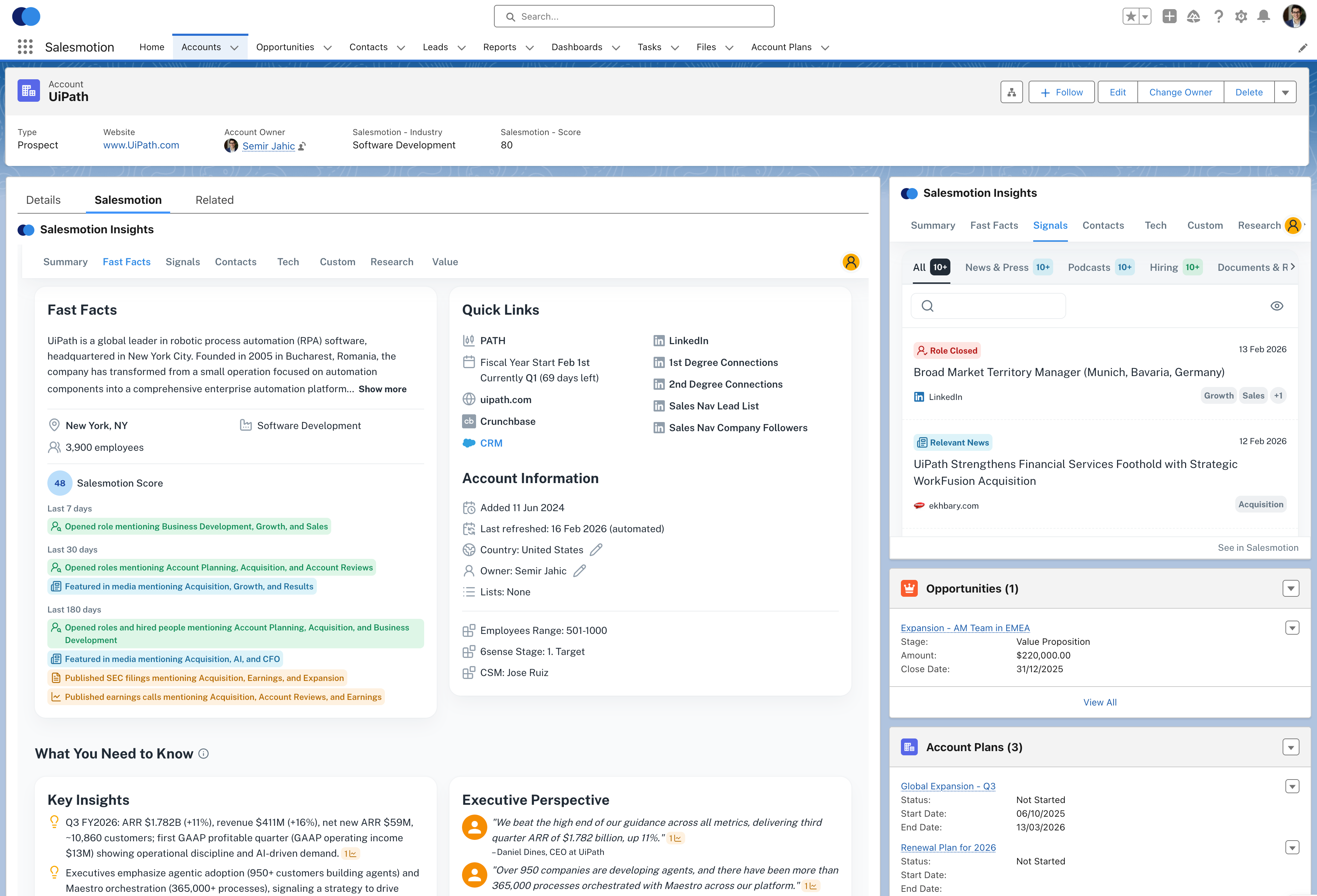 Account intelligence embedded directly in Salesforce. Every rep, every office, same intelligence, zero context-switching.
A Concrete Workflow: From 1,500 Accounts to Prioritized Action
Here is an illustrative week for a global IT services firm with 1,500 accounts running research at scale with an API-first approach (the numbers are an example, not a benchmark).
Monday morning. The platform has been monitoring all 1,500 accounts over the weekend. Overnight, it flags 47 accounts with new signals: 12 leadership changes, 8 earnings calls with relevant commentary, 15 hiring patterns suggesting expansion, and 12 news events tied to digital transformation initiatives.
8:30 AM. The regional sales directors in New York, London, and Singapore each see their filtered view. New York gets 18 flagged accounts (their territory). London sees 14. Singapore gets 15. Each alert includes the signal type, a brief summary, and a recommended action.
9:00 AM. A rep in London opens her top-priority alert: a FTSE 100 retailer just posted a VP of Digital Transformation role. The one-click brief pulls up the account's full context: recent earnings commentary about "accelerating e-commerce investment," two other open roles in the technology organization, and the rep's own notes from a conversation six months ago. Total prep time: four minutes.
9:15 AM. She drafts a personalized outreach referencing the retailer's public commitment to e-commerce and the new leadership hire. The message ties her firm's cloud migration services to the retailer's stated priorities. This is not a generic "checking in" email. It is a message that demonstrates genuine understanding of the account's current direction.
End of week. Across all 32 offices, reps have acted on 31 of the 47 flagged accounts. The remaining 16 were deprioritized based on territory strategy. Every interaction was informed by consistent, current intelligence rather than whatever each rep managed to Google that morning.
This is the operational difference between account research done manually and account research done at scale with the right infrastructure.
The 500-Account Playbook: Automating Research Without Missing Compelling Events
Not every team manages 1,500 accounts. But the 500-account threshold is where manual research consistently breaks down. Here is a concrete implementation playbook for teams at that scale; the companion guide on automating sales research for 500+ accounts goes deeper.
The Math That Forces the Shift
| Scenario | Accounts | Research per account/quarter | Total hours/quarter | FTE equivalent (520 h/quarter) |
|---|---|---|---|---|
| Manual | 500 | 45 min | 375 hours | 0.7 FTEs |
| Manual | 750 | 45 min | 562 hours | 1.1 FTEs |
| Manual | 1,000 | 45 min | 750 hours | 1.4 FTEs |
| Automated | 500 | 5 min (review only) | 42 hours | 0.1 FTEs |
| Automated | 1,000 | 5 min (review only) | 83 hours | 0.2 FTEs |
At a fully loaded cost of $75/hour for a sales rep, 375 hours of manual research per quarter costs $28,125 in lost selling time. Over a year, that is $112,500 in rep time spent Googling instead of selling. Model your own team with the manual research cost calculator.
But cost savings are not the real risk. The real risk is missed signals. When reps manually research 500 accounts, they inevitably miss the leadership change that happened last Tuesday, the earnings call mention from three weeks ago, or the hiring surge that started ramping two months back. These are the compelling events that create buying windows, and they do not wait for a rep's quarterly research cycle.
A Daily Workflow for 500-Account Teams
Here is how teams automate research at the 500-account level without letting any compelling event slip through:
Daily (5 minutes). The platform monitors all 500 accounts continuously. Each morning, the rep opens their signal feed filtered to their territory. Typically only a handful of accounts will have new signals: a leadership change, an earnings mention, a hiring pattern shift, a funding event, or a competitive move. The rep scans the summaries and decides which ones warrant immediate action.
Weekly (15 minutes). A weekly digest highlights accounts with the highest signal density, meaning multiple signals converging (a new CRO + earnings commentary about "sales transformation" + a surge of SDR job postings). These multi-signal accounts are the ones entering a buying window. The rep prioritizes these for outreach that week.
Monthly (30 minutes). A territory review identifies "cold" accounts with zero signals in 30+ days. These either need deprioritization or a different approach. Meanwhile, new accounts that crossed into the territory get automatically enrolled in monitoring without the rep lifting a finger.
Before every meeting. A one-click account brief pulls the latest signals, financial context, leadership map, and suggested talking points. Prep takes under five minutes, not 45 minutes. The rep walks in knowing what the CEO said on the last earnings call, who just got hired, and which competitors are active in the account.
Alert Filtering: Signal Volume Without Noise
The fear with automating 500+ accounts: will I drown in alerts? The answer depends on how the platform handles filtering.
Effective filtering routes signals based on:
- Territory assignment: Each rep only sees their own accounts
- Signal type priority: Leadership changes and earnings mentions rank higher than general news
- Account tier: Tier 1 accounts get real-time alerts; Tier 3 accounts batch into weekly digests
- Custom rules: Filter by industry, company size, or specific keywords (for example, only show earnings mentions that reference "digital transformation" or "vendor consolidation")
The result: a rep managing 500 accounts sees a short list of actionable signals per day, not 50. That is a manageable workflow that keeps every account covered without creating alert fatigue.
What Should You Look For in a Scaled Research Platform?
Not every intelligence tool is built for the 1,000+ account use case. When evaluating platforms for large-scale deployment, look for these capabilities:
API access with structured data. The platform should expose its intelligence through well-documented APIs that your engineering team can integrate with existing systems. If the only way to access data is through a browser UI, it will not scale.
Continuous monitoring, not periodic snapshots. Accounts change daily. A platform that updates quarterly or requires manual refresh is useless at scale. Look for real-time or near-real-time signal monitoring across financial filings, news, job postings, and social activity.
Multi-tenant territory support. Global teams need territory-based access controls, regional views, and the ability to route signals to the right rep automatically. A flat account list shared by everyone creates noise, not insight.
CRM-native delivery. The intelligence should surface inside Salesforce, HubSpot, or whatever CRM your team uses daily. Separate dashboards collect dust. The best research platform is the one reps never have to remember to open.
Custom data enrichment. Your proprietary data (deal history, client satisfaction, internal scoring models) is half the picture. The platform should support merging external intelligence with your internal data through the API layer.
Salesmotion is built around all five: a REST API and MCP server, continuous monitoring, native Salesforce delivery and custom fields. But regardless of which platform you choose, these five criteria separate tools built for enterprise scale from tools that work for a 10-person sales team.
Key Takeaways
- Inconsistency is the real enemy at scale. When each office runs its own research process, you get 32 different definitions of "prepared." Standardize the research infrastructure, not just the template.
- Manual research collapses above 500 accounts. The math simply does not work. At 1,500 accounts, you need API-first automation to maintain quality across the full book.
- Separate the data layer from the consumption layer. Centralize intelligence collection and let each team access it through their preferred interface (CRM, Slack, custom tools).
- Treat your intelligence vendor as a partner. Large-scale deployments succeed through co-built workflows, API integration, and dedicated rollout support, not self-serve onboarding.
- Prioritize continuous monitoring over periodic snapshots. Accounts change daily. Quarterly research refreshes miss the signals that matter most.
- Measure research consistency, not just research volume. Track whether every office is producing briefs at the same quality standard, not just whether they are producing briefs at all. The account research playbook gives a shared standard to start from.
Frequently Asked Questions
How do global teams ensure consistent account research quality across offices?
The most effective approach is centralizing the research infrastructure while allowing local customization. A shared intelligence platform delivers the same foundational data (financials, leadership, signals, competitive landscape) to every office through APIs or CRM integrations. Regional teams then add their own local context. This ensures a consistent quality baseline without forcing rigid uniformity.
What is an API-first approach to account research?
An API-first approach means the intelligence platform exposes its data through structured APIs that your engineering team can integrate directly into existing systems (CRM, internal tools, custom dashboards). Instead of reps manually logging into a separate tool, account intelligence flows automatically into the workflows they already use. This is particularly valuable for IT services firms with 1,000+ accounts, where custom copilots and internal tools built on top of API data can combine external intelligence with proprietary CRM data for a unified research view.
How much time does automated account research save at enterprise scale?
The savings compound quickly. If manual research takes 30 to 45 minutes per account per quarter, 1,500 accounts need 750 to 1,125 hours a quarter, roughly one and a half to two full-time people. Automation cuts the per-account work to a few minutes of review by delivering pre-built, continuously updated briefs; Analytic Partners, for example, went from 3 hours to 15 minutes per account.
Can smaller teams benefit from scaled research infrastructure?
Yes, but the ROI inflection point is different. Teams with fewer than 100 accounts can often maintain quality through disciplined manual processes. Between 100 and 500 accounts, a platform with a browser-based UI delivers strong value. Above 500 accounts, API-first integration becomes increasingly necessary to prevent research quality from degrading. The key question is not team size but account volume: how many accounts does each rep need to stay current on, and can they realistically do that manually?
How can I automate sales research for 500+ accounts without missing compelling events?
The most effective approach is deploying always-on monitoring across your entire book of business. Salesmotion's Signal Agent monitors 1,000+ public sources (earnings calls, SEC filings, news, job postings, leadership changes, funding rounds) 24/7 for every account in your territory. When a compelling event fires, the Research Agent compiles a cited account brief (it is built to turn about 3 hours of research into 5 minutes), and the Outreach Agent drafts personalized messaging anchored to that specific event. Guild Education saves 6 hours per rep per week (Derek Rosen, Director, Strategic Accounts), and Cacheflow cut prep time by 60% (Adam Wainwright, Head of Revenue). For teams managing 500+ accounts, this replaces the impossible task of manual research with continuous, automated intelligence. See our buying signals software comparison for how this approach compares to alternatives like Clay, Apollo, and ZoomInfo.
What tools are best for automating account research at enterprise scale?
For large territory management (500-5,000+ accounts), you need different tools depending on the type of intelligence. Contact enrichment: ZoomInfo or Apollo for firmographics, technographics, and contact data. Intent data: Bombora or 6sense for anonymous web research signals. Account intelligence and signals: Salesmotion for earnings call analysis, leadership changes, hiring patterns, and AI-generated research briefs. Custom workflows: Clay for building bespoke enrichment pipelines across 150+ data sources. The most effective enterprise teams combine 2-3 of these: a contact database plus an account intelligence platform plus an intent data feed, all flowing into their CRM.