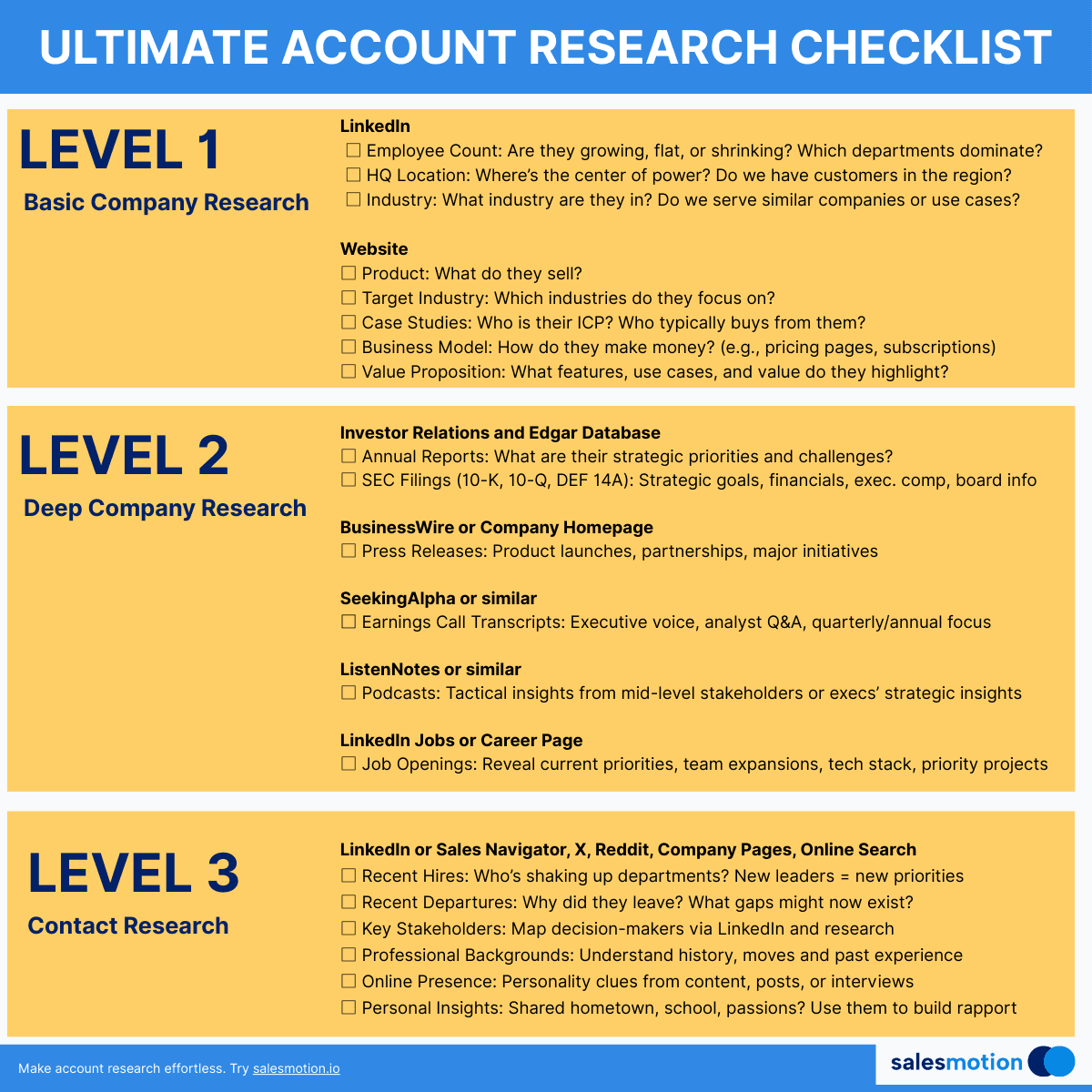
Your best rep just closed a six-figure deal in half the typical sales cycle. When you ask what they did differently, the answer is always the same: "I just did my homework."
But what does "doing homework" actually look like? For most sales teams, account research is an undefined skill. Some reps spend 45 minutes reading 10-Ks before every call. Others Google the company name two minutes before dialing and hope for the best. Neither approach scales.
Here is the problem with unstructured research: 76% of top-performing reps do thorough pre-call preparation, yet 42% of all sales reps say they lack sufficient information before making a call. The gap is not effort. It is process. Top performers follow a system. Everyone else wings it.
This post gives you that system. A 15-minute, step-by-step account research checklist your team can follow before every meeting, discovery call, or outbound sequence. It is built from the workflows of reps who consistently hit 120%+ of quota, distilled into a repeatable framework you can roll out across your entire team this week.
We also include a free-source reference table so your reps know exactly where to find each data point without paying for expensive tools. And for teams ready to eliminate the manual work entirely, we show how account intelligence platforms can compress this entire checklist into seconds.
Key Takeaways
- A structured 15-minute research process outperforms both no-prep and over-prep. Reps who research prospects before calling improve conversion rates by up to 30%, but spending more than 15 minutes per account hits diminishing returns for most outbound motions.
- The checklist covers seven research stages, from company overview to crafting a personalized opening hook, each with a specific time allocation so reps stay disciplined.
- Every data point in the checklist can be found using free tools. LinkedIn, Google News, Crunchbase, Glassdoor, BuiltWith, and company websites cover 90% of what you need.
- Your buyers already did their homework. 96% of prospects research your company before they speak to a sales rep. Showing up unprepared creates an immediate credibility gap.
- Automation can collapse 15 minutes into under 5. Teams using account intelligence platforms like Salesmotion report cutting research time from 60 minutes to under 5, freeing reps to spend more time in actual conversations.
See Salesmotion in action
Take a self-guided interactive tour — no signup required.
Why Account Research Still Matters in the AI Era
There is a tempting narrative that AI-generated outreach makes research obsolete. Just plug a name into a sequence tool, let the model personalize the first line, and send. But the data tells a different story.
According to Gartner, buyers who receive personalized, context-rich outreach are 2.3x more likely to confidently complete critical purchase decisions. Meanwhile, 73% of B2B buyers actively avoid suppliers that send irrelevant outreach.
The issue is not whether to personalize. It is how deeply you personalize. AI can generate a line about a prospect's alma mater. But only real research uncovers that their new CRO just inherited a team using a competitor's tool with a contract expiring in Q3, that the company missed revenue targets by 8% last quarter, and that the board is pressuring them to consolidate vendors. That level of context is what separates a deleted email from a booked meeting.
Forrester found that sales reps spend roughly two full days per week on non-selling activities, with research and administrative tasks consuming the largest share. The goal is not to eliminate research. It is to make research faster, more structured, and more consistently applied across your team.
The checklist below does exactly that.

“This is massive and saves me hours of searching Google and reading annual reports. Using Salesmotion as my very first place to go when I'm doing anything account-related now.”
Derek Rosen
Director, Strategic Accounts, Guild Education
The 15-Minute Account Research Checklist
Print this. Pin it next to every rep's monitor. Build it into your CRM as a pre-call task. The specific time allocations keep reps from falling down rabbit holes while ensuring they cover every critical angle.
Minutes 1-3: Company Overview
What to find:
- Annual revenue (or funding stage for startups)
- Employee headcount and recent growth trajectory
- Industry vertical and sub-segment
- Company stage (startup, growth, enterprise, turnaround)
- Headquarters and key office locations
Why it matters: You cannot position your solution correctly without understanding the company's scale and context. A 50-person Series A startup buying for the first time has a fundamentally different decision process than a 5,000-person public company replacing an incumbent vendor.
Where to look: Company website "About" page, LinkedIn company page, Crunchbase (funding/headcount), annual reports for public companies.
Pro tip: Check the headcount trend, not just the current number. A company that grew from 200 to 800 employees in 18 months has different priorities than one that has been at 800 for five years. Growth velocity signals where budget and urgency live.
Minutes 3-5: Leadership and Org Chart
What to find:
- CEO/CRO/VP-level leaders in your buying center
- Recent executive hires or departures (last 6 months)
- Reporting structure for your target persona
- LinkedIn activity of key decision-makers
Why it matters: New leaders are one of the strongest buying triggers in B2B sales. A new VP of Sales has 90 days to make an impact and a mandate to bring in new tools. A departing CRO means a strategic reset is coming.
Where to look: LinkedIn (people tab, filtered by title), company press releases, board of directors pages.
Pro tip: Do not stop at the economic buyer. Identify the likely champion (the person who will use your product daily), the technical evaluator (the person who will vet your integration), and the internal coach (someone who has a reason to want the deal done). Read our guide on building an ideal customer profile template to sharpen your targeting.
Minutes 5-8: Recent News and Signals
What to find:
- Earnings calls or financial results (last 1-2 quarters)
- Funding rounds, M&A activity, or IPO filings
- Product launches or major partnerships
- Regulatory changes affecting their industry
- Layoffs, restructuring, or strategic pivots
Why it matters: This is where you find the "why now." A company that just announced flat revenue growth and a new cost-optimization initiative is signaling exactly where they will spend and where they will cut. Your outreach needs to align with the direction they are already moving. For a deeper framework on reading these signals, see our guide on buying signals in sales.
Where to look: Google News (company name in quotes), SEC filings (EDGAR for public companies), company blog/newsroom, industry trade publications.
Pro tip: Earnings call transcripts are an underrated gold mine. CEOs and CFOs telegraph priorities in investor Q&A sessions months before those priorities show up in RFPs. Search for the company name plus "earnings transcript" to find these.
Minutes 8-10: Competitive Landscape
What to find:
- Current vendors in your category (visible on job postings, G2 reviews, BuiltWith)
- Contract renewal timing (if discoverable)
- Public sentiment about current solutions (G2, Glassdoor, Reddit)
- Technology stack adjacent to your solution
Why it matters: If they are already using a competitor, your conversation is about displacement, not greenfield adoption. Those are fundamentally different sales motions with different objections, timelines, and value propositions.
Where to look: BuiltWith or Wappalyzer (tech stack), G2 reviews filtered to the company, job postings that mention specific tools, LinkedIn posts from their employees.
Pro tip: Job postings are one of the most reliable signals of technology strategy. If a company is hiring "Salesforce administrators" and "HubSpot specialists" simultaneously, that tells you something important about their stack consolidation (or lack thereof). Our guide on free account research tools covers how to extract maximum insight from job boards.
Minutes 10-12: Pain Points and Strategic Priorities
What to find:
- Stated strategic initiatives (annual reports, CEO interviews, press)
- Investor or board pressure points (for venture-backed or public companies)
- Hiring patterns that reveal priorities (e.g., 20 open SDR roles means outbound is a focus)
- Glassdoor reviews that surface operational pain
Why it matters: The difference between a pitch and a conversation is whether you understand their priorities before they tell you. When you can say, "I noticed your CEO mentioned consolidating your sales tech stack on the last earnings call," you immediately demonstrate that you have done the work. That earns the right to a longer conversation.
Where to look: Annual report/investor presentations (search "[Company] investor day" or "[Company] annual report"), Glassdoor company reviews (sort by recent), hiring pages filtered by department.
Pro tip: Build a simple value hypothesis for the account before you reach out. Map one of their stated priorities to a specific outcome your product delivers. "You're hiring 20 SDRs. Each one will spend 30% of their time researching accounts. That's 6 FTE-equivalents of research time our platform eliminates." That is a CFO-level statement, not a product pitch.
Minutes 12-14: Contact Strategy
What to find:
- 2-3 specific contacts by name and title
- Their preferred communication channels (LinkedIn activity, podcast appearances, conference speaking)
- Mutual connections or shared experiences
- Organizational proximity to power (who reports to the decision-maker)
Why it matters: Reaching the right person through the right channel with the right message is where all your research pays off. A CRO who posts daily on LinkedIn wants to be engaged there. A VP of Operations who has not posted in two years probably prefers email or a direct referral.
Where to look: LinkedIn profiles and activity, company "leadership" page, conference speaker lists, podcast guest directories.
Pro tip: Check who in your company has existing connections to anyone at the target account. A warm introduction from a mutual connection converts at 3-5x the rate of cold outreach. Run the account name through your CRM for past interactions.
Minute 15: Craft Your Opening Hook
What to do:
Take the single most relevant insight from your research and turn it into a 1-2 sentence opening that demonstrates you have done the work.
Bad: "Hi, I wanted to learn more about your sales process and see if we can help."
Good: "Your CEO mentioned on the Q3 call that reducing sales cycle length is a top-3 priority this year. We just helped a similar company in the healthcare analytics space cut their average cycle from 90 to 62 days. Worth a conversation?"
The hook should reference something specific (an event, a quote, a signal), connect it to a relevant outcome, and create a reason to continue the conversation. It should not mention your product features.
Write the hook before you pick up the phone or hit send. If you cannot write a compelling hook, you have not done enough research. Go back to minutes 5-8 and dig deeper into recent news and signals.
Where to Find Each Data Point (Free Sources)
You do not need a $50K/year data subscription to run this checklist. Here is where to find each category of information using free tools.
| Research Area | Free Sources | What You Will Find |
|---|---|---|
| Company overview | LinkedIn company page, Crunchbase (free tier), company website | Revenue range, headcount, funding, HQ location |
| Leadership & org chart | LinkedIn (people search + filters), company website leadership page | Executives, recent hires, reporting structure |
| Recent news & signals | Google News, Google Alerts, SEC EDGAR, company newsroom | Earnings, funding, M&A, product launches, layoffs |
| Competitive landscape | BuiltWith (free), job postings, G2 reviews | Current tech stack, vendor sentiment, tool requirements |
| Pain points & priorities | Annual reports, Glassdoor reviews, CEO interviews | Strategic initiatives, operational challenges, investor pressure |
| Contact strategy | LinkedIn profiles, conference agendas, podcast directories | Communication preferences, mutual connections, activity patterns |
| ICP fit scoring | ICP template guide | Fit score against your ideal customer profile criteria |
For a detailed walkthrough of how to use each tool effectively, see our complete guide to free account research tools for sales teams.
“This is my singular place that very simply summarizes a company's top initiatives, strategies and connects them to my solution. Something I would spend hours researching manually, now it's automated.”
Derek Rosen
Director, Strategic Accounts, Guild Education
Building the Checklist Into Your Team's Workflow
A checklist only works if your team actually uses it. Here is how to operationalize it.
Embed it in your CRM. Create a custom field or pre-call task template that mirrors the seven steps above. Make it a required step before any meeting is marked "confirmed" in the pipeline. Most CRMs support custom activity types. Create one called "Account Research Complete" with a checkbox for each section.
Run weekly checklist reviews. During pipeline reviews, ask reps to walk through their research on the top 3 accounts they are pursuing. This normalizes the practice and surfaces gaps before they become lost deals. You will be surprised how quickly reps internalize the framework once it is part of your team rhythm.
Set a time standard, not a perfection standard. The goal is 15 minutes of structured research, not exhaustive research. Reps should know that completing all seven sections with "good enough" information beats perfecting two sections and skipping the rest. Coverage matters more than depth for outbound motions.
Track the impact. Compare meeting conversion rates, cycle length, and average deal size for accounts where the checklist was completed versus those where it was skipped. Most teams see the data confirm what they already suspect within 30 days. Reps who prep have 2-3x the meeting-to-opportunity conversion of reps who do not.
How Salesmotion Does This in 30 Seconds
The 15-minute checklist above is the best manual process we have seen. But 15 minutes per account still creates a math problem.
If your team is running 50 outbound accounts per rep per week, that is 12.5 hours of research time, roughly 30% of their selling week. Multiply that across a team of 10, and you are looking at 125 hours of manual research per week. That is more than three full-time headcount just doing research.
Salesmotion automates every step of this checklist using AI-powered account intelligence. Company overview, leadership changes, recent signals, competitive landscape, pain points, and contact strategy all appear in a single account profile, updated continuously.
Teams report cutting account research from 60 minutes to under 5 minutes per account. Not because they skip steps, but because the platform surfaces the same insights (company signals, leadership moves, competitive context, strategic priorities) automatically. Reps open the account, scan the briefing, and craft their hook. Total time: 30 seconds to 2 minutes.
If you want to see what that looks like for your target accounts, book a demo and we will run your top 10 accounts through the platform live.
Frequently Asked Questions
How much time should sales reps spend on pre-call research?
For outbound prospecting motions, 10-15 minutes per account is the sweet spot. Research from SPOTIO shows that 76% of top-performing sales reps conduct thorough pre-call preparation, and reps who research prospects can improve conversion rates by up to 30%. However, spending more than 15 minutes per account in an outbound workflow hits diminishing returns. For enterprise deals with six-figure contract values, invest 30-45 minutes. For high-volume outbound, 10 minutes with a structured checklist outperforms 30 minutes of unstructured browsing.
What is the most important piece of information to find during account research?
The "why now" signal. Everything else (company size, industry, tech stack) is static context that helps you qualify and position. But the reason a company would take a meeting with you this week rather than someday is always tied to a recent event: a leadership change, earnings miss, funding round, competitor failure, or strategic pivot. That is why minutes 5-8 of the checklist (recent news and signals) are allocated the most time. For a detailed look at these events, read our guide on buying triggers.
How do I get my team to actually follow a research checklist?
Build it into the workflow, not alongside it. The number one reason sales checklists fail is that they exist as a separate document reps have to remember to open. Instead, embed the checklist directly into your CRM as a required pre-call activity. Make it part of pipeline review by asking reps to present their research on key accounts. And track the outcome data. When reps see that colleagues who complete the checklist convert meetings at 2-3x the rate of those who skip it, adoption becomes self-reinforcing.
Can AI replace manual account research entirely?
Not yet, but it can handle 80-90% of it. AI-powered platforms excel at aggregating structured data: company financials, leadership changes, tech stack, recent news, and competitive intelligence. What still requires human judgment is interpreting how those data points connect to your specific value proposition, selecting which signal matters most for a given account, and crafting the opening hook that ties it all together. The best workflow combines automated data collection with 2-3 minutes of human synthesis.
What free tools are best for sales account research?
The core free toolkit includes LinkedIn (company pages and people search for org intelligence), Google News and Google Alerts (real-time company monitoring), Crunchbase free tier (funding, headcount, and company basics), BuiltWith or Wappalyzer (technology stack discovery), Glassdoor (employee sentiment and operational challenges), and SEC EDGAR (public company filings and earnings transcripts). For a full breakdown, see our guide on free account research tools for sales teams.
How is account research different for inbound leads versus outbound prospecting?
For inbound leads, you already know the account is interested but you need to understand why they raised their hand. Focus your research on recent signals (what triggered the inquiry), the specific person's role and seniority (are they the buyer or a researcher), and competitive context (what they are comparing you against). For outbound, research serves a different purpose: it helps you craft a reason for reaching out that feels relevant rather than random. The checklist above is designed primarily for outbound, but sections 5-8 (news/signals) and 10-12 (pain points) are equally critical for inbound pre-call prep.