A few years ago, AI sales tools meant auto-dialers and basic lead scoring. The category barely resembles what it was. Today the average sales team juggles 13 different tools, yet 70% of B2B reps still missed quota in 2024. The problem isn't a shortage of AI sales tools -- it's that most teams buy them in the wrong order, evaluate them on demo polish instead of operational impact, and end up with expensive shelfware. MIT's 2025 research found that 95% of companies see zero measurable bottom-line impact from their AI spending. I've watched this play out firsthand at every company I've worked with, and this guide is the framework I wish someone had handed me before I made those same mistakes.
Quick Summary: If you only read one section, read "The Stack Sequencing Problem." Most teams waste budget by buying outreach tools before solving the intelligence gap. Start with account research (Layer 1), then add engagement and analytics. Teams that sequence correctly see 3-5x better ROI. Salesmotion is our top pick for the intelligence layer — but this guide covers all six categories honestly.
TL;DR: AI sales tools fall into six categories: account intelligence, prospecting, conversation intelligence, sales engagement, forecasting, and coaching. The most common mistake is investing in outreach automation before solving the intelligence gap. Teams that start with the research and intelligence layer see 3-5x better ROI because every downstream tool performs better with accurate, timely data. Evaluate tools on operational impact with your real accounts, not feature lists or demo scenarios.
Quick-Pick: Top AI Sales Tools by Category (2027)
| Category | Top Pick | Best For | Starting Price |
|---|---|---|---|
| Account Intelligence | Salesmotion | Research, signals, account briefs | $85/mo |
| Prospecting | Apollo.io | Email sequences + contact data | $49/mo |
| Conversation Intelligence | Gong | Call recording + deal insights | Not published |
| Sales Engagement | Outreach | Enterprise multi-channel sequences | Not published |
| Forecasting | Salesloft (Clari Forecast) | Revenue intelligence + pipeline | Custom pricing |
| Coaching | Second Nature | AI role-play + skill building | Does not publish pricing |
Read on for the full evaluation framework, stack sequencing strategy, and ROI benchmarks for each category.
Why Trust This Guide?
I'm Semir Jahic, CEO & Co-Founder of Salesmotion. Before building in the account intelligence space, I spent a decade in enterprise sales at Salesforce, Clari, and Webhelp — managing seven-figure tech stacks and evaluating hundreds of tools for teams from 10 to 10,000 reps. I've been the buyer sitting through vendor demos, the operator measuring adoption, and now the founder competing in the category. This guide reflects what I've learned from all three seats: what actually moves pipeline, what becomes shelfware, and how to tell the difference before you sign the contract.
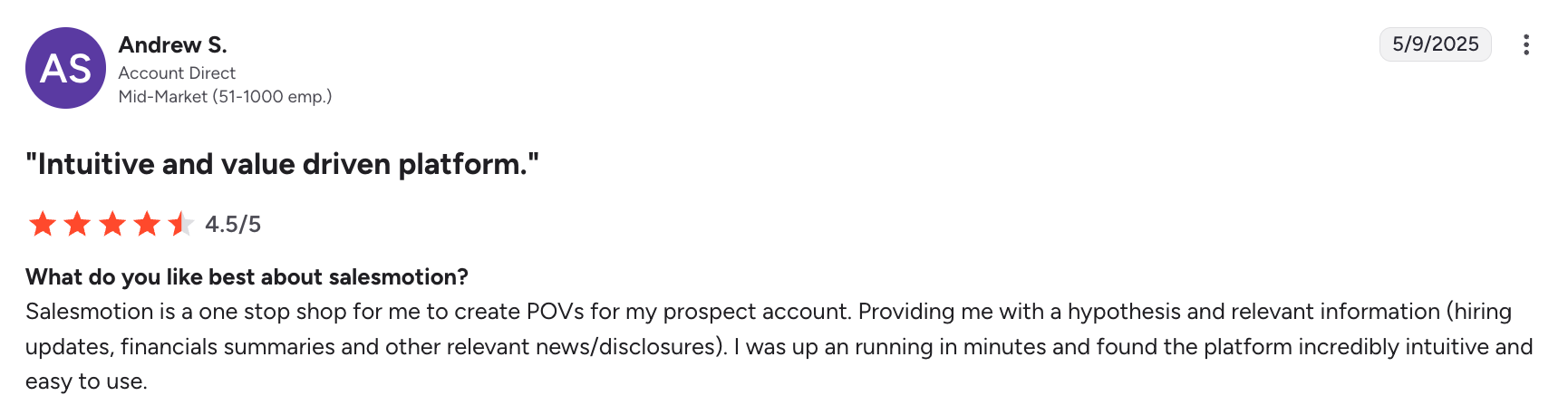 Verified G2 review from a Growth AE using Salesmotion for account planning.
See Salesmotion on a real account
Book a 15-minute demo and see how your team saves hours on account research.
The Six Categories of AI Sales Tools
The AI sales landscape has matured into distinct categories. Understanding what each does (and doesn't do) prevents the most common buying mistake: treating all AI tools as interchangeable.
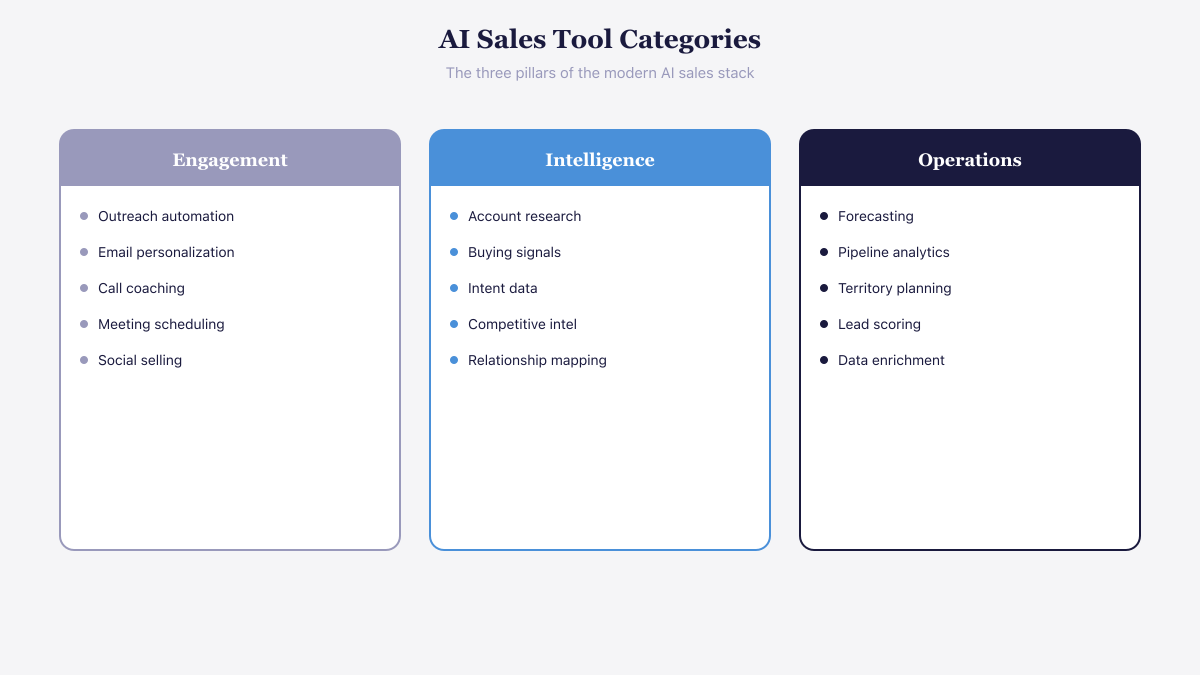 The modern AI sales stack covers three pillars: engagement, intelligence, and operations.
1. Account Intelligence and Research — Best for Strategic Deal Preparation
These tools monitor external data sources to surface insights about target accounts: leadership changes, hiring patterns, earnings call language, competitive moves, strategic initiatives, and buying signals. They answer the question "which accounts should I prioritize right now, and why?"
This is the foundational layer. Without accurate, current account intelligence, every other tool in your stack operates on incomplete information. Reps send personalized emails based on stale data. Forecasts rely on deal stages without context about buyer readiness. Coaching focuses on call technique when the real problem is that reps entered the conversation unprepared.
Salesmotion operates in this category, monitoring 1,000+ sources to generate one-click account briefs that replace hours of manual research. Teams like Analytic Partners cut research from 3 hours to 15 minutes per account while growing qualified pipeline 40% YoY.
Key Features:
- Signal Monitoring. Track leadership changes, hiring patterns, earnings call language, and competitive moves across target accounts.
- One-Click Account Briefs. Replace hours of manual research with AI-generated summaries from 1,000+ sources.
- Buying Signal Detection. Surface strategic initiatives, budget signals, and timing indicators that reveal when accounts enter a buying window.
- Proactive Alerts. Continuous monitoring delivers insights automatically rather than requiring manual research sessions.
Pricing: Varies by vendor. Salesmotion starts at $85/month. Enterprise intelligence platforms range from $500-$5,000+/month depending on account volume.
Best for: B2B teams managing strategic accounts where preparation quality directly impacts deal velocity and win rates.
✅ Pros
- Foundational layer — every downstream tool performs better with accurate, timely intelligence
- Proven time savings: Analytic Partners cut research from 3 hours to 15 minutes per account
- Surfaces context reps can't get from contact databases or CRM data alone
- Continuous monitoring replaces manual, point-in-time research
❌ Cons
- Not a contact database — still need a data provider for net-new contact discovery
- Requires reps to act on insights — intelligence without behavior change is shelfware
- Most teams skip this layer in favor of flashier engagement tools, reducing stack ROI
Salesmotion's Take
I built Salesmotion because I kept seeing the same pattern at every company I worked at: reps spending 3+ hours per account cobbling together research from Google, LinkedIn, SEC filings, and internal notes. The intelligence layer is where AI delivers the most immediate, measurable impact — and it's the layer most teams skip. If you're evaluating tools right now, don't start with the flashiest demo. Start with the tool that makes your reps smarter before they pick up the phone.

Semir Jahic
CEO & Co-Founder, Salesmotion
2. Prospecting and Lead Generation — Best for Contact Discovery and List Building
Tools that use firmographic, technographic, and intent data to identify and prioritize prospects. For a detailed comparison, see our top AI account intelligence tools roundup. Apollo.io, ZoomInfo, Cognism, and Clay are the major players. They answer "who should I contact?" with contact databases, email verification, and basic enrichment.
These tools are valuable for building initial prospect lists but limited in strategic context. They tell you a person's title and email address. They don't tell you what their company is prioritizing this quarter or whether the timing is right for your solution.
Key Features:
- Contact Databases. Large B2B databases with firmographic, technographic, and job-level data for building prospect lists.
- Email Verification. Validate contact information before outreach to reduce bounce rates and protect sender reputation.
- Intent Data Overlays. Some platforms (ZoomInfo, 6sense) layer intent signals to prioritize which prospects to contact first.
- Basic Enrichment. Append company and contact data to existing CRM records to fill gaps.
Key players: Apollo.io, ZoomInfo, Cognism, Clay
Best for: SDR teams and outbound-heavy organizations that need to build and prioritize large prospect lists quickly.
✅ Pros
- Essential for building initial prospect lists at scale
- Email verification reduces wasted outreach effort
- Firmographic and technographic filters enable targeted list building by ICP
- Multiple vendor options across price points — from Apollo.io to enterprise ZoomInfo
❌ Cons
- Limited to "who to contact" — doesn't answer "why now" or "what to say"
- Contact data decays quickly — 30% accuracy loss within a year
- Strategic context is shallow — title and email, not company priorities or buying windows
3. Conversation Intelligence — Best for Call Analytics and Rep Coaching
Tools that record, transcribe, and analyze sales calls. Gong leads this category, with competitors like Chorus (now part of ZoomInfo) and newer entrants like Fireflies.ai. They identify winning behaviors, track competitor mentions, flag objections, and provide coaching insights from real conversations.
Organizations using conversation intelligence report 38% improvement in rep performance and 29% reduction in new-hire ramp time. The ROI is proven when call volume is high enough to generate meaningful patterns.
Key Features:
- Call Recording and Transcription. Automatic recording, transcription, and indexing of every customer-facing conversation.
- Winning Behavior Identification. AI surfaces which talk tracks, questions, and patterns correlate with closed deals.
- Competitor Mention Tracking. Flags when prospects mention competitors and how reps respond to those moments.
- Coaching Insights. Data-driven coaching recommendations from real conversations rather than manager intuition.
Key players: Gong, Chorus (ZoomInfo), Fireflies.ai
Best for: Sales organizations with high call volumes (50+ reps) where coaching at scale and deal visibility matter.
✅ Pros
- 38% improvement in rep performance reported by organizations using these tools
- 29% reduction in new-hire ramp time through pattern-based onboarding
- Surfaces patterns human managers miss across hundreds of weekly calls
- Proven ROI when call volume is high enough to generate meaningful data
❌ Cons
- Backward-looking — analyzes what happened on the call, not what's happening at the account before it
- Requires high call volume to generate statistically meaningful patterns
- Addresses symptoms (call technique) rather than root causes when reps enter calls unprepared
4. Sales Engagement and Outreach — Best for Multi-Channel Sequence Automation
Multi-channel sequence platforms that automate email, phone, and social outreach. Outreach and Salesloft (Salesloft completed its merger with Clari in December 2025) dominate, with Saleshandy and Instantly.ai serving smaller teams. AI enhancements include optimal send-time prediction, message personalization, and adaptive cadence management.
Key Features:
- Multi-Channel Sequences. Automate coordinated outreach across email, phone, and social channels in structured workflows.
- Optimal Send-Time Prediction. AI determines the best time to deliver messages for maximum engagement.
- Message Personalization. AI-assisted personalization at scale, adapting templates based on prospect data.
- Adaptive Cadence Management. Sequences adjust automatically based on prospect engagement signals.
Key players: Outreach, Salesloft, Saleshandy, Instantly.ai
Best for: SDR and AE teams that need structured, high-volume outreach workflows with engagement analytics.
✅ Pros
- Automates repetitive outreach tasks across email, phone, and social channels
- AI enhancements improve timing, personalization, and cadence optimization
- Outreach and Salesloft are proven at enterprise scale with deep CRM integration
- A/B testing and analytics help optimize messaging and sequences over time
❌ Cons
- Only as good as the data and context feeding the sequences — AI personalization based on stale data creates noise
- Engagement platforms without the intelligence layer automate bad outreach at scale
- Market consolidation (Salesloft-Clari merger) may limit competitive options
5. Revenue Forecasting and Pipeline Intelligence — Best for Forecast Accuracy and Deal Prediction
AI-driven deal prediction, pipeline health scoring, and forecast accuracy tools. Clari Forecast, now part of Salesloft, leads here, with Salesforce and Terret (formerly BoostUp) as alternatives. These tools analyze deal progression patterns to predict which opportunities will close and flag at-risk deals before they slip.
Clari customers report 20% faster deal closures and forecast accuracy within 3-4% every quarter. The value scales with pipeline volume and deal complexity.
Key Features:
- AI Deal Prediction. Machine learning analyzes deal progression patterns to predict which opportunities will close.
- Pipeline Health Scoring. Visual scoring of deal health across the pipeline to flag at-risk opportunities.
- Forecast Accuracy. Replaces gut-feel pipeline calls with data-backed quarterly predictions (3-4% accuracy at Clari).
- At-Risk Deal Flagging. Proactive alerts when deals show signs of slipping before they miss their close date.
Key players: Salesloft (Clari Forecast), Salesforce, Terret (formerly BoostUp)
Best for: Revenue leaders and RevOps teams managing complex, multi-quarter pipelines where forecast accuracy drives business planning.
✅ Pros
- 20% faster deal closures reported by Clari customers
- Forecast accuracy within 3-4% quarterly — far better than the 7% of orgs achieving 90%+ accuracy without these tools
- Value scales with pipeline volume and deal complexity
- Flags at-risk deals before they slip, enabling proactive intervention
❌ Cons
- Forecast quality depends entirely on CRM data quality — incomplete activity logging undermines predictions
- Requires sufficient pipeline volume to generate meaningful patterns
- Analytics layer (Layer 3) — delivers less ROI if intelligence and engagement layers aren't already in place
6. Sales Coaching and Enablement — Best for Rep Onboarding and Content Management
Tools that deliver personalized coaching from conversation data, accelerate onboarding, and manage sales content. Seismic, Highspot (now part of Seismic), and Lavender (for email coaching) are the key players. AI capabilities include automated call scoring, personalized coaching recommendations, and content suggestions based on deal stage.
Key Features:
- Automated Call Scoring. AI evaluates call quality against best practices and scoring criteria without manual review.
- Personalized Coaching Recommendations. Data-driven suggestions for each rep based on their conversation patterns and gaps.
- Content Suggestions. Recommends the right sales content based on deal stage, industry, and buyer persona.
- Accelerated Onboarding. New-hire ramp programs powered by real conversation examples and pattern-based training.
Key players: Seismic (including Highspot), Lavender
Best for: Sales enablement teams focused on scaling coaching, reducing new-hire ramp time, and ensuring reps use the right content at the right time.
✅ Pros
- Scales coaching beyond what managers can deliver through 1:1 sessions
- AI call scoring provides objective, consistent evaluation across the team
- Content suggestions ensure reps send relevant materials at each deal stage
- Accelerates new-hire ramp with pattern-based training from real conversations
❌ Cons
- Coaching addresses call technique but not preparation quality — if reps enter calls without context, better technique alone won't close enterprise deals
- Content management tools require ongoing investment in content creation and curation
- ROI depends on adoption — tools that reps don't use become expensive shelfware

“The moment we turned on Salesmotion, it became essential. No more hours on LinkedIn or Google to figure out who we're talking to. It's just there, served up to you, so it's always 'go time.'”
Adam Wainwright
Head of Revenue, Cacheflow
The Stack Sequencing Problem: Why Order Matters
Most teams buy AI sales tools in the wrong order. They start with engagement (outreach automation) or analytics (conversation intelligence) because those categories have the flashiest demos. The result is AI that automates sending emails based on stale data, or AI that analyzes calls where the rep was underprepared.
The correct sequence follows a dependency chain:
Layer 1: Intelligence → Know which accounts matter and why, before any outreach happens.
Layer 2: Engagement → Automate and personalize outreach, powered by intelligence from Layer 1.
Layer 3: Analytics → Analyze conversations, forecast deals, and coach reps, with context from Layers 1 and 2.
Each layer depends on the one below it. An outreach tool sending personalized emails is only as good as the account research feeding it. A forecasting tool is only as accurate as the deal context available to it. A coaching tool can only improve what it can observe, and if reps are entering calls without preparation, the coaching addresses symptoms rather than root causes.
According to McKinsey, companies that implement AI in the right sequence report 3-15% revenue increases and 10-20% boosts in sales ROI. Companies that skip the intelligence layer and jump to automation rarely see returns above the cost of the tool.
How to Evaluate AI Sales Tools (Without Getting Burned)
The evaluation process matters more than the selection. For a detailed framework, see our guide on evaluating AI sales tools. 60% of AI sales tools that launched in mid-2024 shut down or pivoted by Q4 2025. Here's how to avoid buying vaporware.
Test With Your Real Accounts
Ask every vendor to run their tool against 10-20 of your actual target accounts. Compare what the AI surfaces against what your best reps already know. If the tool misses obvious signals, returns generic summaries, or produces hallucinated data, it's not ready for production.
Demo scenarios are designed to impress. Your real accounts reveal whether the tool delivers in your specific market, industry, and ICP.
Measure Operational Impact, Not Features
Features don't close deals. Operational changes do. For each tool, define the specific workflow change it should produce:
- Intelligence tools: How many minutes does this save per account research session? Does the output change what reps say in their first email or call?
- Engagement tools: Does message personalization improve reply rates by a measurable amount? Does adaptive timing increase connect rates?
- Analytics tools: Does the forecast become more accurate? Do coached reps improve faster than uncoached ones?
If you can't define the workflow change, you can't measure the ROI.
Check the Data Layer
AI is only as good as its data. Ask where the data comes from:
- CRM-only tools are limited to what reps have already entered, which is often incomplete and outdated.
- Third-party database tools rely on static data that decays quickly. Contact databases lose 30% accuracy within a year.
- Multi-source intelligence tools pull from external sources (news, SEC filings, job postings, intent data, earnings calls) to deliver insights reps can't get from internal data alone.
Evaluate Integration Depth
The tool must connect natively to your CRM and engagement platform. Manual data transfers guarantee stale intelligence and low adoption. Ask about:
- Pre-built CRM connectors (Salesforce, HubSpot)
- Bi-directional sync (data flows both ways)
- API access for custom workflows
- Time to deploy (days, not months)
Cacheflow went from signature to full platform utilization in 24 hours because the integration was native, not custom-built.
Run a Real Pilot
Never commit to an annual contract based on a demo. Run a 30-day pilot with actual users. Track:
- Daily active usage (do reps actually open it?)
- Time savings per workflow (measured, not estimated)
- Impact on downstream metrics (reply rates, meeting bookings, deal velocity)
- User satisfaction (would reps pay for this themselves?)
If adoption drops after week two, the tool solves a problem your team doesn't actually have.

“The Business Development team gets 80 to 90 percent of what they need in 15 minutes. That is a complete shift in how our reps work.”
Andrew Giordano
VP of Global Commercial Operations, Analytic Partners
The ChatGPT vs. Purpose-Built Tools Question
Every sales leader has wondered: "Can we just use ChatGPT instead of buying another tool?" The answer depends on what you're trying to do.
Where ChatGPT works: One-off research tasks, email drafting, summarizing long documents, brainstorming messaging angles. For individual productivity on ad-hoc tasks, it's genuinely useful.
Where it falls short:
| Capability | ChatGPT | Purpose-Built AI |
|---|---|---|
| Account monitoring | Scheduled tasks, set up per account | Automated, across territory |
| Data freshness | Web search when a prompt or task runs | Real-time from live sources |
| CRM integration | Through apps an admin sets up | Native, bi-directional |
| Signal detection | When prompted or scheduled | Continuous, proactive alerts |
| Source checking | Citations when web search runs | Cited sources, verified data |
| Scale | One prompt or task per account | Hundreds of accounts simultaneously |
For teams managing 10 accounts, ChatGPT might suffice. For teams managing 50+ accounts across a territory, the manual effort of prompting, verifying, and transferring data into the CRM makes it operationally unviable. The math breaks down quickly: even 15 minutes per account per week across 100 accounts equals 25 hours of manual research.
Five Mistakes That Waste AI Sales Tool Budget
1. Buying the outreach layer before the intelligence layer. AI that sends personalized emails is useless if the personalization is based on outdated LinkedIn summaries.
2. Evaluating on features instead of outcomes. A tool with 50 features and no measurable impact on pipeline is worse than one with 5 features that saves reps 3 hours per week.
3. Skipping the pilot. Businesses waste approximately $30 billion per year on unused software. Martech utilization sits at just 33%. A 30-day pilot prevents six-figure mistakes.
4. Ignoring data governance. 60% of AI project failures trace back to inadequate data governance, according to Gartner. Ask about SOC 2 compliance, data retention policies, and how the vendor handles your CRM data.
5. Expecting immediate ROI. Realistic timelines are 3-6 months with clean data, 6-9 months if building processes from scratch. Teams that declare AI "doesn't work" after 30 days usually have a change management problem, not a technology problem.
Key Takeaways
- AI sales tools fall into six categories: account intelligence, prospecting, conversation intelligence, engagement, forecasting, and coaching. Each serves a different function.
- Build your stack in layers: intelligence first, engagement second, analytics third. Each layer depends on the quality of data from the layer below.
- Test every tool against your real accounts, not demo scenarios. If the AI can't surface insights your best reps don't already know, it won't change behavior.
- 95% of companies see zero bottom-line impact from AI spending (MIT 2025). The difference is evaluation rigor, stack sequencing, and change management.
- ChatGPT works for ad-hoc tasks but is not built for territory-scale monitoring.
- Run 30-day pilots before annual commitments. Track daily usage, time savings, and downstream pipeline metrics to validate ROI.
Frequently Asked Questions
What is the best AI tool for B2B sales?
There is no single best tool because AI sales tools serve different functions. The best starting point for most B2B teams is an account intelligence platform that provides buying signals and research automation, because this improves every downstream activity (outreach, calls, forecasting). From there, add conversation intelligence for call analysis and a sales engagement platform for outreach execution.
How much do AI sales tools cost?
Costs vary significantly by category and team size. Small teams (1-10 sellers) spend $200-$1,500/month per tool. Mid-market teams spend $2,000-$8,000/month. Enterprise deployments with multiple AI tools start at $15,000+/month. Multi-year commitments typically yield 20-30% discounts. The more important metric is cost per hour saved or cost per incremental deal, not the license fee alone.
How long does it take to see ROI from AI sales tools?
Expect 3-6 months with clean CRM data and established processes, or 6-9 months if building from scratch. According to industry benchmarks, 86% of sales teams using AI report positive ROI within their first year. The key variables are data quality, integration depth, and user adoption. Tools that integrate natively with your CRM and require minimal behavior change show faster returns.
Should I buy a platform or point solutions?
The trend is toward platforms: 72% of enterprise sales organizations now prefer platform approaches over best-of-breed point solutions, driven by data flow, vendor management, and user experience needs. However, best-of-breed tools still win when they deliver significantly better capabilities in a specific category. The pragmatic approach is to pick a platform for your core workflow and supplement with one or two specialized point solutions where the platform has gaps.