Every record in your CRM is rotting right now. B2B data decays at roughly 22.5% per year — about 2.1% per month, compounding silently. That means by December, one in four records you rely on to drive pipeline will be wrong. Wrong titles. Wrong emails. Wrong companies entirely. And the average B2B contact changes jobs every 18 months, so the people your reps think they are targeting have already moved on.
This is not a data hygiene problem. It is a revenue problem. Gartner estimates that poor data quality costs organizations an average of $12.9 million per year. For a mid-market sales team running 50 reps, that number shows up as blown quotas, wasted sequences, and a CRM that actively misleads rather than informs.
TL;DR: B2B data decay is not a once-a-year cleanup task. It is a continuous revenue leak that accelerates over time. Single-source enrichment leaves 40–60% of your records incomplete. The fix requires multi-source enrichment, automated monitoring, and a quarterly hygiene cadence. If you are deploying AI on top of decayed data, you are automating bad decisions at scale.
The Math of Data Decay: What $12.9 Million Actually Looks Like
Let's make the abstract concrete. Consider a mid-market B2B company with 20 account executives, each managing 200 accounts. That is 4,000 accounts in the CRM. At a 22.5% annual decay rate, roughly 900 of those accounts will have materially inaccurate data by year-end.
Here is where the cost stacks up:
Wasted rep time. ZoomInfo reports that sales reps spend 27.3% of their time dealing with inaccurate data. That is 546 hours per rep per year — more than 13 full working weeks — spent chasing wrong numbers, updating stale records, and verifying information that should already be correct. Across 20 reps, that is 10,920 hours annually. At a blended cost of $75/hour (salary plus benefits plus tools), you are burning $819,000 per year on data janitorial work.
Lost deals. Validity's 2025 State of CRM Data Management report (n=602) found that 37% of CRM users lost revenue directly due to poor data quality, and companies lose an average of 16 sales opportunities per quarter from unreliable data. Sixteen deals per quarter. Sixty-four per year. If your average deal size is $50,000, that is $3.2 million in pipeline that evaporated because your data was wrong.
Bounced outreach. Email decay has been accelerating. Landbase found that email decay hit 3.6% per month in November 2024 — nearly double the traditional rate. When your sequences bounce, your domain reputation takes the hit. Deliverability drops. The good emails start landing in spam too. The decay compounds on itself.
Operational drag. Validity's same report found that workers spend 13 hours per week hunting for information in CRM systems. That is not 13 hours of selling. That is 13 hours of scrolling, cross-referencing, and second-guessing whether the data they are looking at is even current.
Add it up and the $12.9 million average from Gartner stops sounding abstract. For some organizations, it is conservative.

“We had a variety of tools, and that was the pain — the variety. We had to go to multiple places to get streamlined data.”
Lyndsay Thomson
Head of Sales Operations, Cytel
Where the Rot Starts: The Four Vectors of Data Decay
Data does not go bad in one dramatic failure. It degrades through four persistent, overlapping channels that most organizations address piecemeal, if at all.
1. Job Changes and Career Movement
The average B2B contact changes roles every 18 months. In fast-moving sectors like SaaS and fintech, that number is closer to 12 months. Every time a champion changes companies, your CRM record becomes a dead link — the email bounces, the direct dial goes to a new hire who has no context, and the buying committee you mapped is now fiction.
This is the most visible form of decay and, paradoxically, the one most teams handle worst. They rely on reps to manually update records when they discover a contact has left. By then, weeks or months of outreach have been wasted.
2. Mergers, Acquisitions, and Restructuring
When Company A acquires Company B, your CRM does not magically merge accounts, reconcile duplicate contacts, or update firmographic data. Instead, you end up with ghost accounts — companies that technically no longer exist, contacts mapped to defunct entities, and account hierarchies that no longer reflect reality.
In 2024 and 2025 alone, thousands of B2B companies went through M&A. Every single one created data decay for their vendors' CRMs.
3. Manual Entry and Human Error
Reps type fast and move on. Marketing imports lists from trade shows with inconsistent formatting. RevOps stitches together spreadsheets from three different systems. The result: 91% of CRM data is incomplete, stale, or duplicated, according to Salesforce's own research. And 76% of organizations say less than half their CRM data is accurate, per Validity's 2025 report.
This is not a training problem. It is a systems problem. If data entry is a manual, after-the-fact task that competes with quota-carrying activity, it will always lose.
4. No Data Governance Framework
Most mid-market companies have no formal data governance. No defined owner for CRM hygiene. No automated validation rules. No decay monitoring. No enrichment cadence. Data quality is everyone's responsibility, which means it is no one's responsibility.
Without governance, decay compounds silently. Six months pass. Then a new VP of Sales arrives, pulls a pipeline report, and discovers the CRM is essentially a fiction database with a Salesforce skin.
See Salesmotion on a real account
Book a 15-minute demo and see how your team saves hours on account research.
The Single-Source Trap
Here is a pattern I see constantly: a company subscribes to one data vendor — ZoomInfo, Apollo, Lusha, Cognism — and assumes their data problem is solved. It is not.
Single-source enrichment delivers only a 30–60% match rate. That is not a knock on any individual vendor. It is a structural limitation. No single database covers every company, every contact, every geography, and every data attribute. The B2B data landscape is too fragmented for one provider to own it all.
The math is brutal. If your single provider matches 50% of records, and 22.5% of matched data decays annually, you are operating with roughly 39% accurate, complete CRM data at any given time. Less than four in ten records. That is the foundation you are building pipeline on.
Waterfall Enrichment: The Structural Fix
Waterfall enrichment (also called cascading or sequential enrichment) runs your records through multiple data sources in sequence. If Source A misses, Source B fills the gap. If Source B has a stale record, Source C provides the update. This approach routinely pushes match rates to 80–95%.
The economics work too. Instead of paying one vendor $40K/year for 50% coverage, you orchestrate three or four sources and get 85%+ coverage, often at a comparable total cost. Platforms like Clay, FullEnrich, and others have built their entire value proposition around this model.
But waterfall enrichment alone is not enough. It solves the breadth problem — how many records have data. It does not solve the freshness problem — how current that data stays over time. For that, you need continuous monitoring. Enrichment at the point of record creation is a snapshot. Your data starts decaying the moment the enrichment job finishes.
For a deeper comparison of how different data enrichment tools handle this problem, and where account intelligence fits into the stack, that breakdown covers the landscape in detail.
Building a Living Data Strategy
A living data strategy treats data not as a static asset to be loaded once and maintained periodically, but as a continuously refreshing stream. Here is what that looks like in practice.
Layer 1: Multi-Source Enrichment at Point of Entry
Every record that enters your CRM — whether from inbound forms, outbound prospecting, list imports, or integrations — should pass through a multi-source enrichment pipeline immediately. Not tomorrow. Not in the next batch job. At the point of entry.
This means:
- Contact verification against 2–3 providers to validate email, phone, title, and current company.
- Firmographic enrichment from multiple databases to capture revenue, headcount, industry classification, and location — the baseline you need for segmentation and routing.
- Technographic enrichment to map the account's current tech stack, which informs product positioning and competitive displacement plays.
The goal at this layer is coverage and accuracy at the moment of first contact. CRM data enrichment done right at the point of entry prevents the largest category of data quality issues: records that enter the system incomplete and never get cleaned up.
Layer 2: Continuous Signal Monitoring
Static enrichment decays. Signals do not — they update themselves by definition. The second layer of a living data strategy is continuous monitoring for changes that indicate either decay (someone left the company) or opportunity (a new executive hire, a funding round, a strategic initiative shift).
This is where buying signals software and account intelligence platforms add a fundamentally different kind of value than traditional enrichment. Instead of re-running a batch enrichment job every quarter, you are listening for real-time changes across your entire book of business.
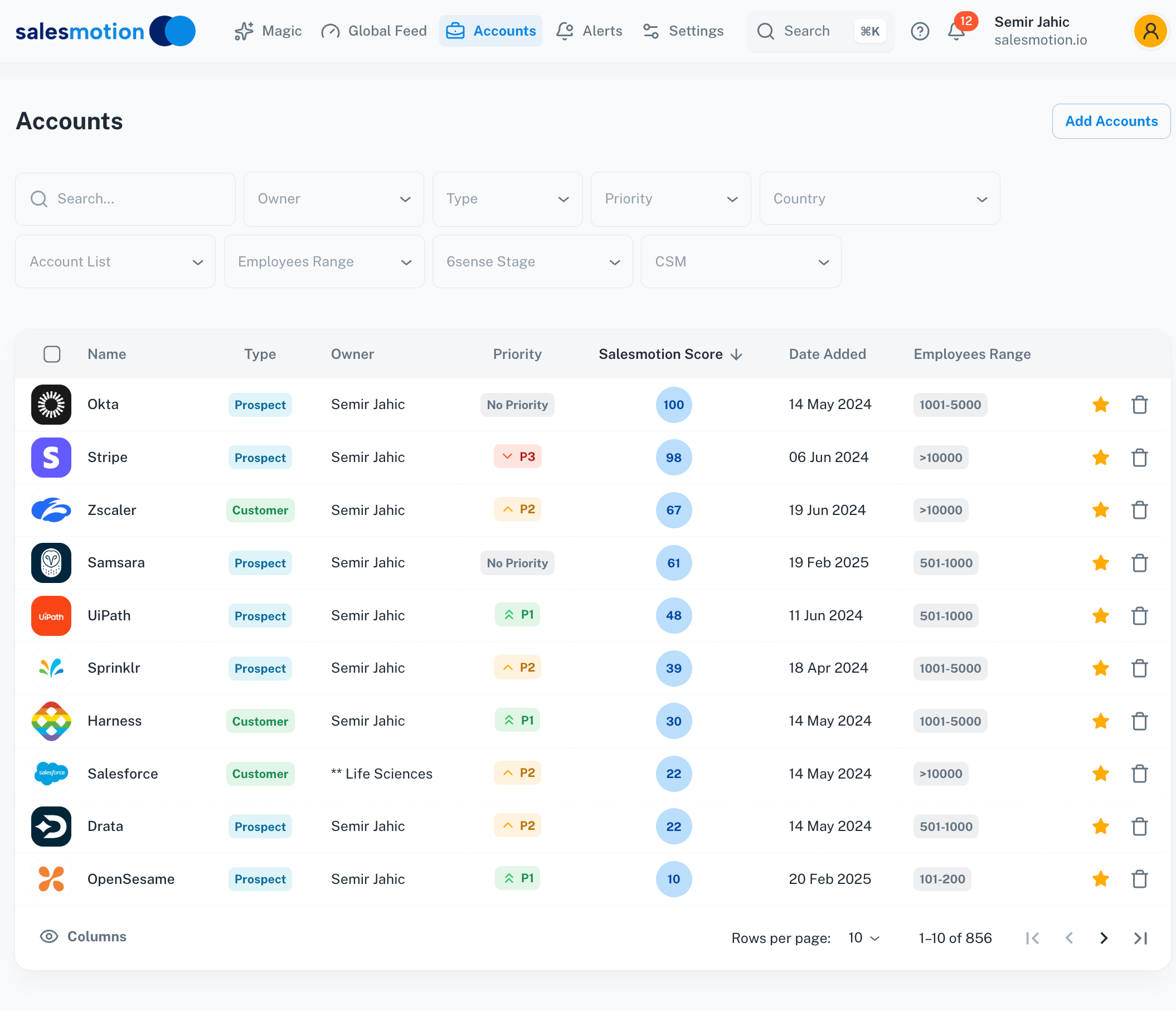 A living data approach surfaces real-time signals and intelligence scores across your account portfolio, replacing static snapshots with continuous updates.
Key signals to monitor continuously:
- Job changes among contacts in your CRM (both departures and new hires at target accounts)
- Funding events and M&A activity that reshape account hierarchies
- Leadership changes that reset buying committees
- Earnings calls and strategic initiatives that reveal new priorities (and new budget)
- Tech stack changes that open competitive displacement windows
- Hiring patterns that signal growth areas or budget allocation shifts
The difference between batch enrichment and continuous monitoring is the difference between a photograph and a video feed. One tells you what was true at a point in time. The other tells you what is true right now.
Layer 3: Quarterly Hygiene Cadence
Even with multi-source enrichment and continuous monitoring, you need a structured review cycle. Cleaning your CRM data every 90 days reduces bounce rates by up to 37%, according to Mailmend's analysis.
A quarterly hygiene cadence includes:
- Bounce and undeliverable audit. Pull every hard bounce from the last 90 days. Remove or quarantine those contacts. Re-verify the remainder.
- Duplicate detection and merge. M&A, list imports, and multi-channel captures inevitably create duplicates. Automated deduplication with human review for edge cases.
- Stale account flagging. Any account with no engagement signal (email open, website visit, meeting, call) in 90+ days gets flagged for re-validation. If the account's firmographic data has changed (acquisition, shutdown, pivot), update or archive.
- Contact role verification. Re-verify that the contacts mapped to each account still hold those roles. This is where the 18-month job-change cycle bites hardest.
- Enrichment gap analysis. Identify records missing critical fields (no phone, no title, no revenue data) and run them through enrichment again.
The 90-day cycle is not arbitrary. It aligns with the roughly 2.1% monthly decay rate. After three months, approximately 6.3% of your data has degraded. That is a manageable cleanup scope. Wait six months and you are looking at 12%+ decay, which turns a maintenance task into a project.
Layer 4: Account Intelligence as a Continuous Layer
The top layer of a living data strategy goes beyond data accuracy into data usefulness. Having correct contact information is necessary but not sufficient. Your reps also need to understand what each account cares about right now, what their strategic priorities are, and what makes this moment the right time to reach out.
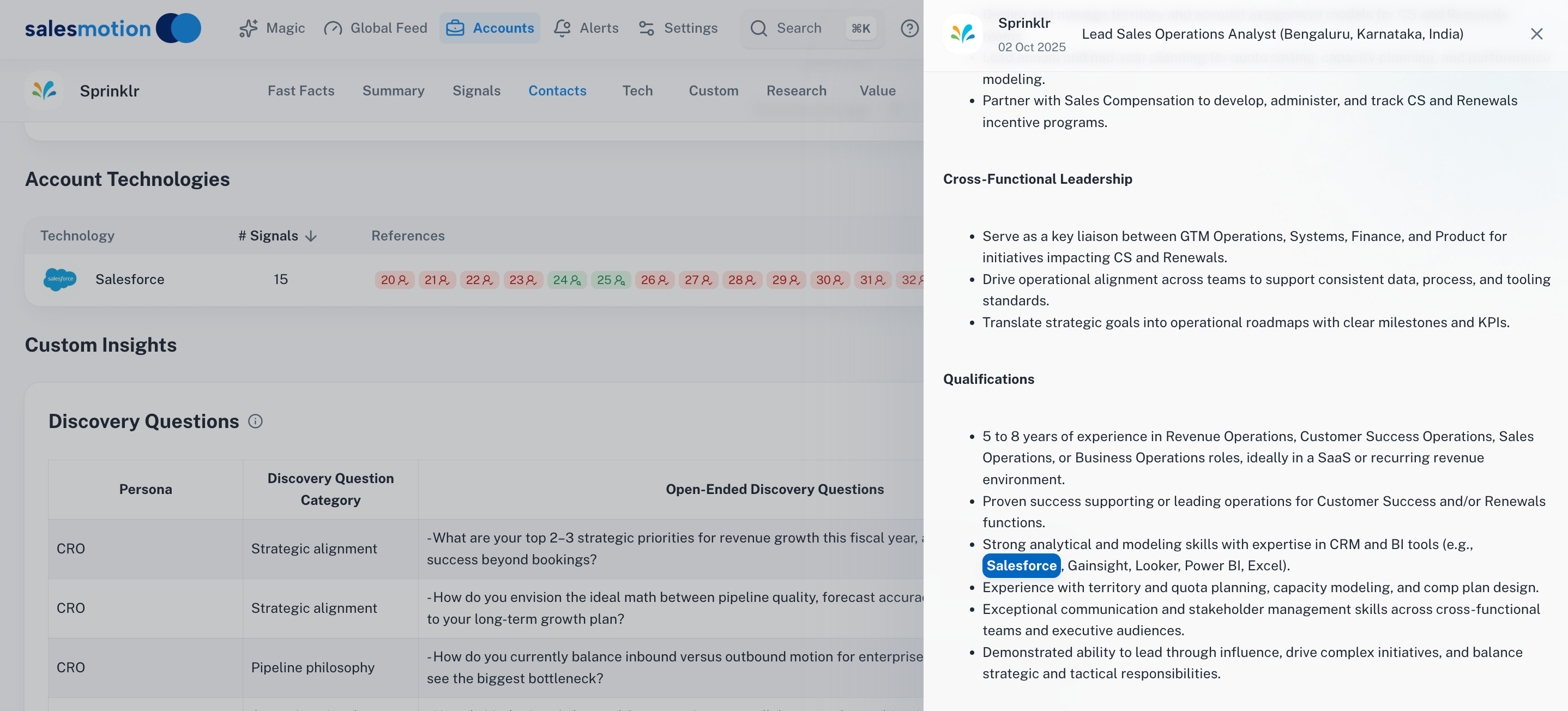 Account-level intelligence layers technology, custom research, and strategic context on top of enriched firmographic data, giving reps the full picture.
This is the domain of account intelligence, and it represents the most significant evolution in how B2B teams think about data. Instead of asking "Is this contact's email correct?" you are asking "What does this account care about, and how does that connect to what we sell?" That shift — from data accuracy to strategic relevance — is where the real revenue impact lives.
66% of B2B marketers now rank data quality in their top three GTM priorities, according to the 2025 Demand Gen Report. And companies that invest in proper enrichment generate 44% more sales qualified leads than those relying on manual research. The data makes the case clearly: living data strategies win.

“We're saving about 6 hours per week per seller on account research alone. That's time they can reinvest in actually selling.”
Derek Rosen
Director, Strategic Accounts, Guild Education
The AI Readiness Problem: Automating Bad Decisions at Scale
Here is the elephant in the room. B2B teams are racing to deploy AI across their go-to-market operations. AI-powered SDRs. AI-generated emails. AI account scoring. AI call coaching. The 2025 AI gold rush is real.
But 45% of CRM data is not prepared for AI tools, even though 54% of organizations are already deploying them. That is from Validity's 2025 report, and it represents one of the most dangerous disconnects in modern B2B sales.
AI is an amplifier. Feed it good data, and it amplifies good decisions — better targeting, sharper personalization, more relevant outreach. Feed it decayed data, and it amplifies bad decisions at machine speed and machine scale. Your AI SDR does not know that the VP of Engineering it just emailed left the company three months ago. Your AI scoring model does not know that the company was acquired and no longer operates independently. Your AI-generated email does not know that the strategic priority it references is from two fiscal years ago.
The result is not just wasted effort. It is reputation damage. When a prospect receives a perfectly formatted, clearly AI-generated email that references outdated information, they do not think "their data is stale." They think "this company does not understand us." And they are right.
If you are investing in AI sales tools — and you probably should be — data quality is not a separate initiative. It is a prerequisite. Understanding what intent data actually is and how it feeds AI models is the starting point. Without clean, current, enriched data underneath, your AI stack is a sports car running on contaminated fuel.
End-to-End Example: The Life Cycle of an Account Record
Let's trace a single account through the full decay-and-recovery cycle to see how this plays out in practice.
Day 1: Record Creation. Your marketing team runs a campaign targeting Series B+ SaaS companies. A VP of Revenue Operations at a 400-person fintech company fills out a form on your website. The record enters your CRM with: name, email, company name, title. Four fields. No phone. No firmographic data. No tech stack. No strategic context.
Day 1 (automated): Point-of-entry enrichment. Your multi-source enrichment pipeline fires immediately. Across three data providers, it appends: direct phone number, LinkedIn URL, company revenue ($68M ARR), headcount (412), tech stack (Salesforce, HubSpot, Outreach, Snowflake), headquarters (Austin, TX), and industry classification (fintech / payments). The record is now actionable.
Day 30: First decay event. The company announces a $50M Series C. Headcount jumps to 480. The enriched record still says 412. No automated update fires because your enrichment was a one-time snapshot.
Day 90: Second decay event. The VP of RevOps accepts a role at a different company. Her email bounces. Her direct dial reaches a confused new hire. Two months of nurture sequences have been hitting a dead inbox. Your rep discovers this on a call attempt and manually updates the record.
Day 120: Third decay event. The fintech company acquires a smaller competitor. The combined entity now operates under a new name. Your CRM still shows the old company name, old headcount, old revenue. The account hierarchy is wrong. Territory mapping is wrong. Any outreach referencing the old company name signals that your team is out of touch.
Day 180: Quarterly hygiene catches some, misses others. Your 90-day cleanup cycle flags the bounced email and the duplicate records created by the acquisition. Good. But it does not catch the revenue change, the headcount change, or the new strategic priorities the combined company announced in their press release. Those require enrichment, not just cleanup.
Day 180 (with a living data strategy): Continuous monitoring catches everything. A Salesmotion-style account intelligence layer would have flagged the Series C at Day 30, updated the firmographic data, and surfaced the funding event as a buying signal. It would have flagged the VP departure before the email bounced, triggered a re-mapping of the buying committee, and identified the new RevOps hire as a contact to pursue. It would have caught the acquisition, merged the account records, and surfaced the combined entity's new strategic priorities from the press release and earnings commentary.
The difference between these two scenarios is the difference between a CRM that degrades over time and one that improves. That is what a living data strategy delivers.
Key Takeaways
- B2B data decays at 22.5% annually. By December, one in four CRM records will be wrong. This is not a risk — it is a certainty.
- The cost is measurable. Organizations lose an average of $12.9M/year to poor data quality, driven by wasted rep time (27.3% of their hours), lost deals (16 per quarter), and bounced outreach that tanks deliverability.
- Single-source enrichment is structurally broken. One vendor delivers 30–60% match rates. Waterfall enrichment pushes that to 80–95% by cascading across multiple sources.
- Continuous monitoring beats batch enrichment. Static snapshots start decaying immediately. Real-time signal monitoring catches job changes, M&A, funding events, and strategic shifts as they happen.
- Quarterly hygiene is non-negotiable. Cleaning every 90 days reduces bounce rates by up to 37% and keeps decay at a manageable 6% per cycle.
- AI amplifies your data quality, good or bad. 45% of CRM data is not AI-ready, yet 54% of organizations are already deploying AI tools. Without clean data, you are automating bad decisions at machine speed.
- Data governance needs an owner. If data quality is everyone's responsibility, it is no one's. Assign a clear owner, define validation rules, and enforce enrichment standards at the point of entry.
Frequently Asked Questions
How often should B2B companies clean their CRM data?
At minimum, every 90 days. The 2.1% monthly decay rate means roughly 6% of your data degrades each quarter. Waiting longer than 90 days turns a maintenance task into a remediation project. The best-performing teams combine quarterly deep cleans with continuous automated monitoring that catches critical changes (job departures, acquisitions, email bounces) in real time. Mailmend's analysis found that this 90-day cadence reduces bounce rates by up to 37%.
What is waterfall enrichment and why is it better than using a single data provider?
Waterfall enrichment (also called cascading enrichment) runs your CRM records through multiple data sources in sequence. If the first source cannot find or verify a record, the second source tries. Then the third. This approach consistently delivers 80–95% match rates, compared to the 30–60% you get from any single provider. No single B2B database covers every contact across every geography, company size, and industry. Waterfall enrichment accounts for that structural limitation by design.
How does data decay affect AI-powered sales tools?
AI models are only as good as the data they consume. When 45% of CRM data is not AI-ready — as Validity's 2025 report found — AI tools generate outputs based on stale, incomplete, or duplicated information. That means AI SDRs email people who left the company months ago. AI scoring models prioritize accounts based on outdated firmographics. AI-generated personalization references strategic initiatives from two fiscal years back. The result is not just wasted effort — it actively damages your brand with prospects who can tell when outreach is both automated and uninformed.
What is the difference between data enrichment and a living data strategy?
Traditional data enrichment is a point-in-time event: you import records, run an enrichment job, and move on. A living data strategy treats data as a continuous stream. It combines multi-source enrichment at the point of entry, real-time signal monitoring for changes across your account portfolio, a structured quarterly hygiene cadence, and an account intelligence layer that provides strategic context beyond basic contact and firmographic fields. The distinction matters because enrichment alone does not solve decay. Within 90 days of a one-time enrichment, 6% of those freshly enriched records are already degrading.