An effective executive briefing template isn't just another document in your sales stack. It's a strategic tool that turns messy account data into sharp, actionable sales intelligence.
TL;DR: A standardized executive briefing template gives your reps a repeatable way to distill account research into a clear, one-page view of a prospect's priorities, key players, and "why now" triggers -- cutting research time by 40-60% and making every meeting count.
For any B2B sales team, a good template creates a repeatable framework for understanding a prospect's business, spotting key buying triggers, and crafting a message that lands with decision-makers.
Why Your Sales Team Needs a Better Executive Briefing

Let's be direct: generic outreach is a dead end. Right now, your reps likely spend hours piecing together account details from earnings calls, press releases, and endless LinkedIn scrolling. This manual work is slow and inconsistent, leading to weak messaging and missed opportunities.
The real cost of this scattered approach is lost revenue. When every rep uses their own DIY account plan, you have no scalable process. Your team misses the critical "why now?" moment that turns a generic sales pitch into a timely, relevant conversation.
The Shift From Manual Research to Strategic Intelligence
In today's B2B landscape--especially in complex fields like Life Sciences or enterprise SaaS--executives have no time for pitches that don't address their immediate priorities. They need to see you've done your homework and understand their world.
A standardized executive briefing template solves this problem. It's not about adding more admin work. It's about building a structured process that distills overwhelming data into clear, actionable insights your team can use.
A well-designed briefing forces your team to answer the most important questions before picking up the phone: What are the prospect's top strategic initiatives? What recent events make our solution relevant right now? Who are the key players we need to influence?
This structured approach is key to scaling success. In high-stakes B2B sales, teams using smart briefing templates cut their account research time by 40-60%. That efficiency frees up your reps to do what they do best: sell.
Mapping Sales Challenges to Template Solutions
Here's how a well-structured briefing directly solves the common headaches your B2B sales team faces.
| Common Sales Pain Point | How a Smart Briefing Template Solves It |
|---|---|
| "My outreach feels generic and gets ignored." | Forces reps to connect your solution to specific company initiatives, recent news, or stated pain points. |
| "I'm wasting too much time on research." | Creates a consistent, scannable format for key intel, eliminating redundant manual work. |
| "New hires take forever to ramp up." | Gives new team members a clear summary of key accounts, accelerating their learning curve. |
| "My manager and I aren't aligned on strategy." | Provides a single source of truth for account strategy, making coaching sessions focused and productive. |
| "Our account team is working in silos." | Ensures everyone--AEs, SDRs, CSMs--is operating from the same playbook with shared intelligence. |
This isn't just about better organization; it's about building a more strategic and successful sales motion.
Key Benefits of a Standardized Template
Implementing a consistent briefing process brings immediate wins that directly boost your pipeline and revenue. It helps shift your team from a reactive to a proactive sales culture.
Here's what you can expect:
- Improved Messaging Relevance: Reps can instantly connect your solution to the prospect's specific goals, pain points, and recent business triggers.
- Faster Onboarding: New hires get up to speed on key accounts faster by reviewing a consistent, easy-to-digest briefing.
- Better Sales Coaching: Managers can review a standardized document to give targeted feedback on account strategy and next steps.
- Enhanced Team Collaboration: Account teams share intelligence and coordinate outreach without confusion or crossed wires.
Ultimately, a robust executive briefing template is the foundation of effective account planning. To see how this fits into the bigger picture, check out our guide on building a world-class account planning process for sales.
See Salesmotion in action
Take a self-guided interactive tour — no signup required.
The Core Components of a Powerful Briefing Template

An effective executive briefing is not a data dump. Think of it less as a fact sheet and more as a strategic guide for your sales motion. To build a great one, skip generic fields like "company size" and focus on components that spark meaningful conversations.
The goal is to give your sales reps a strategic cheat sheet, not just a list of facts. Each part of the briefing should answer a critical question, helping them connect your solution to the prospect's world. Let's break down the essential building blocks.
The Executive Snapshot
This is the 30-second overview every busy rep needs. It's the first thing they'll see, so it must be packed with value. Think of it as the TL;DR version of your account strategy, summarizing the must-know info at a glance.
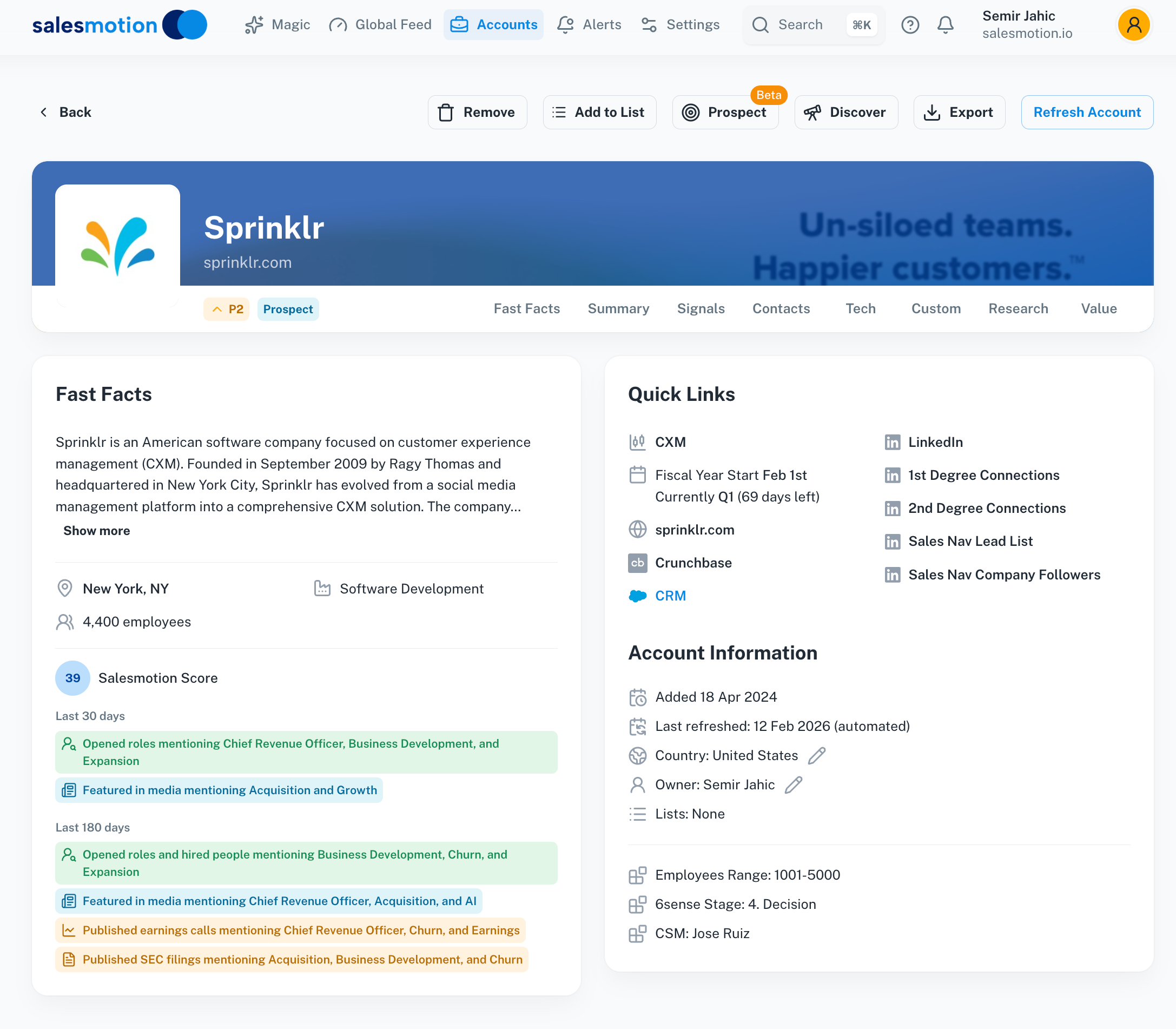 Salesmotion's fast facts panel delivers the executive snapshot you need: company overview, strategic priorities, and key signals at a glance.
This section should concisely answer:
- Who they are: A single sentence describing the company and its market position.
- What matters most: Their top one or two strategic priorities for the year.
- Why talk now: The single most compelling trigger or signal that makes this conversation urgent.
For example, a snapshot for a manufacturing company might read: "Global leader in industrial automation facing pressure to improve supply chain efficiency after a recent acquisition. New CIO hire signals a push for tech modernization." It's direct, insightful, and actionable. For more on crafting these, our article on how to write an effective executive summary offers practical tips.
Key Strategic Initiatives
This is where you connect your solution directly to the prospect's stated business goals. It shifts the conversation from what you sell to how you help them achieve what they care about. Scour their recent earnings calls, investor presentations, and annual reports to identify their top three priorities.
For a financial services firm, this might look like:
- Digital Transformation: Launching a new mobile banking app to improve customer experience.
- Regulatory Compliance: Preparing for new data privacy regulations going into effect next year.
- Cost Optimization: Reducing operational overhead in their back-office processes by 15%.
When you map out these initiatives, your reps can frame every conversation around the prospect's agenda, not their own.
The Competitive Landscape
Understanding who you're competing against is non-negotiable. But this section shouldn't just list competitors; it needs strategic context. Who is the incumbent? Have they recently won or lost major deals with this account? Are there known frustrations with the current solution?
An effective briefing doesn't just name competitors. It highlights their weaknesses and gives your team the specific talking points needed to differentiate your value proposition.
This intelligence helps your reps position your solution as the superior choice, tailored to the competitive dynamics within that account.

“Salesmotion has been a game-changer for me. I used to spend 12 hours a week on prospect research, now it's down to 4. Plus I'm finding stuff I was totally missing - podcasts, news mentions, the good bits.”
George Treschi
Account Executive, FY25 President's Club, Sigma
Turning Raw Signals into Actionable Sales Insights

Getting data is easy. Knowing what to do with it is the hard part, and it's where most sales teams get stuck.
Your executive briefing template can't be a folder of news clippings. It has to connect the dots for your reps by answering the critical "so what?" question. The real value comes from turning raw signals into sharp, actionable talking points.
A signal is any event that hints at a potential opportunity, like a funding announcement, a new C-suite hire, or a competitor's misstep. The goal is to translate these triggers into compelling reasons to start a conversation.
From Market Trigger to Prospect Pain
Let's walk through a B2B SaaS scenario. You sell cybersecurity software, and an alert shows that a target account, Acme Health, just hired a new 'VP of Cybersecurity.' That's your trigger.
The average rep sends a generic "congrats on the new role" email. A powerful approach, guided by your briefing template, digs deeper. The template should prompt your rep to ask:
- Why was this role created now? A new leadership position often signals a shift in strategy or a reaction to a recent problem, like a security breach.
- What are this new VP's likely 90-day priorities? They'll need to assess current systems, find weak spots, and score quick wins.
- How does our solution map to those priorities? Your software can help them run a fast risk assessment and show immediate progress.
This analysis transforms a simple hiring announcement into a highly relevant conversation about their most urgent pains and priorities.
Connecting Signals in Healthcare
Now, let's take a healthcare example. A mid-sized hospital network announces a $50 million investment to upgrade its patient data infrastructure. This isn't just a budget item; it's a signal loaded with potential pain points.
The key skill here is pattern recognition--seeing a signal and hypothesizing the underlying business challenge. A funding announcement isn't just about money; it's about the problem that money is meant to solve.
Instead of just noting the investment, your briefing should push the rep to connect it to likely challenges. To make this work, you need context. Using robust business intelligence resources is critical for turning raw signals into these kinds of actionable insights.
Your briefing should prompt an exploration of:
- Integration Headaches: Merging new systems with legacy infrastructure is a nightmare, often leading to data silos and broken workflows.
- Compliance Risks: Upgrading patient data systems means navigating HIPAA regulations, a major concern for any healthcare provider.
- Physician Adoption: New tech is useless if doctors and nurses won't use it. Change management is a huge and often underestimated pain point.
This framework turns a data point into a strategic narrative, empowering your sales team to stop reporting news and start providing genuine insight. That's how you make your outreach impossible to ignore.
For a closer look at the different types of information you can use, learn more about what intent data is and how it can fuel your sales process.
Integrating Briefings into Your Daily Sales Workflow
A world-class executive briefing template is useless if it isn't used. To get real value, it needs to become a living part of your team's daily routine, shifting from a static document to a dynamic tool for action.
The goal is simple: make account intelligence so accessible that it's easier for your reps to use it than to ignore it. This means embedding the briefing directly into the tools your team already uses.
From Static Document to Dynamic Workflow
True integration means your briefing template isn't something reps have to hunt for or manually update. It's a dynamic asset that surfaces the right information at the right time.
You can achieve this by embedding automated briefs directly into your CRM. Imagine a sales rep opening a Salesforce or HubSpot account page and seeing a concise, up-to-the-minute briefing right there. No digging, no searching--just instant context.
This approach removes friction. B2B revenue teams that master complex buying cycles see 23% YoY growth when they adopt integrated briefing templates. Why? Because these briefs can slash messaging irrelevance by 50%, a critical advantage when 60% of deals hinge on timely triggers.
Real-Time Alerts and Five-Minute Prep
Another effective strategy is setting up real-time alerts in tools like Slack. When a key signal hits--like a funding announcement or an executive changing jobs--an automated alert can push a summary directly to the account owner's channel.
This creates a culture of proactive engagement. Reps stop spending hours on pre-call research and start using 'Five-Minute Meeting Prep.'
The best briefings are designed for speed and action. A rep should be able to glance at the brief five minutes before a call and instantly grasp the account's strategic priorities, recent triggers, and key talking points.
This simple workflow shift has a massive impact, ensuring every interaction is sharp, relevant, and informed by the latest intel.
Building Trigger-Based Sequences
Finally, connect your briefing directly to your outreach. When a new trigger is identified, it shouldn't just be a piece of trivia. It should automatically kick off a "Trigger-Based Sequence."
Here's how it works:
- Signal: A target company announces a plant expansion.
- Briefing Update: The executive briefing is automatically updated with this new intel.
- Action: The rep gets an alert, and a pre-built outreach sequence is suggested with messaging already tailored to the expansion news.
This is how you transform account plans from passive documents into an active part of your sales motion. For a deeper dive, check out our guide on how sales research automation can drive your strategy. By weaving your briefing into your daily workflow, you empower your team to act on intelligence consistently and at scale.

“The Business Development team gets 80 to 90 percent of what they need in 15 minutes. That is a complete shift in how our reps work.”
Andrew Giordano
VP of Global Commercial Operations, Analytic Partners
How to Measure the ROI of Your Briefings
Every sales initiative must prove its worth, and your executive briefing program is no different. To show real business impact, move beyond vanity metrics and focus on what leadership cares about: clear, measurable results that tie directly to revenue.
This is how you prove that a strategic briefing template is a growth driver, not just more administrative work. The goal is to connect the briefing to your most important KPIs, showing that better intel upfront leads to better sales outcomes.
Moving Beyond Vanity Metrics
First, track metrics that directly reflect sales efficiency and effectiveness. Don't get bogged down by superficial numbers like how many briefs were created. Instead, focus on the outcomes those briefs helped produce.
Here are the core KPIs to build your tracking dashboard around:
- Reduced Research Time Per Rep: Before you roll out the new template, get a baseline. How many hours do reps spend on manual account research each week? Track it again after they've adopted the new process. A 30-40% reduction is a realistic and powerful efficiency gain.
- Increased Meeting Acceptance Rates: When reps use sharp, relevant insights from a briefing, their outreach is far more compelling. Track the conversion rate from first touch to booked meeting. This is a direct measure of relevance. For more on this, see our guide on how to book executive meetings that lead to second meetings.
- Shorter Sales Cycles: A well-informed rep can navigate a complex buying committee more effectively. They can anticipate objections and align with key stakeholders faster. Measure the average time from first meeting to closed deal.
- Higher Win Rates: This is the ultimate metric. A solid briefing process should directly correlate with an increase in your competitive win rate because your team is better equipped to differentiate your solution and tell a story that resonates.
The most powerful ROI story combines both efficiency and effectiveness metrics. You can show that not only are your reps saving time, but they are also closing more deals, faster. That's a narrative every sales leader wants to hear.
This data-driven approach has a proven track record. For instance, executive briefing templates have transformed strategic account planning, with some enterprise software firms linking them to 92% customer retention rates.
As you can see from these insights on impactful executive briefings, a structured process creates measurable success.
Key Takeaways
- A standardized executive briefing template cuts account research time by 40-60% by giving reps a consistent, scannable format for the intelligence that matters most: strategic initiatives, buying triggers, and key stakeholders.
- The best briefings answer three critical questions before every interaction: What are the prospect's top priorities? What recent event makes your solution relevant right now? Who are the key players you need to influence?
- Raw signals like funding announcements or executive hires must be translated into actionable insights that answer the "so what?" question -- connecting the event to a specific pain point and a compelling reason to engage.
- Briefings should be embedded directly into CRM workflows and delivered via real-time Slack alerts, not stored as static documents that reps have to hunt for and manually update.
- B2B revenue teams that adopt integrated briefing templates see 23% year-over-year growth, with a 50% reduction in messaging irrelevance -- proving that better intel upfront leads to shorter sales cycles and higher win rates.
Common Questions About Executive Briefings
Even with the best template, questions will come up when you roll out a new process. Getting the practical details right is what makes a briefing process a secret weapon for your sales team, rather than something that gets ignored.
Let's dig into the most common questions sales leaders ask when they start using these strategic documents. The goal is to give you straightforward, real-world answers to help you turn your briefing process into a competitive advantage.
How Often Should We Update an Executive Briefing?
Think of an executive briefing as a living document, not a static report you create and file away. Its value is tied to being current, so keeping it fresh is non-negotiable.
For your most strategic, high-value accounts, the brief needs a refresh before any major interaction, like a Quarterly Business Review (QBR), a meeting with an executive, or before sending a proposal. This ensures your team has the absolute latest intel.
For all other accounts, a quarterly review is a good starting point. But the most effective teams move beyond manual updates.
The gold standard is using automated intelligence that pushes real-time alerts for game-changing events--like a key executive leaving, a new funding round, or a major product launch. This keeps your team informed without adding more manual work to their plates.
What Is the Ideal Length for a Briefing Document?
When it comes to the length of an executive briefing template, the rule is simple: clarity over complexity. The goal is to deliver intelligence a rep can absorb in minutes. If it takes 20 minutes to read, it's a research paper, and it won't get used.
Aim for a punchy one- to two-page format.
- Page One: This should be your high-level snapshot--the ultimate cheat sheet with the top three strategic initiatives, key insights, and the most recent triggers.
- Page Two: Here, you can add more depth. It's the perfect spot for stakeholder maps, a quick competitive analysis, and a few specific talk tracks.
Be ruthless when you edit. If a piece of information doesn't directly shape your sales strategy or offer a clear "so what?" for your reps, it doesn't belong in the briefing.
How Do We Get the Sales Team to Actually Use It?
Adoption is everything. It comes down to a single question every rep will ask: "Does this make my life easier?" If the answer is yes, they'll use it. If it feels like another administrative task from management, it's dead on arrival.
First, integrate the template directly into their existing workflow. Don't make them hunt for it. Embed it in your CRM or push alerts through Slack to eliminate friction. Second, automate the heavy lifting. Use tools that can populate 80% of the briefing with AI-driven research. This lets reps spend their time strategizing, not doing data entry.
Finally, celebrate the wins. When the team sees that a sharp briefing helped an AE land a critical meeting or shorten a deal cycle, they'll stop seeing it as a task and start seeing it as a tool that helps them crush their quota.
Ready to stop the manual research and give your team the actionable intelligence they need to win? Salesmotion is an AI-powered platform that automatically tracks what matters across your accounts and turns signals into action. Learn more and see how it works at Salesmotion.
Frequently Asked Questions
What is an executive briefing template in B2B sales?
An executive briefing template is a standardized, strategic document that distills account research into a clear, scannable format covering a prospect's priorities, key stakeholders, buying triggers, and competitive landscape. It gives sales reps a repeatable framework for preparing high-quality, insight-driven outreach and meeting prep, replacing the scattered DIY research process that leads to generic messaging.
How long should an executive briefing document be?
Aim for a punchy one- to two-page format that a rep can absorb in minutes. Page one should contain the high-level snapshot with the top strategic initiatives, key insights, and most recent triggers. Page two can include more depth like stakeholder maps, competitive analysis, and specific talk tracks. If it takes more than five minutes to review, it is too long and will not get used.
How often should executive briefings be updated?
For your most strategic, high-value accounts, refresh the brief before any major interaction such as a quarterly business review, an executive meeting, or a proposal. For all other accounts, a quarterly review is a solid baseline. The most effective approach is to use automated intelligence that pushes real-time alerts for game-changing events, keeping briefings current without adding manual work.
How do you get a sales team to actually use executive briefings?
Adoption depends on making the briefing easier to use than to ignore. Integrate the template directly into your CRM so reps see it when they open an account page, and push alerts through Slack to eliminate friction. Automate as much of the population as possible with AI-driven research, then celebrate wins publicly when a sharp briefing helps an AE land a critical meeting or shorten a deal cycle.
What should be included in the executive snapshot section?
The executive snapshot should concisely answer three questions: who the company is (a single sentence on their market position), what matters most to them (their top one or two strategic priorities), and why you should talk now (the single most compelling trigger or signal that creates urgency). This 30-second overview gives busy reps immediate context before any interaction.
How do you measure the ROI of an executive briefing program?
Track metrics that directly reflect sales efficiency and effectiveness, including reduced research time per rep, increased meeting acceptance rates, shorter sales cycles, and higher win rates. Before rolling out the new template, establish baselines for these metrics so you can measure improvement. The most compelling ROI story combines both efficiency gains and revenue impact.