
Is your pipeline feeling stuck? The problem probably isn't your pitch. It's your timing.
TL;DR: Effective market trend analysis for sales means tracking real-time signals -- exec hires, funding rounds, strategy shifts -- not waiting for quarterly reports. By connecting these live triggers to your outreach, you engage buyers at the exact moment they need your solution.
Learning how to analyze market trends isn't about flipping through last quarter's dusty industry reports. It's about spotting the real-time buying signals inside your target accounts right now. A new exec hire, a fresh funding round, or a major strategy shift are all clues that tell you why now is the moment to engage a buyer who's actually ready to listen.

Move From Guesswork To Signal-Based Selling
Many B2B revenue teams are still running on old habits. They’re buried in outdated quarterly reports and spending hours on manual research, which means they're always a step behind. This reactive approach leads to generic, one-size-fits-all outreach that rarely connects with what a buyer cares about today.
Here's the hard truth: by the time a trend makes it into a published report, it's already old news. The window of opportunity has closed.
The Shift to Real-Time Intelligence
To win, you need to shift your mindset from reactive research to proactive, signal-based engagement. Instead of asking "what happened last quarter?", the best teams ask "what is happening right now that creates an opening for us?"
This isn’t just a new tactic; it's a strategic necessity. With the massive shift to digital, market trend analysis is now a real-time data game. It's estimated that around 80% of B2B sales will happen through digital channels by 2025. For reps, this means the most important trends are now visible in digital footprints—like a surge in hiring for a specific role or a new funding announcement—weeks before they show up in a CRM.
The goal is to stop selling into a void and start engaging with accounts based on tangible, timely events. This transforms your outreach from an interruption into a relevant conversation.
This is the heart of signal-based selling. Forget generic pitches. The key is connecting the subtle shifts within your target accounts—a new executive hire, a fresh funding round, or a pivot mentioned on an earnings call—directly to the problems your solution solves.
This guide will show you how to build a repeatable system for identifying these triggers so you can focus your effort where it matters most: on buyers who are showing signs they're ready to buy.
Old vs New Market Trend Analysis
The way we analyze market trends has changed. What was once a backward-looking exercise is now a forward-looking, proactive strategy. Here’s a quick comparison.
| Method | Traditional Approach (Reactive) | Modern Approach (Proactive) |
|---|---|---|
| Data Sources | Quarterly industry reports, annual surveys, historical CRM data | Real-time news, funding alerts, job postings, social media activity |
| Timing | Weeks or months after the event | Instantly, as the signal occurs |
| Focus | Macro-level trends (e.g., industry growth) | Account-level triggers (e.g., a specific company's new initiative) |
| Outreach | Generic, broad messaging ("We help companies like yours...") | Hyper-relevant, timely outreach ("I saw your new funding...") |
| Goal | General market understanding | Creating "why now" urgency for specific accounts |
The modern approach allows you to be a strategic advisor, not just another salesperson. You show up with insight at the exact moment your prospect needs it, turning a cold call into a warm conversation.
See Salesmotion in action
Take a self-guided interactive tour — no signup required.
Identify The Market Signals That Actually Matter
Let's get straight to it: your target accounts are firehoses of information. Press releases, social media posts, minor job changes—it never stops. Most of it is noise. But hidden in the chaos are the real buying signals that tell you a company has a problem you can solve, and they're ready to talk about it now.
A company pushing out a minor product update is just background chatter. But that same company announcing a major cloud migration initiative? For a SaaS vendor specializing in data integration, that’s a blaring siren. The first is forgettable; the second is a compelling reason to make a call.
Differentiating Signal From Noise
The skill is to move past generic news alerts and zero in on the specific triggers that indicate purchase intent for your solution. These signals usually fall into a few key categories, each giving you a different clue about an account’s priorities.
Top revenue teams don’t just read the news; they categorize it. They hunt for specific events that map directly to the problems they solve.
- Financial Signals: Follow the money. Think funding rounds, M&A activity, earnings call transcripts, and shifts in financial performance. A biotech firm landing a $50 million funding round isn't just news—it’s a clear sign they have cash to invest in R&D and operational efficiency.
- Strategic Signals: Look for the big-picture moves. Is a company entering a new market, announcing a major partnership, or launching a flagship product? A manufacturing company launching a huge "sustainability" initiative is a prime target for a vendor selling ESG reporting software.
- Operational Signals: This is about how the business runs. Look for key executive hires (like a new CRO or CIO), large hiring sprees in a specific department, or changes in their tech stack. A company that starts hiring dozens of data scientists isn't just staffing up; they're making a massive bet on analytics.
The most powerful signals draw a straight line from a company's public announcement to a painful, urgent business problem you solve. An M&A announcement, for instance, almost always creates immediate needs around system integration and data consolidation.
Create Your Signal-to-Pain Matrix
The easiest way to get your team acting on this is to build a simple "Signal-to-Pain" matrix for your ideal customer profile (ICP). This framework helps everyone on the team instantly see what matters and what to ignore.
For example, a B2B SaaS company that sells project management software could map signals like this:
- Signal: Company announces a major acquisition. (For a real-world example, see how Google's $32B acquisition of Wiz created selling opportunities across cybersecurity.)
- Implied Pain: They're now dealing with redundant processes, conflicting workflows, and a critical need to merge different teams and systems effectively.
- Signal: A sudden flood of job postings for "Remote Project Manager."
- Implied Pain: Their current tools are failing to keep their distributed workforce connected, leading to missed deadlines and communication issues.
Mapping these connections is a core part of learning the best signals for enterprise sales. It removes the guesswork from prospecting and gives every rep the confidence to act decisively.
To move from guesswork to a true signal-based strategy, you need to learn how to proactively identify market trends before your competitors do. By focusing on these triggers, you stop chasing cold accounts and start engaging companies that have real momentum and a genuine need.

“Salesmotion is instrumental in helping me prioritize net-new accounts, understand their strategic initiatives, and cover more ground. With a lot of green-field accounts, I'm heavily leaning on the AI insights to tier my accounts and focus my time. The platform is incredibly intuitive and easy to use.”
Rob Webster
Enterprise Account Executive, Synthesia
Build Your Automated Sales Intelligence Engine
Once you know which signals matter, the next challenge is catching them without spending all day glued to news feeds. Manual research doesn't scale. To analyze trends effectively, you must build an automated system that pushes the most important insights directly to you and your team.
This doesn't require a complex, custom solution from day one. You can start by piecing together a powerful intelligence engine using alerts and feeds you already have. The point is to create a system that does the heavy lifting, freeing you up to act on the information, not just find it.
Setting Up Your Monitoring System
First, automate the monitoring of your key signal sources. Instead of visiting sites one by one, have the information come to you. This is about efficiency and ensuring nothing important slips through the cracks.
Here’s a practical setup to get started:
- Financial Filings: Use a free tool like Google Alerts. Set up notifications for terms like "[Company Name] funding," "[Company Name] acquisition," or "[Company Name] earnings call." This keeps you on top of major financial moves effortlessly.
- Industry Publications: Pick the top 3-5 trade publications in your target industry and create RSS feeds for them. Tools like Feedly can pull these into a single, scannable dashboard.
- LinkedIn Activity: For your highest-priority accounts, use LinkedIn Sales Navigator to save leads and accounts. This will push notifications about job changes, key hires, and significant company posts directly into your feed.
This combination creates a solid foundation for tracking financial, strategic, and operational signals. It’s about seeing the complete picture, not just one type of news.
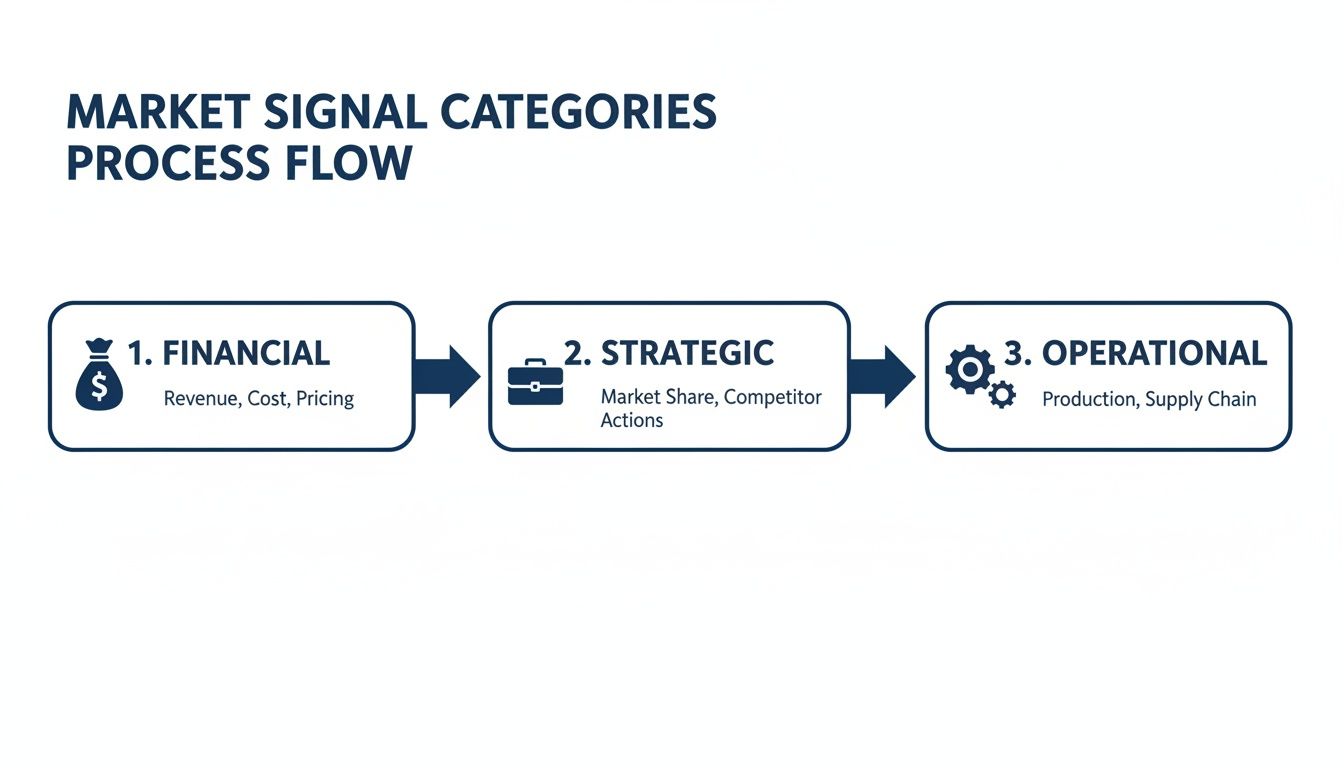
By tracking these three pillars, you can develop a multi-dimensional understanding of an account's trajectory and immediate needs.
From Raw Data to Actionable Alerts
The real power comes from integrating these alerts into your team's daily workflow. An unread email digest is useless. A crisp, actionable alert delivered in the right channel triggers immediate action.
The objective is to eliminate the manual research tax for good. A well-designed system should deliver alerts so clear that a rep can understand the "so what" in under 30 seconds and immediately begin their outreach.
Modern market-trend analysis is becoming an AI-and-data problem. With the global artificial intelligence market projected to reach $407 billion by 2027, the tools for this are becoming more accessible. This means a rep can get a Slack alert hours after a target account announces a major initiative, creating a massive competitive advantage.
You can connect these automated feeds directly into your CRM, a dedicated Slack channel, or team email. For a deeper dive into the tools that make this possible, check out our guide on choosing the right sales intelligence platform. If you want to get more technical, you could even learn how to build a custom SERP results checker as a core component of your engine.
Turn Market Trends Into Compelling Outreach

Finding the perfect signal is only half the battle. Knowing what to do with it is what builds pipeline. This is where execution comes in—transforming a data point into a conversation your prospect wants to have.
The goal is to move beyond the generic. Anyone can send an email saying, "I saw your company hired a new CIO." It's a hollow observation that screams "sales pitch incoming."
Top performers connect that signal to a broader market context and a specific, implied pain point. They develop a compelling point of view (POV).
Develop a Strong Point of View
A strong POV is the bridge between a market trend and your solution's value. It shows you haven’t just seen the news; you’ve understood its implications. This approach changes the dynamic of your outreach.
Here’s a simple framework: Signal + Implied Pain + Industry Insight = Compelling POV.
Let's unpack that with an example. Imagine your target, a mid-size logistics company, just hired its first-ever Chief Sustainability Officer (CSO).
- Weak Outreach: "Congrats on hiring Jane Doe as your new CSO. I'd love to show you how our ESG reporting software works."
- Strong Outreach: "With your new CSO's appointment, it’s clear you’re prioritizing sustainability. We're seeing leaders in logistics use this moment to tackle the challenge of fragmented emissions data—it helps them meet new regulatory deadlines and sharpen their brand reputation with eco-conscious clients."
The second example doesn't just state a fact; it builds a narrative. It shows you understand their world and the pressures they're facing.
The most effective outreach proves you’ve done your homework. It connects a company-level trend to a specific pain point your solution directly addresses, turning a cold email into valuable insight.
Crafting Trigger-Based Outreach That Works
Once you have your POV, you can build specific outreach plays. These aren't just one-off emails but thoughtful, sequenced touchpoints designed to start conversations.
Example 1: The New Executive Trigger
- Signal: A target account hires a new VP of Engineering.
- POV: A new engineering leader is almost always brought in to modernize the tech stack, boost developer productivity, or attack technical debt.
- Email Snippet: "Hi [Name], I saw the announcement about [New VP's Name] joining as the new VP of Engineering. Typically, when a new leader comes on board, one of their first priorities is to assess developer workflows and tools. We recently helped [Similar Company] cut their build times by 30% right after they made a similar leadership change."
Example 2: The Funding Announcement Trigger
- Signal: A SaaS company raises a $40 million Series B.
- POV: Fresh funding means aggressive growth targets, immense pressure to scale operations efficiently, and a new budget for tools that support that expansion.
- Multi-Threading Play:
- To the CFO: "With your recent Series B, managing burn rate while scaling is critical. Leaders in your position are looking for ways to automate financial reporting to give the board better visibility."
- To the VP of Sales: "Congrats on the funding! Hitting those new growth targets means your team needs to be more efficient. Are you thinking about how to streamline your reps' workflows so they can spend more time selling?"
This approach respects the buyer’s time by offering immediate value. For more strategies, explore our deep dive into outbound lead generation.
When you connect trends to real-world pain, your outreach becomes impossible to ignore.

“The Business Development team gets 80 to 90 percent of what they need in 15 minutes. That is a complete shift in how our reps work.”
Andrew Giordano
VP of Global Commercial Operations, Analytic Partners
Take Your Trend Analysis Team-Wide
One rep digging up a great insight is a good start. But a systematic, team-wide approach is what moves the revenue needle. When your entire organization learns how to analyze and act on market trends, you build a serious competitive advantage. Revenue leaders and RevOps need to turn trend analysis into a core part of your go-to-market engine.
The mission is to shift from random acts of research to a consistent, scalable system. This ensures every rep—from the seasoned pro to the new hire—has the same high-quality intelligence. It stops being a "nice-to-have" skill and becomes an operational backbone.
Build a Data-Driven Prioritization Model
Not all accounts are created equal, and not every trend has the same impact. An effective prioritization model uses trend data to automatically surface the highest-opportunity accounts. This isn't about stale firmographics; it's about dynamic, real-time signals.
You can build a powerful scoring model in your CRM that adds points to accounts based on specific triggers. It might look something like this:
- +15 points for a recent funding round over $20 million. (Signal: Cash and mandate to grow)
- +10 points for a key executive hire (like a new CIO or CRO) in the last 90 days. (Signal: New leaders often buy new tools)
- +5 points for a spike in hiring for a department you sell into. (Signal: Expansion and growing pains)
When you layer these signal-based scores over your existing ICP criteria, you create a dynamic "hot list." This list tells your AEs exactly where to focus their energy each day, ensuring they’re always chasing accounts with genuine momentum.
A great prioritization model doesn't just tell you who to call—it tells you why now. It uses market trends to rank your addressable market based on purchase intent.
Standardize Your Intel with Dynamic Account Plans
Inconsistent account planning is a massive bottleneck. To scale trend analysis, you need standardized, dynamic templates that are simple to use and are automatically fed with the latest intelligence.
Create a shared account plan template in your CRM or a collaborative tool like Notion. This template needs dedicated sections that map directly to your key signals and trends.
What to Include in Your Dynamic Account Plan Template:
- Recent Company Triggers: A live feed or summary of recent funding, M&A activity, or major partnerships.
- Key Executive Moves: A running list of recent C-level or VP-level hires, with links to their LinkedIn profiles.
- Strategic Initiatives: Notes from earnings calls or press releases that spell out the company's biggest priorities.
- Relevant Talking Points: Pre-built conversation starters that connect each signal to a specific pain point your solution addresses.
When new signals are detected for an account, they should automatically flow into the plan. This turns a static document into a living brief that gives every rep an up-to-the-minute view before any call, ensuring the whole team is working from the same real-time playbook.
Key Takeaways
- Effective market trend analysis for sales means tracking real-time signals like executive hires, funding rounds, and strategy shifts rather than waiting for quarterly industry reports that are already old news by the time they are published.
- Build a "Signal-to-Pain" matrix that maps specific account triggers to the business problems your solution solves, giving every rep the confidence to act decisively on the signals that matter most.
- Automate your monitoring system using Google Alerts for financial signals, RSS feeds for industry publications, and LinkedIn Sales Navigator for operational signals to create a multi-dimensional view of each account.
- Transform raw signals into compelling outreach by developing a strong Point of View that connects the trigger to a broader market context and a specific pain point, moving beyond hollow observations to genuine insight.
- Scale trend analysis team-wide by building a data-driven prioritization model in your CRM that scores accounts based on real-time triggers, creating a dynamic "hot list" that tells reps where to focus and why.
Got Questions About Market Trend Analysis?
Adopting a systematic approach for trend analysis is a big shift. Here are answers to common questions we hear from B2B revenue teams.
How Much Time Should Reps Spend on This Daily?
The answer: Less than 15 minutes a day.
If your reps are spending hours hunting for signals, the system is broken. The point of building an intelligence engine is to eliminate manual research, not create more of it.
A well-designed workflow pushes crisp, pre-vetted alerts directly to your team via Slack, email, or your CRM. The goal isn't more research; it's faster, more decisive action on high-quality intelligence.
If trend analysis feels like a chore, you haven't automated enough. The process should feel less like research and more like receiving a perfectly timed tap on the shoulder telling you where to focus.
The real work shouldn't be in finding the signal but in crafting a compelling point of view based on it. That’s where a rep’s time is best spent.
What’s the Difference Between a Signal and a Trend?
This is a key distinction. Think of it like this: signals are the individual dots, and a trend is the pattern you see when you connect them.
-
A signal is a single, discrete event. For example: "Company X just hired a new Chief Information Security Officer." This is an actionable piece of information for that one account.
-
A trend is the bigger picture. For instance: "We've seen 25% of our target accounts in the financial services industry hire their first-ever CISO in the last six months."
Both are valuable. Signals give you the "why now" for immediate outreach to a specific account. Trends inform your entire go-to-market strategy, campaign messaging, and even your product roadmap. A great system tracks both.
How Do You Get Sales Reps to Actually Use This Data?
Adoption comes down to one thing: making it ridiculously easy to see the value. Simply dumping raw news alerts on them is a recipe for failure.
To get your team on board, the intelligence you provide must be:
- Directly in their workflow. Don't make them log into another platform. Push alerts into the tools they already use every day.
- Actionable at a glance. The alert must clearly state the signal and the "so what?" It should even include a suggested talking point or angle they can use right away.
- Proven to work. Showcase wins from early adopters. When one rep closes a deal by acting on a signal, share that story. Success is contagious.
Stop wasting hours on manual research and start winning more deals with timely, relevant outreach. Salesmotion is an AI-powered account intelligence platform that delivers actionable signals directly to your team, so you can always have a compelling "why now." See how it works.
Frequently Asked Questions
How is market trend analysis different for sales teams versus analysts?
For sales teams, market trend analysis is not about producing broad industry reports or academic research. It is about spotting real-time, account-level signals like executive hires, funding rounds, and strategic shifts that create immediate selling opportunities. The focus is on actionable triggers that answer the question "why should I contact this specific account right now?" rather than understanding macro-level market movements.
What types of market signals should B2B sales teams prioritize?
The most valuable signals fall into three categories: financial signals (funding rounds, M&A activity, earnings call highlights), strategic signals (new market entries, major partnerships, product launches), and operational signals (key executive hires, hiring sprees in specific departments, tech stack changes). The strongest signals draw a direct line from a company's public announcement to a business problem your solution solves.
How much time should sales reps spend on market trend analysis each day?
Less than 15 minutes a day. If your reps are spending hours hunting for signals, the system is broken. The point of building an automated intelligence engine is to eliminate manual research, not create more of it. A well-designed workflow pushes pre-vetted, contextual alerts directly to your team so that reps spend their time crafting compelling outreach rather than searching for information.
What is a Signal-to-Pain matrix and how do you build one?
A Signal-to-Pain matrix is a simple framework that maps specific account triggers to the business problems your solution solves. For each signal your team monitors, document the implied pain point it creates and the relevant talking points that connect your solution. This tool removes guesswork from prospecting and gives every rep the confidence to act decisively when a high-value signal appears.
What is the difference between a signal and a market trend?
A signal is a single, discrete event at one account, such as a company hiring a new Chief Information Security Officer. A trend is the broader pattern you see when you connect multiple signals, such as 25% of your target accounts in financial services hiring their first CISO in the past six months. Signals drive immediate, account-specific outreach, while trends inform your overall go-to-market strategy and messaging.
How do you get sales reps to actually use market intelligence data?
Adoption depends on making the intelligence ridiculously easy to access and immediately valuable. Push alerts directly into tools reps already use like Slack or their CRM, ensure each alert clearly states the signal and the "so what," and showcase early wins publicly. When reps see a colleague close a deal by acting on a signal, the value becomes contagious and adoption accelerates.