Your rep owns 40 target accounts and a slide deck last updated in January. At the pipeline meeting, they can explain the deal they're working today, but not which neglected account deserves attention next. Meanwhile, a target company has hired a new executive, changed its priorities, or started recruiting for a project your team could support.
That's the problem sales account planning software should solve. Not prettier notes. Better decisions about where sellers spend their time, who they engage, and what they do next.
What Sales Account Planning Software Actually Does
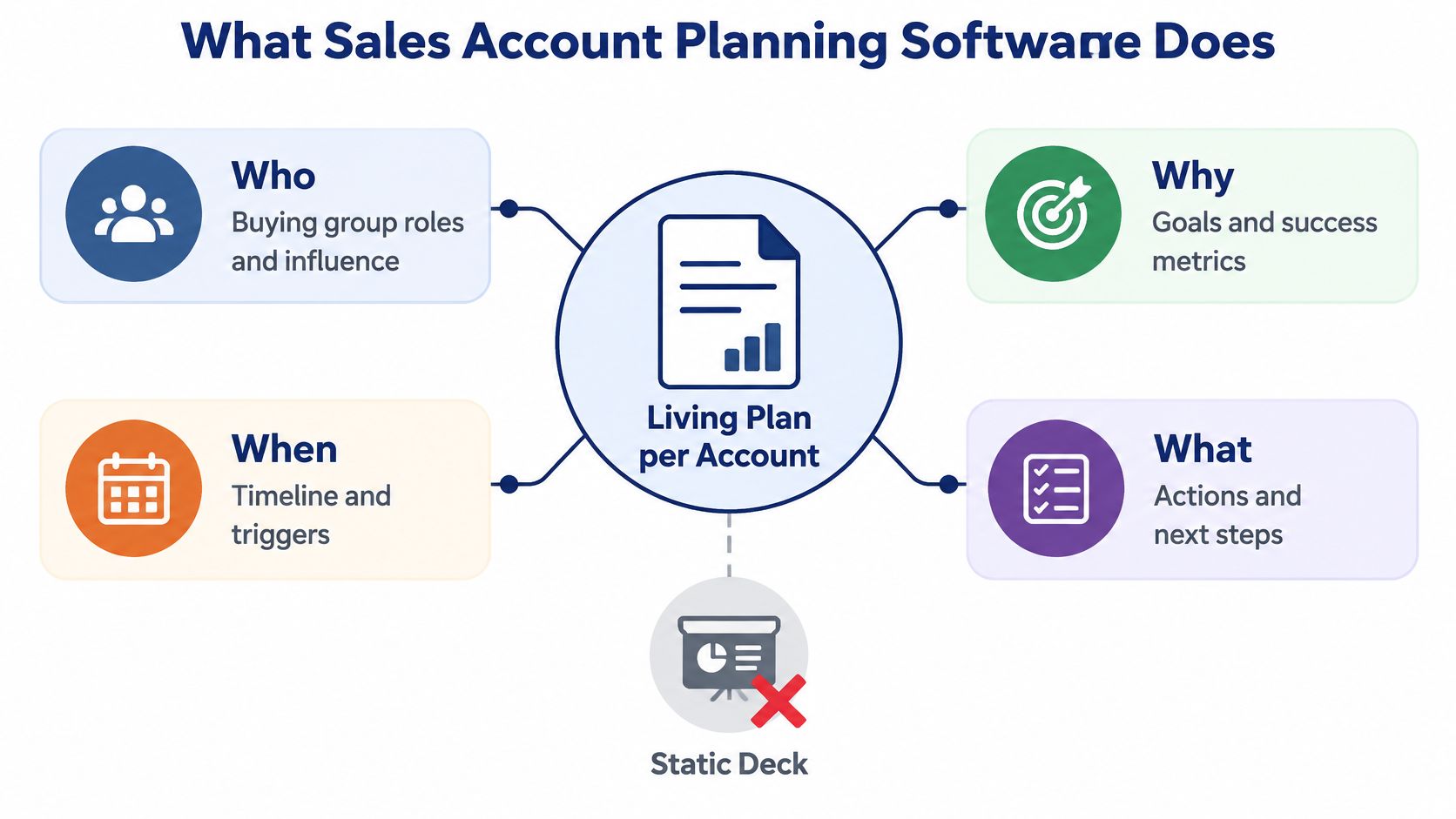
Sales account planning software keeps a living plan for each target account. It connects who matters, what's changing, what your team believes about the opportunity, and the next action someone owns.
A static plan is a paper map drawn once. Planning software should work more like a navigation system, recalculating when conditions change. An executive departure should prompt a stakeholder review, not sit unnoticed beside an outdated relationship chart.
The layers behind a living plan
Most platforms combine three layers:
- Account intelligence, the brief: A structured view of customer priorities, stakeholders, risks, and potential opportunities.
- Signal monitoring, the trigger: Changes that warrant a fresh look at the account.
- Outreach, the action: A relevant conversation or follow-up grounded in that change.
The software earns its place when those layers connect. An alert without an owner is just another notification.
Market size isn't the buying case
Gartner's CRM sales-software market analysis forecast worldwide revenue of $20.6 billion, with a 12.9% five-year compound annual growth rate through 2027; a separate Gartner-based summary reported total CRM software revenue of $128 billion in 2024, up 13.4% from the prior year. These figures describe the adjacent CRM market, not a standalone account-planning segment.
The more useful buying question is where deeper planning belongs. SAMA's strategic-account-management guidance says member organizations typically designate 2% to 20% of clients as strategic. Concentrate planning effort where revenue, expansion potential, or strategic influence justifies it.
Choose software by the decisions it improves, the workflows your team will maintain, and the commercial results you can credibly measure.
Need to scale account research?
3 hours of account research, done in 5 minutes. That's the Salesmotion promise.
Cited account briefs, SWOT analyses, talking points — built from 1,000+ public sources. From $85/mo.
The Four Features That Define Account Planning Software
Evaluate capabilities in the order a rep uses them: understand the account, notice a change, prepare a response, and record the work. A strong demonstration should follow that path using one of your own accounts, not a polished sample company.
From account context to a relevant response
Account intelligence turns scattered information into a structured brief covering initiatives, risks, stakeholders, competitive context, and suggested talk tracks. A useful brief separates public evidence from the seller's hypothesis. A hiring announcement might suggest an initiative, but it doesn't confirm budget or purchase intent.
For each monitored account, Salesmotion scans news, filings, hiring activity, and dozens of other sources, detects buying signals, updates research briefs, and surfaces verified decision-maker contacts.
Signal monitoring should explain why an event matters. A new CRO, funding round, competitor mention, or relevant job posting can justify attention, but only in context. Think of a smoke alarm that tells you which room needs checking, not merely that something is burning. Our Signal Agent watches every account in a territory for 50+ signal types across 1,000+ sources, 24/7, and alerts users when something changes.
Personalized outreach translates the event into a stakeholder-specific conversation. The rep should review the premise and wording before sending. Mentioning an executive appointment isn't enough; the message needs a plausible connection to that executive's responsibilities.
Core features compared by what good looks like
| Feature | What It Does | What Good Looks Like | Red Flag |
|---|---|---|---|
| Account intelligence | Builds a structured brief on each account | Cited sources, named stakeholders, initiatives and risks, refreshed continuously | Clipped news with no sources or sense of what matters |
| Signal monitoring | Watches accounts for buying triggers | Broad signal coverage, daily checks, each alert explains the so what | Only news alerts, or alerts with no context |
| Personalized outreach | Drafts messages tied to real account events | Each draft cites a specific signal and a stakeholder priority, reviewed before sending | Mail-merge templates with a first-name field |
| CRM integration | Moves briefs and alerts into existing systems | Native sync with Salesforce or HubSpot, alerts in Slack or email | CSV export only and manual double entry |
CRM integration determines whether the work sticks. Briefs and alerts should reach Salesforce or HubSpot and the channels sellers already use, rather than require another tab. We integrate with Salesforce, HubSpot, Salesloft, lemlist, Outreach, and Clay.
Test what happens when records change, contacts duplicate, or an account changes owners. Integration logos won't answer those questions.
A feature only earns its place if it changes what someone does on Monday morning.

“Salesmotion has been a game-changer for me. I used to spend 12 hours a week on prospect research, now it's down to 4. Plus I'm finding stuff I was totally missing - podcasts, news mentions, the good bits.”
George Treschi
Account Executive, FY25 President's Club, Sigma
Business Value and ROI Worth Defending in Front of Finance
The strongest business case has three levers: better prioritization, wider buying-group coverage, and faster response. Research time saved matters, but it doesn't tell finance whether sellers redirected that capacity toward better opportunities.
In a McKinsey survey of 2,500 B2B companies, 72% of the fastest-growing businesses said their analytics effectively supported sales planning, compared with 50% of the slowest-growing businesses; the same article describes a high-tech company whose granular account and product analysis raised sales productivity by 5% to 10% while reducing planning time by two-thirds. These findings support investing in better commercial decisions, but they don't prove that buying software causes growth.

A worked capacity example
Consider a hypothetical team of 12 account executives, each managing 25 target accounts. Assume each saves 2.5 hours weekly across 46 working weeks, at a loaded hourly cost of $75.
| Hypothetical input | Calculation |
|---|---|
| Annual capacity recovered | 12 × 2.5 × 46 = 1,380 hours |
| Capacity value | 1,380 × $75 = $103,500 |
That's capacity value, not automatically cash savings. Unless you reduce expenditure, finance should treat it as time available for additional selling work.
Hours saved is the floor of the return, not the ceiling.
The missing question is what sellers accomplish with that time. They might reach an overlooked budget owner, validate an expansion hypothesis, or stop pursuing an account with no active need. Each is a better allocation decision, even though only some produce immediate pipeline.
Build the case around outcomes
Track pipeline per account and win rate on planned accounts against a baseline, alongside software, implementation, and administration costs. Keep influenced pipeline separate from revenue, and don't count the same opportunity as a benefit under several headings.
Use a consistent sales-intelligence ROI framework to distinguish capacity recovered from commercial improvement. Before rollout starts, measure current planning time, trigger response time, and pipeline per account so finance has something more reliable than seller recollection.
Governance, Trust and Vendor Questions to Ask
Trust belongs in the buying decision, not in a security questionnaire sent after the commercial agreement. Salesforce's sales-statistics compilation reports that 51% of sales professionals say data-security concerns halt AI initiatives; separate research summarized alongside that finding puts 44.4% of revenue leaders as viewing human skepticism as a bigger barrier to measurable AI value than technical problems.
More data doesn't automatically create better plans. Unverified volume can lead sellers to manufacture urgency, repeat stale information, or personalize outreach around an assumption the buyer never made.
Vendor questions with strong answers and red flags
Get these answers in writing before signing.
| Question to Ask | Strong Answer | Red Flag |
|---|---|---|
| Which sources feed each account brief? | Named source types with links and dates | Generic AI insights with no source list |
| Can a rep see the evidence behind a recommendation? | Every claim links to its source with a timestamp | Summaries with no way to trace them |
| How are conflicting signals resolved? | A documented rule, visible in the interface | Unexplained scores |
| What is logged when AI drafts outreach? | Audit log of drafts, edits and sends | No record of what was sent or changed |
| What happens when a fact is wrong? | A correction workflow that feeds back into the brief | Support email with no fix path |
| Does the tool replace our contact database? | No, it enriches the existing database | A forced migration before go-live |
| How is pricing scaled? | Per-seat or per-account limits written into the contract | Limits that surface only at renewal |
Test conflict handling with a practical scenario. An older company page names an executive who has left, while a recent announcement names the replacement. The interface should make the dates and evidence visible rather than combine both people into a misleading account map.
Separate suggestions from permission to act
Your evaluation should also cover:
- Confidence indicators: Reps can distinguish confirmed facts from inferred relevance.
- Permissions: Access respects account ownership and sensitive internal information.
- Retention controls: Administrators can understand what gets stored and how it's removed.
- Regional privacy handling: Security and legal teams can review applicable processing arrangements.
- Human-review boundaries: Higher-risk outreach requires approval, with a clear distinction between an AI suggestion and an autonomous action.
A sales-intelligence security review should involve the people who will approve the deployment and the managers who will supervise its use. Ask sellers to challenge a recommendation during the evaluation. If they can't inspect or correct it, distrust is a reasonable response.
On data fit, we work alongside your contact database rather than replacing it. On monitoring scale, we have no practical limit on the number of accounts a customer can monitor. Keep that distinction separate from contractual pricing terms, which still need to be explicit.
A vendor that can't answer these questions in writing is telling you something useful about the operational risk you'd be accepting.

“The Business Development team gets 80 to 90 percent of what they need in 15 minutes. That is a complete shift in how our reps work.”
Andrew Giordano
VP of Global Commercial Operations, Analytic Partners
KPIs That Show Account Planning Is Working
CRM login counts show use, not impact. A seller can open a plan every day without changing account priorities or improving stakeholder coverage.
McKinsey's analysis of next-generation B2B sales capabilities reports that outperforming organizations update account priorities and realign coverage as frequently as monthly, rather than relying on annual reviews. Match your management cadence to changing account conditions.
Measure health, speed, and commercial impact
Separate operating health, such as plan coverage and freshness, from speed, such as trigger response, and commercial impact, such as qualified pipeline and opportunity progression. Otherwise, a busy team can look successful while pursuing the wrong accounts.
The targets below are proposed pilot operating rules, not industry benchmarks. Establish starting values during the first 30 days, including a week-one snapshot for rollout comparisons.
| KPI | Definition | Target or Baseline | Review Cadence |
|---|---|---|---|
| Plan coverage | Share of target accounts with a plan updated in the last 30 days | Proposed target of 90% or more of Tier 1 accounts | Weekly |
| Trigger-to-touch time | Hours from a buying signal to the first outreach | Proposed target under 48 hours for highest-priority triggers | Weekly |
| Signal-to-opportunity rate | Share of signals that lead to a meeting or opportunity | Set baseline in first 30 days; separate meetings from qualified opportunities | Monthly |
| Multi-threading depth | Distinct buying-group contacts engaged per open opportunity | Set baseline in first 30 days, then raise for large deals | Monthly |
| Pipeline per monitored account | Pipeline created per account in the planned tier | Establish baseline, then compare against matched untreated accounts | Quarterly |
| Win rate and deal velocity on planned accounts | Win rate and days to close on planned vs. unplanned accounts | Compare against baseline and track the gap | Quarterly |
Keep the denominators honest
Define an engaged stakeholder as someone participating in a meaningful exchange, not merely receiving an email. Likewise, exclude duplicate alerts from the signal denominator and keep opportunity qualification consistent across teams.
Measurement rule: Compare like with like before attributing improvement to the software.
Match untreated accounts on segment, potential, existing relationship, and starting pipeline where practical. Record material differences in seller effort or campaign support. Report influenced pipeline, but don't claim the software caused every win.
Rolling Out Account Planning Software in Five Phases
Rollout fails less often because the product is wrong than because managers keep inspecting accounts the old way. Complex B2B purchases pull in a large buying group, and a plan built around whoever responded first misses the people who control approval, implementation, and budget. The gap surfaces late, when a deal stalls on a stakeholder nobody mapped. That is why the pilot has to test whether the software changes where seller attention goes, not whether reps log in.
Run a bounded operational test
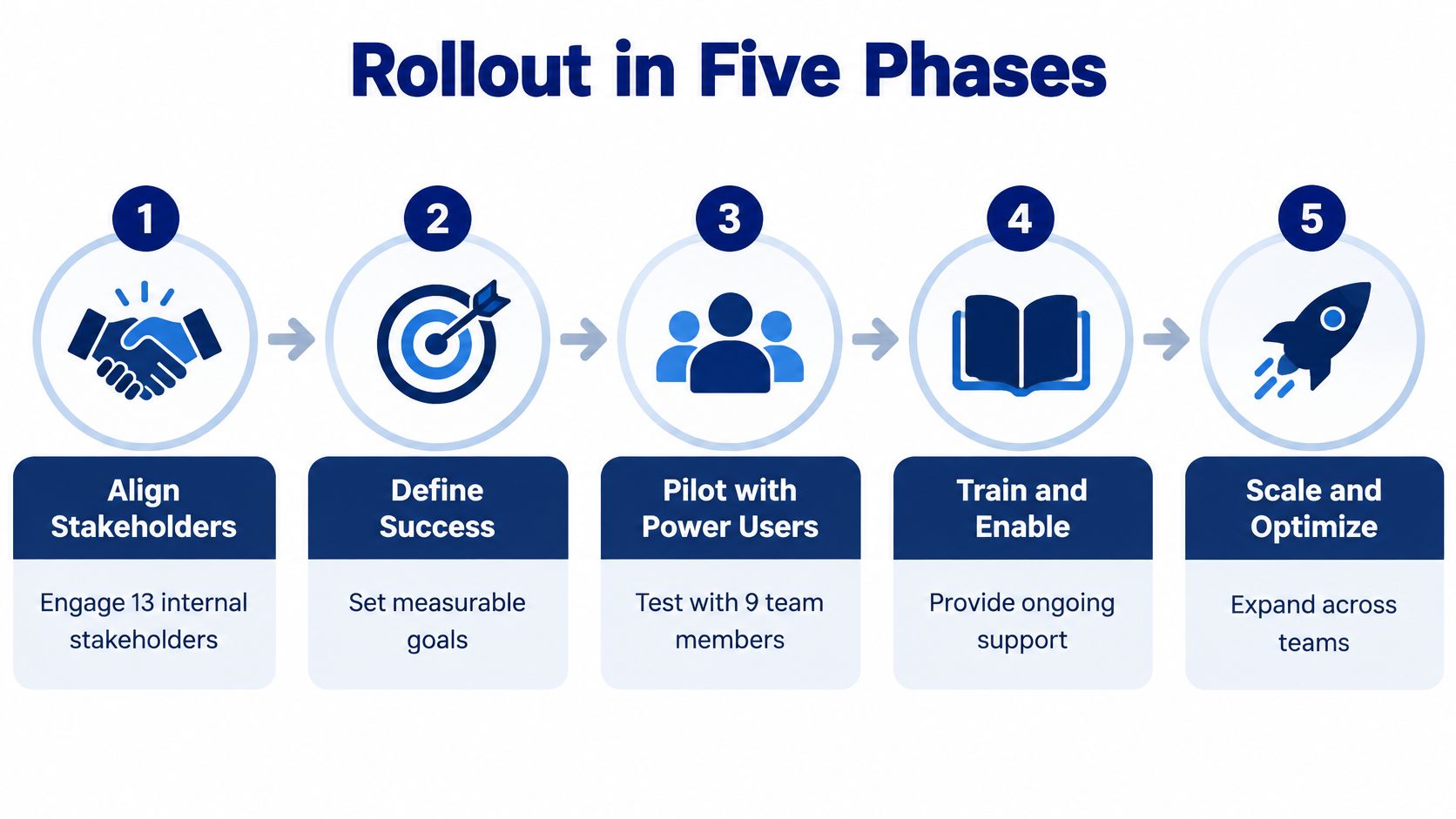
Use this proposed rollout sequence rather than switching the whole organization at once.
- Choose a pilot of 40 accounts across two segments. Large-account and mid-market groups will expose different research needs and coverage patterns. Keep the account selection stable enough to evaluate progress.
- Set a five-field plan template. Use strategic hypothesis, stakeholder map, active initiatives, next action, and named owner. A concise template makes missing thinking easier to spot than a long mandatory form.
- Connect the working systems. Confirm CRM synchronization, route alerts to Slack or email, and retain the existing contact database. Test account matching before distributing intelligence widely.
- Hold a 30-minute weekly account review. Managers inspect plans, and reps act on the top three relevant alerts. Discuss the resulting decision, including when the right choice is not to contact the account.
- Expand after 60 to 90 days only if operating measures improve. Compare plan coverage and trigger-to-touch time with the week-one baseline. Resolve workflow failures before adding more sellers.
Get the vendor's rollout responsibilities in writing, including training, integration troubleshooting, and adoption support. We stay with customers through rollout to ensure adoption, because an activated seat counts for little if the weekly review never changes which accounts get worked.
Fix the workflow before expanding
Alert fatigue: Cut the trigger list to events tied to your sales motion. A funding announcement isn't equally useful to every seller.
Stale plans: Assign a named owner and a proposed 30-day refresh requirement, with immediate updates for material changes. Updating the timestamp without revisiting the hypothesis doesn't count.
Low adoption: Tie the weekly review to pipeline inspection. Managers should ask which evidence changed the account strategy, not whether every field is populated.
Build those plans before outreach. In its survey of 2,509 recent B2B buyers, the 6sense 2024 Buyer Experience Report found that 69% of the purchasing process occurred before buyers engaged with sellers. Discovery still earns its place, though it shouldn't be your first attempt to understand an account's priorities.
Where Autonomous AI Agents Change Account Planning
Say a target company announces a supply-chain overhaul during an earnings call. In a manual workflow, the transcript might remain unread until quarterly preparation, while the rep continues sending messages about a different business problem.
The agent workflow starts with the same public evidence, but assigns the research, monitoring, and drafting work to distinct tasks. The seller still has to decide whether the initiative creates a credible opportunity.
From transcript to reviewable outreach
The Research Agent builds a structured brief covering initiatives, risks, stakeholders, and talk tracks. Our broader research capability draws from 1,000+ public sources, while the Deep Research Agent creates one-click briefs from earnings calls, filings, news, and 50+ sources. It produces the brief in minutes rather than the hours a manual brief can take.
The Signal Agent monitors for changes connected to the supply-chain priority, a new executive, or a relevant job posting. The useful output isn't just the event. It's an explanation of why the event might change the account strategy.
The Prospector Agent then drafts a personalized, multi-step sequence anchored to that signal. For an operations stakeholder, the draft might connect the announced overhaul to implementation coordination and ask how the team is approaching the transition, without pretending to know an undisclosed problem.
Judge the output, not just the automation
Salesmotion reports 80% less research time for users of its agents. We also report that customer Cytel consolidated five separate research tools, reduced research time by half, and accelerated account planning by 30%. Treat these as company-reported outcomes, not guaranteed pilot results.
The case for autonomous account research is strongest when the resulting message contributes useful context. HubSpot's compilation, cited in Reach Marketing's B2B buyer-research roundup, reports that 96% of prospects research companies and products before engaging a sales representative, while 71% prefer independent research over speaking with a rep.
Agents draft and alert. The rep judges, edits, and sends.
That boundary protects relevance. An announced initiative supports a thoughtful question, not a claim that you already understand the buyer's requirements.
Confirm Your Shortlist and Start a Pilot This Quarter
Start with a proposed shortlist of three vendors. Score each against the feature comparison, written governance answers, and KPI definitions. Drop vendors that can't document how their intelligence is sourced, corrected, and controlled, even if their demonstration looks impressive.
Include Salesmotion if your team needs autonomous research, signal alerts, and drafted outreach in one place. Judge our platform against exactly the same criteria as the alternatives, including integration behavior and the work your managers must do to sustain adoption.
Set the decision before the test
Next, run a proposed 60-day, 40-account pilot using a written sales-intelligence pilot evaluation. Capture week-one plan coverage, trigger-to-touch time, and pipeline per account, then maintain consistent definitions throughout the test.
Finally, agree on the decision criteria before access goes live:
- Coverage: A proposed threshold of 90% or more of Tier 1 accounts with current plans.
- Responsiveness: A proposed threshold under 48 hours for priority triggers.
- Commercial progress: A measurable win-rate gap between planned and unplanned accounts, where enough opportunities have closed to make comparison meaningful.
If your sales cycle extends beyond the pilot, don't force a premature win-rate conclusion. Make the operating decision on the available evidence and schedule a later commercial-outcome review.
A combined platform may reduce tool sprawl, but test which subscriptions you can retire. Use Cytel's consolidation outcome as a reference case, not an assumed saving.
For a concrete schedule, launch the proposed pilot on July 1, 2026, and set September 1, 2026 as the decision date. Assign the RevOps lead to report results to leadership, with the sales manager accountable for explaining adoption and account-level decisions.
Salesmotion combines account research, continuous buying-signal monitoring, and drafted outreach to help teams turn account plans into coordinated action. Visit Salesmotion to evaluate those workflows against your own target accounts and build a pilot around better prioritization, stronger coverage, and measurable pipeline outcomes.