Autonomous research is AI-driven, continuous account intelligence: software agents monitor public information, identify what is relevant, and hand reps a brief, alert, or outreach draft without waiting for someone to trigger every step. Humans keep the judgment and the final approval.
TL;DR: Manual account research gets rationed to a few accounts, goes stale, and varies by rep. Autonomous research turns it into a system: agents work through goal understanding, gathering, extraction, synthesis, source tracking, and report generation, and keep links to the original material so reps can verify claims. To deploy it, start with one operational question, pilot on a narrow segment, keep outreach drafts in review mode, and track signal-to-action rate and coverage across the target list.
Monday morning usually starts the same way for a revenue leader. A rep says the target account looks active. Another says the buyer has gone quiet. A manager asks for updated account briefs before pipeline review. By the time those notes arrive, one company has announced a new executive hire, another has posted a role that changes the buying story, and a third has already taken a meeting with a faster competitor.
That gap is the core cost of manual research. It's not just time spent in browser tabs. It's missed timing, weak relevance, and outreach built on stale context. Teams call it preparation, but a lot of it is really delay.
Autonomous research changes that operating model. Instead of waiting for each rep to gather, clean, interpret, and rewrite account context by hand, AI agents can monitor public information continuously, synthesize what matters, and hand reps a usable brief or next action while the signal is still fresh. If you need a quick refresher on the broader category, this overview of sales intelligence fundamentals is a useful starting point.
Introduction to Autonomous Research
A familiar sales problem hides in plain sight. Reps don't ignore research because they're lazy. They skip it because the day fills up with calls, follow-ups, internal updates, and forecast pressure. Research becomes something they do only for the biggest accounts or the deals already in motion.
That creates an uneven pipeline. A few strategic accounts get deep attention. The rest get shallow personalization, generic messaging, or no outreach at all. When a buying signal appears, the team often sees it too late or doesn't know what to do with it. The issue isn't effort. The issue is a workflow that depends on every rep acting like a part-time analyst.
The hidden tax in everyday prospecting
Manual account prep usually looks simple on paper. Open LinkedIn. Scan the company site. Check the latest press release. Search for earnings commentary. Look at job postings. Pull a few notes into the CRM. Then repeat for the next account.
In practice, that process breaks in predictable ways:
- Research gets rationed: Reps save their time for a small set of accounts.
- Signals get missed: Hiring changes, strategic shifts, and executive moves slip through.
- Context goes stale: Yesterday's brief becomes wrong faster than expected.
- Quality varies by rep: One person writes sharp account notes. Another pastes headlines with no interpretation.
Practical rule: If account context depends on individual rep discipline, it won't be consistent at scale.
Autonomous research matters because it removes that dependency. It gives teams a way to treat account intelligence as a system instead of a side task. That's why revenue leaders are paying closer attention to how research gets done, not just which data vendors they buy.
Understanding Key Concepts
Most confusion starts with the name. Autonomous research doesn't mean a robot replaces your sales team. It means software handles the repetitive research work on its own, then passes structured findings to humans who decide what to do next.
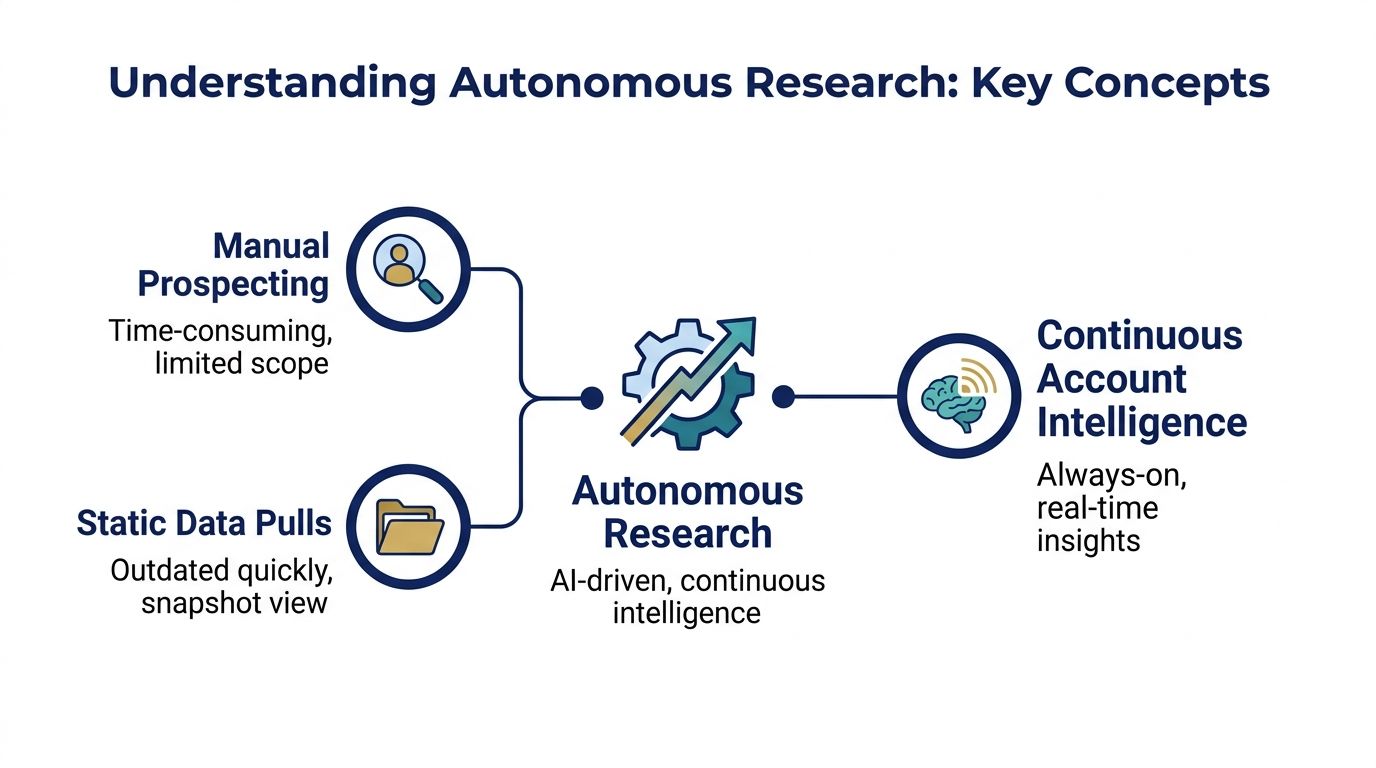
The easiest analogy is a library. Manual prospecting is like asking a clerk to walk to the shelves every time you need a book. Static data pulls are like printing a catalog once and hoping it stays useful. Autonomous research works more like a live digital index that keeps updating itself, flags what changed, and points you to the exact shelf before you ask.
What autonomous research actually means
In plain language, autonomous research is AI-driven, continuous intelligence. The system gathers information from public sources, identifies what's relevant, connects the dots, and turns that into a brief, alert, or outreach draft without waiting for a rep to trigger every step.
Three terms worth getting straight
People often mix up alerts, research, and outreach automation. They aren't the same.
-
Research agent This agent builds the account picture (here is how Salesmotion's Research Agent does it). It gathers company context, recent changes, stakeholder clues, and strategic themes, then turns that into something a rep can effectively use.
-
Signal agent
This agent watches for change. It notices events that may create urgency, like a funding announcement, a new executive, or a shift in hiring patterns. -
Outreach agent
This agent uses the research and signals to draft outreach tied to a real reason to contact the account now.
Why teams care now
The old model gave teams snapshots. The new model gives them motion. That's the operational shift. Instead of checking whether an account was interesting last week, reps can work from a stream of fresh context.
If you want a practical view of how these roles show up in go-to-market work, this overview of AI agents for sales teams breaks down the category in sales language.
Continuous intelligence is the difference between knowing a company exists and knowing why a conversation might happen now.

“Consolidation of prospect company information that I can use frequently to be way better informed when I'm doing my outbound, preparing for a meeting, or building relationships. Ease of use and Customer Support is excellent.”
Werner Schmidt
CEO & Co-Founder, Lative
How Autonomous Research Works
Autonomous research feels mysterious until you break it into steps. Under the hood, it's less like magic and more like a strong research analyst following a disciplined process over and over.
A common design, walked through in this research agent architecture guide, breaks the work into six stages: goal understanding, gathering, extraction, synthesis, source tracking, and report generation.
The six stages in sales terms
-
Goal understanding
The system starts by defining the job. Is it researching an account for first outreach, monitoring for timing signals, or preparing a brief before an executive meeting? Clear goals shape what it looks for. -
Information gathering
The agent searches relevant public sources. In a sales setting, that can include company pages, filings, press releases, role postings, and executive content. -
Extraction
Raw text isn't useful by itself. The system pulls out the parts that matter, such as initiatives, leadership changes, product launches, or expansion patterns. -
Synthesis
Value manifests at this stage. The agent asks, “So what?” A hiring spike may suggest a systems change. A new executive may reset priorities. A funding event may increase urgency. -
Source tracking
Good systems keep links back to the original material so reps can verify claims instead of trusting unsupported summaries. -
Report generation
The output becomes usable. That might be a brief, an alert, or a recommended message draft.
What separates a serious system from a basic scraper
Strong autonomous research systems don't just collect text. They refine searches, compare conflicting claims, and prefer primary sources when details disagree. Multi-agent designs often split work in parallel, with one agent planning, others gathering evidence, and another consolidating the result.
That matters in vendor evaluation. A tool that only summarizes a few pages can look impressive in a demo but fail in daily use. A stronger setup keeps checking, revising, and grounding the output in sources. If you're evaluating process design in more detail, this walkthrough on how to automate sales research with AI is a good companion resource.
The best question to ask a vendor isn't “Can it summarize?” It's “How does it verify, prioritize, and explain what changed?”
Benefits and ROI for Revenue Teams
The clearest benefit of autonomous research is simple. Reps spend less time hunting for context and more time acting on it. But the bigger payoff is operational consistency. Every account can get researched, monitored, and updated without relying on who had spare time that week.
One reason this shift is practical, not theoretical, is scale: software can watch every account on the list every day, which no rep can.
Where the return really comes from
A lot of ROI conversations get stuck on labor savings. That matters, but it's only part of the picture. Revenue teams usually gain value in four places:
- Coverage improves: Teams don't have to cherry-pick only a handful of named accounts.
- Timing improves: Signals reach reps while they can still shape a conversation.
- Messaging improves: Outreach has a reason behind it, not just a personalization token.
- Manager visibility improves: Leaders can inspect research quality as a process, not guess from rep notes.
A practical ROI lens
When leaders evaluate autonomous research, they usually ask three questions.
| ROI question | What to assess |
|---|---|
| Where is time being lost today | Look at hours spent gathering context instead of contacting buyers |
| What happens when no one researches smaller accounts | Review missed opportunities caused by weak prioritization |
| How much variation exists across reps | Compare account prep quality between top performers and the rest |
If you're building a budget case, focus on consistency and speed to action, not just “AI productivity.” The strongest argument is that autonomous research removes the manual research tax from every rep and gives managers a more reliable operating rhythm. This guide to the ROI of sales intelligence tools can help frame that conversation in commercial terms.

“This is my singular place that very simply summarizes a company's top initiatives, strategies and connects them to my solution. Something I would spend hours researching manually, now it's automated.”
Derek Rosen
Director, Strategic Accounts, Guild Education
Comparing Manual Research with Autonomous Research
A side-by-side comparison makes the tradeoff easier to see. Manual research still has a role, especially for strategic deal strategy and final judgment. But as a day-to-day operating model for account intelligence, it doesn't scale well.
Cargo, which sells research-automation infrastructure, estimates that agents compress 20 to 30 minutes of manual prospect research into under 1 minute per account at less than $0.50 per brief, making overnight coverage of an entire target list possible (Cargo).
Manual Research vs Autonomous Research Comparison
| Dimension | Manual Research | Autonomous Research |
|---|---|---|
| Speed | Done one account at a time | Runs across many accounts continuously |
| Coverage | Usually reserved for priority accounts | Can extend across broader target lists |
| Freshness | Depends on when a rep last checked | Updates as new public information appears |
| Consistency | Varies by rep skill and discipline | Follows a repeatable workflow |
| Signal interpretation | Often limited to headline spotting | Can connect events to likely sales relevance |
| Source handling | Notes may lose original links | Better systems preserve source paths |
| Manager visibility | Hard to audit | Easier to review as a standard process |
| Cost of inaction | Missed timing is common | Faster handoff supports quicker action |
Where humans still matter
This comparison isn't an argument for removing judgment from sales. It's an argument for moving repetitive work out of human hands.
Human reps still do the parts machines can't own well on their own:
- Contextual judgment: Deciding whether a signal matters for this territory, rep, or deal.
- Relationship strategy: Choosing how direct, consultative, or patient the outreach should be.
- Final message quality: Adapting tone for a real buyer and a real situation.
The best teams don't choose between humans and automation. They decide which tasks deserve human attention and which tasks are draining selling time without adding much strategic value.
Implementation and Deployment Best Practices
Most autonomous research rollouts fail for ordinary reasons. The tool is added, but the workflow doesn't change. Reps get alerts, but nobody agrees on which ones matter. Managers ask for adoption, but there's no operating rule for review, approval, or follow-up.
That's why deployment should start with process design, not features.
A useful anchor here is the design choice behind the tool. Amplemarket's overview of AI sales agents describes the market as split between fully autonomous tools and human-in-the-loop systems, where AI prepares the work and a rep reviews and approves it before anything is sent.
Start with one operational question
Don't begin with “Which AI features do we want?” Start with a narrower question such as:
- Which accounts should always receive fresh research?
- Which signals deserve same-day action?
- Who approves outbound messages drafted from AI context?
- Where should insights appear, in Slack, email, or CRM?
That single choice shapes deployment more than most vendor scorecards do.
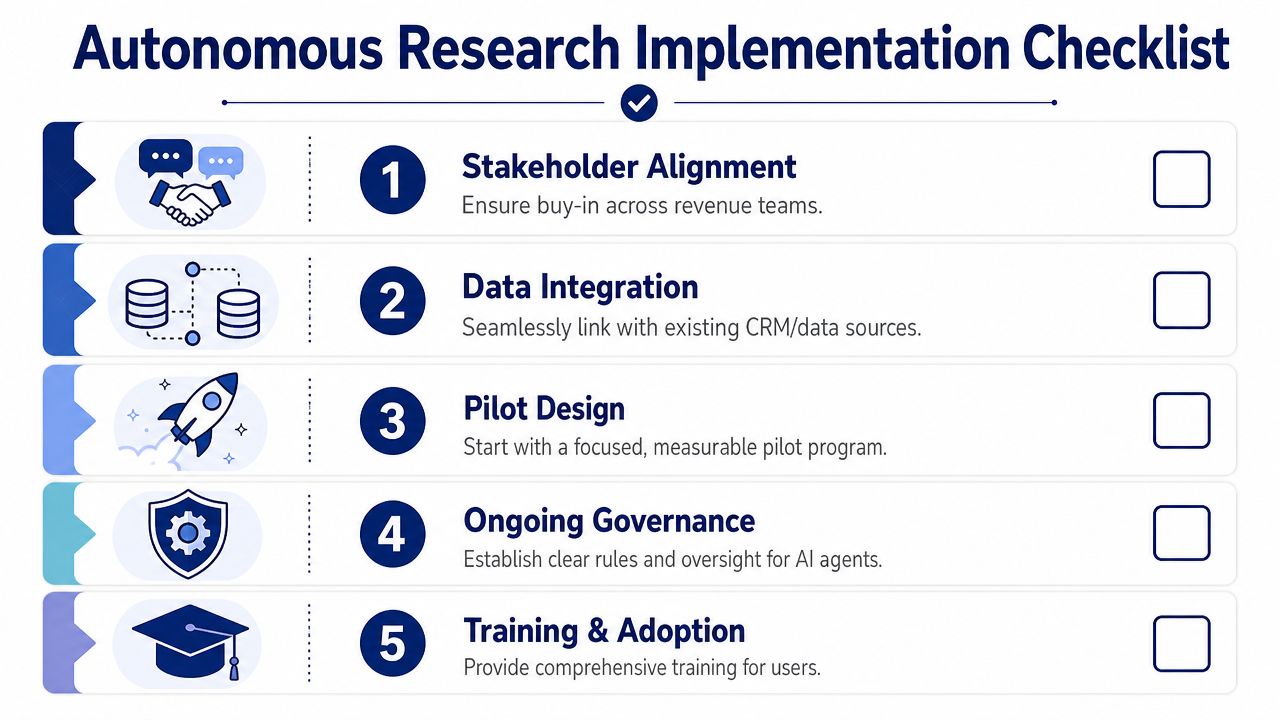
A practical rollout checklist
Get stakeholder alignment first
Bring together sales leadership, RevOps, and frontline managers before you switch anything on. They need a shared definition of what counts as a useful brief, a meaningful signal, and an acceptable outreach draft.
Connect data where reps already work
If research lives in a separate tab no one opens, adoption will fade. Pipe outputs into the systems reps already use. Many teams want alerts in CRM records, Slack channels, or inbox summaries.
Design a focused pilot
Pick a segment, territory, or pod. Keep the scope narrow enough that managers can inspect the output closely. A pilot should answer whether the research is accurate, timely, and actionable, not just whether the software can generate text.
Define governance early
Decide how people should handle questionable signals, duplicate alerts, and edge cases. Autonomous systems need review paths. They shouldn't become a black box.
Train for interpretation, not just clicks Reps don't need a lecture on AI. They need examples of good use. Show them how to read an account brief, how to separate a weak signal from a useful one, and how to edit outreach without stripping out essential context.
Common mistakes that slow adoption
A few problems show up again and again.
| Mistake | What it causes | Better approach |
|---|---|---|
| Turning on every alert | Reps stop paying attention | Limit early rollout to a few high-value triggers |
| Measuring output volume only | Teams chase noise | Track whether briefs and alerts lead to action |
| Skipping manager review | Quality drifts unnoticed | Have managers inspect usage in pipeline reviews |
What a workable deployment can look like
One practical model is this: research briefs refresh automatically for named accounts, meaningful changes trigger alerts into the team's workflow, and outreach drafts stay in review mode until reps approve them. That keeps speed high without removing human control.
This is also where one tool category can matter. For example, Salesmotion is a sales intelligence platform that uses three AI agents across target accounts: one for research, one for signal monitoring, and one for personalized outreach drafting, with outputs routed into channels like Slack, email, and CRM. The point isn't that every team needs the same product. The point is that your deployment should mirror the actual work: research, monitoring, and action.
Teams adopt autonomous research faster when they can see exactly where human approval starts and where automation stops.
Real-World Use Cases and KPIs
Teams don't buy autonomous research because the architecture is elegant. They buy it because manual work keeps creating preventable gaps. The most useful examples aren't flashy transformations. They're everyday workflow fixes.
Mid-market software team
A mid-market software sales team often has a familiar problem: account plans exist for a small group of tier-one targets, while the rest of the market gets generic outreach. Reps know they should research more thoroughly, but each person handles too many accounts to do it consistently.
In a realistic rollout, the team would start by assigning autonomous research to a defined account list and routing concise updates into the rep workflow. Managers would then review whether reps are taking first actions faster, whether outreach references current company context more often, and whether more accounts receive usable prep before meetings.
The KPIs worth watching are operational:
- Time to first action: How quickly a rep moves from new account assignment to meaningful outreach
- Brief usage rate: Whether reps open and use generated account intelligence
- Signal response consistency: Whether important account changes lead to follow-up across the team, not just among top performers
Enterprise financial services team
Enterprise teams usually face a different issue. The problem isn't only volume. It's complexity. Multiple stakeholders, regulated environments, and long deal cycles make weak context expensive. A signal might matter, but only if the team understands why it matters to a specific buying group.
A practical deployment here would focus less on broad outbound coverage and more on strategic account monitoring. Research outputs would support account directors before executive meetings, renewal motions, and expansion planning. Instead of expecting the system to “sell,” the team would use it to tighten preparation and reduce blind spots.
The strongest use case for autonomous research isn't replacing seller judgment. It's giving experienced sellers better context before they act.
KPIs that make sense in real deployments
Because every motion is different, the best KPIs stay close to workflow quality:
| KPI | Why it matters |
|---|---|
| Research completion consistency | Shows whether account prep is becoming a system |
| Signal-to-action rate | Reveals whether alerts are useful or just noise |
| Message relevance in manager review | Tests whether generated context improves outreach quality |
| Coverage across the target list | Confirms whether more accounts get meaningful attention |
For most revenue leaders, that's the actual proof. Not a dramatic dashboard claim. A cleaner operating cadence, stronger timing, and fewer accounts slipping by because no one had time to do the homework.
Conclusion and Next Steps
Autonomous research is best understood as an operating model for sales intelligence. It takes work that is repetitive, easy to delay, and hard to standardize, then turns it into a repeatable system. That system can monitor change, preserve source context, and hand reps something useful before the opportunity goes cold.
The value is practical. Better coverage. Better timing. Better consistency. And a clearer line between what software should handle and what sellers should own.
If you're evaluating options, keep the bar simple. Look for clear source tracking, useful signal interpretation, strong workflow integration, and an explicit human approval model. Then run a focused proof of concept on a specific segment or account set. Review whether reps act faster, whether managers trust the output, and whether outreach quality improves in visible ways.
Autonomous research isn't interesting because it sounds advanced. It matters because manual research is still a hidden bottleneck on too many revenue teams.
If your team wants to see how autonomous research can fit a live sales workflow, Salesmotion offers a practical example with AI agents for account research, signal monitoring, and outreach drafting, all designed to plug into the systems reps already use. You can also try the interactive demo first.