Your team looks busy all day. Calls happen. Emails go out. Opportunities move, then stall. A few reps keep pulling rabbits out of hats, while everyone else works hard and still misses the number.
That’s not a talent problem. It’s an operating problem.
Many B2B sales teams don’t lose because they lack activity. They lose because the process lives in too many places. The CRM has some data. Reps keep notes in docs. Managers run pipeline reviews from memory. Account plans are inconsistent. Follow-up depends on who’s disciplined that week. By the time leadership spots a pattern, the quarter is already damaged.
Sales process software matters because it turns selling from a collection of individual habits into a system the team can run.
Key Takeaways
- The problem is rarely effort — it's operating model. Most B2B teams have plenty of activity, but the process lives in too many places: CRMs, docs, manager memory, individual habits.
- Sales process software is the operating layer on top of the CRM. It standardizes how deals progress, how forecasts are built, and how account context is captured — so coaching, pipeline review, and handoffs run the same way every time.
- Look for five core features: stage-gating with exit criteria, structured pipeline reviews, account intelligence that updates automatically, AI-drafted next steps, and reporting that ties activity to outcomes.
- AI account intelligence is the upgrade that compounds. Teams that add automated research and signals on top of a clean sales process move faster, lose fewer cycles to bad-fit deals, and ramp new reps in weeks rather than quarters.
Skip the comparison fatigue?
If you're shopping for a sales intelligence tool, here's the short version.
Salesmotion combines account intel, buying signals, verified contacts, and AI-drafted outreach in one tool. From $85/mo, live in an hour, no annual contract.
Your Sales Floor Is More Chaotic Than It Needs to Be
A common pattern shows up when a new Sales Director takes over.
One rep updates Salesforce meticulously. Another logs the bare minimum. One AE knows how to multi-thread an enterprise deal. Another stays attached to a single champion until procurement kills it. One manager coaches around stage exits. Another asks for “more pipeline” without defining what that means.
That isn’t scale. It’s drift.
Hero reps are not a strategy
Many teams over-rely on tribal knowledge. Top performers know when to pull in an executive sponsor, how to write a relevant follow-up, and how to spot buying signals before competitors do. Average reps don’t.
If your process only works for your best people, you don’t have a process. You have exceptions.
The answer isn’t another dashboard. It’s sales process software that operationalizes how work gets done across the entire funnel.
That means:
- Stages mean something: Each pipeline stage has clear entry and exit criteria.
- Follow-up is enforced: Reps don’t decide from scratch what happens after every interaction.
- Managers coach from evidence: They can see why deals are stuck, not just that they’re stuck.
- Account work becomes repeatable: Research, planning, and stakeholder mapping stop depending on who has spare time.
Cost of manual work
Breakdowns often don’t look dramatic. They look ordinary.
A rep forgets to follow up after a strong demo. Another spends too long researching an account and still misses the trigger. A deal sits in “proposal” because nobody defined the next required action. A forecast gets padded because stages aren’t tied to buyer progress.
Practical rule: If your reps are improvising core parts of prospecting, qualification, and account planning, the software is not supporting the process. It’s just storing leftovers.
Good teams usually know they need process. What they often miss is that process has to live inside the tools reps use every day. If it sits in a sales playbook nobody opens, it won’t survive the quarter.
That’s why the right move is to treat software as the mechanism that makes your process visible, enforceable, and coachable. If you’re still trying to fix inconsistency with meetings alone, start with a tighter operating model like this approach to sales process optimization.
The question worth asking isn’t whether your reps are working hard. It’s whether you’ve codified what your best reps do, and made it available to everyone else.

“Consolidation of prospect company information that I can use frequently to be way better informed when I'm doing my outbound, preparing for a meeting, or building relationships. Ease of use and Customer Support is excellent.”
Werner Schmidt
CEO & Co-Founder, Lative
Beyond the CRM What Is Sales Process Software
A CRM is not the full answer. It’s the database.
Sales process software is the operating system that tells your team what should happen, when it should happen, who should do it, and what data should be captured along the way.
Consider it a factory. The CRM stores the parts list. The rest of the sales stack runs the assembly line.
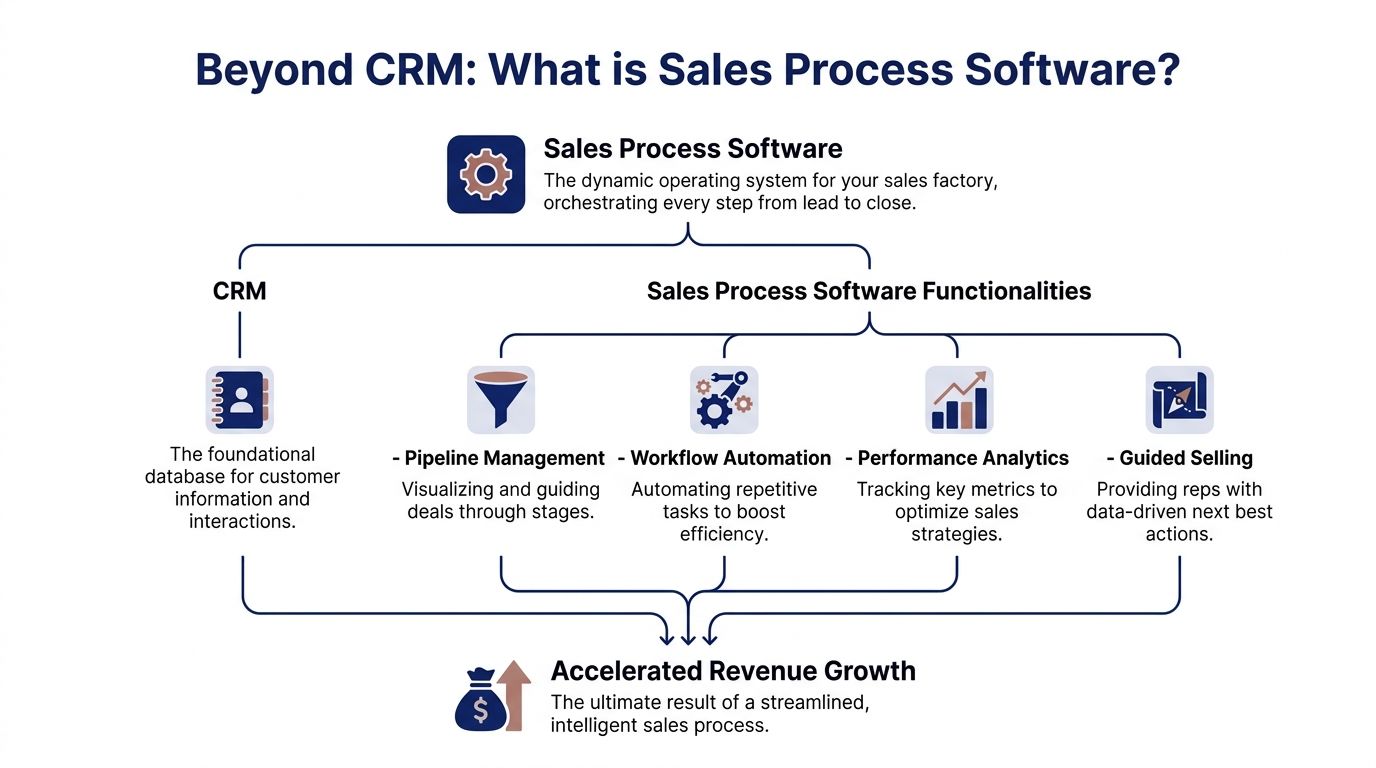
The market is moving in that direction fast. The global sales software market was valued at USD 31.26 billion in 2025 and is projected to reach USD 71.83 billion by 2031, while AI Sales Assistant categories are growing at 23.85% CAGR, pointing to a shift from static record-keeping toward real-time seller guidance, according to Mordor Intelligence’s sales software market analysis.
The three layers that matter
Many teams need to think in three layers, not one.
System of record
This is Salesforce, HubSpot, Dynamics 365, or another CRM.
Its job is straightforward. Store accounts, contacts, opportunities, activities, and forecast data. It’s your source of truth, assuming reps use it well.
But a CRM alone won’t drive behavior. It records process after the fact unless you build the rest of the operating model around it.
System of engagement
Tools like Outreach, Salesloft, Apollo, Gong, or sequencing platforms fit here, depending on your stack.
These tools help reps execute. They manage cadences, email steps, calls, tasks, meetings, and conversation capture. They make sure outreach happens.
If your team is serious about automating sales process, this layer is where consistency starts showing up in daily rep behavior, not just in leadership slides.
System of intelligence
Many teams underbuild this layer.
You need software that tells reps what changed in an account, why it matters, and what to do next. Without that, the team still does manual research, still guesses at timing, and still sends generic outreach because they lack useful context.
That’s where account intelligence, trigger monitoring, and guided selling belong.
Your CRM tells you what you already know. Your intelligence layer tells you what just changed and why your team should care.
What this looks like in practice
A healthy setup works like this:
| Layer | What it does | Example outcome |
|---|---|---|
| CRM | Stores account and deal data | Clean pipeline and consistent forecasting |
| Engagement | Executes touches and follow-up | Reps don’t miss next steps |
| Intelligence | Adds external context and triggers | Outreach has a real reason behind it |
This is why I push teams to stop shopping for isolated features and instead design an operating model. Your process needs workflow enforcement, activity execution, and live account context. If one layer is weak, the whole thing gets sloppy.
If you want a practical view of how process and automation fit together, this guide on sales process automation is a useful starting point.
Core Features That Drive Revenue
Feature lists are where software buying goes off the rails.
Vendors love long checklists. Revenue leaders should care about a simpler question. Which features change rep behavior and improve pipeline quality?
The right automation tools can free up 20% of a sales team’s capacity and drive 14.5% higher sales productivity, and businesses report earning an average of $8.71 for every $1 spent on CRM, according to Cirrus Insight’s sales automation statistics. That only happens when the features are tied to execution.

Pipeline control beats pipeline visibility
Many teams say they want pipeline visibility. What they need is pipeline control.
A good pipeline management layer should show:
- Stage progression: You need to know whether deals are moving based on buyer actions or rep optimism.
- Stall points: Managers should immediately spot opportunities that haven’t advanced for the wrong reasons.
- Required fields and exits: Reps shouldn’t move a deal forward without capturing the information that matters.
Take a mid-market AE working a six-figure software opportunity. If the deal moves from discovery to demo without confirmed pain, timeline, and stakeholder mapping, the stage is lying. Your software should make that visible and hard to ignore.
Workflow automation should remove friction, not create it
Automation works when it handles repetitive work that reps hate and often do poorly.
That includes:
- Task creation after meetings
- Follow-up reminders after demos
- Lead routing based on territory or account owner
- Sequence enrollment after inbound activity
- Auto-logging activities into the CRM
Many teams get fast gains here. If a prospect downloads a pricing guide, your system should assign the right rep, create the task, and trigger the right follow-up path. No spreadsheet. No Slack scramble. No manual handoff.
Manager test: If a rep can still say “I forgot” about a critical next step, the workflow isn’t operationalized yet.
Analytics should support coaching, not just reporting
Dashboards are cheap. Useful analytics are not.
A Sales Director needs to answer practical questions:
| Question | What the software should reveal |
|---|---|
| Why are deals slipping? | Stage aging, missing actions, weak stakeholder coverage |
| Who needs coaching? | Low conversion between stages, poor follow-up discipline, weak qualification notes |
| Is the forecast credible? | Opportunity hygiene, activity patterns, and buyer-confirmed milestones |
The point isn’t to admire charts. It’s to make coaching more precise.
If one rep converts discovery to demo well but loses momentum after proposal, that’s a different problem from a rep who books meetings but never qualifies thoroughly. Good sales process software helps you coach the issue.
Guided selling is now table stakes
This category separates modern platforms from glorified databases.
Guided selling means the system can push next-best actions, surface account signals, and help reps prioritize where to spend time. For a team dealing with a crowded market and limited headcount, that matters more than another activity dashboard.
If your team is evaluating what the intelligence layer should look like, this guide to sales intelligence software is worth reviewing.
Four features I’d prioritize first
If I were rebuilding a stack for a new Sales Director, I’d prioritize these before anything flashy:
- Pipeline stage governance that enforces clean exits.
- Task and sequence automation that protects follow-up.
- Manager-grade analytics tied to conversion and risk.
- Guided selling inputs that bring context into daily work.
Everything else is secondary.

“This is my singular place that very simply summarizes a company's top initiatives, strategies and connects them to my solution. Something I would spend hours researching manually, now it's automated.”
Derek Rosen
Director, Strategic Accounts, Guild Education
How Software Supports Modern B2B Sales Workflows
Many software demos stay too high level. They show a dashboard, a sequence builder, and a report. That’s not how teams buy or sell.
What matters is whether sales process software can support the messy workflows that determine pipeline quality.
High-intent prospecting
Traditional prospecting breaks because reps start with lists instead of context.
They grab a title, push a sequence, and hope timing works out. It usually doesn’t. The message lands with no real trigger behind it, so the buyer ignores it.
A stronger workflow looks different.
The rep starts with an account list in the CRM. The intelligence layer adds recent account changes, leadership moves, company initiatives, public announcements, or other relevant triggers. The engagement layer then turns that context into outreach tasks and messaging paths.
That sequence matters. Signal first. Outreach second.
If your team wants a stronger framework for optimizing sales outreach, build it around trigger-based prioritization, not just higher email volume.
What the software should do
- Surface relevant account activity before the rep writes a message
- Route priority accounts to the right owner quickly
- Create follow-up actions based on opens, replies, meetings, or inactivity
- Keep context attached to the account record so managers can inspect the work
The rep still writes, calls, and thinks. The system just removes the blind guessing.
Rigorous qualification
Qualification usually fails because teams treat it like note-taking.
A rep asks a few decent questions, logs scattered details, and advances the deal because the prospect “seems interested.” That’s how weak opportunities pollute forecasts.
The software needs to enforce a qualification framework. MEDDPICC is a common one, but the exact model matters less than discipline.
A clean process looks like this:
| Qualification area | What the rep should capture in the software |
|---|---|
| Business problem | Clear issue, impact, and urgency |
| Decision process | Steps, timeline, and approval path |
| Stakeholders | Champion, economic buyer, influencers, blockers |
| Competition | Status quo, alternative vendors, internal option |
You’re not trying to make the CRM pretty. You’re trying to make the deal inspectable.
Task automation tools built into sales software can drive a 14.5% increase in sales team productivity by automating work such as lead scoring and follow-up scheduling, and when integrated with a CRM they can reduce manual data input errors by up to 90%, according to Wasp Barcode Technologies’ overview of sales management software features.
That matters because qualification falls apart when reps are forced to do too much admin by hand. Data gets skipped. Next steps get lost. Managers coach from incomplete records.
Don’t let reps advance deals because they had a good call. Let them advance deals because the software shows buyer progress.
Enterprise multi-threading
Single-threaded enterprise deals are fragile.
One champion leaves. One department changes priority. One legal reviewer slows things down. If the account map exists only in the AE’s head, the deal is exposed.
Here, sales process software should act like shared memory for the account team.
What good multi-threading support looks like
First, the software should make stakeholder mapping visible. Not buried in call notes. Visible.
Second, it should tie contacts to roles in the buying process. Champion, approver, evaluator, executive sponsor, technical reviewer. That way managers can ask better questions during reviews.
Third, it should trigger actions when coverage is thin. If an opportunity is deep in the cycle and only one active contact exists, the system should make that risk obvious.
A practical example: an AE is selling into a manufacturing company. The operations lead loves the solution, but IT hasn’t been engaged and finance hasn’t seen the business case. A mature system flags incomplete stakeholder coverage before procurement becomes the first time those groups show up.
Dynamic account planning
Many account plans are dead on arrival.
A rep builds a slide or doc before QBR season. It looks thoughtful. Then the market changes, leadership shifts, priorities move, and the plan sits untouched.
Dynamic account planning fixes that by pulling planning into the workflow.
The account plan should include:
- Current business initiatives
- Key stakeholders and relationship status
- Known risks and blockers
- Open opportunities and whitespace
- Recent signals that change priority or timing
- Specific actions assigned to the account team
That’s why I push teams to stop treating planning as a quarterly writing exercise. It should live in the same system reps use for prospecting, qualification, and opportunity management.
If your account planning still depends on manual research and scattered notes, look closely at workflows built around sales research automation. That’s usually where the bottleneck starts.
Where traditional processes still break
Even with solid CRM and engagement tooling, four friction points keep showing up:
- Reps spend too long researching accounts
- Signals are noticed too late
- Stakeholder maps are incomplete
- Plans don’t refresh as accounts change
Those aren’t small annoyances. They directly affect prioritization, timing, and deal quality.
Software supports the workflow when it captures context, enforces steps, and pushes action. It fails when it just stores activity after the work is already done.
Your Evaluation Checklist for Sales Process Software
Many buying committees evaluate sales process software the wrong way.
They compare features, ask about dashboards, check whether Salesforce integrates, and call it done. Then adoption stalls, workflows stay generic, and the team blames the tool.
A better evaluation process is blunt. You’re not buying software. You’re buying a new operating model. If the tool can’t hold up under real-world sales behavior, skip it.

Start with adoption, not ambition
Many leaders deceive themselves on this point.
They buy a platform with every advanced capability, then discover reps won’t use it because the workflows are awkward, the UI is clunky, or the configuration doesn’t match how the team sells.
That risk is real. Despite the upside of these tools, low user adoption remains a major issue. Only 26% of salesforces have built custom workflow processes in their automation systems, and just 19% use AI for process automation, according to Johnny Grow’s review of sales technology challenges.
If reps hate the experience, your rollout is already in trouble.
Buy the system your managers can enforce and your reps will live in. Not the one that looks smartest in a demo.
The five questions I’d insist on
1. Does it fit the stack you already have
You need clean integration with your CRM, engagement platform, calendar, email, and reporting environment.
If integrations are weak, your team creates workarounds. Workarounds become shadow process. Shadow process destroys visibility.
2. Can you configure it without building a science project
Customization sounds attractive until your ops team becomes full-time internal IT.
Look for flexible configuration, not endless custom development. You want stage rules, routing logic, and templates that can adapt to your process without turning every change into a ticket.
3. Will managers use it for coaching
A lot of tools are built for admins, not frontline leaders.
Ask whether a Sales Manager can open an opportunity and immediately understand deal quality, stakeholder coverage, recent activity, and next actions. If not, the software won’t improve execution. It’ll just improve record storage.
4. Does it scale with complexity
Your process today may be simple. It won’t stay that way.
You need a system that can support more reps, more territories, more products, more approvals, and more nuanced workflows without becoming brittle.
5. Is it intelligence-ready
Many teams underweight this aspect.
The future-proof question isn’t just whether the tool captures your internal data. It’s whether it can ingest external account context, tie that context to opportunities, and help reps act on it.
A quick scoring model
Use something this simple in your evaluation meetings:
| Criteria | What to test |
|---|---|
| Rep usability | Can an AE complete daily work without friction? |
| Manager visibility | Can a manager coach from the record in minutes? |
| Process control | Can stage exits, routing, and follow-up rules be enforced? |
| Data quality | Does the tool reduce missing fields and scattered notes? |
| Intelligence fit | Can external triggers and account context plug into the workflow? |
If a vendor scores well on features but poorly on rep usability and intelligence fit, don’t rationalize it. Move on.
The expensive mistake isn’t overpaying for software. It’s buying a system your team never operationalizes.
Supercharge Your Stack With Autonomous Account Intelligence
Many teams build the chassis and forget the fuel.
They buy a CRM. They add engagement software. They set stages, workflows, and dashboards. Then reps still spend chunks of the week hunting for context, piecing together account updates, and guessing whether there’s a good reason to reach out now.
That gap is why many stacks feel complete on paper and weak in practice.

The missing layer is external intelligence
Mid-market companies are often poorly served by traditional enterprise tools even though they represent a “huge untapped market,” and no-setup AI agents that monitor triggers like hiring, press releases, and funding can solve the weak “why now” problem while enabling scalable personalization without heavy setup, as described in Bain’s analysis of underserved small and mid-sized business selling.
That same logic applies beyond mid-market.
Reps need current, useful context without doing all the work manually. They need to know what changed in the account, which stakeholder matters, and how to turn that into a relevant next move.
Where an autonomous layer changes the process
Here, a tool like Salesmotion fits. Not as a CRM replacement and not as a sequencing platform. It functions as an external intelligence layer that feeds the process you already run.
Its three-agent model is practical:
- Research Agent: Builds structured account briefs from public sources so reps don’t have to stitch together context manually.
- Signal Agent: Monitors target accounts for events like org changes, hiring activity, funding, press releases, and leadership moves, then explains why the event matters.
- Prospector Agent: Turns that context into personalized outreach sequences that reps can review and send through their existing engagement tools.
That setup matters because it plugs into the workflows that usually break.
Account planning gets faster
Instead of asking reps to spend hours prepping for one strategic account, the system can generate and refresh the brief. Managers get more consistency. Reps get more time back.
Multi-threading gets sharper
If leadership changes or a new function starts hiring around an initiative you support, the account team sees it faster and can expand coverage with purpose.
Outreach gets a real reason
A message tied to a visible account trigger is stronger than generic prospecting copy. It gives the rep a credible opening and a more useful call plan.
The intelligence layer shouldn’t dump more data on reps. It should cut through noise and tell them what action is worth taking now.
My recommendation
If you’re evaluating sales process software in isolation, you’re only solving part of the problem.
The process platform should govern stages, tasks, and reporting. The intelligence layer should feed it fresh context, stronger timing, and better prioritization. Put those together and your stack stops acting like a filing cabinet. It starts acting like a revenue system.
The Future of Selling Is An Operationalized Process
A lot of leaders still talk about software as if it’s support equipment.
It isn’t. In modern B2B sales, software is where your process either becomes real or falls apart.
If your CRM is just a record of what happened, your team will keep relying on heroics. If your engagement layer only automates activity, reps will still send forgettable outreach. If your account planning depends on manual research, you’ll keep getting uneven execution across the team.
The fix is not more tools for the sake of tools.
The fix is an operationalized sales process. One that defines how opportunities move, how qualification is captured, how multi-threading is inspected, how follow-up is enforced, and how account context gets injected into the workflow at the right moment.
What winning teams do differently
They treat process as something the software must enforce.
They make pipeline stages credible. They reduce manual work. They give managers systems they can coach from. They add intelligence where reps used to guess.
That changes the shape of the organization:
- Reps spend more time selling
- Managers coach with more precision
- Forecasts become more believable
- Account execution becomes more consistent
The strongest sales teams won’t be the ones with the most tools. They’ll be the ones that turn process, execution, and intelligence into one working system.
That’s the shift to make now.
Don’t ask whether you need sales process software. Ask whether your current stack operationalizes how your team wins. If it doesn’t, fix that before you ask the team for a bigger number next quarter.
If you want to see how an external intelligence layer can plug into your existing CRM and engagement stack, take a look at Salesmotion. It helps revenue teams turn account research, live signals, and personalized outreach into a usable workflow instead of more manual work.