The average B2B sales rep uses 6-10 tools and still spends 70% of their time on non-selling activities. For a 10-person outbound team, the problem is different: you can't afford enterprise sprawl, but you also can't afford to have reps burn half their day toggling between LinkedIn, Google, earnings transcripts, and a CRM that doesn't help them decide who to call next.
This guide is written for a specific buyer: the Head of Sales, SDR Manager, or founding AE responsible for standing up or replacing the sales intelligence stack for a team of 10 outbound reps. You need to buy the right tools, deploy fast, and show pipeline impact in 90 days without a six-figure budget or a six-month implementation.
According to research from Nektar, companies spend an average of $1,200 per rep per year on sales tools, yet 67% of purchased features go unused. The stakes: buy the wrong category and your reps ignore it. Buy the right tools but fail to integrate them into the CRM, and adoption dies in week three. This guide cuts through the noise with a concrete starter stack, real pricing, a phased rollout timeline, and the decision framework for when to add account intelligence.
TL;DR: For 10 outbound reps, start with LinkedIn Sales Navigator Core ($1,079.88/user/year) and either Apollo.io or a lightweight contact database. Budget $150-$200/rep/month total in Month 1. Roll out over 30 days: CRM integration Week 1, pilot with 5 reps Week 2-3, full team live by Week 4. Add account intelligence in Month 3-6 when signal-driven outreach consistently beats generic volume.
Why Team Size Changes Your Buying Decision
A 10-person outbound team sits in the worst possible zone for sales intelligence: too big to wing it with free tools and manual research, too small to afford enterprise pricing and multi-month implementations.
Here's what changes when you're buying for 10 reps instead of 2 or 50:
Budget dynamics shift. ZoomInfo does not publish a price, and Vendr puts the average contract value at $33,500 across 1,012 anonymized deals. A number like that is defensible when one or two power users drive the whole outbound motion; spread across a 10-person team it is most of a headcount, and most teams this size have no RevOps budget at that scale. You're forced to optimize for per-seat cost and monthly contracts, which rules out most enterprise platforms.
Workflow standardization becomes critical. When you have two reps, they can each use their own research process. When you have 10, inconsistent workflows create pipeline chaos. You need tools that enforce a repeatable prospecting motion: same data sources, same CRM hygiene, same outreach templates.
Onboarding speed matters more than feature depth. With 10 reps, you're probably hiring and ramping new people quarterly. If your sales intelligence stack takes three weeks to learn, every new hire loses a month of productivity. You need tools that deliver value on Day 1, not Day 90.
Tool sprawl risk is real but containable. Two reps can get by with five disconnected tools. Ten reps using five tools creates 50 login combinations, data living in multiple places, and reps who spend more time asking "which tool has the phone number?" than actually calling. The right stack for 10 reps consolidates as much as possible into 2-3 core platforms.
The gap is easy to size because one side of it publishes. Ten Apollo.io seats on Professional cost $9,480/year at the published $79 per user per month; ZoomInfo publishes nothing, and Vendr's average contract value is $33,500. For a small outbound team, that gap is the difference between affordable and untenable.
See the product in action
Take a self-guided tour of the Salesmotion platform — no signup required.
The Starter Stack: What to Buy First (and What to Skip)
Here's the foundational stack for a 10-person outbound team, ranked by priority and budget impact.
Tier 1: Non-Negotiable (Buy These First)
CRM: HubSpot (Free or Starter at $20/seat/month) or Salesforce (if already in place)
Your CRM is the system of record. Every other tool in the stack feeds data into it or pulls context from it. If you're starting from scratch, HubSpot's free tier is the best option for teams under 10: it includes pipeline management, email tracking, meeting scheduling, and basic automation. If your company already uses Salesforce, keep it — switching CRMs for a small team is rarely worth the migration cost.
Why this matters for a 10-person team: CRM adoption predicts whether every other tool gets used. If reps don't trust the CRM as the single source of truth, they'll revert to spreadsheets and Slack threads.
Contact Database: LinkedIn Sales Navigator Core ($119.99/user/month, or $1,079.88/user/year)
Sales Navigator is table stakes for B2B outbound. Advanced search filters let reps build targeted lists by title, industry, company size, and recent activity (job changes, posts, hiring signals). The InMail credits (50/month per seat) and lead/account alerts make it more than a contact finder — it's a lightweight signal engine.
According to LinkedIn's published pricing, Sales Navigator Core costs $119.99/month on monthly billing or $1,079.88/year on annual. For 10 reps, that's $10,798.80/year on annual billing, or $14,398.80 if you keep the flexibility of paying monthly. Advanced, if you need it, runs $159.99/month or $1,799.88/year.
Why this matters for a 10-person team: Sales Navigator integrates with most CRMs and delivers immediate, daily value. Reps open it every morning to see who changed jobs, which accounts are hiring, and who's engaging with content. No three-month ramp required.
Contact Data Enrichment: Apollo.io (free plan, then $49-$119/user/month) OR Lusha ($49.90-$399.90/month)
Sales Navigator gives you names and LinkedIn profiles. You still need verified emails and mobile numbers. Apollo.io is the best value for small teams: the free plan includes 900 credits a year and two sequences, and the paid Professional plan ($79/user/month on annual billing) adds credits, phone numbers, and basic sequencing tools in one platform.
Alternative: Lusha is a strong pick if your team lives in LinkedIn and needs a one-click browser extension to pull contact data. Lusha prices per plan with seats included rather than per user — Starter at $49.90, Pro at $69.90 and Premium at $399.90 per month on annual billing — and it's easier to adopt for teams that resist learning a new platform.
Why this matters for a 10-person team: You want contact data and engagement tools bundled when possible. Apollo combines both, eliminating the need for a separate sequencing tool in Month 1.
Tier 2: High-Impact Add-Ons (Add in Month 2-3)
Meeting Scheduling: Calendly (Free tier or Essentials at $10/user/month)
Calendly eliminates the 4-6 email back-and-forth to book a meeting. Reps include their Calendly link in cold emails and LinkedIn messages. Prospects book directly into the rep's calendar. The free tier works for most 10-person teams; upgrade to Essentials ($10/user/month) if you need workflow automation (e.g., auto-send a prep email when a meeting is booked).
Why this matters for a 10-person team: Calendly is one of the few tools with near-100% adoption. Reps use it because it saves them time, not because a manager mandates it.
Call Recording & Transcription: Fireflies.ai (Free tier or Pro at $10/seat/month)
Fireflies joins your Zoom/Google Meet calls, records them, and generates a transcript and summary. For a 10-person outbound team, this is critical for coaching. Managers can review discovery calls, identify objection patterns, and build a library of winning talk tracks without sitting in every meeting.
Why this matters for a 10-person team: At 10 reps, you're past the stage where the founder or sales leader can personally coach every call. Conversation intelligence creates coaching leverage.
Tier 3: Scale Additions (Month 3-6, When Pipeline Justifies It)
Account Intelligence: Salesmotion (starting ~$1,000/month for team plans with unlimited users)
This is the layer most 10-person teams skip in Month 1 and regret by Month 4. Account intelligence platforms monitor hundreds or thousands of sources — earnings calls, SEC filings, leadership changes, hiring patterns, funding announcements, competitive moves, podcast mentions — and surface the signals that indicate why an account is worth pursuing now.
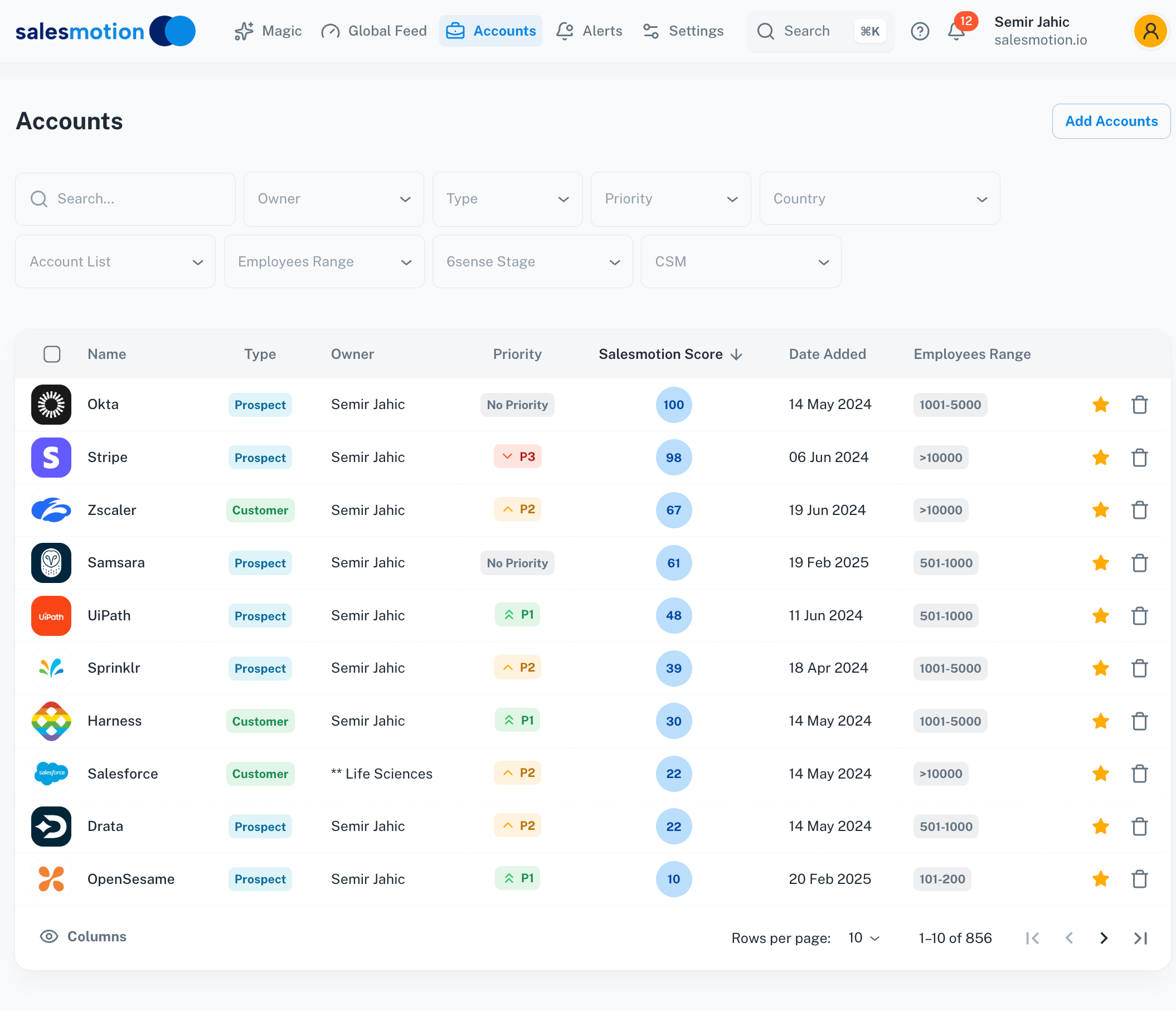 Salesmotion's account dashboard scores and prioritizes accounts based on live buying signals from 1,000+ sources.
Salesmotion consolidates what used to require five separate workflows (Google News alerts, LinkedIn stalking, earnings call skimming, CRM notes, and ChatGPT prompts) into a single feed of prioritized signals and auto-generated account briefs. The platform is built for teams that manage large account books (e.g., each AE owns 500+ accounts) and need always-on monitoring rather than manual research.
Why this matters for a 10-person team: In Month 1, your team can survive on manual research — reps Google accounts before calls and skim LinkedIn. By Month 4, that approach doesn't scale. Reps either narrow their coverage to 20-30 accounts they can research deeply (leaving 80% of their book untouched), or they send generic outreach across the full list and watch reply rates tank. Account intelligence tools solve this by automating the "why reach out now" research so reps can cover their full book with relevant, signal-based outreach.
Email Sequencing (if not using Apollo): lemlist or Instantly ($59-$99/user/month)
If you chose Lusha or Sales Navigator for contact data instead of Apollo, you'll need a dedicated sequencing tool. lemlist and Instantly both offer multi-channel sequences (email + LinkedIn), A/B testing, and deliverability monitoring. Pricing is similar; lemlist has a better UI, Instantly has stronger automation.
Why this matters for a 10-person team: Sequencing tools are only worth buying if they replace manual follow-up work. If your reps are already disciplined about 5-touch cadences in the CRM, skip this and invest in account intelligence instead.
Total Cost: What to Budget
Here's what a realistic 10-person starter stack costs:
Month 1-2 (Essentials Only):
- CRM (HubSpot Free or Starter): $0-$200/month total
- LinkedIn Sales Navigator Core: $900/month (10 seats on annual billing; $1,200 if you pay monthly)
- Apollo.io Professional: $790/month (10 seats at $79/month annual)
- Calendly Free: $0
- Fireflies Free: $0
Total: ~$1,900/month or $190/rep/month
Month 3-6 (With Account Intelligence):
- Add Salesmotion: ~$1,000/month (team plan, unlimited users)
- Upgrade Calendly to Essentials: $100/month
- Upgrade Fireflies to Pro: $100/month
Total: ~$3,100/month or $310/rep/month
That is roughly $37,000 a year, all of it on published rate cards. Compare it to an enterprise contact database plus a separate intent platform, neither of which publishes a price: Vendr's average ZoomInfo contract is $33,500 and its median 6sense purchase is $62,440, so the same two-layer stack starts near six figures before you have a single seat of anything else.

“The moment we turned on Salesmotion, it became essential. No more hours on LinkedIn or Google to figure out who we're talking to. It's just there, served up to you, so it's always 'go time.'”
Adam Wainwright
Head of Revenue, Cacheflow
The 30-Day Rollout Timeline (Pilot to Full Deployment)
Buying the tools is easy. Getting 10 reps to actually use them is hard. Here's a proven 30-day rollout plan that drives adoption without requiring a RevOps team.
Week 1: Strategy, Integration, and Data Hygiene
Day 1-2: Define success metrics. Before you buy anything, write down the three behaviors you want to change. Examples: "Reps spend 15 minutes or less researching an account before a call," "Every cold email references a specific account signal," "We touch 100% of our ICP accounts monthly instead of 30%."
These metrics are your North Star. If a tool doesn't move one of these numbers, you don't buy it.
Day 3-5: CRM integration and data sync. Set up your CRM-to-intelligence-tool integrations. If you're using HubSpot + Apollo, sync contact and account data bidirectionally so updates in one system appear in the other. If you're using Salesforce + Sales Navigator, install the Sales Navigator for Salesforce integration so LinkedIn activity surfaces inside account records.
Why this matters: Tools that require reps to open a separate tab die by Week 3. Intelligence must live inside the CRM.
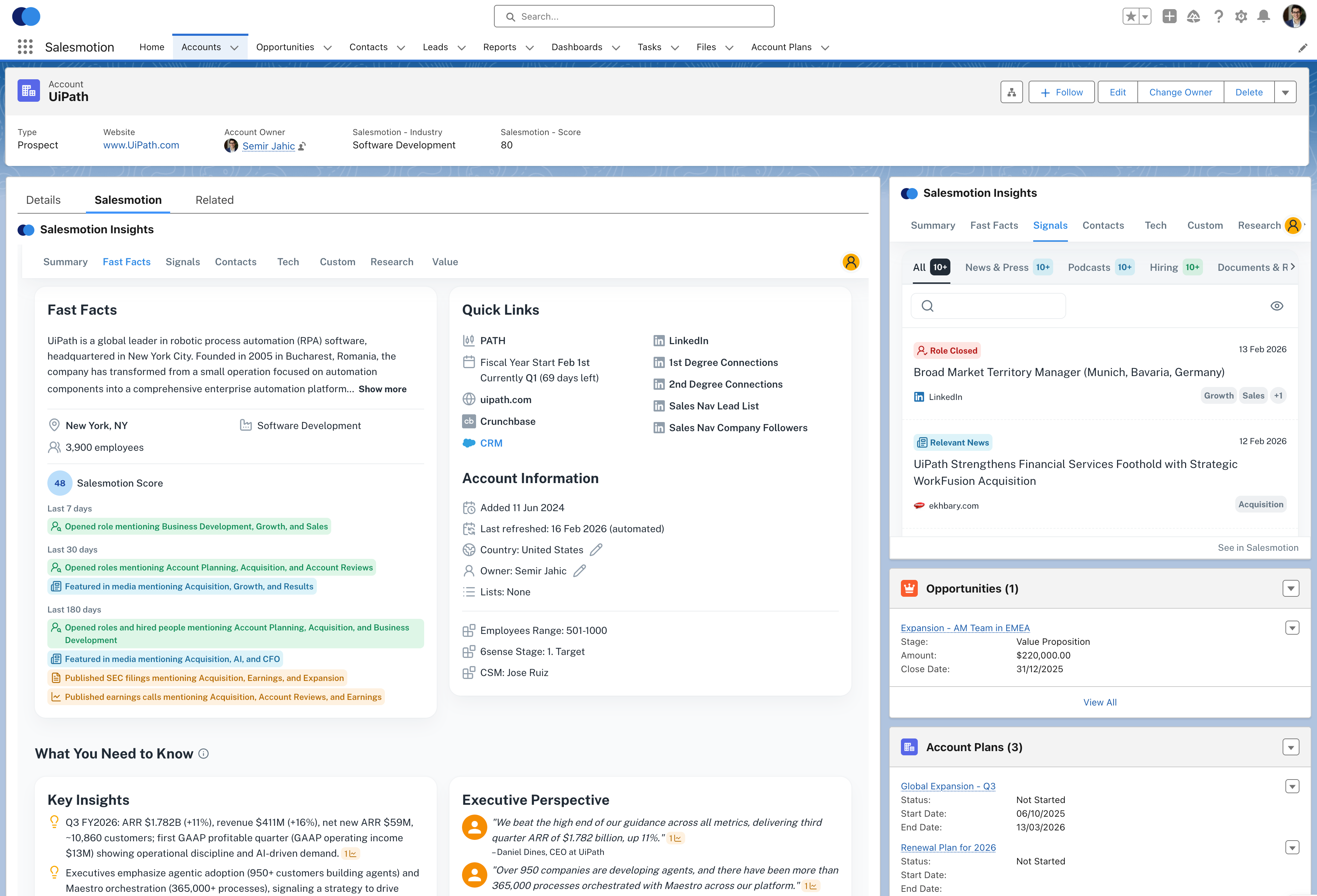 Account intelligence surfaces directly inside the CRM — reps never need to leave Salesforce to access signals and research.
Day 6-7: Clean your existing data. Export your target account list from the CRM. Remove duplicates, standardize company names, and verify that firmographics (industry, employee count, revenue) are accurate. Upload the cleaned list into your contact database and account intelligence platform. This step is boring but critical — bad data in means bad signals out.
Week 2-3: Pilot with 5 Reps
Day 8: Select your pilot group. Pick 5 reps who represent a mix of experience levels and account segments. Include at least one skeptic — if the tools work for them, they'll become your internal champions.
Day 9-10: Live onboarding session (60-90 minutes). Walk the pilot group through the stack in one session. Show them how to:
- Build a target account list in Sales Navigator
- Enrich contacts with emails/phones in Apollo or Lusha
- Add contacts to a CRM sequence
- Use account signals (if you're piloting Salesmotion or competitive intel tools) to personalize first touch
Record this session. You'll reuse it for future new hires.
Day 11-21: Pilot period with weekly check-ins. Let the 5 reps use the tools for two weeks. Schedule a 30-minute sync every Friday to hear what's working, what's confusing, and where they're getting stuck. Make workflow adjustments in real time.
Measure: How many accounts did each rep research? How long did research take per account? How many emails referenced a specific signal vs. generic templates?
According to a 2026 Salesmotion case study, Analytic Partners' Business Development team reduced account research time by 80-90%, getting what they needed in 15 minutes instead of 2+ hours per account after implementing account intelligence.
Week 4: Full Team Rollout and Reinforcement
Day 22-23: Full team onboarding. Repeat the Day 9-10 live training for the remaining 5 reps. Use examples and screenshots from the pilot group to show real wins (e.g., "Sarah booked three meetings last week by referencing earnings call mentions she found in Salesmotion").
Day 24-30: Manager reinforcement. The single biggest adoption driver: managers reference the tools in every one-on-one and pipeline review. Ask reps: "What signal did you use to prioritize this account?" and "Show me the research you pulled before this call." If managers don't ask, reps stop using the tools.
Set a 30-day usage threshold: every rep should log at least 20 account lookups and 50 contact enrichments in the first month. Publish a leaderboard (without shaming low performers) to create friendly competition.
When to Upgrade from Contact Data to Account Intelligence
Most 10-person outbound teams start with contact databases (Apollo, Lusha, Sales Navigator) and add account intelligence 3-6 months later. Here's how to know when it's time.
Signal 1: Reps Are Researching the Same Accounts Over and Over
If your reps spend 30-60 minutes researching an account before a first call, then re-research the same account three months later because they forgot the context, you're wasting hours every week. Account intelligence platforms store and update research automatically, so the next time a rep touches that account, the brief is already current.
Signal 2: Generic Outreach Volume Is Up, But Reply Rates Are Flat or Falling
Contact databases make it easy to send 100 emails a day. If reply rates are stuck below 2-3%, the bottleneck is not volume — it's relevance. Account intelligence shifts the strategy from "say and pray" to "fewer, better-researched touches."
According to Salesmotion's outbound sales FAQ, top-performing cold email campaigns exceed 5% reply rates and 1-2% meeting-booked rates by combining strong targeting, compelling messaging, and timing tied to account signals.
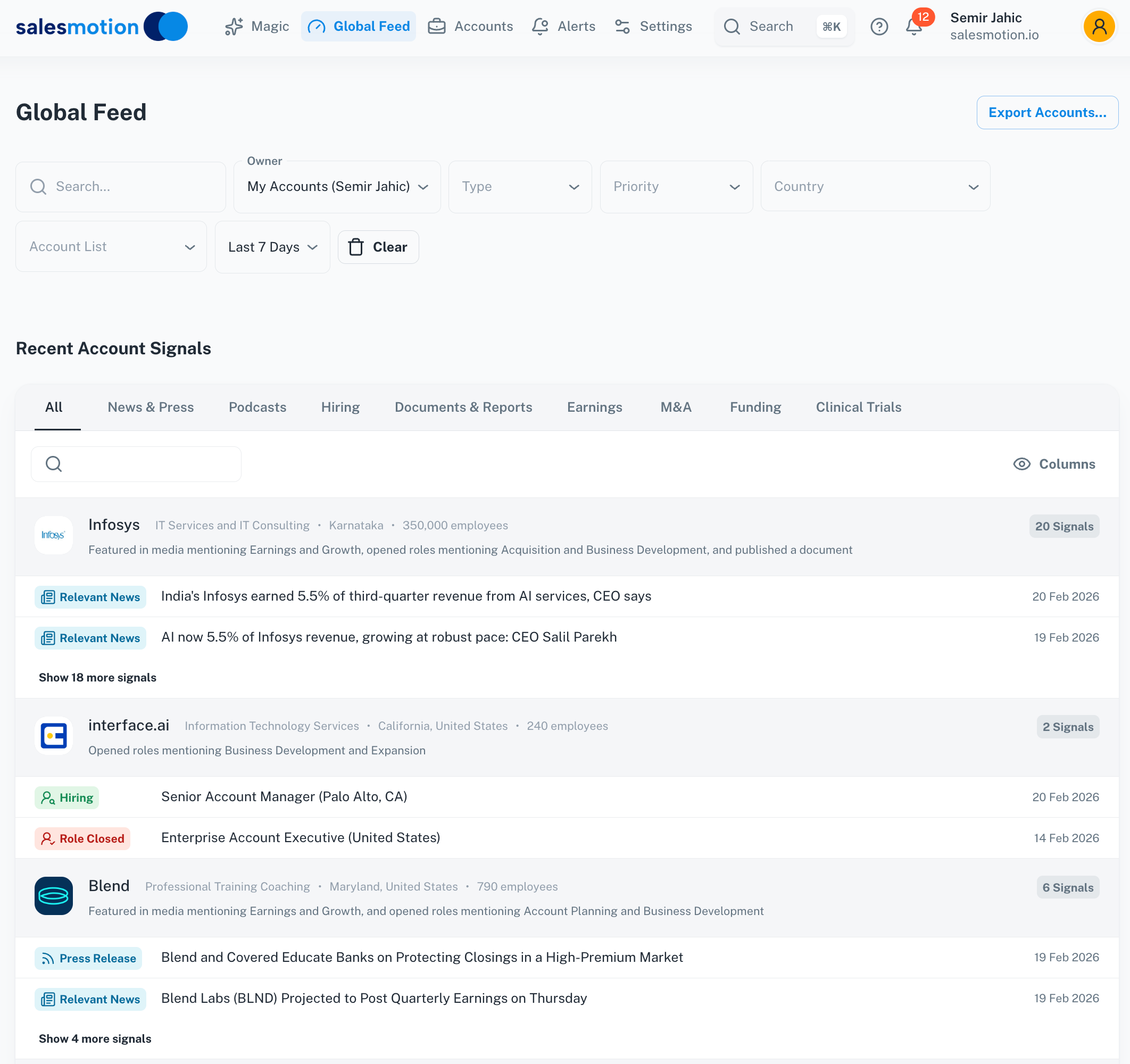 Always-on signal monitoring watches all your accounts 24/7 and alerts reps when buying signals fire.
Signal 3: You're Managing 500+ Accounts Per Rep and Missing Buying Signals
If each AE owns a large account book (common in mid-market and enterprise outbound), they physically can't manually monitor every account for compelling events. They end up focusing on the top 20-30 accounts and ignoring the rest. This is where always-on signal monitoring delivers ROI: the platform watches all 500 accounts and alerts the rep when one becomes high-priority (new CRO hire, earnings call mention of budget expansion, competitive displacement signal, etc.).
Signal 4: Your Team Is Toggling Between 5+ Tools to Research One Account
If reps are opening ZoomInfo for contacts, LinkedIn for org charts, Google News for recent updates, the company's investor relations page for earnings data, Crunchbase for funding, and ChatGPT to synthesize it all, you're burning 40% of productive time on context-switching. Account intelligence platforms consolidate these workflows into a single research view with citations.
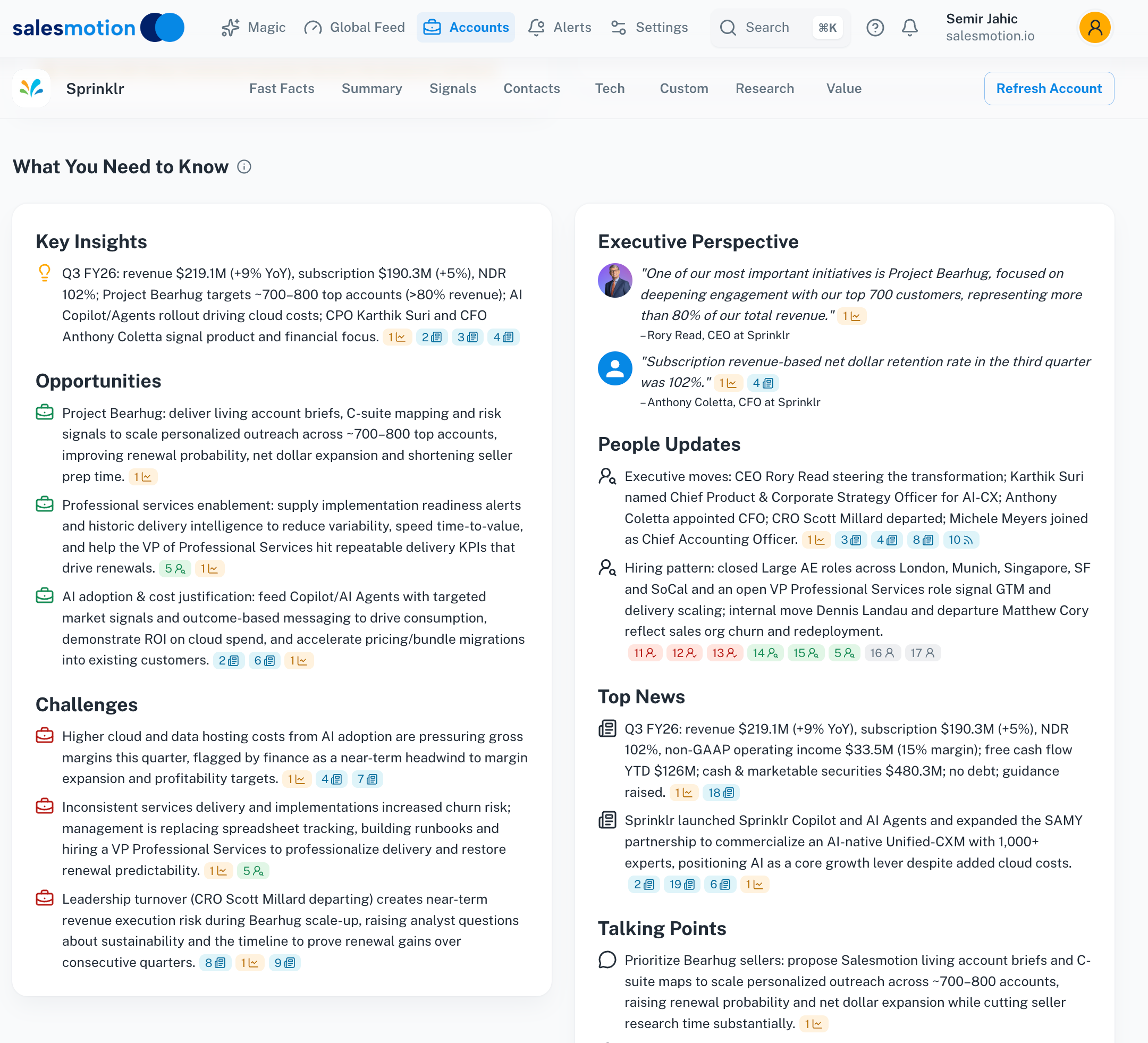 One view replaces five tools: earnings data, news, hiring patterns, competitive moves, and strategic initiatives in a single account brief.
The Upgrade Decision Framework
Here's the math:
- If your average rep spends 45 minutes researching each account, and touches 20 accounts/week, that's 15 hours/week or 60 hours/month.
- If account intelligence cuts research time from 45 minutes to 10 minutes (the outcome Salesmotion customers report), you save 11.7 hours/week per rep.
- For a 10-person team, that's 117 hours/week or ~470 hours/month.
- At a $75/hour fully loaded cost per rep, that's $35,250/month in reclaimed capacity.
Compare that to the cost of the platform (~$1,000-$3,000/month for a 10-person team) and the ROI is clear.
Add the account intelligence layer when the cost of NOT having it (missed signals, wasted research time, low reply rates) exceeds the subscription cost.

“We're saving about 6 hours per week per seller on account research alone. That's time they can reinvest in actually selling.”
Derek Rosen
Director, Strategic Accounts, Guild Education
The Procurement Checklist: What to Ask Before You Buy
Use this checklist in every vendor demo to cut through the sales pitch and evaluate whether the tool will actually work for a 10-person outbound team.
Budget and Contract
- What's the per-seat cost on monthly vs. annual billing? Most vendors discount 15-25% for annual, but 10-person teams often can't commit to 12 months upfront. Know both prices.
- Are there seat minimums? Some platforms require 5-seat or 10-seat minimums. If you only need the tool for 3 reps initially, negotiate or walk.
- What counts as a "seat"? Is it a named user, a concurrent login, or consumption-based (credits per month)? Apollo and Lusha use credit models; Sales Navigator uses named seats.
- What's included in the base price vs. add-on modules? Vendors that quote rather than publish — ZoomInfo among them — routinely price intent data, conversation intelligence, and advanced integrations as separate line items. Get the full itemization in writing before you compare two quotes.
Data Quality and Coverage
- Can I test the data on MY target accounts before buying? Don't accept vendor-provided "sample data." Give them a list of 50 accounts from your ICP and have them run a coverage report: how many contacts, how many emails, how many direct dials, how recent is the data?
- What's your email bounce rate? Anything above 5% is a red flag. Ask for a third-party validation (e.g., a G2 review snapshot filtered for "data accuracy").
- How often is data refreshed? Contact databases should update weekly at minimum. Account intelligence platforms should monitor signals in real time or daily.
Integration and Workflow
- Does this integrate natively with [our CRM]? Native integrations (built and maintained by the vendor) are infinitely better than Zapier hacks. Ask to see a screenshot of what the integration looks like inside the CRM.
- Can reps access this without leaving the CRM? If the answer is "they'll open the platform in a separate tab," adoption will be low. The best tools surface insights inside CRM account and contact records.
- How long does integration setup take? For a 10-person team, you want same-day or same-week setup. If the vendor says "2-4 weeks," they're selling an enterprise implementation.
Onboarding and Support
- What does onboarding include? The best vendors offer a live kickoff session, recorded training, and written playbooks. The worst vendors send a login link and a knowledge base.
- Is there a dedicated customer success manager, or is support ticket-based? At 10 seats, you're unlikely to get a dedicated CSM from enterprise vendors. Look for vendors that offer live chat or Slack-based support.
- What's the ramp time to first value? Ask: "How long until a rep can research an account and send a personalized email using your platform?" The answer should be "same day" or "within the first week."
Measuring Success
- What metrics do your customers track to measure ROI? Good vendors will share: "Customers measure time saved per account, increase in reply rates, or meetings booked per rep per week." Bad vendors will deflect with vague claims about "pipeline influence."
- Can you share a case study from a team our size? Most vendor case studies feature 500-person sales orgs. Ask for an example from a 5-15 person outbound team.
The Red Flags That Mean "Walk Away"
- No transparent pricing on the website, and the sales rep won't share a ballpark range in the first call.
- Minimum 12-month contract with no pilot or trial option.
- Integration requires a "professional services" engagement or custom API work.
- The tool solves a problem your team doesn't have (e.g., ABM orchestration when you're doing cold outbound, or conversation analytics when you're not yet running enough calls to analyze).
What You'll Regret Buying (And What You'll Wish You'd Bought Sooner)
Tools 10-Person Teams Regret Buying
Enterprise ABM platforms (6sense, Demandbase) in Year 1. These platforms are built for teams running coordinated account-based campaigns across sales, marketing, and customer success. At 10 outbound reps, you don't have the account volume, the budget (Vendr's medians are $62,440 for 6sense and $68,591 for Demandbase), or the cross-functional orchestration to justify them. You'll use 10% of the features and resent the cost.
Conversation intelligence before you have conversation volume. Gong, Chorus, and Clari are exceptional tools — for teams running 200+ sales calls per month. If your 10-person team is doing 50-80 calls/month, the insights won't be statistically meaningful, and you'll spend more time tagging and reviewing recordings than coaching reps. Start with Fireflies (free or $10/seat) and upgrade to Gong when call volume justifies it.
Best-of-breed tools for every micro-workflow. The temptation is to buy the "best" tool in every category: best contact data, best sequencing, best call tracking, best scheduling, best intelligence. You end up with eight login screens, data in seven places, and reps who ignore all of them. For a 10-person team, integrated platforms (e.g., Apollo for contacts + sequences, HubSpot for CRM + email tracking) beat best-of-breed every time.
Tools 10-Person Teams Wish They'd Bought Sooner
Account intelligence. Almost every sales leader we speak to says the same thing: "I wish we'd added account intelligence in Month 2 instead of Month 8." The earlier you train reps to sell with signals instead of generic pitches, the faster they ramp and the better their long-term habits.
Call recording and transcription. Even the free tier of Fireflies or Otter.ai delivers immediate value. New reps listen to veteran reps' calls. Managers spot objection patterns. Reps review their own calls and self-correct. There's no downside, and setup takes 10 minutes.
LinkedIn Sales Navigator. Some teams try to "make do" with free LinkedIn and a contact database. Sales Navigator's advanced search, lead alerts, and InMail credits pay for themselves in the first month. It's the one tool every outbound rep uses daily.
Final Recommendation: The 3-6 Month Roadmap
Here's the playbook that works for 10-person outbound teams in 2026:
Month 1: Deploy the essentials (CRM, Sales Navigator, Apollo or Lusha, Calendly, Fireflies free). Total cost: ~$1,900/month. Focus: get reps building lists, enriching contacts, and running sequences inside the CRM.
Month 2-3: Measure leading indicators (accounts researched per week, emails sent with account-specific context, reply rates, meetings booked). If reps are manually researching accounts for 30+ minutes or reply rates are below 3%, add account intelligence. If call volume is picking up (50+ calls/month), upgrade Fireflies to Pro.
Month 3-6: Add account intelligence (Salesmotion or similar). Train reps to prioritize accounts based on signals (leadership changes, earnings mentions, hiring patterns, funding) instead of gut feel. Track: percentage of outreach that references a specific signal, change in reply rates, reduction in research time per account.
Month 6+: Revisit the stack. If conversation volume justifies it, upgrade from Fireflies to Gong. If you've outgrown Apollo's database, evaluate ZoomInfo or Cognism (but only if your team relies heavily on phone-based outbound). If account intelligence is working, expand coverage to include post-sale accounts (CSMs monitoring expansion signals) and inbound (marketing monitoring intent on key accounts).
The mistake most 10-person teams make is buying enterprise tools too early or staying on free-tier tools too long. The right strategy: start lean, measure obsessively, and upgrade the moment the cost of NOT upgrading (wasted time, missed pipeline) exceeds the tool cost.
For more on how to evaluate and compare sales intelligence platforms, see our full buyer's guide and pricing breakdown. If your team is spending hours researching accounts manually, book a demo of Salesmotion to see how account intelligence changes the workflow.