Your reps already know where to look. Earnings calls, press releases, LinkedIn, SEC filings, job boards, podcasts, investor updates. The problem isn't access. The problem is that account context is scattered across too many places, arrives at the wrong time, and rarely lands inside the workflow where a seller can use it.
That’s why ai for company research with api has become such a practical topic for RevOps and sales leaders. You’re not trying to create another dashboard. You’re trying to build a system that can watch accounts continuously, interpret what changed, decide whether it matters, and push a usable answer to the rep who owns the account.
It's often underestimated where the actual work sits. It’s not in calling one model endpoint. It’s in orchestration, normalization, relevance scoring, and workflow delivery. That’s where projects either become a working intelligence layer or die as a demo.
Moving Beyond the Manual Research Tax
Sales teams pay a hidden penalty every day. Reps spend time assembling fragments of context instead of using context to start better conversations. One tab has the latest funding news. Another has hiring activity. Another has an old call note in the CRM. Someone copies links into Slack. Someone else asks sales enablement for a summary. By the time outreach goes out, the trigger is stale.
The usual response is to buy another data source or connect a generic LLM. That helps at the edges, but it doesn’t solve the operating problem. The hard part is turning many moving inputs into one coherent brief or one justified alert.
Practical rule: If a rep still has to read five sources and decide what matters, you haven’t automated research. You’ve just sped up retrieval.
The last mile is where most AI research projects get stuck. As noted in this discussion of the last mile problem for AI research deployments, vendors often show what a single API can do, while the deployment architecture for multi-account, real-time triggers at scale remains underexplored. That’s exactly the gap CROs and RevOps teams run into after the proof of concept.
What the system actually has to do
A usable research stack has to perform four jobs in sequence:
- Collect dispersed signals from public sources without creating duplicate or conflicting records.
- Translate raw updates into account context so a rep doesn’t have to interpret every source manually.
- Decide relevance based on your motion, not generic company news.
- Deliver action in workflow through CRM, Slack, email, or sequence tooling.
That sequence sounds simple until you try to operationalize it across a target account list. A single account is manageable. Hundreds of accounts with live updates are not.
Why orchestration matters more than one good model
The mistake I see most often is treating company research as a prompting problem. It isn’t. It’s a systems problem. You need routing logic, source precedence, retry handling, structured output, and controls around freshness.
That’s also why adjacent tooling matters. If your team is also trying to understand how prospects discover your brand through AI interfaces, resources on AI answer tracking tools are useful because they show the same pattern. Raw model output isn't enough. You need monitoring, attribution, and a way to turn signals into operating decisions.
When leaders frame the problem correctly, the buying criteria change. They stop asking, “Can this API summarize a company?” and start asking, “Can this system monitor the right accounts, explain the so what, and feed my sellers without more admin work?”
See Salesmotion in action
Take a self-guided interactive tour — no signup required.
Architecting Your Data Foundation with APIs
A strong research system starts with the data model, not the prompt. If the inputs are thin, stale, or inconsistent, the output will sound polished but miss the complete story. Good company research depends on combining structured facts with messy, unstructured text and keeping both tied to a stable account identity.
That’s why API design matters. According to the Postman State of the API report, 82% of organizations adopting API-first architectures show that model, yet only 24% of developers actively design APIs with AI agents in mind, and 60% of organizations still design primarily for human consumption. For revenue systems, that gap shows up fast. Human-readable dashboards are easy to demo. Machine-readable outputs are what let you automate research.
The categories that matter
You don’t need every possible source. You need coverage across the sources that change account strategy, org shape, and timing.
| Data Category | What It Tells You | Example API Providers |
|---|---|---|
| Financial filings and earnings | Strategy shifts, budget pressure, guidance, risk language, competitor mentions | SEC and filings APIs, earnings transcript APIs |
| Company profile and firmographics | Size, geography, industry, ownership, operating footprint | Company profile and firmographic APIs |
| Hiring and org changes | Team expansion, new initiatives, tool adoption clues, regional growth | Job posting APIs, LinkedIn data providers |
| News and press releases | Launches, partnerships, acquisitions, leadership moves, office openings | News aggregation APIs, PR monitoring APIs |
| Legal and regulatory activity | Litigation, compliance exposure, market entry constraints | Legal records and regulatory APIs |
| Web and content signals | Messaging changes, product launches, category language, ICP clues | Website crawl APIs, search APIs, content extraction tools |
A lot of teams stop at the first two rows. That gives you a decent account overview, but not a live account narrative. Hiring patterns and company-authored updates are often what create a usable “why now.”
Design for agents, not analysts
If your output is meant for an LLM or a signal engine, your APIs should return clean fields, source metadata, timestamps, and account identifiers. A rep may tolerate ambiguity. An agent won’t.
Use a pipeline that does the following:
- Resolve identity first. Map company name, domain, parent entity, and known aliases before enrichment starts.
- Separate retrieval from interpretation. Store the original item, then generate summaries and extracted fields downstream.
- Keep source lineage. Every fact should link back to its originating record so reps and managers can verify it.
- Version your schemas. Research outputs change over time. Don’t break downstream scoring or CRM writes because a field name drifted.
Build for replayability. When a model changes or a scoring rule changes, you want to reprocess historical data without recollecting every source.
A lot of teams exploring agent workflows find it useful to think in terms of tool contracts and shared schemas. If you’re formalizing tool access across services, this MCP server setup guide is a useful reference because it pushes you toward explicit interfaces instead of loose prompt chaining.
Off-the-shelf API access can remove a lot of plumbing
You can wire these sources yourself, but it’s worth being honest about what the engineering bill looks like. Beyond connectors, you also need normalization, monitoring, backfills, and source maintenance. For some teams, using an account intelligence endpoint such as the Salesmotion API is a cleaner starting point because it provides structured company research outputs without forcing RevOps to own every source integration from day one.
The key decision is whether your team wants to build a proprietary data layer or a proprietary decision layer. Most revenue teams benefit more from owning the scoring logic and workflow design, not the connector maintenance.

“The account and contact signals are key for reaching out at important times, and the value-add messaging it creates unique to every contact helps save time and efficiency.”
Daniel Pitman
Mid-Market Account Executive, Black Swan Data
Turning Raw Data into Actionable Intelligence
The data foundation only gets you raw material. The useful part happens when a model turns scattered facts into a structured point of view a rep can act on. That’s where generative APIs earn their keep.
The market momentum reflects that. The Fortune Business Insights AI API market analysis says the global AI API market was valued at USD 64.76 billion in 2025 and is projected to reach USD 783.33 billion by 2034, with generative AI APIs accounting for approximately 38% of the market. For sales operations, the implication is simple. Teams increasingly expect APIs not just to return data, but to synthesize it into usable intelligence.

Use fixed output patterns
Free-form summaries are fine for reading. They’re weak for automation. For ai for company research with api, the output should be predictable enough to score, route, and store.
I prefer prompts that force a schema such as:
- Executive summary in a few sentences
- Top strategic initiatives
- Current risks or constraints
- Signals relevant to our product category
- Likely stakeholder priorities
- Suggested outreach angle
- Source-backed evidence list
That structure lets the same research object support a rep brief, a CRM field update, and a signal scoring model.
Here’s what works better than “summarize this company”:
Review the attached earnings transcript, recent press releases, and job postings. Return a structured JSON object with current initiatives, expansion indicators, budget clues, competitor mentions, probable buying committee functions, and a short why-now summary for a sales rep.
That prompt does two useful things. It narrows the task, and it asks for fields your downstream systems can use.
Add retrieval that understands meaning
Company research isn’t only about the latest update. It’s also about finding patterns across documents over time. That’s where vector search helps. You embed earnings calls, SEC text, press releases, and web content so the system can pull semantically related passages rather than relying on exact keyword matches.
That matters for questions like:
- Where has this company described operational efficiency efforts in the last few quarters?
- Which documents mention a competitor’s category, even when the product name isn’t exact?
- Has hiring language shifted toward security, AI, or enterprise sales?
A searchable document layer becomes even more valuable when paired with enrichment. If you’re refining contact and account context for outbound, this guide on how to enhance sales outreach is useful because it shows the practical relationship between better data inputs and more relevant messaging. The same principle applies here. Better synthesis starts with better context.
Don’t confuse readable with actionable
A polished paragraph is not enough. Your model output should answer three operational questions:
- What changed
- Why it matters
- What the rep should do next
If you’re evaluating tooling in this area, a broader review of data enrichment platforms for sales teams can help frame where pure enrichment ends and actual intelligence generation begins. That distinction matters. Enrichment fills fields. Intelligence connects facts into a buying narrative.
Implementing Automated Signal Detection and Scoring
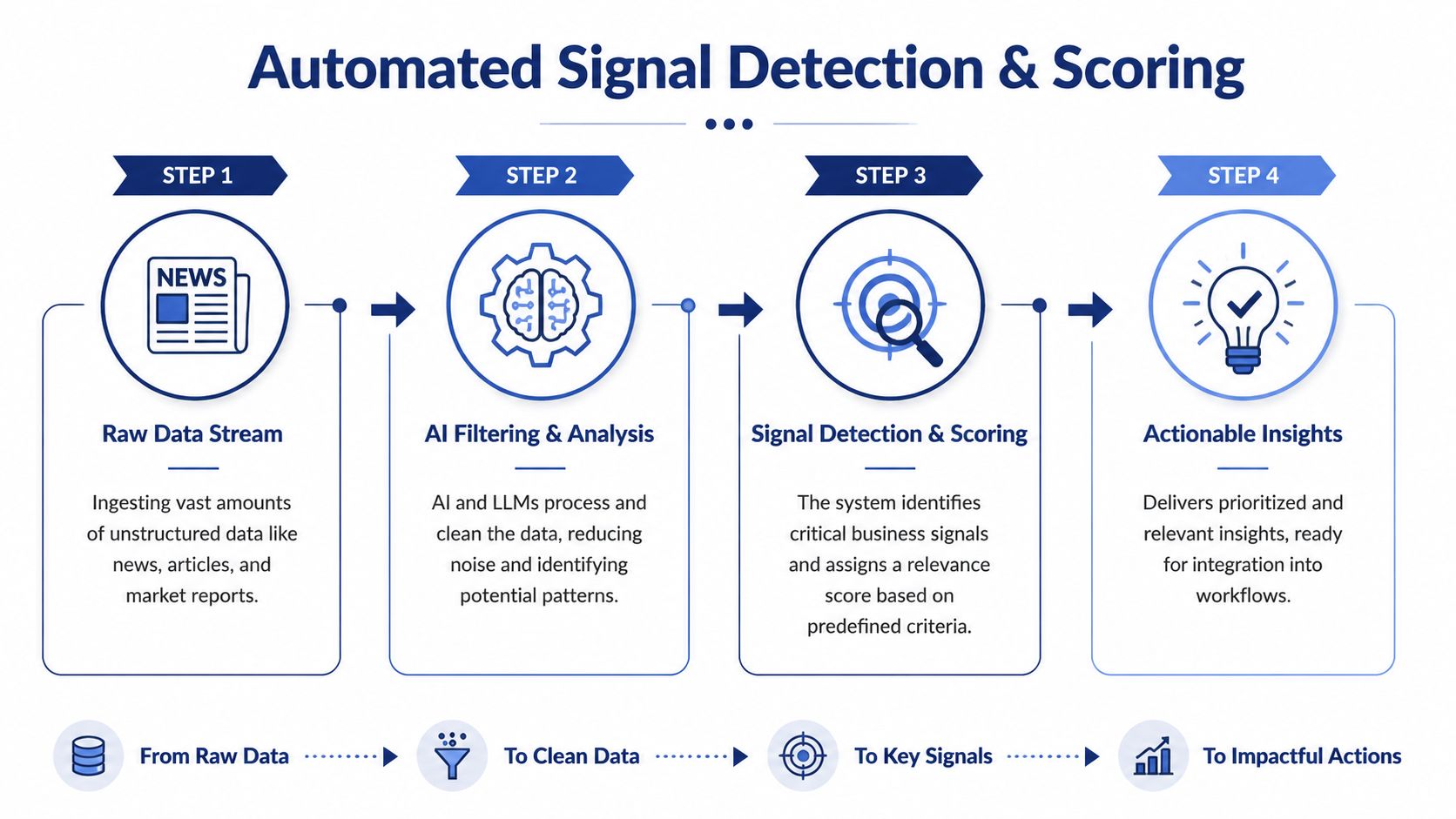
Most company alerts don’t help reps because they tell you that something happened, not whether it matters to your motion. A funding round may be relevant for one product and useless for another. A leadership hire may matter only if the new executive owns your category. A generic alert stream creates activity, not prioritization.
That’s the core gap. As noted in this analysis of AI-powered market research and signal overload, most company research alerts fail to convert because they’re generic or misaligned with buyer intent. The main challenge isn’t detection. It’s filtering for signals that are actionable.
A scoring model that sales can trust
A workable signal model usually combines event data with account context. I’d score each alert across several dimensions rather than relying on one headline trigger.
Consider these layers:
-
Event type Some triggers are naturally stronger. Executive hires, product launches, budget commentary, and initiative-linked hiring usually matter more than generic brand mentions.
-
Account fit A major event at a poor-fit account should still rank lower than a moderate event at a strong-fit account.
-
Role relevance The same company event has different value depending on whether you sell to finance, security, infrastructure, marketing, or HR.
-
Timing A signal that aligns with an open opportunity or recent outbound activity deserves a boost.
-
Evidence strength Company-authored or regulator-filed sources often deserve more weight than third-party commentary.
What strong filtering looks like
A useful alert should read more like a recommendation than a notification.
Bad alert:
- Company posted five new jobs in data engineering.
Better alert:
- Company posted multiple data engineering roles tied to platform scaling. This likely supports a broader data modernization initiative. Route to the rep owning the open account because the current opportunity is positioned around analytics infrastructure.
If the alert doesn’t explain the “so what,” reps will ignore it after the novelty wears off.
That’s why a buying-signal system needs interpretation logic, not just event scraping. A good framework for thinking through this is to separate signals into three buckets:
| Signal bucket | What it means for the team | Typical action |
|---|---|---|
| High intent | Strong link to active initiative or buying motion | Immediate outreach, task creation, CRM update |
| Watchlist | Meaningful but not urgent without more context | Monitor, append to account brief |
| Noise | Weak relevance or broad market chatter | Suppress or archive |
For teams refining this layer, practical thinking around buying signals in B2B sales is useful because it pushes the conversation away from volume and toward conversion quality.
The trade-off most teams miss
Aggressive detection catches more events, but it also floods reps. Conservative detection protects attention, but it can miss niche triggers that matter for a narrow ICP. There isn’t a universal setting. The right threshold depends on account volume, sales cycle length, and how specialized your product is.
That’s why feedback loops matter. Let reps mark alerts as useful, irrelevant, or mistimed. Then feed that behavior back into the weighting model. Without that loop, signal scoring stays theoretical.

“All of the vendors that I've worked with, all of the onboarding that I have had to deal with, I will say, hands down, Salesmotion was the easiest that I have had.”
Lyndsay Thomson
Head of Sales Operations, Cytel
Building Real-Time Alerts and Workflow Integrations
A research system becomes operational when it stops living in a dashboard. Reps won’t check another portal consistently. The intelligence has to meet them where they already work.
That usually means Slack, Microsoft Teams, Salesforce, HubSpot, sequencing tools, and email. The trigger should create motion with minimal friction. If a rep has to copy context manually into the CRM or rewrite the insight before using it, the system hasn’t closed the loop.

Deliver alerts with context, not just speed
The McKinsey State of AI analysis notes that signal systems that don’t filter and contextualize the “so what” generate low engagement, and that top-tier systems require real-time ingestion with latency under 2 seconds for alert delivery in fast-moving sales cycles. In practice, that means a webhook pipeline isn’t enough on its own. The message also has to be crisp and decision-ready.
A strong alert payload usually includes:
- Account name and trigger
- Why this matters to our motion
- Suggested next step
- Linked source record
- Owner routing
- CRM record reference
CRM writes should be selective
Not every signal belongs on the account object. If you write every event into Salesforce or HubSpot, you’ll pollute the record and lose trust. Only push fields that help segmentation, prioritization, or rep action.
Good CRM updates often include:
- Latest meaningful trigger
- Signal score or priority band
- Current strategic initiative summary
- Recommended outreach angle
- Last verified source date
Everything else can live in an attached note, timeline event, or linked intelligence pane.
Route broad awareness to Slack. Write durable account context to CRM. Don’t treat those channels as interchangeable.
Integration patterns that work
Different teams need different delivery models, but a few patterns hold up:
-
Webhook to Slack or Teams Best for immediate visibility on high-priority accounts. Keep messages short and assign ownership clearly.
-
CRM enrichment job Best for keeping account records fresh. Run this on a schedule or trigger it after a verified event.
-
Sequence trigger Best when the signal maps tightly to a tested outbound motion. Human review should still sit between the trigger and send.
-
Daily digest Best for lower-priority monitoring. Useful for managers and account teams reviewing account movement in batches.
Off-the-shelf systems often earn their value. Building alerts is easy. Building reliable routing, source links, CRM hygiene, and usable summaries takes more care than typically anticipated. A platform such as Salesmotion can fit here because it monitors account triggers across public sources and delivers source-linked context into Slack, email, and CRM, which reduces the amount of custom workflow glue RevOps has to maintain.
From Automated Research to Autonomous Selling
A custom intelligence stack can absolutely work. The blueprint is clear enough. You need a stable data layer, structured synthesis, a relevance model, and workflow delivery. But each layer creates ongoing ownership. APIs change. Source quality drifts. Schemas need revision. Prompt outputs wander. CRM field logic gets messy. Rep feedback has to be folded back into scoring.
That’s manageable for teams with dedicated engineering support and a clear reason to build proprietary infrastructure. It’s much harder for a revenue organization that mainly wants better account coverage, faster “why now” outreach, and less manual prep.
The more practical decision for many teams is to buy the infrastructure and keep ownership over the playbook. Let the platform handle source monitoring, normalization, and delivery mechanics. Keep your internal energy focused on ICP fit, territory design, routing rules, and message quality.
A lot of leaders describe this as moving from automation to autonomy. That’s the right framing. The goal isn’t just to summarize accounts faster. It’s to create a system that continuously watches your market, explains why a change matters, and tees up the next action without waiting for a rep to go hunting.
If you’re thinking in those terms, it helps to look at how an AI sales agent changes the operating model. The fundamental shift is not “AI writes an email.” It’s “AI maintains account understanding and initiates the right workflow when conditions change.”
That’s where ai for company research with api becomes more than a tooling experiment. It becomes part of how the revenue engine runs.
If your team wants that outcome without stitching together a custom stack, Salesmotion is built for this exact workflow. It uses AI agents to monitor target accounts, synthesize research from public sources, detect meaningful signals, and push actionable context into Slack, email, and CRM so reps can spend less time researching and more time selling.