Sales reps spend just 28% of their week actually selling. The rest goes to admin work, internal meetings, CRM updates, and the biggest time sink of all: manual account research. According to Salesforce, reps average about two hours per day in live selling conversations. Meanwhile, quota attainment keeps falling. Only 16% of reps hit their number in 2024, down from 28% in 2023.
TL;DR: The best sales productivity tools eliminate the repetitive tasks that steal selling time. This guide covers 10 tools across account research, call analysis, scheduling, sequencing, knowledge management, and workflow automation, with honest pricing, strengths, and trade-offs for each. Account research automation delivers the single largest time savings for most B2B teams.
The productivity problem is not effort. It is friction. Reps toggle between five or more applications to prepare for a single meeting. They copy-paste earnings data from SEC filings into Google Docs, scan LinkedIn for leadership changes, and check Crunchbase for funding rounds. By the time they have enough context for a personalized outreach, the buying window may have closed.
The right sales productivity tools remove that friction. They automate the tasks that consume the 72% of non-selling time so reps can spend more of their week in conversations that generate revenue.
Where Sales Reps Actually Lose Time
Before picking tools, you need to understand the time breakdown. A SPOTIO analysis of 140+ sales statistics shows the average rep's week breaks down roughly like this:
| Activity | % of Week | Hours (40-hr week) |
|---|---|---|
| Active selling (calls, meetings, demos) | 28-36% | 11-14 hrs |
| Administrative tasks (CRM updates, logging, reporting) | 18% | 7 hrs |
| Prospecting and research | 16% | 6.5 hrs |
| Email and communication | 21% | 8.5 hrs |
| Internal meetings and training | 10% | 4 hrs |
Research and prospecting consume 16% of the week on average, but for enterprise AEs managing complex accounts, it can be much higher. George Treschi, an account executive at Sigma who won FY25 President's Club, was spending 12 hours per week on account research alone before automating it. That is nearly a third of a 40-hour week devoted to a task that produces zero revenue on its own.
The 10 tools below target the biggest time drains in this breakdown. We start with account research automation because it typically delivers the largest per-rep time savings.
The 10 Best Sales Productivity Tools for 2027
1. Salesmotion: Account Research Automation
Salesmotion automates the most time-consuming part of a sales rep's week: account research. Instead of toggling between LinkedIn, SEC.gov, Crunchbase, news sites, and ChatGPT, reps get one-click account briefs sourced from over 1,000 public and private data sources. Each brief covers executive changes, hiring patterns, earnings commentary, strategic initiatives, competitive moves, and more.
The platform also monitors your entire territory 24/7 for buying signals (leadership changes, funding rounds, product launches, earnings calls) and delivers proactive alerts when accounts enter a buying window.
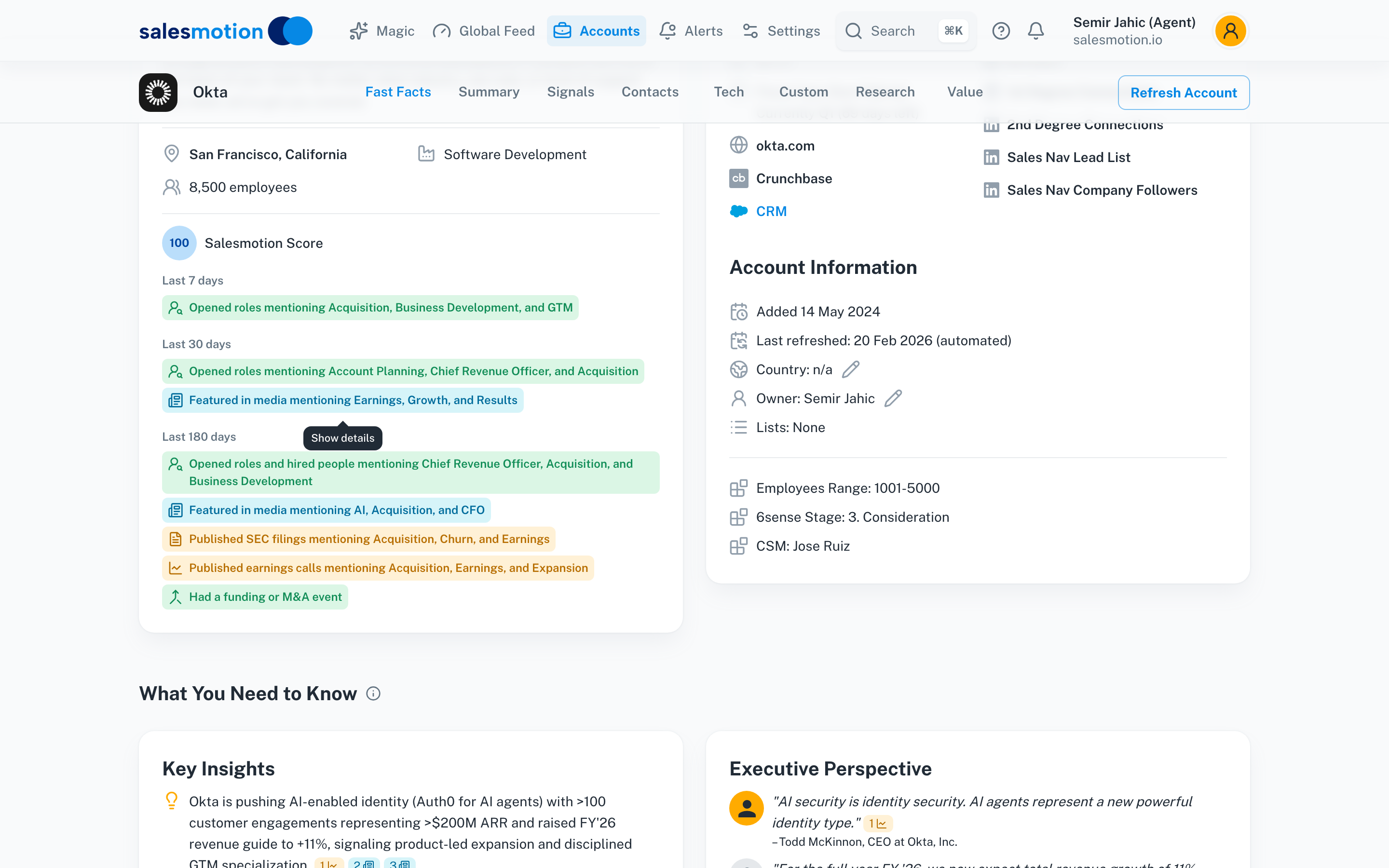 A 5-minute Salesmotion brief replaces 3+ hours of manual research — key insights, executive quotes, and talking points ready before every meeting.
What it does best: Replaces 3+ hours of manual account research with a 5-minute automated brief.
Who it's for: B2B sales teams at mid-market and enterprise companies with complex, multi-stakeholder deal cycles.
Key differentiator: Breadth of signal coverage. Most tools track one or two signal types (like job changes). The platform tracks earnings calls, strategic initiatives, hiring patterns, competitive moves, funding, and leadership changes in a single view.
Pricing: Flexible account-based pricing starting at $85/month, scaling by accounts monitored. See the pricing page for current plans.
Limitation: Designed for account-level intelligence, not a contact database. Teams that need bulk contact data will pair it with a data provider.
Results in practice: Guild Education saves 30 minutes per account and 6+ hours per rep per week. Analytic Partners cut research time by 85%, from 3 hours to 15 minutes per account, and grew qualified pipeline 40% year over year.
2. Gong: Conversation Intelligence and Call Analysis
Gong records, transcribes, and analyzes sales calls to identify what top performers do differently. It surfaces patterns in talk-to-listen ratios, competitor mentions, pricing discussions, and objection handling across your entire team.
What it does best: Turns call recordings into coaching insights and deal intelligence at scale.
Who it's for: Sales teams with 10+ reps running regular discovery calls and demos where call quality directly impacts win rates.
Key differentiator: AI-powered deal boards that aggregate signals across all calls for a given opportunity, giving managers visibility into deal health without sitting in on every meeting.
Pricing: Gong does not publish pricing. Licences are priced per user with a platform fee based on the number of users supported. See our Gong alternatives comparison for details on competitive options.
Limitation: Requires consistent call recording adoption across the team. Value scales with call volume, so small teams with few recorded calls get less from the pattern analysis.
3. Calendly: Scheduling Automation
Calendly eliminates the back-and-forth emails that plague meeting scheduling. Reps share a booking link, prospects pick a time, and the meeting lands on the calendar with a confirmation and reminder sequence.
What it does best: Reduces the 4-7 email exchanges typically needed to book a single meeting to zero.
Who it's for: Any sales professional who books external meetings, from SDRs scheduling discovery calls to AEs coordinating multi-stakeholder demos.
Key differentiator: Round-robin and routing rules that distribute meetings across a team based on territory, account ownership, or availability.
Pricing: Free tier for basic scheduling. Professional plan at $16/user/month adds routing, integrations, and analytics.
Limitation: The free tier is limited to one event type. More complex routing (by territory, deal size, or account tier) requires the Teams plan at $20/user/month.
4. Outreach: Sales Sequence Automation
Outreach automates multi-step outreach sequences across email, phone, and LinkedIn. Reps build sequences that trigger follow-ups based on prospect behavior (opens, clicks, replies), keeping pipeline moving without manual tracking.
What it does best: Orchestrates multi-channel cadences that would take hours to manage manually, with A/B testing built into every sequence.
Who it's for: SDR and BDR teams running high-volume outbound, and AEs managing multi-touch deal progression on 50+ accounts.
Key differentiator: Sequence analytics that show exactly which step, channel, and message variation drives the most meetings. See our Outreach vs. Salesloft comparison for a detailed breakdown.
Pricing: Outreach does not publish dollar figures. It sells four tiers (Amplify Essentials, Core, Plus and Pro) differentiated by AI credit allotments, on per-user pricing with no platform fees.
Limitation: Sequences are only as good as their design. Teams get the most from Outreach when they invest in onboarding and build signal-driven sequences instead of generic templates.
5. Notion: Sales Knowledge Base and Playbook Hub
Notion provides a flexible workspace where sales teams centralize playbooks, competitive battlecards, objection handling guides, and deal templates. Unlike rigid knowledge management tools, Notion adapts to how your team actually organizes information.
What it does best: Creates a single source of truth for sales content that reps actually use, instead of documents scattered across Google Drive, Confluence, and Slack channels.
Who it's for: Sales teams of any size that need to onboard new reps quickly and keep competitive intelligence current.
Key differentiator: Database views with filters, so a rep can pull up the right battlecard for a specific competitor and deal stage in seconds, not minutes.
Pricing: Free for individuals. Team plan at $10/user/month. Enterprise plans with SSO and audit logs from $15/user/month.
Limitation: Notion is a blank canvas. Without someone owning the information architecture (usually RevOps), it becomes another graveyard of outdated docs within six months.
6. Slack: Real-Time Sales Team Communication
Slack is the connective tissue of modern sales organizations. Deal rooms, win/loss alerts, CRM notifications, and quick manager coaching all flow through Slack channels, keeping teams aligned without another meeting.
What it does best: Reduces internal meetings by centralizing deal discussions, approvals, and competitive updates in searchable channels.
Who it's for: Any B2B sales organization that needs cross-functional coordination between sales, marketing, product, and customer success.
Key differentiator: Integration ecosystem. Slack connects with CRM platforms, sales engagement tools, and intelligence platforms to surface alerts where reps already spend their time.
Pricing: Free tier with limited message history. Pro plan at $8.75/user/month. Business+ at $12.50/user/month adds compliance and data retention features.
Limitation: Slack can become a productivity drain itself if channels proliferate without governance. Sales-specific channels need clear naming conventions and archival policies.
7. Loom: Async Video for Sales
Loom lets reps record and share short video messages instead of writing long emails or scheduling live calls for every update. It is particularly effective for personalized prospecting, deal check-ins, and internal handoffs between sales stages.
What it does best: Replaces 30-minute status calls with 3-minute video walkthroughs that the recipient watches at their convenience.
Who it's for: AEs who need to communicate complex proposals, product capabilities, or competitive differentiators to buying committees that cannot all attend a live meeting.
Key differentiator: Viewer analytics that show who watched, how much they watched, and when, giving reps a follow-up trigger based on engagement.
Pricing: Free tier with 25 video limit. Business plan at $15/user/month with unlimited videos, CRM integrations, and custom branding.
Limitation: Video prospecting fatigue is real. Reps who send generic Loom videos see low engagement. The tool works best when the video references something specific about the recipient's situation (a signal, a recent announcement, a shared connection).
8. Zapier: Workflow Automation
Zapier connects the apps in your sales stack without code. When a prospect fills out a form, Zapier can create a CRM record, add them to a sequence, notify the account owner in Slack, and log the activity, all automatically.
What it does best: Eliminates the manual data entry and copy-paste workflows that eat 30-60 minutes per rep per day.
Who it's for: RevOps teams that need to integrate tools without engineering resources, and individual reps who want to automate their personal workflows.
Key differentiator: 7,000+ app integrations and multi-step Zaps that chain together complex workflows with conditional logic.
Pricing: Free tier with 100 tasks/month. Starter at $19.99/month. Professional at $49/month adds multi-step Zaps and filters.
Limitation: Complex Zaps can break silently when an API changes or a field is renamed. Someone on the team (usually RevOps) needs to monitor Zap health and fix failures. For a broader view of how these tools fit together, see our guide to building an effective B2B sales tools stack.
9. Dooly: Meeting Notes and CRM Sync
Dooly captures meeting notes in a structured format and syncs them directly to Salesforce fields, opportunities, and contacts. Reps take notes during calls, and Dooly pushes the data to the CRM without the rep ever opening Salesforce.
What it does best: Cuts post-call CRM updating from 10-15 minutes per meeting to under 2 minutes.
Who it's for: AEs and customer success managers who run 4+ meetings per day and struggle to keep CRM data current.
Key differentiator: Templates tied to your sales methodology (MEDDIC, BANT, SPIN) so reps capture the right qualification data during every call, not after.
Pricing: Free tier with basic note sync. Growth plan at $35/user/month. Enterprise pricing for custom integrations and admin controls.
Limitation: Salesforce-centric. Teams on HubSpot CRM or other platforms have fewer integration options, though HubSpot support has improved.
10. Fireflies.ai: AI Meeting Transcription
Fireflies.ai joins your meetings as a bot, records the conversation, generates a searchable transcript, and extracts action items, questions, and key topics automatically.
What it does best: Makes every sales conversation searchable. Need to find the moment a prospect mentioned their renewal date? Search the transcript instead of scrubbing a 45-minute recording.
Who it's for: Sales teams that want meeting intelligence without the enterprise price tag of platforms like Gong or Chorus.
Key differentiator: Price-to-value ratio. Pro starts at $10 per seat per month on annual billing, a published price for teams that mainly need recording, transcripts, and summaries.
Pricing: Free tier. Pro at $10 per seat per month billed annually ($18 monthly). Business at $19 billed annually ($29 monthly). Enterprise at $39, annual only.
Limitation: Built for meeting capture and search. Teams that want deal-level coaching and forecasting usually compare it with a conversation intelligence platform.

“This is massive and saves me hours of searching Google and reading annual reports. Using Salesmotion as my very first place to go when I'm doing anything account-related now.”
Derek Rosen
Director, Strategic Accounts, Guild Education
Building Your Sales Productivity Stack
You do not need all 10 tools. In fact, tool sprawl is one of the leading causes of low sales productivity in the first place. The goal is to eliminate the largest time drains with the fewest tools.
Here is how to prioritize based on where your team loses the most time:
If reps spend 5+ hours/week on account research: Start with account research automation. This is the single highest-ROI investment for most enterprise sales teams. When Derek Rosen's team at Guild Education automated their account research with Salesmotion, they recovered 6+ hours per rep per week, the equivalent of adding a full selling day without increasing headcount.
If pipeline moves slowly because reps lack call insights: Add conversation intelligence (Gong or Fireflies.ai, depending on budget) to identify where deals stall and what top performers do differently.
If reps spend more time on admin than selling: Layer in Dooly for CRM sync and Zapier for workflow automation. These two tools together can eliminate 60-90 minutes of daily admin work.
If outbound volume is high but conversion is low: Invest in sequencing (Outreach) combined with better targeting. Sequences without account intelligence behind them just automate bad outreach faster.
The stack that delivers the most ROI for a typical 15-person B2B sales team:
| Priority | Tool | Time Saved Per Rep/Week | Annual Cost (15 reps) |
|---|---|---|---|
| 1 | Account research automation | 4-6 hours | Custom (Team) |
| 2 | Meeting scheduling | 1-2 hours | Free-$2,880 |
| 3 | CRM sync automation | 1-2 hours | Free-$6,300 |
| 4 | Conversation intelligence | 1-2 hours | $18,000-$27,000 |
| 5 | Sequence automation | 2-3 hours | $18,000-$23,400 |
A McKinsey analysis estimates that generative AI could unlock $0.8 to $1.2 trillion in additional productivity across sales and marketing. The teams capturing that value are not adopting every new tool. They are systematically eliminating their biggest time sinks and measuring the results.
Frequently Asked Questions
What is the biggest time waster for sales reps?
Manual account research is the single largest time drain for most B2B sales reps. Reps spend 16% of their week on prospecting and research on average, and enterprise AEs can spend significantly more. This includes toggling between LinkedIn, SEC filings, news sites, and CRM data to build enough context for personalized outreach. Automating this research delivers the highest per-rep time savings of any productivity investment.
How many sales productivity tools does a team actually need?
Most effective B2B sales teams operate with 4-6 core tools that cover CRM, communication, research/intelligence, sequencing, and scheduling. According to Everstage, reps waste up to 60 minutes daily navigating between disconnected apps. Adding more tools without removing old ones creates context-switching overhead that offsets any productivity gains. Consolidation and integration quality matter more than feature counts.
How do you measure the ROI of sales productivity tools?
Measure three metrics before and after adoption: time spent on non-selling activities (track via CRM activity logs), meetings booked per rep per week, and pipeline velocity (average days from opportunity creation to close). A tool that saves 4 hours per week per rep across a 15-person team recovers 3,120 selling hours annually. At an average AE cost of $150/hour fully loaded, that represents $468,000 in recovered capacity.
Can AI tools really replace manual sales research?
AI tools do not replace the strategic thinking behind account research, but they eliminate the data gathering that consumes most of the time. What used to require toggling across 5+ tabs and 45-60 minutes per account, pulling earnings data, tracking leadership moves, monitoring competitive activity, can be automated into a single brief generated in minutes. The rep's job shifts from collecting information to interpreting it and acting on it, which is where human judgment still outperforms any AI.
What sales productivity tools work best for small teams?
Small teams (under 10 reps) should prioritize free or low-cost tools first: Calendly (free tier), Slack (free tier), and Fireflies.ai (free tier for basic transcription). As pipeline grows, add a sequencing tool and account intelligence. The mistake small teams make is buying enterprise tools too early. Start with the tools that address your biggest bottleneck, not the ones with the most features.

“Salesmotion has been a game-changer for me. I used to spend 12 hours a week on prospect research, now it's down to 4. Plus I'm finding stuff I was totally missing - podcasts, news mentions, the good bits.”
George Treschi
Account Executive, FY25 President's Club, Sigma
Key Takeaways
- Sales reps spend only 28-36% of their week on actual selling activities. The rest goes to admin, research, meetings, and email. Productivity tools should target the 64-72% of non-selling time.
- Account research automation delivers the highest per-rep time savings for most B2B teams. Guild Education recovered 6+ hours per rep per week, and Analytic Partners cut research from 3 hours to 15 minutes per account.
- Tool consolidation beats tool accumulation. Effective sales teams run 4-6 core tools, not 10+. Every additional tool adds context-switching overhead that erodes the productivity gains it promises.
- Measure before and after: track time on non-selling activities, meetings booked per week, and pipeline velocity. These three metrics tell you whether a tool is delivering real ROI or just adding another dashboard.
- Build your stack in priority order: research automation first, then scheduling, CRM sync, conversation intelligence, and sequencing. Each layer compounds the time savings from the one before it.