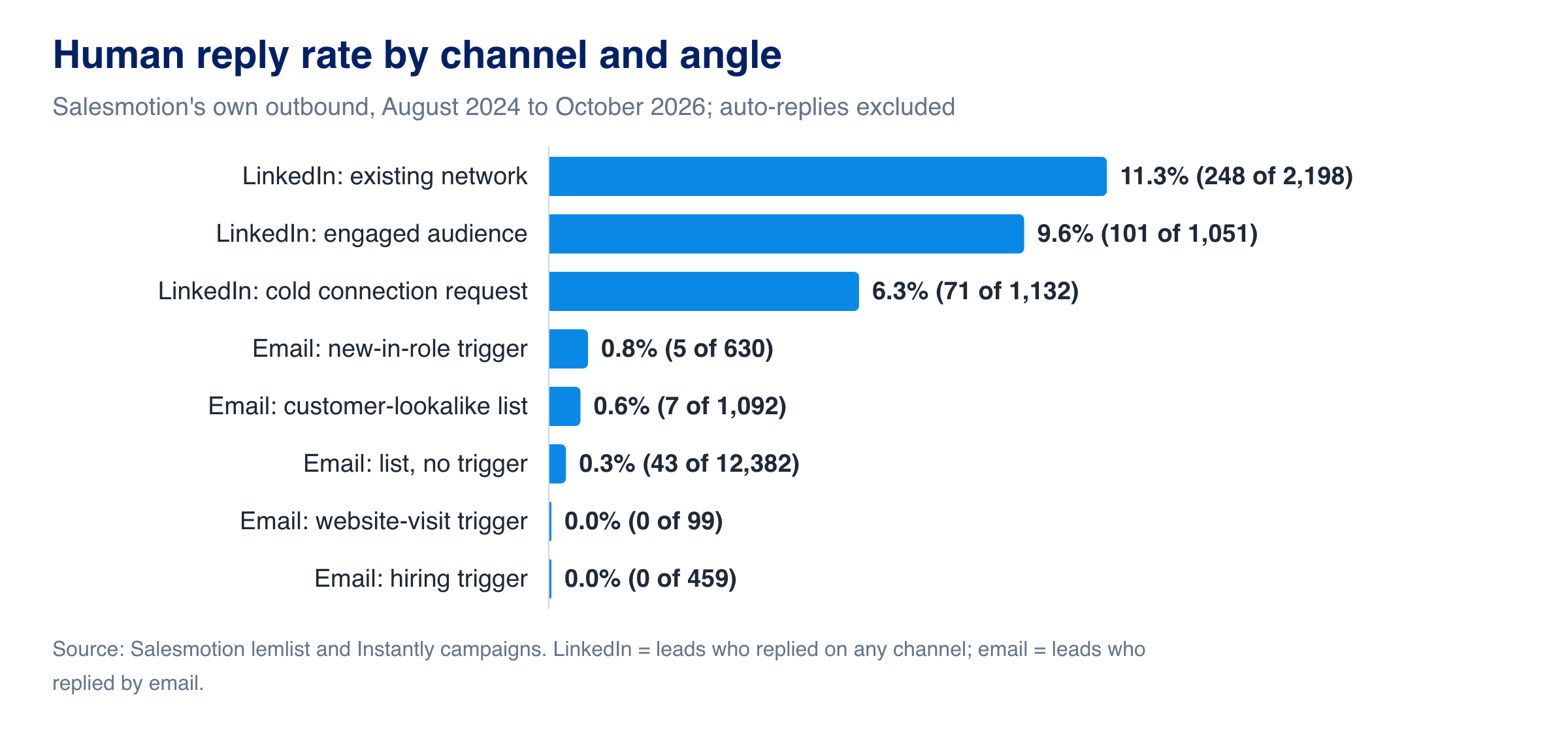
The cold outreach best practices that hold up in real data are simpler than most playbooks suggest: reach people through a channel where they already know you, use buying signals to choose who and when, count only human replies, and keep bounces low. Salesmotion measured its own outbound across 19,043 leads between August 2024 and October 2026. LinkedIn messages to people in the sender's network got a human reply 11.3% of the time. Cold email to bought or built lists got 0.3%. Anchoring a cold email to a trigger event did not close that gap.
Key takeaways (Salesmotion's own campaigns, auto-replies removed)
- Channel and relationship beat copy. LinkedIn to an existing network: 11.3% human replies. LinkedIn to people who had engaged with the sender first: 9.6%. Cold LinkedIn connection requests: 6.3%. List-based cold email: 0.3%.
- Triggers did not rescue cold email. Cold email tied to a hiring signal drew no human replies from 459 leads; a new-in-role trigger drew 0.8% from 630. Both cohorts are small, so treat them as directional.
- Auto-replies distort benchmarks. In the Instantly campaigns, automatic replies outnumbered human ones 197 to 14. A reply rate that includes them is mostly out-of-office messages.
- Half of human email replies were a no. Of the 39 human email replies that could be read, 20 were opt-outs or a flat no.
- Watch the bounce rate. The hiring-trigger campaigns bounced at 10.8%, against 2.0% for the list-based lemlist campaigns.
The Data: Human Reply Rates by Channel and Angle
| Channel and angle | Campaigns | Leads reached | Human reply rate | Read it as |
|---|---|---|---|---|
| LinkedIn: existing network (first-degree connections, alumni) | 4 | 2,198 | 11.3% | Solid |
| LinkedIn: engaged audience (profile visitors, followers, post engagers) | 5 | 1,051 | 9.6% | Solid |
| LinkedIn: cold connection request plus message | 10 | 1,132 | 6.3% | Solid |
| Email: new-in-role trigger (new leader at the account) | 3 | 630 | 0.8% | Directional |
| Email: customer-lookalike list | 3 | 1,092 | 0.6% | Directional |
| Email: list, no trigger | 23 | 12,382 | 0.3% | Solid |
| Email: website-visit trigger | 2 | 99 | 0 replies | Directional |
| Email: hiring trigger (account hiring for the buyer's team) | 5 | 459 | 0 replies | Directional |
LinkedIn rows count a lead who replied on any channel. Email rows count a lead who replied by email. "Directional" means fewer than ten replies or fewer than 1,000 leads, so the rate could move a lot with more data. The method is at the end of this page.
Two things in the mixed campaigns stand out. In the three customer-lookalike campaigns, which ran email and LinkedIn side by side, 37 of the 44 leads who replied did so on LinkedIn. And the positive email replies that could be read were mostly short yeses to a concrete offer, such as a sample or an example, rather than to a request for a meeting.
Know who to contact and when
Salesmotion monitors 1,000+ public sources for buying signals, such as earnings calls, leadership changes and hiring spikes, and drafts outreach against each one. From $85/mo.
Cold Outreach Best Practices the Data Supports
1. Start where you already have trust
The biggest gap in the data is not between good and bad copy. It is between people who know the sender and people who do not. Before buying a list, work through the audiences that already have a reason to answer: first-degree connections, alumni networks, people who visited your profile or followed your company page, past users and event contacts. The same message reaches a different person when it lands in a known inbox.
2. Use signals to pick who and when, not as the whole message
A trigger event tells you which account to work this week and gives you a first line. It does not make a stranger answer an email. In this data, emails anchored to hiring signals and website visits drew nothing, and the new-in-role trigger did only slightly better than a list. Use the signal to decide who goes into this week's work, then reach them through the best channel you have. The B2B buying signals benchmark shows how often each trigger happens, and signal-based selling covers the plays.
3. Research before you write
A sales lead at a cybersecurity software firm told us: "it's more like much more sniper type of thing rather than just trying to shoot everything with a machine gun and see what falls, right?"
Five minutes of research beats five more emails. Before a first touch, check:
- Recent account events: leadership changes, acquisitions, funding, product launches, regulatory news.
- What the company said publicly: earnings-call priorities, annual report themes, press releases.
- The person: time in role, previous company, what they post about.
- The team: open roles in the department you sell to.
Write one sentence that proves you read it. If you cannot write that sentence, the account is not ready for outreach yet. The account research checklist has the full list.
4. Make the ask small and concrete
The positive email replies in this data were mostly agreements to receive something specific. "Can I send you an example for your accounts?" is easier to say yes to than "Do you have 30 minutes this week?" Keep the first email to a few sentences, one observation and one small ask.
5. Follow up with something new
A follow-up that repeats the first email is a reminder to ignore it. Each follow-up should add one new fact: a second signal, a short example, a relevant number from the account's own reporting. If there is nothing new to say, wait until there is.
6. Verify every address before you send
The hiring-trigger campaigns bounced at 10.8%, against 2.0% for the list-based lemlist campaigns. High bounce rates damage sender reputation for every campaign on the same domains, so verify emails, warm new inboxes and remove role addresses before sending. The email deliverability best practices guide covers authentication and warm-up.
7. Count human replies only
Most sending tools report a reply rate that includes out-of-office and other automatic responses. In Salesmotion's Instantly campaigns, those outnumbered human replies 197 to 14. One campaign's headline reply rate of 8.6% was, on inspection, 42 automatic replies and one human. Strip automatic replies before comparing campaigns, and track positive replies and meetings separately from opt-outs.
8. Run channels together, not in sequence
Email and LinkedIn reach different people in the same account at different times. Run them side by side for the same account and the same signal, and add a call for accounts where a phone conversation is normal. Judge the sequence by meetings per account worked, not by opens or sends.

“The moment we turned on Salesmotion, it became essential. No more hours on LinkedIn or Google to figure out who we're talking to. It's just there, served up to you, so it's always 'go time.'”
Adam Wainwright
Head of Revenue, Cacheflow
Templates Built on Real Signals
Templates are starting points. Each one assumes you have done the research in step 3 and have a reason to contact this account now.
Template 1: Leadership change
Subject: your first 90 days at {company}
Hi {Name}, congratulations on the move to {company}. At {previous company} you {initiative they led}. As you look at {area}, one thing I noticed: {specific observation about the account}.
Happy to send a short example of how other {role} teams handled it, if useful.
Template 2: Earnings priority
Subject: {CEO name} on {topic}
Hi {Name}, on the last earnings call {CEO} said "{exact quote}". If that lands on your team, {one sentence on what that usually means for their function}.
Would an example from a team in a similar position be useful?
Template 3: Hiring for the buyer's team
Subject: {X} open {role type} roles
Hi {Name}, {company} has {X} open {role type} roles. Teams growing that fast usually hit {specific challenge} within the first quarter.
I can share how one team avoided it, if that is on your list.
Template 4: Several signals together
Subject: three things at {company}
Hi {Name}, three things caught my eye: {signal 1}, {signal 2} and {signal 3}. Together they look like {the initiative}. If {your area} is part of that, I can send a short example.
Measure Outcomes, Not Activity
| Metric | Why it matters |
|---|---|
| Human reply rate | The honest version of reply rate: automatic replies removed |
| Positive reply rate | Replies that agree to a next step, separate from opt-outs |
| Meetings per account worked | Whether the sequence turns attention into conversations |
| Opportunities per 100 accounts worked | Whether the meetings are real pipeline |
| Bounce rate | Data quality, and the health of your sending domains |
Track each by channel and by angle, as in the table above, so you can see which combinations earn their place. Salesmotion's own Instantly campaigns produced 4 opportunities from 6,153 contacted leads.
Spend your outreach on the right accounts
See which of your accounts changed this week, what changed, and who to talk to. Book a 30-minute demo on your own territory.
Book a demo →How This Data Was Collected
Sources. Salesmotion's own outbound campaigns in lemlist (email and LinkedIn) and Instantly (email), read through each tool's API on 22 October 2026. Only Salesmotion campaigns are included. Campaigns from other businesses that share the Instantly account, test campaigns, campaigns still running, and campaigns that reached fewer than 20 leads are excluded.
Period. Campaigns created from August 2024 to October 2026. The Instantly campaigns ran from June to October 2026.
Sample. 19,043 leads reached: 12,890 in 46 lemlist campaigns and 6,153 in 9 Instantly campaigns. Most campaigns were sent by Salesmotion's founders and sales team to sales and revenue leaders, IT services firms and life-sciences service providers.
Definitions.
- Leads reached is lemlist's count of leads who received at least one step, and Instantly's count of contacted leads.
- Human reply in lemlist is a lead with at least one reply activity on that channel; none of the 29 lemlist email replies with readable text was an automatic reply. In Instantly it is the reply count excluding replies Instantly flags as automatic.
- Angle is assigned per campaign from how its list was built and what its first message referenced: a list with no trigger, a hiring signal, a new leader, a website visit, a lookalike of an existing customer, or a LinkedIn audience (cold, engaged or existing network).
- Opt-out or no is a human reply asking to be removed or declining outright. Reply text was readable for 39 of the human email replies (2026 campaigns only).
Limits. Campaigns differ in copy, sender, list source and year, so the comparison between angles is not a controlled test. Cohorts with fewer than ten replies or fewer than 1,000 leads are marked directional.
Frequently Asked Questions
What is a good cold email reply rate?
Count human replies only. In Salesmotion's own campaigns, list-based cold email got 0.3% human replies across 12,382 leads, and automatic replies outnumbered human ones by about 14 to 1 in the campaigns where both were counted. Many published benchmarks include automatic replies, which makes them look several times higher than what a rep actually sees.
Does personalizing cold email with buying signals increase reply rates?
Not reliably on its own. In Salesmotion's data, cold email tied to a hiring signal drew no human replies from 459 leads and a new-in-role trigger drew 0.8% from 630. Both samples are small. Signals work best for choosing which accounts to contact and when; the channel and the relationship decide whether anyone replies.
Is LinkedIn better than email for cold outreach?
In this data, yes. Cold LinkedIn connection requests with a message got 6.3% human replies, against 0.3% for list-based cold email. Messages to people who already knew the sender, or had engaged with the sender's profile or posts, reached 9.6% to 11.3%.
How many follow-ups should a cold outreach sequence have?
As many as you have new, relevant things to say. Each follow-up should add one new fact about the account. A follow-up that only repeats the first message trains the prospect to ignore the thread.
How do you personalize cold outreach at scale?
Automate the research, not the writing. The slow part is gathering account context: recent events, executive priorities, open roles. Account intelligence tools can surface buying signals and briefs for every account, so a rep spends minutes, not hours, finding the one fact worth mentioning. The guide to personalizing outreach at scale shows the workflow.
What is cold outreach, and how is it different from warm and triggered outreach?
Cold outreach is contact with someone who has no prior relationship with you and has shown no visible interest: no referral, no inbound request, no previous conversation. Warm outreach starts from some familiarity, such as a referral, an event conversation, engagement with your content or a reply from a colleague at the same account. Triggered outreach is contact sent because something just happened at the account, such as a new executive, a funding round or an earnings-call priority. Triggered outreach is still cold in relationship terms; the event gives a reason to reach out, but in Salesmotion's data it did not lift cold email replies on its own, which is why warm channels matter. For the wider motion these sit in, see how outbound sales works.
What compliance basics apply to B2B cold outreach?
Rules such as GDPR in Europe and CAN-SPAM in the US vary by region and use case, so your legal counsel should set the exact boundaries. The working habits are the same everywhere: contact people with a legitimate business reason, keep your data accurate, say clearly who you are, make opting out easy, and never mislead in the subject line or body. Relevant, honest, well-targeted outreach tends to meet these standards by default.
How the Outreach Agent drafts from a signal
Every draft is anchored to a real account event, and the rep reviews and sends it.