
This is the short version. It gets one person from nothing to a working setup in about five minutes, and shows an admin how to roll it out to the team. The full reference lives in MCP Integration. Forwarding this to your team? Download it as a PDF.
1. Connect (2 minutes)
All you need is your Salesmotion login.
In claude.ai or Claude Desktop:
- Settings → Connectors → Add custom connector
- Name:
Salesmotion· URL:https://mcp.salesmotion.io - Click Connect, then Sign in with Salesmotion, and log in with your Salesmotion account
- Check the consent page and click Allow and connect
In Claude Code: create a personal key under app.salesmotion.io → Settings → API and add the server to your MCP config with the key as a bearer token — see the Claude Code section of MCP Integration.
2. Try five prompts (3 minutes)
Open a new chat, make sure Salesmotion is enabled under + → Connectors, and type these one at a time. Use any account in your Salesmotion workspace.
| Type this | What you get |
|---|---|
| Show me Honeywell | An interactive card: score, insights, signals, contacts, SWOT, value pyramid, with buttons for the next step |
| Brief me on Honeywell before my call | A one-pager: what changed, three things to know, two openers, one question |
| Account plan for Honeywell | Stakeholders, SWOT, whitespace, competition, objectives, 90-day actions |
| Draft an email to the CFO at Honeywell about their last earnings call | A 50–90-word email anchored to a real, dated signal, plus a follow-up |
| What's new across my accounts this week? | A prioritised action list, capped at five accounts to act on now |
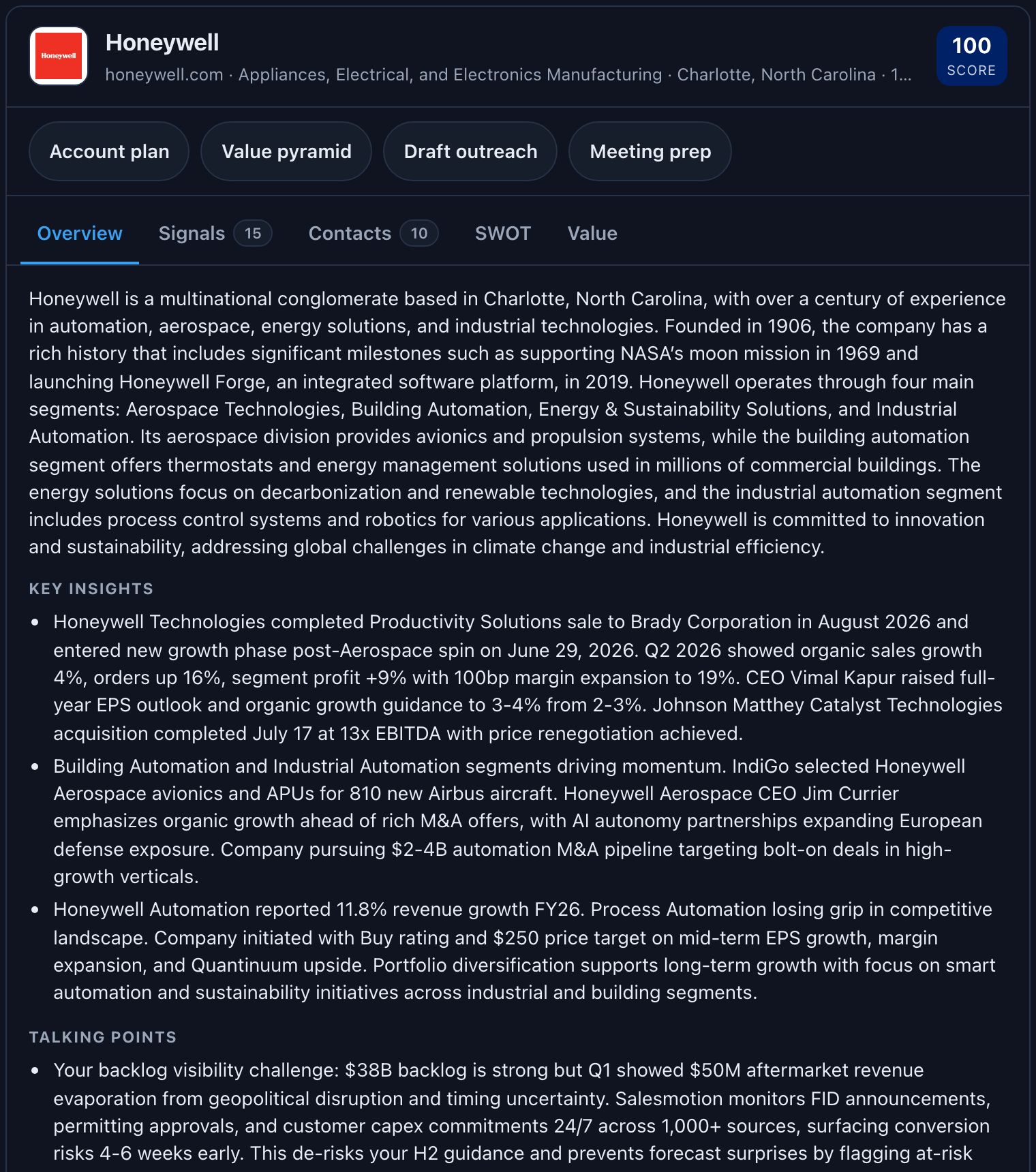
The first time you ask for the card, Claude asks permission once — it is an interactive tool. Click Allow.
Every answer follows the same rules: each claim names its source and date, gaps are stated as gaps, and Claude's own conclusions are labelled as such. Ask "where did that come from?" and it can tell you.
3. Learn the twelve skills (optional)
Those prompts ran built-in workflows we call skills. There are twelve; the others cover MEDDIC qualification, stakeholder maps, meeting prep for a named person, value pyramids, deeper account research, territory reviews, earnings analysis, and hiring analysis. You never need to name them — describe what you want and Claude picks. The full list with examples: Using Salesmotion skills in Claude.
Prefer a slash command? Install the /salesmotion skill: Install the /salesmotion skill.
4. Roll it out to the team (admins, 5 minutes)
Nothing to hand out. On Claude Team or Enterprise:
- In Claude, Admin settings → Connectors → add custom connector with
https://mcp.salesmotion.io. This makes Salesmotion available across the workspace. - Each teammate clicks Connect, signs in with their own Salesmotion account, and approves. One-time, per person.
- Review or revoke anyone's connection in Salesmotion under Settings → API.
Details and what your security team will ask: Sign in with Salesmotion and Company Claude deployments. Prefer one shared key? Connecting your team with a shared key.
If something is off
- Claude answers from general knowledge → the connector is not enabled in that chat (+ → Connectors).
- "API access isn't enabled" on the consent page, or "Salesmotion rejected this key" → API access is not enabled for your organisation, or a pasted key is inactive or expired; an admin can check under Settings → API.
- You get text instead of the card → your Claude client does not support interactive apps yet (the text is the intended fallback), or the connector needs a reconnect under Settings → Connectors.
- A section says "Not available in Salesmotion" → that account has not been added or refreshed in Salesmotion yet.
Still stuck: support@salesmotion.io.