
What a skill is
A skill is a complete sales workflow that Claude runs for you through the Salesmotion connector. It knows which Salesmotion tools to call, in what order, and what the finished output has to contain. You describe what you want; Claude picks the skill and follows it.
Skills exist because the raw tools are building blocks, not outcomes. An account plan takes an account insight, a wide contact pull, ninety days of signals, the job postings, and — for a public company — the earnings history and filings, assembled into a specific structure. A skill does all of that from one sentence.
Skills need the Salesmotion connector. If you have not set it up yet, start with MCP Integration.
The twelve skills
| Skill | Ask for it when you want… | Example |
|---|---|---|
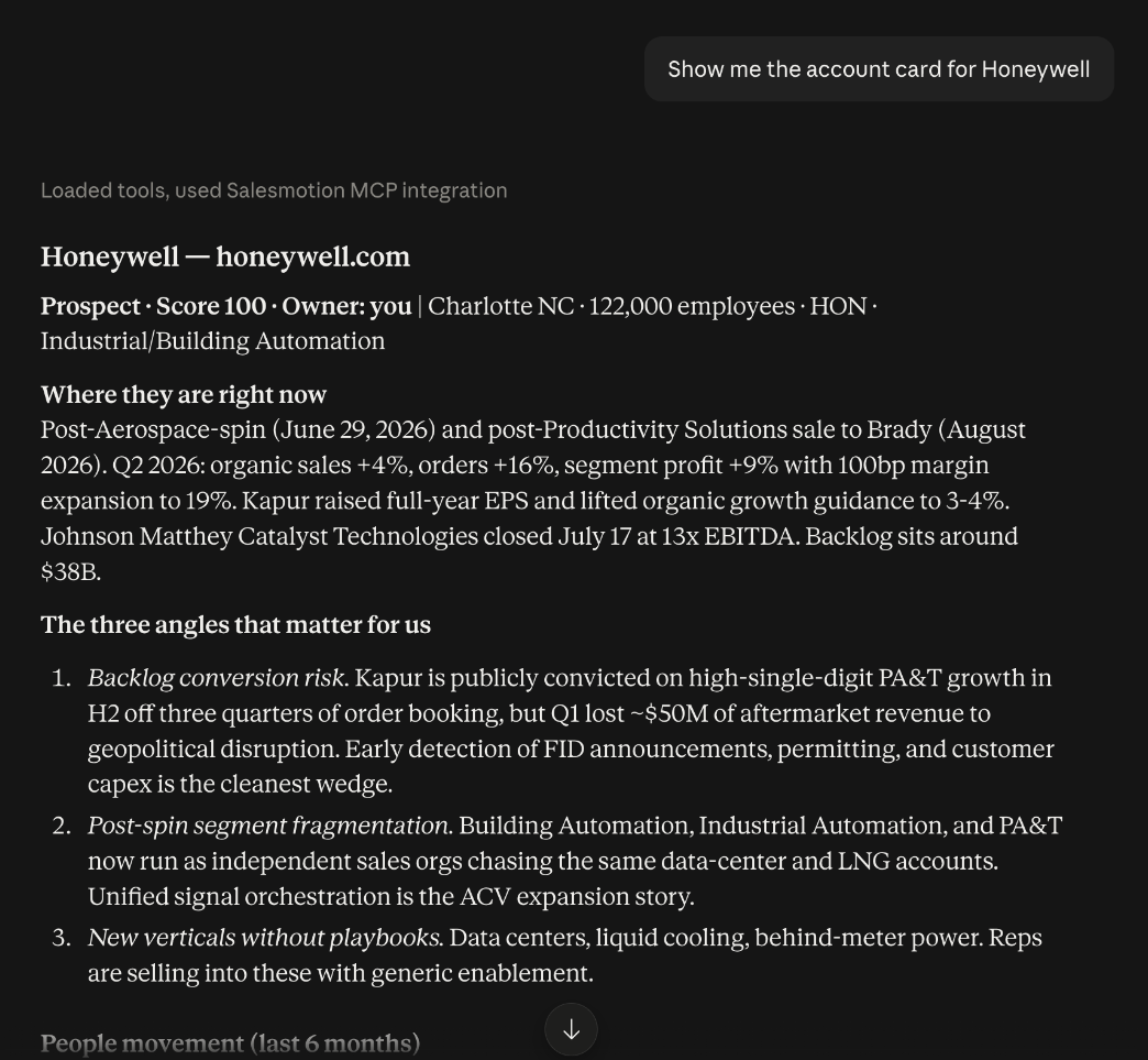
account_brief | a one-page read before a call (under 400 words) | "Brief me on Honeywell" — or just "Honeywell" |
account_research | the full read: intelligence, signals, contacts, synthesis | "Research Bayer in depth" |
account_plan | a strategic plan with stakeholders, SWOT, objectives, 90-day actions | "Account plan for Hitachi, goal: land the first deal" |
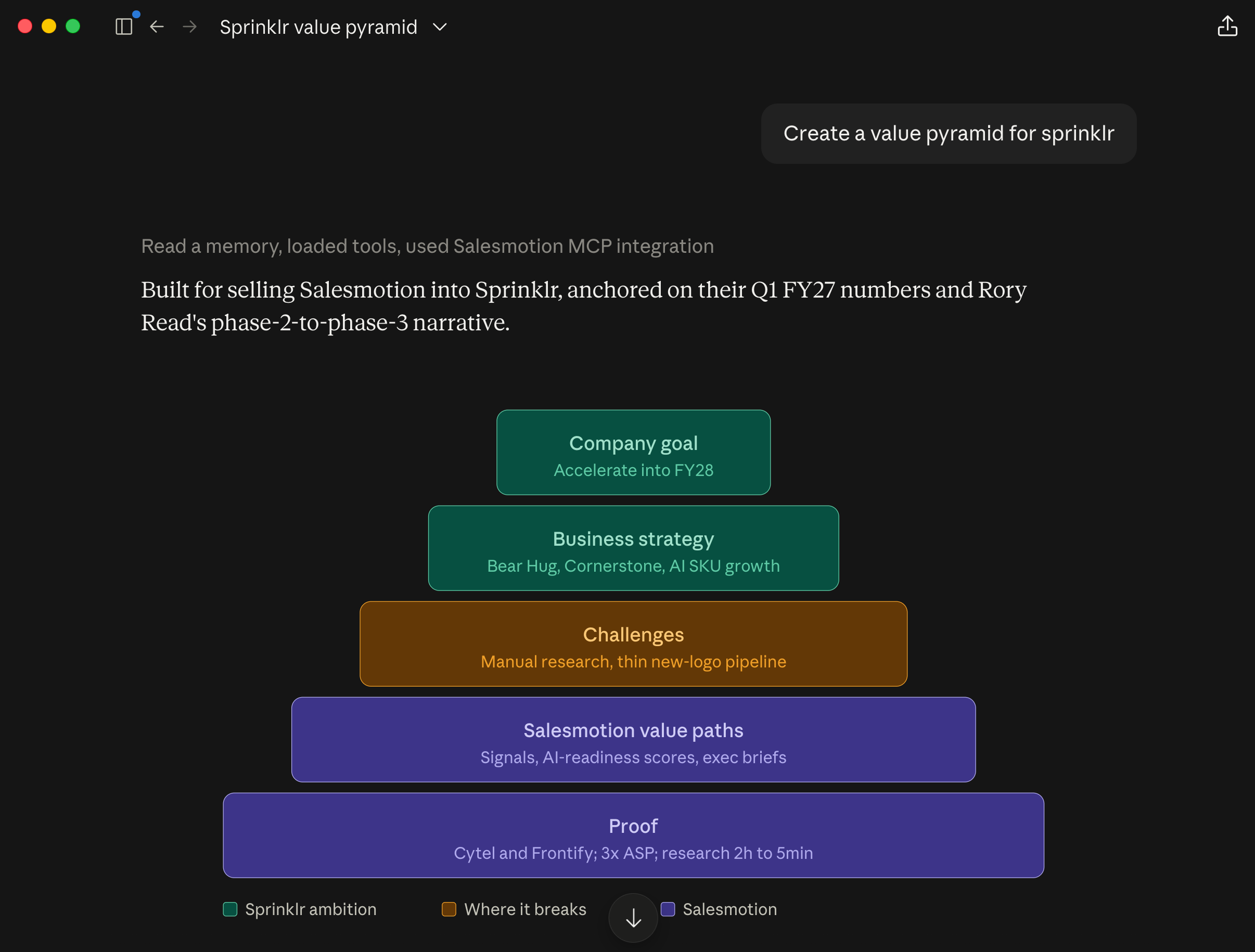
value_pyramid | goals → strategy → obstacles → value paths | "Value pyramid for Honeywell; we sell account intelligence" |
meddic_qualification | to qualify a live opportunity and see the gaps | "Qualify the Bayer deal with MEDDIC" |
stakeholder_map | the buying committee: power, champions, movers, gaps | "Who decides at Panasonic?" |
meeting_prep | to prepare for a specific person | "Prep me for a meeting with Jane Doe at Honeywell" |
signal_to_outreach | an email or LinkedIn message anchored to a real signal | "Draft an email to the CFO at Bayer about their earnings call" |
pipeline_signals | what happened across your accounts recently, as an action list | "What's new across my accounts this week?" |
territory_review | to tier a whole book and see where time should go | "Review my territory" |
earnings_deep_dive | management's own words across several quarters | "What has Honeywell's CEO said about margins over the last four quarters?" |
hiring_signals_analysis | what job postings reveal | "What is Hitachi hiring for?" |
Three ways to run a skill
1. Plain text (recommended)
Type what you want in any chat that has the Salesmotion connector enabled. Claude matches your intent to a skill. Not sure what to ask? Say "what can Salesmotion do?" and it lists the skills with an example each.
- A bare company name runs
account_brief. - A person plus a company runs
meeting_prep. - Otherwise the wording decides: "plan", "qualify", "who decides", "email", "hiring", "territory".
This works in claude.ai, Claude Desktop, Claude Code, Microsoft Copilot, and any other MCP client. The connector tells Claude which skill fits which request when it connects, and the skills are also available as a tool (run_skill), so clients that hide MCP prompts behind menus still run them by name.
2. The connector picker
In claude.ai, click + in the message box → Salesmotion → choose a skill → fill in the company (and any optional fields) → send. Use this when you want to be certain a specific skill runs.
3. The /salesmotion slash command (claude.ai)
The same twelve workflows are also packaged as a Claude Skill for claude.ai. Once installed, type /salesmotion followed by what you want:
/salesmotion Honeywell
/salesmotion account plan for Honeywell
/salesmotion value pyramid Honeywell
/salesmotion meeting with Jane Doe at Honeywell
Download the skill and upload it under Settings → Capabilities → Skills, or install it from GitHub. Full instructions: Install the /salesmotion skill. The connector must still be enabled in the chat — the slash command drives it.
Optional inputs
Most skills accept modifiers. Mention them in your sentence and Claude passes them through:
| Skill | Optional inputs |
|---|---|
account_research | depth: deep — also mines news archive, job postings, earnings calls, and filings |
account_brief | context, e.g. "for a renewal call" |
account_plan | objective ("protect renewal"), timeframe ("two quarters") |
value_pyramid | what you sell, so value paths connect to real capabilities |
meddic_qualification, stakeholder_map | deal context — stage, size, who you have met |
meeting_prep | meeting type: discovery, demo, negotiation, QBR |
signal_to_outreach | channel (email or linkedin), which signal to anchor on |
pipeline_signals | days to look back (default 7), a signal type, a focus (new business, expansion, renewal risk) |
territory_review | an owner, days to look back (default 90) |
earnings_deep_dive | number of quarters (default 4) |
hiring_signals_analysis | a function or theme to focus on |
What every skill guarantees
The workflows were written for a world where buyers check what AI tells them. Every skill follows the same rules:
- Every material claim is sourced. Signals, earnings calls, filings, job postings, and news articles are named with dates. Executives are quoted verbatim when their words are available.
- Nothing is invented. If something is not in Salesmotion, the output says "Not available in Salesmotion" and lists it as an open question.
- Inference is labeled. What the data says and what Claude concludes are kept apart.
- It degrades gracefully. If a company is not in your account list, the skill builds from the public company record — news, jobs, earnings, filings — and tells you which path it used.
Examples
A brief before a call
Brief me on Honeywell before my 2 pm.
You get: a one-liner, the single most compelling recent development with its date and source, three things it would embarrass you not to know, who you are talking to, two openers specific enough that they could only apply to Honeywell, and one question worth asking.
An account plan with a goal
Account plan for Bayer. Objective: expand from the oncology team into the wider commercial org over two quarters.
You get: overview, their stated strategic priorities (quoted and dated), a stakeholder map with unmapped roles called out, a SWOT specific to this account, whitespace, competitive landscape, two or three measurable objectives for the period, an action plan with owners and dates, and the risks.
Outreach anchored to a signal
Draft a LinkedIn message to the VP of Sales at Hitachi about their new data-center push.
You get: the signal Claude anchored on and why it matters to that person, a draft under 500 characters, an alternative opening line, and the follow-up to send if there is no reply.
Troubleshooting
Claude answers from general knowledge instead of running a skill
The Salesmotion connector is not enabled in that chat. Check the connector toggle under + → Connectors, or reconnect it under Settings → Connectors.
The skill picker only shows three prompts
Your connector is on a cached tool list from before the skills shipped. Settings → Connectors → Salesmotion → disconnect, then reconnect. All twelve appear.
A skill says "Not available in Salesmotion" for something you expected
The account may not be in your workspace, or the section has not been generated yet. Open the account in Salesmotion to confirm; if it is missing there too, add or refresh the account and run the skill again.
The output is shorter than expected for a company outside your account list
That is the fallback path. Skills that lead with the full account insight can only use the public company record for companies you have not added. Add the account to Salesmotion for the full depth.