If you're trying to build a martech stack right now, you're probably staring at a messy reality.
Marketing has one set of tools. Sales has another. Customer data lives in five places. Reps are doing manual account research before every call. Marketing sees intent. Sales sees noise. RevOps sits in the middle trying to turn all of it into pipeline.
That setup isn't a stack. It's a collection of subscriptions.
A revenue stack does something simpler and harder. It turns data into action for the teams that carry pipeline. That means your CRM, automation, reporting, and intelligence tools need to work as one system. It also means you should stop thinking like a buyer of software and start thinking like an architect of revenue workflows.
Your Martech Stack Is More Than a Collection of Tools
First-time stack builds often fail for one reason. Teams shop by category instead of by operating model.
They buy a CRM, add marketing automation, bolt on enrichment, layer in outreach, and call it a strategy. A year later, nobody trusts the data, sales ignores half the alerts, and marketing can't prove which signals moved a deal forward.

The market makes this worse. The martech market grew from 150 solutions in 2011 to 15,384 by 2025, and 65.7% of marketers say data integration is one of their biggest stack management challenges, according to StackAdapt's review of the martech stack market. More choice didn't make the job easier. It made bad architecture easier to hide.
More tools usually means more friction
I've seen this pattern a lot:
- Marketing buys for campaign execution. The tool is great for email, landing pages, or attribution.
- Sales buys for rep productivity. The tool helps with sequencing, call prep, or contact data.
- Ops gets pulled into cleanup mode. Fields don't map, alerts duplicate, and ownership gets blurry.
- Leadership expects one version of the truth. Nobody can provide it confidently.
If that sounds familiar, spend a few minutes looking at how disconnected systems create operational drag. It's a useful frame for what goes wrong when platforms share data poorly and teams compensate manually.
A marketing stack and a revenue stack are not the same thing
A marketing-only stack is built to launch campaigns, capture leads, and report on channel performance.
A revenue-focused stack is built to answer harder questions:
- Which accounts are moving?
- Why should a rep reach out now?
- What changed in the account that matters?
- Which signals should trigger marketing support versus sales action?
- Where is manual work slowing pipeline creation?
That's why sales and marketing collaboration can't be an afterthought. If your teams still operate on different definitions of qualified activity, priorities, and timing, fix that before you add more technology. This breakdown shows up constantly in real-world sales and marketing collaboration problems.
Your stack is an information supply chain. If data enters slowly, gets cleaned inconsistently, and reaches reps without context, pipeline suffers.
The right mental model
When you build a martech stack, don't ask, "What tools do we need?"
Ask, "How will a real buying signal move from source to decision to action?"
That shift changes everything. It pushes you toward shared data models, fewer handoffs, clearer ownership, and systems that support marketing, sales, and customer-facing teams together.
That's the difference between software sprawl and revenue architecture.
See Salesmotion in action
Take a self-guided interactive tour — no signup required.
Start with Strategy Not Software
Don't start with demos. Don't start with vendor shortlists. Don't start with a giant spreadsheet of features.
Start with the revenue problem you're trying to solve.
Many organizations underuse martech because they bought software before they defined the job. Organizations use only about one-third of their martech stack's capabilities, and poor utilization often comes from a disconnect between the technology and strategic business goals, as noted in CMSWire's analysis of martech stack underutilization.
That number should bother every RevOps leader. If your team only uses a fraction of what it buys, the issue usually isn't effort. It's fit.
Define the job in revenue terms
"Improve lead generation" is not a useful requirement.
"Help AEs identify live account changes fast enough to send relevant outreach this week" is useful.
"Increase campaign efficiency" is fuzzy.
"Give marketing and sales one shared signal model for prioritizing accounts entering evaluation" is useful.
Use business outcomes that map directly to work people do every day. The most common ones I see are:
- Reduce manual research. Reps shouldn't spend hours stitching together company news, hiring activity, executive changes, and initiative context before outreach.
- Improve timing. If the team can't act when a real trigger happens, your stack is reporting activity, not enabling revenue.
- Increase message relevance. Generic outbound often fails because nobody has enough account context.
- Tighten handoffs. Marketing shouldn't throw leads over the wall. Sales shouldn't ignore intent because it lacks context.
- Create operating visibility. Leadership needs to know which workflows produce meetings, opportunities, and movement.
Interview the people who live in the process
You need input from the teams doing the work, not just the executives approving budget.
Run short interviews with sales managers, AEs, SDRs, demand gen, lifecycle marketing, and customer success. Keep it practical. You're not collecting opinions about software. You're identifying workflow friction.
Ask questions like:
- Where do you lose time before outreach?
- What signals do you trust today, and which ones do you ignore?
- What information is always missing in the CRM?
- Which alerts create action, and which ones create noise?
- What gets done manually every week that should already be automated?
The answers usually expose the gaps. Not "we need another platform." More often it's "we don't know which account changes matter" or "marketing sees engagement but reps can't tie it to a reason to act."
If you need a planning reference for this stage, this go-to-market strategy framework is a useful way to align goals, motions, and ownership before tool selection.
Turn pain points into requirements
Once interviews are done, translate complaints into concrete requirements.
For example:
| Business pain | Real requirement |
|---|---|
| Reps waste time researching accounts | System must surface account changes and summarize why they matter |
| Marketing and sales prioritize differently | Shared account scoring and signal definitions must exist across teams |
| CRM fields are incomplete or stale | Required data model, ownership rules, and sync logic must be documented |
| Teams ignore alerts | Alerting must be role-based, contextual, and tied to next actions |
| Tool adoption is weak | Enablement, documentation, and manager reinforcement must be built into rollout |
Success or failure for most stack projects is determined here. Good requirements protect you from buying flashy tools that demo well and die after onboarding.
Practical rule: If a requirement can't be tied to a workflow, owner, and business outcome, it probably shouldn't drive your buying decision.
Build for enablement from day one
Underutilization isn't just a training issue. It's usually a design issue first and an enablement issue second.
If your stack asks a rep to check six systems before writing an email, adoption will fall. If a marketer has to export data manually to support account prioritization, the workflow will break under pressure.
Good stack design feels boring in the best way. The right data appears where people already work. The action is obvious. The value shows up fast.
That's what strategy gives you. It narrows the field. It forces tradeoffs. It keeps you from building a stack that looks extensive and operates like dead weight.

“Consolidation of prospect company information that I can use frequently to be way better informed when I'm doing my outbound, preparing for a meeting, or building relationships. Ease of use and Customer Support is excellent.”
Werner Schmidt
CEO & Co-Founder, Lative
Architecting Your Revenue Engine's Core Components
A useful stack isn't a list. It's a system with layers.
When I help teams build a martech stack for revenue, I use a four-layer model. It keeps architecture clean and forces each tool to earn its place. You need a foundation for data, a way to turn raw information into usable insight, tools for execution, and a reporting layer that tells you what is working.
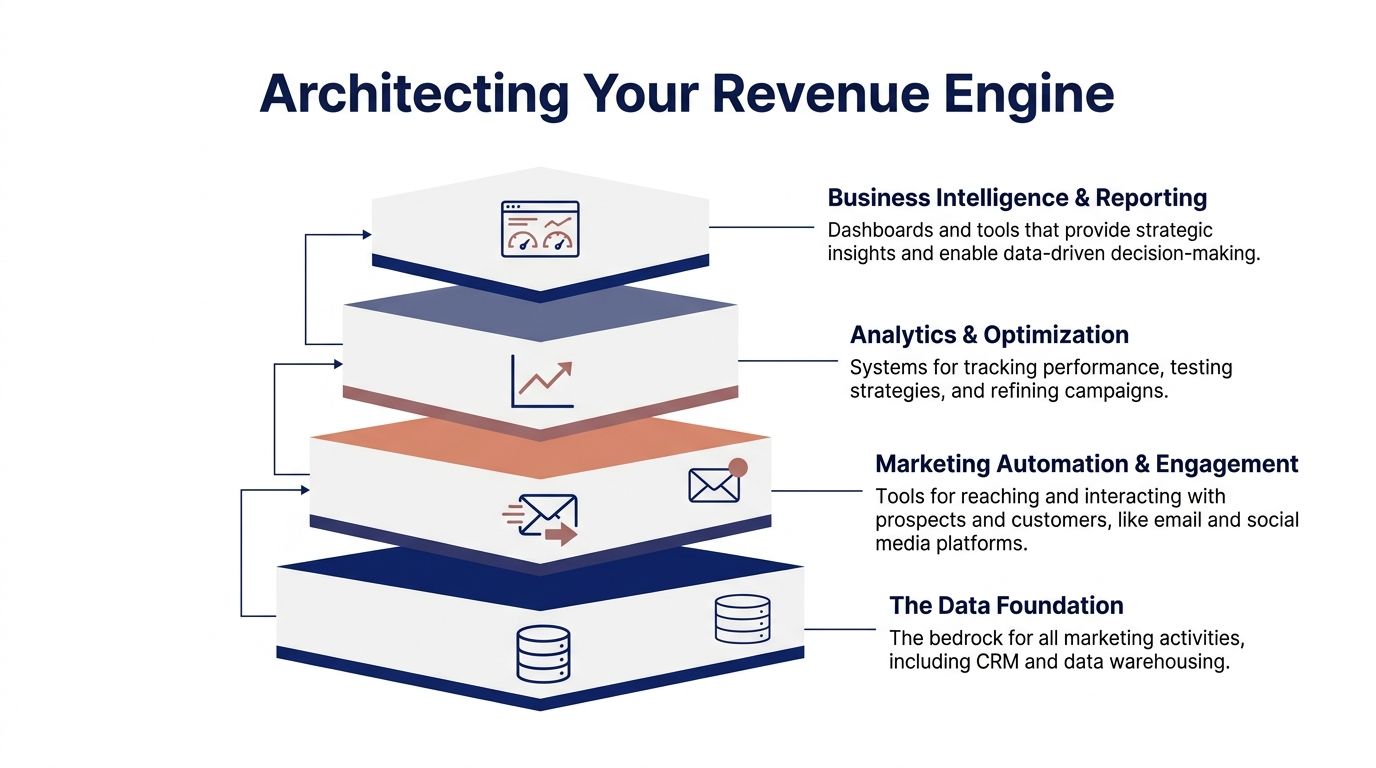
McKinsey argues that an AI-driven agentic orchestration layer on top of traditional data and distribution layers is key to simplifying complexity and enabling dynamic, personalized engagement in its piece on rewiring martech from cost center to growth engine. For revenue teams, that's not an abstract idea. It's the missing link between "we saw something happen" and "a rep acted on it with context."
The data foundation
This is your base layer. If it's weak, everything above it gets noisy. This foundation typically includes:
- CRM such as Salesforce or HubSpot
- Data warehouse such as Snowflake, BigQuery, or Redshift
- Core enrichment and sync tooling such as Segment, Hightouch, Census, or your ETL stack
- Governance rules for account ownership, field definitions, lifecycle stages, and object relationships
Your CRM is where operational truth needs to live. Your warehouse is where broader truth gets modeled, joined, and analyzed. Don't force the CRM to do the warehouse's job. Don't let the warehouse become a graveyard of unused exports.
What matters here is discipline. Define what counts as an account, contact, buying group signal, opportunity stage, and customer milestone. If those definitions drift by team, your automation will amplify confusion.
The intelligence layer
Most companies are still behind in this area.
Raw signals are not intelligence. A funding round, executive hire, earnings comment, new job post, product launch, or competitor mention only matters if someone explains the commercial relevance and routes it into the right workflow.
That's the point of an intelligence layer. It watches for change, interprets it, prioritizes it, and sends useful context to the people who can act.
In practical terms, this layer can include:
- Account intelligence platforms
- Intent and signal monitoring
- Research automation
- AI summarization and prioritization
- Workflow routing into CRM, Slack, and engagement tools
One option in this category is Salesmotion integrations, where an AI-driven intelligence layer connects account research, signals, and outreach workflows with systems your team already uses.
What I care about most in this layer is not the volume of alerts. It's whether the system answers three questions clearly:
- What happened?
- Why does it matter commercially?
- What should the team do next?
If your tool can't do that, it isn't reducing complexity. It's repackaging noise.
The best intelligence layer doesn't dump news on reps. It converts change into a point of view.
The engagement layer
Once the intelligence exists, teams need channels to act on it.
This layer typically includes:
- Marketing automation like Marketo, HubSpot, or Pardot
- Sales engagement like Outreach or Salesloft
- Paid media and audience activation platforms
- Onsite and lifecycle tools for nurture and conversion paths
- Messaging QA tools when email is a core outbound channel
Many teams overspend in this area because it's visible and easy to demo. But execution tools only perform as well as the data and intelligence feeding them.
A simple example. If a rep gets a signal that a target account just hired a new revenue leader, that context can trigger a customized sequence in Outreach or Salesloft. Before launch, it also helps to run messages through an email deliverability & spam checker so the team isn't undermining good targeting with poor inbox placement.
The same principle applies to marketing. If lifecycle automation isn't connected to account context, your nurture programs will feel generic at exactly the moment they should feel specific.
The analytics layer
You need a reporting layer that tells you whether the stack is helping revenue teams move faster and act smarter.
That usually includes:
- BI tools such as Looker, Tableau, or Power BI
- Revenue dashboards for pipeline creation, conversion, and velocity
- Operational reporting on signal usage, workflow completion, and source quality
- Attribution and influence analysis where useful, but not as the whole story
Don't obsess over vanity dashboards. Track whether intelligence gets used and whether that usage changes action.
A healthy analytics layer helps you answer:
| Question | Why it matters |
|---|---|
| Are reps acting on account signals quickly? | Speed matters when timing drives relevance |
| Which signal types lead to meetings or opportunities? | Not all signals deserve equal weight |
| Which workflows are ignored? | Adoption problems often reveal design flaws |
| Where does data quality break downstream action? | Bad inputs create bad automation |
How the layers should work together
A strong revenue stack works like this:
The data foundation stores and normalizes account and activity data. The intelligence layer monitors changes, interprets them, and prioritizes action. The engagement layer pushes customized outreach and coordinated programs. The analytics layer shows which signals, actions, and plays created movement.
Many organizations already have parts of this. They just don't connect them cleanly.
When you build a martech stack around revenue, the intelligence layer becomes the central nervous system. That's what closes the gap between marketing insight and sales action.
Choosing Partners Not Just Products
Tool selection gets sloppy when teams treat it like online shopping.
A vendor shows a polished demo, claims they integrate with everything, and promises fast onboarding. Then implementation starts. APIs are limited, support is thin, security review drags, and the product works well only if you change your process to fit the tool.
That's why mature stack decisions are less about features and more about fit, operability, and partnership.
A rigorous selection process should include requirements for API compatibility, data volume handling, GDPR/CCPA compliance, and smooth integration with sales platforms, because data silos remain a leading barrier to success, according to The CMO's guidance on how to build a martech stack.
What to evaluate beyond the demo
Here's the scorecard I use most often.
| Criteria | What to Look For |
|---|---|
| Integration quality | Native connectors, clear API documentation, stable sync behavior, and flexibility for your existing CRM and warehouse |
| Data model fit | Support for account-based workflows, contact relationships, activity capture, and custom fields without awkward workarounds |
| Security and governance | GDPR/CCPA readiness, permission controls, auditability, and a realistic answer to data retention questions |
| Scalability | Ability to handle your data volume, workflow complexity, and future use cases without major rework |
| Workflow usability | Whether sellers, marketers, and ops users can do the job without opening five tabs and reading a manual |
| Implementation support | Named onboarding resources, practical documentation, technical support that understands real deployment constraints |
| Reporting depth | Visibility into usage, data health, workflow outcomes, and operational exceptions |
| Commercial fit | Pricing that aligns with adoption reality, not just seat expansion or feature bundling |
The point isn't to find a perfect score. It's to expose risk before you're locked in.
Native integration or iPaaS
This decision matters more than many organizations think.
If two core systems already have a reliable native connection and the field mapping is straightforward, use it. Native integrations are usually easier to maintain and simpler for internal teams to troubleshoot.
Use an iPaaS like Workato or Zapier when:
- You need orchestration across multiple systems
- Routing logic depends on business rules
- Data needs transformation before sync
- You want one place to manage process automation across the stack
Don't use an iPaaS to compensate for a product that doesn't fit your architecture. That's how you create brittle workflows nobody wants to touch.
Test the vendor like an operator
Buying teams often ask the wrong questions. They ask what the product can do in theory.
Ask what happens when things go wrong.
For example:
- How does the platform handle failed syncs?
- Can your team inspect logs without opening a support ticket?
- What happens when a field changes in Salesforce?
- How are duplicates managed?
- How quickly can a workflow be updated when the GTM motion changes?
Those answers tell you more than the feature grid.
Buy from vendors who behave like long-term operators, not vendors who disappear after procurement signs.
Red flags worth taking seriously
Some issues aren't minor. They're warnings.
- Vague implementation answers. If the vendor can't explain rollout clearly, they probably rely on customer improvisation.
- Weak admin controls. RevOps needs control without engineering dependency for every small change.
- Shallow support for sales workflows. A tool built only for marketing often struggles in real revenue environments.
- Messy reporting. If you can't see usage and outcomes, you'll struggle to defend the investment later.
- Feature overlap with your current tools. Redundant capability sounds harmless until nobody knows which system owns the workflow.
The best stack partners make your architecture simpler over time. The wrong ones add more maintenance, more exceptions, and more internal politics.

“This is my singular place that very simply summarizes a company's top initiatives, strategies and connects them to my solution. Something I would spend hours researching manually, now it's automated.”
Derek Rosen
Director, Strategic Accounts, Guild Education
Your Phased Rollout and Measurement Plan
A stack rollout fails when leadership expects instant transformation and the team gets a rushed migration.
Don't launch everything at once. Build in phases, prove value early, and expand only when the workflow is stable.
That's not just cleaner execution. It's better economics. B2B companies with a clear martech roadmap report reducing wasted spend by up to 26%, and 70% of teams in structured strategies launch campaigns faster, according to UnboundB2B's research on building a successful martech roadmap.

Phase one, fix the foundation
Get your CRM and core account data under control first.
That means cleaning ownership logic, standardizing key fields, removing obvious duplicates, and documenting what counts as a valid account, contact, and opportunity signal.
If you skip this step, every automation you add later will spread bad data faster.
Focus your phase-one metrics on operational health:
- Data completeness for key account and contact records
- Field consistency across teams and workflows
- Sync reliability between CRM and core systems
- Time to find account context for frontline users
Phase two, activate intelligence with a pilot
Many revenue teams finally feel relief in this phase.
Pick a focused pilot group. Usually that means one segment, one manager, and a clear set of target accounts. Give them account monitoring, signal interpretation, and context delivery inside the tools they already use.
You are not trying to transform the whole org in one move. You're trying to prove that better intelligence changes behavior.
For this stage, I care about metrics like:
| Pilot measure | Why it matters |
|---|---|
| Reduction in manual research time | Shows whether the workflow is saving rep effort |
| Rep response to surfaced signals | Indicates whether alerts are relevant enough to trigger action |
| Meeting creation from signal-driven outreach | Connects intelligence to pipeline activity |
| Quality feedback from frontline users | Reveals whether context is clear, timely, and actionable |
A lot of teams over-index on "logins." That's weak. If a rep logs in and still writes generic outreach, the stack isn't helping.
You can also align pilot reporting with broader B2B marketing KPIs so leadership sees both operational adoption and revenue movement in one view.
Phase three, scale engagement and tighten the loop
Once the intelligence workflow proves useful, connect it more closely to your engagement systems.
That can include routing signals into sales engagement sequences, triggering marketing support around account activity, and adding reporting that shows which plays worked by segment or signal type.
Managers are essential at this stage. Reps adopt workflows faster when managers inspect usage in deal reviews, account planning, and weekly pipeline conversations.
If managers don't coach to the new workflow, the rollout becomes optional. Optional workflows die fast.
Measure behavior first, revenue second
Revenue impact matters. But in the early rollout, behavior change is the leading indicator.
Look for evidence that the team is:
- Acting on signals faster
- Spending less time on low-value research
- Sending more relevant outreach
- Prioritizing accounts with real momentum
- Coordinating marketing and sales around the same account changes
If those behaviors improve, pipeline metrics usually follow. If they don't, adding more tools won't fix the problem.
Example Stacks for Different Business Models
A good stack depends on how you sell.
The right architecture for a high-growth SaaS team isn't the same as the right architecture for an enterprise advisory firm with long relationship cycles. But both benefit from the same discipline. Keep the stack focused, center it on shared data, and add intelligence that helps revenue teams act with context.
Expert-optimized stacks often consolidate to 5 to 8 core tools, anchored by a data warehouse and CRM, with AI agents helping automate work like account research that can take reps 2 to 3 hours per account, according to Camphouse's guidance on martech stack optimization.
Example one for a high-growth B2B SaaS company
This company sells into mid-market and enterprise accounts. The sales motion is fast, competitive, and highly timing-sensitive.
A practical stack could look like this:
- CRM with Salesforce or HubSpot
- Data warehouse with Snowflake or BigQuery
- Marketing automation with HubSpot or Marketo
- Sales engagement with Outreach or Salesloft
- Account intelligence layer with AI-driven account research and signal monitoring
- BI with Looker or Tableau
Why this works:
The CRM manages account ownership and pipeline stages. The warehouse supports account scoring, segment reporting, and cleaner joins across activity sources. Marketing automation handles nurture and lifecycle messaging. Sales engagement executes outbound at scale.
The differentiator is the intelligence layer. In a SaaS motion, timing matters. If a target account announces expansion, opens relevant roles, changes leadership, or signals a strategic shift, reps need that context quickly. Otherwise they send the same sequences as every competitor.
A simple workflow might look like this:
- A target account shows a meaningful business change.
- The intelligence layer summarizes the event and explains the commercial angle.
- The rep gets context in Slack, CRM, or the engagement platform.
- Outreach is customized to that trigger instead of a generic persona play.
- Marketing can reinforce the same theme with coordinated air cover.
That stack doesn't try to do everything. It helps the team move fast with relevance.
Example two for an enterprise consulting firm
This business sells large engagements into complex accounts. The deal cycle is longer. Relationships matter more. Shallow signals are less useful than deep account understanding.
A smarter stack here would lean into depth:
- CRM with Salesforce
- Secure data warehouse for central account and relationship intelligence
- Marketing automation for executive programs and thought leadership distribution
- Research and signal monitoring for account briefs, leadership moves, and strategic initiative tracking
- BI and reporting for account coverage, relationship activity, and opportunity progression
This team doesn't need endless alerts. It needs fewer, better signals and strong account preparation.
For example, before an executive meeting, the account team should be able to pull a current brief showing company priorities, leadership context, recent announcements, hiring direction, and likely areas of change. That turns prep from scattered searching into structured planning.
The workflow is less about velocity and more about precision. But the principle is the same. Intelligence should reduce manual effort and improve the quality of action.
The pattern to copy
Different business models need different tools. They do not need different discipline.
The pattern that works across both examples is straightforward:
- Keep the core small
- Make CRM and warehouse the system of record
- Add intelligence that supports real workflows
- Route insights into the tools people already use
- Measure whether behavior changes before you add more software
If you're building your first revenue-focused stack, that's the standard. Not maximum tool coverage. Not the flashiest demo. A system that helps your team spot what matters and act on it faster.
If you want to add an AI-powered intelligence layer to your revenue stack, Salesmotion is built for that job. It uses three AI agents to monitor target accounts, surface relevant signals, build structured account research, and turn those insights into sales action across Slack, email, and CRM workflows. For revenue teams trying to connect marketing signals to timely outreach without heavy setup, it's a practical place to start.