Finding the right person at a 50,000-employee enterprise is one of the hardest problems in B2B sales. The org chart is deep, the buying committee is large, and the people with actual budget authority are shielded by layers of managers, procurement teams, and executive assistants. Most sales teams default to targeting the most senior title they can find, but that approach fails more often than it works. The most effective way to find decision makers at enterprise companies is to combine organizational mapping with real-time signals that reveal who is actively involved in purchasing decisions.
TL;DR: Finding enterprise decision makers requires more than title searches. Map the buying committee by function (economic buyer, technical evaluator, end user, champion), use org chart intelligence to identify reporting lines, and monitor leadership changes and hiring signals that indicate active buying windows.
Why Enterprise Decision Makers Are Hard to Find
Three structural realities make enterprise prospecting fundamentally different from mid-market or SMB sales.
Buying committees are large and distributed. A Gartner study found that the average enterprise technology purchase involves 6-10 decision makers across multiple departments. For strategic purchases, that number can exceed 15. Each person has different priorities, evaluation criteria, and veto authority. Targeting one person is not enough.
Titles do not map to authority. A "Vice President" at a bank might manage a team of 5. A "Director" at a tech company might manage a budget of $20M. Enterprise titles are inconsistent across industries, geographies, and companies. A title search for "VP of Engineering" at your target accounts may return people with vastly different levels of authority and relevance.
Organizational structures change frequently. Enterprise companies restructure regularly. Divisions merge, new business units are created, and leaders change roles internally without leaving the company. These internal movements often do not update in B2B databases for months. The contact your rep targeted last quarter may now be in a completely different function.
See Salesmotion on a real account
Book a 15-minute demo and see how your team saves hours on account research.
The Enterprise Buying Committee: Roles to Map
Instead of searching by title, map the buying committee by function. These four roles appear in nearly every enterprise technology purchase.
Economic Buyer
The economic buyer controls the budget and has final sign-off authority. This is typically a VP-level or C-level executive one or two levels above the day-to-day evaluation team. They care about ROI, strategic fit, and risk. They are the hardest to reach directly but the most important to identify early because their priorities shape the entire evaluation.
Technical Evaluator
The technical evaluator assesses product capabilities, integration requirements, security compliance, and architectural fit. This is often a senior individual contributor or manager-level technical leader. They run proof-of-concept tests, write the technical sections of the vendor scorecard, and can disqualify a vendor on technical grounds alone.
End User / Department Champion
The champion is the person who experiences the pain your product solves and is willing to advocate internally. They are often the first person to engage with your content, attend a demo, or respond to outreach. Identifying and enabling your champion is critical because they navigate the internal politics that you cannot see from outside.
Procurement / Vendor Management
Enterprise procurement teams manage the commercial relationship. They run RFPs, negotiate pricing, enforce compliance requirements, and manage vendor onboarding. They typically engage mid-to-late in the process. Having their contact information ready before they enter the evaluation prevents delays and shows organizational readiness.

“We're saving about 6 hours per week per seller on account research alone. That's time they can reinvest in actually selling.”
Derek Rosen
Director, Strategic Accounts, Guild Education
How to Map the Enterprise Org Chart
Mapping the org chart at an enterprise account requires combining multiple data sources.
LinkedIn Organizational Research
LinkedIn is the richest source of org chart data for enterprise companies. Search for your target account and filter by function (Engineering, IT, Operations, etc.) and seniority (VP, Director, Manager). Look at reporting patterns: who lists who as their manager, who shares the same team hashtags, and whose profiles mention the same projects or initiatives.
SEC Filings and Annual Reports
For public companies, proxy statements (DEF 14A) and annual reports list senior executives, their compensation, and their functional responsibilities. This provides verified information about the top 10-20 leaders and their strategic priorities.
Job Postings and Hiring Patterns
Current job postings reveal organizational structure. A company hiring a "Director of IT Security, reporting to the CISO" tells you the CISO exists, the reporting line, and that the security function is expanding. Monitoring hiring patterns over time reveals which departments are growing, which are restructuring, and where budget is flowing.
Signal-Based Account Intelligence
Salesmotion combines multiple signals, including leadership changes, job postings, earnings commentary, and strategic announcements, into a unified account view. When a target enterprise hires a new CTO, the platform surfaces the hire alongside the CTO's background, the company's strategic context, and the contacts who report to the new leader. This saves hours of manual org chart research per account.
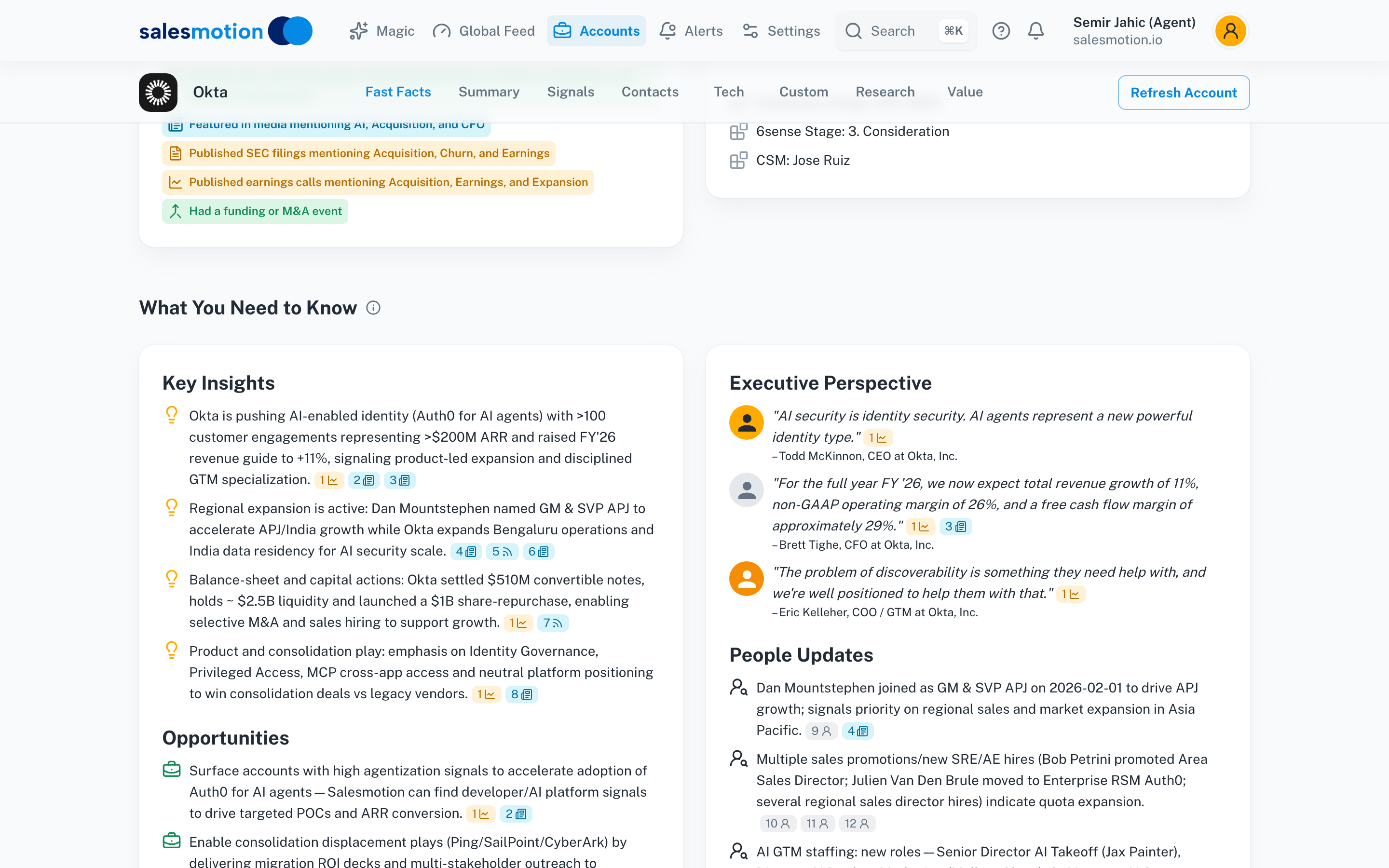 Salesmotion surfaces key insights, executive perspectives, people moves, and talking points — giving reps the context behind every contact.
Multi-Threading: Reaching Multiple Decision Makers
Identifying decision makers is only the first step. The next challenge is engaging multiple contacts simultaneously without creating confusion or territorial conflicts within the account.
The Multi-Threading Approach
Multi-threading means building relationships with 3-5 contacts across the buying committee rather than relying on a single point of contact. Research from Gong shows that deals with 3+ contacts engaged are significantly more likely to close than single-threaded deals.
Thread 1: The Champion. Start here. Your champion opens doors, provides internal context, and helps you navigate the buying process. Engage them with educational content and insights relevant to their specific pain point.
Thread 2: The Economic Buyer. Your champion introduces you or provides the intelligence to reach the economic buyer directly. Your message to the economic buyer should focus on business outcomes and ROI, not product features.
Thread 3: The Technical Evaluator. Engage the technical evaluator with detailed product information, integration documentation, and proof-of-concept offers. They need to be satisfied that the product works before the deal advances.
Thread 4: Procurement. Engage procurement proactively with pricing information, security certifications, and compliance documentation. Waiting for procurement to come to you adds weeks to the cycle.

“My ultimate goal is to know more about the company than they know themselves. Before, that took hours across multiple tools. With Salesmotion, I can get there in 30 minutes or less and walk into a Fortune 500 conversation fully prepared.”
Jeff Dalo
Senior Director Business Development, Analytic Partners
Using Signals to Identify Active Buying Windows
The best time to reach enterprise decision makers is when they are actively building or changing something. Four signals reliably indicate an active buying window.
Leadership changes. New leaders evaluate and replace vendors at a significantly higher rate during their first 12-18 months. A new CTO, VP of Operations, or Chief Digital Officer is far more likely to take your meeting than someone who has been in the role for three years.
Hiring surges. A company hiring 5+ people in a specific function within 30 days is building capability. That build-out typically requires new tools and infrastructure. Monitor job postings in your target function for surges.
Earnings call commentary. When a public company's CEO mentions "investing in digital transformation" or "improving operational efficiency" on an earnings call, that is a budget signal. Teams using Salesmotion monitor earnings call transcripts to flag accounts where strategic priorities align with their product.
Strategic announcements. M&A activity, new product launches, geographic expansions, and partnership announcements all create technology needs. A company that just acquired a competitor needs to consolidate systems. A company expanding to Europe needs GDPR-compliant tools.
A Practical Enterprise Prospecting Workflow
Here is how to put all of this together for a single target enterprise account.
Week 1: Map the account. Use LinkedIn, SEC filings, and account intelligence to identify the 5-8 people on the buying committee. Categorize each by role: economic buyer, technical evaluator, champion, procurement.
Week 2: Personalize outreach. For each contact, craft a message that references their specific role, the company's strategic context, and a relevant signal. The economic buyer gets an ROI-focused message. The technical evaluator gets a capability-focused message. The champion gets a pain-point-focused message.
Week 3: Engage and expand. Start with the champion and one other contact. As conversations progress, use internal referrals to reach additional stakeholders. Every conversation should yield at least one additional contact or piece of organizational intelligence.
Ongoing: Monitor for changes. Enterprise deals take months. During that time, contacts change roles, priorities shift, and new stakeholders enter the picture. Continuous signal monitoring ensures your account intelligence stays current throughout the deal cycle.
For more on finding the right contacts, see our contact data provider comparison and our guide to enterprise account planning.
Key Takeaways
- Enterprise buying committees average 6-10 people; map by function (economic buyer, technical evaluator, champion, procurement) rather than searching by title alone
- Titles do not map consistently to authority across enterprises; a "Director" at one company may have more budget authority than a "VP" at another
- Multi-threading across 3-5 contacts significantly increases close rates versus relying on a single champion
- Leadership changes, hiring surges, and earnings call commentary are the strongest signals for identifying active buying windows
- Combine LinkedIn org chart research with signal-based account intelligence to build a complete and current view of each target account
- Enterprise prospecting is a multi-week process, not a batch email campaign; plan for ongoing monitoring and relationship building
Frequently Asked Questions
How many decision makers should I map at an enterprise account?
Aim for 5-8 contacts covering the four key buying committee functions: economic buyer, technical evaluator, champion, and procurement. For strategic deals, you may need 10-15 contacts. The rule of thumb: if you cannot name at least 3 people at the account who are actively engaged, the deal is at risk.
How do I find the economic buyer at a large enterprise?
Start by identifying the department that owns the budget for your product category. The economic buyer is typically 1-2 levels above the person who will use the product daily. SEC filings list senior executives at public companies. LinkedIn reporting structures and account research tools help map the hierarchy at private companies. Your internal champion is also a valuable source for identifying who controls the budget.
What is the best way to multi-thread without creating confusion?
Coordinate your outreach so each contact receives a message tailored to their role. Do not send the same email to five people at the same company. Use your CRM to track who has been contacted, by whom, and when. Ideally, your champion helps coordinate internal communication so the buying committee knows you are engaged at multiple levels.
How do leadership changes affect enterprise buying decisions?
New leaders are significantly more likely to evaluate new vendors within their first 12-18 months. They bring fresh perspectives, have explicit mandates for change, and are less invested in existing vendor relationships. Monitoring leadership transitions and reaching out within the first 60 days of a new hire is one of the highest-conversion prospecting strategies in enterprise sales.