
What is Discover?
Discover is Salesmotion's AI-powered lookalike company finder. Given any account you're already tracking, Discover identifies companies that share similar characteristics — industry, size, technology stack, and business model — and presents them as a curated list of potential new prospects.
It's one of the fastest ways to expand your target account list with companies that are likely to be a good fit, based on the patterns Salesmotion has already identified in your existing accounts.
How to find similar companies
- Open the account you want to use as your reference point from the Accounts dashboard.
- In the account toolbar at the top of the page, click Discover.
- A modal will appear showing a list of companies similar to the one you're viewing.
- Browse the results — each company card shows the company name, domain, and employee count.
- To start tracking a company, click the Add Account button next to it.
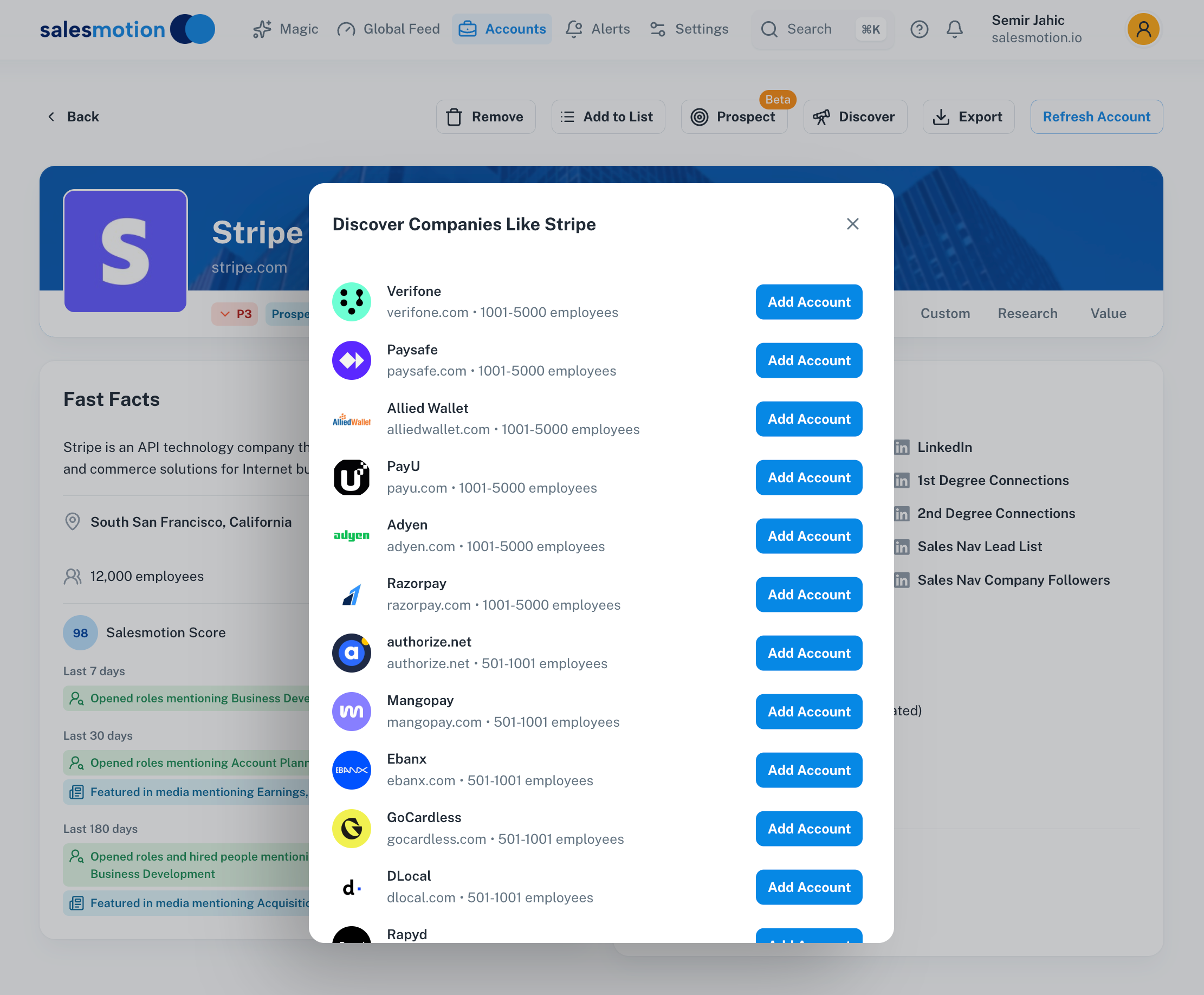 The Discover modal for Stripe — showing lookalike companies such as Verifone, Paysafe, Adyen, and Razorpay, each with employee count and a one-click option to add them to your tracked accounts.
What Discover shows you
Each result in the Discover list includes:
- Company name — The name of the similar company.
- Domain — The company's website, so you can quickly verify it's the right match.
- Employee count range — An indication of company size (e.g. 1001–5000, 501–1001), helping you assess whether the company fits your ideal customer profile.
- Add Account button — A single click to add the company to your tracked accounts in Salesmotion. Once added, Salesmotion immediately begins gathering signals, generating insights, and scoring the account.
The results are ranked by similarity to the reference account, so the most relevant matches appear at the top of the list.
How Discover finds similar companies
Salesmotion's AI analyses multiple dimensions of the reference account to find meaningful matches:
- Industry and vertical — Companies operating in the same sector or adjacent markets.
- Company size — Organisations with a comparable employee count and scale of operations.
- Technology stack — Companies using similar technologies, which often indicates similar business needs.
- Business model — How the company generates revenue and serves its customers.
This multi-dimensional approach means the results go beyond simple industry matching — you'll find companies that genuinely resemble your best accounts in ways that matter for your selling motion.
Use cases for Discover
- Expand your target account list. Start from your top-performing accounts and use Discover to find more companies with the same profile. This is far more effective than building lists manually.
- Build territory plans. If you've been assigned a new territory or vertical, use Discover on a handful of known-good accounts to quickly generate a pipeline of similar prospects.
- Find prospects in adjacent verticals. Discover may surface companies in related industries that you hadn't considered — useful for identifying whitespace opportunities.
- Validate your ICP. Run Discover on several of your best customers and see which companies come up repeatedly. Consistent results help confirm your ideal customer profile.
- Complement Search. Use Discover to generate a candidate list, then use Salesmotion's Search feature to dig deeper into specific companies or validate fit before adding them.
Tips for getting the most from Discover
- Start from your best accounts. The quality of Discover results depends on the reference account. Begin with accounts that truly represent your ideal customer — the ones with the highest deal values, fastest sales cycles, or strongest retention.
- Try multiple reference accounts. Different starting points will surface different lookalikes. Run Discover on three or four of your top accounts to build a comprehensive prospect list.
- Add accounts selectively. You don't need to add every result. Review each company's domain and size to confirm it matches your target profile before clicking Add Account.
- Check back periodically. As Salesmotion's data and models improve, Discover results may evolve. Revisiting the feature every quarter can surface new opportunities.
- Combine with other tools. After adding a discovered company, use the account's Fast Facts and Signals tabs to assess whether it's worth active pursuit, and use the Prospector to start building outreach.
Frequently asked questions
How many similar companies does Discover show?
Discover typically surfaces 10–15 lookalike companies per reference account. The exact number depends on how many strong matches Salesmotion's AI can identify based on the characteristics of the reference account.
Can I use Discover on any account?
Yes. You can run Discover on any account you're currently tracking in Salesmotion. For the best results, choose accounts that are well-established and have a clear industry and technology profile, as this gives the AI more data points to work with.
What happens when I click "Add Account"?
The company is immediately added to your tracked accounts in Salesmotion. Signal monitoring, scoring, and AI analysis begin right away. You'll start seeing data populate on the account within a short time, depending on how much public information is available.