
What is the Salesmotion Score?
The Salesmotion Score is a dynamic 0–100 rating assigned to every tracked account. It helps your team quickly identify which accounts are showing the strongest buying signals right now, so you can focus your time where it matters most.
You'll see the score displayed as a coloured badge in the Accounts dashboard, making it easy to sort and prioritise at a glance.
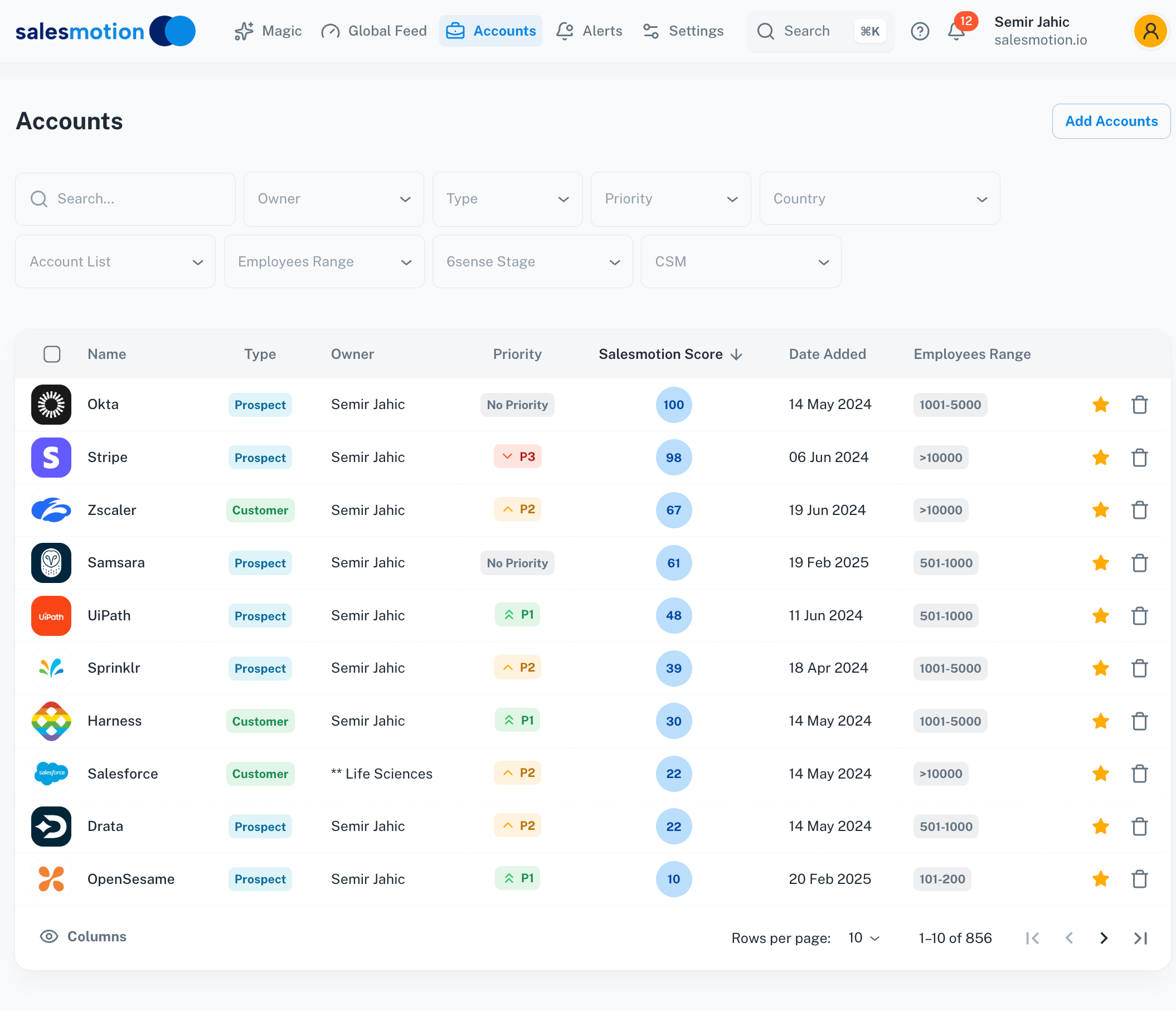 The Accounts dashboard with the Salesmotion Score column — higher scores indicate stronger recent signal activity.
Click on the score badge to expand it and see exactly which signals contributed:
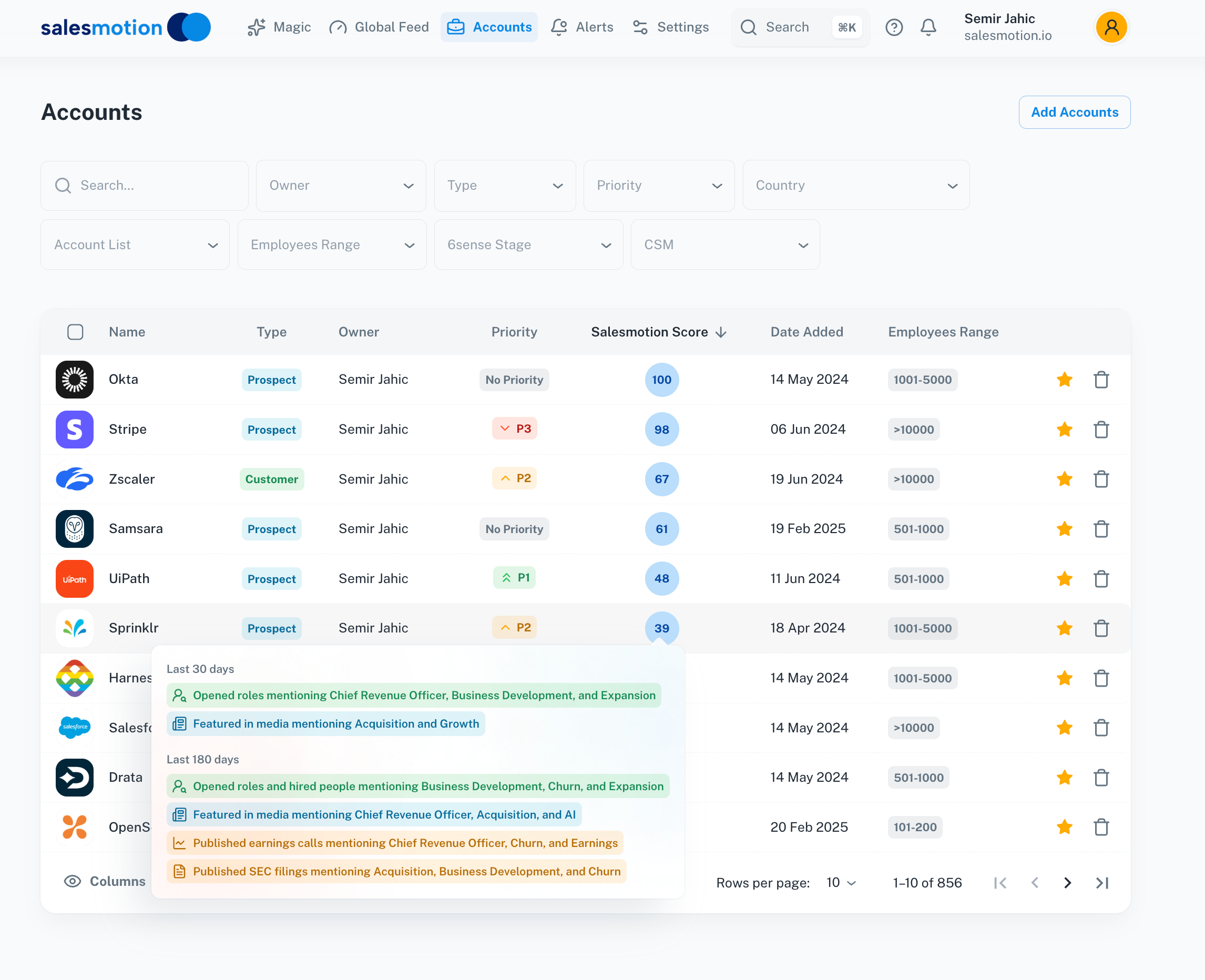 The expanded score view shows the specific signals driving an account's score, helping you understand what changed and why.
How the score is calculated
The Salesmotion Score is built from three core ingredients:
1. Signal importance
Not all signals carry the same weight. An earnings call mentioning cost-reduction initiatives is typically more significant than a routine press release. Admins can configure which signal types matter most for your business in Settings → Setup, and those weights directly influence the score.
2. Signal volume
Accounts generating a higher volume of relevant signals — across news, hiring activity, financial filings, leadership changes, and more — receive a higher score. A single data point won't move the needle much, but a cluster of activity will.
3. Signal recency
Recent activity counts more than older activity. A major leadership change this week is weighted far more heavily than one from three months ago. This time-decay ensures the score reflects what's happening right now, not what happened last quarter.
The combination of these three factors — importance × volume × recency — produces a score that surfaces the accounts with the most actionable opportunity at any given time.
What data feeds into the score
Salesmotion monitors 1,000+ public data sources to gather signals, including:
- News & press releases — company announcements, media coverage, analyst mentions
- Hiring activity — job postings that indicate growth, new initiatives, or technology adoption
- Financial filings & earnings — revenue changes, cost-reduction programmes, strategic pivots
- Leadership changes — executive appointments, departures, and reorganisations
- Funding & M&A — investment rounds, acquisitions, and ownership changes
- Technology changes — new tools adopted or deprecated in the company's stack
- Documents & reports — industry reports, regulatory filings, and published research
Because the score is based on publicly available data, accounts with limited public activity may score lower even if there are strong private indicators (e.g. intent data from your CRM or Sales Navigator). The score is one input — always combine it with your own knowledge of the account.
How admins can configure scoring
The Salesmotion Score is highly configurable. Workspace admins can adjust scoring to match their team's specific priorities:
- Signal type weights — Increase the weight of signal types that matter most to your business (e.g. give earnings signals a 3× multiplier for financial services accounts).
- Industry-specific tuning — Different verticals may need different scoring profiles. An account showing heavy hiring in AI roles may be a stronger signal in some industries than others.
- Recency window — Control how quickly older signals decay in the score calculation.
To adjust scoring configuration, go to Settings → Setup in your Salesmotion workspace. Changes apply across the workspace and are reflected in scores within 24 hours.
Why scores change over time
Scores are dynamic — they update as new signals are detected and older signals decay. Here are common reasons a score might shift:
- New signals detected — A cluster of hiring posts or a major earnings report will push the score up.
- Signal decay — If an account had a burst of activity two months ago but has been quiet since, the score will gradually decline as those signals age out.
- Algorithm updates — Salesmotion periodically refines its scoring algorithm to improve accuracy. When this happens, scores are recomputed across all accounts, which can cause noticeable shifts — sometimes significant ones. These recalibrations are designed to make scores more meaningful and actionable. See below for more detail.
- Weight changes — If an admin adjusts signal weights, scores are recalculated accordingly.
A score drop does not necessarily mean an account is less valuable — it means there has been less recent public activity for that account. Always combine the score with your own context and other data sources.
Understanding algorithm updates
Salesmotion's engineering team periodically improves the scoring algorithm to make scores more accurate and actionable. When an algorithm update occurs:
- All account scores are recalculated. This means scores across your entire workspace may shift — some up, some down.
- The shift can be significant. An account that scored 60 under the old algorithm might score 20 under the new one (or vice versa). This does not mean the account changed — it means the scoring formula was refined.
- Recent activity is weighted more heavily. Algorithm updates have generally moved toward emphasising real-time signal activity over accumulated historical data. This means accounts with strong recent activity score higher, while accounts that were once active but are now quiet may see larger drops.
What to do when you notice score changes
- Check the account's signal timeline. Open the account and look at the Signals tab to see whether there's been recent activity. If there's limited recent activity, the lower score is reflecting reality.
- Don't panic about drops. A score dropping from 54 to 10 doesn't mean the account is no longer valuable — it means there's limited recent public signal activity. Your personal knowledge of the account is still critical.
- Compare with other data sources. Use your CRM data, Sales Navigator intent signals, and direct conversations to build a complete picture. The Salesmotion Score is one input, not the only input.
- Talk to your admin. If scores across your territory don't feel right, flag specific examples to your admin. They can adjust signal weights in Settings → Setup to better match your team's priorities.
Salesmotion Score vs. Sales Navigator intent
A common question is how the Salesmotion Score compares to LinkedIn Sales Navigator's intent or buyer interest signals. They measure fundamentally different things:
| Salesmotion Score | Sales Navigator Intent | |
|---|---|---|
| What it measures | Public signal activity (news, earnings, hiring, filings) | LinkedIn engagement (profile views, content interactions, InMail) |
| Data sources | 1,000+ public web sources | LinkedIn platform data only |
| What a high score means | The company is active in public — lots of news, hiring, financial activity | Buyers at the company are engaging on LinkedIn — viewing profiles, reading content |
| What a low score means | Limited recent public activity (not necessarily a bad account) | Limited LinkedIn engagement (may still be active elsewhere) |
These scores complement each other. A high Sales Navigator intent score with a low Salesmotion score means there's buyer engagement on LinkedIn but limited public company-level signals. A high Salesmotion score with low Sales Navigator intent means the company is active publicly but your specific buyers aren't engaging on LinkedIn yet.
Use both together for the most complete picture of account prioritisation.
Tips for getting the most from the score
- Sort by score in the Accounts dashboard to focus your day on the highest-priority accounts.
- Compare scores over time to spot accounts with rising momentum — a jump from 30 to 70 in a week is a strong signal.
- Don't treat the score as the only input. It excels at surfacing public activity, but your personal knowledge of the account, CRM data, and intent signals from other tools should all feed into your prioritisation.
- Give feedback to your admin. If scores don't feel right for your territory, flag specific accounts — this helps admins fine-tune the signal weights for your team's needs.
- Work with your admin to set up alerts for score changes above a certain threshold, so you're notified when an account starts showing significant new activity.
Frequently asked questions
My account went from 54 to 0 — is something broken?
Probably not. This typically happens for one of two reasons:
- Algorithm update — Salesmotion recently refined its scoring algorithm, and all scores were recalculated. The new algorithm weights real-time activity more heavily, so accounts with limited recent public signals may score lower than before. See the algorithm updates section above for more detail.
- Reduced public activity — The company may have had a burst of activity (earnings, hiring, press) that has since quieted down. Check the Signals tab to see the account's recent activity timeline.
In either case, the score reflects the current state of public signals — it doesn't mean the account is a bad target. Combine the score with your own knowledge and other data sources.
Why did scores change across my whole territory at once?
If many accounts changed scores simultaneously, it's most likely an algorithm update. These affect all accounts workspace-wide and are designed to improve scoring accuracy. The overall rank order of your accounts should remain broadly similar — accounts with the most activity will still score highest — but the absolute numbers may shift.
Can I manually override a score?
Individual users cannot override scores. Admins can adjust signal weights in Settings → Setup to influence how scores are calculated across the workspace. If you believe a specific account is underscored, talk to your admin about tuning the relevant signal types.
How often are scores updated?
Scores update continuously as new signals are detected. You'll always see the latest score when you visit the Accounts dashboard.
What does a score of 0 mean?
A score of 0 means Salesmotion has not detected any recent public signals for that account that match your configured signal weights. It does not mean the account has no value — it means there's limited recent public data. This is more common with:
- Smaller or privately held companies
- Companies with limited English-language public presence
- Companies in a quiet period between major announcements
Consider checking Sales Navigator intent data, your CRM, or direct conversations for additional context on these accounts.
Is the Salesmotion Score the same as Sales Navigator's buyer intent score?
No — they measure different things entirely. See the comparison table above for a full breakdown. In short: Salesmotion monitors public web data, while Sales Navigator tracks LinkedIn engagement. Use both together for the best results.