
What is Prospector?
Prospector is Salesmotion's AI-powered outreach module. It combines the best of everything Salesmotion offers — deep account research, real-time signals, and intelligent messaging — to find the most relevant contacts and draft high-quality, personalised emails.
Instead of writing generic outreach from scratch, Prospector gives you a context-rich starting point that references real events and strategic priorities at the account. The result is outreach that feels relevant, informed, and timely.
You can feed Prospector your own writing styles, product descriptions, value propositions, target personas, and more — so the generated emails sound like they came from your team, not a generic AI.
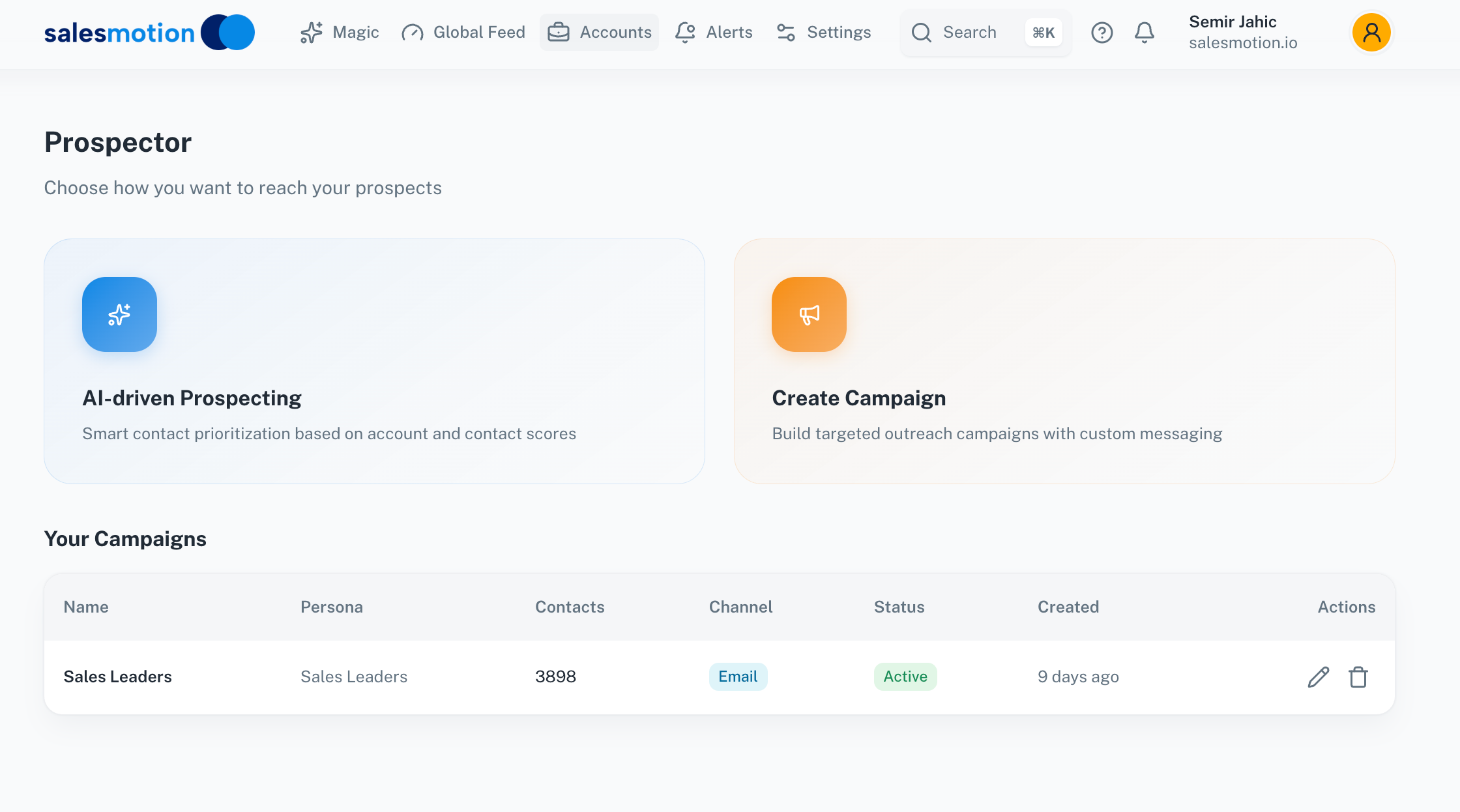 The Prospector landing page — choose between AI-driven Prospecting for individual outreach or Create Campaign for bulk targeting.
Two modes of prospecting
Prospector offers two approaches depending on your workflow:
AI-driven Prospecting
This mode is designed for targeted, one-to-one outreach. You select an account and a contact, and Salesmotion generates a personalised email draft that draws on everything it knows about the account — recent signals, strategic priorities, key challenges, and opportunities.
This is ideal when you're preparing outreach for a specific high-value prospect and want the message to be informed and relevant from the first line.
Create Campaign
Campaign mode lets you build targeted outreach at scale. Define your target persona, set your messaging parameters, and Prospector generates personalised emails for each contact in the campaign. You can track active campaigns, monitor contact counts, and manage channels from the campaigns table.
This is useful when you need to reach a broader audience — for example, targeting all sales leaders across your tracked accounts — while still maintaining personalisation.
Using AI-driven Prospecting
Here's how to generate a personalised email for a specific contact:
- Open Prospector from the left sidebar.
- Select AI-driven Prospecting.
- Choose the account you want to target.
- Browse the contacts list on the left. Contacts are displayed with their name and role.
- Click on a contact to generate an email draft.
Salesmotion generates an email that references the account's current situation — recent earnings results, strategic initiatives, or challenges — and frames your solution in that context.
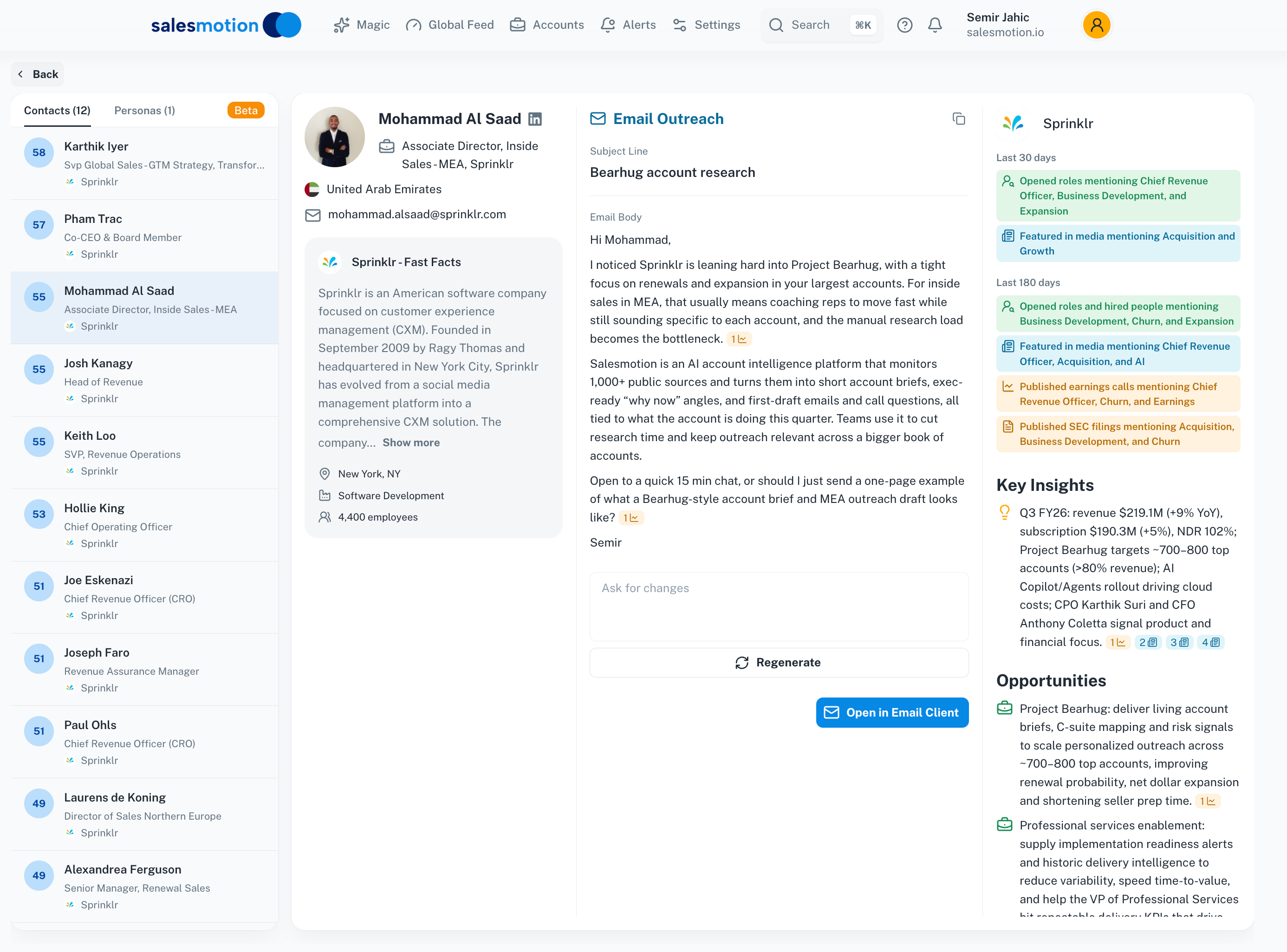 Prospector generates a personalised email to a contact at Sprinklr, referencing the account's specific strategic initiatives. The account insights sidebar on the right provides context while you review the draft.
What the email includes
The AI-generated email typically includes:
- A personalised opening that references the contact's role and a relevant account event.
- Account-specific context drawn from recent signals — such as strategic programmes, earnings highlights, or leadership changes.
- A value proposition that connects your solution to the account's situation.
- A clear call to action — usually a request for a brief conversation.
Refining the email
Below the generated email, you'll find two actions:
- Regenerate — Click to generate a completely new draft. Each regeneration draws on the same account intelligence but produces a different angle or framing.
- Open in Email Client — Click to open the email in your default mail application, ready to send (or edit further before sending).
- Push to sales engagement tools — Prospector integrates directly with Lemlist, and other sales engagement platforms. Push your drafted emails straight into your existing cadences and sequences — no copy-pasting required.
Always review and personalise the draft before sending. The AI provides a strong starting point, but your personal knowledge of the contact and the deal context will make it even better.
The account insights sidebar
While composing or reviewing an email, the right sidebar displays a summary of the account's intelligence:
- Key Insights — The most important recent developments at the account (revenue figures, strategic programmes, major announcements).
- Opportunities — Specific areas where your solution could add value, drawn from Salesmotion's analysis.
- Fast Facts — Company overview, headquarters, employee count, and industry.
This sidebar gives you additional context to draw from if you want to customise the email further. You can reference a specific insight or opportunity to make the message even more targeted.
Managing campaigns
The campaigns table on the Prospector landing page shows your active campaigns with key details:
- Campaign name — The label you gave the campaign.
- Target persona — The type of contact being targeted (e.g. "Sales Leaders").
- Contact count — How many contacts are included.
- Channel — The outreach channel (e.g. Email).
- Status — Whether the campaign is Active or paused.
- Created — When the campaign was set up.
Click on a campaign to view its contacts, review generated emails, and track progress.
Tips for getting the most from Prospector
- Always review and personalise AI-generated emails before sending. The draft is a starting point — adding a sentence that references something personal (a mutual connection, a recent interaction, or a specific challenge you've discussed) makes it significantly more effective.
- Use the account insights sidebar while reviewing drafts. If the email references a strategic programme, the sidebar gives you the full context so you can decide whether to elaborate or adjust the framing.
- Try Regenerate if the first draft doesn't feel right. Each generation takes a different angle. You might prefer one framing over another, or you could combine elements from multiple drafts.
- Time your outreach around signals. If an account just released earnings or announced a leadership change, Prospector will reference those events — and your outreach will feel timely and relevant.
- Use campaigns for broad outreach and AI-driven Prospecting for high-value, targeted contacts. The two modes complement each other well.
- Combine with the Value Pyramid for maximum impact. Review the Value Pyramid before generating an email to understand the account's goals and challenges, then check that the AI draft aligns with your intended messaging.
Frequently asked questions
Does Prospector send emails automatically?
No. Prospector generates email drafts for your review. You always have full control over what gets sent. Use the Open in Email Client button to transfer the draft to your mail application, where you can review, edit, and send it on your own terms.
How does Prospector personalise emails for different contacts?
Prospector uses the contact's name, role, and seniority in combination with the account's intelligence — recent signals, strategic priorities, challenges, and opportunities — to tailor the email. A draft for a VP of Sales will be framed differently from one for a Director of Operations, even at the same account.
Can I use Prospector for accounts with limited public data?
Yes, but the emails will be less detailed for accounts with fewer signals. For privately held companies with limited public coverage, the AI will work with whatever data is available. You may want to supplement the generated draft with insights from your own research or CRM notes for these accounts.